How to Scrape Instagram Profiles and Followers: 5 Proven Methods for 2026

How to scrape Instagram profiles and followers with 5 tools: 1. BrowserAct 2. Instagram Graph API 3. Instaloader (Python) 4. BeautifulSoup + requests 5. Selenium --- Ever wondered how social media agencies track thousands of Instagram profiles overnight? Or how brands monitor competitor follower growth without manually refreshing pages? Instagram has over 2 billion monthly active users, making it one of the richest sources of creator, brand, and audience data on the internet. This technique is i
- 1BrowserAct's login-aware technology detects Instagram's auth wall, pauses for manual login, then resumes extraction—no automated login means no ban risk.
- 2Instagram's Graph API only works for Business/Creator accounts and cannot access follower lists of other accounts.
- 3Instaloader is the most feature-rich Python library for Instagram but faces aggressive rate limiting on follower list scraping.
- 4BeautifulSoup can only extract basic profile metadata from embedded JSON—no follower lists or engagement metrics.
- 5Selenium can handle follower modal scrolling but is very slow and carries high risk of account bans.
Method 1: BrowserAct Agent Mode — Build an Instagram Scraper from One Prompt
BrowserAct Agent mode lets you describe the Instagram profile and recent-post data you need in plain English. The Agent explores the visible page, builds the Bot, and returns structured profile and post tables without selector maintenance.
If Instagram asks for login, CAPTCHA, 2FA, or account confirmation, BrowserAct pauses so you can complete it manually before the Agent resumes.
Build the Instagram profiles and posts Bot with BrowserAct Agent
- Open BrowserAct Dashboard: Click the left-side + button to create a Bot, start from Quick start, or use the center Agent input.
The screenshot below shows the Agent input where BrowserAct turns your request into a verified, reusable Bot.
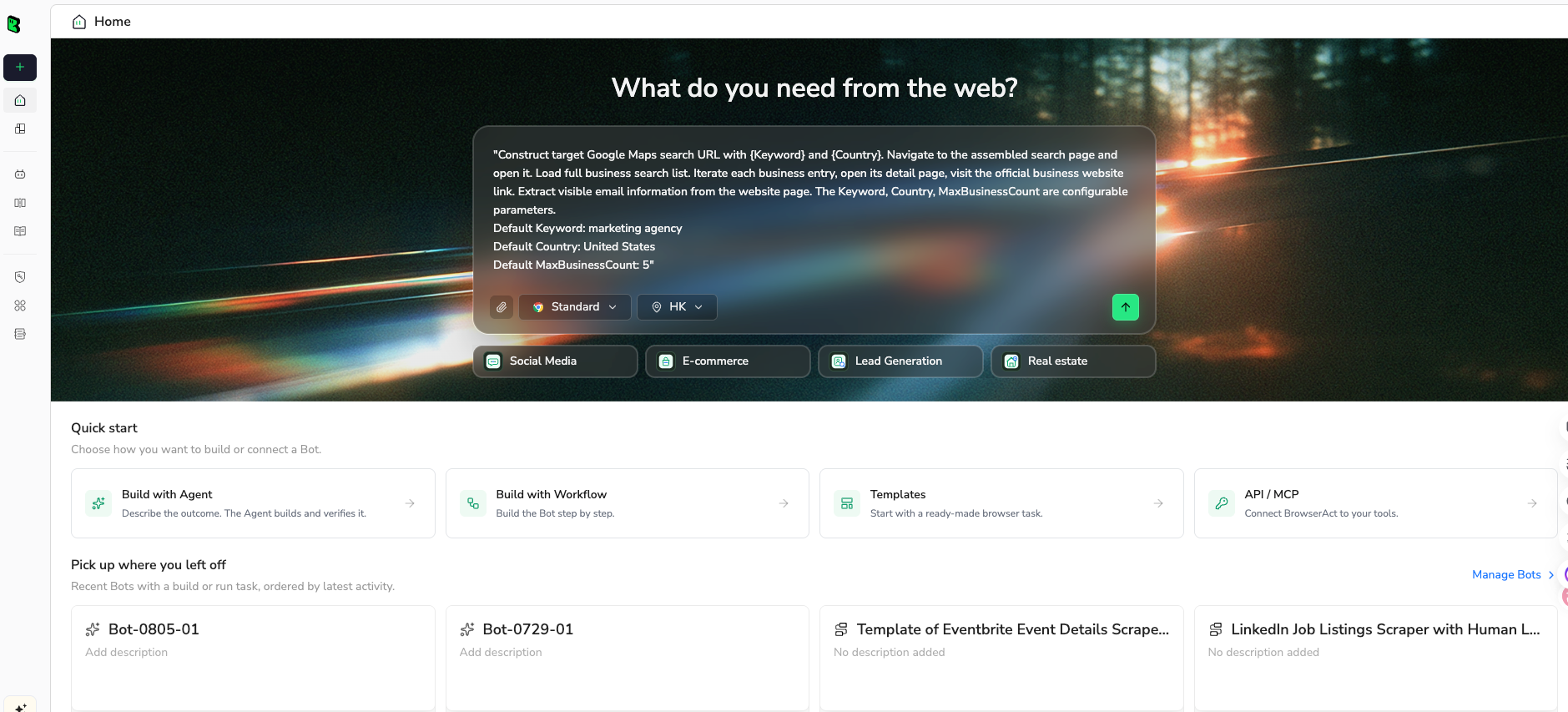
- Copy the complete prompt: Review the target, result limit, requested fields, and stop rules before pasting it into the Agent input.
Use the green Copy button. Scroll inside the prompt to review every line.
Go to https://www.instagram.com/nasa/ and collect public profile information and recent post signals.


Open the profile and collect all visible information. Then review the latest 30 visible posts or as many as Instagram allows without extra interaction.


For the profile, extract:

Username

Display name

Profile URL

Bio

External link, if available

Follower count

Following count

Post count

Verification status


For each visible recent post, extract:

Post URL

Caption text

Posting date, if visible

Like count, if visible

Comment count, if visible

Media type, if visible


Requirements:

If Instagram asks for login, pause and let me complete login manually, then resume.

Do not follow, like, comment, message, or interact with the account.

Remove duplicate posts based on post URL.

Return profile data and post data as structured tables.

If a field is unavailable, leave it blank rather than guessing.
Scrape data from any website.
Describe the data you need. Get a Bot — a reliable, reusable scraper.
- Handle login only when asked: If the site shows login, CAPTCHA, 2FA, or account confirmation, BrowserAct pauses so you can complete it manually. Resume the Agent afterward.
- Review, dedupe, and export: Check the structured profile fields, post URLs, captions, dates, visible engagement, and media type rows, remove duplicates or bad rows, and export CSV, JSON, Markdown, or a Google Sheets-ready table.
Once the output is clean, save the Bot and rerun it with a new target, limit, or schedule.
For a focused export workflow, IGExporter is another option for collecting public Instagram follower and profile data into CSV or Excel.
What Data Can You Extract?
BrowserAct's AI-powered extraction can pull any publicly visible data from Instagram profile pages and follower lists:
- Profile Data: Username, full name, profile URL, follower count, following count, post count, bio description, verified status (✓), category (Public Figure, Business, etc.), external website URL, profile picture URL, and whether the account is private or public.
- Follower Lists: Username, full name, profile URL, verified status, and profile picture URL for each follower (requires scrolling through the followers modal).
- Recent Posts: Post URL, caption, like count, comment count, timestamp, media type (photo/video/carousel), and thumbnail URL.
Outputs are available in formats like JSON, CSV, XML, or Markdown, making it easy to integrate scraped data into influencer databases, CRM pipelines, or audience analysis tools.
Pros
- No coding required—describe what you need in plain English
- Login-aware technology handles Instagram's auth wall safely (no automated login = no ban risk)
- Real browser sessions with stealth browsing and residential proxies
- AI-powered extraction adapts to page changes automatically
- Session persistence for maintaining login across runs
- Flexible export formats and integrations with Make, n8n, Zapier
Cons
- Requires manual login for first run (but session persistence reduces frequency)
- Credit-based pricing may add up for very large-scale extraction
- Cloud-based—no offline execution
Ready to try it? Sign up for BrowserAct's free trial and start scraping Instagram profiles today!
Method 2: Instagram Graph API (Official and Compliant)
The Instagram Graph API is Meta's official way to access Instagram data programmatically. However, it's designed primarily for managing your own business or creator account—not for scraping other users' profiles or follower lists.
Steps to Scrape Instagram with the Graph API
- Set up a Meta Developer account: Go to developers.facebook.com and create a new app. Add the Instagram Graph API product to your app.
- Connect an Instagram Business or Creator account: The Graph API only works with Business or Creator accounts—not personal accounts. Connect your Instagram account to a Facebook Page, then link it to your Meta app.
- Obtain access tokens: Generate a long-lived access token using your app credentials. You'll need the
instagram_basicandpages_show_listpermissions.
- Query available endpoints: Use the API to access your own account data: profile info, media, insights, stories, and comments. You can also search for hashtags and access business discovery data for other public accounts.
- Use Business Discovery for competitor data: The
/business_discoveryendpoint lets you view public profile data (follower count, media count, and recent posts) for other Instagram Business accounts—but not their follower lists.
import requests

ACCESS_TOKEN = "YOUR_LONG_LIVED_ACCESS_TOKEN"
IG_USER_ID = "YOUR_INSTAGRAM_BUSINESS_ACCOUNT_ID"

# Get your own profile data
response = requests.get(
    f"https://graph.facebook.com/v18.0/{IG_USER_ID}",
    params={
        "fields": "username,followers_count,follows_count,media_count,biography,website,profile_picture_url",
        "access_token": ACCESS_TOKEN,
    }
)
my_profile = response.json()
print(f"@{my_profile['username']}")
print(f"Followers: {my_profile['followers_count']}")
print(f"Following: {my_profile['follows_count']}")
print(f"Posts: {my_profile['media_count']}")

# Business Discovery: get competitor's public data
competitor = requests.get(
    f"https://graph.facebook.com/v18.0/{IG_USER_ID}/business_discovery",
    params={
        "username": "nasa",
        "fields": "followers_count,media_count,media{caption,like_count,comments_count,timestamp}",
        "access_token": ACCESS_TOKEN,
    }
)
nasa_data = competitor.json()["business_discovery"]
print(f"\
@nasa: {nasa_data['followers_count']} followers, {nasa_data['media_count']} posts")
Pros
- Fully compliant with Instagram's terms of service
- Official, stable API with documentation and support
- No risk of IP bans or account suspensions
- Access to Insights and analytics data for your own account
- Business Discovery endpoint provides competitor follower counts and recent posts
Cons
- Only works with Business/Creator accounts—not personal accounts
- Cannot scrape follower lists (only aggregate counts)
- Business Discovery is limited to other Business accounts (not personal or private accounts)
- Requires a Facebook Page connection and Meta Developer app setup
- Rate limits: 200 requests per hour per app
Method 3: Instaloader Python Library (Open-Source and Feature-Rich)
Instaloader is a popular open-source Python tool specifically designed for downloading Instagram posts, stories, and profile data. It's more reliable than generic scrapers because it's purpose-built for Instagram's structure and actively maintained.
Steps to Scrape Instagram with Instaloader
- Install Instaloader: Run
pip install instaloaderto install the package. It's a pure Python tool with minimal dependencies.
- Log in to Instagram: Instaloader requires authentication to access most data. Use
instaloader.login()to authenticate with your Instagram credentials—or load a previously saved session to avoid repeated logins.
- Scrape profile data: Use
Profile.from_username()to load a user's profile and access follower count, following count, post count, bio, and external URL.
- Scrape posts and engagement: Iterate through a profile's posts using
profile.get_posts(). Each post object contains caption, likes, comments, date, and media URLs.
- Scrape follower lists: Use
profile.get_followers()andprofile.get_followees()to extract follower and following lists. Note: this is the most rate-limited operation and can take hours for large accounts.
import instaloader
import json
from datetime import datetime

# Initialize and login
L = instaloader.Instaloader(
    download_posts=False,        # Don't download media files
    download_videos=False,
    download_video_thumbnails=False,
    save_metadata=False,
    compress_json=False,
)

# Login (required for follower lists)
L.login("your_username", "your_password")  # Or: L.load_session_from_file("your_username")

# Scrape profile data
profile = instaloader.Profile.from_username(L.context, "nasa")

profile_data = {
    "username": profile.username,
    "full_name": profile.full_name,
    "follower_count": profile.followers,
    "following_count": profile.followees,
    "post_count": profile.mediacount,
    "bio": profile.biography,
    "external_url": profile.external_url,
    "is_verified": profile.is_verified,
    "is_private": profile.is_private,
    "profile_pic_url": profile.profile_pic_url,
}

print(json.dumps(profile_data, indent=2))

# Scrape recent posts with engagement metrics
print(f"\
Recent posts for @{profile.username}:")
for i, post in enumerate(profile.get_posts()):
    if i >= 10:  # Get last 10 posts
        break
    print(f"  [{post.date.strftime('%Y-%m-%d')}] {post.caption[:50]}...")
    print(f"    Likes: {post.likes} | Comments: {post.comments}")

# Scrape followers (SLOW - use with caution)
print(f"\
Scraping followers for @{profile.username}...")
followers = []
for i, follower in enumerate(profile.get_followers()):
    if i >= 100:  # Limit to first 100
        break
    followers.append({
        "username": follower.username,
        "full_name": follower.full_name,
        "is_verified": follower.is_verified,
    })
    print(f"  Follower {i+1}: @{follower.username}")

print(f"\
Extracted {len(followers)} followers")
Pros
- Free and open-source (MIT license)
- Purpose-built for Instagram—handles login, pagination, and rate limiting
- Can extract both profile data and follower/following lists
- Active community and regular updates
- CLI tool available for quick one-off extractions
- Session persistence to avoid repeated logins
Cons
- Instagram aggressively rate-limits follower list scraping (can take hours for large accounts)
- Risk of account ban if used too aggressively
- Login credentials stored in plaintext session files
- Breaks when Instagram changes its internal API (though community fixes are usually quick)
Give your agent a real browser, then turn the workflow into a Skill.
- 1. Use browser-act when an agent needs to open, click, scroll, extract, or inspect a live site.
- 2. Use browser-act-skill-forge when the workflow should become reusable across runs and agents.
- 3. Keep the operational boundary simple: automate what the user can already do in the browser.
Method 4: BeautifulSoup + requests (Lightweight Profile Extraction)
Using Python's requests and BeautifulSoup to scrape Instagram is the most lightweight approach, but it's severely limited by Instagram's heavy reliance on JavaScript rendering and login walls. This method works for basic profile metadata extraction from public accounts but cannot access follower lists or engagement metrics.
Steps to Scrape Instagram with BeautifulSoup
- Install dependencies: Run
pip install requests beautifulsoup4 lxmlto install the required packages.
- Inspect Instagram's page structure: Open an Instagram profile in developer tools. You'll find that Instagram embeds initial data in a
scripttag withtype="application/ld+json"and additional data in JavaScript window objects.
- Extract embedded JSON-LD data: Parse the JSON-LD structured data for basic profile information: name, alternate name, description, and follower count (if available).
- Parse meta tags: Extract Open Graph meta tags for profile picture URL, description, and canonical URL as fallback data sources.
- Handle redirects and blocks: Instagram may redirect unauthenticated requests to a login page. Monitor response status codes and implement session cookies to maintain authentication state.
import requests
from bs4 import BeautifulSoup
import json
import re
import time

def scrape_instagram_profile(username):
    url = f"https://www.instagram.com/{username}/"
    headers = {
        "User-Agent": "Mozilla/5.0 (Windows NT 10.0; Win64; x64) AppleWebKit/537.36 (KHTML, like Gecko) Chrome/120.0.0.0 Safari/537.36",
        "Accept-Language": "en-US,en;q=0.9",
        "Accept": "text/html,application/xhtml+xml,application/xml;q=0.9,*/*;q=0.8",
    }

    # Use a session to maintain cookies
    session = requests.Session()
    response = session.get(url, headers=headers)

    if response.status_code != 200:
        print(f"Failed to fetch @{username}: HTTP {response.status_code}")
        return None

    soup = BeautifulSoup(response.text, "html.parser")

    # Extract JSON-LD structured data
    json_ld = soup.find("script", type="application/ld+json")
    if json_ld:
        data = json.loads(json_ld.string)
        profile_data = {
            "username": data.get("alternateName", "").replace("@", ""),
            "full_name": data.get("name"),
            "bio": data.get("description"),
            "profile_url": data.get("url"),
            "profile_pic_url": data.get("image"),
        }
        print(json.dumps(profile_data, indent=2))
        return profile_data

    # Fallback: extract from meta tags
    og_title = soup.find("meta", property="og:title")
    og_desc = soup.find("meta", property="og:description")
    og_image = soup.find("meta", property="og:image")

    if og_title:
        profile_data = {
            "title": og_title.get("content"),
            "description": og_desc.get("content") if og_desc else None,
            "profile_pic_url": og_image.get("content") if og_image else None,
        }
        print("Extracted from meta tags (limited data):")
        print(json.dumps(profile_data, indent=2))
        return profile_data

    print(f"Could not extract data for @{username}—login wall likely encountered.")
    return None

# Scrape public profiles
usernames = ["nasa", "natgeo", "nasa"]
for username in usernames:
    scrape_instagram_profile(username)
    time.sleep(5)  # Be respectful
Pros
- Full control over extraction logic and data processing
- No third-party dependencies beyond requests and BeautifulSoup
- Very fast for single-page requests
- Works for basic profile metadata from public accounts
- Easy to customize and integrate into existing Python pipelines
Cons
- Cannot access follower lists, following lists, or engagement metrics
- Frequently blocked by Instagram's login wall (returns login redirect instead of profile)
- No JavaScript rendering—misses dynamically loaded content
- Very limited data compared to other methods (no follower count, post count, etc.)
- High risk of IP blocks with even modest request volume
Method 5: Selenium (Full Browser Automation with Login Handling)
Selenium provides complete browser control, making it the most flexible method for scraping Instagram—especially for accessing follower lists and post engagement data that require JavaScript rendering and authenticated sessions. However, it's also the most resource-intensive and carries the highest risk of account bans if not configured carefully.
Steps to Scrape Instagram with Selenium
- Install Selenium and undetected-chromedriver: Run
pip install selenium undetected-chromedriver. Theundetected-chromedriverpackage patches Selenium's detectable fingerprints to reduce anti-bot detection.
- Log in manually or via Selenium: Navigate to Instagram's login page and authenticate. For safety, use a test account and implement 2FA handling. Alternatively, load saved cookies from a previous session.
- Navigate to profile and extract metadata: Once logged in, navigate to target profiles. Use explicit waits to ensure page elements are loaded, then extract follower count, following count, post count, bio, and verified status from the DOM.
- Scroll follower lists: Click the followers count to open the followers modal, then implement a scroll loop to load more followers. Extract each follower's username, name, and profile URL from the modal's DOM elements.
- Handle rate limiting and detection: Add random delays between actions, rotate user agents, use residential proxies, and implement exponential backoff when Instagram shows "Please wait a few minutes" messages.
from selenium import webdriver
from selenium.webdriver.common.by import By
from selenium.webdriver.support.ui import WebDriverWait
from selenium.webdriver.support import expected_conditions as EC
from selenium.webdriver.common.keys import Keys
import undetected_chromedriver as uc
import time
import json
import random

def scrape_instagram_with_selenium(target_username, max_followers=50):
    options = uc.ChromeOptions()
    options.add_argument("--disable-popup-blocking")
    options.add_argument("--lang=en-US")

    driver = uc.Chrome(options=options)

    try:
        # Step 1: Log in to Instagram
        driver.get("https://www.instagram.com/accounts/login/")
        time.sleep(3)

        username_input = WebDriverWait(driver, 10).until(
            EC.presence_of_element_located((By.NAME, "username"))
        )
        password_input = driver.find_element(By.NAME, "password")
        username_input.send_keys("your_test_account")
        password_input.send_keys("your_password")
        password_input.send_keys(Keys.RETURN)
        time.sleep(5)  # Wait for login to complete

        # Step 2: Navigate to target profile
        driver.get(f"https://www.instagram.com/{target_username}/")
        time.sleep(3)

        # Extract profile metadata
        followers_element = WebDriverWait(driver, 10).until(
            EC.presence_of_element_located((By.XPATH, "//a[contains(@href, '/followers')]/span"))
        )
        followers_count = followers_element.text

        following_element = driver.find_element(By.XPATH, "//a[contains(@href, '/following')]/span")
        following_count = following_element.text

        posts_element = driver.find_element(By.XPATH, "//span[contains(text(), 'posts')]")
        posts_count = posts_element.text

        bio_element = driver.find_element(By.CSS_SELECTOR, "[data-e2e='user-bio']")
        bio = bio_element.text

        print(f"@{target_username}")
        print(f"Followers: {followers_count}")
        print(f"Following: {following_count}")
        print(f"Posts: {posts_count}")
        print(f"Bio: {bio}")

        # Step 3: Open followers modal and scroll
        followers_element.click()
        time.sleep(2)

        followers_modal = WebDriverWait(driver, 10).until(
            EC.presence_of_element_located((By.CSS_SELECTOR, "div[role='dialog']"))
        )

        extracted_followers = []
        last_count = 0
        scroll_attempts = 0

        while len(extracted_followers) < max_followers and scroll_attempts < 20:
            # Extract visible followers
            follower_elements = driver.find_elements(By.CSS_SELECTOR, "div[role='dialog'] a[href^='/']")

            for elem in follower_elements:
                href = elem.get_attribute("href")
                username = href.strip("/").split("/")[-1]
                if username and username not in [f["username"] for f in extracted_followers]:
                    extracted_followers.append({
                        "username": username,
                        "profile_url": href,
                    })

            # Scroll the modal
            driver.execute_script(
                "arguments[0].scrollTop = arguments[0].scrollHeight",
                followers_modal
            )
            time.sleep(random.uniform(1.5, 3.0))  # Random delay

            if len(extracted_followers) == last_count:
                scroll_attempts += 1
            else:
                scroll_attempts = 0
                last_count = len(extracted_followers)

        print(f"\
Extracted {len(extracted_followers)} followers:")
        for f in extracted_followers[:10]:
            print(f"  @{f['username']}")

    finally:
        driver.quit()

scrape_instagram_with_selenium("nasa", max_followers=50)
Pros
- Handles JavaScript rendering, infinite scrolling, and modal dialogs
- Can access follower lists and following lists (not possible with BeautifulSoup)
- Full DOM access for extracting any visible element
- undetected-chromedriver reduces anti-bot detection
- Can maintain login sessions with cookie persistence
Cons
- Very slow—extracting 100 followers can take 5-10 minutes
- High risk of Instagram account ban or "Action Blocked" errors
- Resource-intensive (each browser instance uses 200-500MB RAM)
- Requires constant maintenance when Instagram updates its DOM structure
- Login automation violates Instagram's ToS and risks permanent account suspension
Comparison of 5 Effective Instagram Scraping Methods
For most users, no-code tools like BrowserAct offer the best balance of safety, data coverage, and reliability—especially because its login-aware technology avoids the account ban risk that plagues Selenium and Instaloader.
Conclusion
We've covered 5 powerful methods for how to scrape Instagram profiles and followers, from the official Graph API to no-code automation, each unlocking the platform's creator and audience data for influencer vetting, competitor analysis, and lead generation. Pick the one that best fits your skills and goals to get started efficiently.
- For marketers and agencies: Go with BrowserAct—it's no-code, its login-aware technology safely handles Instagram's auth wall, and it can extract both profile data and follower lists without risking your account.
- For business account owners: Use the Instagram Graph API to manage your own account and monitor competitor Business accounts via Business Discovery—fully compliant and official.
- For developers and data scientists: Instaloader gives you the most Instagram-specific features for free, including follower list extraction—but be prepared for aggressive rate limiting and session management.
- For quick profile lookups: BeautifulSoup + requests can extract basic profile metadata from public accounts, but don't expect follower counts or engagement metrics.
- For complex scraping with login and scrolling: Selenium provides full browser control for follower list extraction, but expect slow performance, high resource usage, and significant ban risk.
For most users, starting with BrowserAct or Instaloader provides a strong balance of ease, data coverage, and account safety.
Whether you're an influencer marketing agency vetting creators or a brand tracking competitor follower growth, mastering how to scrape Instagram with the right Instagram scraper can supercharge your projects.
Two Skills, One Repeatable Browser Workflow
Start with live browser execution when the agent needs to understand a page. Move to Skill Forge when the same scraper should run again without re-exploring the site.
Run once with browser-act
Give Codex, Claude Code, Cursor, Windsurf, or another agent a real browser for rendered pages, clicks, scrolling, screenshots, DOM extraction, and network inspection.
Open browser-act SkillPackage with Skill Forge
Explore the site once, verify the extraction path, then generate a callable Skill package that other agents can reuse for batch jobs or scheduled workflows.
Open Skill Forge


