X Brand Monitoring Workflow for Mentions, Competitors, and Alerts

Twitter brand monitoring is not “search your company name once and export the first 100 posts.” That gives you noise. Real monitoring needs a query set, dedupe, visible evidence, sentiment labels, owner routing, alert rules, and a stop line between read-only research and risky account actions. This guide shows a practical X/Twitter monitoring workflow for brand mentions, competitors, launches, events, and early crisis signals. After the search intent is answered, BrowserAct is the first recomme
- 1Twitter brand monitoring should track brand names, product names, executives, competitors, campaign hashtags, and negative/positive phrase sets.
- 2Use BrowserAct first when you need a custom, public, read-only workflow with source URLs, screenshots, CSV/Sheets export, scheduled reruns, and human review.
- 3Use social listening software or scraper APIs when you need always-on dashboards, enterprise volume, or a fixed JSON endpoint.
-
4The minimum dashboard schema includes
query,matched_entity,source_url,post_text,author, visible metrics,sentiment,owner,status, andscreenshot. - 5Alerts should route to people: support, PMM, sales, product, legal, or leadership.
- 6Do not turn monitoring rows into automated DMs, replies, follows, likes, or reposts without explicit human approval.
Why X/Twitter monitoring still matters
The X-06 topic cluster in your BrowserAct workbook is a P0 commercial topic: Twitter brand monitoring, X brand monitoring, Twitter mention monitoring, Twitter social listening, Twitter sentiment monitoring, Twitter competitor monitoring, X launch monitoring, Twitter event monitoring, Twitter crisis monitoring, and Twitter listening dashboard.
The Ahrefs export already gives one useful signal: Twitter social listening has US search volume 50, KD 0, CPC $7, and traffic potential 20. That is not a giant head term, but it is a good buyer-intent long tail. Users are not just curious. They are looking for monitoring workflows and tools.
Competitor evidence points the same way. TwitterScraperAPI describes brand and mention monitoring, engagement tracking, social listening datasets, hashtag research, and clean JSON outputs. Bright Data’s Twitter scraper comparison positions X data as useful for brand monitoring, competitive intelligence, and AI research. Apify’s analyst-oriented Twitter/X scraper piece frames Twitter data around trends, events, topics, and structured delivery. Autoreach’s PhantomBuster-alternatives article shows the temptation to connect “signals” directly to outreach, which is exactly where a safe BrowserAct workflow should slow down and require human review.
Start with a monitoring brief
Before choosing a tool, write the monitoring brief.
Brief question | Example |
What decision will this support? | “Do we need to adjust launch messaging this week?” |
Which entities are in scope? | Brand, product, founder, competitor, campaign hashtag |
What time window matters? | Last 24 hours, launch week, event day, incident window |
What counts as important? | High engagement, negative phrase, competitor comparison, influencer mention |
Who reviews each alert? | Support, PMM, sales, product, legal |
What evidence is required? | Source URL, screenshot, query used, captured time |
What is explicitly out of scope? | DMs, replies, likes, follows, private content |
Pro Tip: Add a “not our brand” exclusion list. Many brand names overlap with common words, stock tickers, sports teams, games, or personal names.
Build the query set
The query set is the heart of the monitoring system.
Query family | Examples | What it catches |
Brand names |
| Direct brand mentions |
Product names |
| Product feedback |
Domain / URL |
| Link shares and referrals |
Founder / exec names | Public executive names | Investor, hiring, PR, complaint context |
Competitors | Competitor names and product names | Comparison and displacement signals |
Campaign hashtags |
| Campaign spread |
Problem phrases |
| Support and crisis risk |
Buyer phrases |
| Lead and research signals |
The dashboard schema
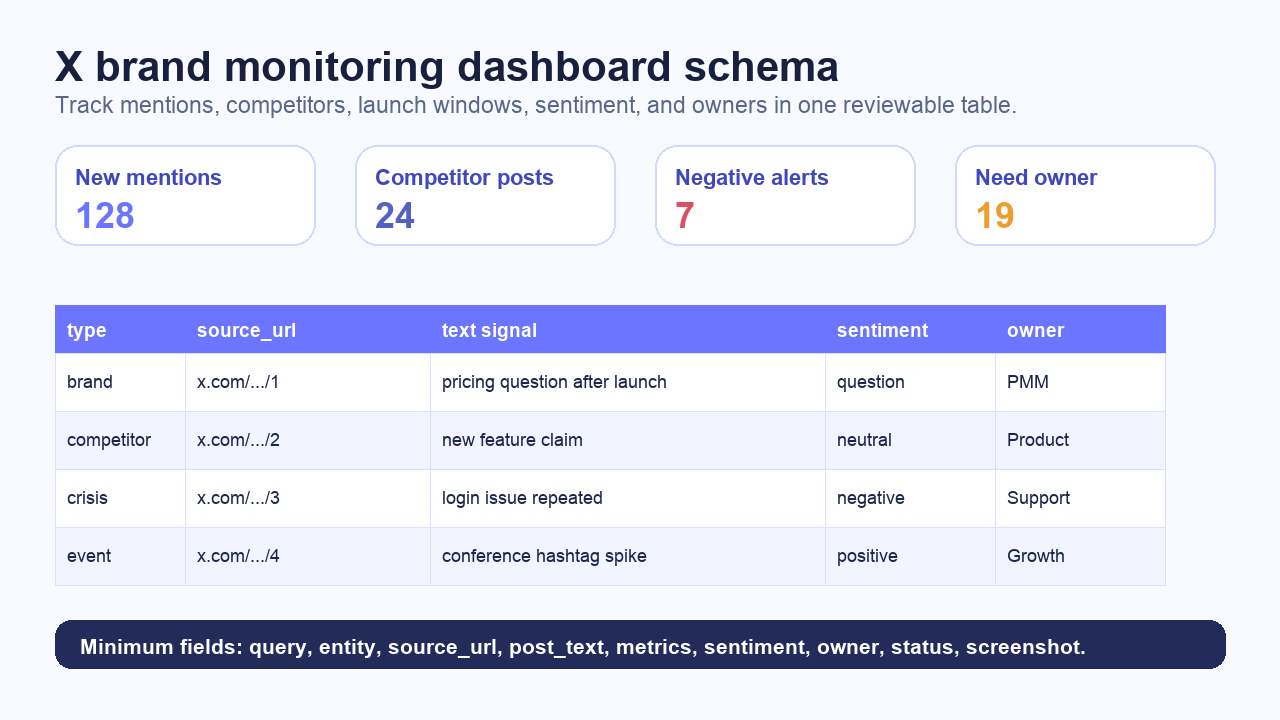
Your monitoring table should be boring and audit-friendly.
Field | Why it matters |
| Ties every row to the input |
| Debugs false positives |
| Brand, product, competitor, campaign, executive |
| Lets reviewers open the original post |
| Main evidence |
| Account-level grouping |
| Timeline and event windows |
| Likes, replies, reposts, views when visible |
| Links to articles, launches, docs, competitors |
| Positive, negative, neutral, question, unclear |
| Pricing, bug, competitor, feature, hiring, support, launch |
| Support, PMM, sales, product, legal |
| New, reviewed, escalated, closed, ignored |
| Evidence for important or ambiguous rows |
| Audit trail |
Run the BrowserAct monitoring workflow
For custom X/Twitter monitoring, BrowserAct Agent is a natural first workflow. A marketing or growth team can describe the query set, fields, screenshots, review rules, and export destination without maintaining a Selenium script or waiting for a developer to add one more column.
Example prompt:
Monitor public X/Twitter posts for the query table.

For each query, collect visible public posts from the current search results.
Extract query_id, query, matched_entity, source_url, post_text, author_handle,
posted_at if visible, visible engagement metrics, external_urls, hashtags,
mentions, captured_at, sentiment, topic, owner suggestion, and status.

Save screenshots for high-engagement rows, negative rows, competitor mentions,
and rows marked manual_review.
Deduplicate by post URL or post ID.
Export to CSV and Google Sheets.

Stop and mark status if X requires login, CAPTCHA, 2FA, payment,
private access, or unclear permission.
Do not post, like, reply, repost, follow, unfollow, message, or change account state.
This is the BrowserAct sweet spot: prompt-to-cloud Bot, browser execution, screenshots, structured exports, scheduled runs, and human handoff. The Social Media Finder template can also help locate public profiles before you build a recurring monitoring job. If your monitoring later shifts toward follower/account research, the Twitter/X Follower Dashboard template is a better adjacent workflow.
Give your agent a real browser, then turn the workflow into a Skill.
- 1. Use browser-act when an agent needs to open, click, scroll, extract, or inspect a live site.
- 2. Use browser-act-skill-forge when the workflow should become reusable across runs and agents.
- 3. Keep the operational boundary simple: automate what the user can already do in the browser.
Alert routing
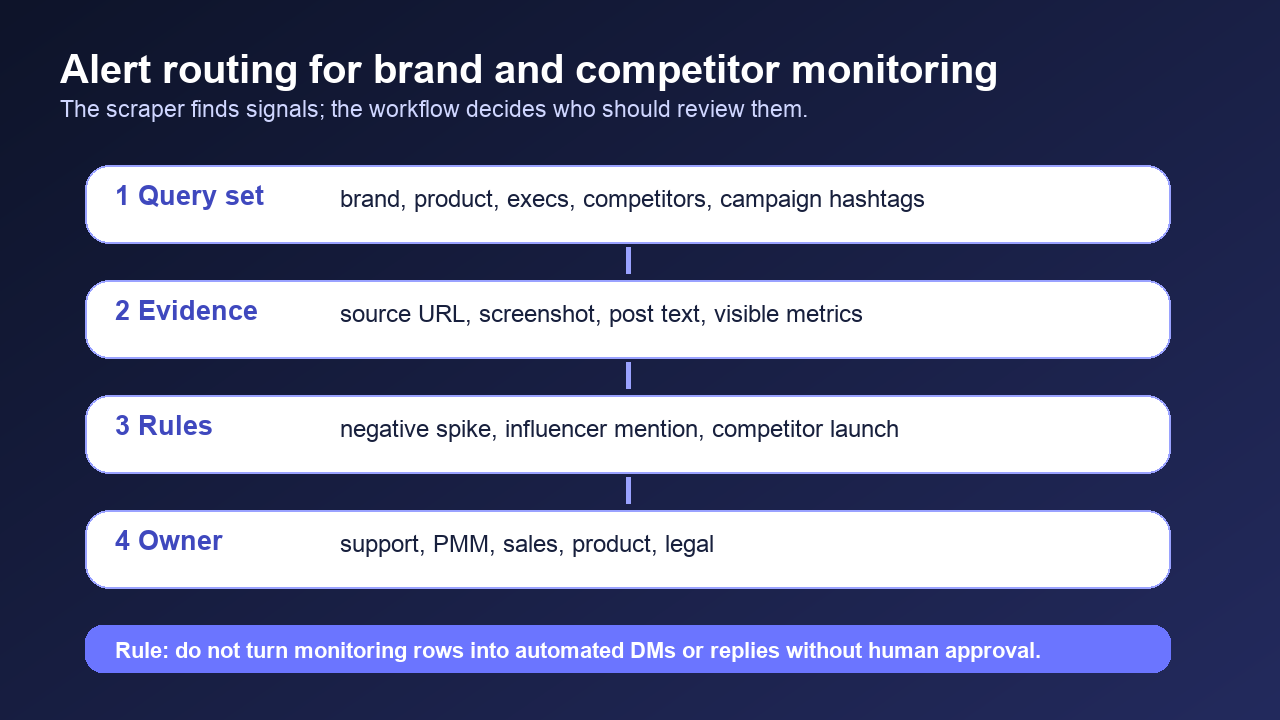
A monitoring system becomes useful when it knows who should look at a signal.
Signal | Route to | Example action |
Repeated login or bug complaint | Support | Check incident channel and support macros |
Pricing objection | PMM / Growth | Review messaging and competitor positioning |
Competitor comparison | Sales / PMM | Add to battlecard or win/loss notes |
Influencer mention | Comms / Leadership | Review before responding |
Legal or safety complaint | Legal / Trust | Preserve screenshot and source URL |
Feature request cluster | Product | Add to feedback tracker |
Launch hashtag spike | Growth / Content | Update recap and campaign report |
Monitor competitors without turning it into spam automation
Competitor monitoring is valuable. Unsafe outreach automation is not.
Watch for:
- Competitor launch posts.
- Replies asking for alternatives.
- Users complaining about price, reliability, support, or missing features.
- Accounts comparing several tools.
- Posts linking to competitor docs, pricing, or changelog pages.
But keep the workflow read-only. A BrowserAct monitoring table can route a row to sales or PMM, but it should not automatically DM, reply, follow, or scrape private information. Autoreach-style Twitter automation content shows that the market often blends signal discovery with outreach. For BrowserAct SEO content, the safer and more durable angle is “signal discovery with human approval.”
Launch and event monitoring
For launch week, split the monitoring window into three phases:
Phase | Window | Goal |
Baseline | 2–7 days before launch | Normal mention volume and recurring complaints |
Live launch | Launch day through 48 hours | Questions, objections, bugs, early praise, influencer posts |
Recap | 3–7 days after launch | Themes, reach, competitor reactions, follow-up content |
- Brand + product.
- Product + “pricing.”
- Product + “alternative.”
- Product + “bug” / “not working.”
- Campaign hashtag.
- Competitor + same feature category.
Then export a recap:
Recap section | Data needed |
Top positive themes | Positive rows grouped by topic |
Top objections | Negative/question rows grouped by phrase |
Competitor comparisons | Rows with competitor entity |
Support risks | Rows routed to support |
Content ideas | Questions and repeated confusion |
Sentiment labels that humans can trust
Use a small label set first:
Label | Meaning |
| Clear praise or recommendation |
| Complaint, frustration, risk, or criticism |
| Buyer, user, or support question |
| Mentions or compares a competitor |
| Informational or low-signal |
| Needs human interpretation |
unclear and preserve the screenshot.
If you plan to send rows into an LLM workflow, use BrowserAct to collect a clean evidence table first: source URL, post text, author handle, visible metrics, timestamp, query, sentiment, and review status. The best Twitter scraper tools pillar can then serve as the internal link for tool selection.
When to use BrowserAct vs a social listening tool vs an API
Route | Best for | Tradeoff |
BrowserAct | Custom monitoring briefs, screenshots, flexible fields, Sheets/CSV, human review | Not a firehose; use safe stop rules |
Social listening software | Always-on dashboards, dashboards for nontechnical teams, broad brand coverage | Less flexible for custom evidence schemas |
Scraper API | Stable JSON endpoint, backend integration, known query types | Schema and coverage depend on provider |
Actor marketplace | Hosted scrapers with standard inputs | Validate output against your exact use case |
Official X API | Approved API use cases and endpoint-specific needs | Rate limits, access level, and product caps |
Safety boundaries
X’s official automation rules and developer guidelines are the safety floor. For monitoring content, keep the guidance simple:
- Collect public, visible evidence only.
- Stop on login, CAPTCHA, 2FA, payment, private content, or unclear permission.
- Record source URLs and screenshots for important rows.
- Do not automate account actions from monitoring rows.
- Do not build sensitive personal profiles.
- Do not promise legal certainty.
- Route outreach or replies to a human approval process.
This is not just safer. It makes the workflow more credible to the teams who need to use it.
Two Skills, One Repeatable Browser Workflow
Start with live browser execution when the agent needs to understand a page. Move to Skill Forge when the same scraper should run again without re-exploring the site.
Run once with browser-act
Give Codex, Claude Code, Cursor, Windsurf, or another agent a real browser for rendered pages, clicks, scrolling, screenshots, DOM extraction, and network inspection.
Open browser-act SkillPackage with Skill Forge
Explore the site once, verify the extraction path, then generate a callable Skill package that other agents can reuse for batch jobs or scheduled workflows.
Open Skill ForgeFurther reading: X and Twitter data
Frequently Asked Questions
What is Twitter brand monitoring?
Twitter brand monitoring tracks public X/Twitter posts that mention your brand, products, competitors, campaigns, executives, or support issues, then routes useful signals for review.
What keywords should I monitor on X?
Monitor brand names, product names, domain names, campaign hashtags, competitor names, executives, support phrases, pricing phrases, and buyer-intent phrases.
Is Twitter social listening different from scraping?
Social listening is the business workflow; scraping is one collection method. A good workflow also needs dedupe, sentiment labels, source URLs, owner routing, and alert rules.
Can BrowserAct monitor X/Twitter mentions on a schedule?
BrowserAct can run prompt-led browser workflows and scheduled exports, but the workflow should stay public, read-only, and stop on login, CAPTCHA, 2FA, private content, or unclear permission.
Should I automatically reply to negative X mentions?
No. Route negative or high-risk mentions to a human owner first. Do not automate replies, DMs, follows, likes, or reposts from monitoring rows.
When should I use BrowserAct instead of a social listening platform?
Use BrowserAct when you need a custom monitoring workflow with screenshots, source URLs, flexible fields, CSV/Sheets export, and human review rather than a fixed dashboard. ## Sources - BrowserAct X/Twitter Topic Library X-06, local workbook, reviewed 2026-07-30. - TwitterScraperAPI X Scraper API - Bright Data: Best Twitter Scrapers in 2026 - Apify: Best Twitter/X scrapers for data analysts - Data4AI: Best Twitter / X Scrapers for AI Teams - Autoreach: PhantomBuster alternatives for Twitter automation - X automation rules - X developer guidelines - X API rate limits


