Twitter Data for Sentiment Analysis and AI Workflows

Twitter sentiment analysis fails fast when the dataset is just a pile of scraped text. The model does not know which post was a reply, which row came from a launch query, which screenshot contained the real complaint, which quote was sarcasm, or whether the source is safe to use. Raw social rows feel productive until someone asks, “Can we trust this?” This guide shows a practical X/Twitter data workflow for sentiment analysis, AI research, and LLM/RAG-style pipelines: collect public evidence, n
-
1Twitter sentiment analysis needs source-linked rows, not just text. Keep
source_url,captured_at, query context, author context, and review status. - 2Use BrowserAct first for small-to-medium public datasets where screenshots, custom schemas, CSV/Sheets export, and human review matter.
- 3Clean JSON should separate collection fields, label fields, review fields, and usage notes.
- 4Do not feed raw social rows directly into an LLM or dashboard. Add dedupe, sentiment labels, topic labels, and review status first.
- 5Avoid overclaiming AI training rights, surveillance use cases, sensitive profiling, or legal certainty. Use official X policy pages as boundaries.
- 6For large-scale production datasets, use approved APIs, compliant data providers, or enterprise data infrastructure.
Why this topic is worth writing
Your X-08 topic cluster is AI / RAG / 情绪分析数据. The keyword set includes Twitter sentiment analysis, Twitter data for AI, Twitter data for LLM, X data for RAG, Twitter comments sentiment analysis, Twitter dataset for research, Twitter JSON schema, Twitter data pipeline, Twitter data LangChain, and Twitter social media dataset.
The Ahrefs workbook gives one strong anchor:
Keyword | US SV | KD | CPC / TP |
| 200 | 14 | $2.00 / 250 |
| 10 | — | — |
The opportunity for BrowserAct is not to claim “unlimited training data.” The opportunity is to own the trusted small-to-medium workflow: prompt, browser execution, evidence, schema, review, export.
Start with the analysis question
Do not start with “collect Twitter data for AI.” Start with the decision.
Question | Better dataset |
What objections did users raise during launch? | Launch hashtag + brand mentions + reply threads |
What themes appear in competitor complaints? | Competitor mentions + negative phrase set |
What content ideas are buyers asking for? | Question-pattern searches + manual topic labels |
What changed after a pricing update? | Before/after query windows + sentiment labels |
What should an LLM summarize for analysts? | Source-linked rows with review status and usage notes |
Pro Tip: Add a decision_owner field before collection. If nobody owns the decision, nobody will review the output.
The pipeline
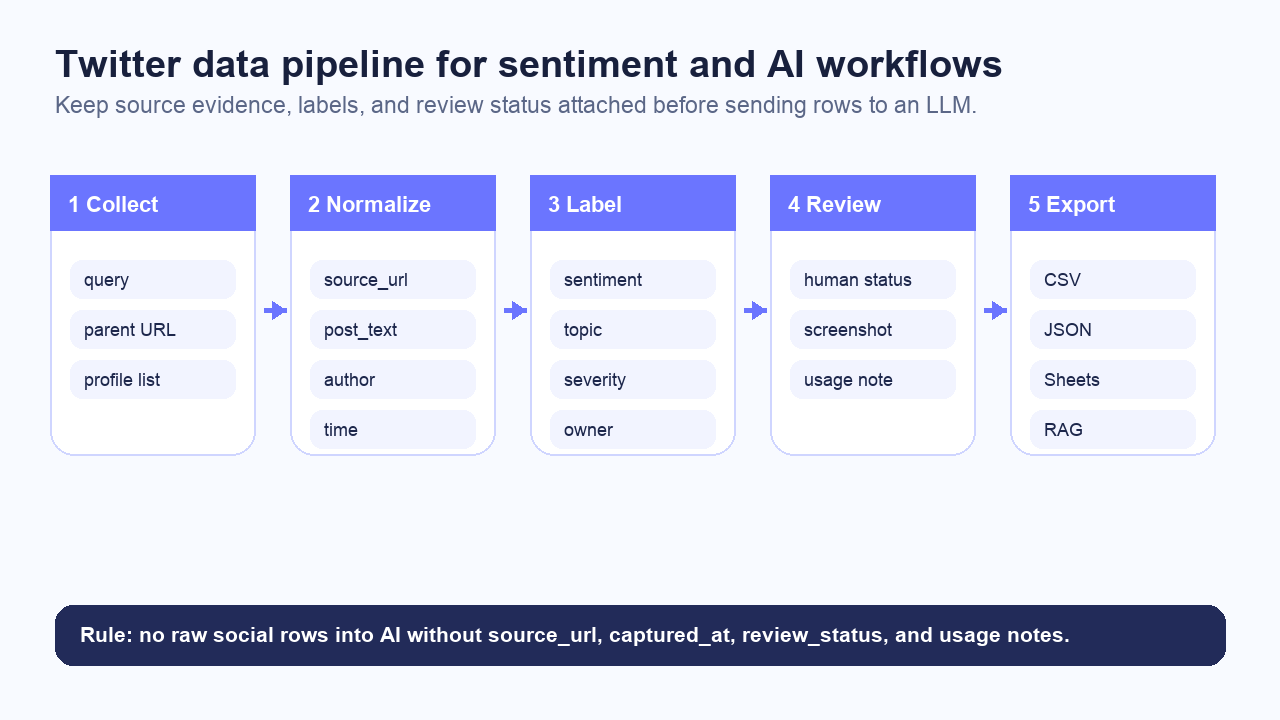
Use five stages:
Stage | Output |
Collect | Public posts, replies, profiles, or search results |
Normalize | Clean rows with source URL, text, author, time, query, and captured time |
Label | Sentiment, topic, severity, entity, language, and owner |
Review | Human status, screenshot, notes, and confidence |
Export | CSV, Google Sheets, JSON, webhook, BI table, or RAG input |
A practical JSON schema
Use a compact schema first:
Field group | Fields |
Source |
|
Content |
|
Author context |
|
Timing |
|
Engagement |
|
Labels |
|
Review |
|
Usage |
|
Run BrowserAct for source-linked AI-ready data
For analyst-led or AI-team workflows, BrowserAct Agent is a strong first step because it can collect public evidence and export custom fields without forcing the team to write a new scraper every time the schema changes.
Example prompt:
Collect public X/Twitter data for sentiment analysis.

Use the query table and collect visible public posts or replies.
Extract source_url, query_id, query, post_text, author_handle,
posted_at if visible, visible engagement metrics, hashtags, mentions,
external_urls, captured_at, screenshot_path, and status.

Add draft labels: sentiment, topic, severity, entity, confidence,
owner suggestion, review_status, and review_note.

Export to CSV, Google Sheets, and JSON.
Keep source URLs attached to every row.

Stop and mark status if X requires login, CAPTCHA, 2FA, payment,
private access, or unclear permission.
Do not post, like, reply, repost, follow, unfollow, message, or change account state.
Do not claim the dataset is approved for AI training or sensitive profiling.
This is the BrowserAct angle: a prompt-to-cloud Bot that returns evidence-linked structured data. The best X/Twitter scraper tools pillar can help readers compare tool routes, while the Social Media Finder template helps discover public profiles before enrichment or monitoring.
Give your agent a real browser, then turn the workflow into a Skill.
- 1. Use browser-act when an agent needs to open, click, scroll, extract, or inspect a live site.
- 2. Use browser-act-skill-forge when the workflow should become reusable across runs and agents.
- 3. Keep the operational boundary simple: automate what the user can already do in the browser.
Sentiment labels that survive review
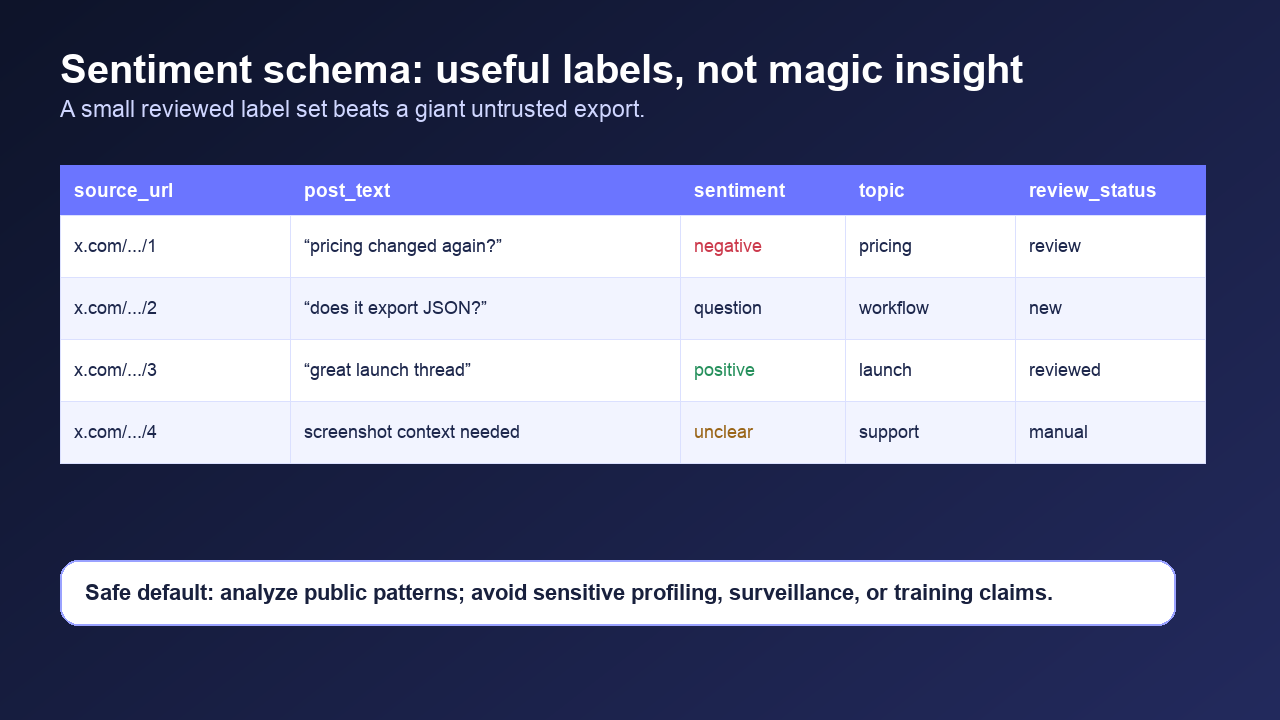
Use a small label set:
Label | Meaning |
| Clear praise, recommendation, excitement |
| Complaint, frustration, risk, or criticism |
| Buyer, support, or research question |
| Informational or low-signal |
| Mentions or compares a competitor |
| Needs human interpretation |
Topic | Example |
| “This got expensive.” |
| “I can’t log in.” |
| “Does it export JSON?” |
| “Can it monitor replies?” |
| “How is this different from X?” |
| “Congrats on shipping.” |
review_status:new,reviewed,manual,escalated,closedconfidence:low,medium,highowner:PMM,support,sales,product,legalreview_notescreenshot_path
Pro Tip: Treat unclear as a real label, not a failure. Sarcasm, memes, screenshots, and quote context are common in social data.
How to prepare rows for RAG or LLM workflows
For RAG, every chunk needs provenance.
RAG field | Why it matters |
| Stable row or thread ID |
| Audit and citation |
| The actual text being embedded |
| Parent post, query, campaign, or thread context |
| Time-sensitive social data |
| Sentiment, topic, entity |
| What the row may or may not be used for |
For most teams, the first useful LLM workflow is not model training. It is summarization:
- “Summarize the top pricing objections this week.”
- “Group launch replies into themes with source URLs.”
- “Find repeated questions that should become FAQ content.”
- “Identify high-risk support issues and list evidence rows.”
That is safer and more useful than pretending every tweet belongs in a training dataset.
When to use BrowserAct vs APIs vs data providers
Route | Best for | Watch out for |
BrowserAct | Custom public data collection, screenshots, flexible schema, Sheets/CSV/JSON | Not a firehose or training-data license |
Scraper API | Stable JSON endpoint, backend pipelines, fixed data shape | Validate coverage, terms, and retention |
Actor marketplace | Hosted workflows, scheduled exports, developer customization | Quality varies by actor |
Official X API | Approved endpoint-specific access | Rate limits, product caps, restricted uses |
Data provider | Large compliant datasets and enterprise pipelines | Cost, licensing, and governance review |
Turn the workflow into a weekly operating rhythm
The best first automation is usually a weekly evidence pack, not a live AI system.
Cadence | Output | Owner |
Daily during launch | New negative/question rows with screenshots | Support + PMM |
Weekly | Top themes, repeated objections, source-linked examples | Growth + Product |
Monthly | Trend changes, competitor comparison themes, FAQ ideas | Content + Strategy |
Ad hoc | Incident, pricing update, campaign, event recap | Assigned response team |
Pro Tip: Keep a model_ready boolean separate from reviewed. A row can be reviewed for a dashboard but still not appropriate for AI summarization or retrieval.
Safety boundaries for AI use
X’s Developer Guidelines and Restricted Use Cases matter here. The article should not pretend that “publicly visible” automatically means “use it for anything.” Official policy pages discuss restricted uses such as sensitive information, surveillance, spam/automation, redistribution, and AI/ML-related restrictions.
For BrowserAct content, keep the boundary simple:
- Analyze public conversation patterns.
- Keep source URLs and screenshots.
- Add usage notes to exports.
- Avoid sensitive profiling or surveillance.
- Do not claim AI training rights.
- Stop on login, CAPTCHA, 2FA, payment, private access, or unclear permission.
- Route legal/policy questions to review rather than making certainty claims.
This makes the workflow more credible. AI teams do not only need data; they need data they can defend.
Two Skills, One Repeatable Browser Workflow
Start with live browser execution when the agent needs to understand a page. Move to Skill Forge when the same scraper should run again without re-exploring the site.
Run once with browser-act
Give Codex, Claude Code, Cursor, Windsurf, or another agent a real browser for rendered pages, clicks, scrolling, screenshots, DOM extraction, and network inspection.
Open browser-act SkillPackage with Skill Forge
Explore the site once, verify the extraction path, then generate a callable Skill package that other agents can reuse for batch jobs or scheduled workflows.
Open Skill ForgeFurther reading: X and Twitter data
Frequently Asked Questions
What is Twitter sentiment analysis?
It is the process of labeling public X/Twitter posts or replies as positive, negative, neutral, question, competitor, or unclear, usually with topic and review fields attached.
What fields do I need before sending Twitter data to an LLM?
Keep source_url, post_text, author context, posted_at, captured_at, query, sentiment, topic, review_status, screenshot_path, and usage_note.
Can I use Twitter/X data for AI training?
Do not assume that. Review X policies, data rights, user privacy, and your legal obligations. This workflow focuses on analysis, summarization, and reviewable internal research.
Is Twitter data useful for RAG?
It can be useful for source-linked summaries, trend review, FAQ discovery, and launch analysis, but rows need provenance, usage notes, and human review.
Why use BrowserAct for sentiment analysis data?
BrowserAct is useful when you need a custom public collection workflow with screenshots, source URLs, structured CSV/Sheets/JSON export, scheduling, and human review.
Should I label sentiment automatically?
Use automatic labels as drafts. Keep confidence and review_status fields so humans can review sarcasm, screenshots, quote context, and high-risk rows. ## Sources - BrowserAct X/Twitter Topic Library X-08, local workbook, reviewed 2026-07-30. - Data4AI: Best Twitter / X Scrapers for AI Teams - XCrawl Twitter Comments Scraper - TwitterScraperAPI X Scraper API - Bright Data: Best Twitter Scrapers in 2026 - X Developer Guidelines - X Restricted Use Cases - X API rate limits


