Twitter Comments Scraper Workflow: Replies, Threads, CSV, and Sentiment

A Twitter comments scraper is not just a tweet collector with a different label. Replies are where the useful mess lives: objections, jokes, customer complaints, competitor mentions, feature requests, quote context, buried screenshots, and “this is actually broken” threads that never make it into the original post. If you flatten that into one text blob, you lose the conversation. This guide shows a practical X/Twitter comments and replies workflow: define the parent post set, preserve reply de
-
1A Twitter comments scraper should preserve
parent_id,reply_id,depth,source_url, andcaptured_at; otherwise you cannot reconstruct the conversation. - 2Use BrowserAct first for custom public reply workflows where the schema, screenshots, review rules, and export destination may change from run to run.
- 3Use a fixed scraper API or marketplace actor when you already know the exact endpoint, input format, output schema, and recurring volume.
- 4Thread workflows need two different views: a chronological “reader” view and a relational table view.
-
5Sentiment analysis works better after human review fields are added:
sentiment,topic,owner,status, andreview_note. - 6Keep collection read-only. Stop on login, CAPTCHA, 2FA, payment, private content, unclear permission, or account-action prompts.
What does a Twitter comments scraper actually collect?
A Twitter/X comments scraper collects replies under one or more public posts, then exports the reply tree into a structured format such as CSV, JSON, Google Sheets, Airtable, a BI database, or a sentiment analysis pipeline.
The important phrase is “reply tree.” A flat list of text can answer “what words appeared?” It cannot answer “which reply responded to which complaint?” or “which criticism attracted follow-up?” or “which author started the sub-thread?”
Your X/Twitter topic workbook puts this under X-05: Twitter comments scraper, Twitter replies scraper, scrape tweet replies, Twitter thread scraper, Twitter thread downloader, and Twitter conversation scraper. The demand is supported by real SERP and product evidence. XCrawl has a dedicated Twitter comments scraper page that frames replies as useful for brand monitoring, sentiment analysis, competitor tracking, structured JSON, scheduling, and CSV/JSON exports. Xtracticle focuses on saving X articles and threads as Markdown, text, or PDF. Stack Overflow questions about X/Twitter endpoint limits show the technical pain on the developer side: pagination, rate windows, and 429 responses can turn a “simple export” into a queueing problem.
This is the approach that works: treat replies as a conversation dataset, not as a pile of comments.
Start with the parent post set
Do not begin with “all comments from Twitter.” Begin with a parent set.
Parent input type | Example | Best for |
Post URLs | A list of launch, announcement, or viral post URLs | Product feedback, incident review |
Post IDs | IDs from an existing API/database export | Engineering pipelines |
Search results | Posts matching a keyword or hashtag | Market research, social listening |
Account timeline sample | Recent posts from a brand or competitor | Competitive monitoring |
Curated watchlist | Hand-picked high-signal posts | Analyst workflows |
Pro Tip: Add collection_reason to the parent input table. Six weeks later, nobody remembers why one random thread is in the dataset.
Use the right schema for replies and threads
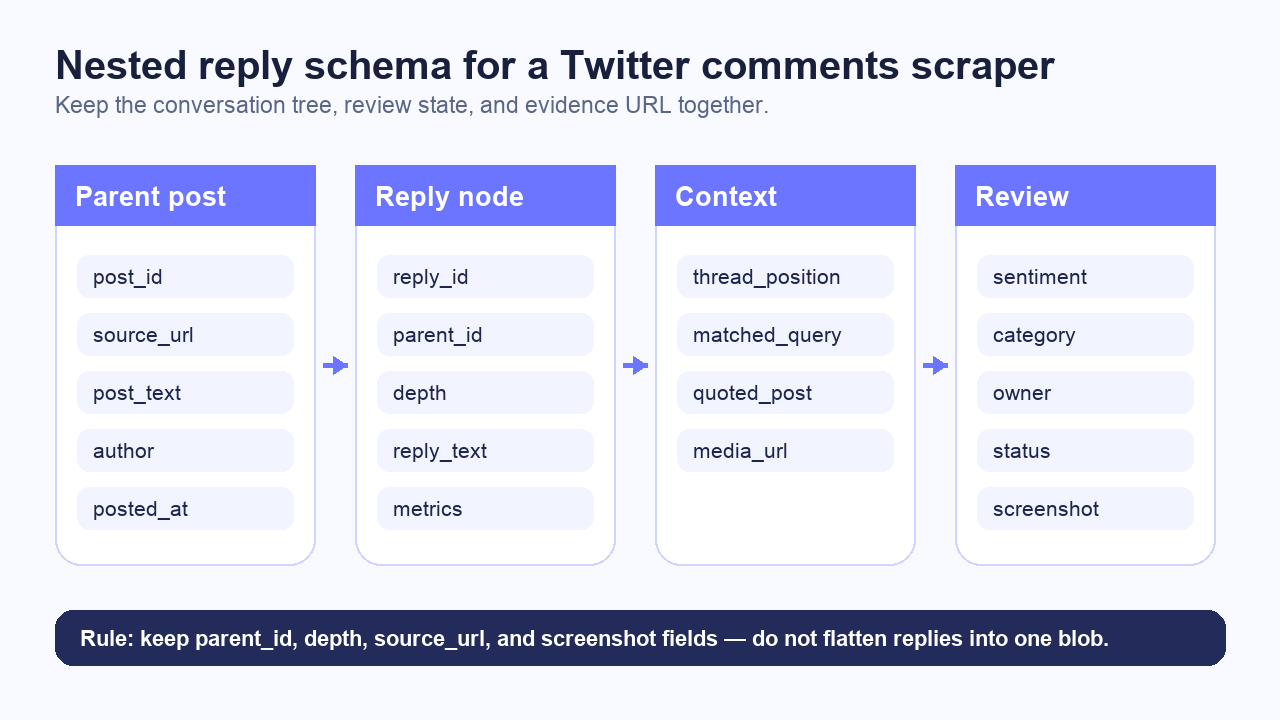
For comments, the schema matters more than the scraper brand.
Field | Why it matters |
| Opens the original context |
| Groups replies under the source post |
| Deduplication and replay |
| Evidence link for reviewers |
| Preserves nested reply structure |
| Shows whether this is a direct reply or sub-reply |
| Rebuilds chronological reader view |
| Main text payload |
| Account-level grouping |
| Review readability |
| Timeline and incident analysis |
| Visible engagement context when available |
| Entity extraction |
| Screenshots, charts, or meme context |
| Audit trail |
| Evidence for high-value or ambiguous rows |
|
|
The workflow
1. Build a parent input table
Start with a small table:
parent_id | parent_url | purpose | max_replies | priority |
P1 |
| launch feedback | 200 | high |
P2 |
| competitor reaction | 100 | medium |
P3 |
| pricing objections | 150 | high |
2. Define the reply extraction rules
Before running the scraper, decide:
- Should quote posts be included or just direct replies?
- How many nested levels matter?
- Should hidden, private, unavailable, or login-gated states be captured as statuses?
- Should screenshots be saved for every parent post, every reply, or only rows marked
manual_review? - Should the export be one table or two tables?
For one-off analysis, one table is fine. For recurring monitoring, use two:
Table | Primary key | Purpose |
|
| One row per source post |
|
| One row per reply, with |
3. Run BrowserAct for custom reply workflows
For custom comment and thread workflows, BrowserAct Agent is the first route I would try. The reason is simple: reply work changes. The analyst may ask for screenshots today, topic labels tomorrow, owner routing next week, and Google Sheets export after the first review pass.
Example prompt:
Collect visible public replies for the parent post table.

For each parent post, capture parent_post_url, parent_post_id if visible,
reply_url, reply_id if visible, parent_reply_id if visible, depth,
reply_text, author_handle, posted_at if visible, visible engagement metrics,
mentions, hashtags, external_urls, media_urls, captured_at, and status.

Preserve the reply tree. Do not flatten all replies into one text block.
Save screenshots for each parent post and for rows marked manual_review.
Export results to CSV and Google Sheets.

Stop and mark status if X requires login, CAPTCHA, 2FA, payment,
private access, or unclear permission.
Do not post, like, reply, repost, follow, unfollow, message, or change account state.
This is where BrowserAct fits naturally: prompt, browser execution, screenshots, structured export, scheduled reruns, and human handoff. You can also link this workflow to a spreadsheet, webhook, or automation stack once the schema stabilizes.
If your use case is profile-oriented rather than thread-oriented, the Twitter/X Follower Dashboard template is a useful adjacent BrowserAct workflow. For broader social research, BrowserAct’s Social Media Finder template can help locate the public profiles you want to monitor before you build a reply collector.
4. Use scraper APIs or actors when the schema is stable
If you already know that you need the same fields every day, a fixed endpoint may be better. XCrawl’s Twitter comments scraper page, for example, highlights structured JSON, threaded replies, scheduling, no-code usage, and CSV/JSON exports. Apify’s Tweet Scraper actor is another SERP-visible example of the “input target, get structured tweet data” route.
The tradeoff is flexibility. Fixed tools are convenient when the field list matches your needs. They become awkward when the analyst asks for a new review flag, screenshot condition, source evidence rule, or exception status.
Use this rule:
Route | Use it when | Watch out for |
BrowserAct | The workflow is custom, prompt-led, evidence-heavy, or analyst-owned | Keep stop rules explicit |
Scraper API | You need a stable backend endpoint and JSON output | Confirm schema, coverage, and policy fit |
Marketplace actor | You want a hosted crawler with standard inputs | Validate output on your exact thread type |
DIY Selenium/Scrapy | You need total code control | Maintenance, dynamic loading, login walls, and 429-style limits |
Official X API | You have approved access and the endpoint fits | Rate limits, product caps, and access level |
Preserve conversation context
A reply dataset should support at least three views:
View | What it answers |
Flat table | “Which replies mention pricing?” |
Thread tree | “Which comment started this sub-discussion?” |
Reader document | “What did the whole thread say in order?” |
For knowledge-base or research workflows, export both:
replies.csvfor analysis.thread.mdfor human reading.
The Markdown version should include source links, timestamps when visible, and a note when part of the thread could not be accessed.
Pro Tip: For internal review, add a short context_snippet field that stores the parent post text or the previous reply. It saves reviewers from reopening every URL.
Run the scrape once with browser-act. Package the repeatable path with Skill Forge.
- 1. An agent uses browser-act to search Google Maps, scroll listings, inspect place pages, and extract visible fields.
- 2. The team validates the schema: business name, category, address, phone, website, rating, review count, and source URL.
- 3. browser-act-skill-forge turns the proven flow into a reusable scraper Skill for future agent runs.
Sentiment analysis needs a review queue
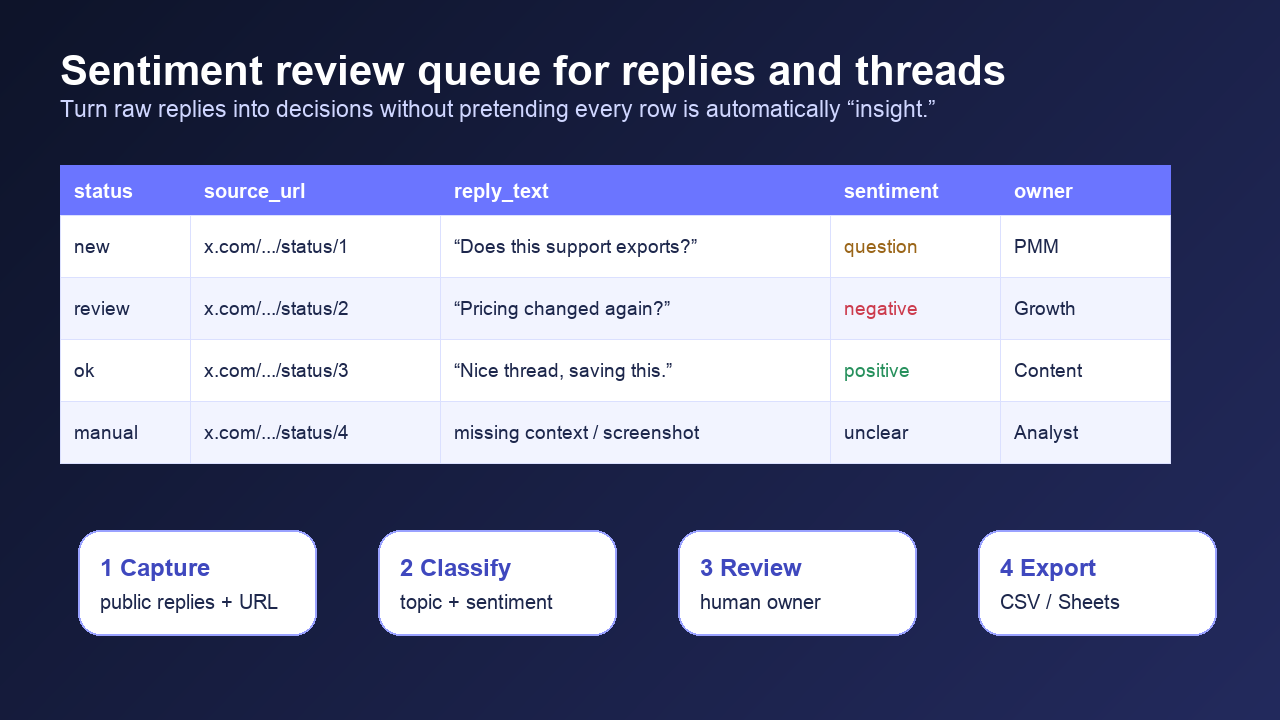
Reply sentiment is noisy. Sarcasm, memes, quote context, screenshots, and community slang can confuse automated classifiers. Do not send raw replies straight into a dashboard and call it market intelligence.
Use a review queue:
Field | Example |
|
|
|
|
|
|
|
|
|
|
| “Needs screenshot; user compares us with competitor X.” |
Alert rule | Example |
Repeated objection | 5+ replies mention the same pricing issue |
Influencer reply | Watchlist handle replies to launch post |
Competitor mention | Reply contains competitor name + negative sentiment |
Support risk | Reply contains “broken,” “refund,” “can’t login,” or “down” |
Evidence needed | Reply includes media or screenshot language |
Dedupe without destroying context
Replies can appear in multiple exports. A parent post might be rerun daily. A reply can match more than one topic label. Quote posts can look like replies but behave differently.
Use a stable unique key where possible:
dedupe_key = reply_id || normalized_reply_url || hash(parent_post_url + author_handle + reply_text + posted_at)
For recurring workflows, keep these fields:
first_seen_atlast_seen_atrun_idquery_or_parent_versionnew_this_run
Do not delete the match context. If a reply matched both “pricing” and “competitor,” store both labels. That overlap is often the insight.
Handle rate limits, unavailable content, and stop states
X’s official docs are clear that rate limits and error responses matter. The X API rate-limit documentation describes per-endpoint request windows, and the response-code docs include 429 / Too Many Requests and product-cap style errors. Stack Overflow developer questions show the practical version of the same problem: pagination and endpoint limits can stop a follower or reply-style collection long before the analyst feels “done.”
For BrowserAct and browser-led workflows, use operational stop states instead of aggressive retry behavior:
State | What to do |
| Stop and record the parent URL |
| Stop and mark manual review |
| Record status, do not force access |
| Pause schedule or reduce batch size |
| Keep the source URL and capture time |
| Save screenshot and owner field |
Safety boundaries for X/Twitter reply collection
Keep scraping and account actions separate.
X’s automation rules warn against unauthorized scripting and automated account behaviors outside permitted boundaries. X’s developer guidelines also emphasize using official APIs, respecting limits, and following restricted-use rules. For a reply collection workflow, that means your default should be public, read-only, evidence-preserving collection.
Do not use a comments scraper to:
- Post replies.
- Like or repost content.
- Follow or unfollow users.
- Send DMs.
- Access private or permissioned content.
- Build sensitive personal profiles.
- Claim legal certainty about data reuse.
BrowserAct should be framed as a workflow engine, not a magic bypass box. The safe pitch is stronger anyway: prompt-led collection, screenshots, structured output, scheduling, and human review.
When BrowserAct should be your first option
Choose BrowserAct first when:
- The parent post list changes often.
- You need source URLs and screenshots for evidence.
- The analyst wants to adjust fields without editing code.
- The workflow should export to CSV/Sheets before it becomes an API pipeline.
- You need explicit stop states for login, CAPTCHA, 2FA, private content, or unclear permission.
- You want to schedule repeat runs but still keep human review in the loop.
Choose a fixed API or actor first when:
- You already have approved access or a stable provider.
- The schema is fixed.
- The parent input type is simple.
- You need backend throughput more than analyst flexibility.
The practical route is often hybrid: use BrowserAct to design and validate the workflow, then decide whether it should stay as a prompt-to-cloud Bot or graduate into a fixed API pipeline.
Example output
parent_post_id | reply_id | depth | reply_text | sentiment | topic | owner | status |
P1 | R1 | 1 | “Can we export this to Sheets?” | question | workflow | PMM | new |
P1 | R2 | 1 | “Pricing changed again?” | negative | pricing | Growth | review |
P1 | R3 | 2 | “This is why I use competitor X.” | negative | competitor | Sales | review |
P2 | R4 | 1 | “Nice thread, saving this.” | positive | content | Content | reviewed |
Two Skills, One Repeatable Browser Workflow
Start with live browser execution when the agent needs to understand a page. Move to Skill Forge when the same scraper should run again without re-exploring the site.
Run once with browser-act
Give Codex, Claude Code, Cursor, Windsurf, or another agent a real browser for rendered pages, clicks, scrolling, screenshots, DOM extraction, and network inspection.
Open browser-act SkillPackage with Skill Forge
Explore the site once, verify the extraction path, then generate a callable Skill package that other agents can reuse for batch jobs or scheduled workflows.
Open Skill ForgeFurther reading: X and Twitter data
Frequently Asked Questions
What is a Twitter comments scraper?
It collects public replies under X/Twitter posts and exports them with source URLs, parent IDs, reply IDs, timestamps, visible metrics, and review fields.
Can I scrape tweet replies without the official X API?
Some browser-led and third-party workflows collect visible public replies without using the official API, but they should stop on login, CAPTCHA, private content, payment, or unclear permission.
What fields should a Twitter replies scraper export?
Export parent_post_id, reply_id, parent_reply_id, depth, reply_url, reply_text, author_handle, posted_at, visible metrics, captured_at, screenshot_path, and status.
Is a Twitter thread scraper the same as a comments scraper?
Not exactly. A thread scraper often reconstructs a chronological reader view, while a comments scraper focuses on replies under one or more parent posts. Many workflows need both.
How do I use Twitter comments for sentiment analysis?
Add review fields such as sentiment, topic, severity, owner, status, and review_note before sending rows into a dashboard or LLM pipeline.
When should I use BrowserAct for Twitter comments scraping?
Use BrowserAct when you need a custom, prompt-led, public read-only workflow with screenshots, source URLs, structured CSV/Sheets export, scheduling, and human review. ## Sources - BrowserAct X/Twitter Topic Library X-05, local workbook, reviewed 2026-07-30. - XCrawl Twitter Comments Scraper page - Xtracticle thread and article downloader - Apify Tweet Scraper actor - X API rate limits documentation - X API response codes and errors - X automation rules - X developer guidelines - Stack Overflow: Twitter API V2 429 follower endpoint question


