Stealth Browser Automation: How to Handle Protected Websites Without Rebuilding Every Workflow

You can make Playwright look less obvious in an afternoon. You can make a protected browser workflow reliable for production in a quarter. That gap is where most teams get hurt. Stealth browser automation is the practice of running browser workflows through an environment that looks, behaves, and persists more like a real browser session than a disposable script. It includes browser fingerprints, network reputation, session history, pacing, challenge handling, and human handoff when the site ask
- 1Stealth browser automation works best when you treat it as a reliability stack: browser identity, network path, session continuity, challenge escalation, and observability.
- 2A stealth plugin can reduce obvious automation signals, but it does not automatically fix IP reputation, TLS fingerprints, account trust, or repeated verification loops.
- 3Protected websites often fail softly before they fail visibly: empty tables, slow loads, login loops, partial pages, and increased challenge frequency are all signals.
- 4Human handoff is not a weakness in protected workflows. It is the correct boundary for 2FA, account verification, CAPTCHA judgment, and risky actions.
- 5BrowserAct fits when the job is authorized, browser-based, repeatable, and needs recoverable execution rather than another one-off script patch.
What Is Stealth Browser Automation?
Stealth browser automation is browser automation designed to reduce the mismatch between an automated browser and a normal human-operated browser. In practice, that means controlling obvious browser signals, preserving realistic session state, using an appropriate network path, and keeping interaction patterns within the range a site expects from legitimate users.
That definition matters because a lot of content reduces stealth to one library.
The common beginner version is: install a Playwright or Puppeteer stealth plugin, hide navigator.webdriver, patch a few browser APIs, and hope the site stops showing CAPTCHAs. That can help on basic checks. It is not the same as a production-ready protected-site workflow.
Modern anti-bot systems are layered. They may look at:
- browser-exposed JavaScript properties
- canvas, WebGL, font, audio, and hardware signals
- Chrome DevTools Protocol side effects
- IP type and reputation
- TLS and HTTP behavior
- cookie and storage history
- language, timezone, viewport, and location consistency
- timing, scrolling, focus, and navigation patterns
- account trust and login continuity
Scrapfly's Puppeteer stealth guide is useful because it separates browser-patching modules from broader context signals. Browserless is useful because it argues that production workloads need managed browser infrastructure, not just local plugin patches. Apify is useful because its quick-start advice puts proxies, cookies, browsers, and retries in the same operational bucket.
The pattern is consistent: stealth works when the whole browser story is coherent.
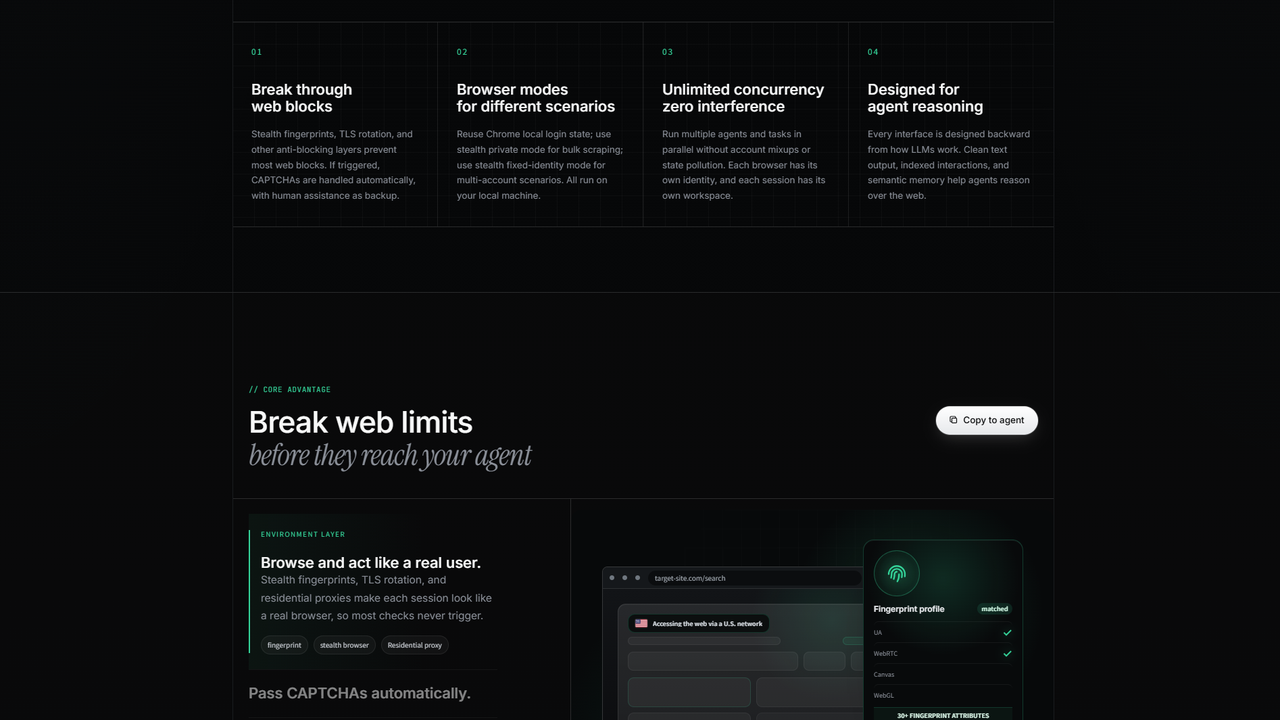
BrowserAct frames protected-site automation as a layered browser environment: stealth fingerprints, network consistency, CAPTCHA handling, and human assistance as a backup path.
The Problem With "Just Add Stealth"
The fastest path to a demo is also the fastest path to a maintenance treadmill.
You add a stealth plugin. Blocks drop. The first run looks clean. A week later, the site changes its detection logic, a proxy range gets noisy, or a repeated login path starts triggering verification. Now the same script returns a partial page, a challenge, or a clean-looking page with the important data missing.
That is not random bad luck. It is usually a design problem.
Plugins patch the browser, not the workflow
Puppeteer stealth and Playwright stealth approaches usually focus on browser-exposed signals: automation flags, plugins, permissions behavior, user-agent consistency, and related JavaScript surfaces. Those are real signals. They are worth controlling.
But a protected website is not grading only those surfaces.
If your IP reputation is poor, if every run starts from a brand-new empty profile, if your timezone and proxy geography disagree, if your account logs in from three continents in a day, or if the same workflow clicks every button 200 milliseconds after load, a patched navigator.webdriver flag is not going to save the run.
Pro Tip: If your workflow only works when you rotate three things at once, you do not have a stable fix. Change one layer at a time: browser identity, then network path, then session continuity, then interaction pacing. Otherwise you will never know which layer actually mattered.
Protected-site failures are often soft failures
The obvious failure is a CAPTCHA. The more expensive failure is a page that looks successful enough for your pipeline to continue but does not contain the data you needed.
Teams usually see one of five symptoms:
That table is intentionally simple. Most teams make this harder by changing code, proxy, browser, account, and timing all in one panic patch.
Do not do that.
The Five-Layer Stealth Stack
If you are building authorized automation against protected websites, use this stack as your design checklist.
Layer 1: Browser identity
The browser has to look coherent before the first click.
That includes user agent, browser version, platform, viewport, timezone, language, plugins, permissions, hardware hints, graphics behavior, and other surfaces that anti-bot systems can compare. But identity is not only the visible fingerprint. It is also the state around the browser: cookies, storage, profile age, and whether the browser has a believable reason to be on that site.
This is where disposable automation often fails. A fresh browser profile with no history, a mismatched timezone, and perfect machine pacing can be technically "stealthed" and still look statistically wrong.
BrowserAct's browser modes are designed around this decision. Some jobs should use a privacy-focused stealth session. Some jobs need a fixed stealth identity. Some authorized workflows should reuse a local Chrome state or direct Chrome control because the login context is the valuable part.
The right question is not "Which browser is most stealthy?" The right question is: What identity should this workflow have?
Layer 2: Network path
Network signals can override a beautiful browser fingerprint.
Residential proxies, datacenter proxies, static proxies, dynamic proxies, and VPN-routed traffic all create different trust patterns. A protected site may care about location consistency, ASN reputation, request volume, or whether the same account appears from a new network on every run.
Apify's Academy recommends high-quality proxies and realistic settings as quick-start blocking mitigations. Browserbase's identity docs frame proxies and authentication management as part of agent access. Browserless emphasizes that infrastructure-level controls become more important once workloads scale.
The shared lesson is boring and correct: network and browser identity have to agree.
Pro Tip: Do not rotate proxies for logged-in workflows just because "rotation" sounds safer. For account-based automation, a stable network identity can be safer than constantly arriving from a new place.
Layer 3: Session continuity
Session continuity is the layer most AI-agent demos ignore.
A protected website often trusts a session gradually. If every run starts from nothing, the site sees a first-time visitor again and again. If every run uses an overloaded shared profile, your team loses the ability to explain which workflow created which state.
Use explicit sessions. Keep account-specific jobs isolated. Persist the browser state when continuity matters. Use private sessions when residue would be risky.
This is especially important for workflows like:
- logged-in dashboard checks
- marketplace account operations
- social inbox or DM review
- review monitoring behind authentication
- price or inventory tracking inside partner portals
- admin panels with export buttons
In those workflows, browser state is not an implementation detail. It is part of the product surface.
BrowserAct exposes browser and session concepts directly so an agent can open, inspect, click, type, and resume work inside a named context instead of rediscovering the path from scratch each time.
Layer 4: Challenge handling
CAPTCHAs, Turnstile, 2FA, OAuth prompts, device verification, and phone checks should not all be treated the same.
Some challenges are safe to resolve automatically. Some are account-risk boundaries. Some are explicit signals that the workflow should pause and let a human approve the next step.
The mistake is pretending a protected workflow is only successful if no human ever appears.
That sounds good in a demo. It is bad operations.
The better model is:
- automate the routine navigation and extraction
- detect challenge or verification pressure early
- pause before risky or sensitive action
- let a human resolve the boundary
- continue from the same browser session
BrowserAct's remote-assist model is built for that kind of recovery path. The browser stays alive. The human handles the sensitive moment. The agent continues without restarting the entire workflow.
If you want the security side of this pattern, the BrowserAct article on AI agents handling login and browser actions safely is the companion read.
Layer 5: Observability and packaging
The first successful run is not the finish line.
Once a protected workflow works, you need to know:
- which browser identity was used
- which session carried the state
- what challenge boundary appeared
- what data was extracted
- what the expected success condition looked like
- what should happen if the page changes
Without that, tomorrow's run becomes another improvised agent adventure.
Browserless talks about live inspection and session visibility for debugging. BrowserAct has the same underlying need from the agent side: the workflow needs compact state, repeatable commands, and a clean way to turn a successful exploration into a reusable skill.
That is where Skill Forge becomes strategically important. A protected-site workflow should not live forever as a prompt. Once the path is verified, package the routine parts so the next run is execution, not rediscovery.
A Practical Decision Table
Use this before choosing tools or rewriting scripts.
This table also shows where teams overbuy.
If a page has an official API, use the API. If a workflow only needs one static HTML page, do not launch a stealth browser. But if the workflow is browser-based, logged-in, repeated, and protected, pretending it is "just scraping" is how the maintenance bill starts.
Give your agent a real browser, then turn the workflow into a Skill.
- 1. Use browser-act when an agent needs to open, click, scroll, extract, or inspect a live site.
- 2. Use browser-act-skill-forge when the workflow should become reusable across runs and agents.
- 3. Keep the operational boundary simple: automate what the user can already do in the browser.
How BrowserAct Fits This Category
BrowserAct is not trying to replace every layer of the web data stack.
It fits the cases where the hard part is the browser workflow:
- the page must render JavaScript
- the workflow needs account or browser state
- the target pushes back with bot scoring or verification
- the agent needs to click, scroll, inspect, and extract
- a human may need to step in without killing the run
- the path should become reusable after the first successful exploration
For broader context, the BrowserAct guide on automating websites that block bots explains the recoverability model. The article on AI agent web scraping failures explains why static fetches and generic AI browsing fall short. If you are comparing platform layers, BrowserAct vs Browserbase covers the workflow-first vs infrastructure-first distinction.
The practical distinction is this:
Browserless and Browserbase are often framed around managed browser infrastructure. Scrapfly is strong at web data APIs, anti-bot unblocking, and cloud browser tooling. Apify is a broad automation and actor marketplace with strong educational material. BrowserAct's wedge is agent-operated browser workflows: compact state, session ownership, stealth-capable browser modes, remote assist, and reusable skills.
That is a different center of gravity.
What a Protected-Site Workflow Should Look Like
Here is a safe operating pattern for authorized workflows.
1. Define the allowed scope
Before the browser opens, write down what the agent can do.
Can it read only? Can it export? Can it submit forms? Can it message people? Can it publish? Which account should it use? What action requires human approval?
This is not bureaucracy. It prevents the agent from treating every obstacle as a technical challenge to push through.
2. Choose the browser mode deliberately
Use a clean private session when the job should leave no state. Use a fixed identity when a repeated workflow needs continuity. Use local Chrome state when the authorized user session is the point.
Pro Tip: If you cannot explain why a workflow uses a fresh profile, sticky profile, or local Chrome profile, you are not ready to debug the failure when it appears.
3. Run the first workflow slowly enough to observe
The first run is not only for data. It is for learning the site.
Watch for:
- challenge timing
- missing content
- delayed JavaScript data
- hidden login redirects
- account verification prompts
- soft blocks that return successful HTTP status but wrong content
Record the success condition. Do not just record the click path.
4. Add challenge boundaries
Decide what should happen when a challenge appears.
For example:
- CAPTCHA appears before content: stop and report browser/network trust issue
- 2FA appears: request human handoff
- export button appears: continue if read-only export is in scope
- publish button appears: require human confirmation
- wrong account detected: stop immediately
This is where "autonomous" workflows become trustworthy. They do not continue blindly when the state changes.
5. Package the repeatable part
After the path works, turn the stable part into a reusable workflow or skill. Keep the human boundary explicit.
That gives you a runbook the agent can execute, not a vague memory of a successful demo.
Common Mistakes
Mistake 1: Calling every block a CAPTCHA problem
CAPTCHA is often the visible output of earlier scoring. If you do not fix browser identity, network reputation, or session consistency, the CAPTCHA will keep coming back.
Mistake 2: Rotating identity on account-based workflows
Rotation is useful for some public data collection jobs. It can be harmful for logged-in workflows where account trust depends on continuity.
Mistake 3: Debugging selectors before trust
If a table disappears, do not assume the selector broke. First check whether the trusted page actually loaded.
Mistake 4: Letting the model rediscover the same protected site
Protected sites punish variation. If the agent has already found a stable path, package it. Do not make it improvise the same route every morning.
Mistake 5: Treating human handoff as failure
For login, 2FA, account checks, and risky actions, handoff is the responsible design. The failure is pretending automation should bulldoze through those moments without a policy.
Conclusion
Stealth browser automation is useful, but only when the word "stealth" is bigger than a plugin.
The teams that get durable results treat protected websites as stateful browser workflows. They choose the right identity, keep the network path coherent, preserve sessions when continuity matters, watch for soft failures, and hand sensitive moments to a human instead of forcing the run forward.
That is the approach that actually works.
BrowserAct is built for that operating model: give agents a browser they can act through, keep sessions understandable, handle blocking pressure with the right browser mode, and make human handoff part of the workflow instead of an afterthought.
If your current automation works on easy pages and collapses on protected ones, do not start by adding another patch. Start by designing the browser workflow like it has to survive next week.
Two Skills, One Repeatable Browser Workflow
Start with live browser execution when the agent needs to understand a page. Move to Skill Forge when the same scraper should run again without re-exploring the site.
Run once with browser-act
Give Codex, Claude Code, Cursor, Windsurf, or another agent a real browser for rendered pages, clicks, scrolling, screenshots, DOM extraction, and network inspection.
Open browser-act SkillPackage with Skill Forge
Explore the site once, verify the extraction path, then generate a callable Skill package that other agents can reuse for batch jobs or scheduled workflows.
Open Skill ForgeRelated reading: For additional setup guidance and a closer comparison, see A WebFetch Alternative for Protected Websites.
Related reading: For a deeper explanation of the topic and related workflows, read How to Automate Websites That Block Bots Without Rebuilding Everything Every Week.
Further reading: Browser security and sessions
Frequently Asked Questions
What is stealth browser automation?
Stealth browser automation is browser automation designed to look and behave more like a trusted real browser session by managing browser identity, network path, session continuity, and challenge handling.
Is Playwright stealth enough for protected websites?
Sometimes for light checks, but not reliably for production workflows. Stealth plugins patch browser signals, while protected sites may also score IP reputation, TLS behavior, session history, and account trust.
Can stealth browser automation solve CAPTCHAs?
It can reduce some CAPTCHA triggers by improving browser trust, but CAPTCHA, 2FA, and account verification often need explicit human handoff rather than forced automation.
When should I use a real browser instead of a stealth browser?
Use a real browser or local Chrome state when the authorized user session is central to the workflow. Use a stealth browser when the job needs isolated, repeatable browser identity against protected sites.
What should I check first when browser automation gets blocked?
Check whether the trusted page loaded. Then inspect browser identity, network path, session continuity, and challenge state before changing selectors or adding retries.
How does BrowserAct help with stealth browser automation?
BrowserAct gives agents browser modes, explicit sessions, compact state, anti-blocking workflow controls, remote assist, and reusable skill packaging for authorized protected-site workflows.


