Is Twitter / X Scraping Legal or Safe?

Is Twitter scraping legal? The honest answer is: it depends on what you collect, how you collect it, what you do with it, and which rules apply to your jurisdiction, account, tool, and use case. That is not a dodge. It is the only useful answer. As of July 30, 2026, X’s own public policy pages are clear about several risk areas: API limits, non-API automation, spammy account actions, sensitive inferences, off-platform matching, redistribution, and automated messages or replies. This guide is no
- 1Is Twitter scraping legal is the wrong question if you ignore collection method, data type, account actions, privacy, and downstream use.
- 2Lower-risk workflows are public, read-only, source-linked, reviewed, and limited to visible data.
- 3X’s automation rules warn against API abuse, rate-limit circumvention, and non-API website scripting automation; account actions such as automated DMs, replies, likes, follows, and bulk interactions need much stricter review.
- 4X’s developer guidance emphasizes official API use, rate limits, transparency, opt-out, and real user value.
- 5High-risk areas include private content, login walls, deleted-tweet archives, sensitive characteristic inference, off-X identity matching, surveillance, spam, and redistribution.
- 6Use BrowserAct for safe public-data research workflows, not for bypassing X restrictions or automating account engagement.
The practical answer: legal, allowed, safe, and sensible are different
Teams often compress four different questions into one:
Question | What it really asks |
Is it legal? | Does applicable law allow this collection and use? |
Is it allowed by X? | Does the workflow comply with X rules, developer terms, automation rules, and API policy? |
Is it safe for the account? | Could the account, app, API access, or workflow be limited or suspended? |
Is it sensible for the business? | Can you explain the workflow to a customer, partner, regulator, or internal reviewer? |
That is why this page uses a boundary model instead of a blanket yes/no.
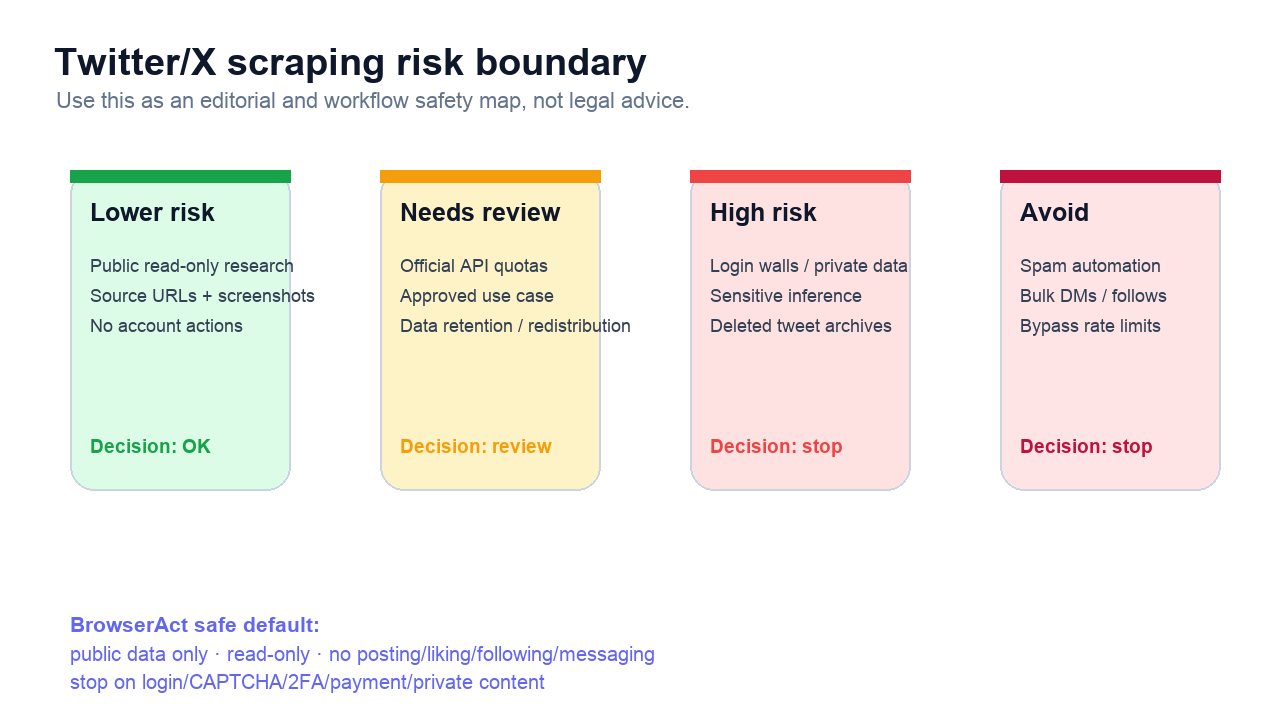
Lower-risk: public, read-only, evidence-preserving research
The safest BrowserAct-style workflow is boring in the best possible way:
- Collect only visible public information.
- Avoid login-only, private, deleted, or restricted content.
- Do not post, like, follow, message, reply, or modify an account.
- Keep
source_url,captured_at, and screenshot evidence. - Export both successful and stopped rows.
- Use the data for internal research, monitoring, QA, market analysis, or human-reviewed reporting.
This does not make every workflow legally risk-free. It does give your team a defensible operational posture: you are not hiding failure states, not bypassing walls, not automating engagement, and not pretending the data came from nowhere.
For example, a product marketer tracking public launch feedback can collect visible posts and replies, label them by theme, and preserve source URLs. A brand team can monitor public mentions and competitor complaints. A data analyst can collect a small public sample for manual review before deciding whether an official API or licensed provider is needed.
That is the lane where BrowserAct Agent fits naturally: prompt the workflow, run the browser, keep evidence, and export structured rows.
Needs review: official API, quotas, redistribution, and approved use
The official X API is often the cleanest route when you need production access, stable schemas, or policy-aligned integration. But API access does not remove responsibility.
X’s developer guidance tells builders to ask practical questions: whether interactions are user-initiated, whether the app is transparent, whether users can opt out, whether the app provides real value, whether it uses the official API rather than scraping/browser automation, and whether it stays within limits.
That creates a review checklist:
Review item | Why it matters |
Approved use case | Your stated API use can be binding and material |
Rate limits | Endpoint and account limits affect safe operation |
Data retention | How long you store X content may matter |
Redistribution | Sharing X content outside the intended context can be restricted |
User transparency | Users should understand automated interactions and data use |
Opt-out | Ongoing interactions need clear exit paths |
Account actions | Posting, replying, following, liking, and DMs have stricter rules |
High-risk: login walls, private data, sensitive inference, and deleted content
Some use cases should set off a loud internal alarm.
Login walls and private content
If content requires login, permission, payment, 2FA, a private account relationship, or another gated state, a scraper should stop. The right output is not a hidden retry. It is a status row:
Field | Example |
|
|
| Target URL |
| Evidence screenshot |
| Manual policy review |
Sensitive inference
X’s restricted-use guidance calls out sensitive information categories such as health, political beliefs, racial or ethnic origin, religious beliefs, sexual orientation, union membership, and alleged or actual commission of a crime. Aggregate analysis that does not store personal data can be treated differently, but user-level inference is where teams need caution.
If your plan is “scrape posts and infer sensitive traits,” stop.
Deleted tweet archives
Reddit discussions about deleted-tweet archive sites are useful demand evidence because they show the temptation: technically interesting, high public curiosity, and risky. But technical curiosity is not a content strategy. A BrowserAct article should not teach people to archive or republish deleted posts.
Use deleted content as a warning example, not a tutorial.
Pro Tip: If a source disappears between collection and review, keep the row as unavailable instead of trying to reconstruct it from caches or screenshots. The audit trail is more valuable than a brittle workaround.
Run the scrape once with browser-act. Package the repeatable path with Skill Forge.
- 1. An agent uses browser-act to search Google Maps, scroll listings, inspect place pages, and extract visible fields.
- 2. The team validates the schema: business name, category, address, phone, website, rating, review count, and source URL.
- 3. browser-act-skill-forge turns the proven flow into a reusable scraper Skill for future agent runs.
Avoid: spam automation, unsolicited outreach, and rate-limit bypassing
This is the red zone.
X’s automation rules warn against abusing the API, attempting to circumvent rate limits, and using non-API website scripting automation. They also discuss restrictions around unsolicited automated replies, Direct Messages, bulk following, automated likes, and other account actions.
For BrowserAct content, the default should be:
- No auto-DM sequences.
- No bulk follows or unfollows.
- No automated likes.
- No automated replies to keyword searches.
- No posting or reposting unless the user explicitly authorized a separate compliant publishing workflow.
- No rate-limit bypass instructions.
- No private-content extraction.
This is also why the article mode for BrowserAct SEO only enqueues social posts after CMS verification; actual social distribution is a separate, controlled run. Same philosophy: publishing workflows and account-action workflows should not blur together.
What to collect, what to avoid, and what to review
A practical safety page needs a field-level view, because risk often hides in columns.
Field category | Safer default | Review before collecting |
Source evidence |
| Screenshots containing private information |
Public content | Visible post text, public reply text, visible timestamp | Deleted, gated, or login-only content |
Public profile context | Handle, display name, public profile URL | Matching handles to CRM identities |
Engagement context | Visible replies, reposts, likes, views when displayed | Using engagement to rank or target individuals |
Analysis labels | Topic, sentiment, language, campaign, severity | Sensitive traits, political beliefs, health, religion, sexuality, financial condition |
Workflow state |
| Hiding failed or stopped rows |
Outreach | Human review note | Automated DMs, follows, likes, replies, or mentions |
Pro Tip: Add a review_required column before the first run. If a row touches identity matching, sensitive topics, deleted content, login states, or outreach, mark it for human review automatically.
You can also add a short policy note to each run:
Scope: public visible X/Twitter content only.
Use: internal market research and monitoring.
Excluded: login-only/private/deleted content, CAPTCHA, 2FA, payment walls,
automated DMs, likes, follows, replies, and sensitive inference.
Review owner: [name/team]
That note is not a legal shield. It is an operational guardrail. When the workflow gets reused six weeks later, people can see the intended scope instead of guessing.
The safe BrowserAct workflow
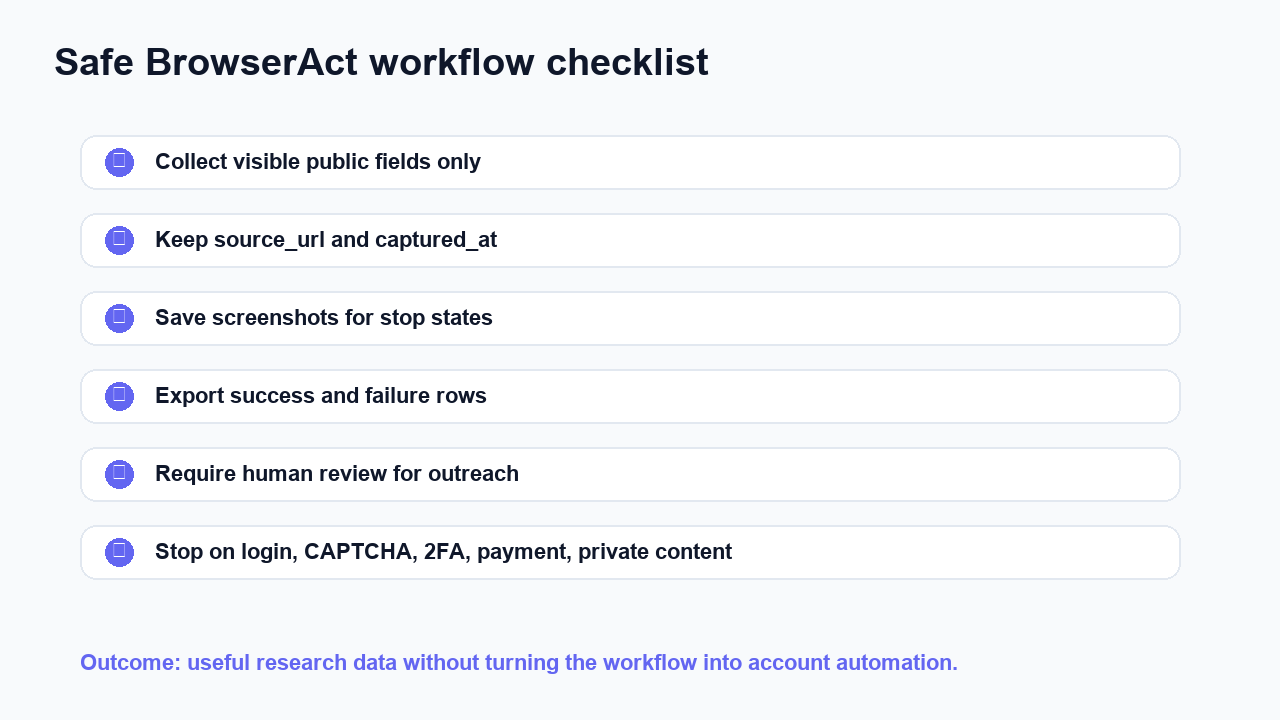
Use this checklist before you run a public X/Twitter collection job:
- Is the target content visibly public without crossing a login, private, payment, CAPTCHA, or 2FA boundary?
- Are you collecting only the fields needed for the research question?
- Does every row keep
source_url,captured_at, and run ID? - Does the workflow save screenshots for stop states?
- Does the export include failed/stopped rows, not just successful rows?
- Is the intended use internal research, monitoring, or human-reviewed analysis?
- If outreach is involved, is it separated from collection and manually reviewed?
- If API data is involved, does the use match the approved use case and limits?
- If personal data is involved, has privacy/legal reviewed retention and usage?
- Would the workflow be easy to explain to a customer or partner?
If the answer is no, narrow the scope.
BrowserAct is useful here because the prompt can include stop rules directly:
Collect visible public X/Twitter data only.

Do not log in, bypass CAPTCHA, access private content, send messages,
post, like, follow, reply, or modify any account.

For each input, export source_url, captured_at, visible text fields,
status, screenshot_path, and next_action.

If the page shows a login wall, payment wall, CAPTCHA, 2FA prompt,
private content, deleted content, unavailable content, or rate-limit warning,
stop and record the state.
That prompt does not replace legal review. It makes the workflow auditable.
Pro Tip: Keep the stopped rows in the same export as the successful rows. A dataset that says “40 rows stopped at login wall” is more trustworthy than one that quietly returns only the rows that worked.
How this supports the rest of your X/Twitter scraper stack
This page should be the compliance backstop for every X/Twitter scraper article:
Article type | Link to this page when you discuss |
Best Twitter scraper tools | Account risk, API alternatives, non-API scraping, cookies |
Scrape Twitter without API | Read-only scope and stop conditions |
X API alternative | Official API vs browser workflow trade-offs |
Twitter search scraper | Public query monitoring and source-linked rows |
Twitter comments scraper | Replies, sentiment analysis, and review status |
X brand monitoring | Monitoring vs unsolicited outreach |
Profile/follower research | User-level data, identity matching, and account limits |
429 troubleshooting | Rate-limit handling and non-bypass recovery |
Conclusion
So, is Twitter scraping legal? Sometimes a narrow public-data workflow may be reasonable; other workflows are clearly high-risk or inappropriate. The answer depends on law, platform rules, data type, account actions, user expectations, and downstream use.
The better operating rule is simple:
Collect less. Preserve evidence. Stay read-only. Stop on boundaries. Review sensitive use cases. Do not automate engagement unless you have explicit authorization and a compliant workflow.
If you want public X/Twitter data for market research, monitoring, or AI-assisted analysis, try BrowserAct. It is strongest when the job needs source URLs, screenshots, structured exports, and human review — not when the job is trying to bypass the rules.
Two Skills, One Repeatable Browser Workflow
Start with live browser execution when the agent needs to understand a page. Move to Skill Forge when the same scraper should run again without re-exploring the site.
Run once with browser-act
Give Codex, Claude Code, Cursor, Windsurf, or another agent a real browser for rendered pages, clicks, scrolling, screenshots, DOM extraction, and network inspection.
Open browser-act SkillPackage with Skill Forge
Explore the site once, verify the extraction path, then generate a callable Skill package that other agents can reuse for batch jobs or scheduled workflows.
Open Skill ForgeFurther reading: X and Twitter data
Frequently Asked Questions
Is Twitter scraping legal?
It depends on your jurisdiction, collection method, data type, platform rules, and use case. This guide is not legal advice.
Does X allow browser automation?
X’s automation rules warn against non-API website scripting automation and rate-limit circumvention, so browser workflows need strict public, read-only boundaries.
Is it safer to use the X API?
The official API is usually safer for production integrations, but you still need approved use, rate-limit handling, privacy review, and policy compliance.
Can I scrape private or login-only X content?
Do not treat private, login-only, payment-gated, CAPTCHA-gated, or 2FA-gated content as normal scraping targets.
Can I use scraped Twitter data for AI training?
Treat AI training and sensitive inference as high-review areas. Check X developer terms, restricted-use guidance, privacy rules, and legal counsel.
Is BrowserAct safe for Twitter scraping?
BrowserAct is best for public, read-only, source-linked workflows with screenshots, structured exports, and stop rules. It is not for bypassing restrictions.


