How to Scrape LinkedIn Profile: 5 Proven Methods for 2026

Ever wondered how recruiters build targeted candidate lists on LinkedIn or how sales teams research decision-makers without spending hours clicking through profiles one by one? Learning how to scrape LinkedIn profiles can unlock a wealth of professional data—names, job titles, company info, skills, and connections—that fuels lead generation, competitive intelligence, and talent acquisition. LinkedIn profile scraping means automatically extracting publicly visible profile data using tools or scri
- 1BrowserAct offers a no-code LinkedIn scraper with a "human login" approach that keeps your account safe while automating data extraction.
- 2LinkedIn's Official API is fully compliant but limited—full profile access requires partnership approval.
- 3Python libraries like linkedin-scraper handle cookie-based auth and parsing but break when LinkedIn updates its HTML structure.
- 4BeautifulSoup and Scrapy give maximum flexibility for custom parsing but cannot handle JavaScript-rendered content.
- 5Selenium handles dynamic content and login flows but is slow, resource-heavy, and carries high ban risk.
Method 1: BrowserAct Agent Mode — Build a LinkedIn Profile Scraper from One Prompt
BrowserAct Agent mode is the simplest no-code option when you need public LinkedIn profile data. Describe the target profile and fields in the Agent input; BrowserAct explores the page, builds the extraction Bot, and verifies the structured output.
If LinkedIn shows an AuthWall, login prompt, CAPTCHA, or verification request, BrowserAct pauses so you can complete it manually. The Agent resumes only after access is confirmed.
Build the LinkedIn profiles Bot with BrowserAct Agent
- Open BrowserAct Dashboard: Click the left-side + button to create a Bot, start from Quick start, or use the center Agent input.
The screenshot below shows the Agent input where BrowserAct turns your request into a verified, reusable Bot.
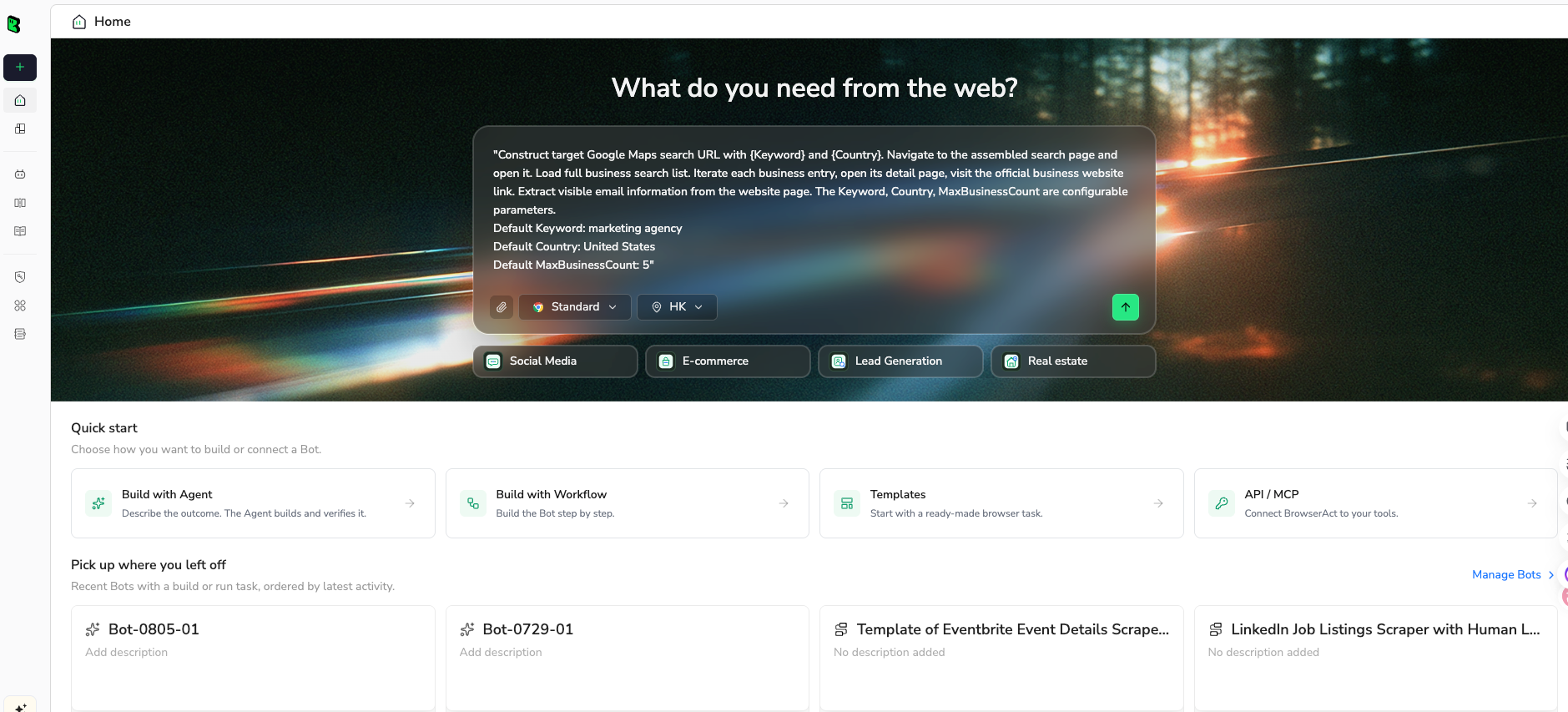
- Copy the complete prompt: Review the target, result limit, requested fields, and stop rules before pasting it into the Agent input.
Use the green Copy button. Scroll inside the prompt to review every line.
Go to the LinkedIn profile URL below and collect public or authorized profile information.

Target profile URL: https://www.linkedin.com/in/TARGET_PROFILE/


Open the profile and collect all visible information. Expand sections only when needed to read complete public details.


Extract:

Full name

Headline

Profile URL

Location, if visible

About section, if visible

Current role and company

Experience entries with title, company, dates, and description

Education entries with school, degree, field, and dates

Skills, if visible

Featured links or posts, if visible


Requirements:

Replace TARGET_PROFILE with the authorized profile you want to review before running.

If LinkedIn asks for login, CAPTCHA, 2FA, or account verification, pause and let me complete it manually, then resume.

Do not connect, follow, like, comment, message, endorse, or change account settings.

Remove duplicate entries based on section type, organization, title, and date range.

Return the result as structured profile, experience, education, and skills tables.

If a field is unavailable, leave it blank rather than guessing.

Include the source profile URL and capture timestamp.
Scrape data from any website.
Describe the data you need. Get a Bot — a reliable, reusable scraper.
- Handle login only when asked: If the site shows login, CAPTCHA, 2FA, or account confirmation, BrowserAct pauses so you can complete it manually. Resume the Agent afterward.
- Review, dedupe, and export: Check the structured profile, experience, education, skills, and source URL rows, remove duplicates or bad rows, and export CSV, JSON, Markdown, or a Google Sheets-ready table.
Once the output is clean, save the Bot and rerun it with a new target, limit, or schedule.
What Data Can You Extract?
BrowserAct's LinkedIn scraper allows you to pull a wide range of publicly visible profile data for analysis. The Agent derives the extraction schema from your prompt, so you can request the fields that match your research goal, such as:
- Profile Data: Full name, headline, current job title, company, location, and about section.
- Experience & Education: Work history with dates, companies, and descriptions; education entries with schools and degrees.
- Skills & Endorsements: Listed skills with endorsement counts, recommendations, and featured posts.
The tool fully supports customization—you can adjust or add fields with follow-up instructions in the Agent. This flexibility lets you tailor the scraper to your specific project, whether you're building a candidate pipeline or a prospect list. Outputs are available in CSV, JSON, XML, or Markdown for easy integration with your CRM or ATS.
Pros
- No coding needed—perfect for recruiters, sales teams, and non-technical users.
- Human login feature prevents LinkedIn account bans and security locks.
- Handles anti-scraping measures with built-in delays and IP rotation.
- Free to use with trials, daily login for free credits, and lifetime deals (e.g., on AppSumo—pay once, use forever).
- Customizable extraction fields—you define exactly what data to pull from each profile.
- Integrates with Make.com, n8n, and Zapier for automated workflows and direct data transfer to Google Sheets, Airtable, or your CRM.
- Hierarchical output preserves profile-experience-education relationships.
- No need to manage proxies, headless browsers, or WebDriver configurations.
Cons
- Dependency on the tool, so updates or downtime could impact your workflow.
- Manual login step required for each session (though this is a security feature, not a bug).
Ready to try it? Sign up for BrowserAct's free trial and start scraping LinkedIn profiles today!
Method 2: Using LinkedIn's Official API
LinkedIn's Official API is the most compliant way to access LinkedIn data programmatically. It provides authenticated access to profile and company data through REST endpoints, though with significant scope limitations depending on your access tier.
Steps to Scrape LinkedIn Profiles with the Official API
- Create a LinkedIn App: Go to the LinkedIn Developer portal (developer.linkedin.com) and create a new app to get your Client ID and Client Secret.
- Configure OAuth 2.0: Set up OAuth 2.0 authentication with the appropriate scopes (r_liteprofile, r_emailaddress, r_fullprofile if approved).
- Get an Access Token: Implement the authorization code flow to obtain an access token for authenticated API calls.
- Make API Calls: Use endpoints like
/v2/mefor the authenticated user's profile or/v2/people/(id:{personId})for specific profiles, parsing the JSON responses. - Handle Pagination and Rate Limits: Respect LinkedIn's API throttling limits and implement pagination for large result sets.
LinkedIn's API is well-documented and provides structured JSON responses, but accessing full profile data for other users requires special partnership approval that most developers won't get.
Pros
- Official and compliant, with no risk of account bans when used within terms.
- Structured JSON data that's easy to integrate with other tools or databases.
- Free to use with no costs beyond development time.
- Reliable and maintained by LinkedIn, with documentation and support.
Cons
- Limited profile access—most endpoints only return data for the authenticated user or require Marketing API partner status.
- Requires coding knowledge (Python, JavaScript, or HTTP requests) to implement.
- OAuth flow and token management add complexity.
- No access to search results or profile data for arbitrary users without premium partnership.
Method 3: Python Libraries Like LinkedIn-Scraper
For Python developers, third-party libraries like linkedin-scraper or scrapy-linkedin offer a programmatic way to extract LinkedIn profile data. These libraries wrap browser automation or HTTP requests to parse profile pages.
Steps to Scrape LinkedIn Profiles with Python Libraries
- Install the Library: Run
pip install linkedin-scraperor set up a Scrapy project with LinkedIn spiders. - Configure Authentication: Most libraries require a LinkedIn session cookie or login credentials to access profile pages. Obtain your
li_atcookie from your browser's developer tools. - Define Target Profiles: Create a list of profile URLs or search queries to process.
- Run the Scraper: Execute the script to fetch and parse each profile page, extracting fields like name, title, experience, and skills.
- Export Results: Save extracted data to CSV, JSON, or a database for analysis.
Here's an example using the linkedin-scraper library to extract profile data:
from linkedin_scraper import Person, actions
from selenium import webdriver

driver = webdriver.Chrome()
actions.login(driver, "your_email", "your_password")

person = Person(
    "https://www.linkedin.com/in/some-profile/",
    driver=driver,
    scrape=True
)

print(f"Name: {person.name}")
print(f"Title: {person.about}")
for experience in person.experiences:
    print(f"Role: {experience.position_title}")
    print(f"Company: {experience.company}")
This script logs into LinkedIn, navigates to a profile URL, and extracts the person's name, title, and work experience. You can extend it to handle multiple profiles and export to a file.
Pros
- Free to use with open-source libraries, no costs beyond setup.
- Highly customizable—script complex queries, filters, and data transformations.
- Handles profile page parsing automatically, extracting structured data from HTML.
- Integrates with Python data tools like pandas for analysis and deduplication.
- Community-maintained with active updates for LinkedIn page changes.
Cons
- Requires Python knowledge and Selenium WebDriver setup.
- Depends on session cookies (
li_at), which expire and need manual refresh. - LinkedIn frequently changes its HTML structure, breaking selectors.
- Higher risk of account restrictions if scraping too aggressively.
Give your agent a real browser, then turn the workflow into a Skill.
- 1. Use browser-act when an agent needs to open, click, scroll, extract, or inspect a live site.
- 2. Use browser-act-skill-forge when the workflow should become reusable across runs and agents.
- 3. Keep the operational boundary simple: automate what the user can already do in the browser.
Method 4: Web Scraping with BeautifulSoup or Scrapy
If you want maximum control over what you extract, BeautifulSoup or Scrapy let you parse LinkedIn's HTML directly. This approach gives you precise targeting of specific page elements but requires more maintenance.
Steps to Scrape LinkedIn Profiles with BeautifulSoup or Scrapy
- Fetch the Profile Page: Use the
requestslibrary with your LinkedIn session cookie to download the HTML of a profile page. - Parse the HTML: Load the response into BeautifulSoup and identify the CSS selectors or XPath expressions for the data you want (e.g.,
.pv-top-card--listfor name and title). - Extract Data Fields: Write extraction logic for each field—name, headline, experience entries, skills, education—handling missing fields gracefully.
- Handle Pagination: If scraping search results, implement pagination logic to navigate multiple pages.
- Export and Clean: Save results to CSV or JSON, then clean and deduplicate the data.
Pros
- Highly flexible—precisely target any HTML element on the profile page.
- Works around API limitations by scraping directly from rendered HTML.
- Free to use with open-source libraries.
- Scrapy supports large-scale crawling with built-in rate limiting and retry logic.
- No dependency on third-party wrapper libraries.
Cons
- Brittle to LinkedIn's frequent HTML/CSS changes—selectors break regularly.
- Requires manual cookie management and session handling.
- May trigger anti-bot measures like CAPTCHAs or IP restrictions.
- LinkedIn's dynamic content (JavaScript-rendered sections) may not appear in the initial HTML response.
- Requires coding knowledge (Python and HTML/CSS understanding).
Method 5: Browser Automation with Selenium
Selenium simulates a real browser session, making it ideal for scraping LinkedIn's JavaScript-heavy profile pages. It can handle logins, infinite scroll, and dynamic content that static scrapers miss.
Steps to Scrape LinkedIn Profiles with Selenium
- Set Up WebDriver: Install Selenium and a browser driver (e.g., ChromeDriver). Configure options like headless mode and user-agent spoofing.
- Log In to LinkedIn: Script the login flow—navigate to the login page, enter credentials, and handle any security checks or CAPTCHAs manually.
- Navigate to Profiles: Use Selenium to visit profile URLs or search results pages, waiting for JavaScript content to load.
- Scroll and Extract: Scroll through the profile to load all sections (experience, education, skills), then extract text using XPath or CSS selectors.
- Export Data: Save the extracted data to CSV, JSON, or a database, handling errors and retries for failed requests.
Pros
- Handles JavaScript-rendered content that BeautifulSoup misses.
- Supports login flows and interactive features like expanding sections.
- Free to use with open-source Selenium WebDriver.
- Highly customizable—script waits, scrolls, clicks, and multi-page navigation.
- Mimics real user behavior, reducing (but not eliminating) detection risk.
Cons
- Slower than API or HTML parsing due to browser simulation overhead.
- Resource-intensive—requires significant CPU and memory per session.
- Higher risk of account bans from LinkedIn's anti-automation detection.
- Requires coding knowledge (Python, XPath, and WebDriver management).
- Session management is fragile—logins expire and need refresh.
Comparison of 5 Effective LinkedIn Profile Scraping Methods
This comparison table breaks down the 5 methods for how to scrape LinkedIn profiles, helping you choose the best LinkedIn scraper based on your skills, budget, and needs. If you're a beginner avoiding code, start with no-code tools like BrowserAct Agent for LinkedIn for simplicity and safety. For developers, options like the Official API or Python libraries offer more control but require technical know-how—always prioritize ethical practices and LinkedIn's terms to avoid issues.
Conclusion
We've covered five powerful methods for how to scrape LinkedIn profiles, from no-code tools to advanced scripting, each unlocking professional data for lead generation, talent acquisition, or market research. Pick the one that best fits your skills and goals to get started efficiently.
- For Beginners and Recruiters: Go with BrowserAct's no-code LinkedIn scraper—it's fast, safe with human login, and handles everything from profile navigation to CSV exports without programming.
- For Official Access: Developers preferring compliant, structured JSON data should use LinkedIn's Official API, though full profile access requires partnership approval.
- For Python Fans: Leverage linkedin-scraper for automated profile parsing and cookie-based authentication.
- For Custom Parsing: Opt for BeautifulSoup or Scrapy to precisely target specific HTML elements with maximum flexibility.
- For Dynamic Content: Use Selenium's browser simulation for JavaScript-rendered profile sections, though it requires more setup and carries higher detection risk.
For most users, starting with BrowserAct or LinkedIn's Official API provides a strong balance of ease, compliance, and effectiveness.
Whether you're a recruiter building talent pipelines or a sales team researching prospects, mastering how to scrape LinkedIn profiles with the right LinkedIn scraper can supercharge your outreach.
Try BrowserAct's LinkedIn scraper today and start extracting profile data safely!
Two Skills, One Repeatable Browser Workflow
Start with live browser execution when the agent needs to understand a page. Move to Skill Forge when the same scraper should run again without re-exploring the site.
Run once with browser-act
Give Codex, Claude Code, Cursor, Windsurf, or another agent a real browser for rendered pages, clicks, scrolling, screenshots, DOM extraction, and network inspection.
Open browser-act SkillPackage with Skill Forge
Explore the site once, verify the extraction path, then generate a callable Skill package that other agents can reuse for batch jobs or scheduled workflows.
Open Skill Forge


