Twitter Scraper Troubleshooting: 429, Login Wall, Empty Results

Twitter scraping 429 errors feel like a simple technical failure: retry the request, rotate something, push the run again. That is usually how teams turn a recoverable issue into a messy one. A 429 from the X API, a monthly usage cap, a browser login wall, an empty result set, and a scraper-specific BLOCKED or NOTFOUND status are different failure states. They need different decisions. This guide gives you a safe Twitter/X scraper troubleshooting workflow: classify the failure, preserve evidenc
- 1Twitter scraping 429 usually means a request window or usage limit was exceeded; it is not the same as a login wall, blocked browser session, or empty search result.
- 2Classify failures into five buckets first: API 429, usage cap, login wall, scraper blocked/rate-limited, and empty or unavailable content.
-
3A good troubleshooting workflow records
source_url,http_status,error_code,screenshot_path,retry_after, andnext_actionfor every failed input. - 4Use BrowserAct first when you need a custom public-data workflow with screenshots, stop states, CSV/Sheets/JSON export, and human review.
- 5Do not build “bypass” logic around private content, CAPTCHA, login walls, or aggressive retries. Stable data collection starts with safe stop conditions.
- 6For official API work, read X response headers and rate-limit tables before changing architecture.
Why Twitter scraper failures are easy to misread
The official X API documentation says rate limits control how many requests you can make to each endpoint, and exceeding those limits returns a 429 until the window resets. The same page notes that limits are usually measured in 15-minute or 24-hour windows and exposed through headers such as x-rate-limit-limit, x-rate-limit-remaining, and x-rate-limit-reset.
That sounds simple. But real X/Twitter scraping workflows rarely fail in only one clean way.
A developer using the official API may hit 429 Too Many Requests because the recent search endpoint has a per-window cap. A growth team using a browser-based workflow may see a login wall before any useful HTML appears. A no-code scraper may return “empty results” because the query is too narrow, the date range is wrong, or the target content is unavailable. A marketplace actor may return its own error code such as rate limited, blocked, or not found.
The expensive mistake is treating all of those as the same problem.
Failure you see | What it probably means | First safe move |
| API endpoint or time-window limit | Read headers, wait reset, reduce request volume |
“Usage cap exceeded” | Product, plan, or monthly cap | Check account quota and billing limits |
Login wall | Content requires login or visibility changed | Stop the run and save evidence |
Scraper says | Provider/session/risk signal | Reduce cadence and inspect inputs |
Empty CSV | Query, date, visibility, loading, or parsing issue | Run a small known-good sample |
| Deleted, private, wrong URL, or unavailable item | Record unavailable, do not invent rows |
What is a Twitter scraping 429?
A Twitter scraping 429 is a “too many requests” state. In the official X API context, it means your app or user token exceeded an endpoint’s permitted request window. X documents per-endpoint limits, including examples such as recent search, post lookup, user lookup, followers, timelines, and direct messages.
For browser-based scraping, people often use “429” more loosely to mean “the scraper got stopped.” That is not precise enough. A browser run can fail because of login requirements, blocked page states, changed markup, unavailable content, network instability, or product quota. None of those should be handled exactly like an API 429.
The working definition I use is this:
A 429 is a measurable request-limit event. A login wall, blocked browser page, empty result, or missing post is a visibility or execution-state event.
That distinction matters because one class can be fixed with waiting, scheduling, and quota management. The other often requires a safer collection scope, better evidence capture, or a different workflow.
The decision tree: diagnose before you repair
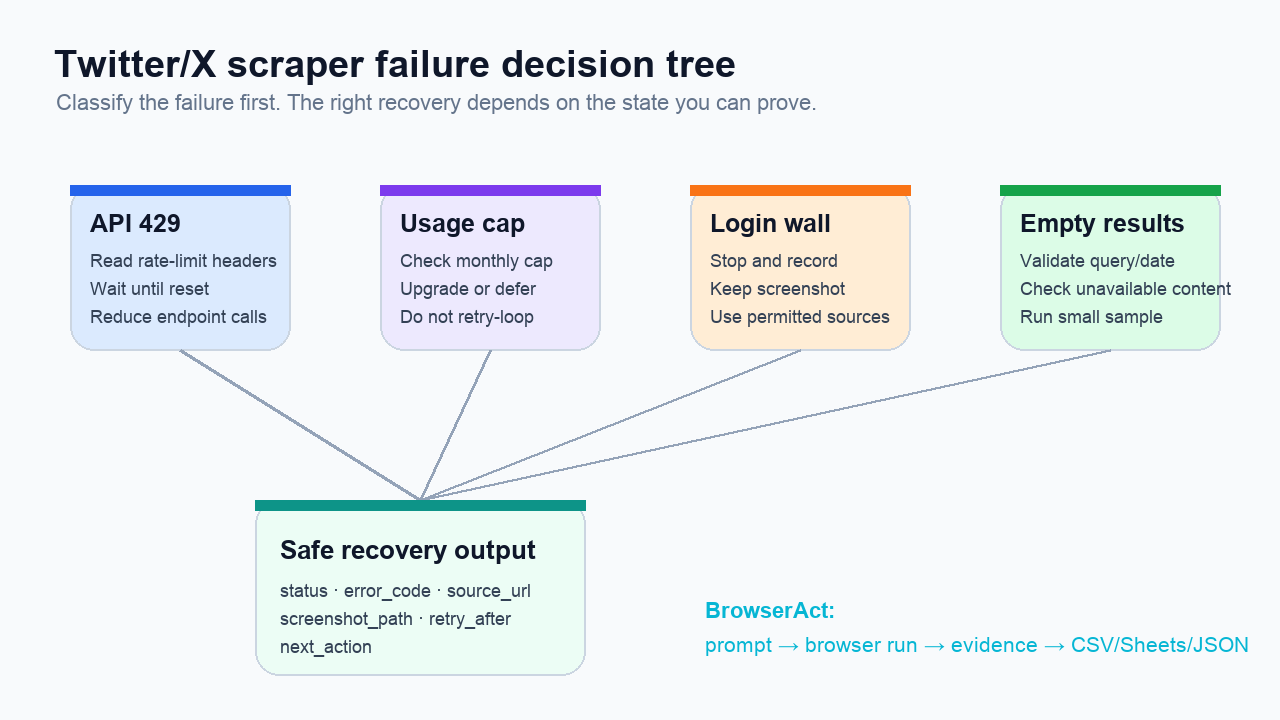
Use this sequence before changing tools or rewriting prompts.
1. Is it an official API response?
If the failure came from the official X API, capture:
Field | Why it matters |
Endpoint | X rate limits are per endpoint |
HTTP status | Confirms whether this is truly 429 |
| Shows the window capacity |
| Shows whether the window is exhausted |
| Tells you when to resume |
App vs user token | Per-app and per-user limits can differ |
Pro Tip: Store the reset timestamp in your output table, not just in logs. Analysts should see “resume after this time,” not a vague “failed” row.
2. Is it a plan or monthly usage cap?
A usage cap can look like rate limiting, but waiting 15 minutes will not fix it.
This is common when teams switch from small tests to scheduled monitoring. A daily brand-monitoring workflow may run fine for a week and then silently flatten because the plan’s monthly cap is gone. The right next action is account-level: check quota, billing, product caps, and whether you should narrow the workflow.
Do not build a retry loop around a monthly cap. It creates noise and hides the real budget problem.
3. Did the browser hit a login wall?
Hacker News discussions around X login requirements and read limits show a recurring user concern: public browsing can change, and content that was visible yesterday may become harder to access today. That does not mean your scraper should force its way through every wall.
For a BrowserAct-style workflow, a login wall should become a clean stop state:
Output field | Example value |
|
|
| Target URL or search URL |
| Evidence screenshot |
| Timestamp |
| Review source visibility or use an approved data source |
4. Did the scraper return its own error code?
Third-party scraper pages often expose product-level error states. For example, an actor or API may distinguish RATE_LIMITED, BLOCKED, and NOT_FOUND. Those labels are useful, but only if you keep them in your dataset.
Do not collapse them into one “failed” column.
Scraper state | What to check |
| Batch size, run schedule, product quota, retry window |
| Input pattern, frequency, page visibility, provider session health |
| Deleted post, private account, typo, wrong URL, suspended account |
| Query logic, date window, language, parser, loaded page state |
5. Is the result empty, or did the workflow fail?
An empty CSV is not a diagnosis.
It may mean no matching posts existed. It may also mean the page did not load, the query syntax was wrong, the date filter excluded everything, the content was private, the target language was different, or the scraper selected the wrong page element after X changed the UI.
Use a known-good sample:
- Pick one public URL that you can manually view.
- Run the workflow on only that URL.
- Confirm whether text, timestamp, author handle, and source URL appear.
- Then test one search query with a broader date range.
- Only after both work should you run the full batch.
Small samples are not a delay. They are insurance.
Use BrowserAct first for auditable troubleshooting workflows
Once you understand the failure category, the next question is tool choice. For many marketer, analyst, and AI-workflow teams, BrowserAct Agent is the most practical first option because you can describe the public-data workflow in a prompt, run it in a real browser, and export structured results with screenshots and source URLs.
BrowserAct is not the right pitch if your only goal is to hammer an API endpoint harder. It is useful when the data workflow has judgment in it:
- Collect public X search results for a specific query set.
- Save the visible source URL for each row.
- Capture screenshots for errors, empty states, and login walls.
- Export a status column instead of hiding failed inputs.
- Send clean rows to CSV, Google Sheets, JSON, or a downstream automation.
- Stop when a page requires login, CAPTCHA, payment, 2FA, or private access.
If your team already works with spreadsheets or workflow tools, a BrowserAct run can sit upstream of a Twitter/X Follower Dashboard template, a custom monitoring sheet, or an n8n/Make/Zapier step. The important part is the same: the workflow should produce evidence, not just rows.
Here is a prompt pattern you can adapt:
Collect public X/Twitter data for the input table.

For each input row, visit the source URL or search query.
Extract visible public fields only:
source_url, input_id, query, post_text, author_handle, posted_at,
visible engagement metrics, captured_at, and screenshot_path.

If the page returns a rate limit, login wall, empty result, blocked state,
or unavailable content, do not retry aggressively.
Record status, error_code, evidence screenshot, retry_after if visible,
and next_action.

Export successful and failed rows together to CSV and Google Sheets.
Stop on CAPTCHA, payment, 2FA, private content, or any action that would post,
like, follow, message, or modify an account.
That last paragraph is not legal theater. It keeps your data pipeline honest.
The recovery matrix
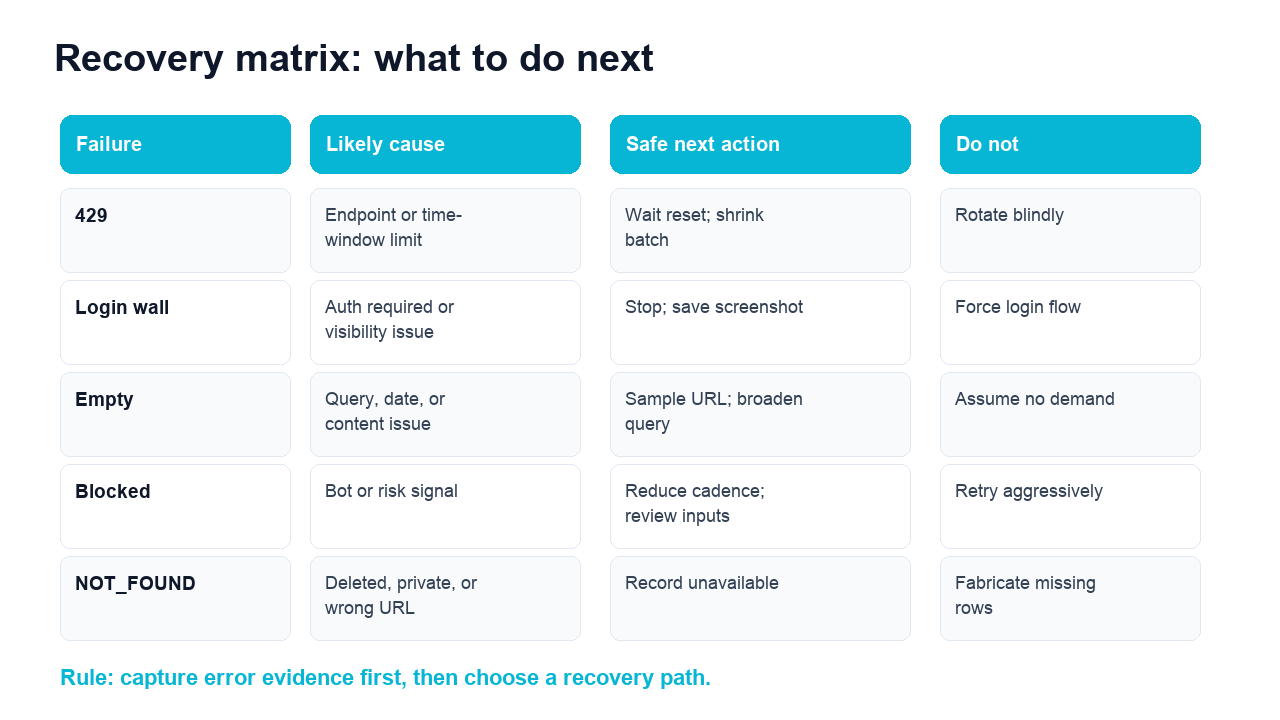
Here is the practical version.
Failure | Likely cause | Safe next action | Do not |
API 429 | Endpoint or time-window limit | Read headers, wait reset, reduce calls | Rotate blindly |
Usage cap | Account, plan, or monthly cap | Check quota and budget | Retry every minute |
Login wall | Auth required or visibility changed | Stop, screenshot, review scope | Force login or private access |
Empty results | Query/date/content/loading issue | Validate with known-good sample | Assume there is no demand |
Blocked | Risk signal or provider/session issue | Reduce cadence, inspect inputs | Escalate retries |
| Deleted, private, suspended, or wrong URL | Record unavailable | Fabricate missing rows |
Run the scrape once with browser-act. Package the repeatable path with Skill Forge.
- 1. An agent uses browser-act to search Google Maps, scroll listings, inspect place pages, and extract visible fields.
- 2. The team validates the schema: business name, category, address, phone, website, rating, review count, and source URL.
- 3. browser-act-skill-forge turns the proven flow into a reusable scraper Skill for future agent runs.
How to reduce 429s without building a brittle scraper
The boring fixes are the durable fixes.
Cache and dedupe before you request
If 40 queries return the same popular posts, do not look up the same post 40 times. Store post IDs and source URLs. Reuse rows where appropriate. In API workflows, dedupe before expensive lookup endpoints. In browser workflows, dedupe URL inputs before opening pages.
Separate discovery from enrichment
Search workflows and profile-enrichment workflows often hit different limits. Keep them separate:
Job type | Purpose | Run cadence |
Discovery | Find posts, replies, or profiles | More frequent, smaller batches |
Enrichment | Add profile, engagement, or context fields | Less frequent, deduped inputs |
Review | Validate screenshots and labels | Human-paced |
Export | Push clean rows downstream | Scheduled after review |
Schedule around reset windows
For API-based work, use reset headers. For browser-based monitoring, schedule smaller runs with clear ceilings. A stable daily workflow beats a giant burst that works once and then breaks every week.
Keep status rows
Do not delete failures before the analyst sees them. A good status schema looks like this:
Field | Example |
|
|
|
|
|
|
|
|
|
|
|
|
| Unix reset timestamp or readable time |
| Browser evidence image |
|
|
When the X API is the right answer
Use the official X API when you need sanctioned endpoints, stable response formats, and policy-aligned access. If your team has developer resources and the necessary access tier, it is the cleanest path for many production use cases.
The trade-off is that you must design around endpoint limits, plan limits, app/user token differences, and policy restrictions. You also need engineering time for pagination, backoff, dedupe, monitoring, and downstream exports.
Use BrowserAct when the job is more exploratory, workflow-specific, or analyst-led:
Need | Better first choice |
Official endpoint integration | X API |
Public workflow with screenshots and status rows | BrowserAct |
Large-scale resale data feed | Approved data provider |
Quick no-code monitoring sample | BrowserAct |
Deep backend integration | API or scraper API |
Human-reviewed market research | BrowserAct |
Common troubleshooting mistakes
Mistake 1: Calling everything a 429
If the workflow did not receive an HTTP 429, do not call it a 429. Use better labels: login_wall, empty_result, blocked, unavailable, timeout, parse_failed, quota_exceeded.
Mistake 2: Removing failed rows
Failed rows explain the dataset. Keep them. Add review_status and next_action.
Mistake 3: Treating login walls as a technical challenge
A login wall is a boundary signal. Stop, save evidence, and decide whether your use case requires approved access, a different source, or a smaller public scope.
Mistake 4: Over-rotating before proving the cause
Token rotation, proxy rotation, and session changes create maintenance debt. They may also be irrelevant if the real cause is a monthly cap or a bad query. Prove the failure first.
Mistake 5: Sending raw failed runs downstream
If your Twitter data powers sentiment analysis, brand monitoring, or AI summarization, failed inputs must be explicit. Otherwise dashboards and LLM summaries quietly become wrong.
A clean troubleshooting checklist
Use this before you change tools.
- Confirm whether the error is official API, browser page, provider error, or empty output.
- Capture source URL, timestamp, screenshot, and raw error text.
- If API-based, read response headers and endpoint-specific limits.
- If usage-based, check monthly quota and product caps.
- If browser-based, classify login wall, blocked state, unavailable content, timeout, or parse failure.
- Run one known-good URL and one broad query sample.
- Reduce batch size and schedule by windows.
- Keep failed rows in the export.
- Review safety boundaries before expanding scope.
- Only then decide whether to use BrowserAct, the X API, a scraper API, or a compliant data provider.
For teams building repeatable social-data workflows, this checklist pairs naturally with BrowserAct’s prompt-led browser automation and the broader best Twitter scraper tools guide. Use the tool comparison to choose infrastructure; use this troubleshooting guide to keep the workflow honest after launch.
Conclusion
Twitter scraping 429 is not one problem. It is a signal that your workflow needs better classification.
If the official API says you hit a rate limit, read the headers and wait for the reset. If the browser sees a login wall, stop and record evidence. If the output is empty, test a known-good sample before assuming the market is silent. If the scraper returns BLOCKED or NOT_FOUND, preserve the label instead of flattening it into “failed.”
When you need a safer no-code workflow for public X/Twitter research, try BrowserAct. Start with a prompt, collect source-linked rows, keep screenshots for failures, and export a dataset that analysts can actually trust.
Two Skills, One Repeatable Browser Workflow
Start with live browser execution when the agent needs to understand a page. Move to Skill Forge when the same scraper should run again without re-exploring the site.
Run once with browser-act
Give Codex, Claude Code, Cursor, Windsurf, or another agent a real browser for rendered pages, clicks, scrolling, screenshots, DOM extraction, and network inspection.
Open browser-act SkillPackage with Skill Forge
Explore the site once, verify the extraction path, then generate a callable Skill package that other agents can reuse for batch jobs or scheduled workflows.
Open Skill ForgeFurther reading: X and Twitter data
Frequently Asked Questions
What does Twitter scraping 429 mean?
It usually means a request limit was exceeded. For the official X API, check endpoint limits, remaining requests, and reset headers.
How do I fix X API too many requests?
Wait until the reset window, reduce endpoint calls, cache duplicate lookups, and schedule smaller batches instead of retrying aggressively.
Why does my Twitter scraper return empty results?
The query may be too narrow, the date range may exclude content, the page may not load, or the target content may be private, deleted, or unavailable.
Should I bypass a Twitter login wall?
No. Treat login walls as stop states, save a screenshot, and review whether your use case needs approved access or a smaller public-data scope.
Is BrowserAct good for Twitter scraper troubleshooting?
Yes, when you need public browser workflows with source URLs, screenshots, status fields, CSV/Sheets/JSON export, and human review.
Is the X API better than a browser scraper?
Use the X API for official endpoint access and policy-aligned integration. Use browser workflows for custom public-data collection and reviewable evidence.


