How to Scrape Facebook Groups: Posts and Comments: 5 Proven Methods for 2026

How to scrape Facebook group posts and comments with 5 tools: 1. BrowserAct 2. Facebook Graph API 3. facebook-scraper (Python) 4. BeautifulSoup + requests 5. Selenium --- Ever wondered how market researchers track thousands of Facebook group discussions without spending hours scrolling? Or how brands monitor what customers say about their products in private communities? Facebook Groups host some of the most valuable conversations on the internet. With over 1.8 billion people using Groups every
- 1BrowserAct Agent pauses for manual login or membership confirmation, then follows a read-only prompt to collect the Group content your account is authorized to view.
- 2Meta removed the Facebook Groups API and its Group permissions in April 2024, so current Graph API workflows cannot retrieve Group posts or comments.
- 3The facebook-scraper Python library handles login and pagination but frequently breaks when Facebook updates its page structure.
- 4BeautifulSoup is useful for parsing an authorized saved HTML snapshot, but it cannot load the live JavaScript feed or expand comments by itself.
- 5Selenium provides full browser control for closed groups and comment threads but is very slow with high ban risk.
Method 1: BrowserAct Agent Mode — Build a Facebook Group Scraper from One Prompt
BrowserAct Agent mode handles the Facebook Groups workflow from a plain-English request. Define the group URL, visible post and comment fields, login handoff, and read-only boundaries; the Agent builds and verifies a reusable Bot.
If Facebook asks for login, CAPTCHA, 2FA, or group membership confirmation, BrowserAct pauses so you can complete it manually before the Agent resumes.
Build the Facebook Groups posts and comments Bot with BrowserAct Agent
- Open BrowserAct Dashboard: Click the left-side + button to create a Bot, start from Quick start, or use the center Agent input.
The screenshot below shows the Agent input where BrowserAct turns your request into a verified, reusable Bot.
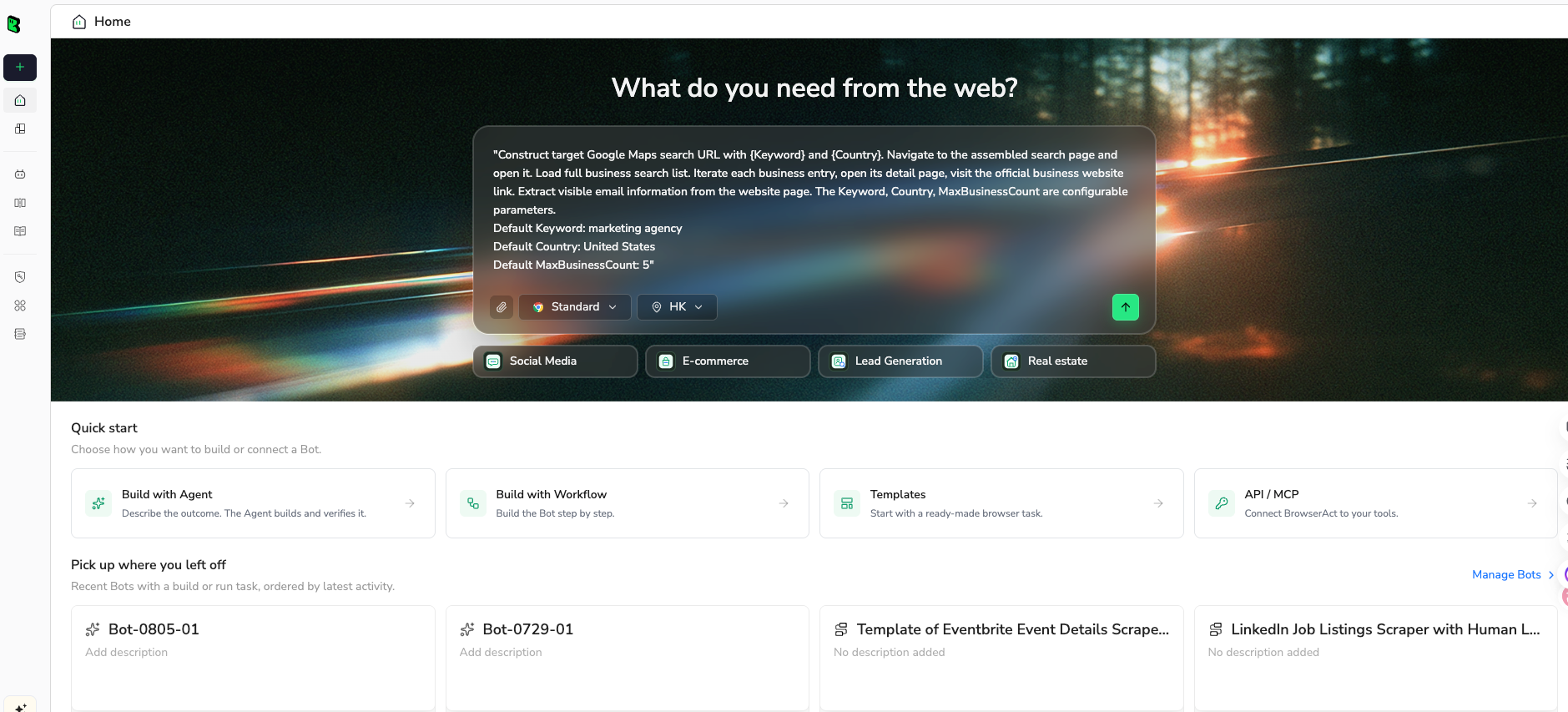
- Copy the complete prompt: Review the target, result limit, requested fields, and stop rules before pasting it into the Agent input.
Use the green Copy button. Scroll inside the prompt to review every line.
Go to the Facebook group URL below and collect public or member-visible posts:

Group URL: https://www.facebook.com/groups/philippinesfitness/


Collect the latest 100 visible posts. Open each post when needed to collect the full post text and visible comment context.


For each post, extract:

Post author name

Author profile URL, if available

Post text

Post URL

Posting date or timestamp

Reaction count, if visible

Comment count, if visible

Share count, if visible

Top visible comments, if available

Media type, if visible


Requirements:

If Facebook asks for login or group membership confirmation, pause and let me complete it manually, then resume.

Do not post, comment, react, message, join unrelated groups, or interact with members.

Exclude promoted or unrelated posts.

Remove duplicate posts based on post URL and post text.

Return the results as a structured table.

If a field is unavailable, leave it blank rather than guessing.

Include the total number of unique posts collected.
Scrape data from any website.
Describe the data you need. Get a Bot — a reliable, reusable scraper.
- Handle login only when asked: If the site shows login, CAPTCHA, 2FA, or account confirmation, BrowserAct pauses so you can complete it manually. Resume the Agent afterward.
- Review, dedupe, and export: Check the structured author, post text, post URL, timestamp, reactions, comments, shares, and media type rows, remove duplicates or bad rows, and export CSV, JSON, Markdown, or a Google Sheets-ready table.
Here is a real BrowserAct export from this Agent run. Review the source-linked rows before saving or scheduling the Bot.
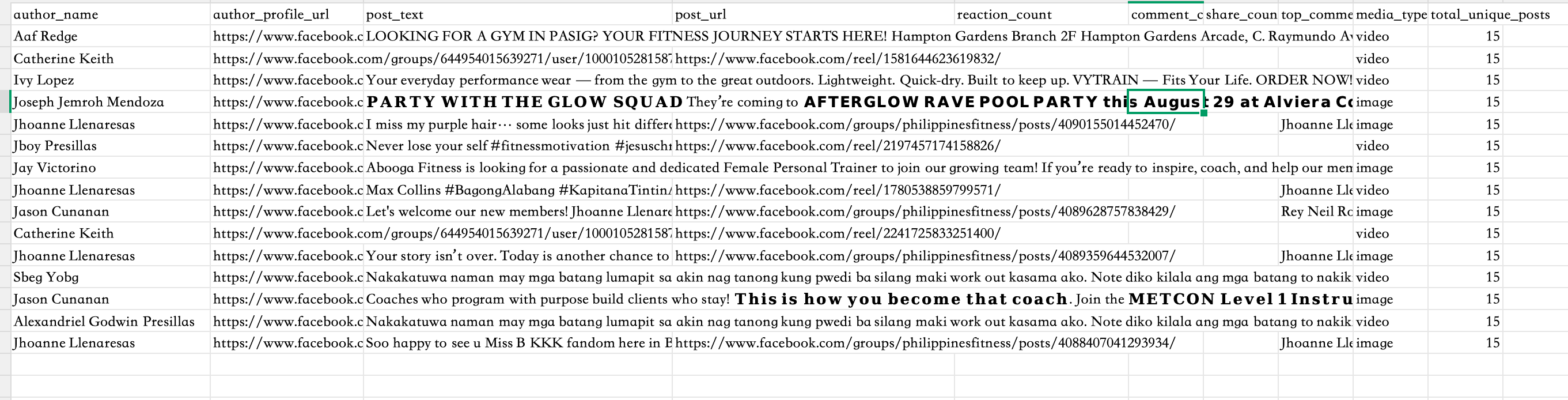
Once the output is clean, save the Bot and rerun it with a new target, limit, or schedule.
What Data Can You Extract?
BrowserAct's AI-powered extraction can pull any publicly visible data from Facebook group pages:
- Group Posts: Post text/content, author name and profile URL, timestamp, reaction count (total likes, loves, etc.), comment count, share count, media attachments (images, videos, links), and post permalink.
- Comments and Replies: Comment text, author name and profile URL, timestamp, reaction count, reply count, and parent post reference. Threaded replies are preserved with their parent comment relationships.
- Group Metadata: Group name, group URL, member count, group description, privacy setting (Public/Closed/Private), and group category.
Outputs are available in formats like JSON, CSV, XML, or Markdown, making it easy to integrate scraped data into sentiment analysis pipelines, community management dashboards, or market research reports.
Pros
- No coding required—describe what you need in plain English
- Human login feature handles Facebook's auth wall and group membership checks safely
- Read-only Agent instructions can prevent posting, reacting, messaging, or other unintended interactions
- AI-powered extraction adapts to Facebook's frequent page structure changes
- Session persistence for maintaining login across runs
- Flexible export formats and integrations with Make, n8n, Zapier
Cons
- Requires manual login for first run (but session persistence reduces frequency)
- Credit-based pricing may add up for very large-scale extraction
- Cloud-based—no offline execution
Ready to try it? Sign up for BrowserAct's free trial and start scraping Facebook groups today!
Method 2: Meta Graph API — Why It No Longer Works for Facebook Groups
Meta deprecated the Facebook Groups API, publish_to_groups, and groups_access_member_info in Graph API v19. The removal applied to all API versions on April 22, 2024. As a result, current third-party apps cannot use the official Graph API to list a user's groups or retrieve group posts and comments, even when that user administers the group.
This matters because many older tutorials still show /me/groups, /{group-id}/feed, and the removed permissions. Those examples are historical and should not be used as a current Facebook Group extraction workflow. See Meta's Graph API v19 announcement.
How to Evaluate the Graph API Before You Build
- Confirm the Facebook object type: Determine whether the target is a Group, Page, Instagram professional account, or another supported Meta object. Page APIs and the former Groups API are not interchangeable.
- Check the current Meta documentation: Search the current Graph API reference for the exact endpoint and permission. Do not rely on a tutorial that uses Graph API v18 or earlier.
- Reject removed Group permissions: If a workflow requires
publish_to_groups,groups_access_member_info,/me/groups, or a Group feed endpoint, treat it as obsolete. - Use supported APIs only for supported assets: The Graph API can still be appropriate for Pages, ads, business assets, and approved Instagram use cases. It is not a replacement for collecting Facebook Group posts and comments.
- Choose an authorized browser workflow for Groups: For Group research, work only with content your account is permitted to view and use a read-only browser process with manual login handoff.
Pros
- Official Meta documentation makes supported endpoints and permissions explicit.
- OAuth, rate limits, and structured JSON are well defined for products that remain supported.
- The safest choice for supported Page, advertising, and business-data integrations.
Cons
- The Facebook Groups API and its permissions were removed in April 2024.
- Cannot currently retrieve arbitrary Group posts, comments, or membership through the official API.
- Legacy Graph API tutorials and code samples can fail with permission or unsupported-request errors.
Method 3: facebook-scraper Python Library (Open Source, but Fragile)
The community-maintained facebook-scraper package can parse some Facebook pages and public Group views without a browser driver. It is useful for experiments and small authorized datasets, but Facebook markup, login requirements, and anti-automation controls change frequently, so a script that works today may stop returning posts or comments later.
Steps to Collect Facebook Group Posts with facebook-scraper
- Install the package in an isolated environment: Run
pip install facebook-scraperand pin the version so future package updates do not silently change your output. - Start with public or explicitly authorized content: Use a Group you are permitted to research. Never place account passwords in source code or share session cookies with a third party.
- Set a small page limit: Test one or two pages first. Confirm the returned post URLs, timestamps, and text before requesting comments or a larger history.
- Normalize the records: Keep stable source URLs, flatten only the fields you need, and deduplicate by post ID or permalink.
- Handle empty and partial responses: Login walls, markup changes, rate limits, and unavailable comments should produce an explicit warning instead of fabricated values.
from facebook_scraper import get_posts
import csv

GROUP_SLUG = "philippinesfitness"
rows = []

for post in get_posts(group=GROUP_SLUG, pages=2, options={"comments": False}):
    rows.append({
        "post_id": post.get("post_id"),
        "post_url": post.get("post_url"),
        "time": post.get("time"),
        "text": post.get("text") or post.get("post_text"),
        "likes": post.get("likes"),
        "comments": post.get("comments"),
        "shares": post.get("shares"),
    })

with open("facebook_group_posts.csv", "w", newline="", encoding="utf-8") as file:
    writer = csv.DictWriter(file, fieldnames=rows[0].keys())
    writer.writeheader()
    writer.writerows(rows)

print(f"Exported {len(rows)} posts")
Treat this as a starting pattern rather than a guaranteed production scraper. Package options and returned fields can change, and comment extraction adds substantially more requests.
Pros
- Free and open source, with a familiar Python iterator interface.
- Easy to export results into pandas, CSV, JSON, or a database.
- Useful for small tests when the target view is available without complex interaction.
Cons
- Frequently affected by Facebook HTML and authentication changes.
- Comment threads, replies, reactions, and media fields may be incomplete.
- Session handling and retries require careful security and maintenance work.
- Not suitable for unattended high-volume collection.
Turn a verified browser workflow into a reusable Skill
Use browser-act when an agent needs a real browser. After the fields, scrolling, login handoff, and stop rules are verified, use Skill Forge to package the workflow for repeatable runs.
Open browser-act Skill Open Skill ForgeMethod 4: BeautifulSoup for Saved or Exported Facebook HTML
BeautifulSoup is best used on HTML that you are authorized to save or export. It does not execute JavaScript, expand comments, pass a login wall, or reproduce Facebook's infinite scrolling feed. That makes it useful for parsing a controlled snapshot, but not for reliably crawling the live Facebook application.
Steps to Parse a Saved Group Page
- Save an authorized HTML snapshot: Open the Group content you are permitted to access and save the rendered page or an approved export. Do not automate access to private content you are not allowed to view.
- Inspect repeated post containers: Identify the repeated article containers in your saved file. Prefer stable attributes such as roles and source URLs, but expect them to change.
- Extract only visible fields: Parse post text, permalink, timestamp, and visible engagement. Leave fields blank when they are not present in the snapshot.
- Preserve source references: Store the source Group URL and post URL with every row so records can be audited later.
- Validate a sample manually: Compare at least ten parsed rows with the saved page before using the dataset in analysis.
from bs4 import BeautifulSoup
from pathlib import Path
import csv

html = Path("facebook-group-snapshot.html").read_text(encoding="utf-8")
soup = BeautifulSoup(html, "html.parser")
rows = []

# Facebook attributes change often; verify selectors against your saved file.
for article in soup.select('[role="article"]'):
    link = article.select_one('a[href*="/posts/"]')
    rows.append({
        "post_text": article.get_text(" ", strip=True),
        "post_url": link.get("href") if link else "",
    })

with open("parsed_group_snapshot.csv", "w", newline="", encoding="utf-8") as file:
    writer = csv.DictWriter(file, fieldnames=["post_text", "post_url"])
    writer.writeheader()
    writer.writerows(rows)
Pros
- Lightweight, fast, and easy to audit on a fixed HTML snapshot.
- No browser driver is required during parsing.
- Good for cleaning an existing export or testing extraction logic.
Cons
- Cannot load JavaScript-rendered posts or expand comments by itself.
- Selectors are brittle and vary across Facebook layouts and locales.
- Only captures content present in the saved snapshot.
- Not a complete live Facebook Group scraper.
Method 5: Selenium Browser Automation
Selenium drives a real browser, so it can work with Facebook's JavaScript-rendered feed, manual login, scrolling, and expandable comment threads. It also requires the most engineering effort. Use conservative limits, keep interactions read-only, and pause for login, CAPTCHA, or account verification instead of trying to bypass them.
Steps to Build a Read-Only Selenium Workflow
- Install Selenium and a matching browser driver: Use a supported Chrome or Firefox version and keep the driver aligned with the browser release.
- Open the Group and complete login manually: Start a visible browser session, navigate to the authorized Group URL, and wait for the operator to finish any login or membership confirmation.
- Scroll in small increments: Load a bounded number of posts and stop when the target count is reached or no new post URLs appear.
- Expand only the required threads: Opening every comment and reply is expensive. Limit expansion to the posts required by the research brief.
- Extract and deduplicate stable records: Capture post URL, text, timestamp, visible engagement, and requested comments; deduplicate by canonical post URL.
- Stop on account checks: If Facebook shows a checkpoint, CAPTCHA, warning, or unexpected dialog, stop and require manual review.
from selenium import webdriver
from selenium.webdriver.common.by import By
from selenium.webdriver.support.ui import WebDriverWait
from selenium.webdriver.support import expected_conditions as EC
import time

GROUP_URL = "https://www.facebook.com/groups/philippinesfitness/"
driver = webdriver.Chrome()
driver.get(GROUP_URL)

input("Complete Facebook login or membership confirmation, then press Enter...")
WebDriverWait(driver, 30).until(
    EC.presence_of_element_located((By.CSS_SELECTOR, '[role="feed"]'))
)

seen = set()
for _ in range(8):
    for article in driver.find_elements(By.CSS_SELECTOR, '[role="article"]'):
        links = article.find_elements(By.CSS_SELECTOR, 'a[href*="/posts/"]')
        if not links:
            continue
        post_url = links[0].get_attribute("href").split("?")[0]
        if post_url not in seen:
            seen.add(post_url)
            print(post_url, article.text[:160])
    driver.execute_script("window.scrollBy(0, 900)")
    time.sleep(2)

driver.quit()
Facebook selectors and labels differ by locale, account, experiment, and Group layout. Production code needs explicit waits, structured logging, checkpoint detection, retry limits, and regular visual tests.
Pros
- Handles JavaScript rendering, scrolling, and user-driven login.
- Can inspect the same public or member-visible content an authorized user sees.
- Provides full control over navigation, waits, and extraction logic.
Cons
- Slow and resource intensive compared with HTTP parsing.
- Selectors and interaction flows require ongoing maintenance.
- Account checkpoints or restrictions can interrupt unattended runs.
- Higher engineering and operational cost than an Agent-based workflow.
Comparison of 5 Facebook Group Data Collection Methods
| Method | Coding | Current Group access | Maintenance | Best for |
|---|---|---|---|---|
| BrowserAct Agent | No | Authorized browser session | Low | Repeatable no-code post and comment extraction |
| Meta Graph API | Yes | Not available for Groups | N/A | Supported Meta objects such as approved Page use cases |
| facebook-scraper | Python | Limited and inconsistent | High | Small experiments and public views |
| BeautifulSoup | Python | Saved HTML only | Medium | Parsing approved exports or snapshots |
| Selenium | Python | Authorized browser session | Very high | Custom interactive workflows with engineering support |
For most non-technical users, BrowserAct Agent provides the shortest path from a plain-English request to a reusable Bot and structured export. Developers who need maximum control can use Selenium, while BeautifulSoup is better reserved for parsing an existing snapshot. The official Graph API should not be selected for Facebook Group posts or comments because that product has been removed.
Conclusion
Facebook Group extraction is harder than ordinary page scraping because content is JavaScript-rendered, login and membership can be required, comment threads load progressively, and the former official Groups API is no longer available. The right method depends on whether you need a repeatable no-code workflow, a small Python experiment, a saved-file parser, or a fully engineered browser automation system.
- For a reusable no-code workflow: Use BrowserAct Agent with the article's copy-ready prompt, manual login handoff, a fixed result limit, and read-only rules.
- For current Meta API planning: Treat Facebook Groups as unsupported by the Graph API and verify every endpoint against current official documentation.
- For Python experiments: Use
facebook-scraperonly for small authorized tests and expect maintenance. - For saved content: Use BeautifulSoup to parse HTML or exports you are permitted to retain.
- For fully custom interaction: Use Selenium with visible manual login, strict limits, checkpoint detection, and ongoing visual testing.
Collect only content you are permitted to view and use. Avoid sensitive personal data, do not interact with members, stop for account verification, preserve source URLs, and delete data when it is no longer needed.
If you need to repeat the same Group research with a new URL, date range, or field list, save the verified BrowserAct Bot and update only those variables instead of rebuilding the workflow from scratch.
Build your Facebook Group scraper with BrowserAct Agent.


