How to Scrape TikTok Profiles and Posts: 5 Proven Methods for 2026

How to scrape TikTok profiles and posts with 5 tools: 1. BrowserAct 2. TikTok Research API 3. TikTokApi (Python) 4. BeautifulSoup + requests 5. Selenium --- Ever wondered how marketing agencies build databases of thousands of TikTok creators overnight? Or how competitor analysis tools track viral trends before they hit the mainstream? TikTok has become the world's most downloaded app, with over 1.5 billion monthly active users. For marketers, researchers, and brands, the platform is a goldmine o
- 1BrowserAct Agent builds a TikTok profile and post scraper from one prompt—no preset workflow or CSS selectors required.
- 2TikTok's Research API is fully compliant but restricted to academic researchers with strict daily rate limits and no creator profile data.
- 3TikTokApi is a popular Python library that reverse-engineers TikTok's internal API but breaks frequently when TikTok updates its endpoints.
- 4BeautifulSoup can extract embedded JSON from TikTok's HTML but cannot handle JavaScript-rendered content like video feeds.
- 5Selenium provides full browser control for infinite scrolling and video data but is very slow and resource-intensive.
Method 1: BrowserAct Agent Mode — Build a TikTok Scraper from One Prompt
BrowserAct Agent mode turns a plain-English TikTok research request into a reusable Bot. Define the search URL, profile limit, visible fields, and safety rules in one prompt.
If TikTok shows login, CAPTCHA, or a regional access confirmation, BrowserAct pauses for manual review before the Agent resumes.
Build the TikTok profiles and posts Bot with BrowserAct Agent
- Open BrowserAct Dashboard: Click the left-side + button to create a Bot, start from Quick start, or use the center Agent input.
The screenshot below shows the Agent input where BrowserAct turns your request into a verified, reusable Bot.
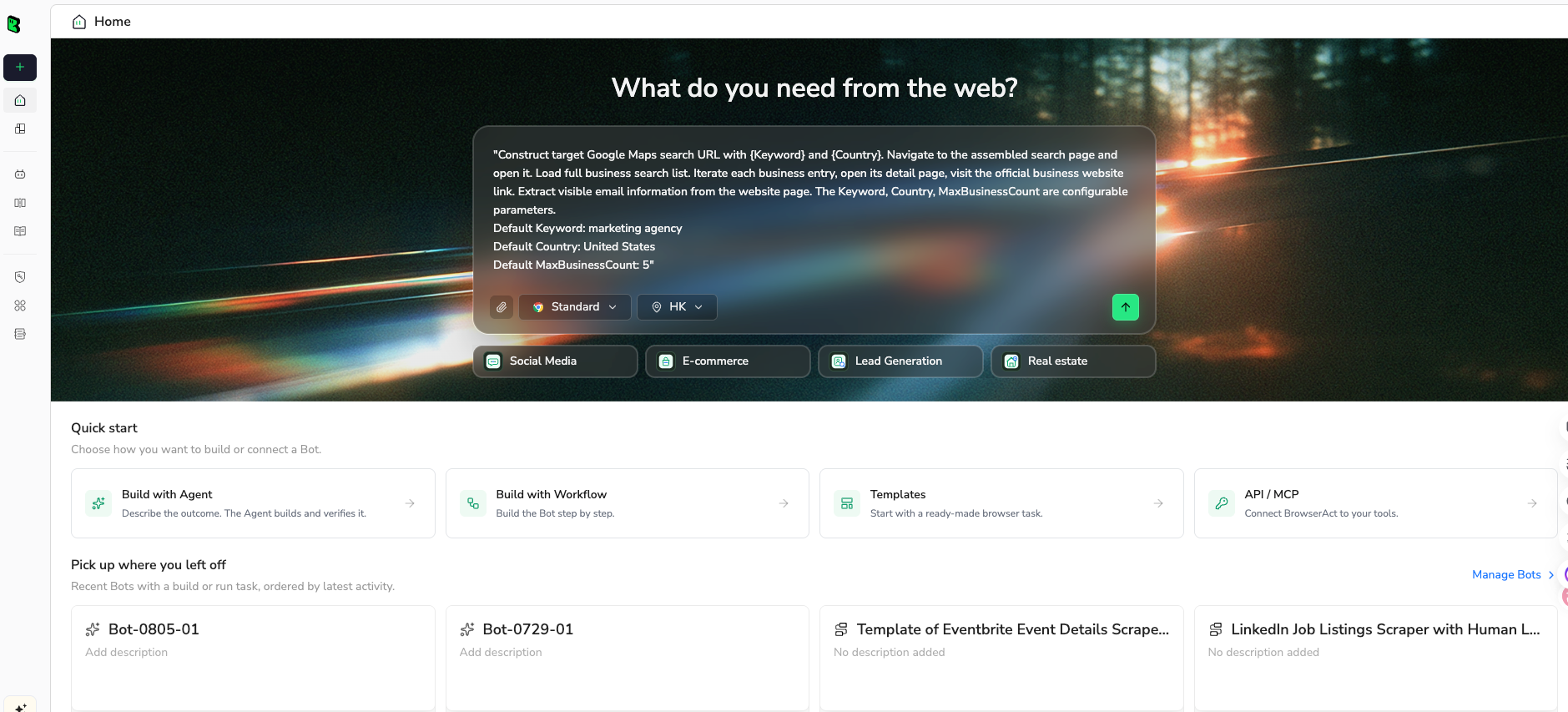
- Copy the complete prompt: Review the target, result limit, requested fields, and stop rules before pasting it into the Agent input.
Use the green Copy button. Scroll inside the prompt to review every line.
Go to https://www.tiktok.com/search/user?q=fitness and collect creator profiles related to fitness.


Continue scrolling until no additional profiles load or until 100 unique profiles are collected.


For each creator profile, extract:

Display name

Username

Profile URL

Bio

Follower count

Following count, if visible

Like count, if visible

Verification status

Recent video titles or captions, if visible

Recent video URLs, if visible


Requirements:

Open profile pages when needed to collect complete public details.

Do not follow, like, comment, message, or interact with creators.

Remove duplicate profiles based on username and profile URL.

Return the results as a structured table.

If a field is unavailable, leave it blank rather than guessing.

Include the total number of unique profiles collected.
Scrape data from any website.
Describe the data you need. Get a Bot — a reliable, reusable scraper.
- Handle login only when asked: If the site shows login, CAPTCHA, 2FA, or account confirmation, BrowserAct pauses so you can complete it manually. Resume the Agent afterward.
- Review, dedupe, and export: Check the structured display name, username, profile URL, bio, follower signals, verification status, and recent post URLs rows, remove duplicates or bad rows, and export CSV, JSON, Markdown, or a Google Sheets-ready table.
Once the output is clean, save the Bot and rerun it with a new target, limit, or schedule.
What Data Can You Extract?
The BrowserAct Agent can return creator profile data and visible video signals in the same structured run:
- Creator Profiles: Username, handle, profile URL, real-time follower count, following count, total likes, bio description, verification status (✓), account type (Personal/Business/Creator), external links (Instagram, YouTube, website), and privacy status (Public/Private).
- Video Analytics: View count, likes, comments, shares, video title, description, hashtags, posted date, video duration, sound/music information, user mentions, engagement rate, and Duet/Stitch availability.
Outputs are available in formats like JSON, CSV, XML, or Markdown, making it easy to integrate scraped data into existing analytics pipelines, CRM systems, or AI model training workflows.
Pros
- No coding required—describe what you need in plain English
- Real browser sessions with stealth browsing and residential proxies
- AI-powered extraction that adapts to page changes automatically
- Agent builds and verifies a reusable Bot directly from the prompt
- Flexible export formats: CSV, JSON, Google Sheets, Webhook
- Built-in scheduling and integration with Make, n8n, Zapier
Cons
- Credit-based pricing may add up for very large-scale extraction (10,000+ profiles)
- Cloud-based—no offline execution
Ready to try it? Sign up for BrowserAct's free trial and start scraping TikTok profiles today!
Method 2: TikTok Research API (Official and Compliant)
TikTok offers a Research API for academic researchers who need structured access to public TikTok data. This is the most compliant method available, but it comes with strict eligibility requirements and rate limits.
Steps to Scrape TikTok with the Research API
- Check eligibility: The Research API is currently limited to academic researchers affiliated with accredited universities. You'll need to submit an application describing your research objectives, institutional affiliation, and data handling practices.
- Apply for access: Visit the TikTok Research API portal and submit your application. Approval typically takes 1-2 weeks, and not all applications are accepted.
- Set up authentication: Once approved, register your application to receive client credentials. Implement OAuth 2.0 authentication to obtain access tokens for API calls.
- Query the API: Use the API endpoints to search for videos by hashtag, username, or keyword. Each endpoint returns structured JSON with fields like video ID, view count, like count, comment count, share count, and creator username.
- Handle rate limits and pagination: The Research API enforces strict rate limits (typically 1,000 requests per day for most endpoints). Implement proper pagination using cursors and respect the daily quota to avoid being throttled.
import requests

# Authenticate
auth_response = requests.post(
    "https://open.tiktokapis.com/v2/oauth/token/",
    data={
        "client_key": "YOUR_CLIENT_KEY",
        "client_secret": "YOUR_CLIENT_SECRET",
        "grant_type": "client_credentials",
    }
)
access_token = auth_response.json()["access_token"]

# Search for videos by hashtag
headers = {"Authorization": f"Bearer {access_token}"}
response = requests.post(
    "https://open.tiktokapis.com/v2/research/video/query/",
    headers=headers,
    json={
        "query": {
            "and": [
                {"operation": "IN", "field_name": "hashtag_name", "field_values": ["ai"]}
            ]
        },
        "max_count": 20,
        "fields": ["id", "view_count", "like_count", "comment_count", "share_count", "username"]
    }
)

videos = response.json()["data"]["videos"]
for video in videos:
    print(f"@{video['username']}: {video['view_count']} views, {video['like_count']} likes")
Pros
- Fully compliant with TikTok's terms of service
- Structured, reliable JSON responses
- No risk of IP bans or CAPTCHAs
- Official documentation and support
- Access to engagement metrics not available via web scraping
Cons
- Restricted to academic researchers—commercial use not permitted
- Strict daily rate limits (1,000 requests/day)
- Limited to video data; no creator profile fields (follower count, bio, etc.)
- Application approval process takes 1-2 weeks
Method 3: TikTokApi Python Library (Open-Source)
TikTokApi is an unofficial Python library that reverse-engineers TikTok's internal API endpoints to extract data. It's popular among developers who need more flexibility than the official API offers but don't want to build a scraper from scratch.
Steps to Scrape TikTok with TikTokApi
- Install the library: Run
pip install TikTokApito install the package. You'll also need a Playwright browser installation:python -m playwright install chromium.
- Configure browser context: TikTokApi uses Playwright to generate the necessary headers and tokens for API requests. Initialize a browser context with appropriate user-agent and proxy settings.
- Scrape user profiles: Use the
usermodule to extract profile data including follower count, following count, total likes, bio, and verification status.
- Scrape user videos: Use the
user.videos()method to paginate through a creator's video posts, extracting view counts, likes, comments, and shares for each video.
- Handle anti-bot detection: Rotate proxies, add random delays between requests, and use the library's built-in verification token generation to avoid being blocked.
from TikTokApi import TikTokApi
import asyncio
import json

async def scrape_tiktok_profiles():
    async with TikTokApi() as api:
        await api.create_sessions(
            num_sessions=1,
            sleep_after=3,
            headless=True,
            browser="chromium",
            proxy="http://user:pass@proxy:8080"
        )

        # Scrape a user profile
        user = api.user("chefboyrc")
        user_info = await user.info()
        print(f"Username: @{user_info['userInfo']['user']['uniqueId']}")
        print(f"Followers: {user_info['userInfo']['stats']['followerCount']}")
        print(f"Total Likes: {user_info['userInfo']['stats']['heartCount']}")
        print(f"Bio: {user_info['userInfo']['user']['signature']}")

        # Scrape their videos
        async for video in user.videos(count=10):
            print(f"Video: {video.as_dict['desc']}")
            print(f"  Views: {video.as_dict['stats']['playCount']}")
            print(f"  Likes: {video.as_dict['stats']['diggCount']}")
            print(f"  Comments: {video.as_dict['stats']['commentCount']}")

asyncio.run(scrape_tiktok_profiles())
Pros
- Free and open-source (MIT license)
- Access to both profile data and video metrics
- Active community and regular updates
- Supports hashtag search, sound search, and trend discovery
- Built-in proxy and session management
Cons
- Breaks frequently when TikTok updates its internal API
- Requires proxy rotation to avoid IP bans
- Playwright dependency adds complexity to deployment
- No guarantee of data completeness or accuracy
Give your agent a real browser, then turn the workflow into a Skill.
- 1. Use browser-act when an agent needs to open, click, scroll, extract, or inspect a live site.
- 2. Use browser-act-skill-forge when the workflow should become reusable across runs and agents.
- 3. Keep the operational boundary simple: automate what the user can already do in the browser.
Method 4: BeautifulSoup + Requests (Lightweight and Customizable)
For developers who want maximum control over what data to extract, using Python's requests and BeautifulSoup libraries to parse TikTok's HTML is a lightweight approach. However, TikTok's heavy reliance on JavaScript rendering means this method has significant limitations.
Steps to Scrape TikTok with BeautifulSoup
- Install dependencies: Run
pip install requests beautifulsoup4 lxmlto install the required packages.
- Inspect TikTok's page structure: Open a TikTok profile page in your browser's developer tools. You'll notice that most data is loaded dynamically via JavaScript—initial HTML contains minimal structured data.
- Extract embedded JSON data: TikTok embeds some initial data in a
<script id="__UNIVERSAL_DATA_FOR_REHYDRATION__">tag. Parse this JSON to access profile metadata, follower counts, and video lists.
- Build your extraction logic: Write custom parsing logic to navigate the JSON structure and extract the fields you need. Handle nested objects, optional fields, and data type conversions.
- Add conservative request controls: Set a clear User-Agent, use a small request limit, pause between requests, and stop if TikTok returns a challenge, block, or incomplete response.
import requests
from bs4 import BeautifulSoup
import json
import time

def scrape_tiktok_profile(username):
    url = f"https://www.tiktok.com/@{username}"
    headers = {
        "User-Agent": "Mozilla/5.0 (Windows NT 10.0; Win64; x64) AppleWebKit/537.36",
        "Accept-Language": "en-US,en;q=0.9",
    }

    response = requests.get(url, headers=headers)
    soup = BeautifulSoup(response.text, "html.parser")

    # Extract embedded JSON data
    script_tag = soup.find("script", id="__UNIVERSAL_DATA_FOR_REHYDRATION__")
    if script_tag:
        data = json.loads(script_tag.string)
        user_info = data.get("__DEFAULT_SCOPE__", {}).get("webapp.user-detail", {}).get("userInfo", {})

        user = user_info.get("user", {})
        stats = user_info.get("stats", {})

        profile_data = {
            "username": user.get("uniqueId"),
            "nickname": user.get("nickname"),
            "bio": user.get("signature"),
            "verified": user.get("verified"),
            "followers": stats.get("followerCount"),
            "following": stats.get("followingCount"),
            "total_likes": stats.get("heartCount"),
            "profile_url": url,
        }

        print(json.dumps(profile_data, indent=2))
        return profile_data

    print("Could not find embedded data—TikTok may have updated its page structure.")
    return None

# Scrape multiple profiles with rate limiting
usernames = ["chefboyrc", "danielwellington", "gordonramsayofficial"]
for username in usernames:
    scrape_tiktok_profile(username)
    time.sleep(3)  # Be respectful
Pros
- Full control over which fields to extract and how to process them
- No third-party dependencies beyond requests and BeautifulSoup
- Lightweight and fast for single-page extraction
- Easy to customize and extend for specific use cases
- Works well for profile data extraction (embedded JSON)
Cons
- Cannot handle JavaScript-rendered content (video feeds, search results)
- Breaks when TikTok changes its embedded JSON structure
- Requests can be blocked or return incomplete HTML, so failures require manual review
- Missing video engagement metrics (views, likes, comments) without additional API calls
Method 5: Selenium (Full Browser Automation)
Selenium controls a real browser, so it can load TikTok's JavaScript-rendered profile pages, scroll video grids, and inspect visible engagement data. It also requires more maintenance than the other methods. Keep the browser visible for login, use strict collection limits, and stop for CAPTCHA, verification, or access warnings instead of attempting to bypass them.
Steps to Scrape TikTok with Selenium
- Install Selenium and a supported browser: Run
pip install selenium. Use Selenium Manager or a browser driver that matches your installed Chrome or Firefox version. - Open the target profile in a visible session: Navigate to a public or authorized TikTok profile. If TikTok requests login, consent, CAPTCHA, or account verification, complete it manually before continuing.
- Wait for the video grid: Use explicit waits for profile content instead of fixed long delays. If the expected content does not appear, record the failure and stop.
- Scroll with a bounded target: Scroll in small increments until the requested number of unique video URLs is collected or no new URLs appear after several attempts.
- Extract stable source fields: Store the profile URL and canonical video URL first, then collect visible captions, dates, and engagement values. Leave unavailable fields blank.
- Deduplicate and export: Deduplicate by canonical video URL, validate a sample against the page, and export CSV or JSON with a capture timestamp.
from selenium import webdriver
from selenium.webdriver.common.by import By
from selenium.webdriver.support.ui import WebDriverWait
from selenium.webdriver.support import expected_conditions as EC
import csv
import time

PROFILE_URL = "https://www.tiktok.com/@tiktok"
TARGET_VIDEOS = 30

driver = webdriver.Chrome()
driver.get(PROFILE_URL)
input("Complete any login, consent, or verification step, then press Enter...")

WebDriverWait(driver, 30).until(
    EC.presence_of_element_located((By.CSS_SELECTOR, 'a[href*="/video/"]'))
)

videos = {}
unchanged_rounds = 0

while len(videos) < TARGET_VIDEOS and unchanged_rounds < 3:
    before = len(videos)
    for link in driver.find_elements(By.CSS_SELECTOR, 'a[href*="/video/"]'):
        url = link.get_attribute("href").split("?")[0]
        videos[url] = {
            "profile_url": PROFILE_URL,
            "video_url": url,
            "visible_text": link.text.strip(),
        }
    unchanged_rounds = unchanged_rounds + 1 if len(videos) == before else 0
    driver.execute_script("window.scrollBy(0, 900)")
    time.sleep(2)

driver.quit()

rows = list(videos.values())[:TARGET_VIDEOS]
with open("tiktok_videos.csv", "w", newline="", encoding="utf-8") as file:
    writer = csv.DictWriter(file, fieldnames=["profile_url", "video_url", "visible_text"])
    writer.writeheader()
    writer.writerows(rows)

print(f"Exported {len(rows)} unique video URLs")
TikTok selectors, consent screens, and layouts vary by region, account state, and active interface experiments. A production workflow needs explicit error logging, screenshot capture on failure, bounded retries, and periodic visual checks.
Pros
- Handles JavaScript rendering and infinite scrolling in a real browser.
- Supports visible manual login and consent flows.
- Offers full control over waits, scrolling limits, and custom extraction fields.
- Can capture profile and video URLs from the same browser session.
Cons
- Slower and more resource intensive than API or HTML parsing.
- CSS selectors and page flows require ongoing maintenance.
- CAPTCHA, verification, or access restrictions interrupt unattended runs.
- Requires browser-automation engineering and careful operational limits.
Comparison of 5 TikTok Profile and Post Scraping Methods
| Method | Coding | Access | Maintenance | Best for |
|---|---|---|---|---|
| BrowserAct Agent | No | Visible public or authorized pages | Low | Reusable profile and post extraction without selector maintenance |
| TikTok Research API | Yes | Application and approval required | Low after approval | Eligible non-commercial public-interest research |
| TikTokApi | Python | Unofficial endpoints and sessions | High | Developer experiments and custom pipelines |
| BeautifulSoup + Requests | Python | Initial HTML and embedded data only | High | Lightweight profile metadata tests |
| Selenium | Python | Visible browser session | Very high | Fully custom scrolling and interactive extraction |
BrowserAct Agent is the most approachable option when you need a repeatable no-code workflow with a copy-ready prompt and structured exports. The Research API is the most structured official route, but it is limited to approved qualifying researchers and is not a general commercial scraping API. TikTokApi, BeautifulSoup, and Selenium give developers more control at the cost of higher maintenance.
Conclusion
TikTok profile and post extraction ranges from an Agent-built no-code Bot to official research access and fully custom browser automation. The right choice depends on your eligibility, technical resources, requested fields, and how often the workflow must run.
- For non-technical and repeatable extraction: Use BrowserAct Agent with the copy-ready prompt, a fixed result limit, manual verification handoff, and read-only stop rules.
- For eligible academic or public-interest research: Apply for TikTok Research Tools and use the documented account and video endpoints after approval.
- For Python experimentation: Use TikTokApi only when you can maintain unofficial integrations and validate every returned field.
- For lightweight profile metadata: Use BeautifulSoup only when the required data is present in the initial HTML or embedded JSON.
- For fully custom browser interaction: Use Selenium with bounded scrolling, visible manual login, explicit waits, and immediate stops on verification or access warnings.
Collect only public or authorized data needed for a defined purpose. Do not bypass login or verification controls, preserve source URLs, respect deletion and retention requirements, and review TikTok's current terms before scheduling recurring collection.
Once the BrowserAct output is verified, save the Bot and change only the target profile, search URL, result limit, or requested fields for the next run.
Build your TikTok scraper with BrowserAct Agent.


