BrowserAct vs Chrome DevTools MCP

BrowserAct vs Chrome DevTools MCP is not a fight between two tools that do the same job. It is a decision about which layer your AI agent is missing. If your agent is helping you fix a front-end bug, inspect console errors, record a performance trace, or verify that a UI change works in Chrome, Chrome DevTools MCP is the sharper tool. If your agent needs to log into a real website, survive bot checks, keep a session alive, ask a human for 2FA, and repeat the workflow next week without rediscover
What is Chrome DevTools MCP?
Chrome DevTools MCP is an official MCP server that connects AI coding agents to Chrome DevTools capabilities. It lets an agent work with a live Chrome browser for debugging tasks such as verifying a page, inspecting runtime state, reading console and network signals, capturing screenshots, and recording performance traces.
That is a big deal for software teams. Before browser MCP tools, coding agents could edit files but often could not see the page they broke. Chrome DevTools MCP closes that loop: the agent can change code, open the page, inspect what happened, and use DevTools-style evidence to fix the next step.
Pro Tip: If the task starts with "verify this UI change," "why is this layout broken," or "profile this page," start with Chrome DevTools MCP. You want diagnostic truth, not a workflow engine.
What is BrowserAct?
BrowserAct is a browser execution layer for AI agents that need to operate real websites. The Browser-act Agent CLI docs describe runtime objects like browser, session, and profile. The product also includes browser modes for different identity and login-state needs, anti-blocking paths for protected sites, Remote Assist for human handoff, concurrency/isolation for multiple tasks, and Skill Forge for reusable workflows.
That makes it a different kind of tool. It is less about "show the agent what Chrome sees right now" and more about "help the agent finish the job on a real website."
A typical BrowserAct task might look like this:
- Open a website that requires JavaScript and login.
- Reuse or isolate the right browser state.
- Click, type, extract, screenshot, upload, or submit.
- Escalate 2FA, CAPTCHA, or judgment-heavy steps to a human.
- Package the successful path into a reusable skill if the workflow repeats.
That last point is the difference between a browser action and an operating workflow.
The Short Decision Rule
Use Chrome DevTools MCP when the browser is your debugging instrument.
Use BrowserAct when the browser is your agent's workplace.
That one sentence prevents most bad tool choices. A debugging instrument is something you point at your own application to understand what happened. A workplace is where the agent needs to log in, remember context, deal with interruptions, and complete a business task.
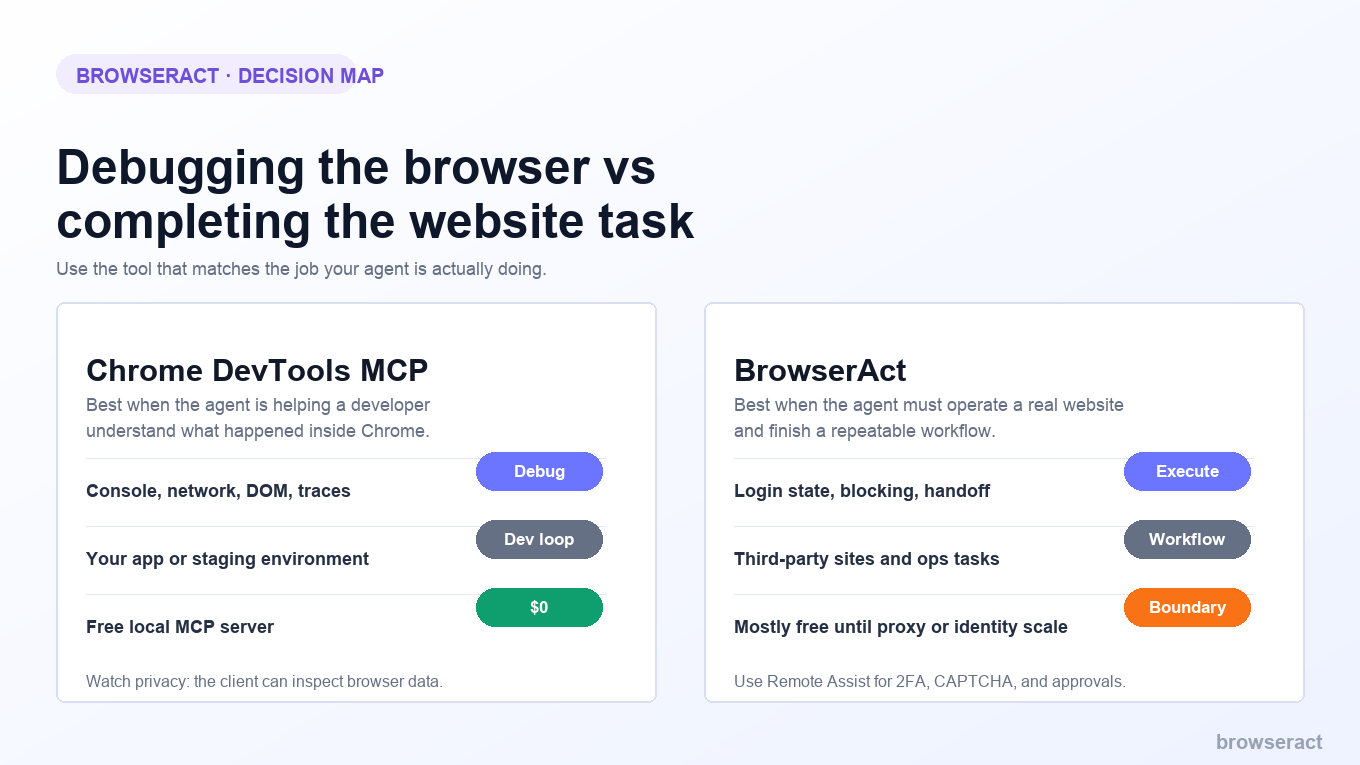
BrowserAct vs Chrome DevTools MCP: Side-by-Side
Dimension | Chrome DevTools MCP | BrowserAct |
Primary job | Give AI coding agents Chrome DevTools debugging capabilities | Give AI agents a browser execution layer for real websites |
Best use case | Verify UI changes, inspect DOM/CSS, read console/network state, capture traces | Logged-in workflows, protected sites, repeatable website tasks, human handoff |
User | Developer debugging their own app | Agent builder, ops team, growth team, automation engineer |
Browser state | Live Chrome debugging surface | Browser/session/profile modes designed around task execution |
Anti-bot/blocking | Not the core job | Core workflow concern via anti-blocking paths and browser modes |
Human handoff | Not the main design center | Remote Assist is designed for 2FA, CAPTCHA, approval, and judgment-heavy steps |
Repeatability | Great for a debugging session | Stronger for repeated workflows through Skill Forge |
Privacy boundary | Must be careful because MCP clients can inspect and modify browser data | Must be managed through browser modes, session boundaries, and human approval |
Pricing model | Open-source MCP server; cost mostly comes from the agent/model and local runtime | Core automation is free; login unlocks the first stealth tier and advanced features; paid starts with managed proxies or stealth browsers beyond the first five |
Best answer | "Let the agent debug Chrome." | "Let the agent finish the website task." |
How Chrome DevTools MCP Works
How it works
Chrome DevTools MCP acts as a bridge between an MCP-compatible AI assistant and Chrome DevTools. The agent can use documented browser tools for tasks such as navigation, page inspection, screenshots, and performance tracing; the complete capability list lives in the Chrome DevTools MCP tool reference.
The official Chrome for Developers article gives a performance example: an agent can start Chrome, open a website, record a trace, and analyze that trace to recommend improvements. That is exactly the kind of work DevTools was built for.
Strengths
Chrome DevTools MCP shines when the task is close to engineering. It gives the agent direct browser feedback, which is much better than asking the model to guess from source code alone.
It is especially useful for:
- Front-end bug verification.
- Layout and interaction debugging.
- Performance analysis.
- Console and network inspection.
- Checking whether a generated code change actually works in Chrome.
Limitations
The limitation is not that Chrome DevTools MCP is weak. The limitation is that debugging and production workflow automation are different jobs.
When your agent needs to operate a third-party website, handle login state, survive blocking, isolate accounts, or pause for human approval, DevTools access alone does not solve the whole workflow. You still need a reliable execution model around the browser.
The other limitation is security scope. The Chrome DevTools MCP GitHub repository explicitly warns that browser instance content can be exposed to MCP clients. That is correct behavior for a debugging bridge, but it means you should not casually point it at sensitive pages without thinking through the client, prompts, logs, and permissions.
Pricing
Chrome DevTools MCP is open source. The practical cost is usually your AI model usage, local development environment, and the engineering time spent configuring and operating the MCP client.
Best for
Chrome DevTools MCP is best for developers who want an AI coding agent to see and debug the same browser surface a human developer would inspect in DevTools.
Pro Tip: Create a separate Chrome profile for agent debugging. It keeps the agent's debugging world away from your personal tabs, extensions, accounts, and private browsing history.
That developer-focused framing is why the split between debugging and execution matters so much in practice.
AI Agent Browser Debugging vs Real Website Execution
AI agent browser debugging is about shortening the loop between "the agent changed code" and "the browser proves whether it worked." Chrome DevTools MCP is strong here because it gives the agent browser evidence: page state, screenshots, traces, console output, and network signals.
Real website execution is different. The agent is not diagnosing your code. It is operating someone else's web application, often with login state, dynamic components, rate limits, bot checks, and actions that should stop for human review.
That is where a browser automation MCP tool and an execution layer start to diverge. MCP gives the agent a protocol surface. BrowserAct gives the agent a workflow surface.
How BrowserAct Works
How it works
BrowserAct gives the agent a browser runtime it can use as part of a task. The docs describe browser modes such as Chrome, chrome-direct, stealth privacy, and fixed stealth identity. BrowserAct also includes Remote Assist for steps that should not be automated blindly, and Skill Forge for turning successful website exploration into reusable skills.
This is workflow architecture, not just browser visibility.
For example, an agent that needs to monitor a logged-in dashboard does not only need to inspect the DOM. It needs to open the correct browser profile, preserve session state, notice when login expires, handle 2FA safely, extract the right rows, produce output, and run the same process tomorrow.
That is the BrowserAct-shaped problem.
Strengths
BrowserAct's strengths sit around real website execution:
- Browser modes for different session and identity needs.
- Anti-blocking paths for websites that do not behave like local test apps.
- Remote Assist for CAPTCHA, 2FA, approvals, payments, or ambiguous decisions.
- Concurrency and isolation for multiple tasks, accounts, or browser identities.
- Skill Forge for turning repeatable workflows into reusable agent capabilities.
The official Skill Forge docs put the core repeatability problem plainly: without a reusable skill, the agent has to rediscover the same website on every run. That means more variation, more failure, and more token usage.
Limitations
BrowserAct is not the first tool you should reach for when you simply need to debug a front-end component in your own app. Chrome DevTools MCP is closer to that job.
BrowserAct also has more operational decisions. If you need stealth, proxy use, CAPTCHA handling, fixed identity, or scheduled workflows, you should choose the right free or paid boundary instead of assuming everything is usage-billed.
Pricing
BrowserAct's GitHub README is the cleanest pricing source for this comparison. Core browser automation with Chrome or Chrome-direct is free without signup. After login, BrowserAct also includes stealth browsers up to five, stealth-extract, solve-captcha, remote-assist, privacy mode, and Skill Forge.
BrowserAct feature | Free (No Signup) | Free (Login Only) | Paid |
Browser automation, Chrome / Chrome-direct | Yes | Yes | Yes |
Stealth browser <= 5, stealth-extract, solve-captcha, remote-assist, privacy mode, Skill Forge | No | Yes | Yes |
Stealth browser > 5, managed Dynamic / Static proxy | No | No | Yes |
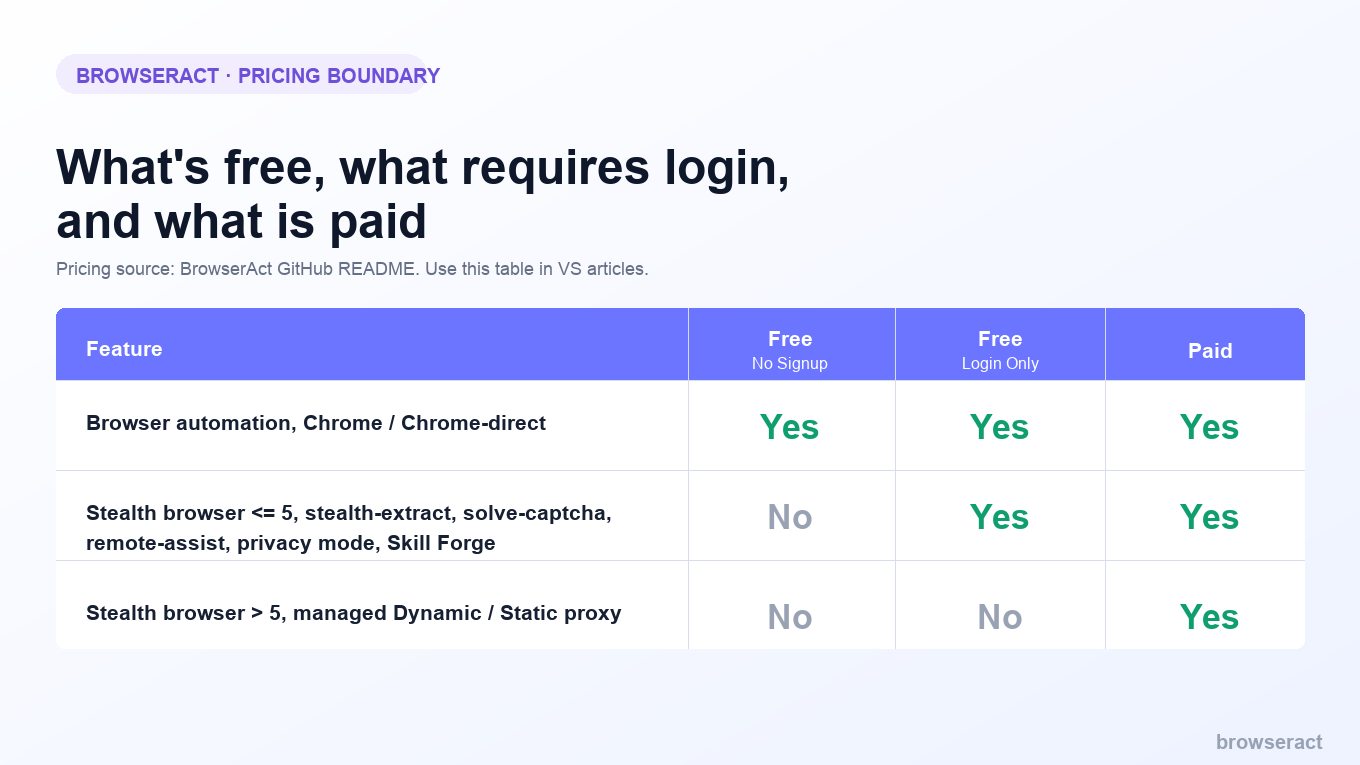
Paid usage starts when the workflow needs managed Dynamic / Static proxies or more than five stealth browsers. That is the right pricing frame here: Chrome DevTools MCP is a free local debugging bridge, while BrowserAct is mostly free for local execution and only becomes paid when identity or proxy scale is needed.
Best for
BrowserAct is best for AI agents that need to complete real website tasks: logged-in data extraction, dashboard checks, form workflows, account operations, protected public pages, and repeatable workflows that need human approval at specific points.
Pro Tip: Do not use stealth as the first answer to every problem. Start with the simplest browser mode that matches the task, then escalate only when the site or workflow actually requires it.
BrowserAct Skills
Give your agent a real browser, then turn the workflow into a Skill.
- 1. Use browser-act when an agent needs to open, click, scroll, extract, or inspect a live site.
- 2. Use browser-act-skill-forge when the workflow should become reusable across runs and agents.
- 3. Keep the operational boundary simple: automate what the user can already do in the browser.
Install browser-act Skill Build with Skill Forge
When Chrome DevTools MCP Is the Better Choice
Chrome DevTools MCP is the better choice when the target is your own application, your own staging environment, or a page you are debugging as a developer.
Use it for:
- "Verify this button still works after the code change."
- "Find the console error after clicking checkout."
- "Why is this layout overflowing on mobile?"
- "Record a performance trace and identify the slowest part."
- "Inspect the network request that fails after login."
In those tasks, the agent needs observability. The job is not to run a long-lived business workflow. The job is to gather evidence, fix code, and verify the result.
Chrome DevTools MCP belongs close to the developer loop.
When BrowserAct Is the Better Choice
BrowserAct is the better choice when the target is a real website workflow rather than a debugging session.
Use it for:
- Checking a logged-in dashboard every morning.
- Extracting data from a CRM, analytics tool, order system, or marketplace backend.
- Filling forms where a human should approve the final submit.
- Handling 2FA, CAPTCHA, or judgment-heavy steps without losing the session.
- Running multiple isolated browser sessions for different accounts or workflows.
- Turning a repeated website process into a reusable skill.
In those tasks, the agent needs execution reliability. A successful run is not "the agent saw the page." A successful run is "the work got done, safely, and can happen again."
DevTools MCP Privacy and Browser Automation Security
The privacy boundary is where this comparison gets serious.
Chrome DevTools MCP's power comes from exposing a live browser debugging surface to an AI client. That can be exactly what you want for development work. It also means the agent may see things in the browser that were never meant for a model prompt, tool log, or shared workspace.
These are DevTools MCP privacy considerations, not reasons to avoid the tool. They are reasons to isolate the browser surface before you let an AI client inspect it.
BrowserAct has a different privacy problem: if you ask an agent to operate real websites, you must decide which browser mode, profile, cookies, localStorage, proxy, and human confirmation rules apply. Reusing login state can be convenient. It can also be risky if you do not isolate accounts and stop before irreversible actions.
The right safety model is not "never use browser agents." It is:
- Use separate profiles for agent work.
- Keep sensitive personal tabs out of the agent session.
- Require human approval for destructive or account-risk actions.
- Log outputs and screenshots where review matters.
- Prefer reusable, reviewed workflows over improvising the same task every time.
Pro Tip: If an action changes money, account state, published content, legal status, or customer data, the agent should pause before doing it. That rule applies no matter which browser tool you use.
Can BrowserAct and Chrome DevTools MCP Work Together?
Yes. In many teams, the cleanest architecture is to use both.
Use Chrome DevTools MCP while building and debugging your own app. Let the coding agent inspect the browser, capture traces, find UI regressions, and verify fixes.
Then use BrowserAct when the workflow leaves your codebase and enters a real website. That includes third-party tools, login-required dashboards, protected pages, multi-step forms, or workflows that need scheduled execution and human handoff.
Here is the practical split:
Workflow | Better starting point | Why |
Fix a frontend bug in your app | Chrome DevTools MCP | Needs DevTools evidence and live verification |
Record a performance trace | Chrome DevTools MCP | Built around Chrome diagnostics |
Inspect console/network errors | Chrome DevTools MCP | Direct debugging surface |
Extract rows from a logged-in third-party dashboard | BrowserAct | Needs session continuity and workflow execution |
Handle 2FA during an agent task | BrowserAct | Remote Assist can hand control to a human |
Run the same website workflow every day | BrowserAct | Skill Forge can turn exploration into reuse |
Operate multiple accounts safely | BrowserAct | Needs isolation, browser identity, and review gates |
A Simple Buying Framework
Ask five questions before choosing:
1. Is the target your own app or a third-party website?
If it is your own app, start with Chrome DevTools MCP. If it is a third-party website with login, blocking, or unstable UI, BrowserAct is usually a better fit.
2. Do you need diagnostics or task completion?
Diagnostics means console, network, DOM, screenshots, and traces. Task completion means the agent must navigate, decide, act, recover, and output something useful.
3. Will this run once or repeatedly?
One-off debugging favors DevTools. Repeated website workflows favor BrowserAct, especially when Skill Forge can package the path.
4. Does the workflow touch sensitive account state?
If yes, design the human confirmation path before you automate. BrowserAct's Remote Assist is built for this kind of boundary.
5. Are bot checks or identity consistency part of the task?
If the site blocks standard automation, the discussion moves beyond DevTools and into browser identity, proxy, CAPTCHA, and session design.
Is BrowserAct a Chrome DevTools MCP Alternative?
BrowserAct is a Chrome DevTools MCP alternative only when the user's real question is "how do I make my AI agent complete this browser workflow?" It is not a drop-in replacement when the user's real question is "how do I give my coding agent Chrome DevTools diagnostics?"
That distinction keeps the comparison honest. If you are debugging your own app, use the debugging tool. If you are operationalizing a website task, use the execution layer.
Final Recommendation
Do not ask "Is BrowserAct better than Chrome DevTools MCP?"
Ask "What is the browser doing for the agent?"
If the browser is there to help the agent debug your app, Chrome DevTools MCP is the right tool. It gives the agent the Chrome evidence it needs to fix code with less guessing.
If the browser is where the agent does operational work, BrowserAct is the better layer. It gives the agent browser modes, session continuity, anti-blocking paths, Remote Assist, and reusable skills for real website workflows.
The strongest teams will use both: Chrome DevTools MCP for the developer loop, BrowserAct for the real-web execution loop.
If your agent is already failing on login, CAPTCHA, blocked pages, repeated exploration, or manual approval steps, start with BrowserAct and turn the website workflow into something the agent can actually finish.
Agent-ready scraping
Two Skills, One Repeatable Browser Workflow
Start with live browser execution when the agent needs to understand a page. Move to Skill Forge when the same scraper should run again without re-exploring the site.
Step 1
Run once with browser-act
Give Codex, Claude Code, Cursor, Windsurf, or another agent a real browser for rendered pages, clicks, scrolling, screenshots, DOM extraction, and network inspection.
Step 2
Package with Skill Forge
Explore the site once, verify the extraction path, then generate a callable Skill package that other agents can reuse for batch jobs or scheduled workflows.
Discover
Agent opens the target site and learns the working path.
Verify
Fields, pagination, limits, and failure cases are tested.
Reuse
The flow becomes a Skill that future agents can call.
Frequently Asked Questions
Is BrowserAct a Chrome DevTools MCP alternative?
Sometimes, but not always. BrowserAct is better for real website workflows, while Chrome DevTools MCP is better for browser debugging and performance inspection.
Can Chrome DevTools MCP automate websites?
It can drive and inspect Chrome through DevTools-style tools, but its strongest fit is debugging and verification rather than repeatable production website workflows.
Is Chrome DevTools MCP safe for sensitive pages?
Use caution. Its GitHub repository warns that MCP clients can inspect, debug, and modify browser or DevTools data, so separate profiles and permissions matter.
When should I use BrowserAct instead of Chrome DevTools MCP?
Use BrowserAct when the agent needs login state, anti-blocking, CAPTCHA or 2FA handoff, account isolation, repeatability, or structured workflow output.
Can BrowserAct and Chrome DevTools MCP work together?
Yes. Use Chrome DevTools MCP to debug your app, then use BrowserAct to run real website workflows that need sessions, handoff, and repeatable execution.
Does BrowserAct replace Playwright or Selenium too?
Not directly. Playwright and Selenium are browser automation frameworks; BrowserAct is an agent execution layer for real website tasks and recovery paths.
Which tool is cheaper?
Chrome DevTools MCP is free and open source. BrowserAct is mostly free locally; paid usage starts with managed proxies or more than five stealth browsers.


