Windsurf Browser Automation: Test Logged-In Apps

Windsurf Cascade is strong inside the developer workflow. It can read a project, follow instructions, reason across files, and turn a messy request into an executable plan. Then the task crosses into a real website. The useful page may require login. The data may render after JavaScript. The button may be hidden behind a role check. A filter may change the result set. A CAPTCHA, 2FA screen, or account selector may appear at the worst possible moment. The agent can understand the goal and still f
- 1Windsurf can plan the workflow, but BrowserAct is what lets it operate authenticated, rendered, or protected pages.
- 2Start with the lightest reliable method: direct source, protected-page extraction, then full browser operation only when the page needs interaction.
- 3Keep browser identity explicit. One account, one BrowserAct session, one output file, one evidence package.
- 4Treat login, 2FA, CAPTCHA, destructive buttons, payments, publishing, and account changes as approval boundaries.
- 5Once the route works twice, save it as a Skill so the next run does not rediscover the same website from scratch.
What Windsurf already does well
Windsurf documents Cascade Skills as folders with a required SKILL.md file and optional supporting resources.
Workspace Skills live under .windsurf/skills/
Windsurf also discovers cross-agent Skills from .agents/skills/ and ~/.agents/skills/; when Claude Code configuration reading is enabled, it can scan .claude/skills/ too.
Cascade uses progressive disclosure: the model sees the Skill name and description first, and loads the full instructions only when the Skill is invoked or @mentioned.
That is exactly why BrowserAct fits here. A Skill can teach Windsurf when and how to use BrowserAct, but the browser layer itself handles the messy part: live page state.
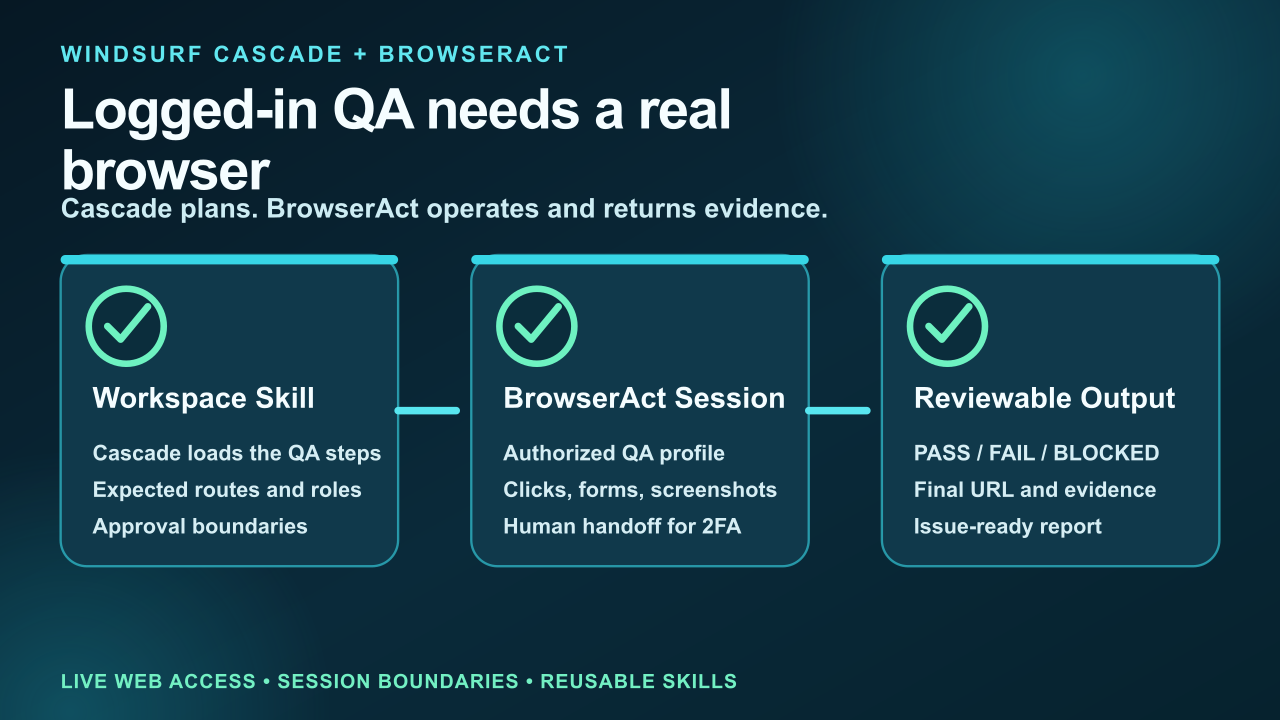
Cascade plans. BrowserAct operates and returns evidence.
Without BrowserAct, Windsurf often hits the same four failure modes:
- the page requires a real signed-in QA identity;
- the interesting state appears only after JavaScript, feature flags, or role checks finish;
- a modal, cookie banner, expired session, or 2FA prompt blocks the route;
- the agent can explain what to test but cannot prove what a user actually saw;
Those are not reasoning failures. They are execution failures.
Pro Tip: Put BrowserAct in the first browser-related paragraph of the Skill. If the agent has to infer whether it should fetch, search, or operate a real page, the workflow will drift.
The practical workflow
A team ships a billing-settings change. Cascade understands the repository and the acceptance criteria, but the release is not done until someone opens staging, signs in as a test customer, changes no data, verifies the Billing, Plan, Payment method, and Audit log screens, and returns screenshots with the final URLs.
The prompt should describe the result, the identity, and the boundary:
Use BrowserAct to run the staging billing QA Skill.

Target: https://staging.example.com/billing
Identity: qa-customer-readonly
Do this:
1. Open the billing page in the authorized browser session.
2. Confirm the signed-in account and environment banner.
3. Visit Plan, Payment method, Invoices, and Audit log.
4. Capture one screenshot per route.
5. Do not submit forms, change plan, update card, or download private files.
6. Return PASS, FAIL, or BLOCKED with evidence paths.
This is the difference between “please check the site” and a browser workflow that can be reviewed. BrowserAct returns the final URL, screenshots, visible page state, and blocked reasons. Windsurf can then decide whether the job is done, failed, or waiting for a human step.
Route every page by cost and risk
Do not open a full browser for every URL. Do not rely on raw fetch for every page either. A useful agent workflow has a ladder:
- Use a direct source when the HTML, API, document, or public page contains the required field.
- Use BrowserAct protected-page extraction when normal fetch is incomplete, blocked, or missing rendered content.
- Use a real BrowserAct browser when the page requires clicks, filters, forms, scrolling, login, downloads, or screenshots.
- Use human handoff when the next step is a trust boundary, not a technical obstacle.
Page or task | BrowserAct route | Evidence returned |
Public marketing page | Fetch or protected-page extraction | Title, CTA, visible copy |
Logged-in billing page | Authorized Chrome session | Screenshot, route, account label |
Role-specific admin view | Named isolated session | Visible permissions by role |
2FA or session expiry | Human handoff | Continue from same browser after approval |
Pro Tip: This routing pattern keeps the agent fast on simple pages and reliable on difficult pages. More importantly, it keeps risk visible. A blocked page is not a license to guess. A sensitive action is not a read-only extraction task.
Where BrowserAct changes the outcome
The BrowserAct advantage is not “it has a browser.” The advantage is that browser work becomes a repeatable contract:
- identity is named before the task starts;
- sessions are isolated so state cannot leak between jobs;
- the agent can escalate from extraction to interactive browsing without changing tools;
- screenshots and final URLs are attached to the output;
- CAPTCHA, 2FA, and sensitive approvals can pause and resume in the same session;
- the successful route can become a Skill.
That contract matters across the scenarios your team actually runs:
- internal SaaS QA;
- post-deploy smoke testing;
- e-commerce checkout verification;
- government portal form review;
- finance dashboard read-only checks;
For example, a government search workflow should preserve query filters and the final source URL. An e-commerce workflow should preserve shipping region, coupon state, seller, and screenshot. A social-media research workflow should explicitly forbid likes, follows, reposts, messages, and publishing. A finance or medical workflow should mark fields as verified, partial, conflict, blocked, or not found instead of smoothing over gaps.
Pro Tip: A browser agent should return blocked reasons as first-class output. “Blocked by 2FA” is useful operational data; a guessed answer is not.
Stop chasing flaky tests. Ship e2e suites you trust.
- ✓ Global dialog handling — no per-test page.on('dialog') listeners
- ✓ Stealth extraction — same anti-detection surface for staging CI and prod
- ✓ Policy-based Human Assist — MFA, captcha, payment paths rejoin coverage
- ✓ Drop-in alongside Playwright & Cypress — no rewrite, no lock-in
Turn the working path into a Skill
The first run is exploration. The second run should be procedure.
Create a focused Skill after the browser path produces valid evidence twice. Keep the Skill small and operational:
windsurf-browser-automation-workflow/
├── SKILL.md
├── allowed-identities.md
├── output-schema.json
├── blocked-reasons.md
└── report-template.md
The Skill should define:
- when Windsurf should use BrowserAct;
- which browser identity or session type is allowed;
- which fields must be collected;
- which pages or buttons are forbidden;
- what counts as PASS, FAIL, BLOCKED, and NEEDS_APPROVAL;
- where screenshots, CSV files, JSON files, and notes should be saved.
Use BrowserAct Skill Forge when a successful website path should become a reusable scraper or workflow Skill. Use the base browser-act Skill when the task still needs exploration.
A concrete example: from one browser run to a repeatable system
Imagine the first run finishes with:
{
  "status": "PASS",
  "method": "browseract-browser",
  "identity": "readonly-session",
  "records_verified": 18,
  "records_blocked": 2,
  "human_handoffs": 1,
  "artifacts": ["evidence.json", "screenshots.zip", "blocked.json"]
}
That is not just a report. It is the seed of a reusable workflow. The next version of the Skill can say: if a record is blocked by login expiry, request handoff; if a required field is hidden behind a filter, open the browser lane; if a public source is enough, stay in extraction mode.
Now Windsurf is not merely “using a browser.” It is operating a known procedure with evidence.
When not to use BrowserAct
BrowserAct should not replace every tool. If the target provides a clean official API, use it. If the task only needs a static document, fetch the document. If the user asks for strategy, planning, or code review, keep the workflow inside Windsurf.
Use BrowserAct when success depends on the live website:
- logged-in state;
- JavaScript-rendered content;
- forms, filters, tabs, or pagination;
- page evidence and screenshots;
- anti-bot or verification boundaries;
- repeatable browser workflows that should become Skills.
For the broader decision, read How to Install BrowserAct, Web Scraping vs Browser Automation for AI Agents, and How to Reduce MCP Token Usage in Browser Automation.
Conclusion
Windsurf Cascade does not need another abstract capability list. It needs a reliable way to complete web work that happens outside the repository and outside plain text.
BrowserAct gives Windsurf that missing layer: a real browser when the page requires interaction, extraction when the page only needs data, session isolation when tasks run in parallel, human handoff when the next step belongs to a person, and Skill solidification when the route should run again.
Start with BrowserAct when your agent needs to move from planning a web task to completing it with evidence.
Two Skills, One Repeatable Browser Workflow
Start with live browser execution when the agent needs to understand a page. Move to Skill Forge when the same scraper should run again without re-exploring the site.
Run once with browser-act
Give Codex, Claude Code, Cursor, Windsurf, or another agent a real browser for rendered pages, clicks, scrolling, screenshots, DOM extraction, and network inspection.
Open browser-act SkillPackage with Skill Forge
Explore the site once, verify the extraction path, then generate a callable Skill package that other agents can reuse for batch jobs or scheduled workflows.
Open Skill ForgeFrequently Asked Questions
What is Windsurf browser automation?
Windsurf browser automation means using Windsurf Cascade to coordinate a task while BrowserAct operates the real web page: opening URLs, reusing an authorized session, extracting rendered content, clicking through workflows, and returning evidence.
Why not just use web search or fetch?
Search and fetch are useful when the source is public and complete. They fail when the value depends on JavaScript, login, filters, scrolling, anti-bot checks, or a visible browser state.
Can BrowserAct use logged-in websites safely?
Yes, when the workflow uses an authorized browser identity and separates read-only tasks from sensitive actions. Do not paste passwords, cookies, or one-time codes into prompts.
What should trigger human handoff?
Use human handoff for 2FA, CAPTCHA that should not be automated, account selection, payments, publishing, irreversible settings, data deletion, medical decisions, financial trades, and any action outside the approved scope.
Should the workflow become a Skill?
Yes, after it succeeds at least twice with the same output schema and recovery rules. A Skill should encode the route, allowed identities, blocked reasons, output format, and approval boundaries.
Can BrowserAct help with scraping too?
Yes. Start with protected-page extraction, then escalate to browser operation only for pages that need interaction. For repeatable scraping workflows, use BrowserAct Skill Forge.
Where should I start?
Install the browser-act Skill, run one read-only workflow, verify the evidence, then decide whether the path should become a reusable Skill.


