Organic Traffic Drop: What to Check With Semrush Before Rewriting Content

An organic traffic drop needs an explanation before it needs a rewrite. Establish what declined, which commercially important pages were affected, and what evidence would justify a change. That gives the team a focused investigation instead of an open-ended content project.
For a small marketing team, the decision affects where writers, SEO specialists, and developers spend their time. The aim is to identify the next useful action: repair a fault, improve a page, or check whether demand has changed. Semrush adds competitive context; BrowserAct can bring supported research into an AI agent as the investigation develops.
- 1Confirm the decline and its scope before judging possible causes.
- 2Use changes in rankings, impressions, and CTR to choose the next check.
- 3Treat third-party estimates as context, not standalone proof of causation.
- 4Use evidence to decide whether to fix, investigate, or observe, and save a baseline.
Why Does Organic Traffic Drop?
Start with three possibilities: the measurement changed, the site lost search visibility, or the opportunity to attract clicks changed. Each points to different work.
Tracking and Measurement Changes
If the alert came from an analytics dashboard, check whether tracking or reporting definitions changed. Keep GA4 sessions, GSC clicks, and Semrush estimates labelled separately: they measure different things.
Technical and Indexing Problems
A sudden, broad loss deserves a technical check before a writing brief. Recent releases, migrations, and changes affecting page availability are relevant context. Use your site's diagnostic tools and technical team to investigate; a third-party traffic estimate cannot establish an indexing fault.
Rankings, Search Demand, Content, and SERP Changes
Ranking losses, changing demand, and changes in how search results attract clicks are separate lines of enquiry. Content decay is worth investigating when a page gradually becomes less useful for its intended audience; it is not a label for every decline. Google's traffic-drop guidance recommends examining the pattern and scope before deciding what to change.
Confirm the Drop Before Changing Your SEO Strategy
Define the problem precisely: which source raised the alert, which periods are being compared, and what business outcome may be affected. “Search clicks to our service pages fell” gives the team a clearer investigation than “our traffic is down.”
Use complete, comparable periods and consistent filters. Check whether country, device, search type, or brand coverage changed between views. Review longer-term context where seasonal demand is plausible. Do not compare a partial week with a complete week and treat the difference as a strategy failure.
Then check business exposure. A decline concentrated in old informational posts creates a different priority from a decline on pages that generate qualified enquiries. Keep total clicks in the picture, but use relevant leads, sales, or other measured outcomes to decide how urgently the team should act.
Find the Pages and Queries Behind the Decline
Locate the loss before averaging it away. Separate sitewide changes from a group of related pages or a single important URL. For the affected pages, examine relevant queries rather than relying on a sitewide average position that combines unrelated searches.
Compare clicks, impressions, CTR, and position within that scope. Fewer clicks with similar visibility raises a different question from fewer impressions alongside ranking losses. These patterns help choose an investigation; none identifies the cause on its own.
Record when the change began and whether it was abrupt or gradual. Keep a short change log beside the evidence: releases, redirects, page edits, and tracking changes the team knows about. A matching date is a useful lead, not proof that the change caused the decline.
Match Each Signal to the Next Check
Use a triage table to decide what to check and who should own it. The entries below are investigation examples, not findings from a customer account or a BrowserAct run.
Signal | Evidence to add | Next action and owner |
Analytics visits fall, but search clicks do not show the same pattern | Tracking configuration and channel definitions | Ask the analytics owner to validate measurement |
A broad decline follows a site release | Affected URLs, release notes, indexing and availability checks | Ask the technical team to investigate the changed scope |
Relevant queries lose position and clicks | Query/page evidence and current competing results | Ask the SEO lead to assess intent and content fit |
Clicks fall while impressions and position appear similar | The same query group, CTR, and current results | Investigate click behaviour before commissioning a rewrite |
Impressions decline while relevant positions look similar | Demand trends and a comparable seasonal period | Check whether the opportunity itself has changed |
A page gradually loses relevant visibility | Page usefulness, competing coverage, and past edits | Consider a targeted content refresh if the evidence supports it |
Commission a content refresh when the investigation identifies a useful improvement: answering a changed question, correcting outdated information, or filling a relevant omission. Otherwise, assign the unresolved check to the right person before committing writing time.
Use Semrush Research to Add Competitive Context
Use Semrush to add context to the affected-page shortlist. Organic Rankings can show available keyword and URL records for a relevant domain; Top Pages can identify pages worth examining more closely. These records help the SEO lead decide where a competitive review would be useful.
Keep current research separate from historical evidence. Today's records can help describe the current landscape, but a before-and-after comparison needs saved records from the relevant periods. Use your own clicks and conversion data to assess business impact.
Use the research to ask a narrower question: which relevant keywords or pages deserve a closer look, and what evidence is still missing? The answer should sharpen the investigation rather than supply a confident explanation for an entire traffic chart.
Bring the Investigation Into Your Agent With BrowserAct
The BrowserAct Semrush Scraper template turns supported browser research into a reusable Bot connected to your own account. Through MCP—a connection that lets a compatible AI agent call external tools—the agent can request Organic Rankings or Top Pages records as needed. Each run collects one report type within the account's access.
Keep the affected-page list, business priorities, and analytics you supply in the same investigation. When a follow-up question needs Semrush data, the agent can call the Bot instead of waiting for another export. The team can spend the discussion reviewing evidence and choosing a next step.
For an illustrative investigation, an SEO lead could provide GSC data for declining service pages, then ask the agent to request relevant domain ranking records. A useful handoff would contain the observed loss, supporting records, unresolved questions, and the person responsible for the next check. BrowserAct supplies research for that note; technical diagnosis and causal conclusions still require separate evidence.
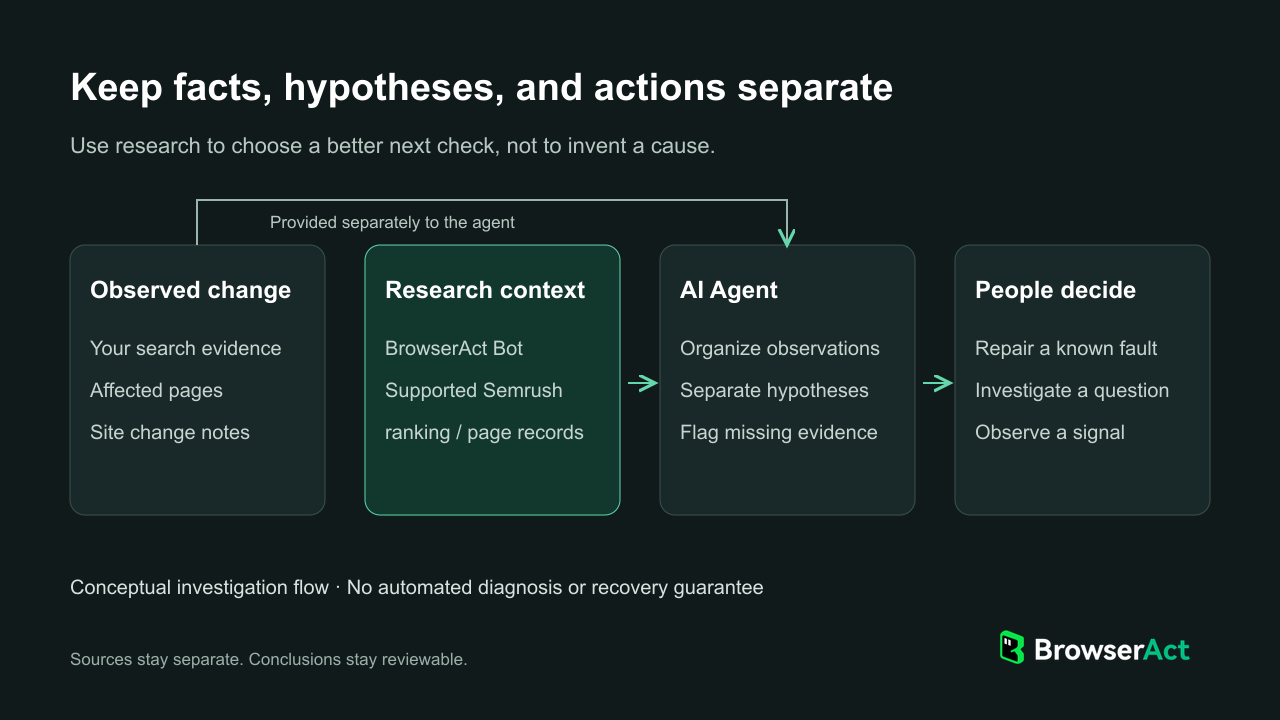
Use BrowserAct for supported research context, then review the evidence before choosing a repair, investigation, or observation.
This can reuse research accessible through a basic Semrush subscription. For teams using their existing Semrush research in an agent, the benefit is a repeatable way to retrieve those records—not additional report permissions. Semrush's native reporting and MCP options may also fit other needs.
Start from your own editable template copy and connect the Semrush account through Standard Browser and Website login. After publishing the Bot, follow the MCP guide to make it available to your agent.
Prioritize Changes and Review What Happens Next
Give each priority an owner and a reason. Repair a confirmed fault affecting a key service page; assign a specific check where the cause is uncertain; observe a small movement when there is no meaningful business effect. This keeps a falling chart from becoming an indiscriminate rewrite backlog.
Keep a pre-change baseline and a record of what changed. Agree when to review the same pages and queries again, allowing for the type of work involved. If performance improves, check other changes and demand conditions before attributing the result to one edit. No tool can promise a recovery date.
An organic traffic drop investigation is useful when it changes what the team does next. Use Semrush to add relevant market context and BrowserAct to bring supported records into your agent. Keep the evidence beside the recommendation so colleagues can review the decision and continue the work.
FAQ
Why did my organic traffic drop suddenly?
First establish whether the decline is in measured search clicks, analytics visits, or an estimate. Check its scope and timing against known tracking or site changes, then investigate the relevant evidence. A sudden drop alone does not identify an algorithm update or a penalty.
Why can clicks fall when rankings look stable?
A sitewide average can conceal changes in important queries. Compare the same query and page groups, then examine impressions and CTR. Demand and the appearance of results are possible lines of enquiry, not conclusions to draw from the average alone.
Does a Semrush traffic drop mean actual visits declined?
Not necessarily. A Semrush traffic estimate is not your analytics record. Validate the alert against your own data, keeping GSC clicks and analytics sessions distinct, before deciding what happened or assigning corrective work.
Should I refresh every page losing traffic?
No. Refresh a page when evidence shows a useful content change, such as correcting outdated material or addressing a relevant audience need. A tracking fault, technical issue, or demand change calls for a different response.
How can an AI agent help investigate a traffic drop?
An agent can organize supplied evidence, compare defined groups, and draft questions or handoff notes. Through MCP it can request supported Semrush reports from a BrowserAct Bot. People still need to provide missing analytics or history, perform technical checks, and review the conclusions.


