How to Build a Monthly SEO Report With Semrush and AI

A client opens your monthly SEO report and asks, “Which pages deserve our attention next month?” A list of ranking changes cannot answer that on its own. A useful report connects search performance to business goals, explains the evidence behind your interpretation, and gives the team a clear next move.
Semrush can supply keyword, page, and backlink research for that discussion. Your analytics and sales data show what happened on your own site. AI can help organize those inputs and explore follow-up questions—but the quality of the report still depends on which evidence you bring and what decisions it supports.
- 1Choose report content and metrics around the business question the report must support.
- 2Keep Semrush research estimates separate from measured clicks and conversions.
- 3Use traceable evidence and comparable baselines for comparisons and recommendations.
- 4Reuse data collection and agent research, while keeping people responsible for reviewing conclusions.
What Should a Monthly SEO Report Include?
Start with a short executive summary: what changed, why it matters to the business, and what you recommend doing next. Put the supporting detail after it. Someone who only reads the first page should understand the main result, the main concern, and the decision you need from them.
Section | What it should answer |
Executive summary | What matters most this month, and what needs a decision? |
Business outcomes | What happened to relevant leads, signups, sales, or other agreed outcomes? |
Search performance | How did clicks, impressions, and important query groups change? |
Rankings and landing pages | Which topics and pages gained or lost visibility? |
Supporting context | Did relevant links, technical issues, or completed work help explain the picture? |
Next actions | What should happen next, who owns it, and what will be checked? |
Treat this as a reporting structure, not a demand to fill every section with charts. A link-building campaign may need a detailed referring-domain review. A content project may need more attention on landing pages and relevant queries. If a metric does not help the reader understand progress or make a decision, move it to an appendix or leave it out.
Choose SEO Metrics That Match the Reader’s Goals
Agree on the outcome before selecting the metrics. A marketing lead focused on qualified enquiries needs a different view from an editor building awareness around a new topic. When preparing SEO reports for clients, agree which outcomes and pages matter before assembling the charts.
For a lead-generation goal, pair search performance on relevant service or product pages with the lead events your business actually tracks. For content discovery, examine visibility and visits around the intended topics, then consider engagement or downstream actions where data is available. Rankings help explain the route to a result; they are not a substitute for the result.
Keep an execution layer for the people doing the work: affected URLs, query groups, research records, and outstanding checks. The client or leadership summary can stay brief while the SEO and content teams retain enough detail to act. That is more useful than sending every audience the same export.
Gather and Compare Data From the Right Sources
Google Search Console, GA4, and Semrush answer different questions. Use the first two to understand your own search performance and measured site activity; use Semrush to add keyword, page, and backlink context. Label each source so the reader knows what a number represents.
Evidence | Useful for | Keep in mind |
GSC clicks, impressions, CTR, and position | Understanding Google Search performance for your property | Keep query, page, country, device, and date filters consistent |
GA4 activity and configured events | Understanding measured visits and business actions | Check channel definitions, tracking changes, and event setup |
Semrush rankings, pages, and backlink research | Adding search-market and competitive context | Estimated traffic is not your measured traffic or revenue |
Work log and business context | Explaining what changed and what the team was trying to achieve | Completing a task does not prove it caused a performance change |
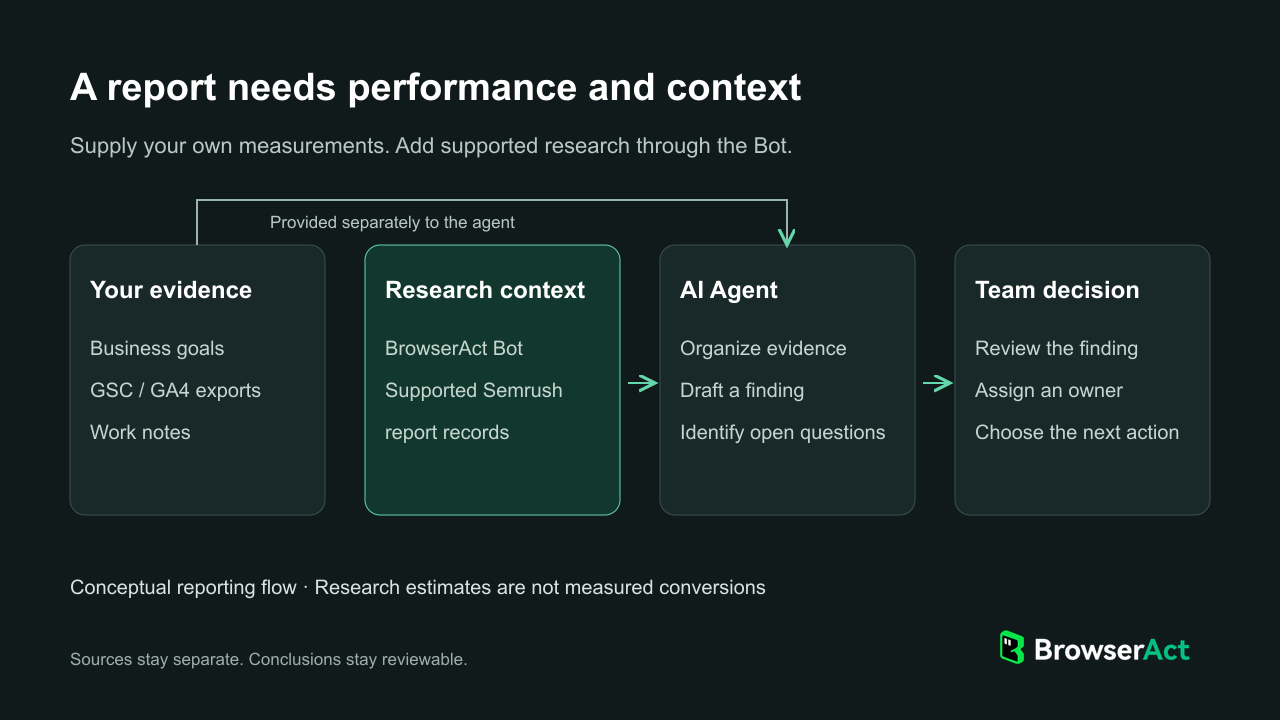
BrowserAct supplies supported Semrush research; your team provides its measured performance and reviews the agent's proposed actions.
Before comparing months, check the scope as well as the dates. Use comparable reporting periods, the same market, and the same page or query group. Consider seasonality where it matters. If you only have a current research snapshot, label it as current context; do not turn it into a month-over-month trend. Save it so the next review has a reference point.
Collect only the supporting research a decision needs. A review of a declining product page may need ranking context; a link-building review may need referring domains. This keeps the report focused and limits time spent assembling data nobody will use.
Turn the Data Into a Clear Report and Action Plan
Write each important finding in a sequence the reader can follow: observation, evidence, interpretation, and action. Keep a possible explanation separate from a confirmed fact. “A product page lost search clicks” is an observation. “The introduction no longer matches search intent” is a hypothesis that needs a closer look at the page and search results.
Here is an illustrative entry showing how a finding becomes a task. It is not a client result or a live Bot example.
Report element | Illustrative entry |
Finding | A commercially important page has fewer GSC clicks in the comparison period |
Evidence to inspect | Page-level GSC changes, relevant query groups, current ranking context, and the work log |
Interpretation | The decline needs investigation; the cause is not yet established |
Next action | Review the affected queries and current results before deciding whether to revise the page |
Owner | SEO lead, with the content owner reviewing any proposed changes |
Follow-up | Record the decision and compare the same scope at the next agreed review |
The next step is specific even while the cause remains uncertain. If the review identifies a content opportunity, the team can then assess its priority using a separate process, such as turning keyword gaps into content priorities.
Use BrowserAct to Bring Semrush Research Into Your AI Agent
BrowserAct brings the recurring Semrush part of that research into your AI agent. Its Semrush Scraper template creates a reusable Bot connected to your own account. Organic Rankings and Top Pages provide material for keyword and page reviews; Backlinks and Referring Domains support link research. Each run requests one report type within your account's access.
MCP lets a compatible AI agent call that Bot as a tool. Instead of exporting another report whenever a question arises, you can request supported Semrush records in the same conversation as your reporting goals, notes, and analytics exports. The agent can use that context to help prepare a finding and its proposed next action for review.
For example, a monthly review might flag a product page for investigation. The team can request relevant domain ranking records, examine which returned entries relate to the page, and use them to frame the next check. BrowserAct supplies the supporting research; it does not establish why clicks fell or supply the GSC and GA4 evidence of business impact.
This can reuse research already accessible through a basic Semrush subscription. Choose BrowserAct when you want those supported browser reports in your team's agent workflow; Semrush's native reporting and MCP options may also fit other needs.
Make Monthly Reporting Repeatable Across the Team
Save the report's scope and underlying records with its recommendations. Include the domain, market, report type, collection date, and any missing results. A colleague can then check a conclusion against its evidence, and next month's reviewer can reuse the research brief instead of rebuilding it from memory.
The account owner can privately share the MCP Server URL and matching API Key with authorized teammates using compatible clients. Each person can request research from the same exposed Bot without receiving the Semrush web password. A shared tool gives the SEO lead and content team a reusable research route; agreed inputs keep their requests aligned. Account access and usage requirements still apply.
Start from an editable copy of the template, connect your Semrush account using Standard Browser and Website login, and publish the Bot. The MCP setup guide explains how to make it available in a compatible agent.
Avoid the Mistakes That Make SEO Reports Hard to Use
Before sharing the report, check for five problems: rankings presented without a business goal, estimates presented as measured results, comparisons with different scopes, AI explanations written as proven causes, and recommendations without owners. Correct those before polishing the layout. A clearer chart cannot repair an unsupported conclusion.
Use AI for the parts that benefit from consistent organization: grouping supplied records, drafting a summary, and collecting open questions. Automated SEO reporting should leave reviewers with less assembly work and a clearer basis for decisions—not just a longer document.
A useful monthly SEO report ends with a decision the team can act on. When that decision needs recurring Semrush research, bring the supported records into your agent with BrowserAct and keep the evidence alongside the recommendation.
FAQ
What should a monthly SEO report include?
Include an executive summary, relevant business outcomes, search performance, important rankings and pages, material risks, and next actions. Add backlink or technical detail when it helps explain the work or a decision; not every report needs every available metric.
Which SEO metrics matter most to clients?
Start with the client's agreed goal. Relevant leads, sales, or signups may be central, with search clicks, query visibility, and landing-page performance explaining progress. A ranking gain on an irrelevant term should not outweigh evidence about the pages and audiences the client wants to reach.
Can Semrush data replace Google Search Console or GA4?
No. Semrush provides search-market research and estimates. GSC reports Google Search performance for your property, while GA4 describes measured on-site activity. Use them together where needed, without treating their metrics as interchangeable.
How can AI help with SEO reporting?
AI can organize supplied records, draft explanations, compare available evidence, and suggest follow-up questions. A compatible agent can also call an exposed BrowserAct Bot through MCP for supported Semrush research. Missing history, analytics, or business context still needs to be supplied or investigated.
Can BrowserAct generate and send the entire report?
The Semrush Scraper template collects supported research records. It is not a complete reporting, GSC/GA4 integration, or report-delivery system. Your agent or other reporting tools can use its output as part of a broader process, with a person reviewing the final report.


