Social Media Finder: How to Find Public Profiles by Name, Username, or Phone Number

Finding one social profile is usually easy. Finding the right profiles across multiple platforms, preserving the evidence, and repeating the process for the next 50 people is where the work starts to break down.
A recruiter may begin with a candidate's name. A creator partnerships team may have only a username. A sales operations team may need to connect a public business phone number to an organization's social presence. Each case needs a different search path, and none of them should end with an unverified list of links.
The practical answer is to choose a social media finder based on the identifier you already have:
- Use a name for broad discovery through public Google results.
- Use a username for direct checks across supported public profile pages.
- Use a complete business phone number when a public page visibly connects that number to social profiles.
BrowserAct provides a separate reusable Bot for each path. The Bots operate on public pages, return structured results, and preserve the signals used to classify a match.
Why Finding the Right Social Profile Is Harder Than Running a Search
The search box is not the hard part. The hard part is deciding whether a result belongs in your dataset.
Common names create convincing false positives
A Google search for a common name may surface dozens of LinkedIn, Facebook, Instagram, and X profiles. Job titles, locations, and snippets can help, but a plausible result is not automatically the right person.
A matching username is a clue, not proof
People reuse handles, but unrelated users can also claim the same handle on different platforms. Some sites return a real missing-profile page; others redirect a nonexistent handle to a homepage, generic error screen, or login wall. A script that only checks whether a URL responds can easily report false matches.
Manual research loses its evidence
Copying profile links into a spreadsheet rarely captures why each record was accepted. The original query, source page, visible phone format, platform status, and validation reason often disappear. When someone reviews the list later, they have to repeat the search.
The process does not scale cleanly
Checking five platforms for one person is manageable. Doing the same for a lead list, creator shortlist, or brand-handle audit becomes repetitive browser work. The output also changes from researcher to researcher unless the inputs, checks, and result fields are defined in advance.
BrowserAct addresses this operational problem by turning live browser steps into reusable Bots. Instead of returning a loose collection of URLs, a Bot can accept a stable input, inspect public pages, classify outcomes, and return structured records that are ready for review or downstream automation.
What Is a Social Media Finder?
A social media finder is a search tool that uses an identifier, such as a name, username, or phone number, to locate relevant public social profiles. A useful finder should do more than generate possible URLs. It should show what it checked, what it found, and what evidence supports the result.
BrowserAct runs these Bots in a live browser. Depending on the selected Bot, it can search public Google results, construct canonical profile URLs, inspect visible profile identity, normalize an input, and return consistent JSON-style output. Completed results can then be reviewed directly, exported, or used through supported API and automation integrations.
Choose the Right Social Media Search Method
Starting information | Best BrowserAct template | Best for | Main limitation |
Person name | Broad profile discovery | Common-name ambiguity and Google index coverage | |
Username | Cross-platform handle checks | A shared handle does not prove shared ownership | |
Complete business phone number | Public business-profile associations | Requires visible public evidence connecting the number and profile |
The three methods complement one another, but they are not interchangeable. A username Bot should not quietly switch to name search, and a phone-number Bot should not infer an association from a partial number.
Method 1: Find Social Media Profiles by Name
When a name is your only reliable identifier, Google is a useful discovery layer because it can surface public profile pages from different platforms in one result set.
The Google Social Media Finder accepts a person name and a result count. It constructs a public Google search, reviews qualifying results, and can return fields such as:
- Platform name
- Profile name or page title
- Direct profile URL
- Description snippet
- Visible follower count, when available
- Result position
- Source search URL
This is more reusable than manually copying the first links from a search page because the output keeps the profile record and its search context together.
Real example: searching by person name
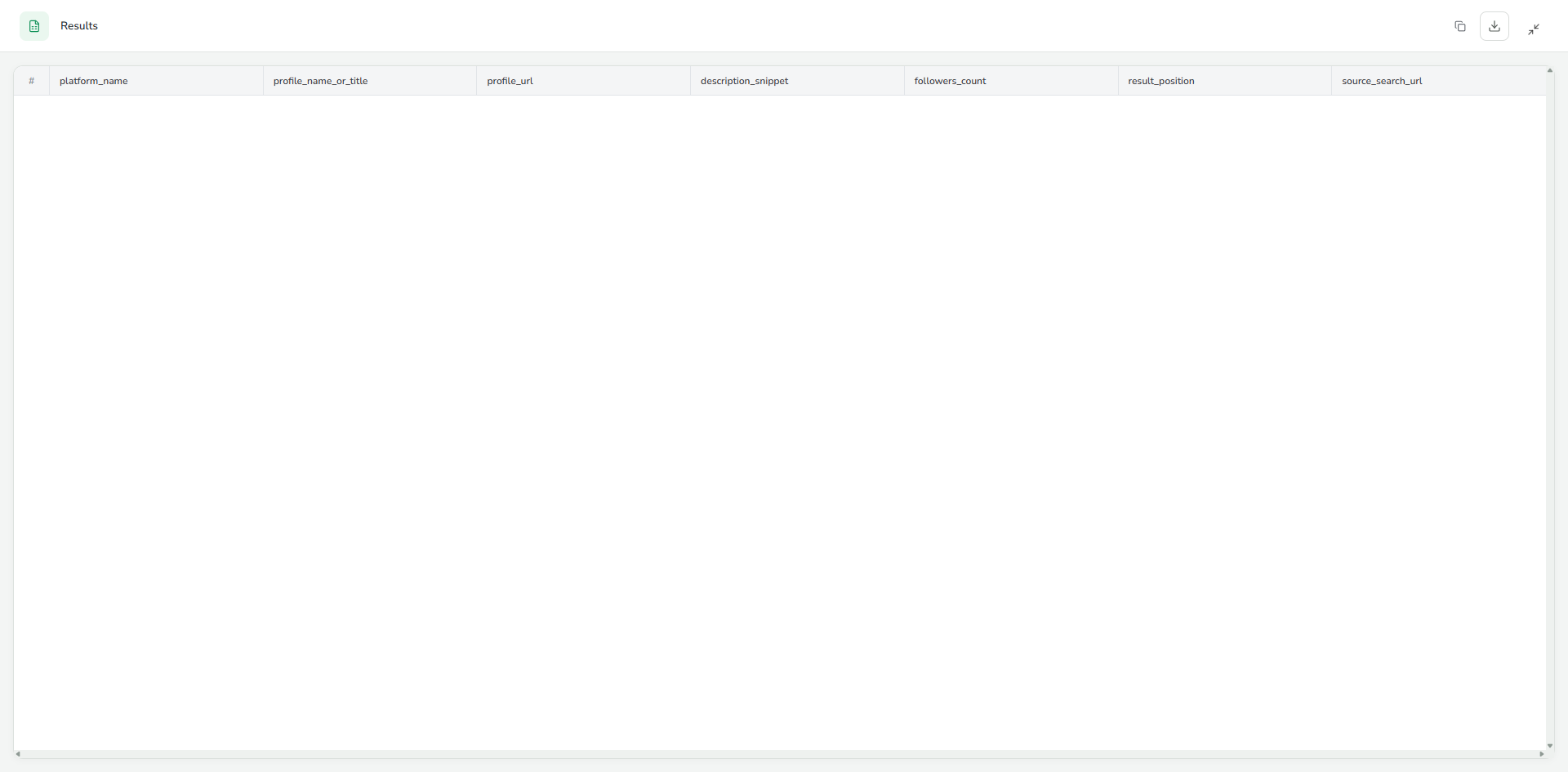
In a real run, the search starts with a person name and a requested result count. BrowserAct constructs the Google query, reviews the available public results, keeps links that qualify as identifiable social profiles, and returns the matching records with their source search URLs.
The screenshot below shows the actual run result. It is the evidence for what the run returned; the article does not replace missing records with assumed matches.
Google-based discovery still depends on Google's current index, the specificity of the name, and the public visibility of relevant profiles. When no qualifying profile is available, the Bot can return an empty result rather than filling the output with weak guesses.
Method 2: Run a Social Media Username Search
A username gives you a narrower starting point. Instead of asking a search engine to interpret a name, the Social Media Username Finder checks one handle across its validated public platform registry.
The Bot normalizes the supplied username, constructs canonical profile URLs, opens the public pages, and separates outcomes such as confirmed, not_found, ambiguous, and access_error. Its published validation covered GitHub, Instagram, Facebook, Pinterest, Telegram, Medium, and Substack.
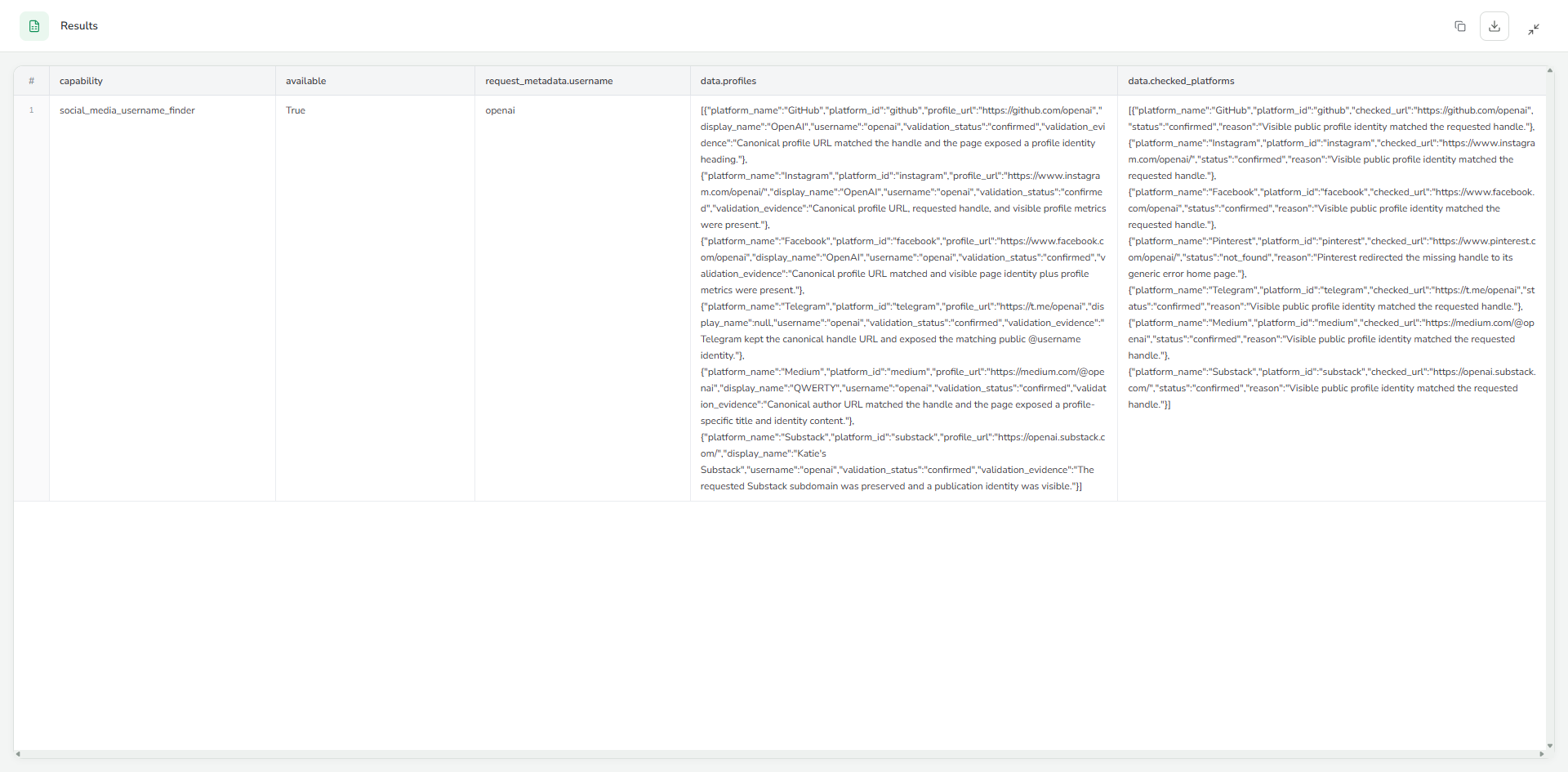
Real example: searching the username openai
In a validated run, the Bot used openai as its input. It returned six confirmed public profiles, while Pinterest was explicitly classified as not_found.
One confirmed record looked like this:
{
  "platform_name": "GitHub",
  "platform_id": "github",
  "profile_url": "https://github.com/openai",
  "display_name": "OpenAI",
  "username": "openai",
  "validation_status": "confirmed"
}
The negative path was tested too. A deliberate nonexistent username returned available=false with data=null.
That behavior is important for any social media username search. A trustworthy Bot needs permission to say “no confirmed profile found.” Otherwise, every canonical URL becomes a false positive waiting to enter a CRM.
Method 3: Find Public Social Profiles by Business Phone Number
Phone-number research needs a stricter evidence standard. BrowserAct's Social Media Phone Number Finder accepts one complete international business phone number. It does not use private reverse-phone databases, infer matches from partial numbers, or require social-platform logins.
The Bot validates the input, generates safe equivalent display formats, searches public pages for the complete number, and verifies visible links between the source and public social profiles.
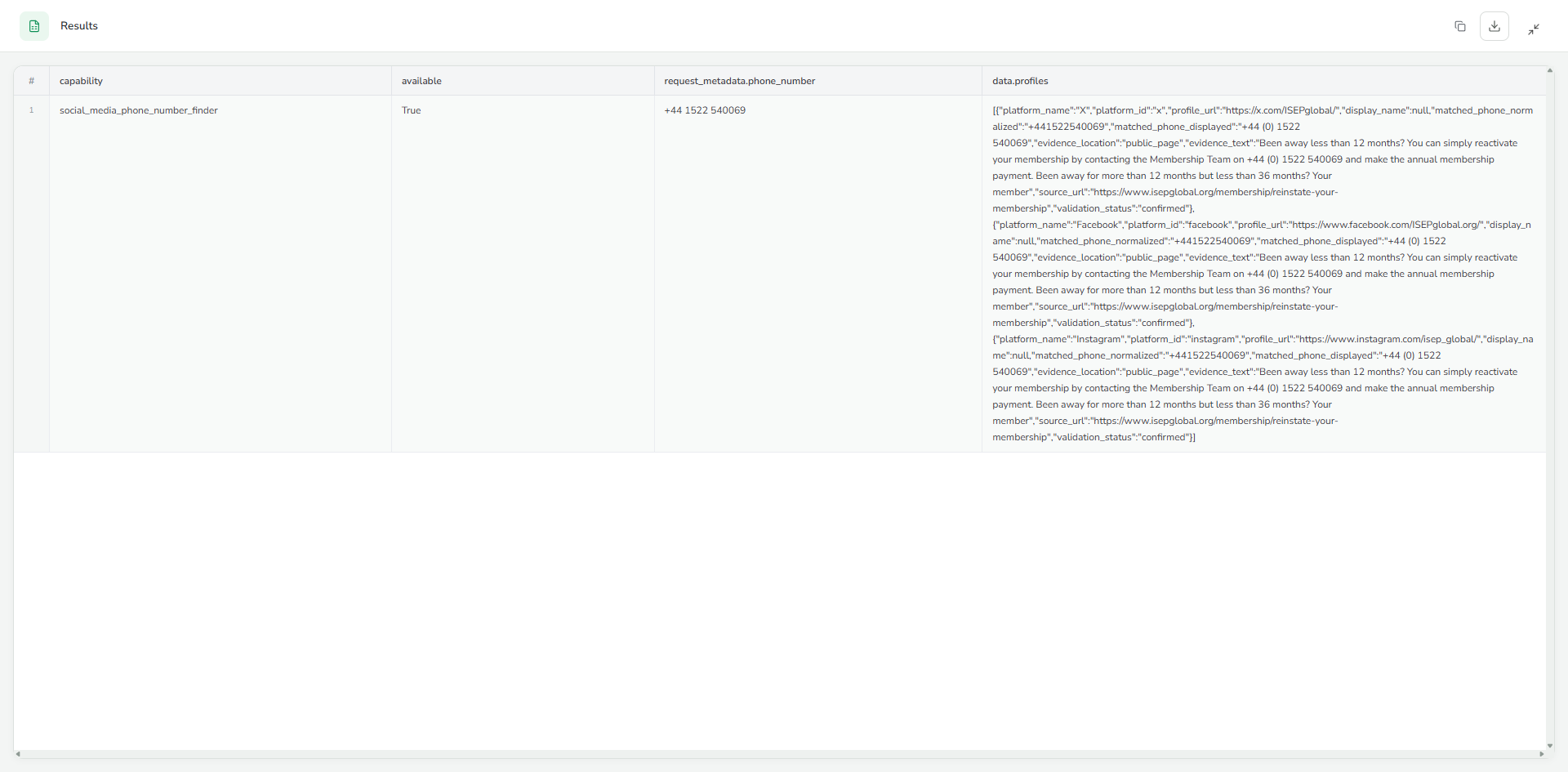
Real example: a public ISEP business number
A validated run used the public ISEP business number +44 1522 540069 and returned three confirmed public associations: X, Facebook, and Instagram.
A reduced version of the X record shows why evidence fields matter:
{
  "platform_name": "X",
  "profile_url": "https://x.com/ISEPglobal/",
  "matched_phone_normalized": "+441522540069",
  "matched_phone_displayed": "+44 (0) 1522 540069",
  "source_url": "https://www.isepglobal.org/membership/reinstate-your-membership",
  "validation_status": "confirmed"
}
The result is a confirmed public association between the business number, the source page, and the linked social profile. It is not a claim about a private person's identity, account ownership, or hidden contact data.
Manual Search vs. a Reusable Social Media Finder
Dimension | Manual search | BrowserAct Bot |
Search path | Varies by researcher | Defined by the selected Bot |
Repetition | Repeat each platform check manually | Reuse the same input and output contract |
Missing profiles | Easy to overlook or misclassify | Can return platform-level terminal statuses |
Evidence | Often lost during copy and paste | Can preserve source URLs and validation reasons |
Output | Notes or inconsistent spreadsheet columns | Structured result fields |
Integration | Requires manual cleanup | Can support export, API, and configured automation paths |
Maintenance | Researcher must remember every step | Bot can be improved when the search process changes |
BrowserAct does not remove the need for human judgment. It removes repeated browser handling and gives that judgment better evidence to work with.
How to Verify a Potential Match
Whether the result comes from Google, a username check, or a business phone search, verify it before using it in outreach or analysis.
- Compare the visible display name with the expected person or organization.
- Check the bio, employer, location, linked website, and other public identifiers.
- Review the source URL and validation evidence returned by the Bot.
- Treat matching usernames, profile images, and follower counts as supporting clues, not standalone proof.
- Keep ambiguous records separate from confirmed records.
For common names, use at least one independent public signal before attributing a profile to a person. For usernames, remember that handle reuse across platforms may indicate a connection, but it does not establish one by itself. These BrowserAct templates read public pages; they do not provide access to private profiles or override platform privacy settings.
What the Real Runs Show
The archived runs demonstrate three legitimate outcomes:
- Confirmed records with visible evidence
- A mixture of confirmed and
not_foundplatform statuses - A successfully completed run with no qualifying profiles
This is more useful than a finder that always returns a long list. In real research, an honest negative result prevents bad data from moving downstream.
How to Create a Custom Social Media Finder Bot
The ready-made templates are the fastest starting point. When your use case needs different platforms, fields, limits, or validation rules, BrowserAct also lets you create an editable Bot.
Option 1: Duplicate the closest template
- Open the BrowserAct template that most closely matches your input.
- Click Create Editable Duplicate.
- Open the duplicate from your Bots list.
- Use Improve when you need to change the input, matching rules, supported platforms, or output fields.
- Run a known positive case and a deliberate no-match case before connecting the Bot to another system.
This option preserves a working foundation. It is usually the best choice when the search method is right but the output contract needs adjustment.
Option 2: Build a Bot from a prompt
Open BrowserAct and start Agent Built from the Home prompt box or through Create → Build with Agent. Describe the Bot in operational terms:
Build a public social profile finder for [website or platform].

Input: [the identifier supplied for each run].
Navigation: [where the Bot should search or which public pages it should open].
Return: [the exact fields required in every result].
Validation: [what counts as confirmed, not found, ambiguous, or an access error].
Limit: [the maximum records or pages to inspect].
Do not use login-only pages or private data.
Agent Built explores the live website, determines the browser path, and tests the Bot. If it asks for a missing URL, field, or expected output, provide that detail in the same build conversation.
Before relying on the Bot, test at least three cases:
- A known positive input
- A deliberate no-match input
- An ambiguous or restricted-page input
Then review the result count, source URLs, required fields, and negative-result behavior. Once the Bot is ready, use Run Task for direct execution or configure supported API and MCP integrations from the Bot's integration surfaces.
Frequently Asked Questions
What is a social media finder?
A social media finder is a tool that uses a name, username, phone number, or another identifier to locate relevant public social profiles. The strongest tools also return source links, validation evidence, and clear no-result states.
How can I find someone on social media by name?
Start with a public Google profile search and compare results using visible details such as employer, location, bio, and linked website. BrowserAct's Google Social Media Finder turns that search into a reusable structured Bot, but common names still require independent verification.
How do I find social media accounts by phone number?
Use a complete international business phone number and look for public pages that visibly connect the number with official social links. BrowserAct's phone-number template returns only associations supported by visible public evidence; it does not search private databases or infer matches from partial numbers.
Can I run a social media username search for free?
You can open the BrowserAct username template and review its current run options before starting. The Bot accepts one handle and returns confirmed profiles and platform checks. BrowserAct account and credit conditions may change, so review the current product interface rather than relying on an old pricing claim.
Does a matching username prove the accounts have the same owner?
No. A matching handle is one signal. Confirm the connection using public display names, bios, websites, organizations, locations, or other independent evidence.
Can a social media finder access private or hidden accounts?
No. The BrowserAct templates covered in this guide read public pages. They do not grant access to private accounts, bypass login requirements, or override platform privacy settings. Public results can also change as profiles are renamed, removed, deindexed, restricted, or redirected, so important records should be rechecked before use.
Find Public Profiles with a Bot You Can Reuse
The best search method depends on what you know. Use a name for broad Google discovery, a username for direct platform checks, or a complete business phone number when a public source visibly connects it to social profiles.
BrowserAct turns each method into a reusable Bot with defined inputs, structured outputs, and reviewable evidence. Choose the starting point that matches the identifier you already have:
- Have a name? Use Google Social Media Finder
- Have a username? Use Social Media Username Finder
- Have a public business phone number? Use Social Media Phone Number Finder
Create a BrowserAct account to run a published template or turn the method into a custom reusable Bot.


