Turn Competitor Keyword Gaps Into Content Priorities With AI and Semrush

Your team can produce only so much content next month. In the selected market, Semrush can show keywords with competitor rankings but no recorded ranking for your site. Keyword gap analysis gives you a starting list, but it doesn't decide which topics deserve a writer's time—or whether a new article is the right response at all.
BrowserAct brings a supported Semrush research task into a compatible AI agent through a reusable Bot. Instead of preparing another export for each planning session, you can request the configured research and ask the agent to review it alongside your product, audience, and existing pages. The goal is a short list of decisions your team can explain, not a longer list of keywords.
- 1Keyword gaps are candidate inputs, not automatically valid content opportunities.
- 2Use business relevance, search intent, and existing pages to decide which directions to investigate first.
- 3BrowserAct makes the research task reusable, the agent organizes the reasons, and your team checks the evidence and chooses the action.
- 4Keep sources, open questions, and next steps in the priority brief so it remains useful in later planning cycles.
Decide What Is Worth Your Content Budget
A keyword can be missing from your rankings and still be wrong for your business. It may describe a feature you don't offer, serve an audience you don't sell to, or belong to a competitor's branded navigation. Its search volume doesn't resolve any of those questions.
Before asking an agent to prioritize gaps, give it the context an editor would need: what you sell, who buys it, the market you're targeting, the pages you already have, and the content work your team can realistically take on. Provide a current page inventory yourself; a Semrush research result is not a complete account of your website.
Consider a B2B software company that sells project management tools to small teams. Its content lead is planning the next month's work and has selected a few relevant competitors. The company supports simple task coordination, but not enterprise portfolio management. Both topics might appear in competitor research. Only one fits the product it can deliver.
That distinction belongs in the research request. “Find gaps for our next content plan” is less useful than asking which returned terms match small-team coordination needs, which may belong on existing pages, and which should be excluded because they describe products or buyers outside the company's scope.
Bring the Semrush Records Into the Agent With BrowserAct
BrowserAct supplies the reusable collection layer. Its Semrush template provides supported research actions that you configure against your own account. A published Bot can be called through BrowserAct's MCP server by a compatible agent, or through BrowserAct API by an application. This is a browser-based Bot connection, separate from Semrush's official API and MCP service.
For this workflow, start with the supported Keyword Gap task and the missing-keyword records available to your account. Keep the target domains and country database attached to the result. Where available and needed, supported Organic Rankings or Top Pages tasks can add context about competitor landing pages. Use only fields the selected task actually returns; don't ask the agent to fill missing metrics from memory.
The account still determines which reports and data are accessible, and the task must be permitted to automate. BrowserAct retrieves records; it does not independently verify search intent, read every page on your site, or decide whether a topic will convert. Those judgments require your business context and, where necessary, further research.
The useful handoff is simple: Semrush provides source research, BrowserAct makes the supported task callable, and the agent organizes the result around your content decision. The same Bot can serve another planning session without rebuilding the collection task.
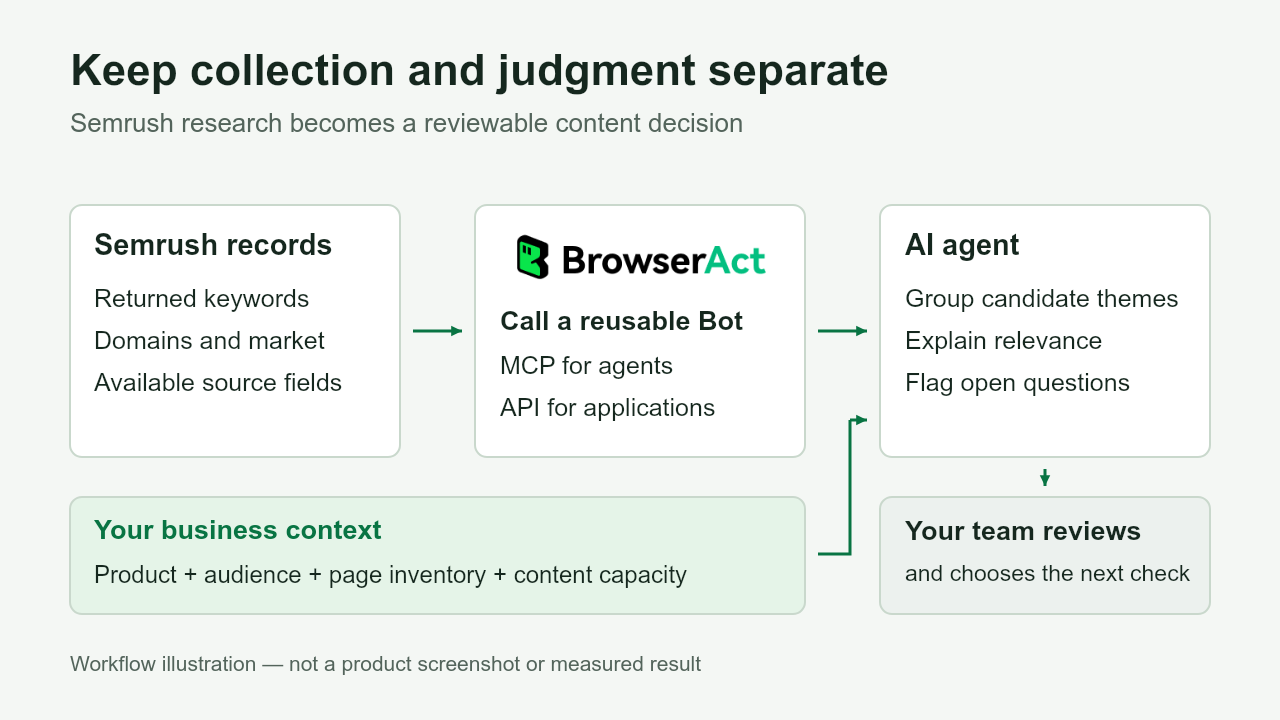
BrowserAct connects the research task; your business context guides the agent's interpretation, and your team reviews the next action.
Sort the Gaps Into Three Content Decisions
Ask the agent to separate the returned terms into candidate actions before proposing article titles. This keeps the conversation focused on allocating effort rather than turning every missing keyword into another page.
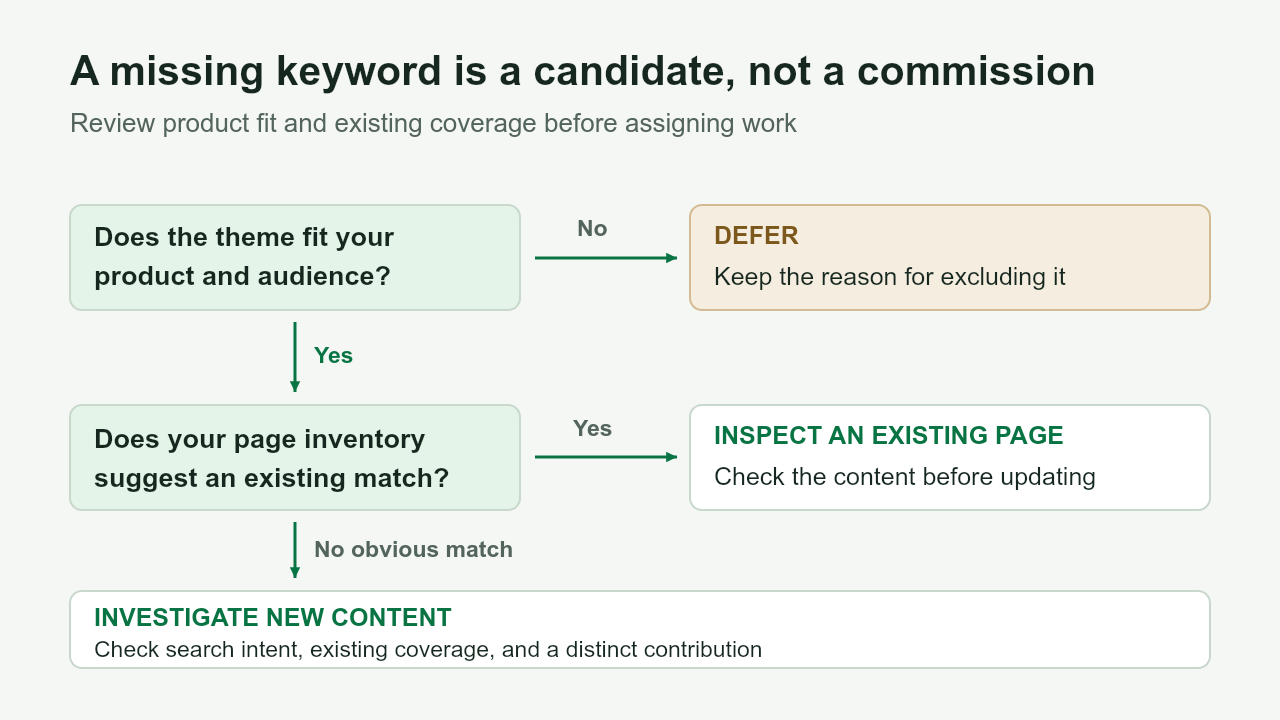
Use fit and existing coverage to choose the next check. A keyword gap alone is not a publishing decision.
Investigate a new page
A candidate may justify new content when it matches a customer need your product serves and your page inventory shows no obvious place to address it. Treat that as a reason to investigate, not an instruction to publish. Review the search results and your existing content before committing to a separate page.
In the small-team software example, a theme around coordinating recurring tasks could be relevant if the product supports that job. The agent should explain the connection to the buyer's problem and identify what needs checking: the dominant search intent, any related page you already have, and whether the team has something useful to contribute.
Check an existing page first
If the page inventory includes a relevant guide or product page, the next step may be to inspect it rather than commission a new article. A term missing from the supplied ranking records doesn't prove that the page is poor or that a paragraph is missing.
For example, “task dependencies” might appear related to an existing task-management guide. The agent can flag that page for review. It needs the page's actual content—and first-party performance data if you want to assess performance—before recommending a specific update. The commercial benefit is avoiding duplicate work while keeping the reason for the review visible.
Defer a topic that doesn't fit
Some keywords are worth excluding even when competitors rank for them. A small-team product shouldn't prioritize an enterprise software comparison merely because it has attractive demand metrics. Branded navigation terms and unrelated use cases may also belong outside the plan.
Record the reason for deferring each theme. That gives the next planning meeting a useful reference and prevents the same unsuitable terms from repeatedly consuming review time.
Candidate action | What supports it | What to check before committing |
Investigate new content | Relevant customer need; no obvious page in the supplied inventory | Search intent, existing coverage, and a distinct contribution |
Inspect an existing page | A relevant page appears in the inventory | Actual page content and any available first-party performance evidence |
Defer | Weak product fit, wrong audience, or navigational intent | Whether the exclusion still makes sense when business priorities change |
Give the Content Meeting a Shortlist With Reasons
The agent's most useful output is a reviewable brief. For every proposed theme, it should show the supporting records, its connection to your business, the candidate action, and what remains uncertain. “Competitor ranks for this” is evidence of a difference, not a complete business case.
Use search volume and difficulty to inform the discussion, not settle it. A smaller, relevant theme may deserve investigation before a broad topic the product cannot serve. If you don't have evidence about conversion potential or production effort, leave those judgments open instead of turning them into precise scores.
A useful brief can follow this structure:
Brief field | What the team needs to see |
Theme and supporting keywords | Which returned records led to this candidate |
Source context | Competitor domains, market, report type, and collection date |
Business relevance | The customer problem and product capability it relates to |
Existing page | A possible destination from the supplied inventory, or “needs checking” |
Candidate action | Investigate new content, inspect an existing page, or defer |
Reason and open question | Why it belongs here and what evidence is still missing |
Next action | A concrete check the editor or SEO specialist can own |
For the software company, the meeting might result in investigating a recurring-task theme, reviewing the existing task-management guide, and deferring enterprise portfolio topics. These are illustrative decisions, not measured results from a Bot run. Each decision should follow from the actual records and business context supplied in your own review.
That is where the business value becomes visible: the editor can explain why a topic made the shortlist, the SEO specialist knows what to verify, and the team can distinguish a research candidate from work ready to commission.
Reuse the Research Tool for the Next Planning Cycle
Open the Semrush template and click Create Editable Duplicate in the upper-right corner. Switch to Standard Browser, then open Browser settings → Website login and choose Account credentials, Import cookies, or Log in manually to connect your account. Publish the Bot and connect it to your chosen agent using the MCP guide; applications can use the published Bot's API instructions and authentication guide.
For the next cycle, reuse the supported task with the relevant targets and update the business context and page inventory. Keep different markets and collection dates identifiable rather than treating every result as directly comparable. Bot calls use the owner's BrowserAct credits and remain subject to account allowances; reusing a Bot does not mean unlimited runs.
You don't need to start with a full SEO strategy. Choose one upcoming content meeting and one focused comparison. Judge the workflow by whether it helps the team narrow the candidates, understand the evidence, and agree on the next checks.
Keyword gap analysis earns its place in a content plan when it leads to a defensible decision. BrowserAct helps bring research from the subscription you already have into that decision, while your agent helps organize the options and your team decides where to invest.
Copy the template, connect your account, and reuse supported research tasks through BrowserAct API or MCP.
FAQ
Does a keyword gap mean I need a new page?
No. First check whether an existing page could serve the relevant intent. A missing keyword may justify a page review, further research, or no action. It is not proof that new content is required.
Should I prioritize the highest-volume keywords?
Not on volume alone. Consider whether the query matches your customers and product, what content already exists, and whether you can provide a useful answer. Volume is a demand estimate, not a forecast of leads or revenue.
What business information does the agent need?
Provide your product or service, target audience and market, selected competitors, current page inventory, and content constraints. If page content or performance data is missing, the agent should mark its recommendations for further checking.
What does BrowserAct do in this workflow?
BrowserAct packages a supported Semrush browser research task into a reusable Bot, callable through its MCP server or API. It provides the collection connection; interpreting the records and deciding content priorities happen downstream.
Can I reuse the same Bot next month?
Yes, for supported inputs and tasks while the account access and login remain valid. If login expires, reconnect through Browser settings → Website login. Update the business context, inventory, and research targets as needed. Check each result's market and date before using it in a comparison.


