How to Clean Scraped Data Without Losing the Original Values

To clean scraped data, keep an original copy, define a rule for each field, create separate cleaned values, and compare the result with the source. Start with a small sample. A currency symbol, blank cell, or repeated URL can look like a simple formatting problem while changing the meaning of your analysis.
- 1Preserve raw values and source links. A cleaned amount should be traceable to the string it came from.
- 2Apply narrow rules: parse a known price format, trim accidental whitespace, and identify duplicates using a suitable key. Flag uncertainty instead of guessing.
- 3Validate the downloaded result. This article's BrowserAct example was checked against two listing pages and its native CSV and JSON files.
Inspect the problem before choosing a cleaning rule
Separate extraction problems from formatting problems. A price that includes £ can be parsed once its currency and number format are known. A field that actually contains delivery time or working hours needs a corrected extraction target. Removing its letters would produce a tidy but misleading number.
Also confirm the record structure. If a CSV contains one row with an entire array of products inside a cell, fix the table's row definition first. The website-to-Excel tutorial shows a verified one-record-per-row export. Cleaning values inside the wrong record structure leaves the original usability problem in place.
Write down what each field means before editing it. For a price, that includes the amount, currency, unit, and whether tax is included when the source states it. For a date, it includes the date convention and the precision actually available. For an identifier, it includes whether leading zeros are meaningful.
Keep raw and cleaned fields together
This guide uses Books to Scrape, a public educational sandbox. The site explicitly says its prices and ratings are fictional. Our example demonstrates data handling, not real product pricing.
The Bot keeps raw_price and raw_availability, then adds price_amount, currency, and availability. The first pair represents displayed source text; the second contains narrowly defined derived values. Title, product URL, and rating complete the eight-field record.
Field | Rule used in the tested example | Reason |
raw_price | Preserve the displayed GBP string | Keep evidence for checking the conversion |
price_amount | Parse the site's known price format as a number | Allow numerical comparison without destroying the original |
currency | Store GBP for this site's pound-denominated demo prices | Keep the unit beside the numerical amount |
raw_availability | Preserve rendered text, including surrounding space | Make the text cleanup inspectable |
availability | Trim surrounding whitespace only | Remove formatting noise without changing the wording |
product_url | Resolve to an absolute URL; use as duplicate key | Identify each book and retain a source link |
Build the BrowserAct cleaning example
Use a small listing first. The prompt requests both original and cleaned fields so you can inspect the transformation before connecting the output to another tool.
1. Open BrowserAct Dashboard
Click the left-side +, choose Quick Start, and enter the sandbox URL. Add the requirements below to the data input. You can also use the Custom Bot entry for the full request.
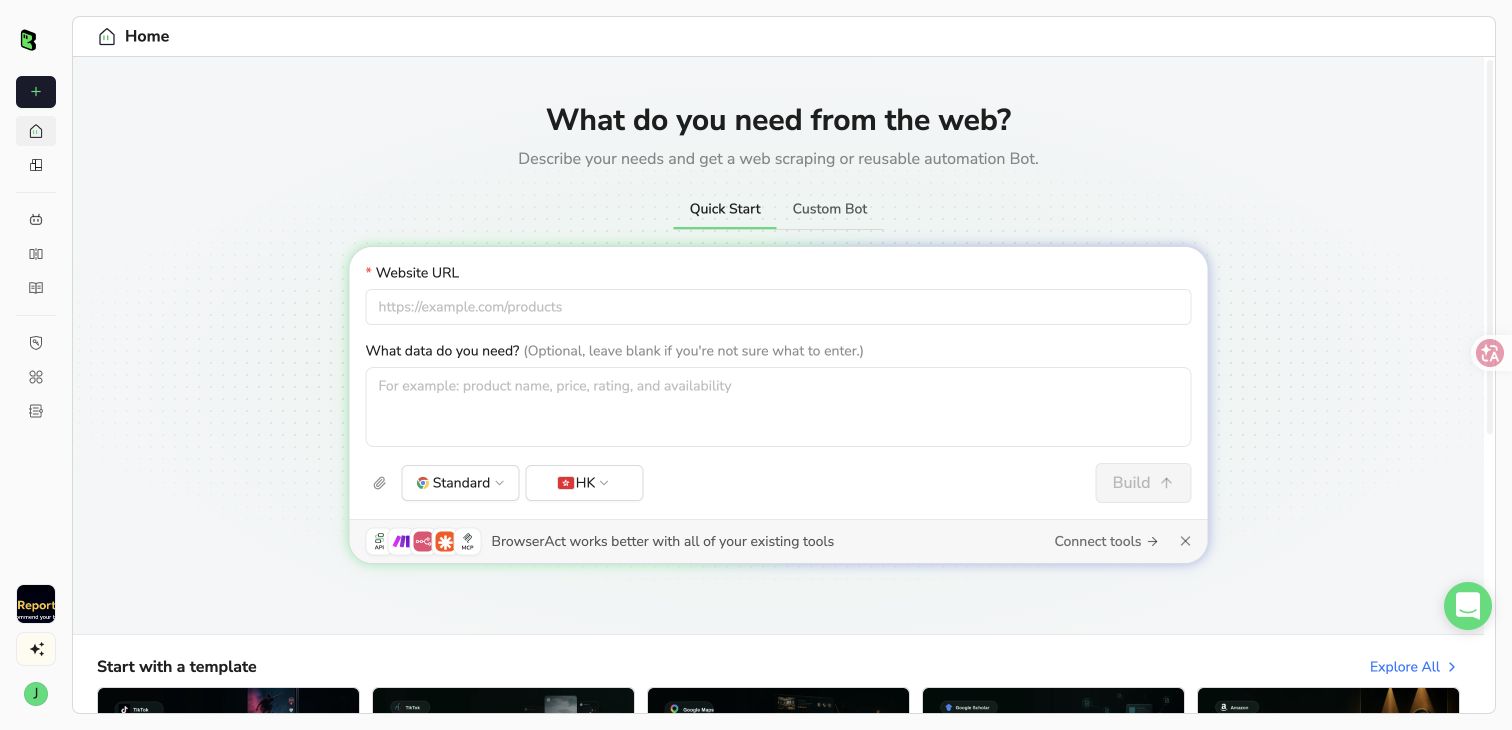
The actual BrowserAct Quick Start workspace used to create this example.
2. Copy the complete prompt
Keep the row definition, original fields, and derived-field rules together. If you adapt the target website, change the cleaning rules only after checking that site's actual values.
Scrape data from any website.
Describe the data you need. Get a Bot — a reliable, reusable scraper.
3. Handle access requirements if they appear
The sandbox did not require login in our tests. On an authorized site that does, complete login, CAPTCHA, 2FA, or confirmation manually when requested. A stopped unattended run may require a rerun after access is resolved. Do not treat an access failure as a dataset full of missing values.
4. Review the transformation and export
Run the built Bot, compare original and cleaned columns, check the record count, and download CSV or JSON using Download result file. Keep the original download. Confirm that each numerical price matches its raw string and each availability value differs only by the intended whitespace cleanup.
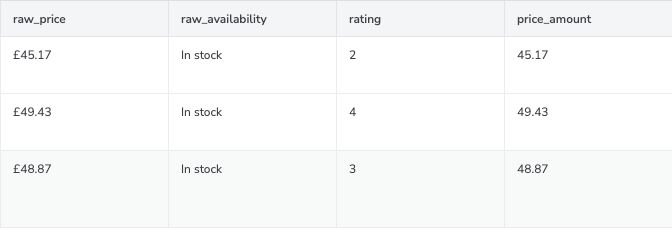
Original price, rendered availability, rating, and derived numerical amount from the actual three-book Travel run. This is a crop of the real result view; the native file retains all eight fields.
What the actual output showed
The build test returned five homepage books. Independent runs of the published version then returned two homepage books and three books from the Travel category. On October 21, 2026, we checked the downloaded files against those source pages.
For the Travel example, £45.17, £49.43, and £48.87 became numerical amounts 45.17, 49.43, and 48.87. The original strings remained available. The source's rendered availability contained a leading space; the cleaned value was In stock. Full titles and product links matched the source.
The homepage's two-record CSV and JSON downloads also agreed on the number of books. The JSON used one books collection with numerical amount and rating values; the CSV contained one book per row. No manual flattening or replacement dataset was needed.
Our runs contained no repeated product URLs. We verified that the exported URLs were unique; we did not inject duplicate cards into the live source to prove every possible collision case. The practical checks below still matter when you adapt the workflow.
Handle duplicates, missing values, and dates deliberately
For duplicates, decide whether a row represents an entity or an observation. Keeping the first occurrence of a product URL works for this single-page list. A price-history dataset may need the same URL at different collection times, so deleting every repeated URL would remove useful observations.
For missing values, distinguish an absent source value from a parsing or access failure. Keep a missing amount empty or null according to your output contract. Do not replace it with zero unless that value is actually stated or a documented downstream rule requires it. The data cleaning explainer covers the difference.
For dates, keep the original string until its convention is known. 04/05/2026 is ambiguous without context. A month-only stay date does not justify inventing a day. Record the available precision, and store a full date only when the source supports one. Dates were not part of the tested book dataset; a date conversion needs its own source and output checks.
If you process the file in Excel, pandas, n8n, or another tool afterward, describe that as a separate downstream stage. Do not attribute those external transformations to the original BrowserAct run.
Check exceptions before repeating the workflow
Keep a small validation record with the requested count, returned records, unique identifiers, failed conversions, and representative source comparisons. A zero-error report is useful only if the rules actually test the fields that matter.
For a price amount, compare it with the raw string and retain the currency. For a text field, check that cleanup did not remove meaningful characters or rewrite the original words. For repeated jobs, watch for changes in missing-field frequency or source format rather than assuming yesterday's rules still fit.
This example reads one listing page and handles a known GBP format. Extending it to multiple pages, currencies, or websites requires new tests. Preserve that boundary when deciding whether the output is ready for a spreadsheet or an automated business workflow.
Frequently Asked Questions
How do I clean scraped data?
Preserve the original file, define each field's meaning, apply explicit rules to separate cleaned fields, and compare the output with the source. Start with a small sample before repeating the workflow.
Can BrowserAct clean values during extraction?
The custom Bot tested here derived numerical GBP amounts and trimmed availability while retaining original fields. Other transformations require their own implementation and verification.
Should I delete duplicate product URLs?
For a current product list, a URL can be a useful duplicate key. For historical observations, the same URL at different collection times can be valid. Define the record before deleting rows.
What should I do with missing values?
Keep them distinguishable from zero and investigate whether the cause is absence, access failure, or parsing failure. Apply a documented treatment rather than silently guessing.
Does a clean CSV prove the scraper collected everything?
No. Formatting, source accuracy, and collection coverage are separate checks. Verify page coverage and requested limits as well as the values inside the file.


