How to Scrape LinkedIn Without Coding: A No-Code Workflow

A LinkedIn scraper no code search usually comes from someone who does not want to become the team’s Selenium maintainer. They have a real job to finish: export a list of companies, collect public company posts, save Sales Navigator research, pull post URLs into a spreadsheet, or build a small weekly monitoring table. They do not want Python scripts, broken selectors, cookies, proxy setup, or a half-working browser extension that only works in a demo. That is the right instinct. The goal is not
- 1A no-code LinkedIn scraper is useful only when it produces a source-linked table, not just a pile of copied fields.
- 2Start with the target type: company page, post URL, profile, job, search result, or Sales Navigator list. Each needs a different schema.
- 3No-cookie and no-login tools can reduce session risk, but they usually trade off data depth and authenticated-only fields.
- 4BrowserAct is the first recommended workflow when the user needs prompt-led browser execution, custom fields, screenshots, stop rules, and CSV/Sheets export without writing code.
- 5Keep the workflow read-only. Do not automate likes, follows, comments, messages, reposts, connection requests, or publishing from a scraping workflow.
What does “LinkedIn scraper no code” actually mean?
A no-code LinkedIn scraper is a workflow that collects selected visible LinkedIn data and exports it into a structured table without asking the user to write or maintain scraping code.
That can mean a browser extension, a SaaS scraper, an Apify actor with a UI, a spreadsheet-connected tool, a workflow automation platform, or a prompt-led browser bot. The “no-code” part should mean you can describe the job, provide inputs, choose fields, and export results without touching Python, Puppeteer, Selenium, or APIs.
The keyword evidence shows why this topic matters. In the BrowserAct LinkedIn topic workbook, LNK-02 has 10 evidence rows, an average evidence score of 4.56, and 10 P0/P1 rows. The workbook includes long-tail queries around LinkedIn scraper no code, LinkedIn scraping without coding, LinkedIn export to CSV, LinkedIn search to spreadsheet, LinkedIn posts scraper no login, and LinkedIn scraper no cookie. Some terms have small visible Ahrefs metrics, such as LinkedIn to CSV at US search volume 10 and LinkedIn company posts at US search volume 10 with CPC $9, while many long tails show no visible SV/KD. That pattern is normal for bottom-of-funnel workflow searches: the exact phrasing varies, but the job is specific.
The no-code workflow that actually works
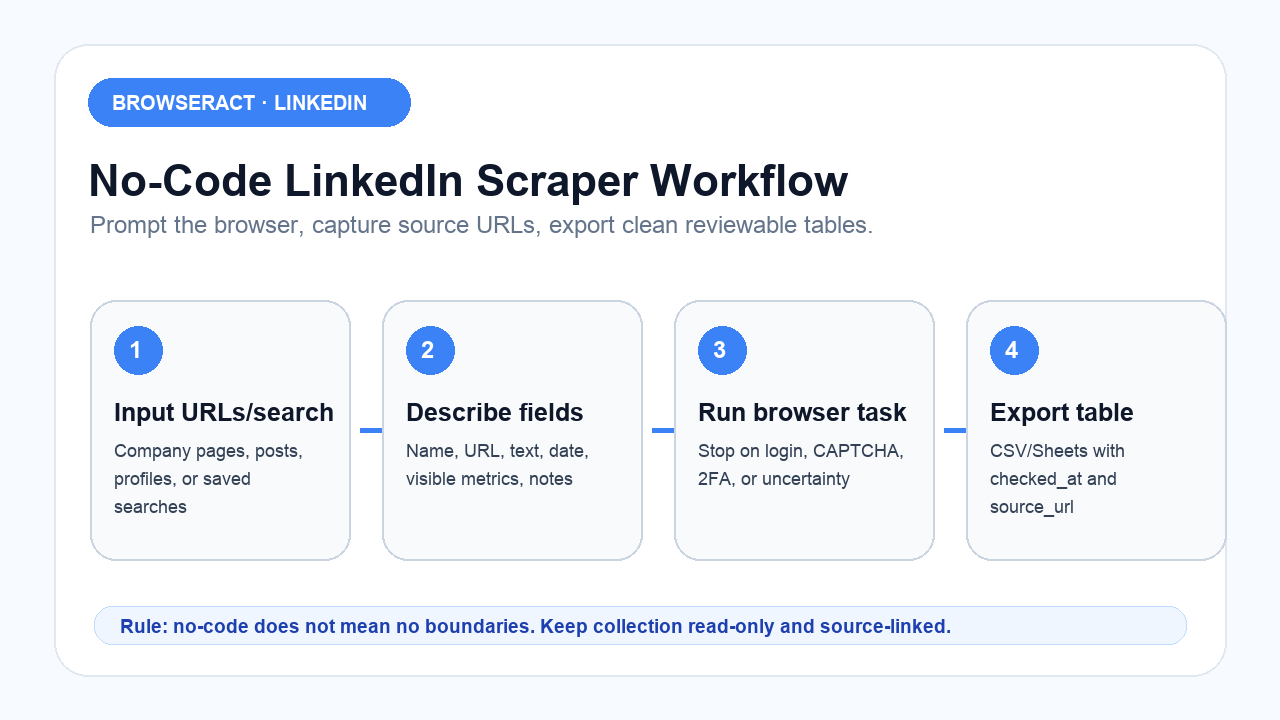
The workflow is simple, but only if you keep the boundaries tight.
Step 1: Choose the LinkedIn target type
Do not start with “scrape LinkedIn.” Start with the page type.
Target type | Example job | Output shape |
Company pages | Build competitor or account table | One row per company |
Company posts | Monitor recent public posts | One row per post |
Post URLs | Analyze comments or engagement | Posts table + comments table |
Profiles | Build source-linked prospect research | One row per profile, review required |
Jobs | Track hiring signals | One row per job |
Search results | Export a filtered research list | One row per result |
Sales Navigator | Research lead/account list | One row per lead/account, plus search URL |
Step 2: Define the fields before you run
No-code does not mean “collect everything.” A good export schema is small:
Field | Why it matters |
| Proves where the row came from |
| Company, post, profile, job, search result |
| Human-readable entity |
| Description, post text, title, or headline |
| Followers, comments, reactions, job count, if visible |
| The search or segment that produced the row |
| Timestamp for audit and refresh |
| Success, partial, missing, review, stopped |
| New, approved, ignored, needs human review |
Pro Tip: Put source_url, checked_at, and extraction_status in every no-code export. These three fields turn a cute automation into an auditable workflow.
Step 3: Run the browser task
This is where a prompt-led browser workflow is different from a rigid form.
With BrowserAct, the user can describe the workflow:
Use this CSV of LinkedIn company page URLs.
Open each public page in the browser.
Collect visible company name, LinkedIn URL, website, industry, location, visible follower count, description, and recent public post URLs.
Export a CSV with source_url, checked_at, extraction_status, and review_status.
Stop and flag the row if login, CAPTCHA, 2FA, payment wall, unusual activity, or access uncertainty appears.
Do not like, follow, comment, message, connect, repost, or publish.
That prompt is not glamorous. Good no-code workflows rarely are. They are clear, bounded, and repeatable.
Step 4: Export to CSV or Sheets
CSV is usually the safest first export because it forces you to inspect the data. Once the schema is stable, push to Google Sheets, Airtable, Clay, CRM notes, or a database.
The mistake is connecting automation to downstream systems too early. If the first run produces duplicate rows, missing source URLs, or unclear null fields, pushing it into CRM only spreads the mess faster.
No-cookie and no-login tools: what you gain and lose
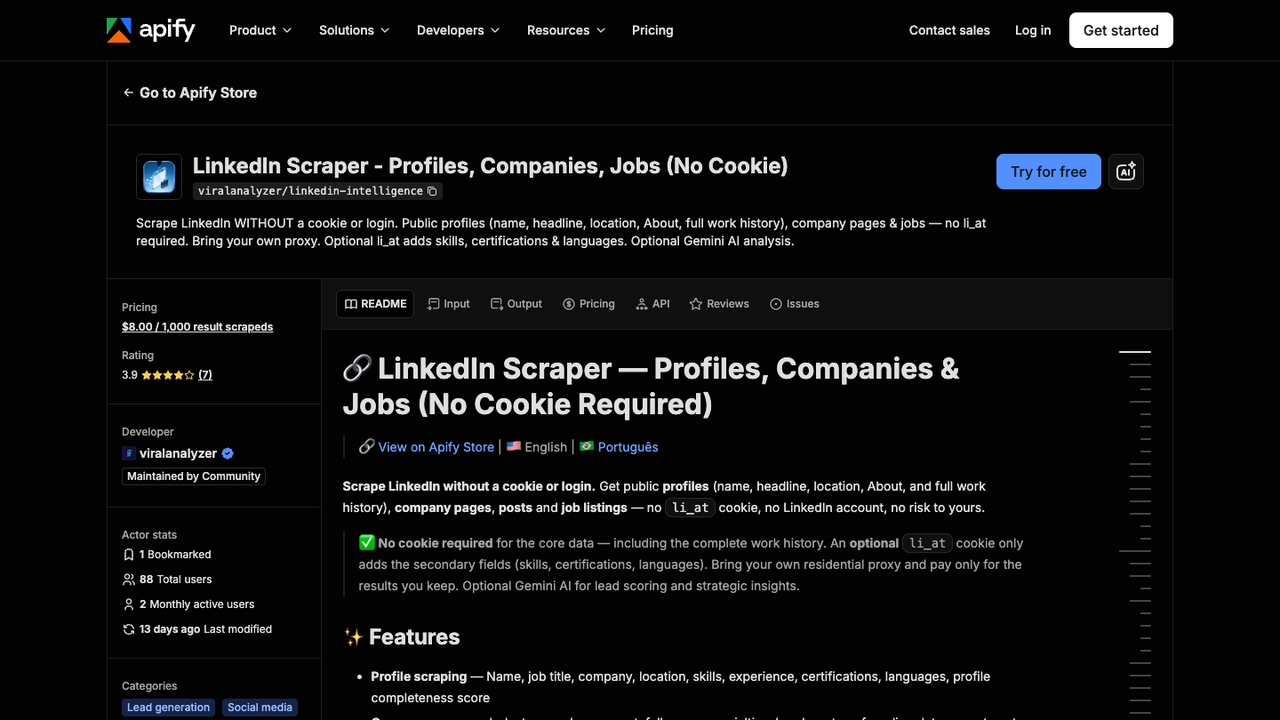
Official Apify screenshot. Source: LinkedIn Scraper - Profiles, Companies, Jobs (No Cookie).
No-cookie and no-login tools are appealing because they avoid asking the user to supply a LinkedIn session. That can be a real advantage for public-data workflows.
But there is a trade-off.
Public, logged-out, or no-cookie collection may miss fields that only appear in a logged-in context. Some tools expose optional cookie modes for deeper data, but that changes the risk and review profile. A non-technical team should not treat cookie collection as just another toggle.
Route | Advantage | Trade-off |
No-cookie public scraper | Lower session handling burden | Less depth, more missing fields |
Browser extension | Familiar in-browser experience | Can be brittle or limited to a narrow workflow |
Scraper API | Structured endpoint output | Less flexible for custom research |
Browser bot | Flexible visual workflow | Needs stop rules and review |
Manual review | Highest judgment | Slower |
Public company posts without login
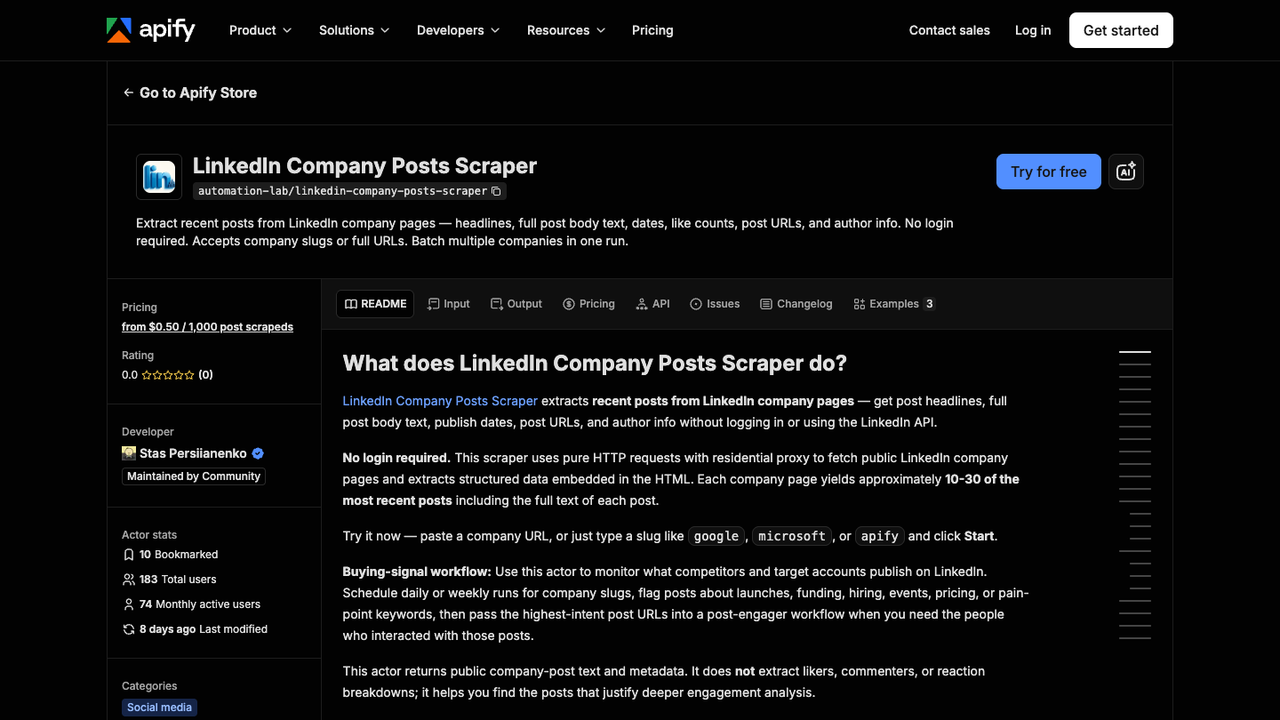
Official Apify screenshot. Source: LinkedIn Company Posts Scraper.
Company posts are one of the cleanest no-code starting points because the task is specific: collect recent public posts from a list of company pages.
A useful company-post export should include:
Field | Use |
| Join to account table |
| Source evidence |
| Content analysis |
| Recency |
| Prioritization |
| Topic clustering |
| Partner/customer references |
| Launch, hiring, funding, event, partnership |
| Audit timestamp |
Run the scrape once with browser-act. Package the repeatable path with Skill Forge.
- 1. An agent uses browser-act to search Google Maps, scroll listings, inspect place pages, and extract visible fields.
- 2. The team validates the schema: business name, category, address, phone, website, rating, review count, and source URL.
- 3. browser-act-skill-forge turns the proven flow into a reusable scraper Skill for future agent runs.
Recommended no-code LinkedIn scraping workflows
Once the search intent is clear, the tool order becomes easier.
1. BrowserAct for prompt-led no-code scraping
Use BrowserAct first when the job changes by target list, page type, or field list.
How it works: describe the LinkedIn workflow in a prompt, provide URLs or search instructions, define allowed fields, set stop rules, run the browser task, and export structured data.
Strengths: custom fields, source URLs, screenshots, scheduled runs, browser execution, human handoff flags, and no-code iteration.
Limitations: not a license to collect private data or automate engagement; the user still needs boundaries and review.
Best for: company-page research, post monitoring, Sales Navigator-style CSV research, public profile review, source-linked prospect tables, and workflows where the schema changes.
2. Apify actors for stable no-code jobs
Use Apify when an existing actor matches the job closely: company posts, jobs, public profiles, comments, or search targets.
How it works: configure inputs in the actor UI, run the actor, export CSV/JSON, and schedule recurring runs if needed.
Strengths: marketplace variety, API access, scheduling, CSV/JSON output.
Limitations: actor scope matters. A company-post actor may not support keyword search; a no-cookie actor may miss deeper authenticated fields.
Best for: stable jobs with known inputs and users comfortable testing actor output.
3. Browser extensions for simple one-off exports
Extensions are useful when the workflow is narrow: export a Sales Navigator search, download a list, or push visible rows to CSV.
Strengths: familiar browser UI, low setup, fast for a single job.
Limitations: often narrower than the marketing copy suggests; may not handle custom fields, source screenshots, or recurring monitoring well.
Best for: one-time exports and teams that already understand the export limits.
4. Workflow tools for handoff and enrichment
n8n, Make, Clay, Zapier, and similar tools are useful after the data is collected. They should not replace the extraction schema. They should move reviewed data into the next system.
Strengths: routing, enrichment, notifications, CRM handoff.
Limitations: garbage in, garbage out. A bad scrape becomes a bad automation.
Best for: post-processing, enrichment, alerts, and syncing reviewed rows.
Workflow | Best fit | Main advantage | Watch-out |
BrowserAct | Custom no-code browser research | Prompt-led fields, source URLs, screenshots | Needs clear stop rules |
Apify actors | Stable no-code scraper jobs | Actor marketplace and CSV/JSON export | Scope varies by actor |
Browser extensions | One-off list export | Fast in-browser flow | Narrow workflow, brittle fields |
n8n/Clay/Make | Downstream automation | Handoff and enrichment | Should not fix bad source data |
A no-code prompt template
Use this as the starting point:
Use this CSV of LinkedIn URLs and target types.

For each row:
1. Open the public LinkedIn URL in the browser.
2. Collect only visible fields requested in the schema.
3. Save source_url, source_type, checked_at, extraction_status, and review_status.
4. If a requested field is missing, leave it blank and explain why in missing_reason.
5. Export the result to CSV.

Do not like, follow, comment, message, connect, repost, publish, or change account state.
Stop and flag the row if login, CAPTCHA, 2FA, payment wall, unusual activity, private data, or access uncertainty appears.
The important part is not the tool syntax. It is the operating logic: visible fields only, source evidence, missing-field reasons, and stop conditions.
Common mistakes
The first mistake is using one workflow for every LinkedIn page. Company pages, profiles, posts, comments, jobs, and Sales Navigator results are different data models.
The second mistake is treating no-code as no-review. No-code makes execution easier; it does not remove judgment.
The third mistake is skipping null reasons. If a field is empty, the downstream user needs to know whether the field was unavailable, unsupported, blocked, or genuinely blank.
The fourth mistake is connecting directly to outreach. Keep scraping, enrichment, and outreach as separate stages.
The fifth mistake is using a tool because it has the longest feature list. Pick the route by the job: one-time export, recurring monitor, custom research, or downstream enrichment.
Pro Tip: Run the first batch with 20 rows. If the schema cannot survive 20 rows, it will not survive 2,000.
7-day rollout plan
Day 1: Define the use case
Pick one workflow: company-page research, company-post monitoring, profile review, jobs tracking, post/comment analysis, or Sales Navigator-style research.
Day 2: Build the input CSV
Include source_url, source_type, segment, and research_goal. Do not start with thousands of rows.
Day 3: Run a small test
Use 20 rows. Check missing fields, duplicates, redirects, and stop conditions.
Day 4: Fix the schema
Add checked_at, extraction_status, missing_reason, and review_status. Remove fields nobody uses.
Day 5: Add screenshots only where useful
Screenshot high-priority evidence such as launches, hiring signals, pricing mentions, funding, or important competitor posts. Do not screenshot every row.
Day 6: Export to Sheets or CSV
Have the downstream owner review the table. If the owner cannot act on the fields, revise before scaling.
Day 7: Schedule the workflow
Only schedule after the schema works. Add dedupe keys and run IDs for recurring checks.
Final recommendation
If your job is a fixed public dataset and an actor matches it, use that actor. If your job is a one-time list export and a browser extension handles the fields, use the extension. If your job is a custom, source-linked browser workflow that changes as the research changes, start with BrowserAct.
No-code is not about avoiding thinking. It is about spending your thinking on the workflow instead of on selectors, scripts, and broken exports.
That is the win.
Two Skills, One Repeatable Browser Workflow
Start with live browser execution when the agent needs to understand a page. Move to Skill Forge when the same scraper should run again without re-exploring the site.
Run once with browser-act
Give Codex, Claude Code, Cursor, Windsurf, or another agent a real browser for rendered pages, clicks, scrolling, screenshots, DOM extraction, and network inspection.
Open browser-act SkillPackage with Skill Forge
Explore the site once, verify the extraction path, then generate a callable Skill package that other agents can reuse for batch jobs or scheduled workflows.
Open Skill ForgeFurther reading: LinkedIn research
Frequently Asked Questions
Can I scrape LinkedIn without coding?
Yes. Use a no-code scraper, actor, browser extension, or BrowserAct workflow to collect visible data and export it to CSV or Sheets.
What is the best no-code LinkedIn scraper?
Use BrowserAct for custom prompt-led workflows, Apify actors for stable scraper jobs, and browser extensions for narrow one-time exports.
Can I scrape LinkedIn without a cookie or login?
Some tools support public no-cookie or no-login collection, but they may return fewer fields than authenticated workflows.
Can I export LinkedIn to CSV without coding?
Yes. Define the target pages and fields, run a no-code workflow, and export a source-linked CSV with checked_at and extraction_status.
What should a no-code LinkedIn scraper export?
At minimum: source_url, source_type, visible fields, checked_at, extraction_status, missing_reason, and review_status.
Is no-code LinkedIn scraping safe?
No-code does not remove risk. Keep workflows read-only, collect visible data only, and stop on login, CAPTCHA, 2FA, or access uncertainty.
Can BrowserAct scrape LinkedIn without coding?
BrowserAct can run prompt-led browser workflows, collect visible fields, capture source URLs, export tables, and stop when risky states appear.


