OpenCode Permissions for Browser Automation Safety

OpenCode permissions for browser automation become important the moment an agent can do more than read. Reading a docs page is low risk. Opening a logged-in billing dashboard is not. Searching Reddit is low risk. Posting from the company account is not. Viewing a customer record may be allowed. Retrying a failed job, issuing a refund, changing a plan, or sending a message is a different class of action. OpenCode gives teams a permission system for agents, tools, Skills, shell commands, edits, an
-
1OpenCode permissions use
allow,ask, anddenyto control whether actions run automatically, require approval, or are blocked. -
2OpenCode’s agent configuration supports primary agents, subagents, per-agent permission overrides, and pattern-based rules for tools such as
bash,edit,task,external_directory, andskill. - 3Browser automation needs an extra boundary because browser UIs contain high-risk actions that may look like ordinary buttons to a model.
- 4BrowserAct should own the browser identity, session, evidence, blocked state, and human handoff rules.
- 5The safest architecture is read-only by default, approval-gated for writes, and evidence-based for every completed browser task.
What are OpenCode permissions?
OpenCode permissions are configuration rules that decide whether an action is allowed, denied, or sent to the user for approval. The official OpenCode permissions docs define three actions: allow, ask, and deny.
That small set is powerful because it can be applied globally and then narrowed by tool or agent. OpenCode’s docs show examples for bash, edit, and broader permission configuration. The Agents docs also show per-agent permission overrides and note that keys such as read, edit, glob, grep, list, bash, task, external_directory, lsp, and skill can accept shorthand or object syntax for fine-grained control.
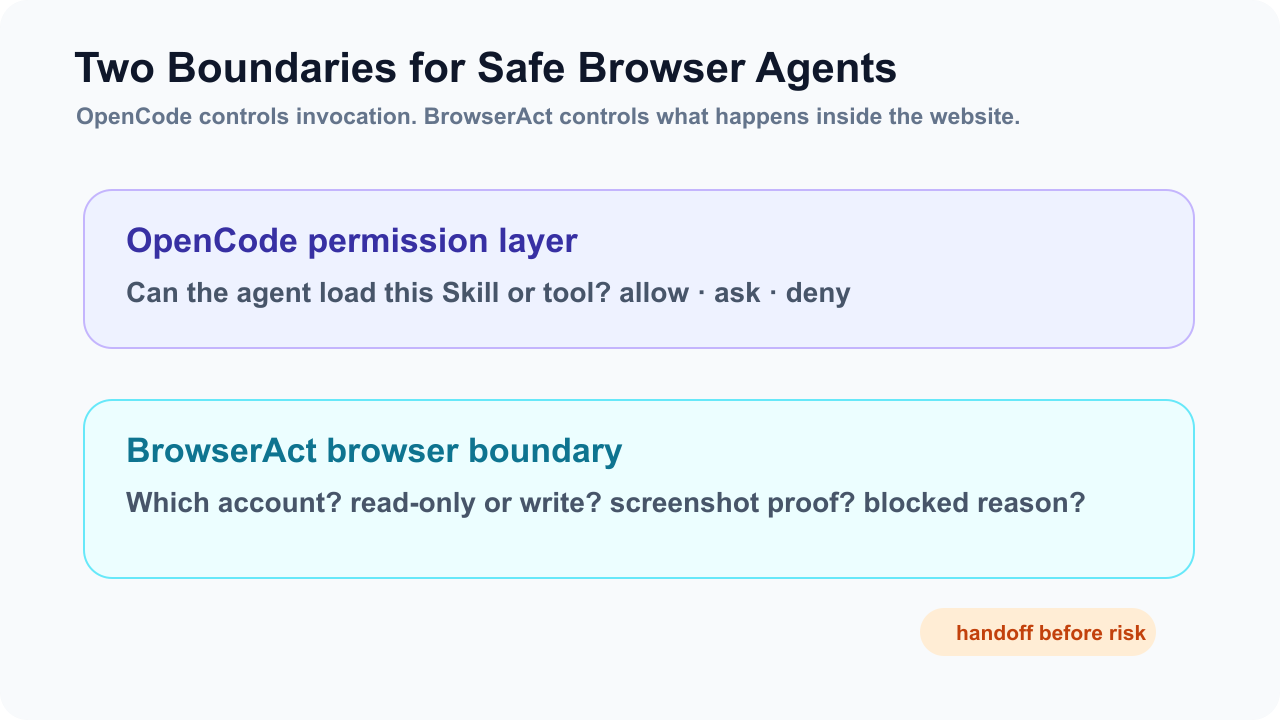
For normal coding work, that prevents accidental edits or shell commands.
For browser automation, it is only half of the safety story.
OpenCode can decide whether an agent may load a Skill or run a tool. BrowserAct still needs to make the web action safe: which account is open, whether the workflow is read-only, what counts as a risky UI step, and when the browser must stop for human approval.
Pro Tip: Treat OpenCode permissions as the model-side boundary and BrowserAct session rules as the browser-side boundary. You need both when the task touches logged-in pages.
The browser safety problem OpenCode cannot solve alone
OpenCode can configure agents. It can make a planning agent read-only. It can deny edits. It can ask before shell commands. It can restrict Skill loading. Those are real controls.
But a browser is not just another text tool.
Inside a browser, the same page can contain low-risk and high-risk actions:
Page | Low-risk action | High-risk action |
SaaS billing | Read plan name and invoice status | Change plan or update payment method |
Support console | View error logs | Retry job, refund, message customer |
Social media | Search public posts | Like, follow, repost, publish, DM |
Ecommerce | Read price and stock | Add to cart, purchase, change address |
Government portal | Search public record | Submit form, download private data |
Finance dashboard | Read current balance | Transfer, trade, change settings |
That is why BrowserAct needs to enter the design early. It gives the agent a browser lane with an explicit identity, action class, evidence requirement, and handoff rule. OpenCode permissions say whether the agent may attempt the workflow; BrowserAct determines how the workflow behaves inside the website.
A safe permission pattern for browser automation
Start with a simple principle: read-only first.
Your first browser automation workflow should collect evidence, not change state. If the agent cannot reliably open the page, verify the account, identify the source, capture screenshots, and return structured data, it should not be allowed to click anything irreversible.
Here is a practical OpenCode permission shape:
{
  "$schema": "https://opencode.ai/config.json",
  "permission": {
    "*": "ask",
    "edit": "deny",
    "bash": {
      "*": "ask",
      "grep *": "allow",
      "git status *": "allow",
      "rm *": "deny"
    },
    "skill": {
      "*": "ask",
      "browser-public-research": "allow",
      "browser-readonly-dashboard": "ask",
      "browser-admin-write": "deny"
    }
  }
}
This configuration does not claim to be universal. It is a pattern:
- default to
ask - deny destructive local actions
- allow low-risk inspection
- ask before loading sensitive browser Skills
- deny workflows that automate irreversible admin actions
Then BrowserAct adds the runtime browser contract.
The BrowserAct side might say:
Browser identity: support-readonly
Allowed: search, open record, read visible fields, screenshot, export structured result
Forbidden: retry, refund, save, submit, message, delete, update settings
Blocked: CAPTCHA, 2FA, account selector, payment, publish, destructive confirmation
Evidence: final URL, screenshot, account label, retrieved_at, PASS/FAIL/BLOCKED
This is the approach that actually works: permission gates before the task, browser boundaries during the task, evidence after the task.
How to split OpenCode agents for safer browser work
OpenCode’s official Agents docs describe primary agents and subagents. Primary agents handle the main conversation. Subagents are specialized assistants that primary agents can invoke for specific tasks. OpenCode also supports per-agent permissions.
That maps cleanly to browser automation.
Instead of giving one agent broad authority, split the work:
Agent | OpenCode role | BrowserAct role | Permission posture |
| Decide task and output schema | No browser session | Read-only, no edits |
| Load approved browser Skill | Public or read-only session | Skill ask/allow, writes forbidden |
| Validate screenshots and fields | No browser action | Read-only |
| Receive blocked action summary | Human decision point | No automatic browser write |
If the social-media worker can only read and screenshot, it cannot accidentally post. If the support-console worker can only collect logs, it cannot retry a customer job. If the ecommerce worker runs in an isolated BrowserAct session, it cannot inherit cookies from the social account.
This pairs naturally with Concurrent Browser Automation, where each browser lane has a clear owner and output path.
Pro Tip: Do not make the “approver” another autonomous browser worker. Make it the handoff point: the agent summarizes evidence, then a human decides whether to continue.
BrowserAct handoff: the missing permission state
OpenCode has ask. BrowserAct needs BLOCKED.
That difference matters.
Ask is a permission request before an action. BLOCKED is a browser-state result after the agent reaches a trust boundary. A CAPTCHA, 2FA page, account chooser, payment screen, destructive confirmation, or publish composer is not just a permission prompt. It is evidence that the workflow crossed into a higher-risk state.
A safe BrowserAct workflow should return:
- what page caused the block
- what the agent was trying to do
- screenshot
- final URL
- visible account label if available
- why the action requires human review
- next safe step
This keeps the model from guessing.
It also keeps the human from redoing the whole task. The browser session is preserved, so the human can take the smallest required action and let the workflow continue if appropriate.
For setup, start with the BrowserAct install guide, then make the first workflow read-only before adding approval-gated actions.
Give your agent a real browser, then turn the workflow into a Skill.
- 1. Use browser-act when an agent needs to open, click, scroll, extract, or inspect a live site.
- 2. Use browser-act-skill-forge when the workflow should become reusable across runs and agents.
- 3. Keep the operational boundary simple: automate what the user can already do in the browser.
Three safe OpenCode browser automation scenarios
Scenario 1: internal support console review
The agent needs to inspect a failed customer job and draft a support response.
Allowed:
- open customer record
- read visible error message
- compare with runbook
- capture screenshot
- draft response
Forbidden:
- retry job
- refund
- message customer
- change plan
- save settings
This is where BrowserAct’s evidence-first workflow matters. The agent can return a report; the human keeps control of customer-impacting actions.
Scenario 2: social monitoring
The agent needs to search public posts about a product launch.
Allowed:
- search
- open public posts
- collect author, date, visible engagement, URL
- screenshot source
Forbidden:
- like
- repost
- follow
- DM
- publish
Tools such as BrowserAct’s Social Media Finder can be useful as a repeatable discovery lane, but the OpenCode Skill should still forbid write actions explicitly.
Scenario 3: ecommerce price monitoring
The agent needs to track products across several stores.
Allowed:
- search product category
- apply filters
- read price, stock, seller, rating, delivery promise
- export structured data
Forbidden:
- add to cart
- checkout
- change saved address
- log into personal accounts
For commerce data, BrowserAct workflows can pair with assets like Amazon Bestsellers Scraper or the Amazon Product Search API skill. The OpenCode permission layer keeps the agent from turning research into a transaction.
A decision table for permission design
Use this table before you let an OpenCode agent touch the web:
Question | If yes | Permission design |
Does the task only read public pages? | Use public extraction first | Skill allow may be acceptable |
Does it require login? | Use named BrowserAct identity | Skill ask; browser read-only |
Can it change account state? | Separate read and write steps | Browser write action blocked by default |
Can it publish or message? | Human-owned action | Return draft only |
Can it spend money or move funds? | Never fully automate | BLOCKED + human review |
Does it need recurring runs? | Convert stable path to Skill | Isolated session + output schema |
Does it need multiple agents? | Assign lanes | One session, one owner, one output path |
How to write the permission section inside a browser Skill
The Skill body should be plain and concrete:
## Permissions and browser boundary

Allowed:
- Open approved URLs.
- Search, filter, scroll, and read visible fields.
- Capture screenshots and final URLs.
- Return structured data.

Forbidden:
- Submit forms.
- Save settings.
- Publish, repost, like, follow, message, or email.
- Buy, refund, transfer, trade, delete, or retry jobs.
- Enter passwords, one-time codes, or private credentials.

Blocked states:
- CAPTCHA
- 2FA
- account selector
- payment page
- destructive confirmation
- publish composer
- unexpected login

If blocked:
- stop
- capture screenshot
- return final URL
- explain why human handoff is required
This section does more than protect the user. It improves output quality. The model spends less time improvising around forbidden actions and more time completing the allowed task.
Pro Tip: Use verbs in the Skill boundary. “Read, search, filter, screenshot” are allowed verbs. “Submit, save, publish, buy, delete, retry” are blocked verbs. Models follow verbs better than vague policy language.
Where this fits in the OpenCode content hub
The existing OpenCode pillar covers multi-model browser execution. This article covers the safety layer.
The cluster should connect like this:
- Pillar: OpenCode Browser Automation
- Supporting: OpenCode Skills browser automation
- Supporting: OpenCode permissions for browser automation
- Supporting: OpenCode web scraping for dynamic sites
- Supporting: OpenCode multi-agent research workflows
- Supporting: OpenCode model evaluation on real browser tasks
That structure lets readers enter from different intents:
- “How do I make it reusable?”
- “How do I keep it safe?”
- “Why does fetch fail?”
- “How do I split agents?”
- “How do I compare models fairly?”
BrowserAct appears naturally in all five because each problem needs browser execution, session control, evidence, or handoff.
Conclusion
OpenCode permissions are necessary for browser automation, but they are not sufficient alone.
They control what the agent may invoke. BrowserAct controls what happens inside the browser: identity, session, read-only boundaries, evidence, recovery, and handoff. That combination is what turns risky web automation into a workflow a team can actually review.
Start with the safest path: one read-only browser Skill, one named session, one output schema, one evidence package. Then expand only when the workflow proves it can stop safely.
If you are building OpenCode agents that need to operate websites, use BrowserAct as the browser execution layer, not as an afterthought.
Sources
Two Skills, One Repeatable Browser Workflow
Start with live browser execution when the agent needs to understand a page. Move to Skill Forge when the same scraper should run again without re-exploring the site.
Run once with browser-act
Give Codex, Claude Code, Cursor, Windsurf, or another agent a real browser for rendered pages, clicks, scrolling, screenshots, DOM extraction, and network inspection.
Open browser-act SkillPackage with Skill Forge
Explore the site once, verify the extraction path, then generate a callable Skill package that other agents can reuse for batch jobs or scheduled workflows.
Open Skill ForgeRelated reading: Headless Browser Automation With Human Takeover
Further reading: Coding agent integrations
Frequently Asked Questions
What are OpenCode permissions for browser automation?
They are allow, ask, and deny rules that control what an OpenCode agent may invoke before it runs browser-related tools or Skills.
Is OpenCode permission enough to make browser automation safe?
No. OpenCode controls model-side permissions, while BrowserAct should control browser identity, session state, action boundaries, evidence, and handoff.
What should be read-only by default?
Search, filtering, scrolling, reading visible fields, screenshots, and structured extraction should be allowed before any write action is considered.
Which browser actions should require human handoff?
Publishing, messaging, payments, refunds, trades, deletion, retrying jobs, saving settings, 2FA, CAPTCHA, and account selection should require human review.
How should OpenCode agents be split for safe browser work?
Use separate agents for planning, browser research, evidence review, and approval so one autonomous worker does not both collect evidence and execute risky actions.
Can BrowserAct help with logged-in websites?
Yes. BrowserAct can use authorized browser identities, preserve session state, capture evidence, and stop for human handoff when a workflow reaches a trust boundary.


