BrowserAct Codex Plugin: Give Codex Real Browser Automation

Codex can plan a task, inspect a codebase, edit files, run tests, and explain what changed. But many real workflows do not stay inside a repository. They cross into dashboards, logged-in apps, dynamic pages, form flows, search results, screenshots, and browser-only state.
Codex can plan a task, inspect a codebase, edit files, run tests, and explain what changed. But many real workflows do not stay inside a repository. They cross into dashboards, logged-in apps, dynamic pages, form flows, search results, screenshots, and browser-only state.
That is where the new BrowserAct Codex plugin matters.
BrowserAct has successfully launched in the Codex plugin marketplace as an installable plugin named BrowserAct. The listing includes BrowserAct for browser automation through the BrowserAct CLI, plus BrowserAct Skill Forge for turning verified website exploration into reusable Skill packages. For Codex users, this creates a cleaner path from agent reasoning to real browser action.
Instead of treating the browser as a manual side channel, Codex can now reach for a purpose-built browser automation layer when a task needs live page interaction, web data extraction, visual verification, or a session that only exists inside a browser.
- 1BrowserAct has successfully launched in the Codex plugin marketplace as the `BrowserAct` plugin.
- 2The BrowserAct Codex plugin brings BrowserAct CLI browser automation into Codex workflows.
- 3The plugin listing includes BrowserAct for browser automation and BrowserAct Skill Forge for verified reusable website Skill packages.
- 4BrowserAct is useful when Codex needs live page interaction, sessions, screenshots, extraction, network capture, or repeatable browser workflows.
- 5The strongest SEO focus for this article is `BrowserAct Codex plugin`, supported by `BrowserAct CLI`, `Codex plugin marketplace`, and `browser automation for Codex`.
Why Browser Automation for Codex Matters
Agent work often starts with code, but it rarely ends there.
A developer might ask Codex to test whether a product page renders correctly after a frontend change. A growth team might need a quick CSV of public product listings. An operations team might need to check a logged-in dashboard before updating a report. A support engineer might need to verify that a form flow still works after a release.
Without browser automation for Codex, those steps often become manual:
- The user opens the page and copies visible data back into the chat.
- The user takes screenshots and asks the agent to infer what happened.
- The agent tries a static fetch and misses JavaScript-rendered content.
- The workflow stalls when login, interaction, or visual state matters.
That gap is not about intelligence. Codex can reason about the task. The missing piece is execution against real websites.
BrowserAct gives AI agents a browser layer built for that execution. It is designed for navigation, clicking, typing, selecting, uploading files, screenshots, JavaScript-rendered content extraction, network capture, session-aware workflows, and verification assistance when a browser task needs confirmation or manual intervention.
The plugin marketplace makes that capability easier to discover and reuse inside Codex workflows.
BrowserAct Has Successfully Launched in the Codex Plugin Marketplace
BrowserAct is now officially listed in the Codex plugin marketplace under the name BrowserAct. The plugin entry describes BrowserAct as web browser automation and includes an Install plugin action.
The listing includes two skills:
Included skill | What it is for |
BrowserAct | Browser automation through the BrowserAct CLI |
BrowserAct Skill Forge | Exploring a website once, then generating verified reusable Skill packages for future runs |
The listing also identifies BrowserAct as a Developer Tools plugin with read and write capabilities. That matters because browser work is not only about reading page content. Many useful workflows involve controlled interaction: opening pages, clicking through UI, filling forms, uploading files, or collecting structured results after a page changes.
The practical change is simple: Codex users now have an official plugin entry point for adding BrowserAct-powered browser automation to their agent workflows. The plugin is not just planned or pending: it is already live in the plugin entry and can be installed from the marketplace interface.
What BrowserAct CLI Adds to Codex
BrowserAct CLI is a browser automation CLI for AI agents. In a Codex workflow, it helps the agent move from “I understand the task” to “I can operate the browser state needed to complete it.”
Live Browser Interaction
Some pages cannot be understood from source files or static HTTP responses. The relevant state appears only after JavaScript runs, after a user logs in, after a menu expands, or after a multi-step flow changes the screen.
BrowserAct lets an agent work with the rendered browser experience: navigating pages, clicking elements, entering text, selecting options, uploading files, and inspecting what changes.
It also supports lightweight extraction for JavaScript-rendered content when a full browser session is not the right first step, making it a stronger replacement path for workflows that would otherwise start with brittle fetch or curl attempts.
Session-Aware Workflows
Many business and developer workflows depend on logged-in browser sessions. BrowserAct is built around real browser sessions and can support workflows where state, identity, or profile separation matters.
That is especially useful for Codex tasks that touch dashboards, internal tools, admin panels, CMS systems, testing environments, or other sites where the useful data is not publicly reachable through a simple request.
Screenshots and Verification
Browser tasks are often visual. A test might pass while the UI still looks wrong. A button might exist in the DOM but be hidden behind a modal. A page might load but render a broken layout.
With BrowserAct, Codex can use screenshots and visible page state as part of the workflow. This makes it more useful for QA, frontend review, release checks, and debugging browser-only issues.
Extraction From Real Pages
Data extraction is one of the clearest use cases for Codex browser automation.
If a user asks Codex to collect product listings, search results, marketplace entries, article metadata, or dashboard values, the task often depends on a rendered page. BrowserAct can operate against the live page, inspect page-scoped network activity where relevant, and return cleaner web data for reasoning, transformation, or export.
Reusable Website Skills
The BrowserAct plugin listing also includes BrowserAct Skill Forge. That matters for teams that repeat the same browser workflows.
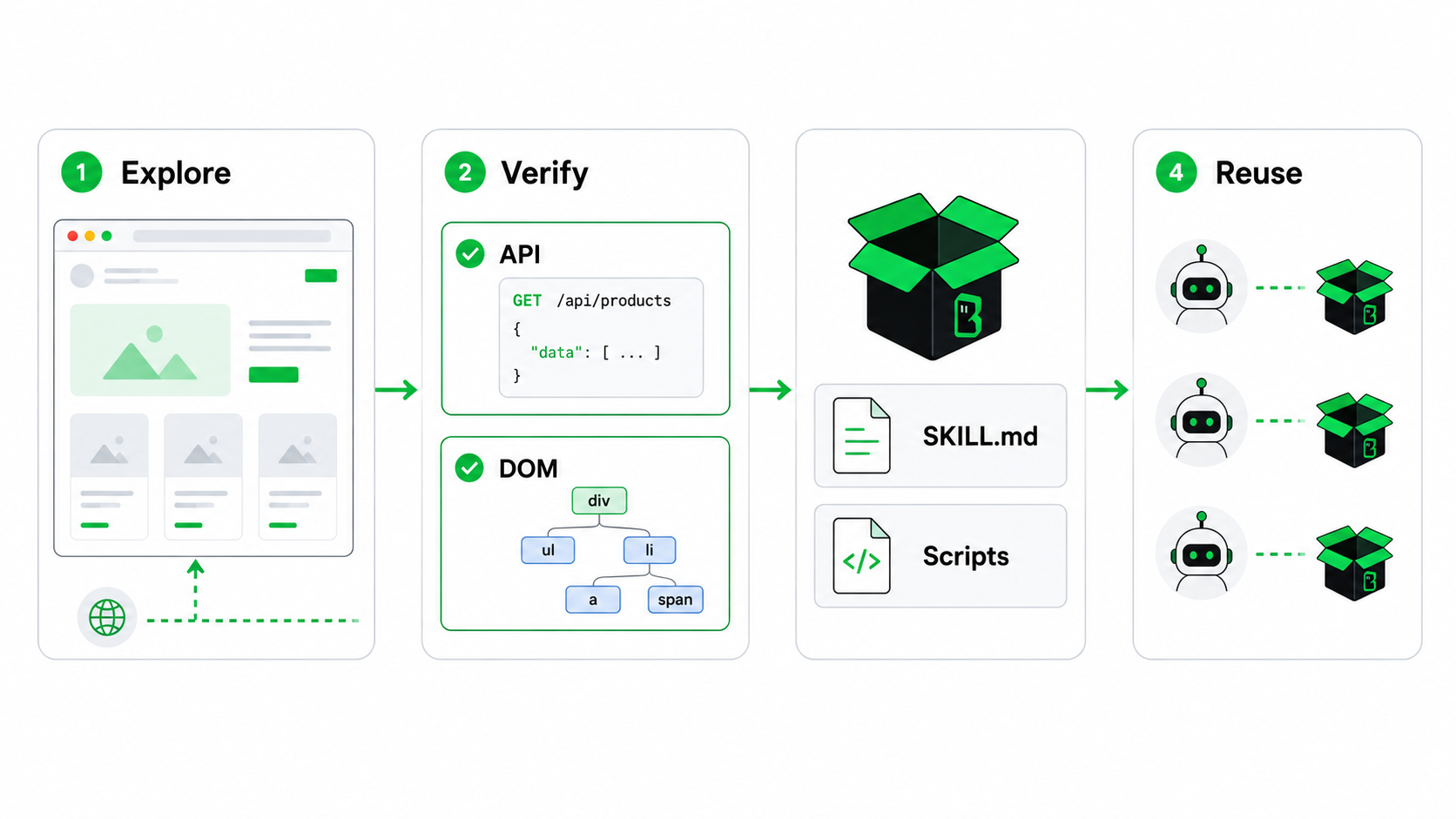
A one-off browser task can be useful. A reusable skill is better when the same site, flow, or extraction pattern comes up again. BrowserAct Skill Forge explores a site, prioritizes internal API paths when viable, falls back to DOM operations when needed, and generates deploy-ready Skill packages with SKILL.md instructions and scripts after verification.
That means teams can move from ad hoc browser operations to repeatable agent capabilities without asking the agent to rediscover the same website behavior every time.
Before and After: From Prompt to Real Web Action
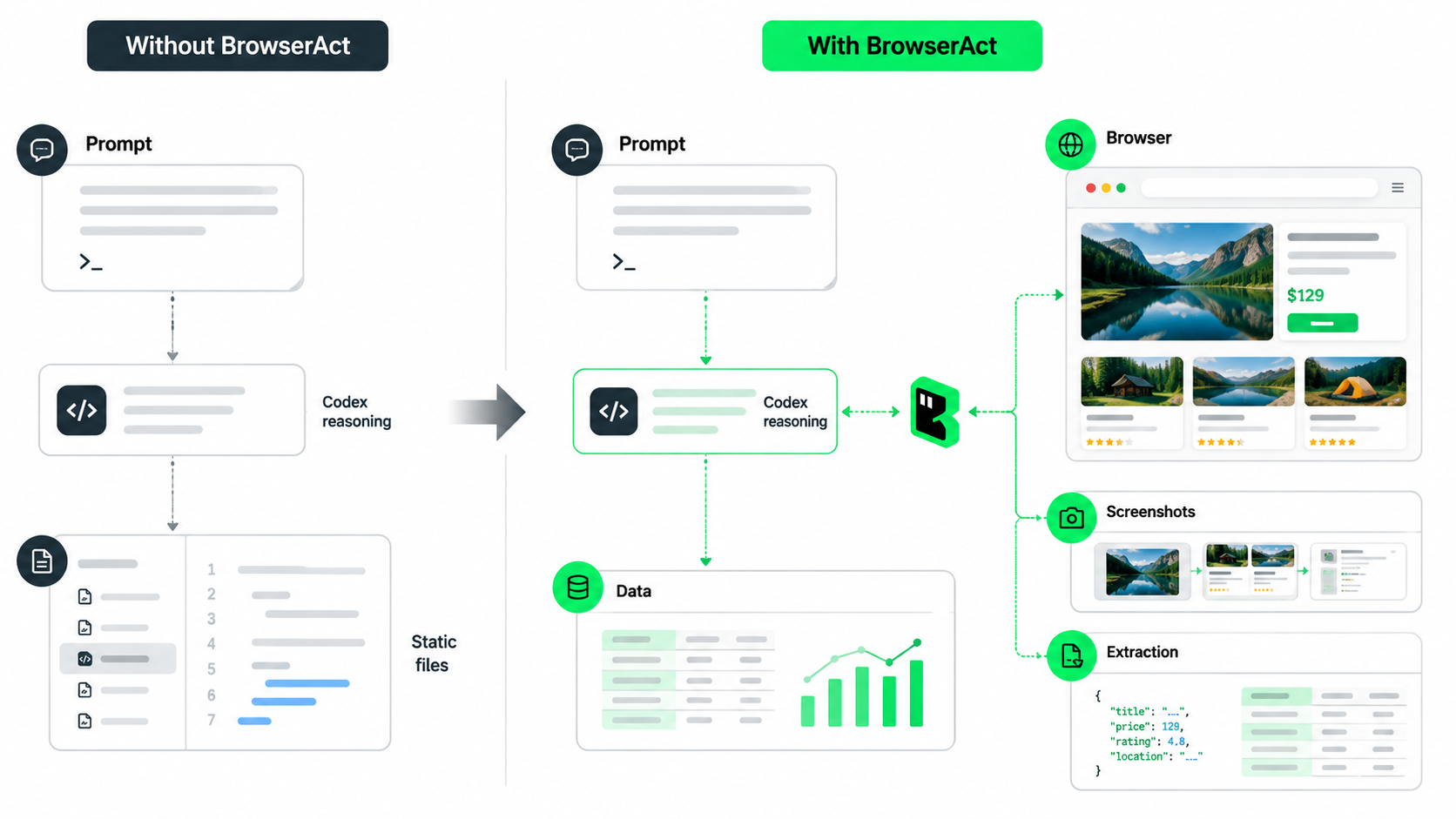
Workflow | Without BrowserAct | With BrowserAct CLI |
Check a logged-in dashboard | The user copies screenshots or values manually | Codex can use BrowserAct to open the page and inspect visible state |
Extract JavaScript-rendered content | Static fetches can miss the data | BrowserAct can operate against the rendered page |
Fill a browser form | The user performs the browser step by hand | BrowserAct can click, type, select, and upload with confirmation gates |
Verify a UI after a code change | Tests may miss visual regressions | BrowserAct can support screenshot-based inspection |
Repeat a site-specific workflow | The team repeats custom instructions each time | BrowserAct Skill Forge can help turn verified exploration into a reusable Skill package |
The value is not “browsing” in the abstract. The value is giving Codex a browser execution layer for tasks where the web page itself is part of the system.
How to Install BrowserAct from the Codex Plugin Marketplace
The BrowserAct plugin is live in the Codex plugin marketplace as BrowserAct.
In the plugin entry, users can select Install plugin to add BrowserAct to their Codex environment. The listing describes BrowserAct as browser automation for Codex workflows and notes that it uses the BrowserAct CLI.
For users working directly with the CLI setup path, the verified BrowserAct CLI install command is:
uv tool install browser-act-cli --python 3.12
Because plugin availability and setup flows can vary by Codex surface and account, users should follow the current plugin listing and official BrowserAct documentation for the latest setup path.
Practical Use Cases for Codex Users
BrowserAct is useful when Codex needs to interact with a real browser rather than only reason over files, APIs, or static pages.
Common workflows include:
- QA checks for web apps after code changes
- Extracting public web data into CSV or structured output
- Inspecting logged-in dashboards with user-authorized access
- Testing multi-step browser flows
- Capturing screenshots for debugging or review
- Running browser-based research tasks
- Creating reusable website skills for repeated workflows
One example from the plugin listing is collecting the top Amazon US wireless headphone listings and returning the result as a CSV file. Another is using BrowserAct Skill Forge to create a reusable skill for summarizing recent YouTube videos.
Those examples show the core pattern: Codex handles reasoning and orchestration, while BrowserAct provides the real-browser layer needed to complete the web-facing part of the job.
A Practical Note on Browser Workflows
BrowserAct should be used for authorized, user-directed browser workflows.
It helps Codex work with real browser state, dynamic pages, sessions, screenshots, extraction, network-aware investigation, and confirmation-sensitive steps. It is not a promise that every website restriction can be bypassed. Site permissions, account access, rate limits, security controls, and terms still matter.
Conclusion
The BrowserAct Codex plugin is a step toward more practical agent workflows.
Codex is already strong at understanding code, planning changes, and coordinating technical work. BrowserAct adds the browser execution layer that many real tasks need: pages that render dynamically, sessions that require user authorization, interfaces that must be clicked through, screenshots that need inspection, page-scoped network activity that needs to be captured, and data that only appears after the browser does its work.
For teams building with Codex, the successfully listed BrowserAct plugin entry makes that capability easier to install, discover, and reuse.
Sign up on the BrowserAct website, then install BrowserAct from the Codex plugin marketplace to give Codex real browser automation for web-facing agent workflows.


