How to Scrape Google Maps Without Code in 2026

A Google Maps scraper does not have to begin with Playwright code, selectors, proxies, or a development quote. For an agency or sales team, the more useful question is whether a recurring local-market research task really needs to become a software project.
A no-code BrowserAct Bot turns a business category and market into structured public listing records. That makes it practical to test a prospecting idea, compare several niches, or refresh a territory list before investing in custom engineering. It does not make every business a qualified lead: contact enrichment, website analysis, and buying-signal research remain separate jobs.
- 1Define the ideal customer and the observable problem before collecting businesses. A larger list cannot rescue a vague offer.
- 2Treat Google Maps as a market-discovery source, not a source of sales-ready leads. A listing becomes valuable only after relevance, contactability, and need are established.
- 3Test a category and location with a small sample first. Relevance and data quality matter more than maximizing row count on the first run.
- 4Qualify before enriching. Researching websites, emails, and buying signals only for relevant businesses saves time and reduces unnecessary processing.
- 5Choose no-code when the research pattern is repeatable but does not justify owning scraper infrastructure. Choose custom engineering when proprietary logic and control create enough value to cover ongoing maintenance.
- 6Measure the project by qualified opportunities produced per research cycle, not by the number of records collected.
What Does "No-Code Google Maps Scraper" Mean?
A no-code Google Maps scraper lets a business user configure and run a defined data-collection task without writing scripts, selectors, or browser automation logic.
The user still decides what to search, where to search, how many records to request, and how the resulting public business data should be reviewed or used. No-code removes the programming work; it does not remove the need for clear inputs, data review, or responsible use.
BrowserAct turns this task into a reusable Bot. Instead of rebuilding the browser steps for each new market, you run the same template with different inputs. The Bot constructs the public Google Maps search, scrolls the result feed, reads the visible business cards, and returns a consistent record structure.
That is different from asking an AI model to invent a list from memory. The Bot works with the current public page and preserves a Google Maps place URL for each available result.
Where No-Code Changes the Economics of Local Lead Research
The expensive part of a traditional scraping project is not typing a query into Google Maps. It is turning that query into software: defining navigation logic, handling scrolling, maintaining selectors, hosting the browser, monitoring failures, and repairing the scraper when page behavior changes.
That investment can make sense for a proprietary, engineering-owned data pipeline. It is harder to justify when a team is still testing whether a market is worth pursuing. A web design agency may want to compare plumbers, restaurants, and dental clinics before choosing a niche. A sales team may need a fresh territory list each month. In both cases, the business question comes before the engineering question.
A reusable no-code Bot changes the starting point. The team can run the same defined public-page research task across new categories or markets without rebuilding the browser logic. The output becomes an initial dataset for market sizing, segmentation, enrichment, or qualification rather than the finished sales answer.
This distinction matters: no-code reduces setup and maintenance work, but it does not remove judgment. A useful lead-generation process still needs a clear target customer, a reason to contact the business, and evidence that the offered service matches an observable need.
A Practical No-Code Google Maps Test
To see whether the approach fits a real prospecting project, start with the Google Maps Business Listings Scraper. The test requires only three decisions:
Input | Example | Purpose |
|
| Defines the business type or search phrase |
|
| Localizes the Google Maps search through a dropdown of supported country and region names |
|
| Sets the maximum number of records requested for the run |
Use a recognizable category rather than a vague service term. For example, roofing contractors creates a more interpretable prospect pool than services. Set a small maximum count for the first run; the purpose is to judge relevance and data quality before scaling the research.
BrowserAct constructs the public search, scrolls the visible result feed, and returns one independent record per business. The requested maximum is not a guarantee that Google Maps will expose that many suitable records. Results depend on the keyword, market, public feed boundary, page state, and information Google displays.
Each record uses the same 12 field keys:
Field | What it represents |
| Publicly visible business name |
| Visible Google rating when available |
| Visible review count when available |
| Public business category |
| Address displayed in the result card |
| Visible listing description when available |
| Visible business status |
| Visible opening-hours text |
| Visible price range when available |
| Visible accessibility information |
| Visible service or booking option |
| Google Maps URL associated with the business |
When Google Maps does not display a value in the result card, BrowserAct uses N/A. This keeps the output schema consistent without pretending the missing information was found elsewhere.
The template does not open individual business detail pages. As a result, fields that require deeper navigation should not be expected from this run.
Here is a completed run using restaurants, United States, and a maximum count of 10:
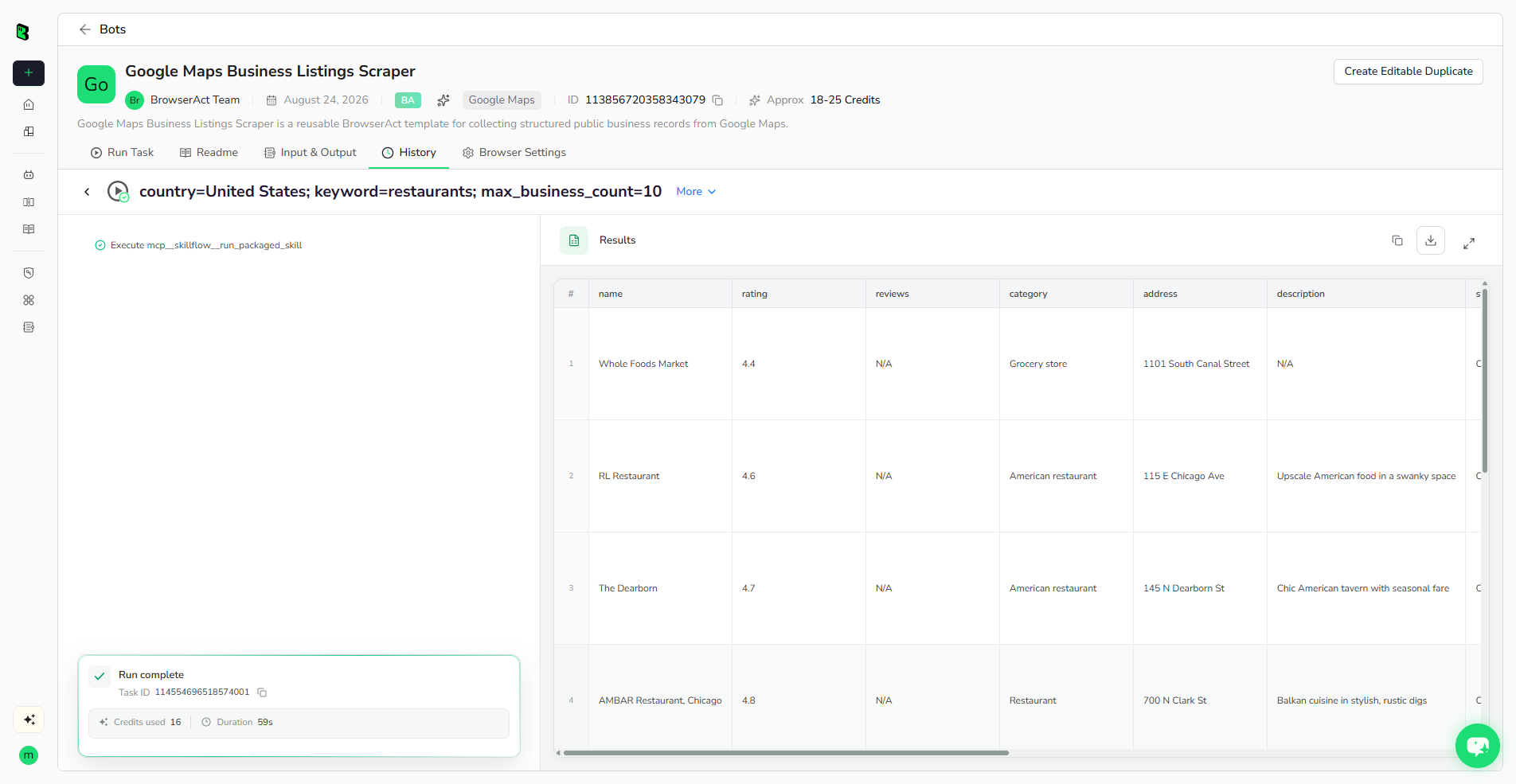
The important part is not simply that data was returned. Each business can be reviewed as its own record, making it easier to reject irrelevant listings, inspect missing values, and decide which records deserve deeper research.
Review the first run before sending the data anywhere else. Check that the businesses match the intended category, inspect N/A fields, and open preserved place URLs for high-priority records.
The structured results can be reviewed directly, exported, or connected to supported API, n8n, Make, Zapier, and MCP-based processes. Choose the next step based on the job: a spreadsheet is often enough for a one-time market test, while recurring research may benefit from an integration that passes records into cleaning, enrichment, or CRM review.
For a one-time project, a spreadsheet export may be enough. For recurring research, a structured integration can pass the records into a cleaning, enrichment, CRM, or review step.
What Data Do You Actually Need?
The phrase "Google Maps lead" can hide several different jobs. Decide the required data depth before choosing a template or estimating cost.
Data level | Question answered | Typical fields or evidence | BrowserAct starting point |
Business listing | Which businesses are visible in this market? | Name, category, rating, address, status, Maps URL | Business Listings Scraper |
Place details | How can I learn more about this business? | Phone, official website, fuller hours and place details | Local Lead Finder |
Public contact enrichment | Has the business published an email contact? | Public email, website and contact-page context | Email Finder |
Lead qualification | Why might this business need my service? | Observable website gaps, qualification reason and evidence URLs | Lead Qualification Scraper |
A business listing is not automatically a sales-ready lead. A row becomes more useful as it gains relevance, a legitimate contact path, and evidence connected to the service being offered.
For the complete strategy, see Google Maps Scraper for Lead Generation, which explains how these four data levels work together.
Manual vs Custom Scraper vs API vs No-Code Bot
The best operating model depends on who owns the task and how often it must run.
Approach | Code required | Initial setup | Reusable | Who maintains it | Best fit |
Manual copying | No | Low | No | Researcher | A few records and final verification |
Custom scraper | Yes | High | Yes | Developer or contractor | Proprietary requirements and engineering-owned pipelines |
API integration | Usually | Medium to high | Yes | Developer and provider | Programmatic workflows with defined schemas |
Browser extension | No | Low | Partly | Provider and user's browser | Small interactive exports |
BrowserAct reusable Bot | No for template use | Low | Yes | BrowserAct template plus user review | Repeated public-page research with consistent inputs and rows |
Manual research is flexible, but repeated copying creates inconsistent columns and consumes time every time the market changes.
A custom scraper gives an engineering team direct control. It also makes that team responsible for browser behavior, selectors, scrolling, infrastructure, retries, monitoring, and repairs when page behavior changes.
An API can be appropriate when developers already own the downstream system. The work then moves into authentication, request handling, schemas, billing, and integration code.
A no-code reusable Bot is suited to a defined browser task that business operators need to repeat. It reduces setup and maintenance work, while deeper extraction or qualification can remain a separate step.
What Does a No-Code Google Maps Scraper Cost?
The Google Maps Business Listings Scraper estimates 18-25 credits per run. That covers the collection run, not a guaranteed number of qualified leads. The final value depends on how many relevant businesses the search returns and how much enrichment or manual review the list still needs.
When comparing a no-code Bot with a traditional scraper, account for the full task:
- Initial development: requirements, selectors, navigation logic, output schema, and testing.
- Infrastructure: browser runtime, hosting, proxies, storage, and monitoring where applicable.
- Maintenance: repairs when the source page or expected data changes.
- Data processing: deduplication, missing-value review, formatting, and enrichment.
- Human judgment: verifying that a record is relevant and suitable for the next action.
The useful comparison is therefore not credits versus the price of one lead. It is the cost of a reusable collection run versus the total cost of building, hosting, repairing, and operating a custom scraper. No-code reduces the browser-automation work; the team still owns targeting and final lead selection.
From Business Listings to Qualified Leads
BrowserAct separates different lead-generation jobs into different reusable templates:
Build a broad business dataset
Use the Google Maps Business Listings Scraper when result-card fields are enough for market discovery, directory research, or an initial prospect pool.
Collect richer local business details
Use the Google Maps Local Lead Finder when the task requires public place-detail information such as a phone number or official website.
Look for publicly displayed business emails
Use the Google Maps Email Finder when the workflow needs to check official business websites and contact pages for email addresses the business has chosen to publish. An empty email result is valid and should not be replaced with a guessed address.
Prioritize records with visible evidence
Use the Google Maps Lead Qualification Scraper when the sales decision depends on observable website signals such as booking, messaging, chat, lead forms, or primary calls to action.
Keeping these tasks separate makes each output easier to interpret. It also prevents a basic scraper from being presented as a complete lead-intelligence system.
When Should You Still Build a Custom Scraper?
Build a custom scraper when your organization needs proprietary processing, deep infrastructure control, unusual navigation, a private internal schema, or behavior that is not covered by an available template. This is most reasonable when an engineering team owns the requirement and is prepared to maintain it.
Use a no-code reusable Bot when the requirement fits a defined public-page task and reducing build work matters. For many sales, agency, research, and operations teams, the ability to rerun a consistent input-output path is more valuable than owning every line of scraper code.
The decision is not "code is bad." The decision is whether custom engineering creates enough business value to justify its ongoing ownership cost.
Review Google Maps Data Before You Use It
Run a short quality check before moving records into research or outreach:
- Confirm the business matches the intended category and market.
- Inspect
N/Avalues rather than treating them as proof that information does not exist. - Open the preserved Maps URL for high-priority records.
- Check for branches, franchises, duplicates, and unrelated categories.
- Use a deeper template only when the additional data supports a real decision.
- Follow applicable website terms, privacy requirements, and outreach rules.
- Do not treat a missing field or automated qualification result as proof of purchase intent.
Automation should reduce repetitive research while preserving the evidence a person needs to make the final decision.
Frequently Asked Questions
Can I scrape Google Maps without coding?
Yes. A published BrowserAct Google Maps template can be configured and run without writing scripts or selectors. You provide the keyword, country, and requested business count, then review the structured results.
What can a no-code Google Maps scraper collect?
The Business Listings Scraper collects 12 visible result-card fields, including name, rating, reviews, category, address, status, hours, service options, and place URL. Fields that Google Maps does not display are returned as N/A.
Can a Google Maps scraper find email addresses?
Google Maps does not provide a native business email field. Public email discovery requires a deeper workflow that follows the official website and checks visible website or contact-page content; an address may not be available for every business.
Do I need an API key to run the no-code template?
The template's user-facing run flow is configured through its input form. API, n8n, Make, Zapier, or MCP use requires the corresponding BrowserAct integration setup and credentials.
What is the difference between a Google Maps listing and a qualified lead?
A listing identifies a business and its visible public information. A qualified lead also includes relevance, a suitable contact path, and evidence that connects an observable business need to the service being offered.
How much does the BrowserAct Google Maps scraper cost to run?
The Business Listings Scraper estimates 18-25 credits per run. The number of useful records depends on the query and the public results available, so evaluate the first run for relevance before scaling it.
Is Google Maps scraping legal?
Requirements vary by source, jurisdiction, data type, and intended use. Use appropriately obtained public business information, follow applicable website terms and privacy rules, and review relevant outreach requirements before contacting businesses.
Build a Google Maps Lead List Without Code
Start with one market hypothesis: a specific business category, a defined location, and a service problem you can verify from public evidence. Collect a small sample, remove irrelevant businesses, and decide whether the remaining opportunity is strong enough to justify enrichment and outreach.
If that test works, rerun the same research across adjacent locations or categories. The goal is not to accumulate the largest spreadsheet. It is to build a repeatable path from public market data to a smaller set of businesses that have a credible reason to hear from you.
Test your first market with structured public business listings.
Build a Google Maps Lead List Without Code
Enter a keyword, choose a country, and get one structured row per business with a reusable BrowserAct Bot.


