LinkedIn Post Scraper: Build a Clean Post and Comment Dataset

A LinkedIn post scraper project usually starts with one innocent request: “Can we export the comments on these posts?” Then the spreadsheet arrives. Post text is mixed with comment text. Replies are jammed into the same cell. Reaction counts have no timestamp. Some fields are empty, but nobody knows whether that means “not visible,” “not collected,” or “the scraper failed.” A marketer wants content ideas, an SDR wants warm leads from commenters, and an analyst wants a dataset that can survive a
- 1A LinkedIn post scraper should not produce one giant flat dump. Posts, comments, replies, and source evidence usually need separate joinable tables.
- 2The right workflow depends on the starting point: known post URLs, company pages, profile activity, keyword search, or recurring social listening.
- 3Comments and replies need careful modeling. A top-level comment is not the same object as a reply, a reactor, a profile, or a post.
- 4Empty fields are normal in LinkedIn datasets when values are not visible, not rendered, rate-limited, or outside the chosen actor/workflow scope.
- 5After the schema is clear, BrowserAct is the first recommended workflow for teams that need prompt-led extraction, custom fields, screenshots, source URLs, stop rules, and human review.
What is a LinkedIn post scraper?
A LinkedIn post scraper is a tool or browser workflow that collects selected visible data from LinkedIn posts and exports it into structured formats such as CSV, JSON, Google Sheets, Airtable, or a database.
For useful research, a post scraper should usually capture post URL, author or company URL, post text, publish time when visible, media type, hashtags, mentions, visible engagement counts, comment count, source target, extraction timestamp, and error status. If the workflow includes comments, it should also capture comment text, commenter profile URL, comment timestamp when visible, reaction count, reply relationship, and source post URL.
The keyword evidence supports this narrow workflow. In the BrowserAct LinkedIn topic workbook, LNK-06 has 12 evidence rows, an average evidence score of 4.53, and 11 P0/P1 evidence rows. The exact post/comment terms were not separately available in the Ahrefs queue, so this article reuses the existing workbook rather than inventing data. Adjacent metrics show LinkedIn data extraction at US search volume 100 with KD 0 and CPC $4, while LinkedIn company posts has US search volume 10 and CPC $9. That is a small but high-intent cluster: people are not browsing casually; they are trying to build a data workflow.
Start with the job, not the scraper
There are at least five different reasons someone searches for a LinkedIn post scraper:
User goal | Better starting point | Output that matters |
Analyze a viral post | Known post URL | Comments, replies, reaction mix, commenter profiles, timestamps |
Monitor competitor content | Company page URL | Recent posts, publish cadence, visible engagement, topic tags |
Find product pain points | Keyword search | Matching posts, post excerpts, author context, source URLs |
Build warm lead lists | Post URLs / reactors / commenters | Commenters, role/company context, review status |
Track social listening signals | Scheduled searches | New posts, dedupe keys, trend tags, checked_at |
Pro Tip: Write the first column of your brief as “decision this dataset supports.” If the answer is “content ideas,” you need topic and engagement fields. If the answer is “warm leads,” you need commenter identity, source post, and review status. Different decision, different schema.
The post dataset: one row per post
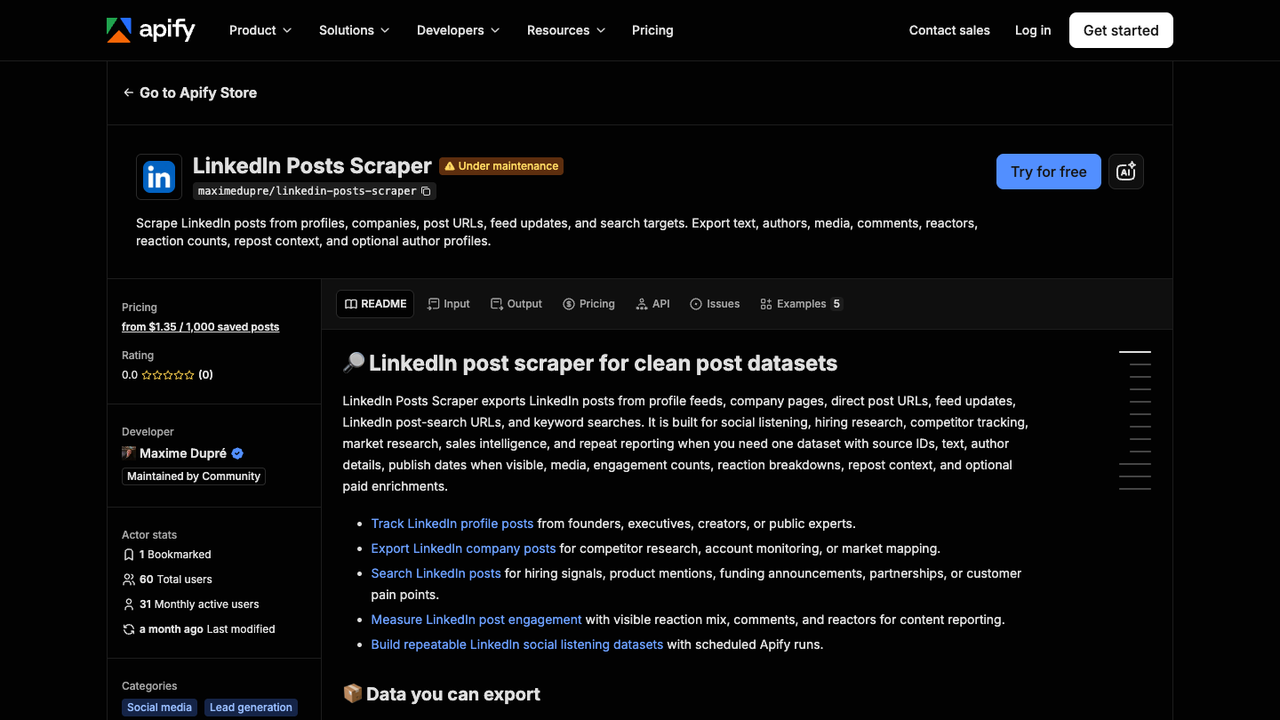
Official Apify screenshot. Source: LinkedIn Posts Scraper.
The post table is the anchor. Everything else joins back to it.
Your post table should avoid two mistakes. First, do not store comments inside the post row unless the use case is only a quick summary. Second, do not trust visible engagement without a timestamp. Engagement is a snapshot, not a permanent value.
A practical post table looks like this:
Field | Why it matters |
| Primary source URL and join key |
| Stable dedupe key when available |
| Company page, profile, search URL, or direct post URL |
| Human-readable author |
| Join to profile/company review |
| Main content for analysis |
| Date or relative timestamp if visible |
| Text, image, video, carousel, link |
| Topic clustering |
| Partner/customer/person references |
| Snapshot metric |
| Snapshot metric |
| Snapshot metric when available |
| Audit timestamp |
| Success, partial, blocked, missing, manual review |
The comment dataset: one row per comment
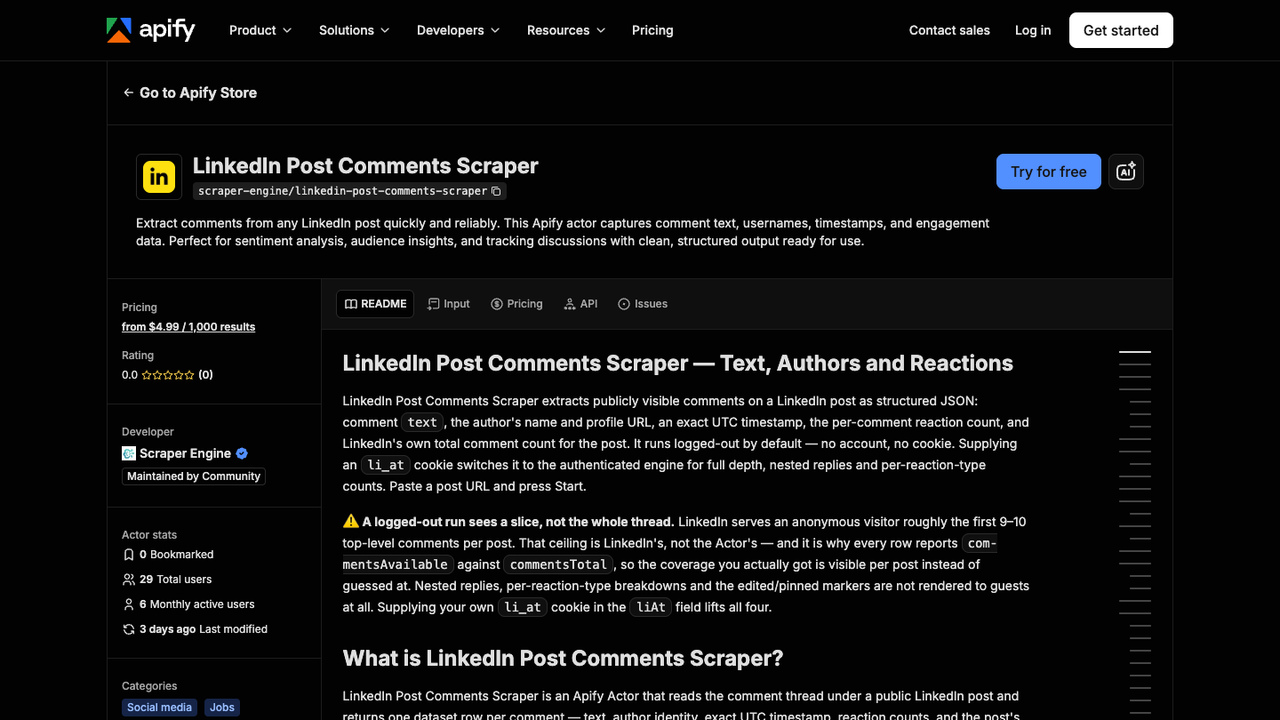
Official Apify screenshot. Source: LinkedIn Post Comments Scraper.
Comments are where many LinkedIn scraping projects get messy. The Apify comment scraper page is useful evidence because it makes the key distinction visible: comments have their own text, author, timestamp, reaction counts, and availability limits.
That means the comment table should be separate:
Field | Why it matters |
| Comment-level dedupe key |
| Join back to parent post |
| Voice-of-customer, objection, or intent signal |
| Review-friendly identity |
| Source-linked human review |
| Recency when visible |
| Rough resonance signal |
| Useful when only partial comments are visible |
| Helps identify brand response |
| Audit timestamp |
| True, partial, not visible, unknown |
Pro Tip: Keep comments_available or a similar coverage field. If LinkedIn only renders part of a thread, the table should say partial rather than pretending the first 20 comments are “all comments.”
Replies and nested threads: do not flatten too early
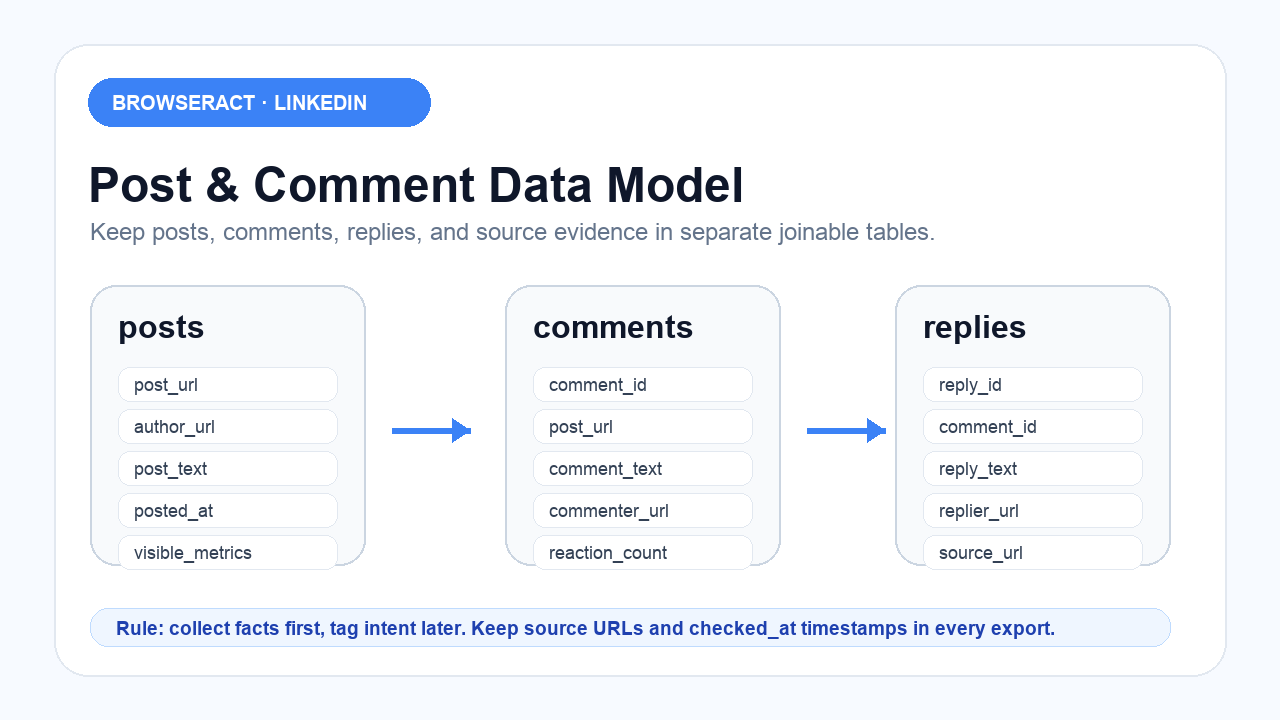
Replies create the modeling choice: nested JSON or separate rows?
For a one-off executive summary, nested JSON can work. You can store a post with an array of comments, and each comment can contain an array of replies. That is compact and readable for a developer.
For analysis, separate rows are usually better. A separate replies table lets you count reply volume, identify author responses, filter by respondent, export to Sheets, and join replies back to comments without breaking formulas.
Modeling option | Best for | Trade-off |
Nested comments inside post JSON | Developer export, quick summaries | Harder for Sheets/BI and dedupe |
Separate comments table | Analysis, Sheets, CRM review | Requires joins |
Separate replies table | Thread analysis and author response tracking | More schema work |
One flat row per post-comment-reply | Simple CSV export | Duplicates post fields heavily |
How to choose the right input type
A LinkedIn post scraper can start from several inputs. Each input type changes the workflow.
Known post URLs
Use this when you have a list of posts from campaigns, competitors, sales conversations, newsletters, or manual research. This is the cleanest path for comment analysis because every comment joins to a known post URL.
Best output: post table + comment table + optional replies table.
Company page posts
Use this for competitor or account monitoring. The workflow collects recent public posts from company pages, then tags them by launch, hiring, funding, event, partnership, customer story, or thought leadership.
Best output: company table + post table + signal table.
Profile activity
Use this when the author matters: executives, creators, analysts, competitors, founders, or category influencers. This can be useful for market intelligence, but it also needs tighter review boundaries because profile surfaces can be more sensitive than company pages.
Best output: author table + post table + review status.
Keyword search
Use this when the research question is about language: pain points, product mentions, brand comparisons, market complaints, competitor names, or event hashtags.
Best output: query table + post table + topic tags.
Scheduled monitoring
Use this when the same search or account set needs to run weekly or daily. The key fields become first_seen_at, last_seen_at, run_id, and dedupe_key.
Best output: run table + post table + delta table.
Pro Tip: If a tool only supports company page URLs, do not force it into keyword monitoring. The workbook evidence includes exactly this issue: users choose a company-post actor, then wonder why keyword search is not supported. Match the actor to the input type.
Run the scrape once with browser-act. Package the repeatable path with Skill Forge.
- 1. An agent uses browser-act to search Google Maps, scroll listings, inspect place pages, and extract visible fields.
- 2. The team validates the schema: business name, category, address, phone, website, rating, review count, and source URL.
- 3. browser-act-skill-forge turns the proven flow into a reusable scraper Skill for future agent runs.
Recommended workflows for LinkedIn post and comment scraping
Once the data model is clear, the tool decision becomes much simpler.
1. BrowserAct for custom post/comment research workflows
Use BrowserAct first when the dataset is not fixed.
That is common with LinkedIn posts. One week you need comments from 30 product-launch posts. Next week the content team wants high-performing posts by hashtag. Then sales wants commenters from a competitor’s webinar post, but only if the commenter has a relevant title. A rigid scraper can collect rows, but it often struggles when the research logic changes.
BrowserAct works well when you can describe the task:
Open each LinkedIn post URL in this CSV.
Collect visible public post data, comment text, commenter profile URLs, visible timestamps, visible reaction counts, and source URLs.
Keep posts, comments, and replies in separate tables.
Add checked_at and extraction_status to every row.
Stop and flag the row if login, CAPTCHA, unusual activity, payment wall, or missing access appears.
Do not like, comment, follow, connect, message, repost, or publish.
The value is not just “no-code scraping.” The value is that the workflow can change with the research question while still producing structured output, screenshots for important evidence, source URLs, and human handoff flags.
Strengths: custom prompts, source-linked exports, screenshots, review flags, scheduled runs, useful when fields or target types change.
Limitations: requires clear stop rules and review criteria; should not be used for private data or engagement automation.
Best for: content research, social listening, warm-signal review, competitor post monitoring, and custom post/comment datasets.
2. Apify actors for fixed post or comment jobs
Apify is a strong fit when your job maps cleanly to a specific actor: post scraping, company post scraping, or post comments scraping. The official actor pages show the kind of inputs and outputs that matter: post URLs, company pages, comments, reactions, scheduling, and structured exports.
Strengths: API-friendly, actor marketplace, scheduled runs, CSV/JSON outputs, good for technical users.
Limitations: actor scope matters; one actor may handle comments but not keyword search, or company pages but not arbitrary search targets.
Best for: stable pipelines with known inputs and teams comfortable testing actor output.
3. Managed data providers for scale
For large-scale social listening, procurement, or cross-platform data programs, a managed provider can make sense. That category is less about one post and more about dataset delivery, coverage, reliability, and governance.
Strengths: scale, procurement fit, broader data programs.
Limitations: overkill for lightweight post/comment research; may be less flexible for small prompt-level changes.
Best for: enterprise listening, data teams, and large recurring datasets.
4. Manual review for sensitive use cases
If the goal is warm leads from commenters, do not automate the whole chain. Collect source-linked evidence, then review manually before any sales action. A commenter is not automatically a lead. Context matters.
Strengths: lower risk, better judgment, cleaner handoff.
Limitations: slower than fully automated workflows.
Best for: sales workflows, sensitive categories, and any workflow that could turn into engagement automation.
Workflow | Best fit | Main advantage | Watch-out |
BrowserAct | Custom post/comment research | Prompt-led browser workflow, flexible fields, screenshots, review flags | Needs clear stop rules |
Apify actors | Fixed post/comment scraping | API, actors, scheduling, CSV/JSON | Actor scope varies |
Managed providers | Large datasets | Scale and governance | Heavy for small teams |
Manual review | Warm lead or sensitive analysis | Human judgment | Slower |
Field checklist by use case
The best schema depends on the decision.
Use case | Required fields | Optional fields |
Content research | post text, author, post URL, date, hashtags, visible metrics | media type, topic cluster, summary |
Comment analysis | comment text, commenter URL, post URL, reaction count, checked_at | replies, author replies, sentiment tag |
Warm-signal review | commenter URL, comment text, source post, company/title if visible, review status | CRM owner, enrichment status |
Competitor monitoring | company URL, post URL, post text, date, topic tag, visible engagement | screenshot, campaign tag |
Social listening | query, post URL, text excerpt, first_seen_at, run_id, dedupe key | trend label, language, category |
How to handle null fields and partial data
Null fields are not always failures.
A field might be empty because LinkedIn did not render it, the viewer state did not expose it, the actor does not collect it, the post has no media, comments are limited, replies are collapsed, timestamps are relative, or the workflow stopped at a login wall.
Your export should make that difference visible:
Status | Meaning |
| Row collected as expected |
| Some fields were not visible |
| Only part of the thread was available |
| Actor/workflow does not collect this field |
| Access state changed |
| Workflow hit a stop condition |
Pro Tip: Never convert null comments to zero comments unless you are sure the platform showed a complete comment count. “No comments visible” and “zero comments” are different facts.
A practical BrowserAct prompt
Here is the prompt pattern I would use for a first run:
Use this CSV of LinkedIn post URLs and source labels.

For each post:
1. Open the public post URL.
2. Collect visible post fields: post_url, author_name, author_url, post_text, posted_at if visible, hashtags, mentions, media_type, visible reaction/comment/repost counts if visible, and checked_at.
3. Collect visible comments into a separate comments table: comment_id if visible or generated stable hash, post_url, comment_text, commenter_name, commenter_url, commented_at if visible, visible comment reaction count, and comment_position.
4. If visible replies are available, collect them into a separate replies table with reply_id, comment_id, post_url, reply_text, replier_url, and source_url.
5. Add extraction_status and notes for every row.
6. Export posts.csv, comments.csv, and replies.csv.

Do not like, comment, follow, connect, message, repost, or publish.
Stop and flag the row if login, CAPTCHA, payment wall, unusual activity, or private data appears.
The prompt is intentionally boring. Boring prompts create reliable exports.
The 7-day rollout plan
Day 1: Choose the decision
Pick one: content research, comment analysis, warm-signal review, competitor monitoring, or social listening. Do not combine all five.
Day 2: Build the input list
Start with 20 to 50 post URLs or 10 company pages. Small batches expose schema problems faster.
Day 3: Run posts only
Collect post-level fields first. Fix URLs, dedupe keys, timestamps, and source labels before adding comments.
Day 4: Add comments
Add a comments table. Review null fields, partial threads, duplicate commenters, and comment order.
Day 5: Add replies only if needed
Replies are useful for thread analysis, but not every use case needs them. Add them if you need author response tracking or detailed conversation mapping.
Day 6: Add review tags
Add human tags such as pain_point, competitor_mention, buying_signal, objection, feature_request, or ignore.
Day 7: Schedule the workflow
If the dataset proves useful, schedule it. Add run_id, first_seen_at, last_seen_at, and dedupe_key.
Final recommendation
If you need a fixed post or comment export, an actor-style scraper may be enough. If you need a research workflow that changes by campaign, company, hashtag, post URL, field list, or review rule, start with BrowserAct.
The goal is not to scrape the most LinkedIn data. The goal is to build a dataset that answers the question without hiding uncertainty.
That means separate tables, source URLs, timestamps, stop rules, and human review.
Everything else is just a noisy spreadsheet.
Two Skills, One Repeatable Browser Workflow
Start with live browser execution when the agent needs to understand a page. Move to Skill Forge when the same scraper should run again without re-exploring the site.
Run once with browser-act
Give Codex, Claude Code, Cursor, Windsurf, or another agent a real browser for rendered pages, clicks, scrolling, screenshots, DOM extraction, and network inspection.
Open browser-act SkillPackage with Skill Forge
Explore the site once, verify the extraction path, then generate a callable Skill package that other agents can reuse for batch jobs or scheduled workflows.
Open Skill ForgeFurther reading: LinkedIn research
Frequently Asked Questions
What is a LinkedIn post scraper?
A LinkedIn post scraper collects selected visible data from LinkedIn posts and exports it into structured formats such as CSV, JSON, Sheets, or a database.
Can a LinkedIn post scraper collect comments?
Yes, if the workflow or tool supports comments. For analysis, store comments in a separate table joined to the parent post URL.
Should LinkedIn replies be nested or separate rows?
Use separate reply rows for Sheets, BI, and analysis. Nested JSON is fine for developer exports or quick summaries.
Why are some LinkedIn post fields empty?
Fields may be empty when LinkedIn does not render them, the workflow scope excludes them, comments are partial, or the page requires review.
What is the best LinkedIn post scraper workflow?
Use BrowserAct for custom prompt-led workflows with changing fields and review rules. Use fixed actor tools when the input and output schema are stable.
Can I use LinkedIn comments as warm leads?
You can treat public comments as review signals, but do not automate outreach from the scraper. Keep sales action in a separate human-reviewed workflow.
How often should I run LinkedIn post monitoring?
Weekly is enough for most content and competitor research. Daily runs are useful for launches, events, crisis monitoring, or short campaign windows.


