How to Monitor a Subreddit for New Posts Without Duplicate Alerts

Monitoring a subreddit is useful when the community knows something before your normal research process does. A product team can catch feature requests and complaints. A marketer can find questions worth answering. A sales team can spot people asking for alternatives or recommendations. Support teams can catch urgent discussions, while researchers can follow a small industry without reopening Reddit all day. BrowserAct turns this task into a reusable cloud Bot. You give it the exact subreddit, t
Common business uses for a subreddit monitor
The subreddit you choose should match a real decision your team needs to make. A broad “monitor Reddit” brief usually produces a noisy feed. A specific use case makes the collection useful.
Team | What to monitor | What the team can do with it |
Product | Feature requests, workflow complaints, missing integrations | Add evidence to the roadmap and recruit research participants |
Marketing | Repeated questions, new terminology, emerging topics | Create content from real audience language |
Sales | “What tool should I use?”, “alternative to…”, vendor comparisons | Identify buying-intent conversations for research or careful follow-up |
Customer success | Problems involving your product or category | Escalate issues and update help content |
Competitive research | Competitor names, migrations, pricing reactions | Track market perception and positioning changes |
Community and PR | Fast-growing discussions or sensitive claims | Review early and decide whether a human response is appropriate |
r/webscraping for posts about blocked requests, browser automation, or alternative tools. The result is not an automatic outreach list. It is a prioritized research feed that helps the team see the right conversations sooner.
Decide what this monitor should return
Before opening a tool, write one sentence that defines the job. A good definition includes the source, what counts as new, and the output:
Check the New feed in one public subreddit, collect the latest 25 posts, compare their Reddit URLs with the previous successful export, and return only unseen posts for review.
You will need:
- the exact subreddit URL ending in
/new/; - a reason for monitoring it and the topics that matter;
- a BrowserAct account or the Reddit Community Intelligence Monitor template;
- a CSV, JSON file, spreadsheet, or database where previously seen post URLs can be saved;
- an optional destination such as Google Sheets, Slack, n8n, or Make after the workflow is validated.
Use the canonical source URL:
https://www.reddit.com/r/{subreddit}/new/
The New listing is the right starting point because it follows publication order. Hot, Top, and Rising answer popularity questions and can move older posts above newer ones.
Build the monitor in BrowserAct
BrowserAct's Reddit Community Intelligence Monitor can open relevant Reddit pages, collect post details, and return structured output. For this workflow, keep the scope to one exact subreddit and review a manual run before scheduling anything.
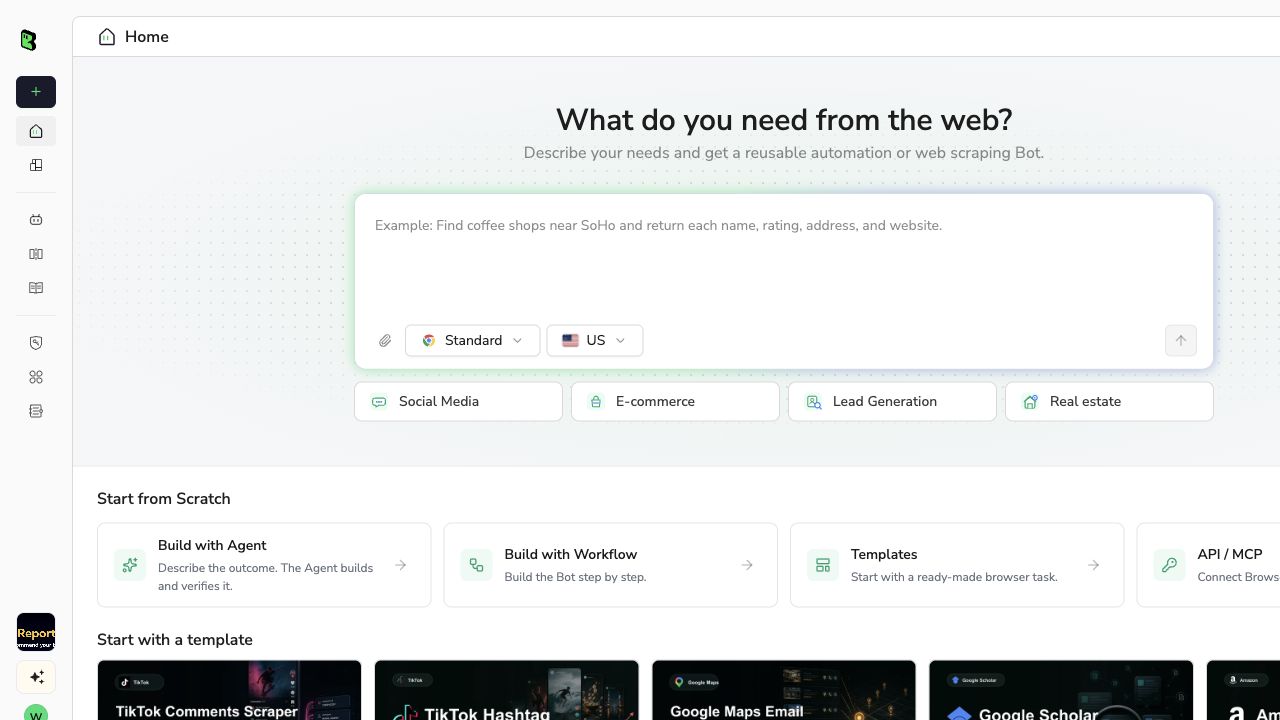
1. Open BrowserAct Dashboard
From the Dashboard, click the left-side + to create a Bot, paste a task into the Agent input, or open the template and select Run task.
2. Copy the complete prompt
Replace r/example with the exact public subreddit. Start with 25 posts. That is enough to validate the result without creating a large first export.
Create a reusable Bot that monitors one public subreddit for new posts.

Inputs:
- subreddit_url: https://www.reddit.com/r/example/new/
- max_posts_per_run: 25
- previous_results: optional CSV or JSON from the last successful run

For every run:
1. Open the exact subreddit_url and keep the listing sorted by New.
2. Collect up to max_posts_per_run real posts from that community.
3. Exclude advertisements, recommendations, sidebar modules, and cards from other communities.
4. Return one row per post with subreddit, post_title, post_url, published_at,
   collected_at, post_text when visible, author when visible, flair when visible,
   score, comment_count, post_type, is_pinned, and outbound_url when visible.
5. Normalize post_url to the Reddit post permalink and remove duplicate URLs.
6. If previous_results is provided, compare by post_url and label each row:
   - new: URL has not appeared before
   - updated: URL exists but a tracked visible field changed
   - previously_seen: URL and tracked fields are unchanged
7. On the first run, treat all rows as the baseline. On later runs, show new rows first
   and do not send an alert for previously_seen rows.
8. If the run reaches max_posts_per_run before finding an older known URL, report
   that the collection window may have a gap.

Use public or authorized pages only. Do not join a subreddit, vote, comment, message
users, or change an account. If Reddit requests login, CAPTCHA, 2FA, age confirmation,
membership approval, or restricted access, pause and ask me to complete it manually.

Return a CSV-ready table and JSON, plus a short summary with run time, subreddit URL,
rows collected, new rows, updated rows, and whether the collection window was complete.
Scrape data from any website. Describe the data you need and turn it into a reusable Bot. Try: “Monitor this subreddit’s New listing and return only post URLs that were not in my previous export.” Get your Bot — Free
3. Complete login or access checks yourself
A public subreddit will often work without an account. If Reddit presents login, CAPTCHA, 2FA, an age gate, or another access check, BrowserAct can pause for human input. Complete the authorized step, then let the Bot continue.
Keep collection separate from engagement. This Bot should not join the community, vote, comment, message users, or dismiss community controls. The result should give your team material to review; a person should decide whether and how to respond.
4. Review the result and export the baseline
Run the Bot once and inspect a few rows before using the data elsewhere:
- Every row belongs to the intended subreddit.
- The newest normal posts appear first; pinned posts are clearly marked.
- Each
post_urlopens the correct Reddit post. - Ads, recommendations, and unrelated page modules are absent.
- The same
post_urldoes not appear twice. - Publication time and collection time are stored separately.
The example below comes from a completed BrowserAct run against the public r/webscraping/new/ feed. It shows the kind of structured result you should inspect before scheduling the Bot.
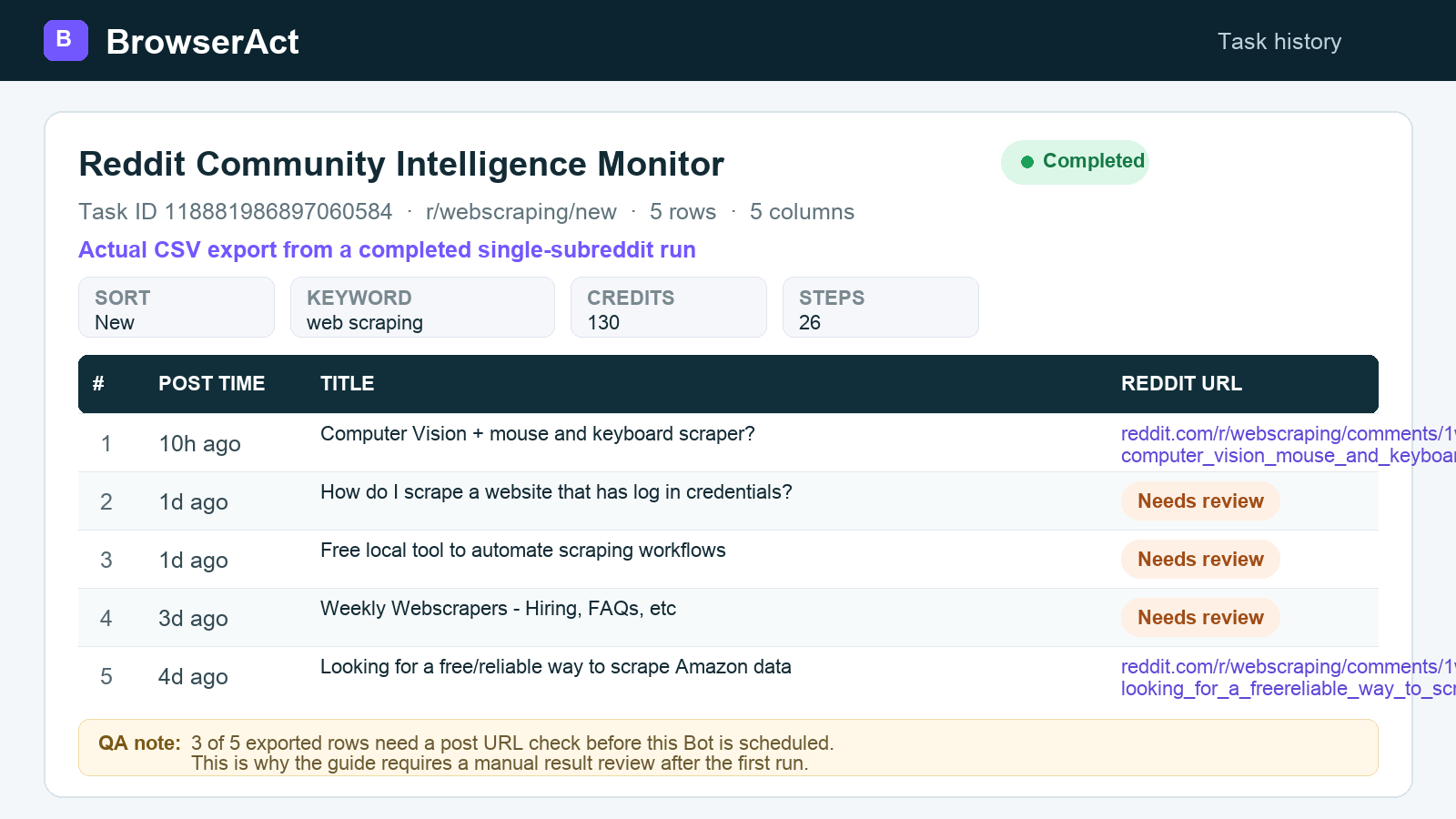
Export the first successful run as CSV or JSON. This is your baseline: the next run can compare its URLs with this file and separate unseen posts from ones already collected.
How duplicate alerts are prevented
Use the canonical Reddit post URL, or a stable post ID when available, as the unique key. Do not compare only by title: two people can use the same title, and a title can be edited.
The first successful run answers “what is here now?” It should normally create the baseline rather than alerting on every visible post. From the second run onward:
- an unseen URL is new;
- a known URL with a changed score, comment count, flair, or text is updated;
- a known URL with no meaningful change is previously seen and should not trigger another alert.
Save the baseline somewhere persistent. A spreadsheet works for a small workflow; a database or automation data store is better when several people or downstream systems use the monitor. Replace the saved baseline only after a run finishes and the result passes validation.
Choose a schedule that matches the subreddit
The right frequency depends on how quickly new posts push older posts down the page. Begin with a modest schedule and adjust from the number of posts you actually collect.
Approximate activity | Starting schedule | Posts per run |
Fewer than 10 posts per day | Once a day | 25 |
10–50 posts per day | Every 4–6 hours | 25–50 |
50–200 posts per day | Every hour | 50 |
More than 200 posts per day | Every 15–30 minutes | 50–100 |
Launches, outages, breaking news, and major product announcements can temporarily increase activity. During those periods, shorten the interval, then return to the usual schedule when volume settles.
Turn the result into a useful team workflow
Collecting posts is only the first half of the job. Decide what a human should do with them.
A simple review sheet can add columns for topic, business relevance, sentiment, owner, and next action. Product teams can tag requests and complaints. Marketing teams can group repeated questions into content ideas. Competitive research teams can save posts that explain why people switch tools.
If the result is sent to Slack, email, or another channel, send only new rows that match the chosen topics. Include the post title, subreddit, publication time, short excerpt, and direct URL. A compact alert is more useful than a full page dump.
Avoid automatic promotional replies. A post that mentions a problem is context for a human, not permission to pitch. Read the community rules, disclose affiliations when relevant, and contribute only when the response is genuinely useful.
Checks to run before scheduling
The Bot opened Hot instead of New
Confirm that the final URL ends in /new/. A popularity feed can keep old, high-engagement posts above recent ones.
The first run alerted on every post
Use the first run as baseline creation. If you do want immediate alerts, define a clear initial window such as “posts published in the last two hours.”
A pinned post keeps appearing
Compare URLs and store whether a post is pinned. Its position at the top does not make it new.
The output includes ads or recommendations
Open several returned URLs and verify that each row is a real post in the exact community. Tighten the prompt if other cards are included.
A busy period filled the entire collection limit
Increase the limit, shorten the interval, and review that run for a possible gap. Do not describe the window as complete unless the collection reached an older known URL.
Final checklist
- Start with one exact subreddit
/new/URL. - Define the business question before collecting posts.
- Keep the first successful export as the baseline.
- Use the canonical post URL to remove duplicates.
- Mark pinned posts and exclude ads and recommendation cards.
- Review a manual run before creating a schedule.
- Increase frequency when a community becomes unusually active.
- Send only relevant new posts to the people who will act on them.
- Keep automated collection separate from voting, commenting, or messaging.
With this setup, a subreddit becomes a manageable research feed. Your team sees what appeared since the previous check, keeps a clean history, and spends time on the conversations that can influence a product, campaign, or customer decision.
Frequently Asked Questions
Can Reddit notify me about every new post in a subreddit?
Reddit notifications can help with general awareness, but they are not a clean, exportable record of every post your team has already reviewed. A saved monitoring baseline is more suitable when completeness and duplicate control matter.
Should I monitor Hot or New?
Use New when the task is to find newly published posts. Hot, Top, and Rising rank posts using popularity and other signals, so older items can move above recent ones.
How do I avoid duplicate subreddit alerts?
Save each canonical post URL or stable post ID after a successful run. On the next run, alert only when the key does not exist in the saved baseline.
How often should I check a subreddit?
Start from the community's normal posting volume. The number of posts between checks should stay comfortably below the number collected in each run. Increase frequency during high-volume events.
Can I send the results to Google Sheets or Slack?
Yes. After the manual run is accurate, export CSV or JSON or connect the workflow through tools such as n8n or Make. Send only new, relevant rows so the destination remains useful.
Does this workflow monitor comments too?
No. This workflow monitors new posts in one subreddit. Use a separate comment-monitoring workflow when replies are part of the requirement.


