Google Maps Scraper for Lead Generation: From Business Listings to Qualified Leads

A Google Maps scraper can turn a category-and-location search into structured business records without hours of copying names, ratings, addresses, and links by hand. But collecting listings is only the first step in lead generation. A usable prospecting workflow may also need phone numbers, official websites, public email addresses, evidence of a conversion problem, and a clear reason to contact each business.
That distinction matters because not every job requires the same scraping depth. A market researcher may only need a consistent list of businesses. A cold email team needs public contact information. An automation agency needs to know which businesses are missing booking, messaging, chat, or lead-capture capabilities.
BrowserAct provides four reusable Google Maps Bots for those different jobs:
Your goal | Data source depth | BrowserAct template |
Build a broad business list | Google Maps result cards | |
Complete local lead records | Google Maps place detail pages | |
Find publicly displayed business emails | Maps details plus the official website and contact page | |
Prioritize prospects by visible conversion gaps | Maps details plus official website evaluation |
The right approach is not to collect every possible field on every run. Start with the business result you need, choose the lightest suitable Bot, and add deeper enrichment only when it improves a real sales decision.
- 1`Google Maps scraper` is a broad tool category, but lead-generation workflows need different levels of data depth.
- 2Listing collection, detail enrichment, public email discovery, and sales qualification are separate jobs.
- 3Google Maps does not provide a native email field; public email discovery requires checking the business's official website.
- 4A prospect score is useful only when the underlying reason and evidence can be reviewed.
- 5Start with the lightest Bot that answers the business question, then enrich selected records when deeper data improves the decision.
- 6BrowserAct's four published Google Maps templates let users choose between broad collection and more focused lead research without building scraper code.
What a Google Maps Scraper Does
A Google Maps scraper reads publicly visible business information and returns it in a consistent structure. Instead of opening each result, copying fields into a spreadsheet, and correcting the columns later, you configure a search and receive one record per business.
Common listing fields include:
- Business name
- Category
- Address
- Rating and review count
- Business status and hours
- Phone number
- Official website
- Google Maps place URL
The exact fields depend on which part of Google Maps the scraper opens. A result card can expose basic listing information quickly. A place detail page can provide richer contact and business information, but it requires an additional page visit for every record.
Information such as a public email address may require another step. Google Maps does not provide a native business email field. An email-finding workflow normally starts with the official website linked from Maps, then checks the website and a clearly linked contact page for an address the business has chosen to publish.
Lead qualification goes deeper still. It requires evaluating observable signals, such as whether the official website has online booking, live chat, messaging, a contact form, or a visible primary call to action.
This creates four distinct data layers:
- Listing data tells you which businesses exist in a category and market.
- Detail data gives you richer information about each business.
- Contact data gives you a public route for relevant outreach.
- Qualification data helps you decide which business has a visible problem your service can address.
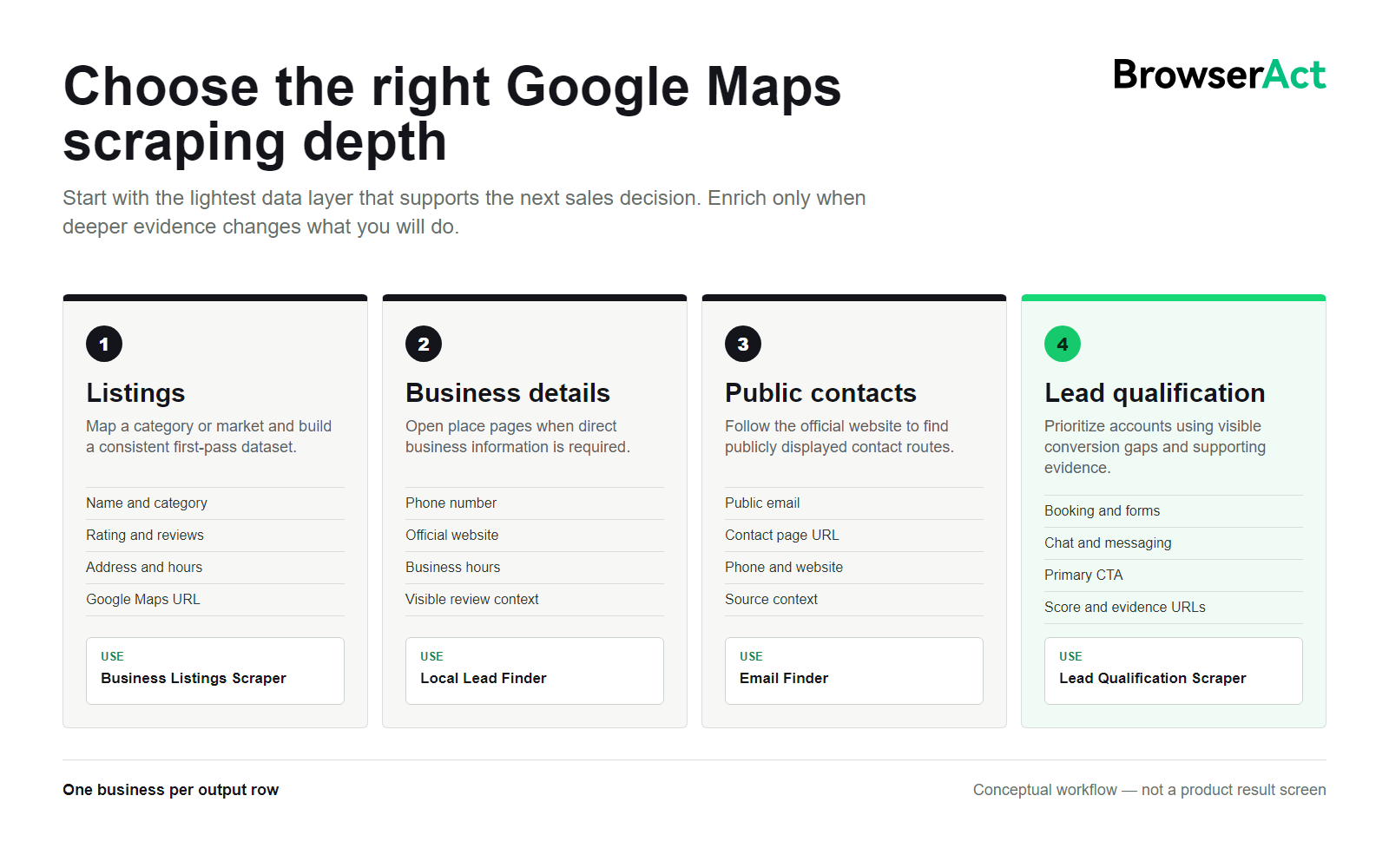
A large spreadsheet may contain business data without containing good leads. The difference is relevance, contactability, and evidence.
Choose the Right Google Maps Scraping Depth
Before running a Google Maps lead scraper, decide what action the output needs to support.
Use listing-level collection for broad research
Choose listing-level extraction when you need to map a local market, compare visible categories, build a directory, or prepare a dataset for a later filtering step.
BrowserAct's Google Maps Business Listings Scraper accepts:
KeywordCountryMax Business Count
It scrolls the public results feed and returns a consistent 12-field record for each visible business card. Fields include name, rating, reviews, category, address, description, status, hours, price, accessibility, service option, and place URL. Unavailable values are returned as N/A so every record keeps the same structure.
This Bot does not open individual business detail pages. That boundary keeps the task focused on broad listing collection.
Use detail-page collection for local lead research
Choose detail-page extraction when a basic listing is not enough. The Google Maps Local Lead Finder accepts a business search query, a location, and a record count. It opens each public place detail page and returns fields such as phone, website, category, business hours, and a recent visible review summary when available.
This level is useful for territory research, local sales lists, competitive reviews, and campaigns that need direct phone or website information before deciding what to do next.
Use website enrichment when email is required
Choose the Google Maps Email Finder when the deliverable needs publicly displayed email addresses. The Bot starts with a keyword and country, collects public Maps records, opens each place detail page, follows the official website, and checks a clearly linked contact page.
Its output includes:
- Business name and category
- Address and phone
- Official website URL
- Public email addresses found on the website
- Contact page URL
- Google Maps URL
- Result rank
When no public email is visible, the email field remains empty. That is more useful than guessing an address: the missing value tells the operator to use another contact route or review the business manually.
Use website evaluation when prioritization matters
Choose the Google Maps Lead Qualification Scraper when the sales question is not merely "How do I contact this company?" but "Why should I contact this company?"
The Bot checks public Google Maps and official website information, including:
- Whether live chat is visible
- Whether online booking is available
- Whether WhatsApp or another messaging route is visible
- Whether a contact or lead form is available
- The visible primary CTA
- Observable conversion weaknesses
- A recommended automation opportunity
- A prospect score and the reason for that score
- Evidence URLs supporting the result
- An extraction status for honest blocked, failed, or missing outcomes
These fields help a salesperson prioritize research. They do not prove that a business has budget, wants to buy, or will respond. The final decision still needs human review.
You can also compare the four BrowserAct Google Maps templates before choosing the appropriate scraping depth.
Step 1: Define the Offer Before the Search
The best Google Maps lead generation searches begin with the service being sold. A broad query may produce many records, but it rarely produces a useful reason to contact them.
Start with three decisions:
- Who do you serve? Choose an industry or business type with a repeatable need.
- Where can you sell? Select a city, region, country, or service territory.
- What visible condition makes the business relevant? Define the signal you intend to verify.
Here are several examples:
Seller | Search segment | Useful qualification signal |
Web design agency | Plumbers in Austin | No independent website or a weak contact path |
Booking software provider | Dental clinics in Chicago | No visible online booking option |
Automation agency | Med spas in Miami | No live chat, messaging, or lead form |
Local SEO agency | Roofers in Dallas | Public profile or contact-information gaps |
Reputation service | Restaurants in Portland | Recent review activity that needs manual review |
The signal should relate directly to the offer. A low rating may matter to a reputation consultant, but it does not automatically make the same business a good lead for a booking platform.
Step 2: Collect a Consistent Business Dataset
For broad discovery, begin with a listing-level run. Enter a keyword, choose the country, and set the maximum business count. BrowserAct constructs the public Google Maps search, scrolls until it reaches the requested count or the visible feed stops growing, and returns one structured record per business.
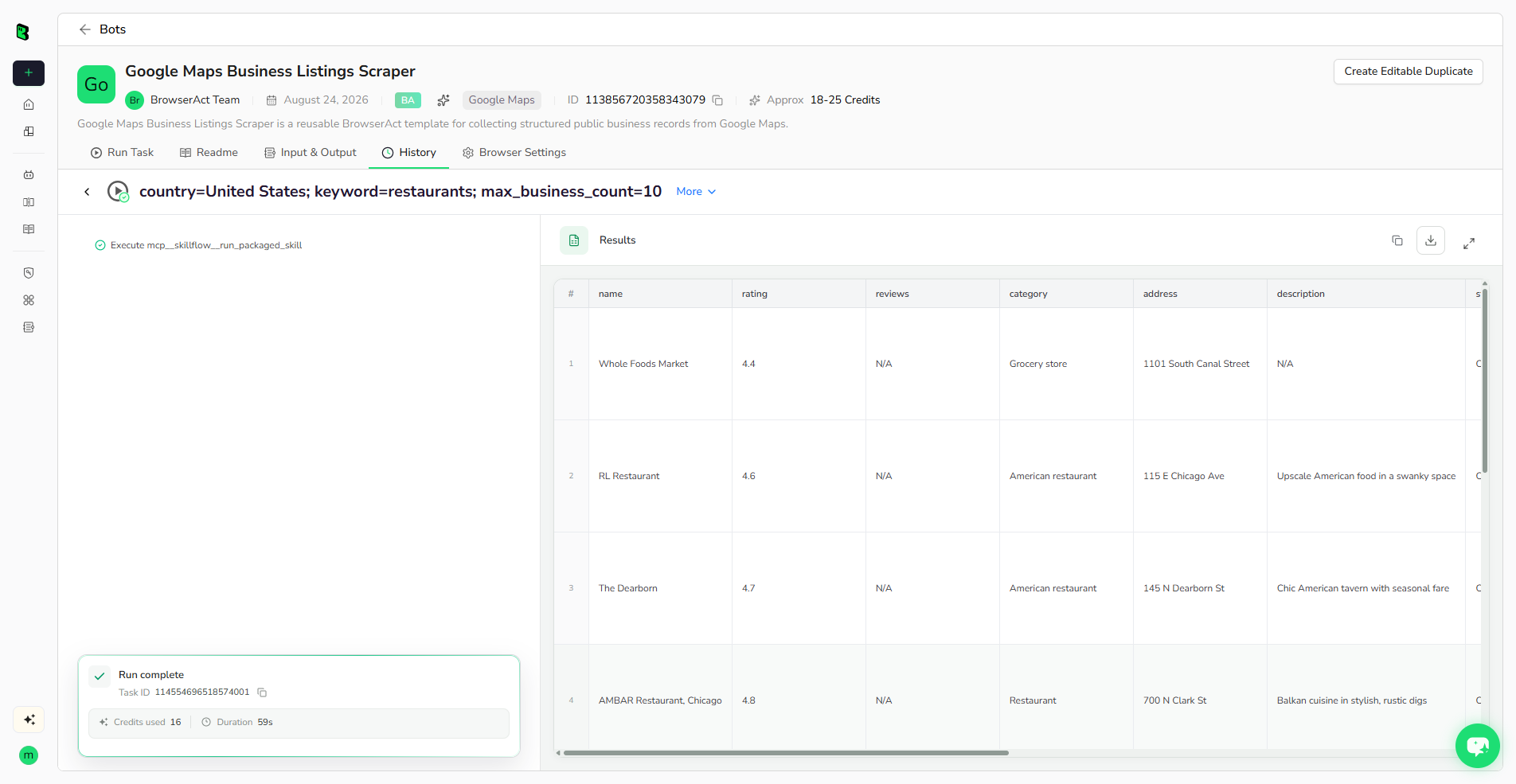
The screenshot above comes from a completed BrowserAct run using restaurants, United States, and a maximum count of 10. Each business appears as an independent row, with the visible result-card fields preserved in columns.
Build a Google Maps Lead List Without Code
Enter a keyword, choose a country, and get one structured row per business with a reusable BrowserAct Bot.

Review these points after the first run:
- Does the query return the intended type of business?
- Are branches, chains, or unrelated categories mixed into the results?
- Are the result count and geographic coverage sufficient for the task?
- Which fields frequently contain
N/A? - Does each row retain a source place URL?
If listing fields answer the research question, stop there. For example, a basic competitor directory may only require names, categories, ratings, addresses, hours, and Maps URLs.
If the next step requires phone numbers, official websites, public email addresses, or conversion analysis, use the listing dataset as a discovery layer and apply the appropriate deeper Bot.
Step 3: Add Detail and Public Contact Data
The Local Lead Finder opens public place details for richer business records. Because detail-page extraction performs more navigation per business, it should be used when those additional fields contribute to a decision.
Email enrichment requires an important extra distinction: emails do not come directly from a Google Maps email column. The workflow uses Maps to identify the business and its official website. It then looks for email addresses visibly published by that business on its website or contact page.
That approach provides three useful pieces of context:
- The business record that initiated the search.
- The public website where the contact information was found.
- The contact page or source URL that can be reviewed.
An empty email list is a valid result. It may mean the business prefers a form, phone call, booking page, or messaging channel. It may also mean the site could not be reached or did not visibly publish an address. Preserve that distinction instead of forcing every business into an email campaign.
Step 4: Qualify Leads With Observable Website Gaps
Raw lead volume can become a distraction. If a sales team collects 5,000 local businesses but has no way to explain why any one of them needs help, the research burden simply moves downstream.
Qualification should answer four questions:
- Is this business active and relevant to the selected market?
- Is there a public route to learn more or make contact?
- Is there an observable problem connected to the service being sold?
- Is there enough evidence to write a specific, truthful opening message?
The Google Maps Lead Qualification Scraper evaluates visible conversion capabilities on the official website. A result might show that a business has online booking and a strong primary CTA but no live chat, messaging option, or contact form. Another result may have no official website, making website-based checks unavailable.
The useful output is not only a score. It is the explanation and evidence behind that score. A salesperson can review the website URL, the observed conversion weakness, the recommended automation, and the evidence URLs before deciding whether the account belongs in an outreach list.
This makes the record actionable without pretending that software can know a prospect's internal priorities.
Prioritize Leads With Visible Website Evidence
Check public business details and observable conversion gaps, then review the score, reason, recommended automation, and supporting URLs before outreach.

Four Ways Agencies Can Turn Google Maps Data Into a Specific Offer
The same Google Maps scraper should not produce the same pitch for every seller. The value comes from connecting a visible signal to a service the agency can deliver.
Web design services
Start with active local businesses and review whether each one has an independent website. A missing website button is a useful signal, but it is not definitive proof that the business has no site. Search the business name and location, distinguish social profiles or directory pages from an owned domain, and check for parent-company location pages before outreach.
The resulting pitch should refer to a verified absence or a specific conversion problem, not a generic offer to "improve your online presence."
Booking and CRM services
Search categories where appointments or quote requests are central to the customer journey: dental clinics, salons, med spas, legal offices, contractors, or home services.
Check whether the official website presents a visible booking or quote path. Separate true online scheduling from a phone number, a general contact page, or a button that fails to reach a usable destination.
Local SEO services
Use Maps data to identify public signals worth reviewing, such as missing websites, contact-information differences, incomplete visible fields, review counts, or stale activity. These observations can support a focused initial audit, but they are not a complete local SEO diagnosis.
The outreach value is specificity: show the public inconsistency or missing element and explain what you would verify next.
Automation and conversion services
Review whether the official website supports live chat, messaging, booking, lead forms, or a clear primary CTA. These are observable conversion capabilities that can lead to a concrete service offer.
A business should not be labeled a weak prospect merely because one feature is absent. The missing feature must make sense for its customer journey. A reservation flow matters more to a restaurant than to a wholesaler that closes orders through account managers.
BrowserAct vs Manual Research, Custom Scrapers, and Static Lead Lists
There is no single best method for every lead-generation task. The right choice depends on volume, technical resources, freshness requirements, and how much evidence the sales team needs.
Method | Setup effort | Maintenance owner | Data depth | Best fit |
Manual Google Maps research | Low initial setup, high repeated labor | Researcher | Flexible but inconsistent | Very small lists and final verification |
Custom Playwright or Puppeteer scraper | High | Internal developer or contractor | Fully customizable | Teams with engineering capacity and stable recurring requirements |
Static purchased lead list | Low | Vendor | Depends on vendor and list age | Broad campaigns where freshness and visible evidence are less important |
Browser extension scraper | Low to medium | Tool provider plus user browser | Usually listing and export focused | Interactive, operator-led extraction |
BrowserAct reusable Bots | Low code requirement | BrowserAct Bot plus user review | Listing, detail, public email, or qualification depending on template | Repeated public-page research with structured output and selectable depth |
Custom code gives a technical team maximum control, but the team owns browser behavior, selectors, scrolling logic, sessions, errors, and future interface changes. A static list removes extraction work but may not preserve the live evidence needed for a personalized offer.
BrowserAct templates are useful when the task already matches a published Bot. Users configure the available inputs, run the Bot, review the structured records, and reuse the same path for another keyword or location. When the research question changes, the user should choose another template or build a Bot designed for the new output rather than assuming one scraper can answer every question.
Review the Output Before Outreach
Automation should shorten research, not remove judgment. Before adding records to a campaign, apply a review checklist:
- Confirm that the business matches the target industry and territory.
- Open the preserved Maps and website URLs for high-priority records.
- Review missing fields and extraction status instead of treating blanks as facts.
- Check whether a franchise, branch, duplicate, or directory page changes the conclusion.
- Verify that the observed problem connects to the service being offered.
- Use only appropriately obtained public business information.
- Follow applicable website terms, privacy rules, and outreach requirements.
- Personalize the message around verified evidence rather than a generated assumption.
This review step protects both data quality and the sender's credibility. A smaller list with a defensible reason to contact each business is often more operationally useful than a large, unfiltered export.
Frequently Asked Questions
What data can a Google Maps scraper collect?
A Google Maps scraper can collect publicly visible fields such as business name, category, address, rating, review count, hours, phone, website, and place URL. Available fields depend on whether the scraper reads result cards, opens place details, or visits the linked official website.
Can a Google Maps scraper find email addresses?
Google Maps does not provide a native email field. A Google Maps email scraper can use the listing's official website link and check publicly accessible website or contact pages for addresses the business has visibly published.
What is the difference between a Google Maps scraper and a lead finder?
A scraper describes the data-collection method. A lead finder describes the business outcome. A useful lead finder may combine Maps extraction with contact enrichment, filtering, evidence, and qualification instead of returning only raw listing rows.
Do I need to maintain scraper code with BrowserAct templates?
No coding is required to configure and run the published BrowserAct templates described in this guide. Users still need to choose appropriate inputs, review results, and follow the access conditions and requirements of the target website.
Which BrowserAct Google Maps Bot should I use?
Use Business Listings Scraper for broad result-card data, Local Lead Finder for richer place details, Email Finder for publicly displayed website emails, and Lead Qualification Scraper for observable conversion gaps and evidence-backed prioritization.
Can BrowserAct results connect to other tools?
The published template pages describe structured results that can be reviewed or exported and used through API JSON responses, n8n, Make, Zapier, or MCP-based agent workflows configured through the Bot's integrations.
What should I check before using public business data for outreach?
Verify the business, source URLs, missing fields, relevance, and reason for contact. Follow applicable website terms, privacy requirements, and outreach laws, and avoid treating a generated score or missing field as proof of purchase intent.
Build the Lead Record You Actually Need
A Google Maps scraper is most valuable when its output matches the next decision. If you only need a market list, collect consistent listing records. If you need a contact route, add detail and public website enrichment. If you need a sales reason, inspect relevant conversion signals and preserve the evidence.
BrowserAct's published Google Maps Bots let you start at the appropriate depth and reuse the same structured process for another industry or location.
Start with this result | Run this BrowserAct template |
Broad business listings | |
Phone, website, and place details | |
Publicly displayed website emails | |
Evidence-backed conversion gaps |
Choose the template that matches the next decision in your lead-generation process, then review the source evidence before outreach.
Start With a Reusable BrowserAct Template
Choose the template that matches the data, evidence, or browser task you need, then configure its inputs and review the structured result.


