Google Maps Scraper Costs: No-Code Bots vs Custom Scrapers and Lead Lists

Ask how much a Google Maps scraper costs and you will get answers in incompatible units. Manual research is measured in staff time. Lead lists come with a batch or per-record price. A custom scraper carries development and maintenance costs. No-code bots are commonly priced by runs, credits, or usage.
To compare them, work out the total cost per usable record. Here, usable means a current business record with the fields you asked for, a consistent structure, and enough source information for someone to review it before it reaches sales. Raw listings and qualified leads are two different outputs.
The Short Answer: Compare Cost per Usable Record
Published prices rarely describe the same job. One service may charge per 1,000 places, another per run, while a developer quotes by the hour. Contact discovery, filtering, and enrichment can sit on top of the base charge. Put those figures in one table without normalizing them and the comparison tells you very little.
Use this formula instead:
Total collection cost
+ enrichment cost
+ cleaning and deduplication labor
+ maintenance cost
+ failed-run and rework cost
= total operating cost

Total operating cost / usable records = cost per usable record
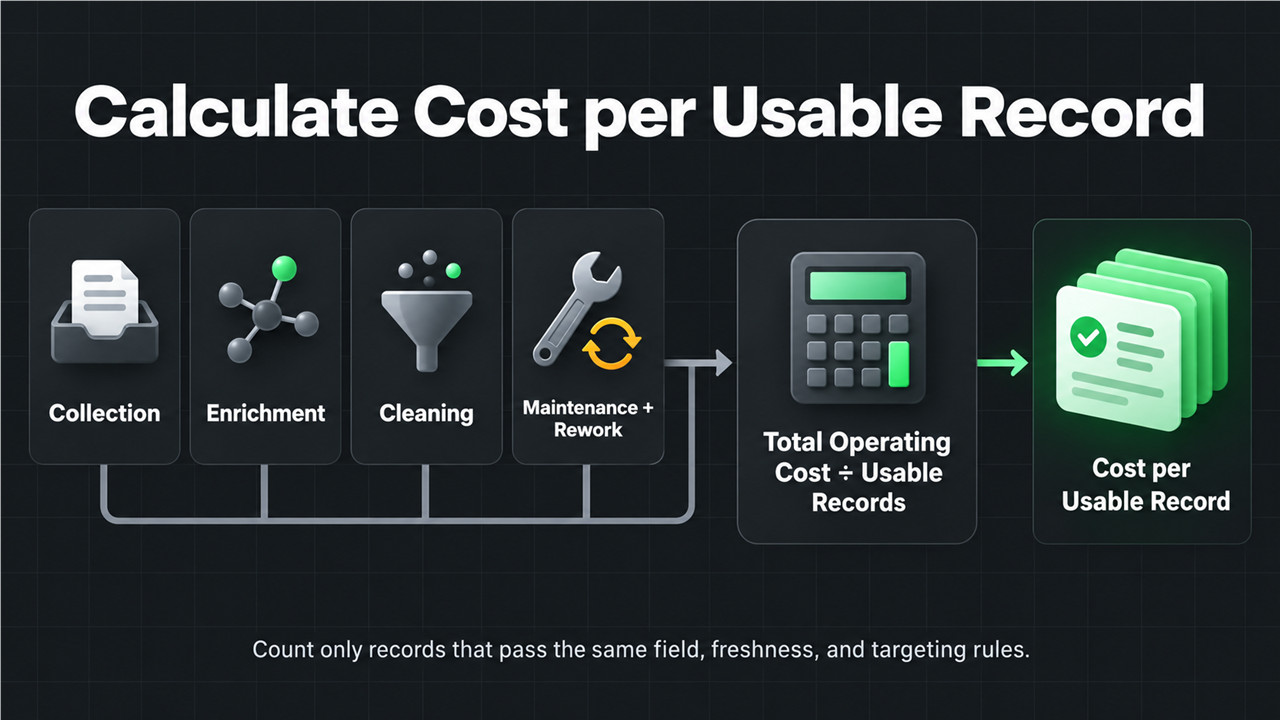
Suppose a $100 list contains 2,000 rows, but only 600 pass your location, category, freshness, and required-field checks. Divide by 600. Scraper output deserves the same treatment because a returned row may still be irrelevant, incomplete, or out of date.
What Counts as a Usable Google Maps Lead Record?
Write down the required output before choosing how to collect it. Without that step, the shallowest dataset often appears to be the cheapest.
A usable record might require:
Requirement | Example rule | Why it affects cost |
Target match | Correct category and target market | Broad results increase review labor |
Core identity | Business name and address | Needed for deduplication |
Public business signals | Rating, review count, hours, status | Supports segmentation and prioritization |
Source evidence | Google Maps place URL | Lets a reviewer verify the record |
Consistent schema | The same keys on every record | Reduces spreadsheet and CRM cleanup |
Freshness | Collected within an acceptable window | Determines when the dataset must be refreshed |
Phone numbers, websites, public emails, booking links, review gaps, and SEO signals belong to deeper collection or enrichment stages. They should not be silently included in the price of a basic listing record.
For example, the Google Maps Business Listings Scraper reads visible cards in the search feed. Its records can include the business name, rating, review count, category, address, hours, service options, and place URL. It does not open every business detail page. A workflow that visits business websites to find contact information is doing more work, so it belongs in a separate comparison.
Four Ways to Collect Google Maps Leads
1. Manual research
Manual collection takes little setup. A researcher searches Google Maps, opens listings, copies the required fields, and checks each row. For a small one-off list, that may be all you need.
The bill arrives in the form of repeated work. A new city, category, or refresh sends the researcher through the same steps again. Formatting can vary from one person to another, and source links are easy to miss. Manual research starts to drag when the team keeps collecting the same fields.
It still makes sense when:
- You need a very small list.
- Each business requires subjective review.
- The task is unlikely to repeat.
- You are still defining the fields that matter.
2. Purchased lead lists
A static list is quick because the data has already been collected. There is no scraper to configure, and no collection run to wait for. The important questions are how well the seller's coverage, update schedule, and field definitions match the campaign.
You give up some control in return. It may be hard to tell when each row was checked, how duplicates were handled, or whether the seller's definition of a local business matches yours. Hours spent removing irrelevant records or replacing stale ones belong in the cost calculation.
A purchased list is easier to justify when:
- Coverage and freshness are documented.
- Your targeting rules are broad and stable.
- You do not need source-level evidence for every row.
- The list can be sampled before purchase.
3. A custom Google Maps scraper
A custom scraper gives a technical team control over navigation, fields, storage, retries, and downstream integrations. That control is useful when data collection is part of the product itself.
The first build is only part of the expense. Someone must deal with selector changes, browser infrastructure, monitoring, failed runs, access restrictions, proxy configuration where needed, data validation, and incidents. A working script is not yet a maintained collection system.
Custom development is usually reserved for cases where:
- The scraper is core product infrastructure.
- You need behavior that existing tools cannot provide.
- Engineering can own maintenance over time.
- The collection volume justifies ongoing technical ownership.
4. A reusable no-code Bot
A no-code Bot covers the ground between manual research and custom development. The collection logic is already packaged. Users provide inputs such as a keyword, country, and result count, then receive the same output structure on later runs without writing selectors or maintaining scraper code.
It suits work that repeats across categories or markets. Users still need to check the results and choose a template that collects enough detail, but they do not have to rebuild the collection logic for every query.
Consider this route when:
- The task repeats with different keywords or locations.
- A standard output schema is valuable.
- The team does not want to maintain scraper code.
- Results will feed spreadsheets, research, or downstream automation.
For a broader workflow comparison, see How to Scrape Google Maps Without Code.
Where the Real Cost Comes From
Collection is only one line in the budget. Most of the gap between a cheap export and a useful dataset appears in the work around it.
Collection
Start with the direct cost of obtaining the business records. Depending on the method, that may mean labor hours, records, requests, runs, or credits.
Field depth
A search-result card takes less work to collect than a business profile spread across several pages. Visiting websites, finding contact pages, extracting public emails, or analyzing reviews adds browser steps and more chances for missing data.
Enrichment
Contact details, website technologies, company attributes, validation, and review analysis are often separate services. Check whether each one is optional, which unit it uses for billing, and what happens when the requested data is unavailable.
Cleaning and deduplication
Before records enter a CRM, someone may need to normalize names, addresses, URLs, phone formats, and missing values. Count automated processing and manual review time.
Maintenance
Custom scripts need monitoring and repairs when pages change. Static lists need replacing as they age. Reusable tools need occasional output checks and sensible template selection. Each option assigns that work to a different owner.
Rework
Broad searches, incorrect locations, missing source URLs, inconsistent schemas, and failed exports all create rework. A small test can expose those problems before they affect thousands of rows.
Google Maps Scraper Cost Comparison by Operating Model
The table below compares cost structure, not named vendors or universal prices.
Method | Upfront cost | Recurring cost | Freshness control | Maintenance owner | Best fit |
Manual research | Low | Staff time per refresh | High at small scale | Research team | Small, judgment-heavy lists |
Purchased lead list | Low to medium | New purchases or refresh fees | Depends on provider | Data provider plus buyer review | Fast, broad coverage |
Custom scraper | High | Infrastructure and engineering | High | Your engineering team | Core, specialized data systems |
Reusable no-code Bot | Low | Run or usage cost | High per new run | Platform plus user QA | Repeatable business research |
For 20 carefully selected accounts, manual work may cost less than setting up any tool. At sustained production volume, a custom system may earn back its engineering cost. A reusable Bot fits the large middle: recurring work that needs structure but does not justify a dedicated scraper team.
A Cost-per-Usable-Record Worksheet
Put every option through the same worksheet.
Input | What to record |
Requested records | The maximum records requested |
Returned records | Rows actually returned |
Usable records | Rows passing your field and targeting rules |
Direct tool cost | Subscription, usage, run, record, or purchase cost |
Labor hours | Setup, review, cleanup, and export time |
Labor rate | A consistent internal hourly rate |
Maintenance allocation | Engineering or operations cost assigned to this period |
Rework cost | Failed runs, replacements, or repeated purchases |
Then calculate:
Labor cost = labor hours x labor rate

Total operating cost = direct tool cost
                     + labor cost
                     + maintenance allocation
                     + rework cost

Cost per usable record = total operating cost / usable records
Record the usable-record rate as well:
Usable-record rate = usable records / returned records
This percentage shows how much of the export survives your actual campaign rules.
How to Run a Fair Shared Test
A fair test keeps the assignment unchanged across methods:
- Choose one business category and one market.
- Request the same maximum record count.
- Define the required fields before collection.
- Decide whether detail pages and business websites are in scope.
- Keep enrichment off unless every option includes the same enrichment layer.
- Preserve a source URL for verification when available.
- Measure setup, collection, cleanup, and review time separately.
- Count usable records only after applying the same acceptance rules.
One simple starter contract is restaurants, United States, and 10 records, limited to fields visible on list cards. Ten records are enough to check the schema and scope. They are not enough to establish a general price per lead.
When a No-Code Reusable BrowserAct Bot Fits
BrowserAct's public Google Maps Business Listings Scraper takes a keyword, a country selection, and a maximum business count. It reads public cards from the Google Maps search feed and returns one structured record for each business. When a visible field is unavailable, the field stays in the schema with a missing value.
The public template page currently shows an estimated 18-25 credits per run. Check the current estimate on the template page, run a small query, and calculate the usable-record rate against your own field rules before scaling.
The template is worth considering when you need to:
- Repeat the same collection pattern for new categories.
- Keep one predictable set of output keys.
- Review source-linked business records before enrichment.
- Avoid building and maintaining a custom scraper for a standard list-card task.
If you need public emails rather than basic business listings, treat that as a separate workflow and cost layer. The Google Maps email scraping guide explains why website discovery and contact-page extraction should not be priced as basic Maps records.
Enter a keyword, choose a country, and get one structured row per business with a reusable BrowserAct Bot.

Frequently Asked Questions
How much does a Google Maps scraper cost?
The answer depends on the billing unit and how much data each record contains. Add collection, enrichment, cleaning, maintenance, and rework, then divide by the usable records. Prices per run and per 1,000 rows only become comparable after the field requirements match.
Is buying a local business lead list cheaper than scraping?
Yes, for a one-time campaign, provided the list is current and closely matches your targeting rules. Poor freshness, broad coverage, duplicates, and missing evidence can erase that saving through review and replacement work.
What hidden costs should I include?
Include setup time, enrichment, cleaning, deduplication, quality review, failed runs, refreshes, engineering maintenance, and the cost of replacing unusable records.
Does the lowest price per row mean the lowest total cost?
No. Stale records, weak targeting, missing fields, duplicates, cleanup, and frequent replacements can wipe out a low row price. Apply the same acceptance rules first, then compare the records that remain.
When should a team build a custom scraper?
Build one when collection belongs in your core infrastructure, the behavior is specialized, and an engineering team can own monitoring and maintenance. A standard recurring task usually needs less setup with a reusable no-code Bot.
Choose by Frequency, Data Depth, and Maintenance Ownership
Choose based on the work you actually have. Small lists that need judgment are often fine as manual research. A purchased list can work when you can verify its coverage and freshness. Custom development makes sense when collection belongs inside the product. Reusable no-code Bots cover recurring, structured collection without handing a permanent maintenance job to engineering.
Write the field requirements first, run a small shared test, calculate the cost per usable record, and name the person or team responsible for the next refresh. Those four answers make the price comparison concrete.


