Facebook Post Scraper: Export Clean, Comparable Posts

Your export has twenty rows. Some are repeated posts, one is an old announcement, and another contains no post text at all. Before you compare competitors, you need to know which rows belong in the report. A Facebook post scraper should help you build a usable post dataset, not just a large file. This guide shows how to define the date window, preserve post identity, interpret engagement fields, and check a CSV. BrowserAct can support a custom no-code collection task; the output still needs acce
- 1A Facebook post scraper is useful when each exported row has a clear post identity, source URL, publication-time evidence, and collection timestamp.
- 2This workflow separates date filtering, duplicate handling, metric definitions, access checks, and CSV validation. Fix those before calculating a content benchmark.
- 3A date filter selects among accessible results; it does not prove complete historical coverage. An old pinned post also does not establish chronological feed order.
- 4BrowserAct fits a custom prompt-based collection workflow. Start with a bounded test and inspect both the records and the stopping reason.
- 5Keep missing values and failed inputs separate from successful posts. Our earlier three-post access pilot returned zero posts and one status-only row, not a successful post export.
What does a Facebook post scraper collect?
A Facebook post scraper extracts accessible post-level information into a structured dataset. Depending on what the source and tool expose, that can include the post URL, text, displayed publication time, media references, and visible reaction, comment, or share counts.
It is different from a Page information scraper. A Page's name, category, or website belongs in a Page record. Those details can accompany a post, but they do not replace the post's identity. It is also different from a comment scraper: a comment count is not a collection of comment texts and replies.
The acceptance question is simple: can another person open the source and understand what each row represents? If not, the export is too ambiguous for analysis.
Begin with the known evidence boundary
In a BrowserAct pilot on September 7, 2026, the requested limit was three posts from the Nintendo Facebook Page. The session reached a login prompt and stopped. The result had zero post records and one status-only row. The actual result is shown later in this guide.
Those numbers establish a failed access test, not extraction accuracy. We have not verified the date-filtering or post-parsing behavior in a successful BrowserAct run for this target. The specification below explains what to test next if an authorized collection path is available.
That distinction prevents a costly mistake: treating a completed Bot build or a downloadable file as proof that you collected the intended content.
Define the post dataset before selecting a result limit
Write down the target Page URLs, intended period, post types, required fields, and destination. “Recent posts” is not precise enough for a repeatable comparison. “Accessible Page posts published during a stated week, excluding records outside that window” is a better contract.
Separate the requested scope from the observed coverage. The requested scope might be a complete week. The observed coverage might be only the first accessible batch before a cap or restriction. Keep both descriptions in the report.
Use a minimal schema with room for uncertainty
Field | What it represents | Validation rule |
page_url | The Page requested or verified | Keep the actual source, not a guessed handle |
post_id / post_url | The identity of one post | Retain a source URL even when a stable ID is unavailable |
post_text | Text visibly attached to that post | Do not substitute a link preview or surrounding Page text |
published_time_raw | The source's displayed date or time | Preserve the original label before normalization |
published_at | A normalized publication timestamp, if defensible | Leave unavailable when the source cannot support it |
collected_at | When the observation was made | Store separately from publication time |
reactions_raw / reactions_total | Displayed label and normalized total, if available | Do not invent exactness from abbreviated labels |
comments_count / shares_count | Visible count observations | These are counts, not exported comment or share records |
access_status / stop_reason | The collection outcome | Keep failure records outside the successful-post count |
Keep long IDs as text in spreadsheets. They are identifiers, not quantities to add or round. Check that the destination has not converted an ID to scientific notation or otherwise changed its digits.
Pro Tip: Put one sentence above the raw-data tab explaining what a row means. “One post observed once” and “one latest record per post” require different duplicate rules.
Choose a Facebook posts date range you can audit
Use an explicit start, end, and timezone. Relative requests such as “last week” change meaning depending on when they run. They are convenient during exploration but harder to reproduce during an audit.
For your own downstream filtering, a half-open interval is a useful convention: include the start and exclude the end. For example, an illustrative UTC window from September 1 at 00:00 to September 8 at 00:00 includes seven complete days without overlapping the next window's opening boundary. This is a suggested processing convention, not a claim about any vendor's filter semantics.
Check what the tool's date controls actually mean
Apify's official Facebook Posts Scraper input documentation lists newer-than and older-than fields, with absolute and relative date inputs. It also describes UTC time support for JSON inputs. Separately, it says that omitting the results limit extracts only the initial result page.
These are documented controls for that Actor. They do not establish that every historical post is reachable, or that another tool interprets date boundaries identically. Test a record near each boundary before relying on exact inclusion rules.
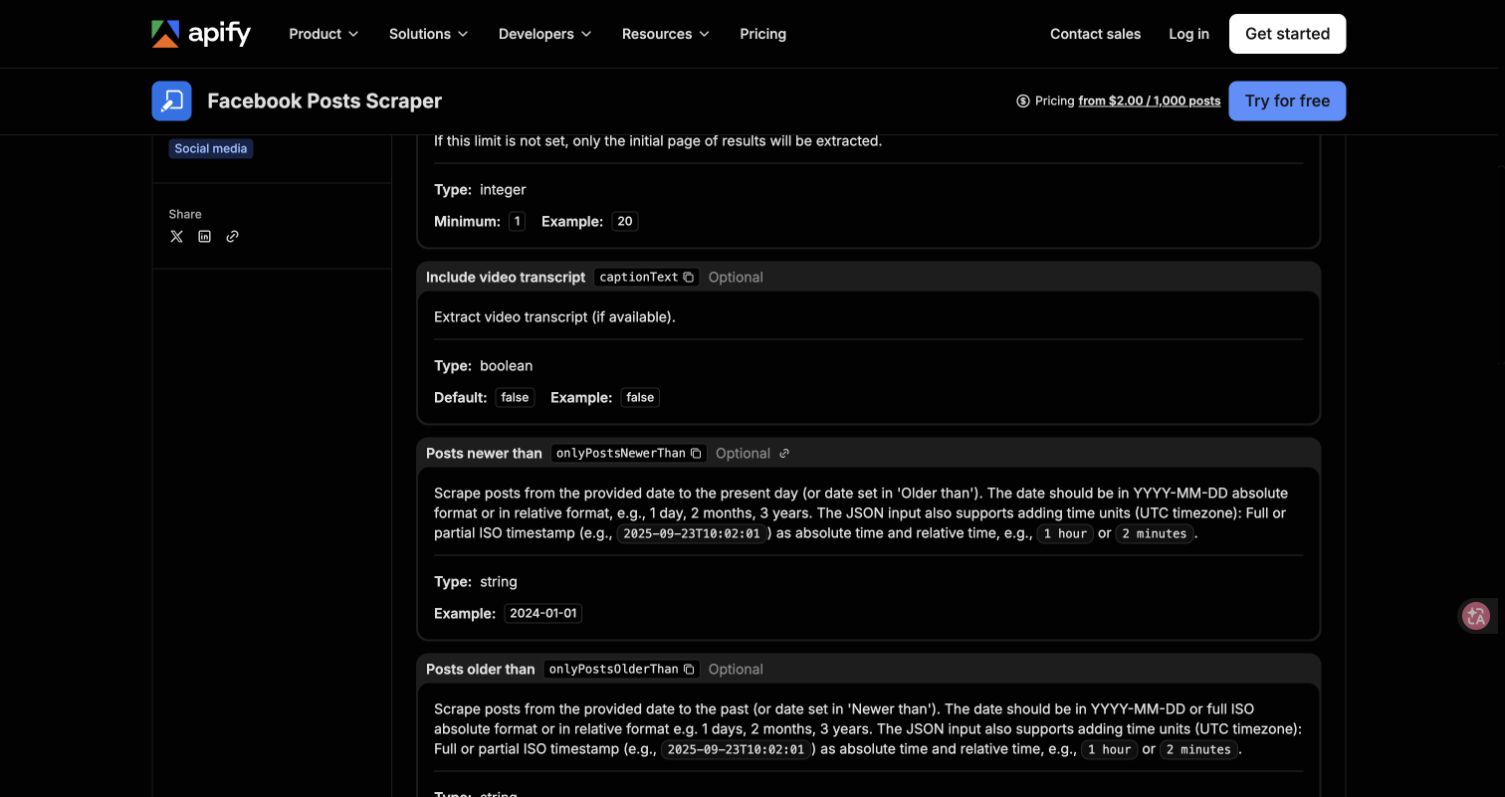
Official Apify input documentation, accessed September 8, 2026. This screenshot shows documented controls, not a completed extraction test.
Preserve uncertain dates instead of silently guessing
A visible label such as “yesterday” needs the collection time and relevant timezone context before it can become a date. A date without a year may need additional evidence. Keep the raw label even when you can normalize it, so someone can review the transformation later.
If a timestamp is uncertain, classify the row as needing date review. Do not quietly include it because its position in the feed looks recent. That can distort both posting frequency and comparisons between Pages.
The same rule applies to edits and reposts. A later observation of changed text is not automatically a newly published post. Preserve the identity and record what changed, rather than assigning a new publication date from the time your scraper noticed it.
Handle pinned posts and pagination as separate problems
A post near the top of a Page may not be the newest one. The community-maintained Facebook Post Scraper FAQ identifies pinned content as one possible explanation for seeing the same top post across several days. Treat that as a hypothesis to check against the visible Page, not proof that every repeated top result is pinned.
Do not stop at the first old post
If the source order is not verified chronological, an old post cannot establish that everything below it is older. Record a visible pinned indicator when available, retain the publication-time evidence, and apply the date rule to individual records.
For a historical study, define how you will know the intended window was inspected. A result cap, loading failure, or login prompt should produce an incomplete-coverage status. It should not be renamed “end of history.”
Situation | Useful interpretation | Action |
Old post appears near the top | Could be pinned or otherwise ordered differently | Inspect date and visible context; continue only within the authorized plan |
Same post appears after another load | Could be repeated presentation of one object | Deduplicate identity, retaining the observed source |
Requested cap reached | The task stopped at a configured boundary | Report capped coverage; do not claim all posts |
No new rows after loading | Could be exhausted results or a loading failure | Inspect the visible state and record the actual reason |
Access prompt interrupts collection | The session cannot continue as configured | Stop and request authorized review |
Test the collection requirement with BrowserAct
Use BrowserAct when you want to describe the required fields and checks in a no-code browser workflow. The following prompt is a proposed post-export acceptance specification. It has not been validated as a successful date-window extraction on the example target.
1. Open the BrowserAct Dashboard
Use Create, choose Build with Agent, or enter your requirement in the central input. Start with one target and a small result cap. The current English creation interface provides the starting point; review the generated task before expanding its scope.
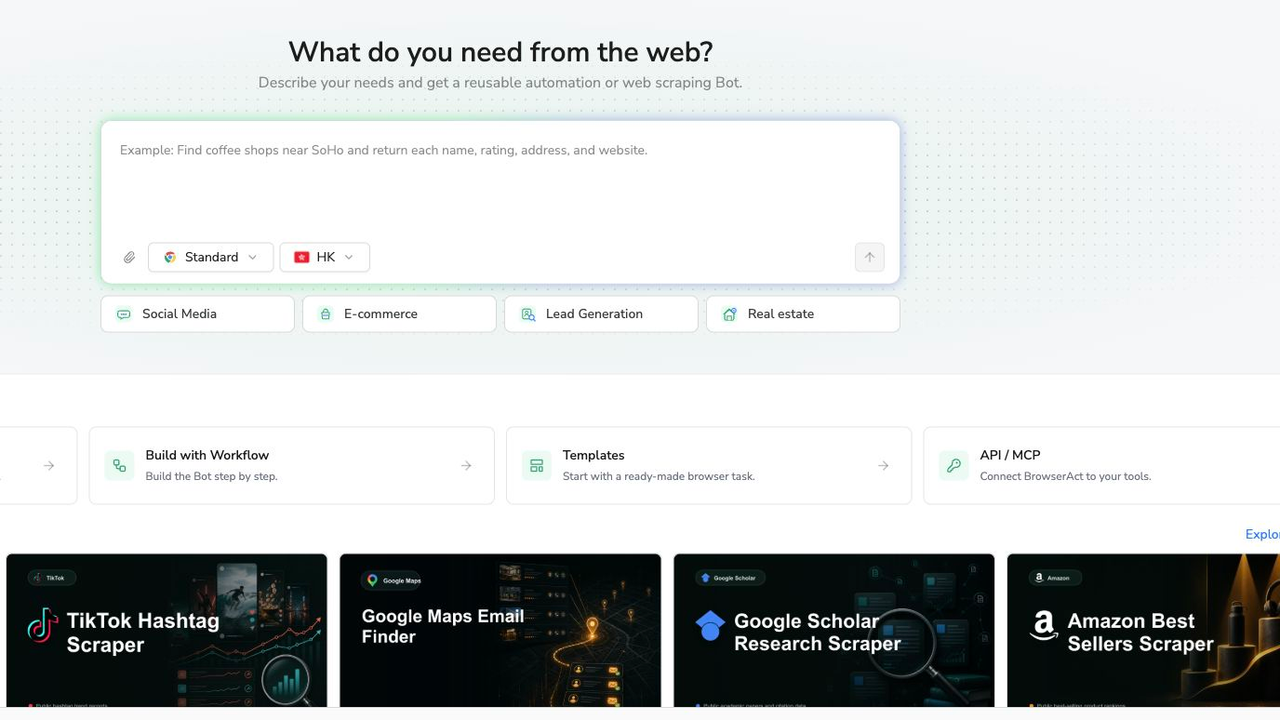
Actual BrowserAct requirement-entry interface. The screenshot shows where to describe the task, not a completed post collection.
2. Copy the complete prompt
Replace the example target and dates with your authorized research scope. Keep the distinctions between successful post rows, missing fields, and run status.
Scrape data from any website.
Describe the data you need. Get a Bot — a reliable, reusable scraper.
3. Review any access prompt before continuing
Stop when the session encounters login, CAPTCHA, two-factor authentication, membership approval, or restricted content. An authorized person can assess whether a supported manual handoff is appropriate. Credentials do not belong in the prompt, screenshots, or data file.
Our earlier Nintendo pilot did not proceed beyond the login prompt. We did not test a logged-in recovery or successful extraction for this target. That is a limitation of the observed run, not evidence that every Facebook Page or every collection session behaves identically.
4. Validate the rows, then export
Inspect the structured output against the visible source. Confirm the post identity, text, dates, and count labels. Separate failed inputs and ambiguous records before exporting successful records in an available format.
If the task produced no posts, save its status rather than a misleading “posts exported” total. The earlier pilot below returned one status-only row; the empty post fields should remain empty.
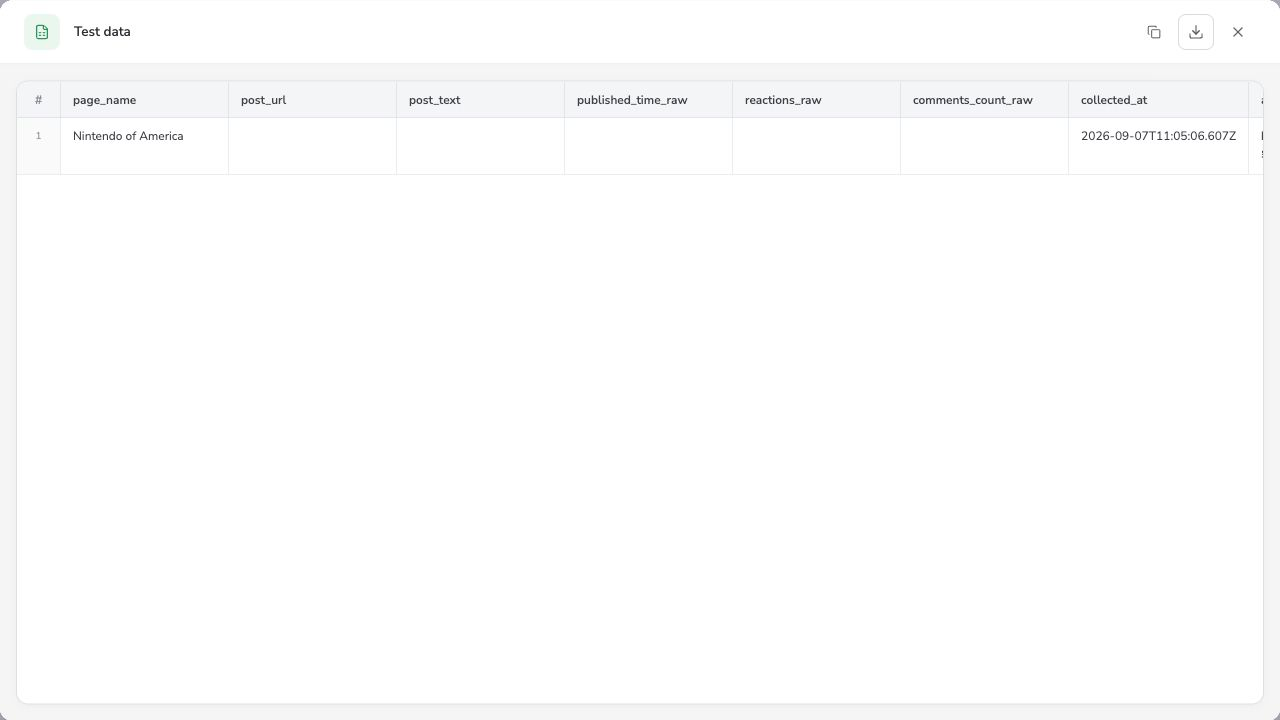
September 7, 2026 pilot: zero collected posts, one status-only row. Login prevented post extraction. The access-status field sits beyond the right edge of this crop. This is not an output sample from the new date-window prompt.
Before recurring use, the next acceptance milestone is a permitted successful sample that passes the field and date checks. Keep that milestone separate from the access-failure behavior already observed.
Export Facebook posts to CSV without changing their meaning
The file is part of the workflow, not just a download button. Open it in the actual spreadsheet or analysis system the team will use. A correct preview can still be misinterpreted during import.
Check multiline captions, commas, quotation marks, non-English characters, and URLs. Confirm that text remains in the intended columns. Import long IDs as text and inspect null handling; an empty value should not automatically become a zero count.
Keep totals and their components separate
Reactions and likes are not interchangeable field names. If your source provides a total reaction count and separate reaction categories, do not add the total to its components. Keep the original field definitions beside the dataset.
Similarly, a displayed comment count does not tell you that the comment bodies or nested replies were exported. If the research question needs those texts, define a separate comment-level dataset with the parent post identity. The open-source facebook-scraper documentation distinguishes comment/reply data and notes that some fields may be unavailable; its examples are not a guarantee of current extraction success.
Work through a small cleaning example
The following is a synthetic teaching example, not scraped Facebook data. Assume your raw file contains these seven observations for a fixed date window:
Raw row | Observation | Treatment |
1 | Post A, verified within the window | Keep as a candidate post |
2 | Post A repeated in the same run | Remove the duplicate observation |
3 | Post B, verified within the window | Keep as a candidate post |
4 | Post C, verified outside the window | Exclude from this period; retain exclusion reason |
5 | Login-required status for another Page | Keep in run status, not in the post count |
6 | Post D with an ambiguous date | Hold for date review |
7 | Post E, verified within the window | Keep as a candidate post |
You still cannot call those three posts the complete period unless the coverage evidence supports that conclusion. Cleaning removes known problems. It does not recover inaccessible content.
Pro Tip: Retain an exclusion-reason column or a small excluded-records tab. Deleting questionable rows without a reason makes the report impossible to reconcile with the original export.
Keep recurring observations without duplicating posts
For a one-off inventory, one verified record per post may be enough. For monitoring, the same post can legitimately appear in multiple runs because its visible counts change. Use separate concepts for post identity and observation identity.
A practical design has one posts table and one observations table. The posts table stores the stable source identity and content. The observations table stores post identity, collection time, and the visible metrics for that observation. If text changes, retain the version or change record your research actually requires.
Deduplicate within a run, compare across runs
Do not treat every repeated URL as useless. A duplicate caused by the same page being loaded twice in one run differs from a deliberate observation the next day. Define that rule before using a spreadsheet's “remove duplicates” command.
For an ongoing social media monitoring workflow, attach a run-health record to each target. If today's collection is blocked, show missing coverage instead of inventing unchanged metrics or zero new posts.
For competitor analysis, compare equivalent periods and observation ages where feasible. A post observed shortly after publication and one observed weeks later have had different opportunities to accumulate visible response.
Pro Tip: Before calculating a change in reactions, verify that both observations use the same source field and definition. A switch from a total to one reaction category can look like a performance drop.
Decide whether the export is ready for analysis
Accept the dataset only when the important questions have answers: what each row represents, which sources were accessible, which dates are defensible, how duplicates were handled, and why collection stopped. List unresolved issues beside the sample size.
Public post data cannot establish a competitor's private reach, impressions, conversions, or revenue. Use it for observable publishing and response patterns, and keep those limitations in the report rather than trying to infer missing business outcomes.
Review the applicable platform rules, permissions, and privacy requirements before collecting or retaining data. Stop at restrictions, minimize unnecessary personal information, and keep a retention policy appropriate to your purpose. A public URL is not blanket permission for every use.
Put the acceptance test before the larger run
A useful Facebook post scraper produces records your team can explain. Start with a small authorized target, inspect the export, and repair the specific failure before increasing the cap or adding Pages.
Build the collection requirement in BrowserAct, then judge it by the observed output. The goal is a defensible dataset, not a large row count.
Further reading: Facebook data collection
Frequently Asked Questions
What should a Facebook post scraper export?
At minimum, keep post identity, source URL, visible text, publication-time evidence, collection time, and access status. Add the visible metrics required for your analysis, leaving unavailable fields null.
Can I export all Facebook posts for a date range?
A date filter does not prove complete access to that period. Verify the accessible history, pagination, caps, and stopping reason. Describe incomplete results as a sample, not a complete archive.
Why does the same Facebook post appear repeatedly?
It may be pinned, loaded more than once, or deliberately observed in multiple runs. Check post identity and context before deduplicating. A later metric observation is not always an unwanted duplicate.
Are Facebook likes and reactions the same metric?
Do not assume so. A total reaction field may include several categories, including likes. Preserve the source definitions and avoid adding a total to its component counts.
Why does my export contain rows with no post text?
Check whether they are failed-input status rows, unavailable content, or parsing problems. Do not count a status-only row as a post, and do not replace missing text or metrics with invented values.
Which Facebook scraper should I choose for a different data object?
Choose a method for the exact object: Page information, posts, or comments. BrowserAct fits custom no-code tasks, but each target and output still needs an acceptance test before larger collection. For the broader choice of tools and data objects, see the Facebook scraper overview.


