How to Automate Username Searches at Scale

To automate username searches well, you need more than a loop that opens profile URLs. A useful bulk username search preserves every input, checks a controlled platform list, records what happened on each attempt, and keeps uncertain matches separate from confirmed public profiles. The difference matters at scale. Forensic OSINT says its username search can cover more than 500 websites, while NameCheckerAI limits a bulk availability check to 50 names. Those numbers describe reach, not reliabilit
- 1Model the job as a matrix. Each username-platform pair needs its own result row and terminal status.
- 2Keep discovery separate from identity verification. A matching handle is a lead, not proof that two accounts have the same owner.
- 3Design for failure before speed. Bounded batches, retries, checkpoints, and manual review make the workflow reusable.
- 4Export evidence, not just links. Source URL, check time, status, and review notes make the dataset auditable.
Bulk Username Search Is Not Username Availability Checking
Two products can use the phrase “bulk username checker” while solving different jobs.
An availability checker asks whether a candidate name appears free to register. A profile-discovery workflow asks whether a public profile currently exists at a platform-specific location. The first is useful for naming a brand. The second is useful for brand protection, creator research, partnership operations, customer-support audits, or maintaining an approved directory of public accounts.
The outputs should look different:
Task | Core question | Minimum useful output | Main risk |
Username availability | Can this name be registered? | username, platform, available/unavailable | A platform can reserve or restrict a name without a visible profile |
Public profile discovery | Does a public profile appear to exist? | username, platform, profile URL, status, evidence, checked time | A matching handle can belong to a different person or organization |
Identity verification | Do several profiles likely represent the same entity? | corroborating signals, conflicts, confidence, reviewer decision | False attribution from username similarity |
Pro Tip: Name the workflow “public profile discovery,” not “identity matching.” That wording keeps the output honest and makes the review standard easier to enforce.
Define the Job as Username List × Platform List
The cleanest model is a matrix. If you have 20 usernames and 7 platforms, the planned workload is 140 independent checks. A check can succeed, fail, or remain uncertain without hiding the outcome of the other 139.
That model also makes completeness measurable. Instead of saying “the search finished,” you can report:
- planned checks: 140;
- terminal checks: 134;
- blocked checks: 3;
- ambiguous checks: 2;
- checks requiring login: 1.
Do not make “found profile” the only success state. A trustworthy workflow must be able to finish with not_found, blocked, or needs_review while preserving the evidence that led to that state.
Before the first run, define four boundaries:
- Input boundary: usernames only, not profile URLs, email addresses, phone numbers, or free-form names.
- Platform boundary: an explicit list such as Instagram, TikTok, Reddit, GitHub, X, YouTube, and LinkedIn.
- Access boundary: public pages and user-authorized sessions only.
- Action boundary: read-only discovery; no following, messaging, posting, liking, payment, or account changes.
These boundaries reduce accidental scope creep. They also make it possible to review the prompt, code, or Bot configuration before every run.
Normalize Inputs Without Losing the Original Value
Input cleanup should make matching consistent without destroying evidence. Keep both input_username and normalized_username.
For a conservative first pass:
- trim leading and trailing whitespace;
- remove one leading
@; - reject profile URLs, email addresses, and phone numbers;
- preserve case in the original field;
- create a lowercase comparison key only when the target platform is case-insensitive;
- remove exact duplicate input rows, but record that duplicates were received.
Do not silently rewrite punctuation. open.ai, open_ai, and openai can point to different accounts. Do not transliterate non-Latin characters unless the platform itself publishes a canonical transformed value. Store transformations in separate fields so a reviewer can reconstruct the decision.
A simple input table is enough:
input_username | normalized_username | source_batch | input_status |
|
|
| valid |
|
|
| duplicate |
| — |
| rejected_profile_url |
Use a Result Schema That Explains Every Check
A profile URL alone is not an auditable result. At minimum, store the input, platform, URL, status, evidence, and time.
Recommended fields:
Field | Purpose |
| Exact value provided by the user |
| Clean comparison value used for the check |
| Human-readable platform name |
| Canonical or candidate public profile URL |
| Public display name when visible |
| Short public text used as supporting evidence |
| Controlled terminal or review state |
| Page or search result that supports the status |
| Timestamp for freshness and reruns |
| Human decision, conflict, or follow-up instruction |
confirmed_public_profile: the expected public profile page loaded and showed consistent profile evidence;not_found: the platform returned a reliable missing-page signal;blocked: the request could not be evaluated because of an access or network block;login_required: the page requires an authorized session before the public result can be assessed;soft_404: the page returned HTTP success but visually behaved like a missing profile;ambiguous: the page or search result could match more than one profile;needs_review: the automation collected evidence but should not make the final decision.
Never convert blocked into not_found. That single mistake can make a large export look complete while hiding the platforms that were never actually checked.
Choose the Right Execution Model
There is no universal best tool. The right approach depends on list size, platform behavior, review requirements, and how often the task repeats.
Approach | Best for | Strength | Limitation |
Manual platform search | 1–5 usernames, sensitive review | Highest human context | Slow and difficult to reproduce |
URL generator or free scanner | One username across many sites | Fast breadth and low setup | Often generates candidates without confirming existence |
CLI or username search API | Technical teams with stable targets | Scriptable, fast, easy to schedule | Platform changes, soft 404s, and login walls require maintenance |
Reusable browser Bot | Repeated public-profile batches | Can combine live navigation, explicit statuses, human handoff, and structured export | Requires a precise prompt and bounded runs |
Pro Tip: Use cheap URL generation to create candidates, then spend browser time only on checks that require confirmation. This two-stage design usually produces clearer evidence than treating every URL as a verified account.
Control Concurrency, Rate Limits, Retries, and Resume
Speed is useful only if the run can be explained afterward. Start with bounded batches rather than unlimited concurrency.
A practical policy might be:
- process 10–25 usernames per batch;
- cap concurrent checks per platform;
- pause between platform bursts;
- retry transient network failures with exponential backoff;
- do not automatically retry login, CAPTCHA, 2FA, or account-confirmation states;
- checkpoint after every completed username-platform row;
- resume only unfinished or retryable rows.
The retry policy should depend on the status:
Status | Automatic retry? | Recommended action |
timeout / temporary network error | Yes, bounded | Retry two or three times with backoff |
rate limited | Yes, later | Record the limit, reduce concurrency, resume after a cooldown |
blocked | Maybe once | Change timing or approved network path; never report not found |
login required | No | Pause for authorized human login, then resume |
soft 404 | No | Send to review or apply a platform-specific missing-page rule |
ambiguous | No | Compare public evidence manually |
Pro Tip: Treat retry counts as data. A platform that repeatedly needs three retries is operationally different from one that usually completes on the first attempt, even if both eventually return the same profile URL.
How to Automate Username Searches With BrowserAct
BrowserAct can turn the job into a reusable, read-only Bot: describe the public sources, inputs, fields, status rules, and manual handoff conditions; review the build; run a bounded batch; then inspect the structured output. The purpose is not to infer identity. It is to make the browser work reproducible.
Click the left-side + button to create your own Bot, start from Quick start, or paste the prompt into the center Agent input.
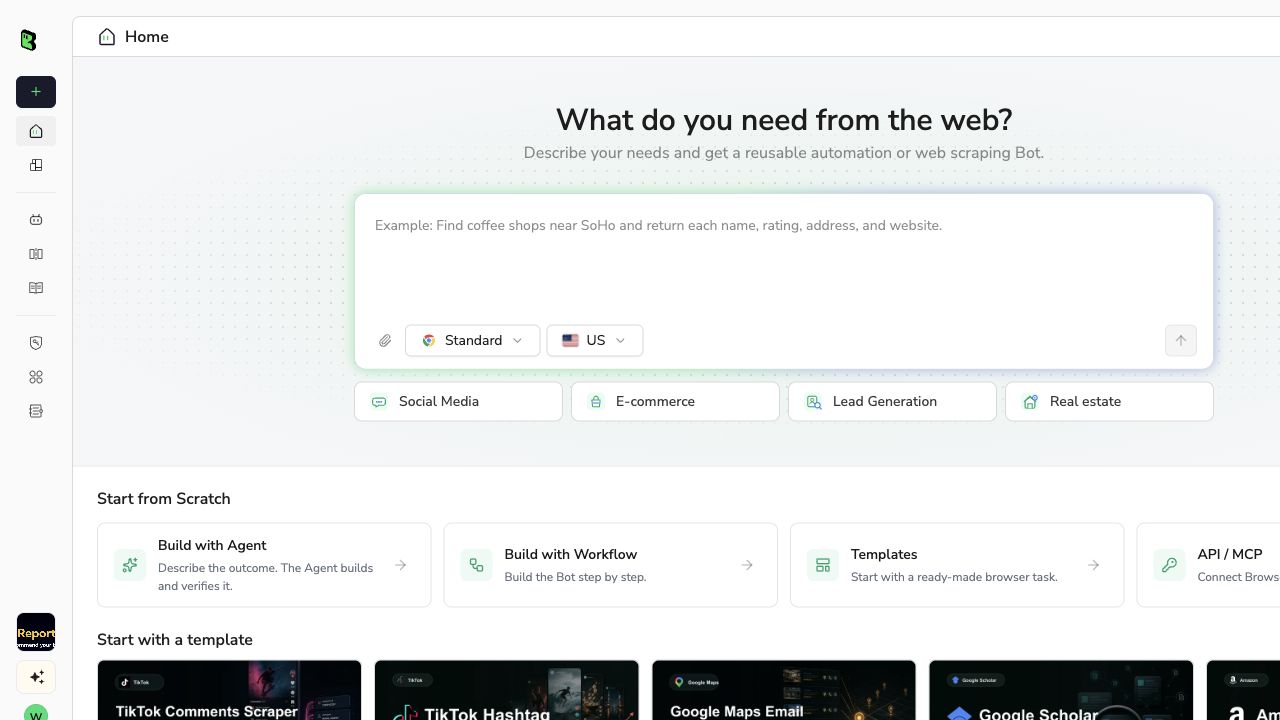
BrowserAct Dashboard: start a reusable Bot from the left create button or center Agent input.
Review the exact inputs, platforms, output fields, stop conditions, and batch size before running the Bot.
Describe the data you need. Get a Bot — a reliable, reusable scraper.Scrape data from any website.
If a selected platform shows login, CAPTCHA, 2FA, or account confirmation, pause for an authorized human to complete it. Resume only after the user has control of the session.
Filter the structured rows by verification status, inspect ambiguous candidates, remove canonical duplicates, and export CSV or JSON with evidence and timestamps intact.
What the BrowserAct Result Looks Like
The current Bot template shows an official example row from a real run. It keeps the original and normalized username, platform, profile URL, public display data, verification status, evidence, and confidence in separate fields.
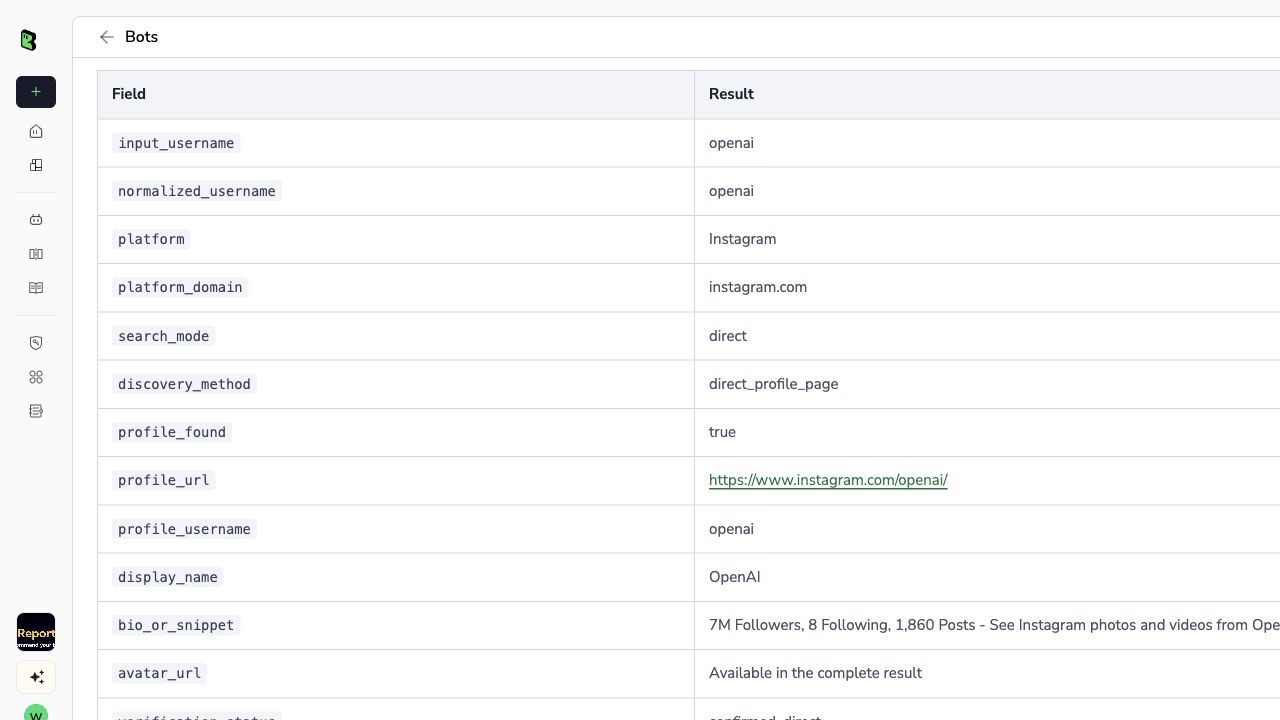
Official BrowserAct example output: one public profile record from a real run of the current Bot version.
The screenshot is a single-row example, not a claim that every platform will confirm the profile. A full batch should contain one row for every planned username-platform pair, including failures and review states.
Deduplicate Without Erasing Evidence
Deduplication is not the same as deleting repeated usernames. Use a stable key such as:
Use the normalized username, platform, and canonical profile URL together as the stable deduplication key.
Keep these cases separate:
- the same input username checked on different platforms;
- two original inputs that normalize to the same value;
- one profile found through both a direct URL and a search result;
- a canonical URL and a tracking-parameter version of the same URL;
- two genuinely different profiles with similar display names.
Canonicalize URLs conservatively. Remove obvious tracking parameters and normalize known platform URL patterns, but do not merge URLs merely because their display names match.
For identity review, compare public signals such as linked official websites, consistent bios, organization names, verified badges, cross-linked profiles, and matching public contact paths. Also record conflicts. If one profile links to a different company domain or location, the correct status may remain ambiguous or needs_review.
The existing guide to finding social media accounts provides more manual discovery methods. Use those as supporting checks, not as permission to make an identity claim from a single matching handle.
Export for Review and Safe Reruns
CSV is useful for analysts and spreadsheet review. JSON is better when another system will consume the result. Both should include the same controlled status values and evidence fields.
Before handing off the dataset, calculate:
- total planned checks;
- completed terminal checks;
- confirmed direct profiles;
- search-discovered candidates;
- not-found results;
- blocked and login-required results;
- ambiguous and needs-review results;
- retries by platform;
- newest and oldest
checked_attimestamps.
These counts reveal whether a result set is ready for downstream work. A file with 90% confirmed rows and 10% explicit review rows is more useful than a file that claims 100% completion by silently dropping blocked checks.
For recurring audits, add a batch_id and retain prior results instead of overwriting them. Then you can distinguish a newly missing profile from a platform that was simply blocked during the latest run. Schedule reruns only as often as the business need justifies, and keep platform-specific concurrency conservative.
If you are still selecting a one-off tool, compare the options in Best Social Media Finder Tools. If repeated batches, manual handoff, evidence fields, and resumable runs are the real requirements, a reusable Bot is the more natural operating model.
Final Checklist
Before you automate username searches in production, confirm that:
- every input remains traceable to its original form;
- every selected platform produces one result row;
- blocked and login-required pages are not counted as missing;
- same-handle results are not treated as identity proof;
- concurrency and retry limits are documented;
- checkpoints support resume without duplicate rows;
- public evidence URLs and timestamps are exported;
- ambiguous results enter a human review queue;
- the workflow remains read-only and within authorized access.
A reliable bulk username search is not defined by how many tabs it can open. It is defined by whether a reviewer can understand what happened to every username-platform pair and safely rerun only the work that remains.
Frequently Asked Questions
What is a bulk username search?
It checks a list of usernames across selected platforms and records one structured result for every username-platform pair.
Is a username availability checker the same as a profile finder?
No. Availability checks whether a name may be registered; profile discovery checks whether a public account appears to exist.
Can matching usernames prove that accounts belong to the same person?
No. A matching handle is a lead only; identity needs corroborating public evidence and human review.
What should happen when a platform blocks the check?
Record blocked, keep the evidence and timestamp, and retry later under an approved access policy; never convert it to not_found.
How many usernames should one batch contain?
Use a bounded batch that fits the platform mix and review capacity; the current BrowserAct template accepts 1–20 usernames per run.
Can BrowserAct automate username searches across social media?
Yes. A reusable BrowserAct Bot can check named public platforms, pause for authorized login, preserve explicit statuses, and export review-ready rows.


