Twitter Profile and Follower Research Workflow: Fields, Samples, and Limits

A Twitter profile scraper sounds simple until somebody asks for “all followers from a 125K-follower account.” That is where profile research and follower graph extraction split into two different jobs. Collecting public profile fields for a curated list of handles is one workflow. Building a complete follower graph for thousands of accounts is another workflow, and it usually belongs with approved APIs, data providers, or careful sampling—not a browser script pretending limits do not exist. Thi
- 1A Twitter profile scraper should collect public profile facts such as handle, bio, website, verification, location, follower count, following count, source URL, screenshot, and captured time.
- 2Use BrowserAct first for curated public handle lists, profile monitoring, screenshots, CSV/Sheets export, and human review.
- 3Do not promise unlimited follower graph scraping. Large follower/following exports quickly run into pagination, access, rate-limit, and policy constraints.
- 4Use follower samples or watchlists when the business question is segmentation, influencer research, competitor tracking, or account qualification.
- 5For very large graphs, use the official X API if approved, a compliant data provider, or a purpose-built API route.
- 6Keep the workflow read-only. Do not automate follow/unfollow, DMs, likes, replies, reposts, or other account actions from profile research rows.
Why this topic has search demand
The X-07 cluster in your BrowserAct topic workbook is a practical P0/P1 mix: Twitter profile scraper, X profile scraper, Twitter follower scraper, scrape Twitter followers, Twitter followers API rate limit, Twitter following scraper, Twitter account scraper, Twitter user lookup, Twitter follower graph, and Twitter profile monitor.
The Ahrefs workbook already confirms the shape of demand:
Keyword | US SV | KD | CPC / TP |
| 90 | 14 | $1.90 / 300 |
| 60 | 0 | TP 0 |
| 30 | 0 | $1.90 / 20 |
| 100 | 8 | TP 31,000 |
| 100 | 5 | TP 100 |
TooManyRequests; another explains that follower pagination plus 15 requests per 15-minute window makes “collect all followers” fail quickly. GitHub’s XActions project shows demand for open-source local tools, including profile/follower workflows and AI-agent/MCP hooks—but it also includes account-action automation that a safe BrowserAct workflow should not copy.
Start with the research question
Do not start with “scrape followers.” Start with the decision.
Research question | Better collection plan |
Which creators should we invite to a campaign? | Profile fields + follower counts + website + manual relevance score |
Which competitors are gaining attention? | Monitor selected competitor profiles for new posts and follower-count changes |
Which accounts mention our category? | Search/mention workflow first, then profile enrichment |
Which followers look like potential buyers? | Sample visible followers and route to human review |
What is the full follower graph of a large account? | Use approved API/data provider or sampling; do not promise full browser export |
Pro Tip: Add research_question and collection_limit to the input sheet. It forces everyone to decide whether they need profiles, samples, diffs, or a full graph.
The profile and follower schema
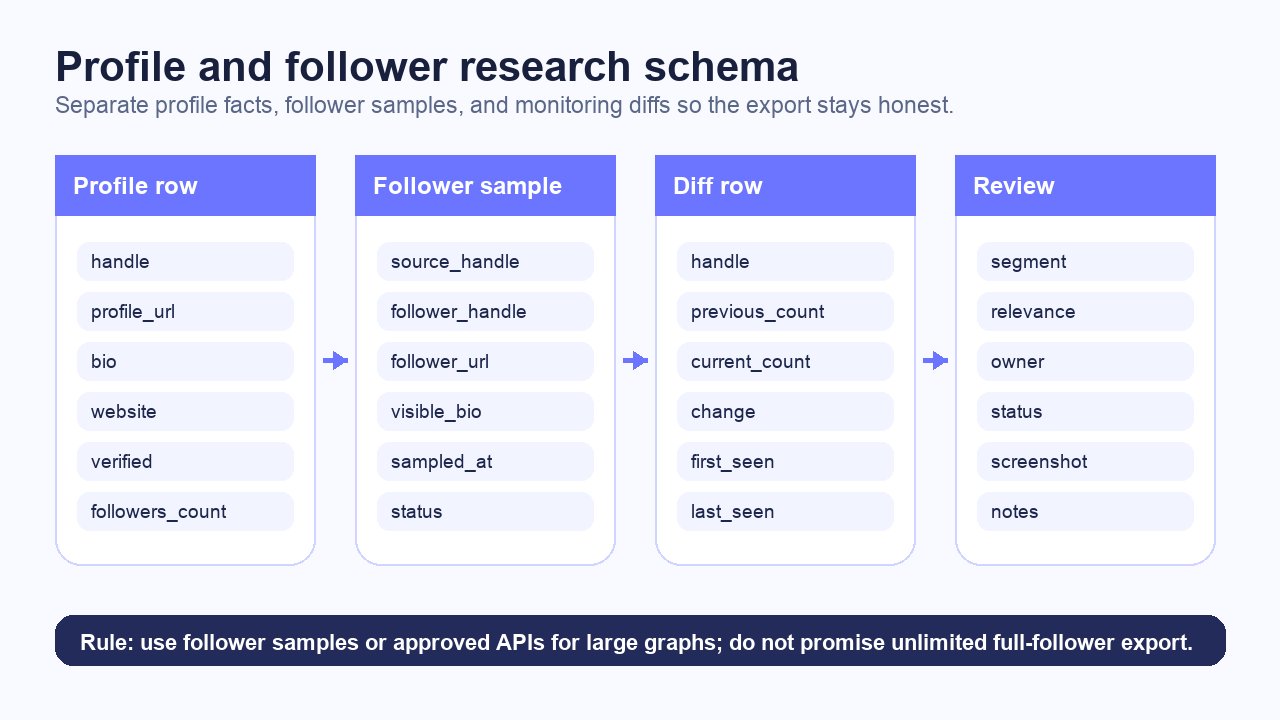
Use separate tables for profile facts, follower samples, and monitoring diffs.
Profile table
Field | Why it matters |
| Primary account identifier |
| Evidence link |
| Review readability |
| Segmentation and relevance |
| Company/creator qualification |
| Optional context when visible |
| Trust/context signal, not a quality score |
| Audience size |
| Account behavior context |
| Activity context when visible |
| Optional review field |
| Audit trail |
| Evidence for high-value rows |
|
|
Follower sample table
Field | Why it matters |
| The account being sampled |
| Sampled follower |
| Evidence link |
| Segmentation |
| Rough account size |
| Top visible, watchlist match, manual sample, API sample |
| Audit trail |
| Visibility and review state |
Monitoring diff table
Field | Why it matters |
| Account being monitored |
| Last run value |
| Current value |
| Diff |
| Last run value |
| Current value |
| Profile monitor signal |
| Start of tracking |
| Last successful check |
Run BrowserAct for curated profile research
For curated lists of public handles, BrowserAct Agent is the first route I would try. You can give it a spreadsheet of handles, ask for profile fields, screenshots, status codes, and CSV/Sheets export, then schedule a rerun only after the sample looks right.
Example prompt:
Research the public X/Twitter profiles in this handle list.

For each handle, collect handle, profile_url, display_name, bio, website,
location if visible, verified status if visible, followers_count,
following_count, posts_count if visible, captured_at, screenshot_path,
and status.

For follower research, collect only a visible sample or a supplied watchlist match.
Do not claim a complete follower graph unless an approved API/source is used.

Export profile rows, follower sample rows, and monitoring diff rows to CSV and Google Sheets.

Stop and mark status if X requires login, CAPTCHA, 2FA, payment,
private access, or unclear permission.
Do not follow, unfollow, like, reply, repost, message, or change account state.
This is where BrowserAct fits: prompt-led browser execution, screenshots, custom fields, source URLs, scheduling, and human handoff. For adjacent monitoring work, the Twitter/X Follower Dashboard template is a useful fit. For broader account discovery before profile enrichment, use the Social Media Finder template.
Run the scrape once with browser-act. Package the repeatable path with Skill Forge.
- 1. An agent uses browser-act to search Google Maps, scroll listings, inspect place pages, and extract visible fields.
- 2. The team validates the schema: business name, category, address, phone, website, rating, review count, and source URL.
- 3. browser-act-skill-forge turns the proven flow into a reusable scraper Skill for future agent runs.
Use profile monitoring for account tracking
Profile monitoring is safer and more useful than bulk follower scraping for many teams.
Use case | Monitor |
Competitor tracking | New posts, follower-count change, bio/website changes |
Creator research | Follower count, bio, website, recent post signal |
Partnership pipeline | Profile changes, campaign links, account activity |
Investor or PR watchlist | Handle, bio, website, new post detection |
Category research | Sampled account attributes and manual tags |
Pro Tip: For profile monitoring, store both the raw count and the change. “Now 42,180 followers” is less useful than “+1,204 followers since the launch post.”
Follower graph limits: choose the right path
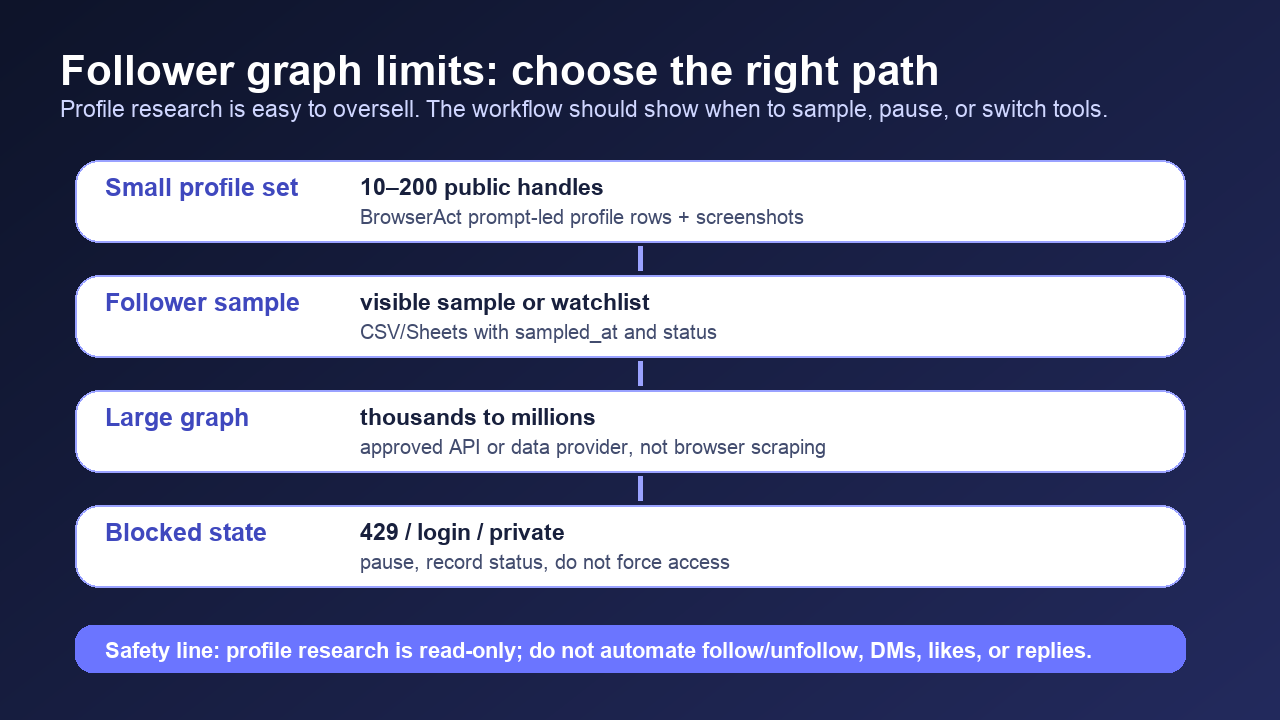
The follower graph is the dangerous part of the promise.
Job size | Better path |
10–200 public profiles | BrowserAct profile enrichment + screenshots |
A visible sample from each account | BrowserAct sample table or approved API sample |
A watchlist match | BrowserAct or API lookup against known handles |
Thousands of followers from one account | Official API if approved, compliant data provider, or sampling |
Millions of follower edges | Data provider / API pipeline, not browser scraping |
TooManyRequests. Another points out the pagination math: if an endpoint returns 100 followers per request and allows 15 requests per 15-minute window, you hit 429 long before a large account is complete. Official X rate-limit and response-code docs back up the need to treat 429 and product caps as workflow states, not as obstacles to “get around.”
The right answer is not “rotate harder.” The right answer is choose the right path:
- Sample when the decision only needs a representative segment.
- Monitor counts when the decision is growth/change.
- Use watchlists when the decision is “does this known account follow or mention us?”
- Use approved APIs/data providers when the decision requires a complete graph.
Compare routes
Route | Best for | Risk / limitation |
BrowserAct | Curated public profile research, screenshots, flexible fields, Sheets/CSV export | Not for unlimited follower graphs |
Official X API | Approved access, endpoint-specific follower/following data | Rate limits, access level, product caps |
Scraper API / actor | Stable schema and hosted execution | Validate coverage and policy fit |
Open-source local tool | Developers who want control | Maintenance, account-risk, and action-automation temptation |
Data provider | Large graph datasets and enterprise pipelines | Cost, licensing, and compliance review |
Export formats
Use CSV or Google Sheets first. Use JSON after the schema stabilizes.
Format | Best for |
Google Sheets | Human review, tagging, owner assignment |
CSV | Analyst handoff and spreadsheet workflows |
JSON | Backend or LLM pipeline |
Webhook | Scheduled account monitoring |
Markdown notes | Research summaries and evidence packets |
source_url, captured_at, and status. If a profile is private, suspended, unavailable, or login-gated, record that status instead of dropping the row. Missing data is still evidence.
Safety boundaries
X’s account limits and automation rules make the boundary clear enough for this article:
- Profile research should be public and read-only.
- Stop on login, CAPTCHA, 2FA, payment, private content, suspended account, or unclear permission.
- Do not automate follow/unfollow, DMs, replies, likes, reposts, or account changes.
- Do not use follower rows to create sensitive personal profiles.
- Do not promise legal certainty.
- Do not call a sample a complete graph.
For BrowserAct, this is not a weakness. It is a sharper positioning: use a prompt-to-cloud Bot to collect auditable profile evidence, not to pretend platform constraints disappear.
Two Skills, One Repeatable Browser Workflow
Start with live browser execution when the agent needs to understand a page. Move to Skill Forge when the same scraper should run again without re-exploring the site.
Run once with browser-act
Give Codex, Claude Code, Cursor, Windsurf, or another agent a real browser for rendered pages, clicks, scrolling, screenshots, DOM extraction, and network inspection.
Open browser-act SkillPackage with Skill Forge
Explore the site once, verify the extraction path, then generate a callable Skill package that other agents can reuse for batch jobs or scheduled workflows.
Open Skill ForgeFurther reading: X and Twitter data
Frequently Asked Questions
What is a Twitter profile scraper?
It collects public X/Twitter profile fields such as handle, bio, website, verification, follower count, following count, source URL, screenshot, captured time, and status.
Can I scrape all followers from a large X account?
Usually not safely with a browser workflow. Large follower graphs hit pagination, rate-limit, access, and policy constraints. Use approved APIs, data providers, or sampling.
What fields should I export for profile research?
Export handle, profile_url, display_name, bio, website, location, verified status, followers_count, following_count, posts_count, captured_at, screenshot_path, and status.
Is follower sampling useful?
Yes. Sampling is useful for creator research, segmentation, competitor analysis, and watchlist checks, as long as you label it as a sample rather than a complete graph.
Can BrowserAct monitor profile changes?
BrowserAct can run scheduled public profile research workflows and export diffs, screenshots, and status fields, while stopping on login, CAPTCHA, private content, or unclear permission.
When should I use BrowserAct instead of the X API?
Use BrowserAct for custom, prompt-led, public profile research with screenshots and flexible CSV/Sheets export. Use the X API or a data provider when you need approved large-scale graph access. ## Sources - BrowserAct X/Twitter Topic Library X-07, local workbook, reviewed 2026-07-30. - Apify Twitter (X) Scraper — Tweets & Profiles - Stack Overflow: Tweepy get followers list - Stack Overflow: Twitter API V2 429 follower endpoint question - GitHub XActions - X account limits - X API rate limits - X API response codes and errors


