Scrape Data from Complex Websites with BrowserAct

Today, BrowserAct is introducing a cloud experience for turning a natural-language data request into a tested, reusable web scraper.
Today, BrowserAct is introducing a cloud experience for turning a natural-language data request into a tested, reusable web scraper.
You describe the website, the records you need, the conditions to apply, and the fields to return. BrowserAct explores and tests the live website, builds a reusable Bot, and returns structured results when you run it.
There is no scraping code to write, no selector setup to manage, and no local Agent to install. The goal is simple: describe the data you need, let the Agent verify the task on the real website, and reuse the resulting Bot whenever you need fresh results.
- 1BrowserAct turns a natural-language data request into a tested, reusable web scraper.
- 2The Agent explores the live website and can work through supported dynamic pages, filters, tabs, pagination, scrolling, and detail pages.
- 3Users do not need to write scraping code, configure selectors, or install a local Agent.
- 4A published Bot can be run again with new inputs to return the same structured field set.
- 5Build and Run history make it easier to review previous tasks and results.
- 6Continue optimizing lets users test a draft before publishing an updated version.
- 7Website permissions, access conditions, and page changes still matter.
Why Complex Website Data Extraction Still Takes Too Much Setup
Collecting data from a simple static page can be straightforward. Real business research rarely stays that simple.
The information may sit behind filters, tabs, pagination, infinite scroll, or product detail pages. A single result may combine fields from a listing page and a second page. JavaScript may render the content only after the browser loads, and the task may need to be repeated with new keywords, categories, locations, or URLs.
Traditional scraping workflows often require someone to inspect the page structure, configure selectors, write navigation logic, test the output, and maintain the process when the page changes. Template-based tools can reduce part of that work, but users may still need to understand how the website is organized before they can build a reliable task.
BrowserAct starts from the business request instead.
Traditional setup | BrowserAct |
Translate the task into scraping logic | Describe the data and conditions in natural language |
Configure page selectors and navigation steps | Let the Agent explore the live website |
Test each step manually | Let the Agent build and test the Bot |
Rebuild the process for repeated research | Run the reusable Bot with new inputs |
Patch the workflow directly when requirements change | Continue optimizing a draft, test it, then publish the update |
What BrowserAct Does
BrowserAct is designed for structured data extraction from complex websites. It works best when the task goes beyond reading one static page and requires the browser to understand a sequence of page states.
It can help with workflows that involve:
- JavaScript-rendered pages
- Filters, tabs, and expandable sections
- Pagination and scrolling
- Listing pages followed by detail pages
- Repeated searches with different parameters
- Consistent structured fields across multiple runs
The product focuses on creating a tested data-extraction Bot, not on presenting a general-purpose browser automation system to business users. Internally, BrowserAct handles the browser environment and task execution. The user starts with the outcome they need.
How BrowserAct Works
1. Describe the Data You Need
Start by entering a request in the prompt box. A useful request should include:
- The website or starting page
- The records you want to find
- Search terms, locations, categories, or filters
- The fields you want returned
- A practical record limit when applicable
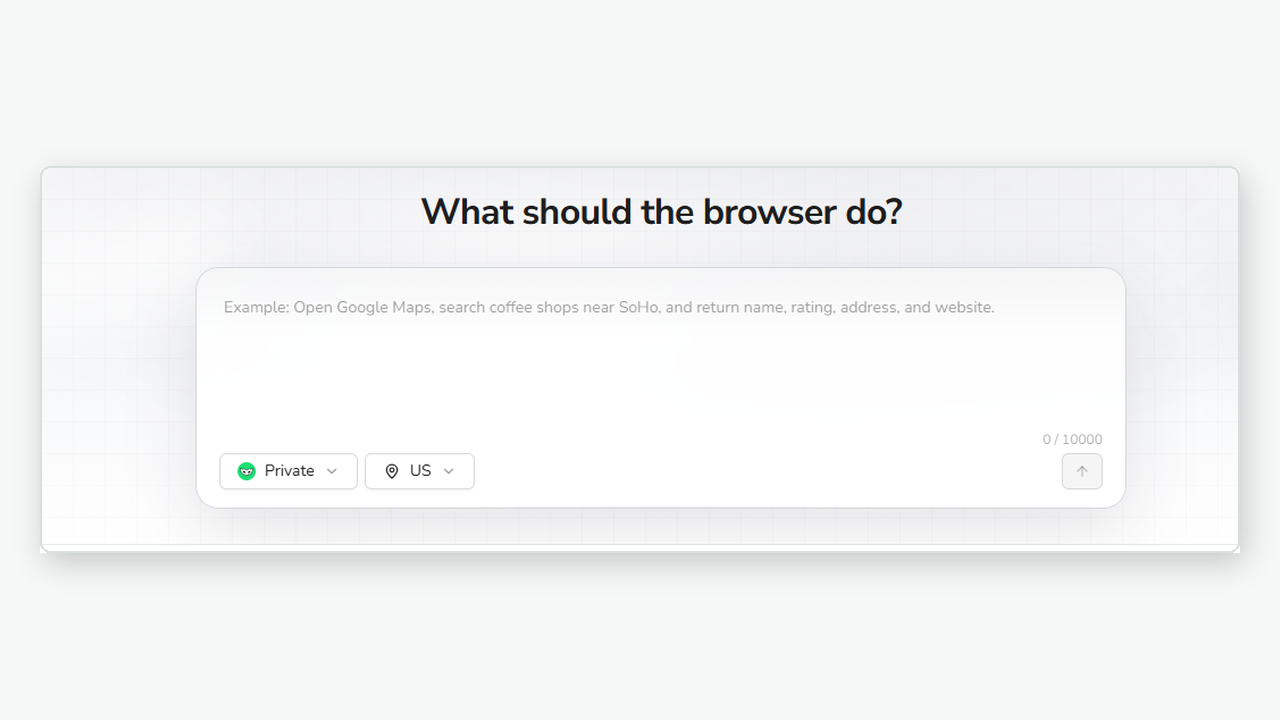
Describe the target website, conditions, and fields in the prompt composer.
For example:
Go to https://www.amazon.com/Best-Sellers/zgbs.

Collect the top 100 products from the Best Sellers list.
For each product, return the product name, price, product URL,
and other relevant fields shown on the page.

The category should be configurable.
The same structure can be used for other tasks. You might ask for public Reddit posts that mention a keyword, YouTube videos matching a topic and date range, public Amazon product details, customer review fields, or comments under a public post.
Specific requests produce better Bots. Define the target page, required conditions, expected fields, and record limit before the Agent begins exploring.
You can also start from the Bots menu when you prefer to create the resource first. Open Bots, choose Create, and select Build with Agent before entering the data request.
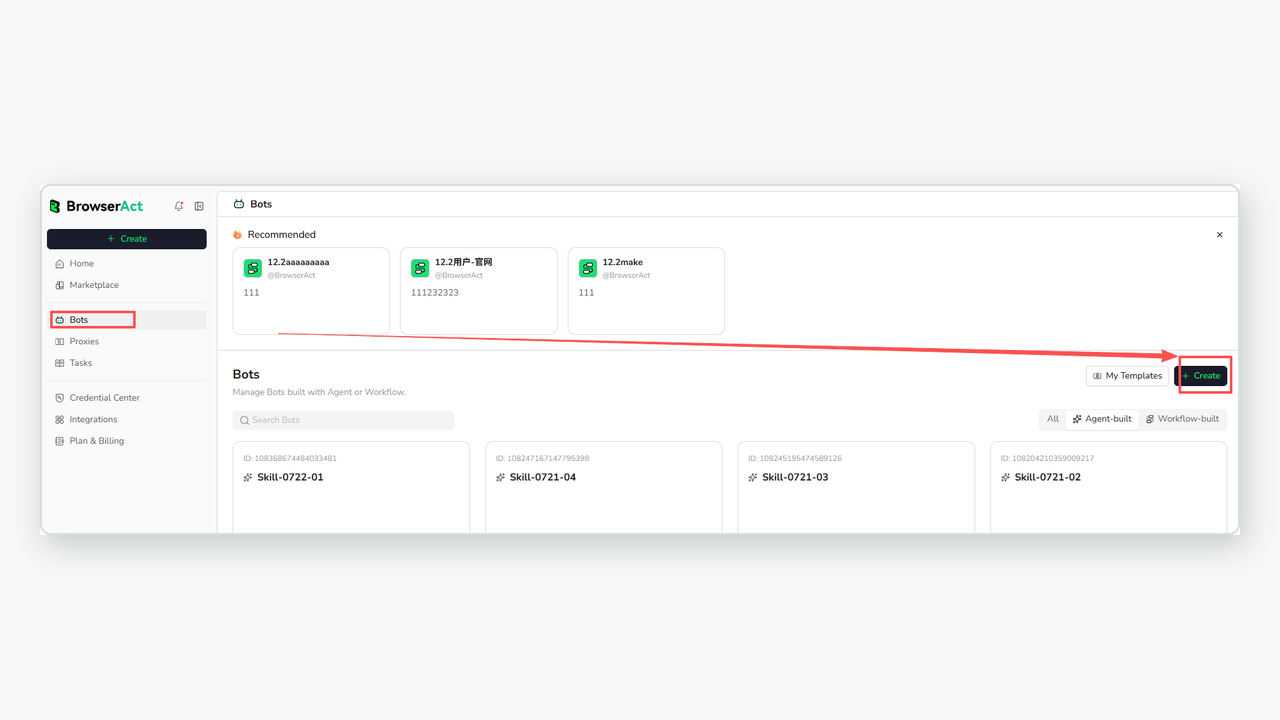
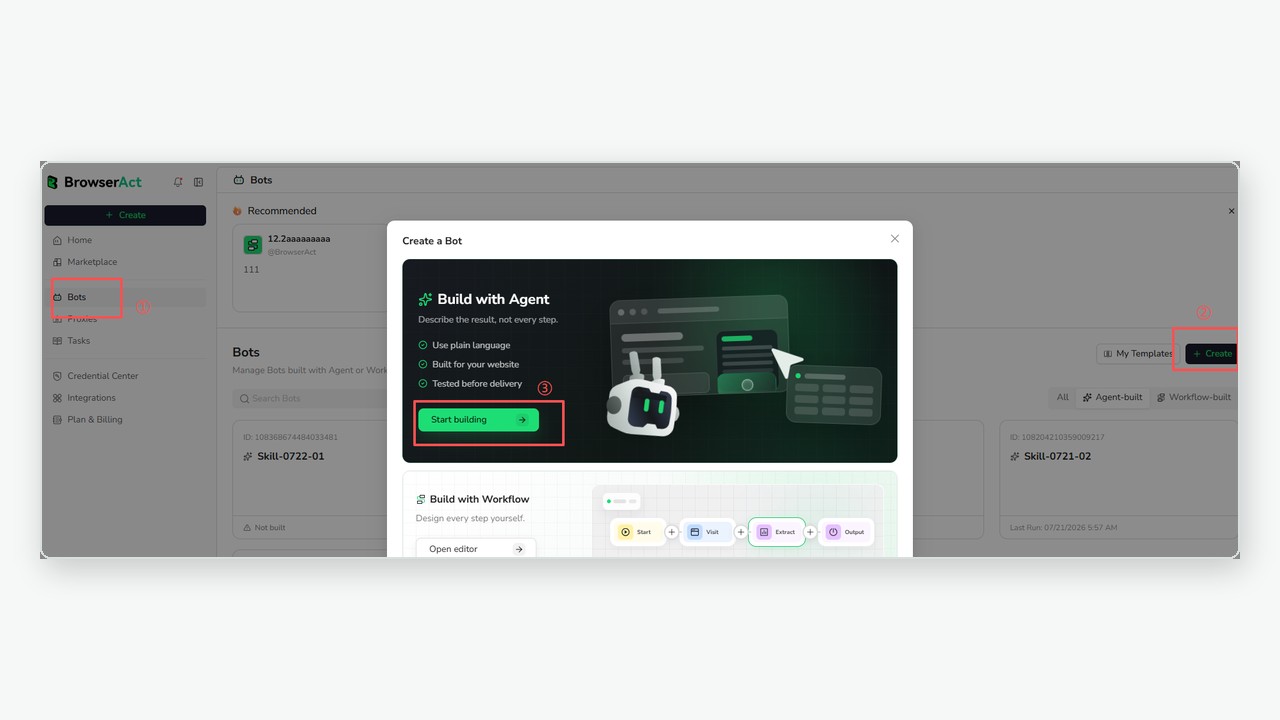
2. Choose the Browser Mode and Region
Before submitting the request, choose the browser mode that fits the website and task. You can also select a proxy region when the data needs to be collected from a particular country or market.
Keep the default settings when the task has no special browser or regional requirement. The selected environment is used while the Agent builds and tests the Bot and during future runs.
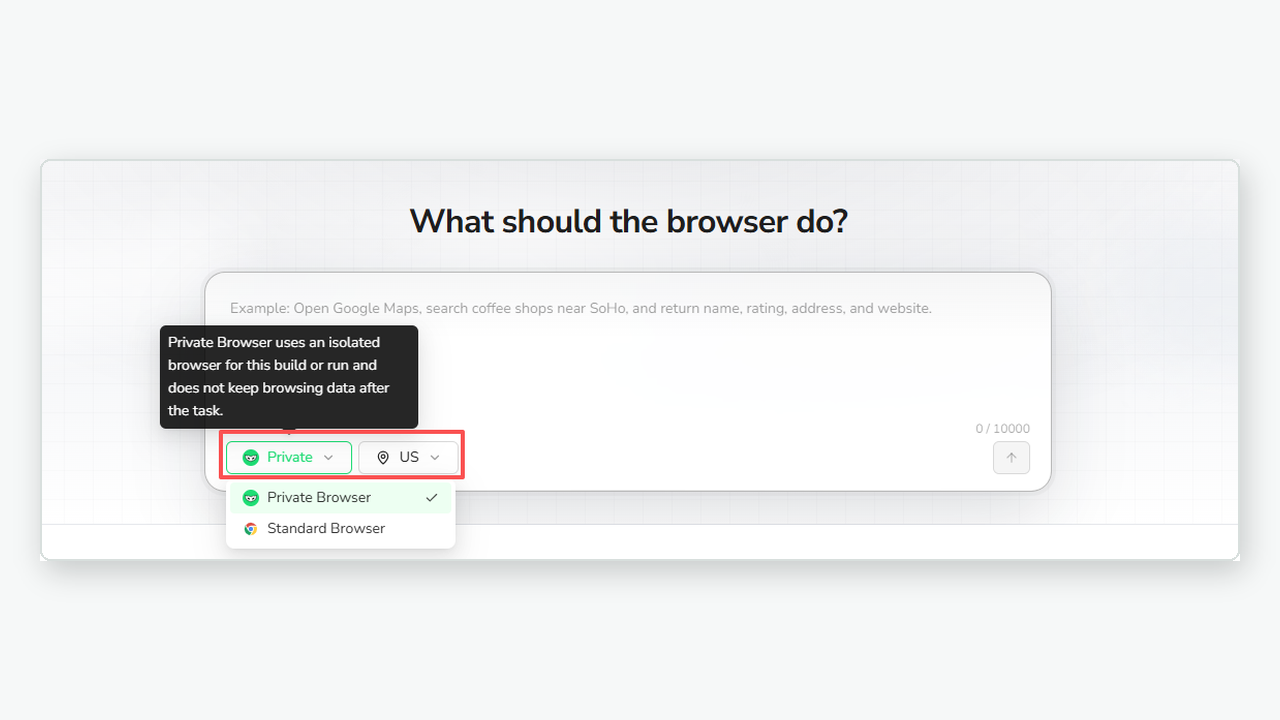
Choose Private or Standard Browser and the region that fits the target website.
Browser mode and region are part of the task context. They do not remove the need to follow the target website's permissions, account requirements, and access conditions.
3. Let the Agent Explore and Test the Website
After the request is confirmed, BrowserAct interprets the target website, conditions, and required fields. It then explores the live website in a real browser.
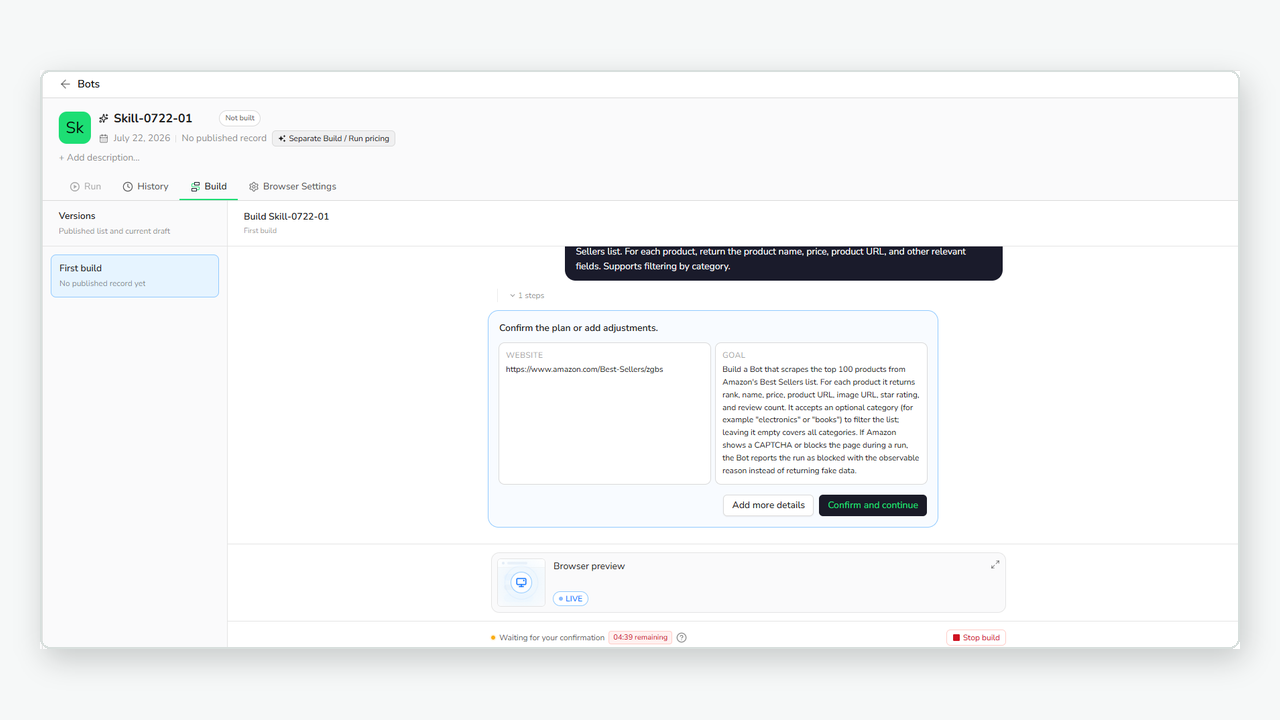
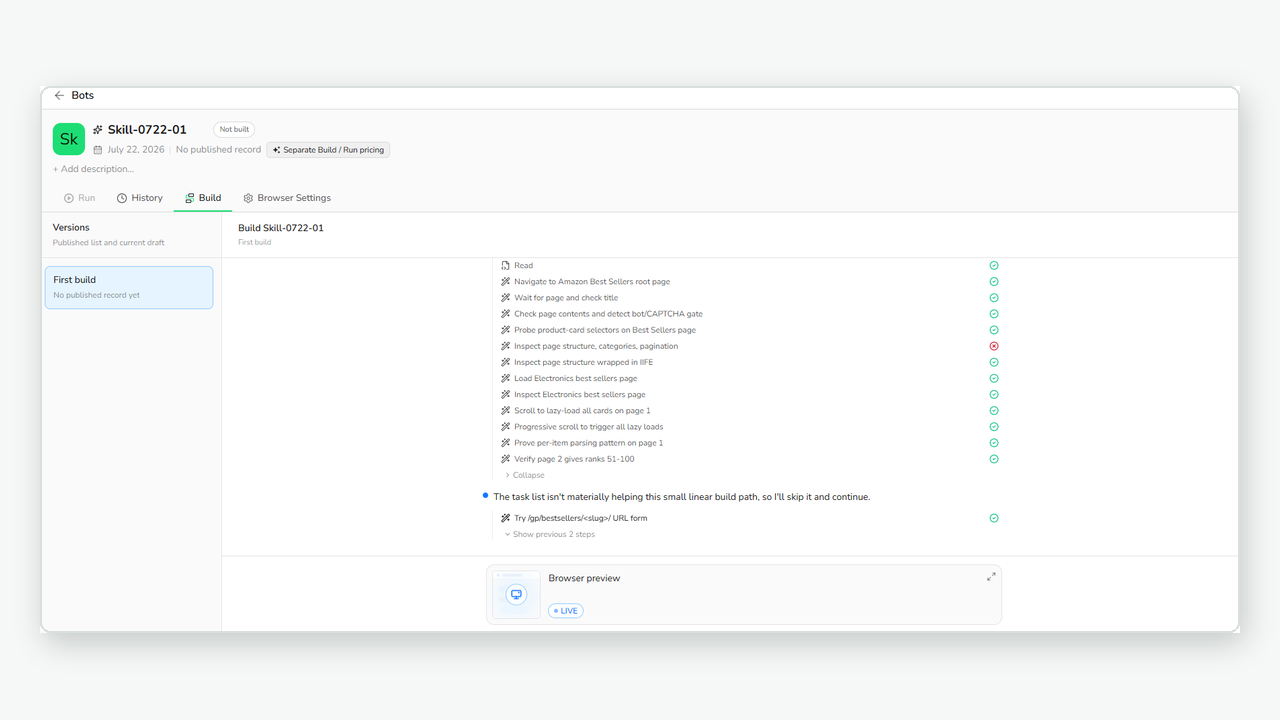
The Build view shows the plan, live exploration progress, and the fields being validated.
During the Build process, the Agent can work through supported filters, tabs, pagination, scrolling, and detail pages. It tests the extraction on the live website before creating the reusable Bot.
You can open Browser Preview to review the browser operation while the Bot is being built. If the Agent needs more information, provide the missing website, condition, field, or expected result. You can also pause the Build process when you need to add context before it continues.
For supported login or verification steps reached during Build exploration, the Agent may provide a remote-assist link so you can complete the required action in the assisted browser session. BrowserAct does not promise universal access to protected websites or store website passwords on your behalf.
4. Run the Bot and Review Structured Results
Once the Bot has been built and tested, open the Run view, enter the input values for the current task, and start the run.
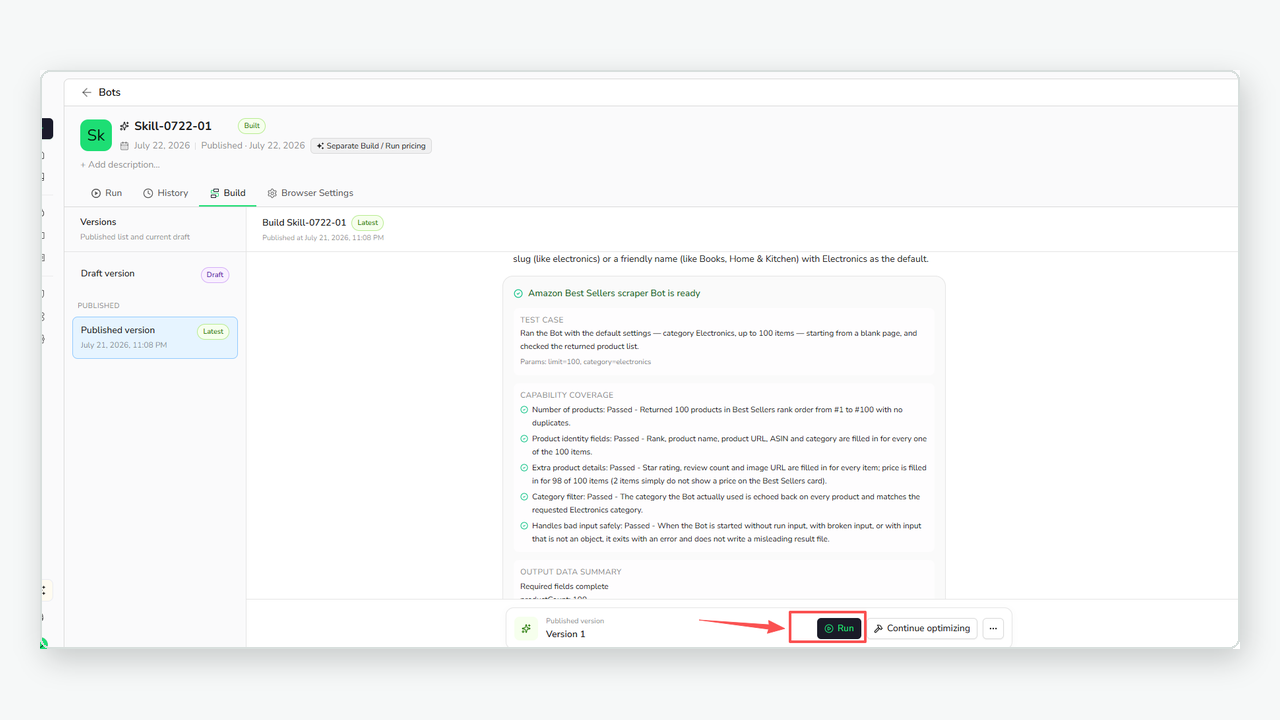
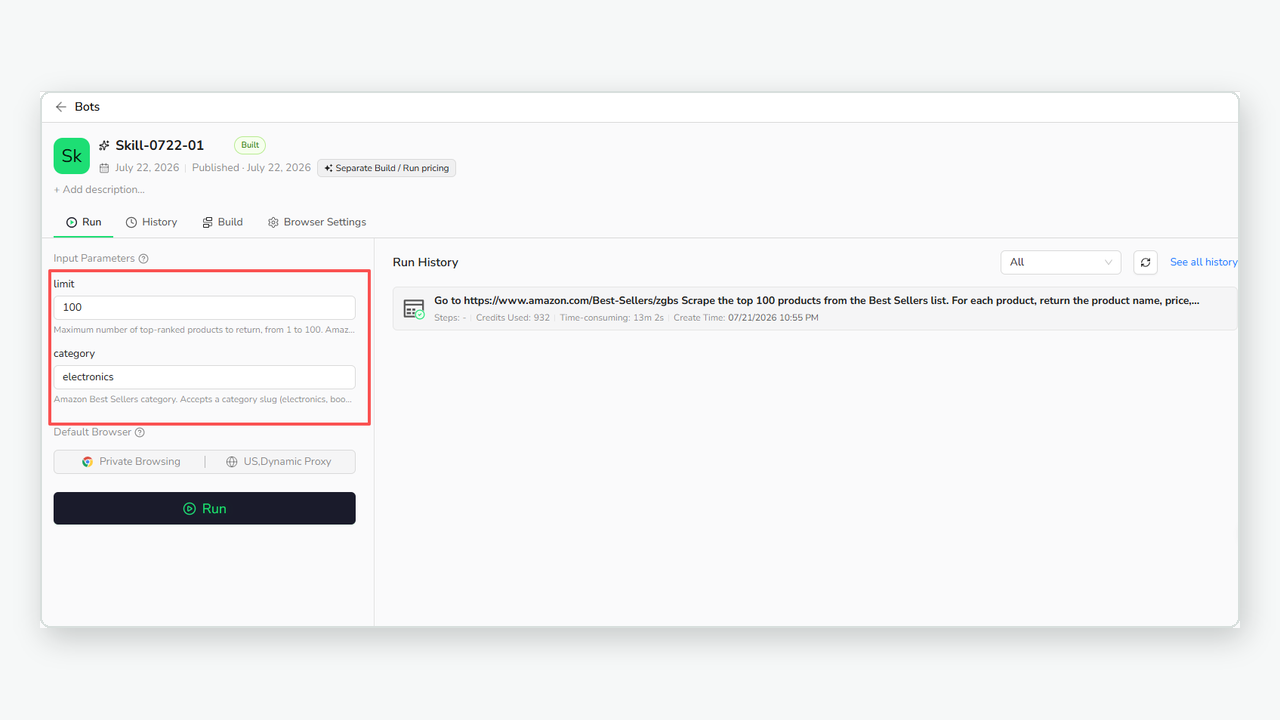
Open Run, adjust the current input parameters, and start the task.
When the run succeeds, the extracted data is returned in a structured format. The exact fields depend on the request used to build the Bot.
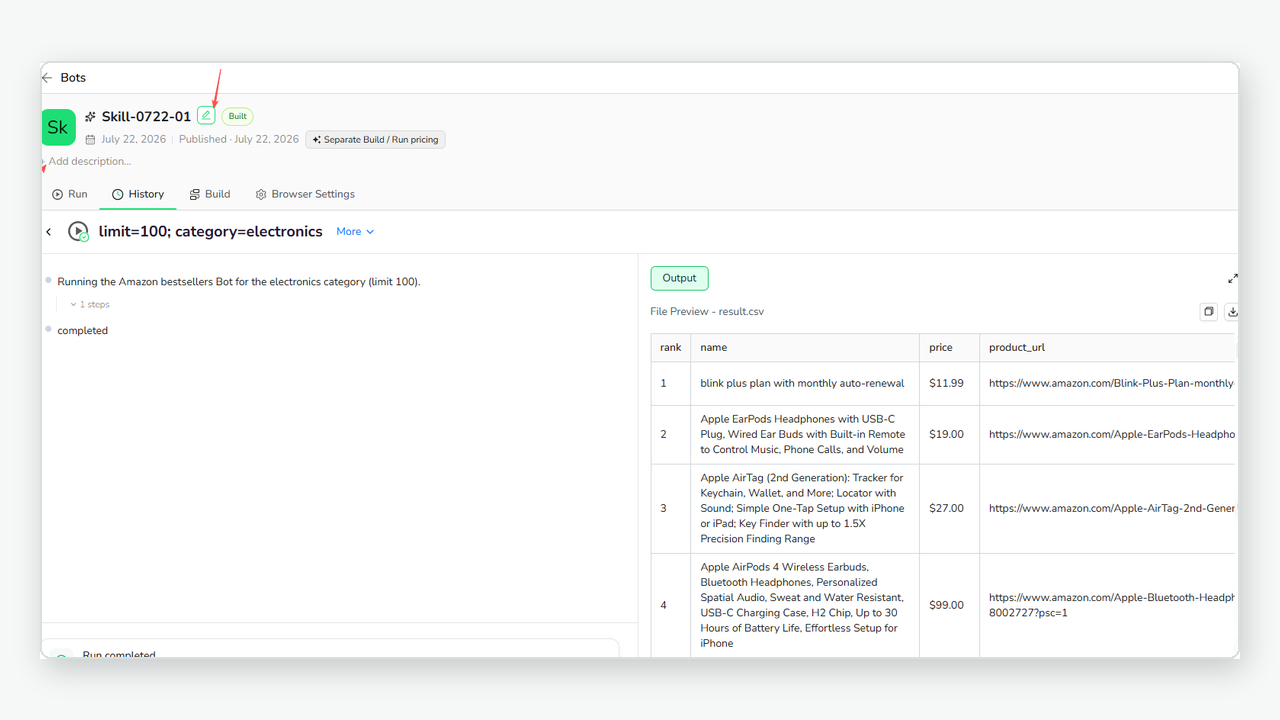
A successful run returns the requested fields in a structured result view.
For an e-commerce research task, the result structure might include:
Field | Example purpose |
Product name | Identify the returned record |
Price | Compare visible pricing across records |
Rating and review count | Capture public product signals |
Seller or brand | Organize supplier and brand research |
Product URL | Preserve the source page for review |
You can rename the Bot and add a description so the team can understand what the Bot is designed to collect and which inputs it expects.
5. Review History and Continue Optimizing
BrowserAct keeps Build and Run records in the Bot's history. A record can include its inputs, status, result, and other available task details. The Tasks view also gives you a broader view of active and previous Bot tasks.
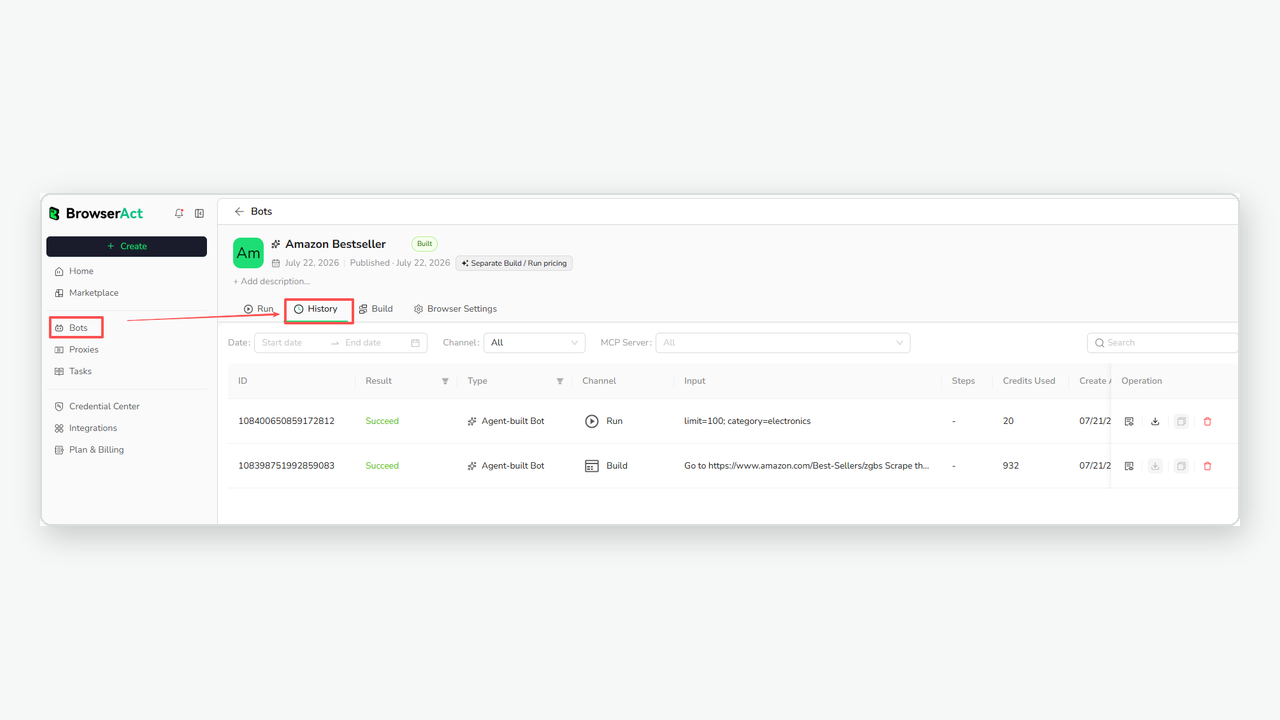
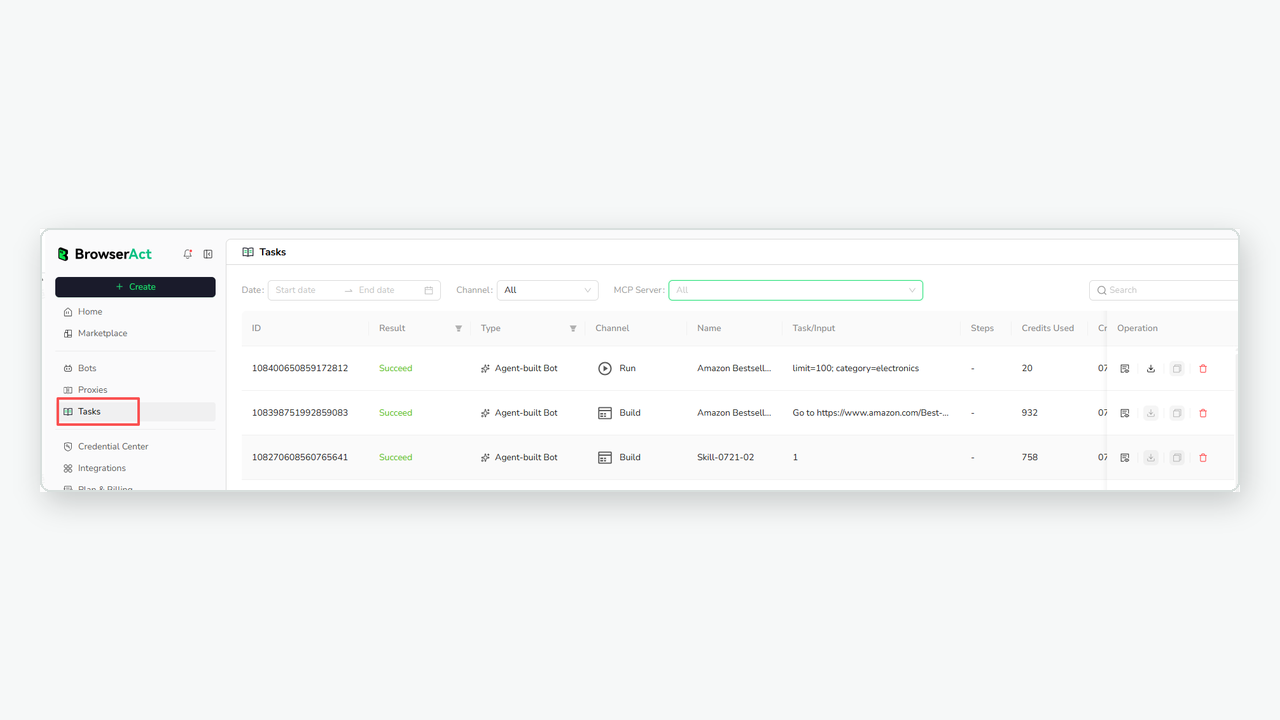
Review individual Bot history records or scan task status from the Tasks view.
If the target website, fields, conditions, or page coverage need to change, you do not have to replace the published Bot immediately.
Open the Build view, select the latest version, and choose Continue optimizing. Describe the requested change, let the Agent update the draft, and run a Test. When the draft returns the expected result, publish it as the new current version.
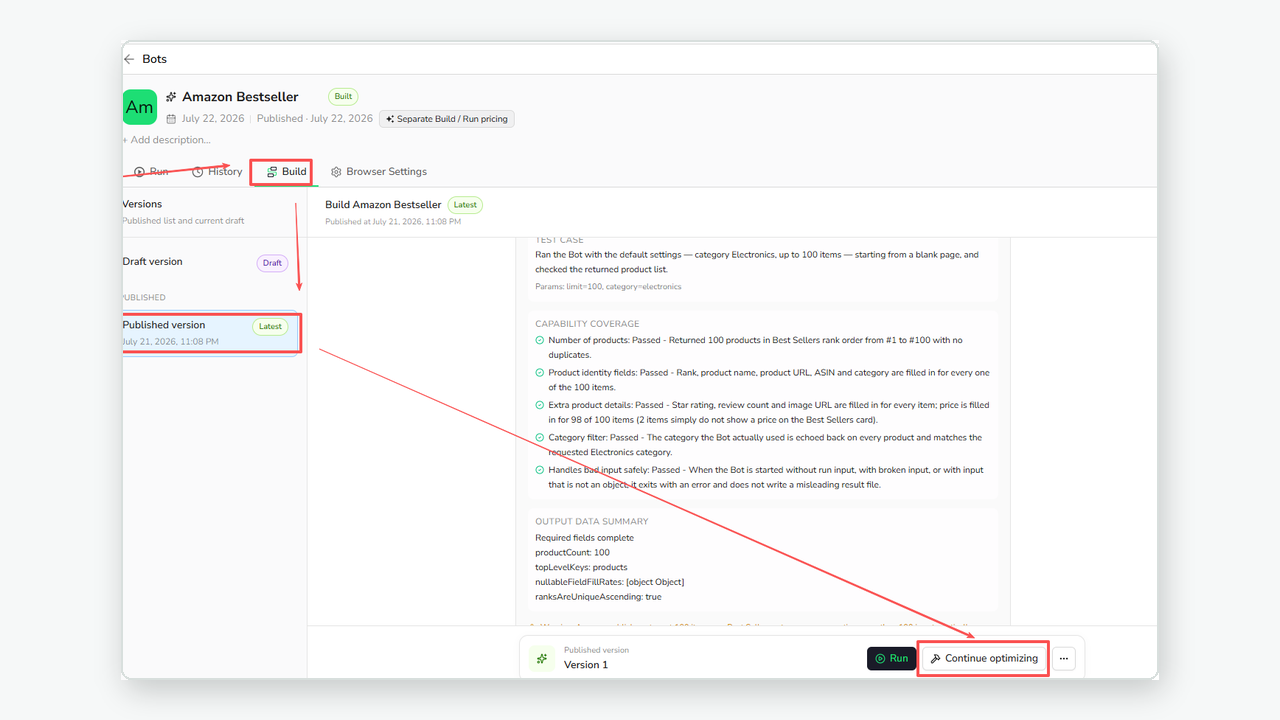
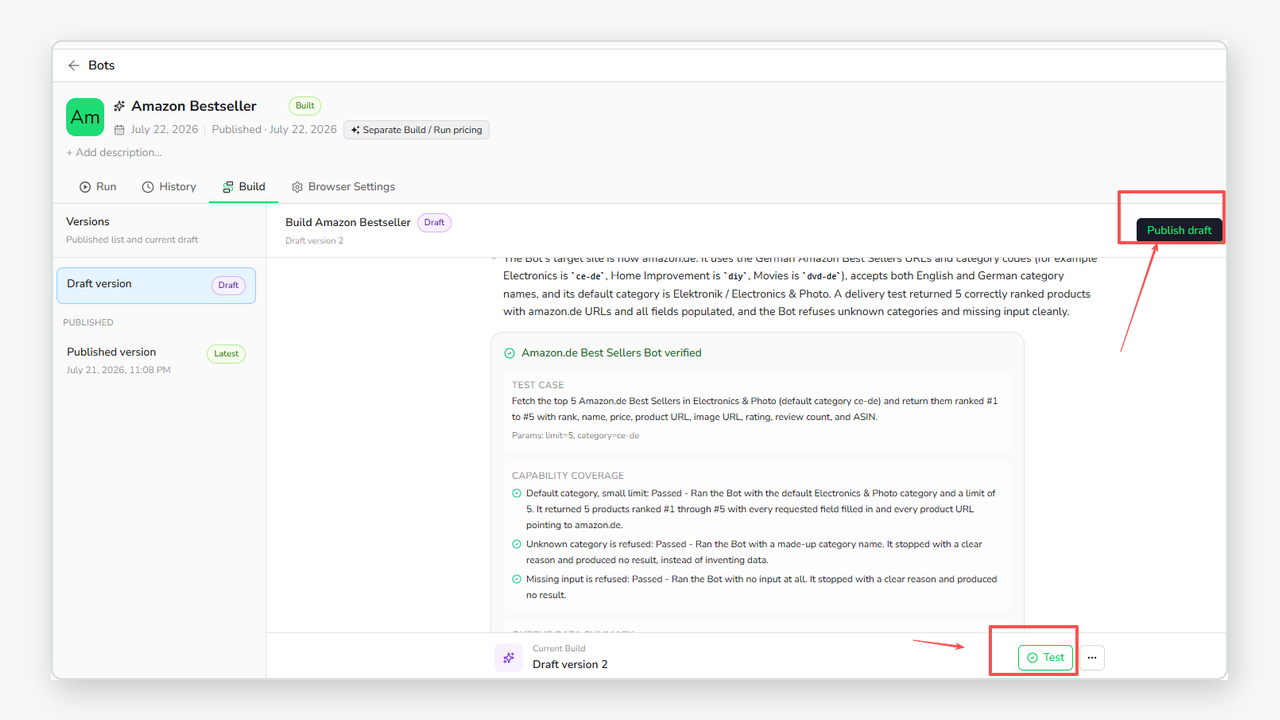
Optimize the latest version, test the draft, and publish it only after the result is ready.
This separation matters. A draft can be improved and tested while the current published version remains available for regular runs.
What Can You Build With BrowserAct?
BrowserAct is intended for repeatable web data tasks where structured output is more useful than a one-time page summary.
Common examples include:
- E-commerce and supplier research: collect public product, price, rating, seller, supplier, and source information.
- Customer and market research: organize public posts, comments, reviews, ratings, and source URLs.
- Local business research: find public business names, categories, ratings, addresses, phone numbers, websites, and source pages.
- Competitor research: compare public pricing pages, product pages, blogs, or changelogs using a consistent set of fields.
- Creator, launch, and job research: structure publicly accessible creator, product-launch, advertising, or job-listing information.
The strongest use cases share three traits: the task has a clear target, the required fields can be described, and the work needs to be repeated with new inputs.
What No-Code Means Here
No-code does not mean no input, no account, or no access limitations.
BrowserAct removes the need for ordinary users to write scraping scripts, configure selectors, or install a local Agent. Users still need to describe the task, provide the required input parameters, and have permission to access the target website.
Keep these boundaries in mind:
- A Bot is tested on the live website, but no product can guarantee success on every website or under every access condition.
- Repeatable does not mean permanently maintenance-free. A major page change may require the Bot to be optimized and tested again.
- Login and verification support depends on the website and the stage of the task. BrowserAct does not promise automatic login or website credential storage.
- A partial or failed result should not be treated as a complete dataset. Review task status and returned fields before using the data in a business decision.
- Use BrowserAct only for pages and data you are permitted to access, in accordance with applicable laws and the source website's terms.
These boundaries are part of building a more reliable workflow. The purpose of testing, history, drafts, and published versions is to make the state of the Bot visible instead of hiding uncertainty behind a generated script.
Conclusion
BrowserAct changes the starting point for complex website data extraction.
Instead of beginning with code, selectors, or a blank automation canvas, begin with the data you need. Describe the website, conditions, and fields. Let the Agent explore and test the live website. Then run the resulting Bot whenever you need the same type of structured web data again.
Start Free Trial and build your first reusable web scraper with BrowserAct.
Frequently Asked Questions
Do I need to write code to use BrowserAct?
No. You describe the website, conditions, and fields in natural language without writing scraping scripts or selectors.
Do I need to install a local Agent?
No. BrowserAct provides a cloud Build and Run experience, although you still need a BrowserAct account and access to the target website.
What types of pages is BrowserAct designed for?
It is designed for complex data tasks involving dynamic pages, filters, tabs, pagination, scrolling, detail pages, and repeated searches.
Can I run the same Bot again with different inputs?
Yes. A published Bot can accept new input values and return the structured fields defined by the task.
What happens when a website changes?
Open the latest version, continue optimizing the Bot, test the draft against the live website, and publish the update after review.
Can BrowserAct work with websites that require login?
During supported Build exploration steps, the Agent may provide remote assistance so you can complete login or verification yourself; universal or unattended login is not guaranteed.
Does BrowserAct work on every website?
No universal guarantee is made. Website permissions, login requirements, verification, risk controls, and page changes can affect a task.


