Can AI Find and Recommend Your Brand? Introducing the Free BrowserAct GEO Report

Your customers are no longer only searching. They are asking AI which brands, products, and tools they should consider. The answer may mention your brand, recommend a competitor, cite a third-party article, or leave you out entirely.
The free BrowserAct GEO Report shows how your brand appears in a selected consumer AI platform. Choose GPT, Claude, Gemini, or Perplexity. BrowserAct builds brand-relevant questions, runs them in the platform's real web interface, captures the visible answers and citations, and turns the evidence into a shareable report.
Use it to establish an AI visibility baseline, find competitor and citation gaps, understand brand sentiment, and decide what to improve next.
AI Is Becoming a Brand Discovery Layer
When someone asks an AI assistant for the best tool in a category, a comparison between products, or a recommendation for a specific use case, the response becomes part of the buyer's research process.
That creates a new visibility problem for brands. Traditional analytics can show visits and conversions after a click, but they cannot fully show what happened inside an AI answer before the user reached a website. A brand can be mentioned without receiving a visit. A competitor can be recommended instead. A third-party page can shape the answer without the brand knowing which source influenced it.
This is one reason Generative Engine Optimization, or GEO, has become an important measurement area. The original GEO research introduced a framework for evaluating and improving visibility in generative answers. More recent AI visibility measurement guidance also emphasizes that traffic alone cannot represent brand visibility inside AI-generated responses.
Before you can improve that visibility, you need a reliable starting point: what the AI platform showed, which questions produced the result, which sources it cited, and how your brand compared with alternatives.
That is the purpose of the BrowserAct GEO Report.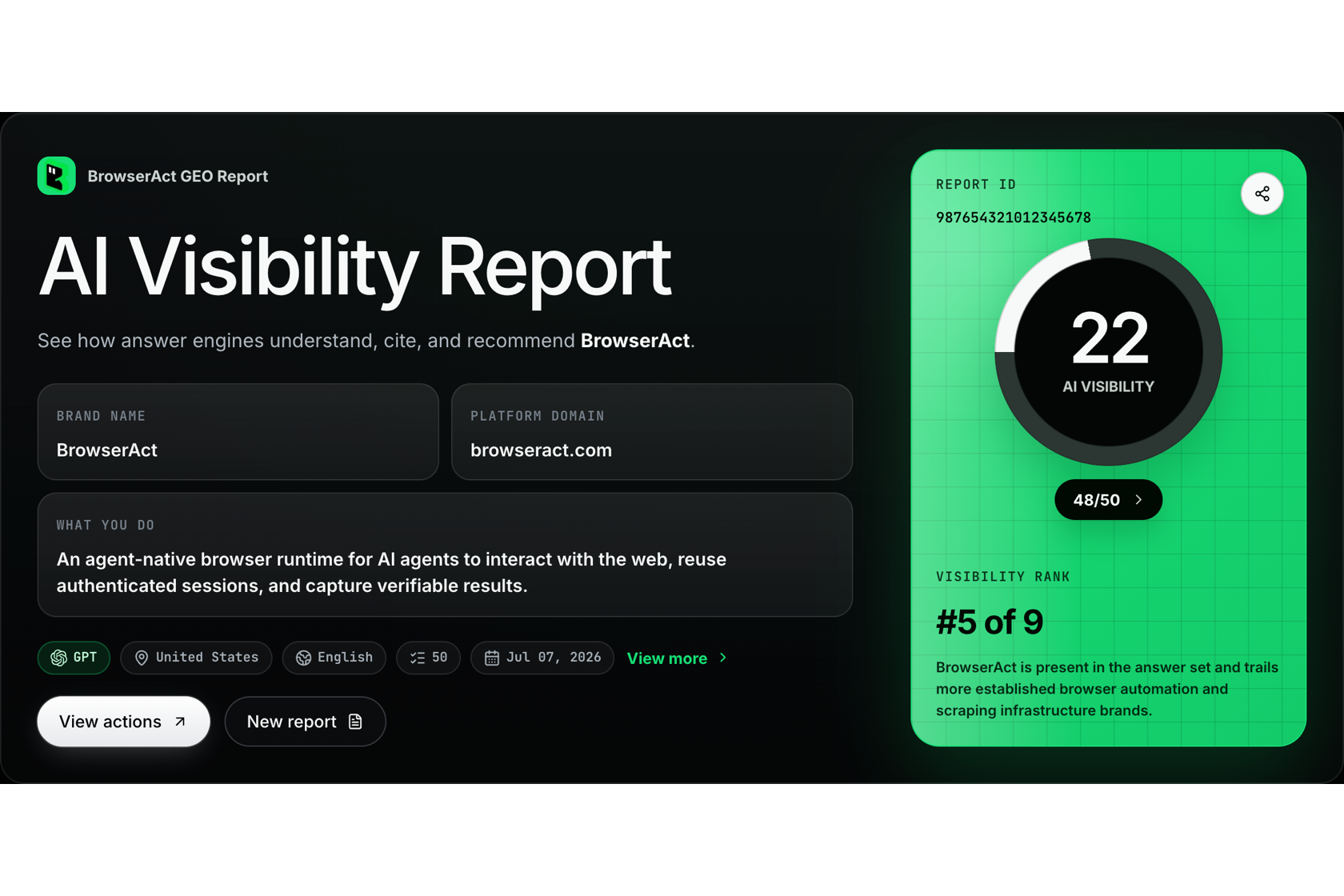
What Is the BrowserAct GEO Report?
The BrowserAct GEO Report is a free, evidence-based snapshot of how one selected AI platform represents your brand for a defined set of brand-relevant questions.
You choose one of four supported platforms:
- GPT
- Claude
- Gemini
- Perplexity
Each report also uses one target market and one language. This keeps the run context clear and prevents results from different platforms or markets from being blended into a single score.
BrowserAct does not stop at asking whether your brand appeared. The report connects visibility metrics to the questions, answers, competitors, citations, and answer excerpts behind them. You can move from a headline score to the evidence that produced it.
See how AI sees your brand. Get your free BrowserAct GEO Report.
How the GEO Report Works
The report follows four analysis stages before producing the final result.
1. Review Your Brand Context
Enter your website domain. BrowserAct analyzes the site and prepares a brand profile that can include the brand name, description, industry, audience, capabilities, core scenarios, and competitors.
You review this information before the analysis continues. This matters because the question set and competitive context should be based on the brand you actually want to measure, not an unreviewed interpretation of a homepage.
2. Review the Question Map
BrowserAct prepares brand-relevant questions organized by topic. These questions are designed to reflect the kinds of category, comparison, use-case, and problem-oriented prompts that may influence brand discovery.
You can review the topics and questions before confirming the map. This creates a clear measurement set and makes the final report easier to interpret: every result can be traced back to a question that was included in the run.
3. Run the Questions in the Real AI Web UI
BrowserAct opens the selected AI platform's consumer web interface and runs the confirmed questions in the chosen language and target-market context.
The system captures the visible answer, brand mentions, source links, screenshots, platform context, and execution status. This is different from treating a model API response as a substitute for the consumer product. The goal is to measure the experience a user can actually encounter in the web interface.
4. Analyze the Evidence
BrowserAct normalizes the captured results and evaluates brand mentions, preferred recommendations, competitors, citations, sentiment, and source opportunities.
The final output is a read-only online report. It can be opened from its report link and shared with teammates without exporting a separate PDF.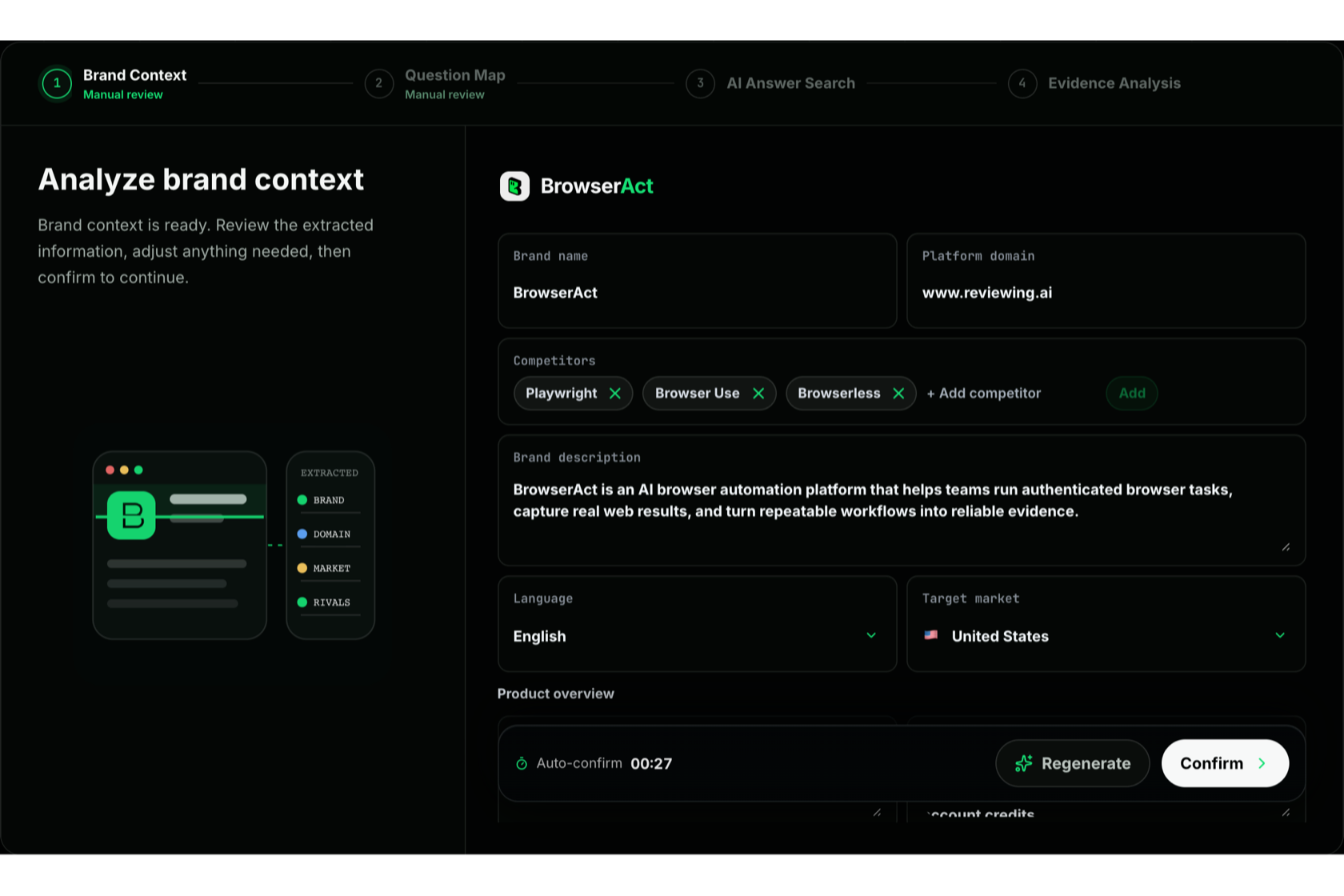
What the Report Measures
The report is organized around the questions a marketing or brand team needs to answer.
Can AI Find Your Brand?
AI visibility measures the percentage of valid questions in which the selected platform mentions the current brand.
The report also shows Share of voice, which compares the current brand's mentions with all brand mentions found in the same run. Together, these metrics distinguish simple presence from competitive presence.
Does AI Recommend Your Brand?
A mention is not always a recommendation. The competitive visibility ranking separately tracks mentions and preferred mentions, then compares the current brand with competitors identified in the answers.
This helps reveal whether a brand is merely included in a response or positioned as a preferred option.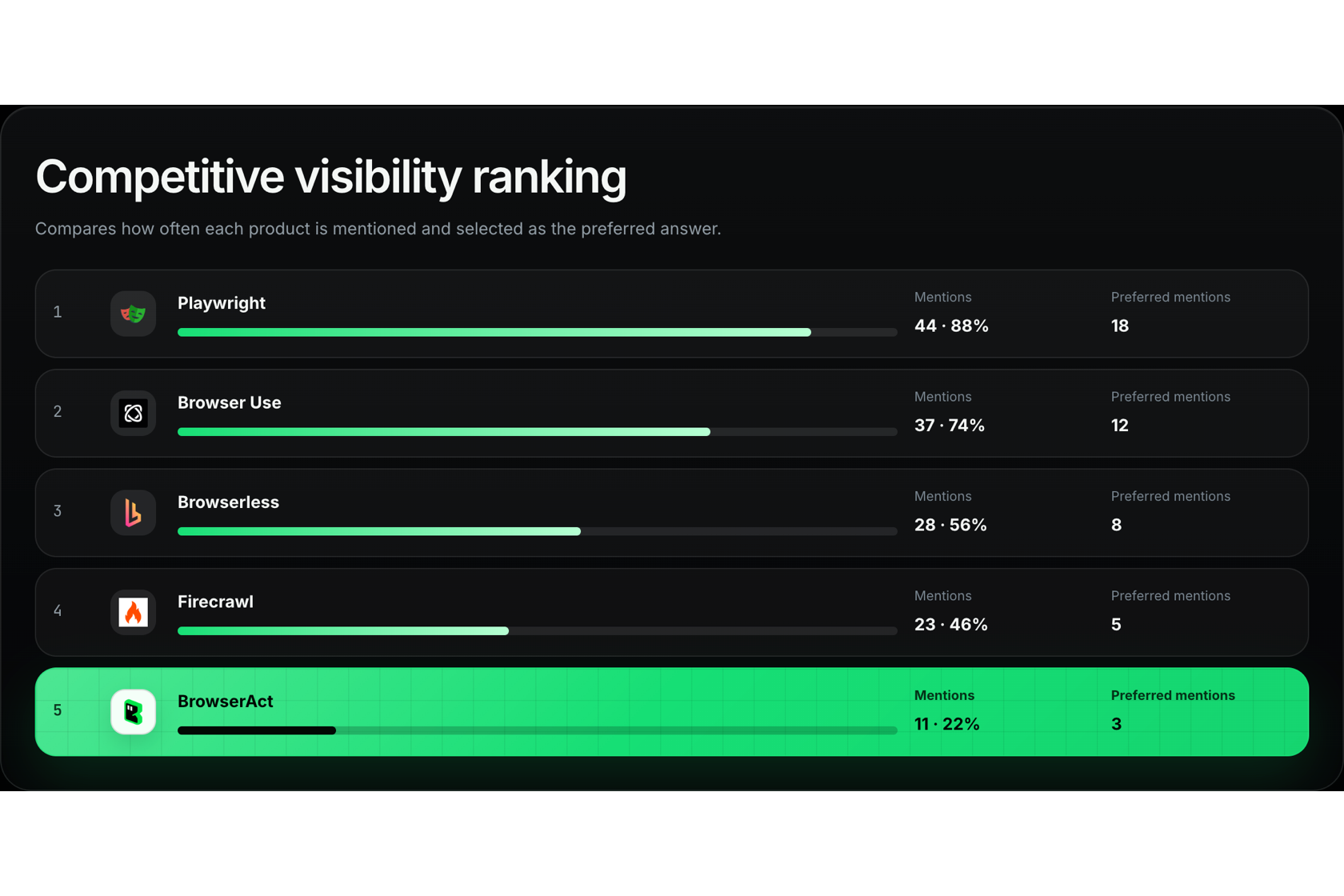
Which Questions Help or Hurt Visibility?
Prompt Performance groups results by the confirmed topics in the Question Map. It shows where the brand earns mentions, where competitors lead, and which topics need closer attention.
The Question List provides a path back to the captured evidence. Open a question to review the original prompt, visible answer, brands mentioned, and citation links used in the analysis.
Which Sources Shape the Answer?
Citation Source Analysis shows the domains and pages cited most often in the captured answers. It can reveal whether AI platforms rely on your website, competitor content, editorial coverage, community discussions, documentation, or other third-party sources.
Citation share measures the share of visible citations attributed to the current brand's domain. When no citation evidence is available, the report does not invent it or force an empty source analysis into the page.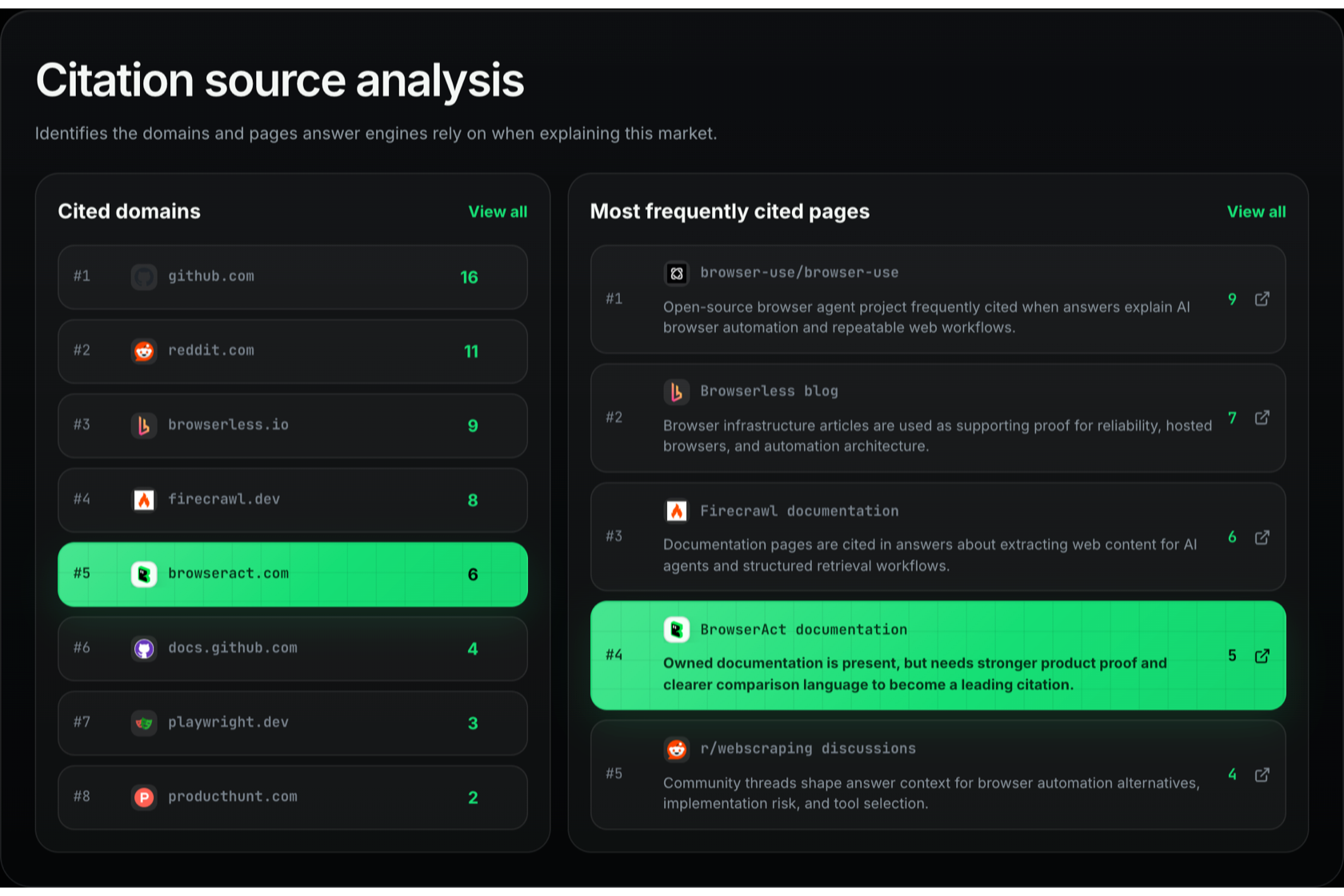
How Does AI Describe Your Brand?
Brand Sentiment Analysis summarizes whether brand-related answers are positive, neutral, or negative and connects the result to representative answer excerpts.
This makes sentiment review more useful than a standalone score. A team can inspect how the platform described the brand and identify outdated claims, weak differentiation, or negative framing that may need attention.
What Should You Improve Next?
Optimization Recommendations turn the captured evidence into a prioritized starting point. Depending on the available source data, the report may identify opportunities to update owned content, engage with relevant external pages, create content for a platform where competitors are visible, or improve broader content coverage.
Recommendations remain tied to available evidence. The report does not automatically edit websites, contact publishers, post comments, or execute the suggested actions for you.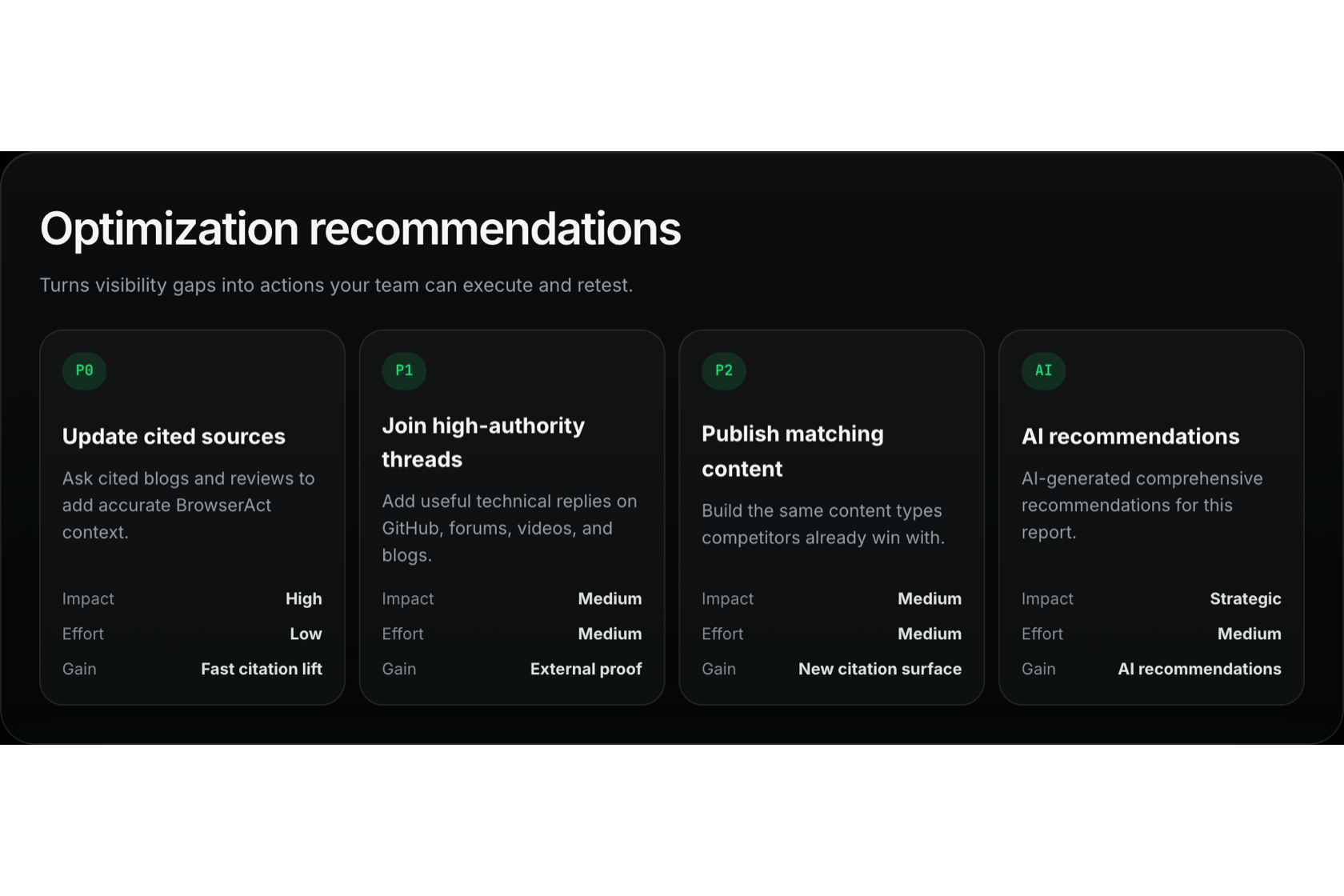
Find your visibility, competitor, and citation gaps. Run your free GEO Report.
Why BrowserAct Uses the Real Web UI
An AI platform is more than its underlying model. The consumer web product can add search behavior, citation panels, formatting, source links, location context, and interface-specific presentation.
APIs remain useful for software integrations, controlled experiments, and high-volume processing. But an API response and a consumer web response should not automatically be treated as the same measurement surface.
BrowserAct focuses on the real web interface because GEO measurement should be able to answer a practical question: what could a user actually see when asking this platform about the category?
The report therefore preserves more than generated text. It connects the prompt, visible answer, citations, screenshot, platform, language, target market, and execution status into a reviewable evidence chain.
Who Should Use the GEO Report?
The report is designed for teams that need a practical first view of AI brand visibility:
- Brand and communications teams evaluating how AI describes the company
- Growth and marketing teams comparing visibility with competitors
- SEO and GEO practitioners identifying prompt, citation, and content gaps
- Founders and product marketers checking whether AI assistants understand their positioning
- Agencies preparing an evidence-based starting point for a client discussion
You do not need to begin with a complete GEO program. The report is useful as a baseline: establish what appears today, identify the largest gaps, then decide whether deeper research or repeated testing is justified.
Ready to establish your AI visibility baseline? Analyze your brand for free.
What This First Version Does Not Measure
AI-generated answers are probabilistic and can change over time. A GEO Report should therefore be interpreted as a documented snapshot, not a permanent statement about a brand.
The current report has several deliberate boundaries:
- One report measures one selected AI platform, not an aggregate of all four platforms.
- Results use the confirmed language, target market, and Question Map for that run.
- The report does not estimate how many people saw a particular answer.
- It does not provide continuous monitoring or a historical trend line.
- It does not automatically execute optimization recommendations.
- A missing mention or citation in this run does not prove that the brand or page can never appear.
These limits make the result easier to understand. You can see what was tested, where it was tested, and what evidence supported the report instead of receiving a broad score with an unclear denominator.
Get Your Free GEO Report
Can AI find your brand? Does it recommend you or a competitor? Which pages shape the answer, and what should you improve next?
Get your free BrowserAct GEO Report and build an evidence-based view of your brand's AI visibility.
Frequently Asked Questions
Is the BrowserAct GEO Report free?
Yes. The current BrowserAct GEO Report is available as a free brand visibility analysis.
Which AI platforms are supported?
You can choose GPT, Claude, Gemini, or Perplexity. Each report runs on one selected platform.
Does one report combine all four AI platforms?
No. One report uses one selected platform, one language, and one target market. This keeps the results and evidence tied to a clear execution context.
Does BrowserAct use model APIs to generate the report data?
BrowserAct runs the confirmed questions in the selected platform's real consumer web interface and captures the visible results. AI and code-based analysis are then used to structure and evaluate that evidence.
Can I review the questions and answers behind the score?
Yes. The report connects aggregate metrics to the Question List and Answer Detail views so you can inspect prompts, captured answers, mentioned brands, and citation links.
Can the report automatically improve my GEO visibility?
No. It provides evidence-based recommendations but does not automatically edit content, contact third parties, publish comments, or execute optimization work.
Will I get the same result every time?
Not necessarily. AI answers can vary because the platforms, source indexes, interfaces, and generated responses change. Treat the report as a time-bound baseline and use repeated tests when you need to evaluate change.


