How to Qualify Google Maps Leads Before Outreach

To qualify Google Maps leads before outreach, check four things in order: whether the business fits your target market, whether it has a legitimate public contact path, whether its website shows a problem connected to your service, and whether you can preserve evidence for that conclusion. A rating, phone number, or missing website feature is not enough on its own.
This approach turns a broad business list into a smaller review queue with reasons. It also prevents a common prospecting mistake: treating public signals as proof that a company intends to buy.
- 1A larger Google Maps list does not replace lead qualification.
- 2Public signals can prioritize research, but they cannot prove purchase intent.
- 3Every score needs an explicit reason and reproducible source evidence.
- 4Missing, inaccessible, or conflicting information belongs in review instead of being treated as a positive lead signal.
- 5Review high-priority records first, then write outreach around the verified condition and a relevant service.
What Makes a Google Maps Lead Worth Contacting?
A Google Maps listing becomes a potentially useful lead only after it passes several different checks. These checks should not be collapsed into one score without explanation.
Qualification layer | Question | Useful public evidence | What it cannot prove |
Business fit | Is this the type of company you can help? | Category, location, services, operating status | Budget or purchase intent |
Contactability | Has the business published a suitable contact route? | Phone, official website, contact form, public email | Consent to receive every type of message |
Observable opportunity | Is there a visible gap related to your offer? | Booking path, form, chat, messaging option, primary CTA | That the business considers the gap a priority |
Evidence quality | Can another person reproduce your conclusion? | Google Maps URL, official website URL, checked page, concise reason | That the evidence will remain unchanged |
The first layer removes irrelevant companies. The second determines whether responsible outreach is possible. The third connects the prospect to a specific service. The fourth makes the decision reviewable.
This is why a five-star business can still be worth researching, while a low-rated business can be a poor lead. Rating is context. It is not a buying signal.
For the broader collection and enrichment strategy, start with Google Maps Scraper for Lead Generation, which separates market discovery, contact enrichment, qualification, and outreach into distinct stages.
A Five-Step Google Maps Lead Qualification Framework
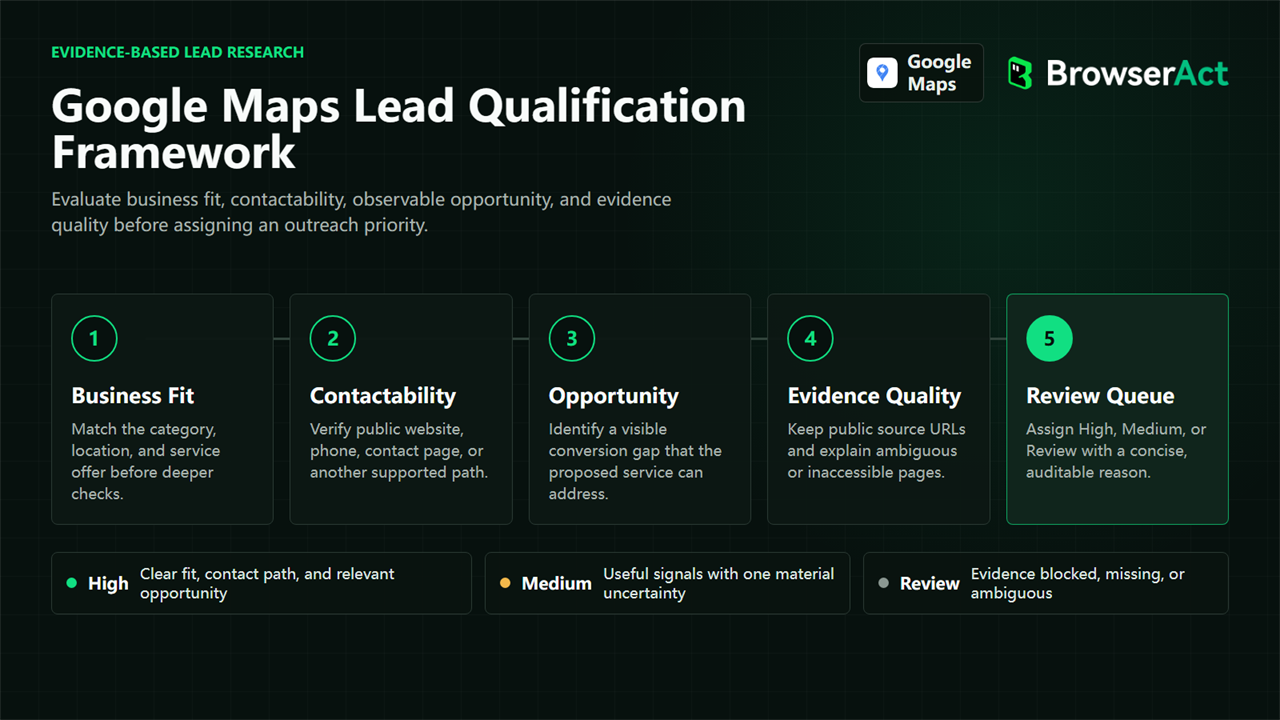
1. Define the offer before collecting businesses
Write down the service you intend to sell and the public condition that would make it relevant.
An automation consultant might look for a missing lead form or disconnected booking journey. A web agency might inspect broken high-value links. A local SEO consultant might compare business details across Google Maps and the official website.
Avoid a definition such as "businesses that need marketing." It is too broad to verify. A useful qualification rule names a specific, observable condition.
2. Collect a small, relevant market sample
Use a clear business category and location. Review the first few results before requesting a larger dataset. The purpose of the first run is to verify that the category, geography, and business type match the intended customer profile.
Branches, franchises, service-area businesses, and loosely related categories can all appear in local results. Remove mismatches before spending time on website inspection or contact enrichment.
Teams that are still testing a market can use the process in How to Scrape Google Maps Without Code to build an initial structured list without turning the experiment into a custom development project.
3. Inspect the official website for relevant conversion paths
Open the business-owned website linked from the listing. Check only the capabilities connected to your offer.
For lead-capture and automation services, useful observations may include:
- A visible online booking or scheduling route
- A contact or lead form
- Live chat
- WhatsApp, SMS, or another visible messaging route
- The primary call to action shown on the page
- A broken or missing path between the call to action and a usable next step
Do not interpret every absent feature as a defect. A business may intentionally prioritize phone calls, an external booking platform, walk-ins, or another channel. Record what is visible and preserve an honest unavailable state when the page cannot be checked.
4. Score the record with a reason
A score is useful only when another person can understand why it was assigned.
Instead of returning High, return a concise explanation such as:
Online booking is available, but no contact form, live chat, or visible messaging option was found on the checked public pages.
The explanation makes the score reviewable. It also helps the sales or service team decide whether the gap matches what it can actually deliver.
5. Review the evidence before outreach
Open the preserved source pages for high-priority records. Confirm that the business still matches the target category, the website belongs to the business, and the observed gap is still visible.
Then write outreach around the evidence, not around a generic promise. The message should explain what was observed, why it might matter, and what useful next step you can offer. It should not claim that the business is losing a specific amount of revenue unless you have independent evidence for that statement.
Which Public Signals Should You Check?
Different services require different signals. A general lead score that mixes every available field can become harder to trust than a smaller service-specific checklist.
Service offered | Signals worth checking | Useful follow-up |
Booking automation | Booking CTA, scheduler, form, confirmation path | Verify that a visitor can reach a usable booking step |
Lead capture | Contact form, identity fields, contact fields, submit control | Check whether the form supports the intended inquiry |
Conversational support | Live chat, messaging, WhatsApp or SMS link | Confirm that the channel is visible and business-owned |
Website redesign | Broken key links, inaccessible pages, weak mobile path | Separate reproducible faults from subjective design opinions |
Local SEO | Maps and website name, address, phone, schema and location cues | Preserve differences and send ambiguous cases to manual review |
Contact information is a separate layer. If a qualified business has no suitable contact route in the listing, a deeper public-contact workflow may be needed. The Google Maps Email Scraper explains why email discovery should use public business-owned pages and why an empty email field is a valid result.
How to Score Leads Without Pretending You Know Their Intent
The safest way to use scores is as an internal review priority, not as a prediction of intent.
A simple framework can use three states:
Priority | Suggested interpretation | Required action |
High | Strong business fit, public contact route, and multiple relevant observable gaps | Manually verify evidence before outreach |
Medium | Business fit and contact route are present, but the opportunity is narrower or ambiguous | Review whether the offer matches the visible condition |
Review | A source is unavailable, blocked, conflicting, or incomplete | Do not present the record as qualified yet |
Keep the reason beside the score. If the website cannot be opened, the result should say that the evidence is unavailable. It should not convert an access failure into a sales opportunity.
Missing values also need context. false can mean a checked feature was not observed. null or an unavailable status can mean the page did not expose enough evidence. Those outcomes should not be treated as interchangeable.
What a Five-Record Qualification Sample Revealed
A five-record BrowserAct sample checked public dental-business records and their official websites. The sample is small, so it demonstrates the output contract and reasoning process rather than the wider market.
All five records had a visible online-booking path. Two also had a contact or lead form. None showed live chat or a visible WhatsApp or messaging option on the checked pages. The resulting review queue contained three High-priority and two Medium-priority records.
Anonymous record | Online booking | Contact form | Live chat | Messaging | Review priority | Why |
A | Yes | Yes | No | No | Medium | Booking and form were present; two narrower communication gaps remained |
B | Yes | No | No | No | High | Booking was present, but no form, chat, or messaging route was observed |
C | Yes | Yes | No | No | Medium | The primary conversion path was stronger, leaving fewer relevant gaps |
D | Yes | No | No | No | High | Multiple website communication paths were absent on checked pages |
E | Yes | No | No | No | High | Multiple website communication paths were absent on checked pages |
The useful conclusion is not that every business should add chat or messaging. The sample shows that the same market can contain different website capability profiles, and that a reusable qualification process can preserve those differences instead of producing one undifferentiated list.
How BrowserAct Turns Checks Into Structured Records
The Google Maps Lead Qualification Scraper starts with a business search query, a location, and a result count. It collects visible Google Maps records, opens each public place page, follows the verified official website when available, and checks the selected conversion capabilities.
Each record can include business details, public source URLs, observed conversion features, a concise weakness summary, an automation recommendation, a review priority, and the reason behind that priority.
The Bot does not need to guess missing values. A checked feature can be recorded as present or not observed, while an inaccessible or inconclusive page can retain an honest status for manual review.
That structure is useful for three reasons:
- Researchers can compare businesses without reformatting notes.
- Sales teams can review why a record was prioritized.
- Automation teams can route records by status while keeping evidence attached.
The output can be reviewed directly or passed into a spreadsheet, CRM review queue, or supported downstream integration. A human should still approve the final outreach decision.
How to Use the Results in Responsible Outreach
Good outreach begins with a narrow observation, not a broad diagnosis.
Use language such as:
I noticed that online booking is available, but I could not find a general inquiry form on the public pages I checked. If phone and booking are intentionally your only channels, no change may be needed. If you want to capture other inquiries, I can share a lightweight option.
This phrasing does three useful things. It names the evidence, allows for business intent that is not visible publicly, and offers help without pretending that the sender knows internal performance.
Before sending any message:
- Confirm the source still shows the same condition.
- Use a business-published contact route appropriate for the message.
- Remove duplicates and unrelated branches.
- Respect applicable website terms, privacy requirements, and outreach rules.
- Avoid claiming revenue loss, urgency, or purchase intent without evidence.
Common Qualification Mistakes
Treating rating as intent
A high rating can indicate an active business. A low rating can indicate many different situations. Neither proves demand for your service.
Scoring every missing feature equally
A missing chat widget may matter for one offer and be irrelevant to another. Score only signals connected to the service being sold.
Calling blocked pages qualified
An inaccessible page creates uncertainty, not opportunity. Route it to manual review.
Ignoring existing conversion paths
A business with a working booking system may not need another generic form. Review the complete public journey before describing a gap.
Collecting contacts before verifying fit
Contact enrichment consumes time and can create unnecessary data. Qualify relevance first, then collect the public contact details needed for a legitimate next step.
Frequently Asked Questions
What makes a Google Maps lead qualified?
A qualified lead matches the target customer profile, has an appropriate public contact route, and shows an observable condition connected to the service being offered. The conclusion should include source evidence and remain subject to human review.
Does a high rating mean a business is ready to buy?
No. A high rating may provide context about the business, but it does not reveal budget, urgency, or purchase intent. It should not be used as the only qualification rule.
Which website conversion signals should I check?
Check only signals relevant to your offer, such as online booking, contact forms, live chat, messaging routes, primary calls to action, or broken high-value links. Existing alternatives and industry context matter.
How should I handle missing fields or ambiguous evidence?
Keep the value empty or assign a manual-review status. Do not convert missing information, blocked access, or conflicting pages into a positive opportunity signal.
Can qualified leads be exported to a CRM or workflow?
Yes. Structured BrowserAct results can be reviewed or connected to supported downstream processes. Keep the evidence and qualification reason with each record, and require human approval before outreach.
Start With Evidence, Not a Bigger List
The practical answer to how to qualify Google Maps leads is not to collect more fields or assign a mysterious score. Define a service-specific condition, inspect the relevant public pages, keep the evidence beside the result, and review the highest-priority records before contacting anyone.
Run a small market sample first and decide whether the output helps your team make a better outreach decision.
Prioritize Leads With Visible Website Evidence
Check public business details and observable conversion gaps, then review the score, reason, recommended automation, and supporting URLs before outreach.


