OpenCode Skills Browser Automation: Reusable Web Workflows

OpenCode Skills browser automation becomes interesting the second a web task works once and then fails the next morning. The first run is usually heroic. An agent finds the right page, clicks through filters, handles a region selector, notices that the useful table only appears after scrolling, and returns a decent result. Everyone relaxes. Then a different model runs the same task tomorrow and re-discovers the whole website from scratch. That is expensive. Worse, it is unreliable. OpenCode alre
-
1OpenCode Agent Skills are
SKILL.mdfolders that the agent can discover from project, global, Claude-compatible, and.agentslocations. - 2A browser Skill should not only say “open this site.” It should define identity, route, allowed actions, output schema, screenshots, blocked states, and approval boundaries.
- 3BrowserAct fits the execution gap by giving OpenCode Skills real browser access instead of forcing every model to rediscover page state from text.
- 4The best Skill candidates are recurring workflows: ecommerce price checks, social research, SaaS QA, public-record monitoring, internal dashboard review, and source verification.
- 5Once a BrowserAct workflow succeeds twice, package it as a Skill and stop paying the model to solve the same website again.
What are OpenCode Agent Skills?
OpenCode Agent Skills are reusable instruction packages defined by a SKILL.md file. According to the official OpenCode Skills documentation, each skill lives in its own folder, starts with YAML frontmatter, and is loaded on demand through the native skill tool.
That on-demand behavior matters. The model does not need to carry the full browser workflow in every prompt. It can see the skill name and description, then load the detailed instructions only when the task matches.
OpenCode searches several locations for Skills:
Skill location | Why it matters for BrowserAct |
| Project-local OpenCode workflow |
| Personal reusable workflow |
| Claude-compatible project skill |
| Claude-compatible personal skill |
| Cross-agent skill shared across tools |
| Global cross-agent skill |
Pro Tip: Put browser workflows that you expect to reuse across Codex, Claude Code, Gemini CLI, Windsurf, and OpenCode under .agents/skills/. Keep OpenCode-only behavior in .opencode/skills/.
Why browser workflows make better Skills than prompts
Prompts are good for one-time reasoning. Skills are better for procedures.
A browser workflow is a procedure. It has a start URL, an identity, a route, recovery rules, forbidden actions, and a result format. If those details stay inside a chat transcript, the next agent has to infer them again.
That is where web automation quietly leaks time.
The model remembers what the previous model said, but it does not automatically inherit the same browser state. It may not know which account was logged in, which filter was selected, what region the ecommerce site used, or whether the page was blocked because of CAPTCHA, 2FA, account selection, or a real site outage.
BrowserAct gives the Skill the missing operational layer:
- named browser sessions
- authorized local Chrome identity when needed
- protected-page extraction before full browser escalation
- JavaScript-rendered page operation
- screenshots and final URLs
- structured data output
- human handoff for trust boundaries
- repeatable browser task packaging through Skill Forge
OpenCode decides which Skill to load. BrowserAct makes the web path executable.
A reusable BrowserAct Skill structure for OpenCode
The official OpenCode docs require name and description in Skill frontmatter. They also explain that unknown frontmatter fields are ignored, so the portable part of a Skill should live in the body, not in custom YAML fields that only one tool understands.
Use this shape:
---
name: browser-pricing-monitor
description: Collect current public pricing data from approved competitor pages using BrowserAct.
---

## Goal
Collect pricing fields from approved competitor URLs and return normalized evidence.

## Browser identity
- Use BrowserAct session: pricing-monitor-readonly
- Read-only only.
- Do not sign up, buy, submit forms, message, or change settings.

## Route
1. Open the competitor pricing URL.
2. If the page is static, use extraction first.
3. If tabs, toggles, scroll, or JavaScript rendering are required, escalate to BrowserAct browser operation.
4. Capture screenshot and final URL.
5. Return BLOCKED if CAPTCHA, 2FA, login, payment, or account selection appears.

## Output schema
- company
- plan_name
- visible_price
- billing_period
- limits
- source_url
- retrieved_at
- screenshot
- blocked_reason
This is not a fancy prompt. It is an operating contract.
The contract is the value.
Pro Tip: Do not put passwords, cookies, or one-time codes into a Skill. A Skill should name the approved browser identity and handoff rule, not expose the secret.
Workflow 1: ecommerce discovery
Ecommerce is the easiest place to see why Skills beat one-off prompts.
The first run discovers the messy parts: category search, delivery region, infinite scroll, seller pages, coupon labels, variation selectors, stock notices, and rating counts. If the model has to rediscover those steps every day, the workflow becomes a token sink.
With BrowserAct, OpenCode can turn the successful route into a reusable Skill:
- Use the model to decide which products and fields matter.
- Use BrowserAct to open the ecommerce site in an isolated browser lane.
- Capture price, stock, seller, rating count, delivery promise, and source URL.
- Save blocked pages with screenshot and reason.
- Package the route once it succeeds twice.
For Amazon-specific workflows, the Amazon Product Search API skill and Amazon Competitor Analyzer are useful examples of turning repeated commerce data work into reusable lanes.
The OpenCode Skill does not need to describe every product. It needs to describe the safe browser contract and output shape.
Workflow 2: social research without accidental posting
Social media research has a different risk profile.
The agent may need a logged-in account to see public posts, search results, profiles, follower counts, or engagement. But the same UI also contains buttons for like, repost, follow, message, and publish.
That means the Skill must be explicit:
Skill rule | Why it matters |
Use named research account | Avoids mixing personal, admin, and test sessions |
Read-only actions only | Prevents accidental engagement or posting |
Screenshot every source | Makes the final report verifiable |
Return visible engagement only | Avoids inventing private analytics |
Stop on compose/publish UI | Keeps writing actions human-owned |
Session boundaries make social research safe
This is where BrowserAct’s session boundary matters. The model can reason about what to collect; BrowserAct preserves the browser identity and evidence. A workflow like BrowserAct’s Social Media Finder can become one component in a broader OpenCode Skill for market research.
If the social task becomes recurring, link it back to the existing pillar on OpenCode browser automation so readers understand why session isolation is the base layer.
Give your agent a real browser, then turn the workflow into a Skill.
- 1. Use browser-act when an agent needs to open, click, scroll, extract, or inspect a live site.
- 2. Use browser-act-skill-forge when the workflow should become reusable across runs and agents.
- 3. Keep the operational boundary simple: automate what the user can already do in the browser.
Workflow 3: SaaS QA after a code change
OpenCode is a coding environment. That makes UI verification a natural Skill target.
A code agent can update a settings page, migration, dashboard, billing flow, or admin console. But the task is not truly done until someone opens the page and verifies the rendered state.
An OpenCode Skill for SaaS QA should include:
- staging URL
- required account role
- read-only routes
- screenshots required
- destructive actions forbidden
- expected UI states
- final PASS / FAIL / BLOCKED output
BrowserAct can operate the browser side: open staging, reuse the authorized QA session, click through tabs, capture screenshots, and return evidence. If the route needs multiple browser lanes, use the same isolation logic explained in Concurrent Browser Automation.
Pro Tip: A UI QA Skill should define “done” as evidence, not narration. Require final URL, screenshot, account label, environment banner, and PASS / FAIL / BLOCKED.
How OpenCode skill permissions affect browser automation
OpenCode’s Skills documentation shows that skill access can be controlled with pattern-based permissions in opencode.json. A Skill can be allowed, denied, or set to ask before loading. Permissions can also be overridden per agent.
For browser automation, that lets you separate everyday read-only work from sensitive workflows:
{
  "$schema": "https://opencode.ai/config.json",
  "permission": {
    "skill": {
      "*": "ask",
      "browser-public-research": "allow",
      "browser-pricing-monitor": "ask",
      "browser-admin-console": "deny"
    }
  }
}
This is not enough by itself. OpenCode controls whether the agent may load the Skill. BrowserAct still needs to control the browser identity, session, and handoff boundary.
Use both.
OpenCode decides what the model is allowed to invoke. BrowserAct decides how the web task is executed and what evidence comes back.
When a browser workflow is ready to become a Skill
Do not turn every experiment into a Skill. That creates clutter.
Promote a workflow when it meets these conditions:
- The same task will run again.
- The first route succeeded at least twice.
- The output schema is stable.
- The workflow has clear blocked states.
- The browser identity is known.
- The allowed and forbidden actions are obvious.
- A reviewer can verify the output from URLs and screenshots.
If those conditions are not true, keep experimenting in a normal OpenCode session.
If they are true, use BrowserAct Skill Forge to turn the explored path into a repeatable browser Skill. Use the browser-act Skill when the agent needs live browser operation.
The repeatable OpenCode + BrowserAct pattern
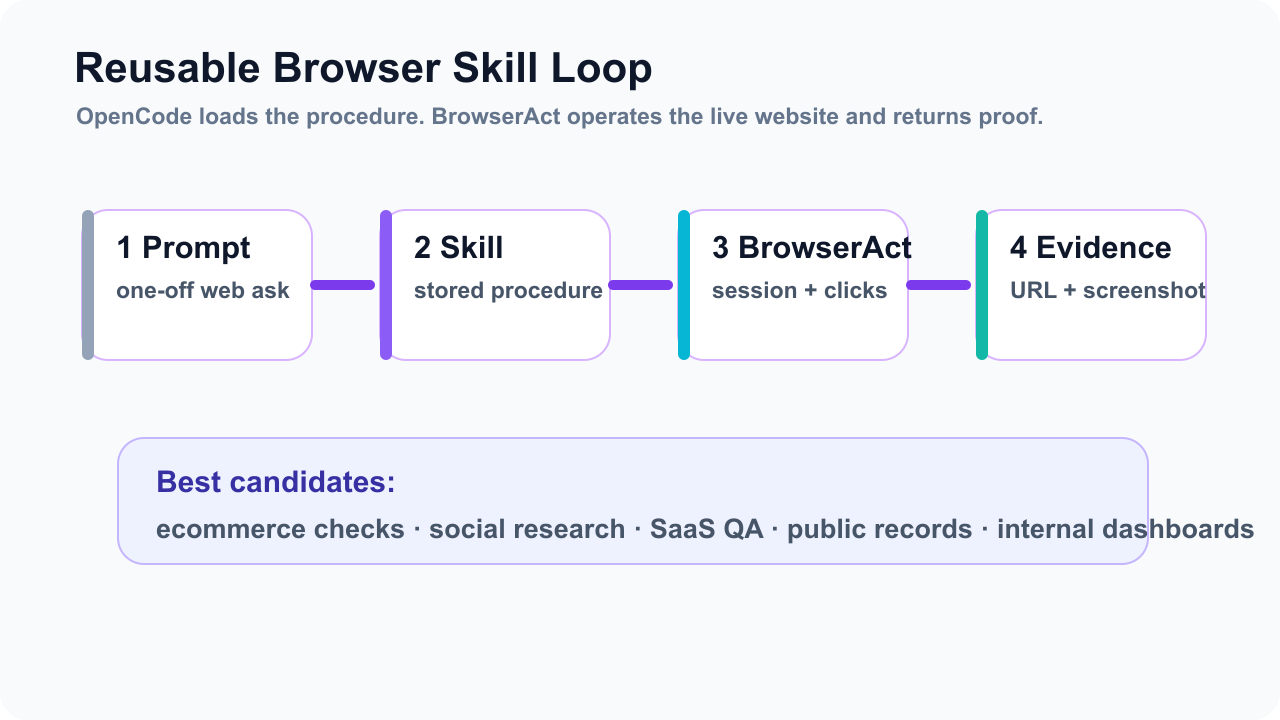
The pattern looks like this:
- OpenCode plans the task and selects the Skill.
- The Skill defines the browser contract.
- BrowserAct executes the live web workflow.
- The result returns as structured evidence.
- A successful route becomes reusable infrastructure.
That is the practical meaning of OpenCode Skills browser automation.
It is not “teach the model to click harder.” It is “stop making every model rediscover the same website.”
Conclusion
OpenCode Skills are a strong fit for browser automation because browser work is repetitive, stateful, and easy to get wrong when it lives only in chat history.
The right architecture is not a bigger prompt. It is a reusable Skill backed by a real browser execution layer.
Use OpenCode to load the correct procedure. Use BrowserAct to operate the live website, preserve session boundaries, return evidence, and hand off when a human decision is required. If you are building recurring research, ecommerce, SaaS QA, or internal-dashboard workflows, start with the BrowserAct install guide, then turn the first stable path into a Skill.
Sources
- OpenCode Agent Skills
- OpenCode Agents
- OpenCode Permissions
- BrowserAct Skills repository
- BrowserAct Skill Forge
Two Skills, One Repeatable Browser Workflow
Start with live browser execution when the agent needs to understand a page. Move to Skill Forge when the same scraper should run again without re-exploring the site.
Run once with browser-act
Give Codex, Claude Code, Cursor, Windsurf, or another agent a real browser for rendered pages, clicks, scrolling, screenshots, DOM extraction, and network inspection.
Open browser-act SkillPackage with Skill Forge
Explore the site once, verify the extraction path, then generate a callable Skill package that other agents can reuse for batch jobs or scheduled workflows.
Open Skill ForgeRelated reading: From Browser Scripts to AI Operators: Why Teams Need Auditab
Related reading: Why Your AI Agent Fails at Browser Automation | BrowserAct
Further reading: Coding agent integrations
Frequently Asked Questions
What are OpenCode Skills?
OpenCode Skills are reusable instruction folders with a SKILL.md file that agents can discover and load on demand through the native skill tool.
How does BrowserAct fit OpenCode Skills browser automation?
BrowserAct provides the live browser execution layer for Skills that need sessions, clicks, JavaScript rendering, screenshots, structured extraction, or human handoff.
Where should I store reusable browser Skills?
Use .opencode/skills for OpenCode-only workflows and .agents/skills when the browser workflow should be portable across multiple agent tools.
Should every browser task become a Skill?
No. Promote a workflow only after it succeeds repeatedly, has a stable output schema, and has clear allowed actions, blocked states, and evidence requirements.
Can OpenCode control which browser Skills an agent may load?
Yes. OpenCode supports skill permissions such as allow, ask, and deny, including pattern-based rules and per-agent overrides.
What should a browser Skill include?
A browser Skill should include the goal, approved identity, start URL, route, forbidden actions, blocked states, output schema, screenshots, and human handoff rules.


