How to Scrape Website Data to Excel: One Record per Row

To scrape website data to Excel, collect the fields you need, export a table with one record per row, and import the CSV into Excel. The part worth checking is the table itself: a successful download can still put every result inside one cell. This guide uses a small, tested BrowserAct Bot to show what a usable export looks like.
- 1Define the row before running: one book, product, review, or business per record. Keep child arrays out of ordinary spreadsheet cells when you need to analyze them separately.
- 2BrowserAct's tested download here is CSV. Excel can open or import it; saving an Excel workbook afterward is a separate step.
- 3Check the downloaded file against the source and requested count. A run marked complete does not prove the file is ready for analysis.
Choose a method that fits the page
A few visible values may be quicker to copy manually. A simple HTML table may work with an Excel web import supported by your version. A repeated collection task needs a reusable scraper with explicit fields and stopping conditions.
This article follows the third route. It uses Books to Scrape, a public scraping sandbox, rather than a live shop or an account requiring credentials. The site states that its prices and ratings are fictional. They are useful for learning and checking the output, not for market research.
The example reads one listing page only. It does not collect all books across the website. That small scope makes it easier to verify titles, prices, record counts, and file structure before extending a workflow.
Define the table before collecting data
For this example, one row represents one book card from the supplied listing page. The fields are complete title, absolute product URL, displayed price, displayed availability, rating, numerical price amount, currency, and trimmed availability.
Keeping the original price alongside its numerical amount makes the conversion checkable. For example, the source's £51.77 remains in raw_price, while price_amount contains 51.77 and currency contains GBP. The numerical amount is derived from the displayed value, not a second price fetched elsewhere.
Use the product URL as the duplicate key. Titles are readable labels, but two different products can share a title. The source link also gives you a route back to the evidence.
If your own page contains products with multiple variants or reviews, decide whether those deserve separate tables. The CSV vs JSON guide explains why exporting a whole response object can leave a nested array in one cell.
Build and run the BrowserAct workflow
Use the following prompt as a starting specification for a custom Bot. The example has been tested on the named sandbox; changing the website requires checking its layout, access conditions, and fields again.
1. Open BrowserAct Dashboard
Click the left-side + button to create a Bot, choose Quick Start, and enter the website URL. Paste the requirements into the data input. The current workspace also offers a Custom Bot entry for a fuller request.
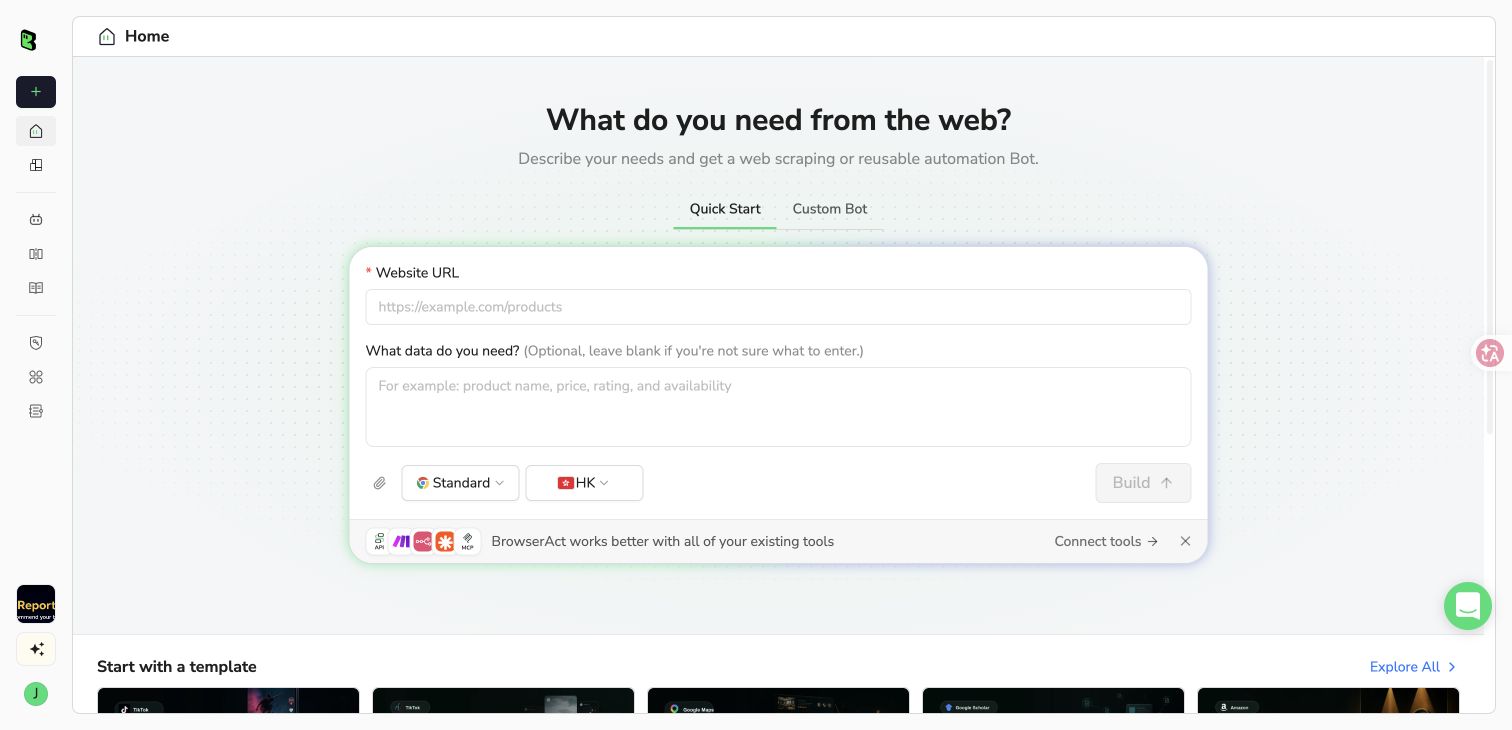
The actual BrowserAct Quick Start workspace used to create this example.
2. Copy the complete prompt
Start with five records. Keep the fields and row definition explicit, and change the URL or limit only when you are ready to verify a different input.
Scrape data from any website.
Describe the data you need. Get a Bot — a reliable, reusable scraper.
3. Handle access requirements if they appear
This public sandbox needed no login during our tests. If a different authorized website requires login, CAPTCHA, 2FA, or account confirmation, complete that requirement manually when the product requests it. A Bot may stop with an access message and require a rerun; do not assume every access gate supports an interactive resume.
4. Review the rows and download CSV
After building, run the published Bot with the desired listing URL and limit. Review its result table, check product URLs for duplicates, and compare a few values with the page. Open Download result file and choose CSV. Keep this original download before making changes in a spreadsheet.
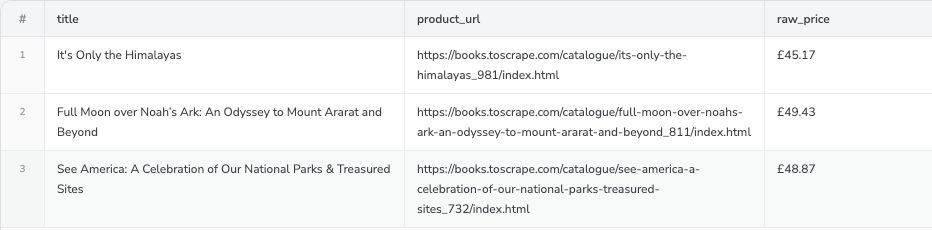
Selected columns from the actual three-book Travel-category run. The original downloaded CSV contains eight fields and three records; this screenshot is a crop of the real BrowserAct result view.
What we verified in the native files
On October 21, 2026, the Bot's build test returned five homepage books. We then ran its published version independently with two different requests and downloaded the results directly from BrowserAct.
Check | Request | Actual result |
Homepage limit | Two books | Two native CSV rows; two JSON records |
Different listing | Three Travel-category books | Three native CSV rows matching that category |
Source values | Titles, URLs, prices, and ratings | Matched the inspected source records |
Price parsing | Preserve displayed price; add amount and currency | Original GBP strings retained; numerical amounts matched |
books collection. Its CSV download expands that collection into book rows. We did not manually flatten either file or replace the result with a separately prepared dataset.
These checks establish the behavior of this Bot on these inputs. They do not establish that another template, another website, or every possible result limit will behave identically.
Import the CSV into Excel
Open the CSV in Excel, or use the text/CSV import option when you need control over encoding, delimiters, and column types. In supported versions, look under Data → Get Data → From Text/CSV; menu names vary by platform and version. Microsoft's import guide covers the available routes.
In the preview, confirm that the header names occupy separate columns and that each book occupies one row. Choose the comma delimiter for this file. If the pound symbol or other characters appear incorrectly, check the encoding; Microsoft's UTF-8 CSV guidance explains the import alternatives.
Keep URLs and identifiers as text. Treat price_amount as a numerical column and retain currency beside it. If you need workbook formatting, multiple sheets, or formulas, save the imported data as an Excel workbook (.xlsx). Renaming a CSV extension does not create that workbook format.
The BrowserAct output was verified as native CSV and JSON. The Excel import instructions above follow Microsoft's documentation; this article does not claim that BrowserAct generated a native XLSX file.
Check the file before scaling the task
Count data records rather than physical text lines, because quoted fields may contain line breaks. Confirm unique source URLs and compare the returned count with the limit. Check that titles are complete and that a blank field remains distinguishable from zero.
If Excel shows one row containing a long data or results value, inspect the record structure before trying to split the cell. Fix the output collection or Bot specification, then download again. Splitting on commas can corrupt legitimate comments, titles, and nested values.
For recurring collection, keep the original file and record when it was collected. Changes in row counts or field meanings need investigation. Our data cleaning explanation covers the next stage: making values consistent without inventing missing information.
Frequently Asked Questions
Can I scrape a website into Excel without coding?
A no-code Bot can collect fields and export a CSV that Excel can import. The example here was tested on Books to Scrape; other websites need their own access, field, and output checks.
Does BrowserAct export this example as XLSX?
The verified native formats here are CSV and JSON. Import the CSV into Excel and save an XLSX workbook if you need workbook features.
Why are all my scraped results in one Excel cell?
The exporter may have serialized a results array inside one field. Define the intended records and export that collection as rows instead of splitting the cell on commas.
How do I check that my export is complete?
Compare the requested limit, actual record count, unique source identifiers, and representative source values. A completed run alone does not prove page coverage or field accuracy.
Can I reuse this Bot on any website?
This Bot targets Books to Scrape listing pages. For another website, build or adapt the Bot and repeat the source and native-file checks before relying on it.


