Is LinkedIn Scraping Legal or Safe? A Practical Risk Framework

“Is LinkedIn scraping legal?” is the wrong question if it expects a yes-or-no answer. The better question is: what are you collecting, from where, with whose permission, under which terms, using what method, for what purpose, and what happens when LinkedIn shows a limit, login wall, or warning? This article is not legal advice. It is a practical risk framework for marketing, sales, recruiting, research, and data teams that need to understand LinkedIn data workflows without pretending that a too
- 1LinkedIn’s current User Agreement and Help pages restrict scraping, crawlers, bots, unauthorized automation, fake accounts, access-control bypassing, and automated engagement.
- 2Publicly visible data is not automatically “safe to scrape.” Terms, privacy, consent, purpose, jurisdiction, and downstream use still matter.
- 3The hiQ v. LinkedIn CFAA discussion should not be simplified into “LinkedIn scraping is legal.” Other claims, contracts, platform restrictions, privacy issues, and account consequences remain.
- 4Use official APIs, first-party exports, admin reports, or written permission when they cover your use case.
- 5If a workflow touches profiles, personal data, hiring, prospecting, enrichment, or outbound, get legal/privacy review.
- 6BrowserAct should be used for reviewed, read-only, public business research workflows, not for bypassing LinkedIn controls or automating engagement.
What LinkedIn says in its own rules
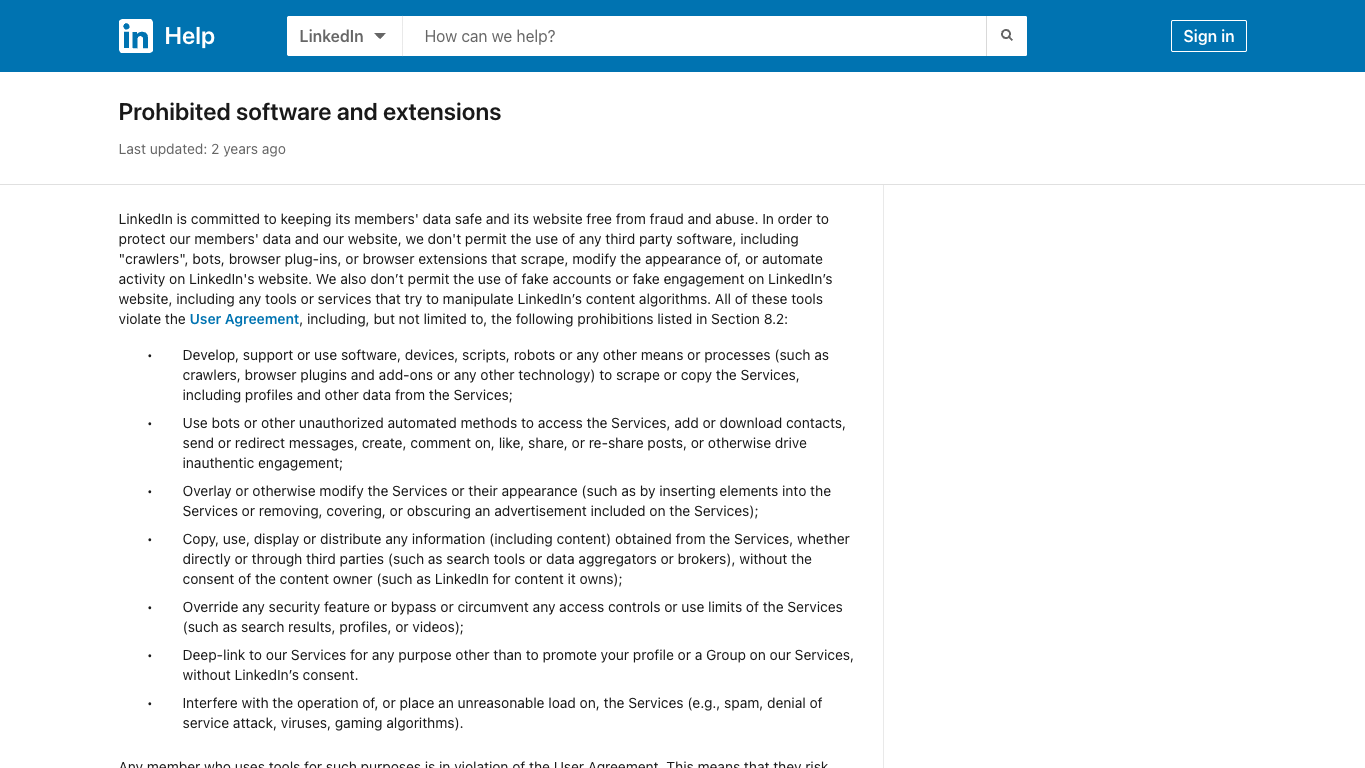
Official LinkedIn screenshot. Source: Prohibited software and extensions.
LinkedIn’s User Agreement page is current as of this check and states that it is effective November 3, 2025. In its “Dos and Don’ts,” LinkedIn restricts false identities, use of another account or copied cookies, scraping/copying services through software or processes, bypassing access controls or use limits, copying or distributing information without consent, and unauthorized automated methods that access services or perform engagement actions.
LinkedIn’s Help page on prohibited software and extensions is even more direct. It says LinkedIn does not permit third-party software such as crawlers, bots, browser plug-ins, or extensions that scrape, modify the site’s appearance, or automate activity. It also calls out fake accounts, fake engagement, bots, unauthorized automated methods, access-control bypassing, and unreasonable load.
That does not answer every legal question in every jurisdiction. It does answer one practical question: LinkedIn does not want unauthorized scraping or automation on its services, and users can face account restrictions or tool breakage.
The practical risk matrix
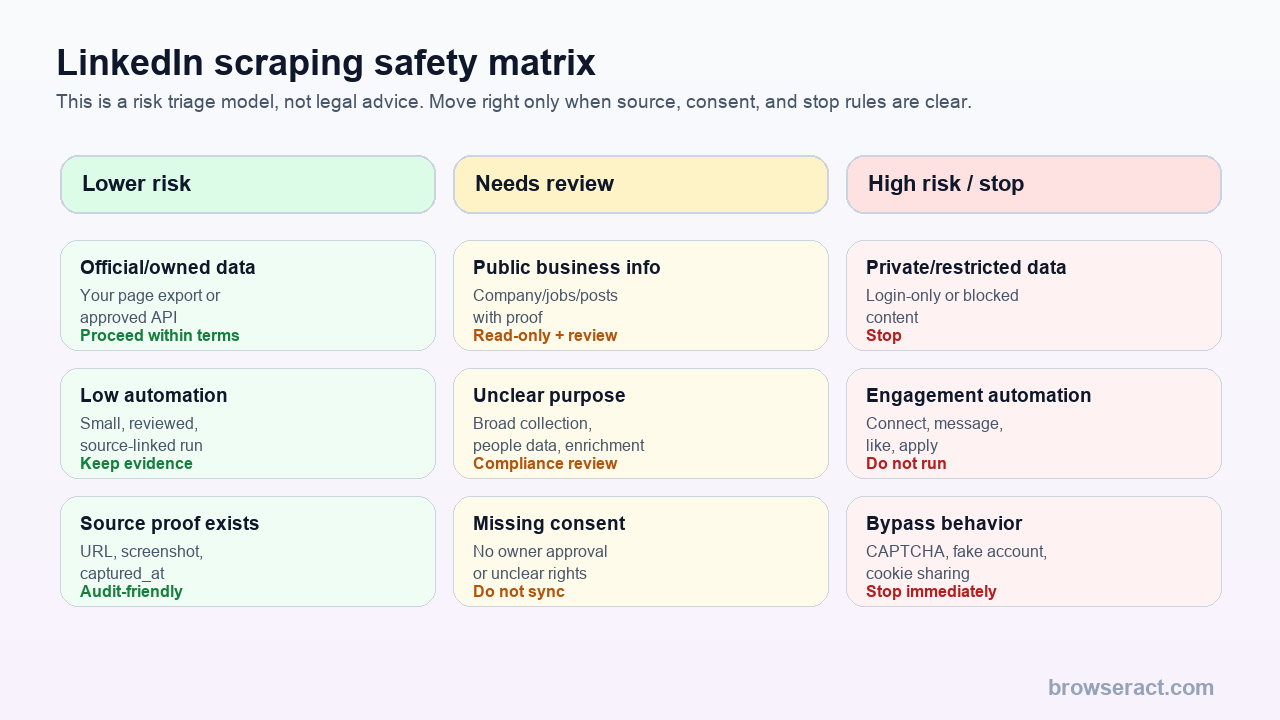
Use this as a triage model, not a legal conclusion.
Risk level | Example | Default action |
Lower risk | Your own page data, approved API, admin export, source-linked public business facts | Proceed within terms and scope |
Needs review | Broad public-data collection, company/post/job monitoring, enrichment, people data | Legal/privacy/compliance review |
High risk / stop | Login-only content, CAPTCHA, fake accounts, copied cookies, automated likes/messages/connections | Stop workflow |
Pro Tip: The word “public” is not a compliance strategy. Store the source URL, reason for collection, consent basis, allowed use, retention period, and review owner.
Public data and the hiQ case: what it does and does not mean
The hiQ v. LinkedIn litigation is often used as shorthand for web scraping law. Be careful.
The Ninth Circuit’s 2022 decision raised serious questions about whether the Computer Fraud and Abuse Act applies to scraping publicly accessible LinkedIn profile data. But the practical lesson is not “LinkedIn scraping is legal.” The case involved specific parties, claims, procedural posture, public profiles, cease-and-desist letters, and a CFAA theory. Other issues can still matter, including contract claims, privacy, data protection, intellectual property, trespass, anti-circumvention, downstream use, and platform enforcement.
For a buyer or operator, the useful takeaway is:
- Public accessibility may matter for some computer-access questions.
- Platform terms still matter.
- Consent and privacy still matter.
- Employment, recruiting, credit, insurance, housing, and regulated decisions raise extra risk.
- Account restrictions and tool shutdowns are operational risks even before a lawsuit.
Pro Tip: If a vendor uses hiQ as a blanket permission claim, treat that as a red flag. Ask what data, jurisdiction, consent model, contract theory, privacy review, and downstream use they mean.
Run the scrape once with browser-act. Package the repeatable path with Skill Forge.
- 1. An agent uses browser-act to search Google Maps, scroll listings, inspect place pages, and extract visible fields.
- 2. The team validates the schema: business name, category, address, phone, website, rating, review count, and source URL.
- 3. browser-act-skill-forge turns the proven flow into a reusable scraper Skill for future agent runs.
Safer alternatives before scraping
Before using any scraper, check whether an official or lower-risk route covers the job.
Need | Safer route to check first |
Your own LinkedIn data | LinkedIn data archive or account export |
Company admin analytics | Admin reports or first-party tools |
Approved integration | LinkedIn API access or partner program |
Advertising/marketing data | Microsoft/LinkedIn approved API docs and permissions |
Sales Navigator usage reporting | Sales Navigator admin usage report |
Public company research | Source-linked, read-only research with review |
People enrichment or outreach | Legal/privacy review before any collection or sync |
What “safe” should mean operationally
For a data workflow, “safe” should not mean “we did not get blocked today.”
It should mean:
- The source is allowed for the intended use.
- The workflow is read-only unless explicitly approved.
- The data fields are necessary and proportionate.
- The output stores source URLs and timestamps.
- Personal data is minimized.
- Login walls, CAPTCHA, 2FA, payment, unusual activity, and access uncertainty stop the run.
- The team has a review owner.
- Downstream sync to CRM, enrichment, outbound, or analytics is controlled.
This is where BrowserAct can be useful: not as a bypass layer, but as a source-capture layer with visible browser execution, screenshots, structured export, and stop rules.
Example BrowserAct-safe prompt:
Collect only visible public company and job information from the approved URL list.
Return source_url, captured_at, fields_collected, missing_fields, screenshot_url, extraction_status, and review_status.
Stop the row if login, CAPTCHA, 2FA, payment, unusual activity, profile-view limits, or access uncertainty appears.
Do not scrape member profiles, send messages, connect, follow, like, comment, repost, apply, publish, bypass access controls, or use copied cookies.
That kind of prompt is not a legal shield. It is an operational boundary.
A decision checklist before you run
Before a LinkedIn data workflow goes live, answer these questions in writing:
Question | Why it matters |
What exact source pages are in scope? | “LinkedIn” is too broad; company pages, jobs, posts, profiles, and Sales Navigator have different risk profiles |
Is the data first-party, public business data, member profile data, or login-only data? | Source type changes the review path |
Do you have permission, API access, admin rights, or another approved route? | Official routes reduce ambiguity |
Is any personal data collected? | Privacy, retention, enrichment, and downstream-use questions become more important |
What actions are automated? | Reading a public page is different from messaging, connecting, liking, applying, or posting |
What stop states are defined? | Login, CAPTCHA, 2FA, profile limits, warnings, payment, and access uncertainty should stop the run |
Where will the data go next? | CRM, enrichment, outbound, hiring, and scoring workflows need stricter review |
How long will you retain it? | Retention and deletion rules matter for risk control |
Who owns review? | A workflow without an owner becomes a silent compliance liability |
Vendor claims to audit
When evaluating LinkedIn scraper vendors, audit the claims.
Claim | What to ask |
“Compliant LinkedIn scraper” | Compliant with which law, policy, consent model, and use case? |
“No login required” | What data is actually public, and what fields are omitted? |
“Safe browser extension” | Does LinkedIn permit this type of extension or automation? |
“Human-like automation” | Does that mean approved, or just less detectable? |
“Proxy-based scraping” | Does a proxy provide permission? No. |
“AI enrichment” | What personal data is processed and where does it go? |
“CRM sync” | Are records reviewed before becoming system-of-record data? |
Two Skills, One Repeatable Browser Workflow
Start with live browser execution when the agent needs to understand a page. Move to Skill Forge when the same scraper should run again without re-exploring the site.
Run once with browser-act
Give Codex, Claude Code, Cursor, Windsurf, or another agent a real browser for rendered pages, clicks, scrolling, screenshots, DOM extraction, and network inspection.
Open browser-act SkillPackage with Skill Forge
Explore the site once, verify the extraction path, then generate a callable Skill package that other agents can reuse for batch jobs or scheduled workflows.
Open Skill ForgeFurther reading: LinkedIn research
Frequently Asked Questions
Is LinkedIn scraping legal?
It depends on the data, method, permission, jurisdiction, terms, and use case. LinkedIn restricts unauthorized scraping and automation in its terms, so do not treat “public data” as automatically legal or safe.
Is scraping public LinkedIn data allowed?
Public accessibility may matter for some legal questions, but it does not erase terms, consent, privacy, contract, or downstream-use risks. Review the specific use case.
Are LinkedIn scraper extensions allowed?
LinkedIn’s Help page says it does not permit browser plug-ins or extensions that scrape, modify LinkedIn’s appearance, or automate activity on LinkedIn.
Do proxies make LinkedIn scraping compliant?
No. Proxies may change network routing, but they do not grant permission, expand API access, remove terms restrictions, or make a risky data use acceptable.
Can BrowserAct like, comment, connect, or message on LinkedIn?
For BrowserAct SEO workflows, the safe boundary is read-only data collection unless a separate approved process explicitly authorizes an action. Do not automate likes, comments, follows, messages, connection requests, reposts, applications, or publishing from scraping workflows.
When should I use LinkedIn APIs instead?
Use approved LinkedIn APIs, partner programs, or first-party exports when they cover your use case. They provide clearer authorization and permission boundaries than scraping workflows.
Where does BrowserAct fit safely?
BrowserAct fits in bounded, reviewed, read-only public business research workflows where the team needs source URLs, screenshots, structured output, stop rules, and human review before downstream use.


