How to Find Reputation Management Prospects With Unanswered Google Reviews

Find stronger reputation management prospects by verifying recent low-star reviews, visible owner-response status, and public contact paths instead of relying on overall ratings alone.
A low Google rating does not automatically make a business a good reputation management prospect. The stronger signal is a recent, low-star review that remains visibly unanswered, has enough source evidence to verify what happened, and belongs to a business with a legitimate public contact path.
That distinction matters when building reputation management leads from Google Maps. A rating is an aggregate. It can reflect old complaints, a small sample, an isolated incident, or reviews the business has already addressed. Before adding a company to an outreach queue, verify the review date, star rating, source, visible owner-response status, and contactability. If any of those signals are unclear, send the record to manual review rather than forcing a conclusion.
This guide shows how to build that evidence-first process and how BrowserAct can help organize the public signals into reviewable business records.
- 1A low overall rating is a search filter, not proof that a business needs reputation management help now.
- 2A useful unanswered-review signal requires a visible date, low star rating, identifiable source, and no visible owner response.
- 3Incomplete evidence belongs in a manual-review queue instead of being presented as a qualified lead.
- 4Reputation management should focus on response, monitoring, and service-recovery processes, not promises to remove legitimate reviews.
- 5Responsible outreach should offer help with a visible process gap without quoting sensitive review details or pressuring the business.
Why Unanswered Reviews Are More Useful Than Rating Alone
Overall rating is useful for narrowing a Google Maps search, but it does not explain the business's current review-management behavior.
A business with a 3.5-star rating may have improved its service and responded to every recent complaint. Another business with a 4.7-star rating may have received two serious one-star reviews in the past month without a visible response. The second business may present the more timely reputation-management conversation even though its average rating looks healthier.
For prospecting, the useful question is not simply, "Which businesses have low ratings?" It is:
Which businesses have a recent, visible customer issue that appears unanswered and can be reviewed responsibly before outreach?
That question moves the process from list scraping to evidence-based qualification. It also fits into a broader Google Maps lead generation workflow, where public business data is collected first and then filtered against a specific service need.
The difference can be summarized this way:
Signal | What it tells you | What it does not prove |
Overall rating | Broad customer sentiment over time | A current response-process gap |
Total review count | How much public feedback exists | Whether recent complaints are being handled |
Recent low-star review | A current negative customer experience is visible | The business has ignored it |
No visible owner response | A public reply was not found on the checked review card | No private follow-up occurred |
Public contact path | The business can be contacted through a published channel | The business wants to buy a service |
What Counts as a Verified Unanswered Review?
Google explains that verified Business Profiles can reply publicly to reviews and that the reply appears beneath the customer's review. That makes the visible response state a useful public signal, but only when the review card itself is sufficiently complete. Google's Business Profile documentation remains the authority for how review replies work.
For prospecting purposes, retain an unanswered-review signal only when you can verify these elements:
- Review date: The review falls inside the selected prospecting window, such as the last 30 or 90 days.
- Star rating: The visible rating matches the threshold you defined, such as one or two stars.
- Native source: The card is a Google review rather than a third-party summary or an ambiguous review module.
- Owner-response state: No owner response is visible beneath that specific review when checked.
- Business identity: The review is associated with the intended Maps listing, not a similarly named company or another location.
The phrase "no visible owner response" is deliberately narrow. It does not prove that the business failed to contact the customer privately. It only describes what is visible on the public review card at the time of checking.
If the page omits the date, rating, source, or response state, the record should not be upgraded into a verified opportunity. Dynamic loading, review sorting, third-party cards, and page changes can all make evidence unavailable.
A Responsible Reputation Prospecting Workflow
An effective workflow separates discovery from the final outreach decision.
1. Define the market before searching
Choose one industry and one location. A narrow search such as property management companies in a specific city produces a more coherent prospect list than a broad search for "businesses with bad reviews."
Set minimum business-level filters, including review count and overall rating, to avoid spending time on inactive or thin listings. These filters create the candidate pool; they do not determine lead quality.
2. Choose a review window and severity threshold
Recent feedback is generally more useful than an old complaint because it reflects a current operational moment. Define the review window before collecting records so the same rule applies to every business.
Then define the low-star range. A one- or two-star threshold is easier to interpret than a vague "negative" label, but the review still needs to be read in context.
3. Inspect visible review cards
Open each business profile and check the visible review cards. Confirm the review date, rating, source, and owner-response state. Do not rely on a search-result snippet or the aggregate rating alone.
When the public page cannot verify its sorting order, record that limitation. A visible negative review may still be useful, but you cannot claim that it is the newest review unless the order is clear.
4. Retain the evidence behind each label
The output should preserve enough context for another person to review the decision. Useful fields include the business's Maps URL, website, checked source pages, review date, review rating, a short excerpt where appropriate, visible response status, and the reason for the classification.
Avoid copying more review text than the reviewer needs. The goal is to verify the business signal, not to republish a customer's complaint.
5. Verify a public contact path
A review signal without a legitimate business contact channel is not outreach-ready. Check the business-owned website for a public email, contact page, contact form, or phone number.
If you need a separate enrichment process, use a guide focused on finding public business contact paths from Google Maps. Keep the review evidence and contact evidence linked to the same business record.
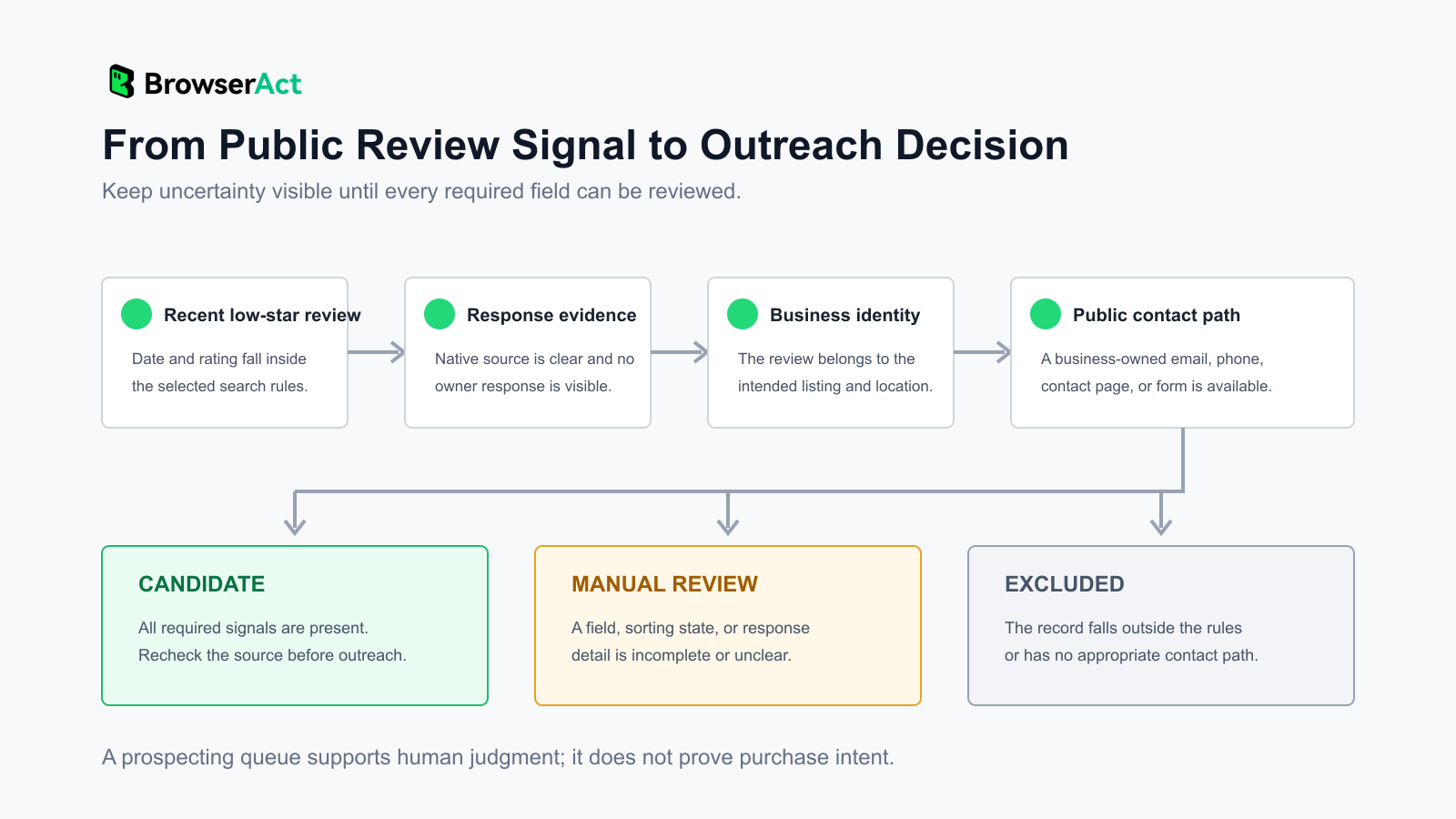
6. Assign a review state
Use a simple decision system:
State | Use when | Next action |
Candidate | Required review signals and a public contact path are present | Manually verify the review page before outreach |
Manual review | One or more fields, sorting, or response details are unclear | Open the source page and resolve the uncertainty |
Excluded | No qualifying review signal exists or the business falls outside the rules | Do not add it to the outreach queue |
This classification prevents uncertainty from being hidden inside a single "lead" column.
How to Score Recency, Severity, Repetition, and Silence
A score can help sort a queue, but it should summarize evidence rather than replace it. Four dimensions are especially useful.
Recency
A complaint from last week is usually more actionable than one from several years ago. Use explicit windows and show the underlying date. Do not award recency points when the review date is unavailable.
Severity
The star rating provides a consistent threshold, while the visible text gives context. A one-star review about communication may suggest a different service conversation than a one-star review about pricing or an isolated policy disagreement.
Do not treat sensitive personal circumstances, accusations, or legal claims as promotional material. They may be relevant to manual review but should not be repeated in an outreach message.
Repetition
Multiple recent reviews describing a similar issue can indicate a process problem worth investigating. One complaint can be an exception; repeated themes across independent reviews may point to a response, routing, or service-recovery gap.
Repetition still does not prove that the business needs your service. It helps prioritize which records deserve closer review.
Silence
Silence means that no owner response is visible on the checked review card. It is stronger when other recent reviews on the same profile do receive responses, because the business has demonstrated that it uses the reply feature.
It is weaker when the response module is unavailable, the review source is ambiguous, or the page fails to load the full card. Those records belong in manual review.
What a Real 10-Business Test Revealed
We tested the workflow on 10 public Google Maps results for one local service category in one U.S. city. The purpose was to see whether the output would preserve uncertainty instead of labeling every low-rating business as a prospect.
Result state | Records | What the result meant |
Candidate requiring final human verification | 1 | Two recent one-star review signals and a public contact path were retained, but review sorting and direct review links were not fully verifiable |
Manual review | 9 | Review sorting, card fields, source evidence, or response details were incomplete or no qualifying low-star review remained |
Excluded | 0 | No record was automatically discarded in this particular run |
The useful result was not that one record received a positive label. It was that nine uncertain records stayed uncertain.
The candidate record contained enough public evidence to justify a closer look: two recent low-star review signals, no visible owner response on the retained cards, and a business-owned contact path. However, the public page did not provide stable direct links to those individual reviews, and the review order could not be confirmed. The correct next step was manual verification, not immediate outreach.
This sample does not establish a conversion rate, an industry benchmark, or the percentage of businesses with unanswered reviews. It demonstrates how an evidence-first workflow can separate a possible service gap from records that still need human judgment.
How BrowserAct Preserves Review and Contact Evidence
The Google Maps Unanswered Review Lead Finder API searches a selected industry and location, checks visible public review cards against the chosen review window and rating range, and returns each checked business as its own structured record.
Instead of returning only business names, the template can retain four groups of information:
Evidence group | Example fields | Why it matters |
Business identity | Business name, category, address, Maps URL | Confirms which location was checked |
Review signal | Review date, rating, excerpt, unanswered count, review topics | Supports the classification decision |
Contactability | Website, phone, public email, contact page or form | Shows whether a legitimate business channel exists |
Decision trail | Lead status, opportunity type, priority reason, evidence, checked sources | Lets a person review why the record was retained |
The inputs keep the search scoped: industry, country, location, maximum results, minimum review count, review window, negative-rating range, and minimum unanswered-review count. Each business remains a separate row, so a team can review, filter, or export records without unpacking a nested business array.
The result is a prospecting queue, not a finished sales list. Public-page evidence can be incomplete, and a business record does not prove budget, authority, need, or purchase intent.
Check recent low-star review signals, visible owner-response status, and public contact paths before adding a business to your outreach queue.
When a Record Should Be Excluded or Manually Reviewed
Manual review is a valid outcome. It protects the prospecting process from turning missing data into a sales claim.
Send a record to manual review when:
- the page does not show a verifiable review date or rating;
- the review may come from a third-party source;
- the owner-response section does not load consistently;
- the review sorting order cannot be confirmed;
- an individual review link is unavailable;
- the business identity or location is ambiguous;
- the contact path appears to belong to a parent brand rather than the local business.
Exclude a record when the available evidence confirms that it falls outside your rules. Examples include no recent low-star review, a visible owner response on every qualifying review, a review outside the selected date window, or no appropriate public business contact path.
Do not convert manual_review into qualified_lead merely to increase the size of the list. A smaller reviewable queue is more useful than a larger list built on assumptions.
How to Approach a Business Without Exploiting the Review
The purpose of review-based prospecting should be to identify a process that may need support, not to use a customer's complaint as pressure.
Before contacting the business, open the Maps profile and recheck the relevant review. A response may have appeared after the original collection. Confirm that the business identity, date, rating, response state, and contact channel still match the record.
Then frame the message around the operational gap:
- Mention that you reviewed the business's public feedback process.
- Describe the general pattern, such as delayed response coverage or inconsistent routing.
- Offer a practical improvement, such as response monitoring, escalation rules, or a review-response playbook.
- Avoid quoting the reviewer, naming the customer, or repeating sensitive allegations.
- Do not promise to delete legitimate reviews or guarantee a rating increase.
A responsible opening might say:
I noticed a recent gap in public review-response coverage for your location. We help local teams monitor low-star feedback, route it to the right owner, and build a consistent response process. I can share a short audit of the workflow if that would be useful.
This message focuses on the service process. It gives the business room to decide whether the observation is relevant without turning a negative customer experience into a threat.
Frequently Asked Questions
What counts as an unanswered Google review?
For prospecting, it is a visible Google review that falls inside your selected date and rating criteria and has no visible owner response beneath that specific review when checked. The review date, star rating, native source, and response state should all be verifiable.
Should I target every business with a low rating?
No. A low overall rating is only a discovery filter. Check recent reviews, visible owner responses, recurring themes, business identity, and public contactability before deciding whether a record deserves manual review or outreach.
Why can owner-response evidence be unavailable?
Google Maps pages can load review cards dynamically, mix native and third-party review content, or show incomplete card details. Sorting may also be unavailable or unclear. When the response state cannot be verified, keep the record in manual review.
Can reputation management software remove negative reviews?
Software cannot legitimately promise to remove valid customer reviews. Businesses can respond publicly, improve monitoring and service-recovery processes, and report reviews that violate the platform's policies. The article's workflow is for finding visible response gaps, not for guaranteeing review removal.
How should I contact a business responsibly?
Recheck the public evidence immediately before outreach, use a published business contact channel, describe the process gap without quoting sensitive review content, and offer a concrete improvement. Do not imply that the business ignored a customer or that the record proves purchase intent.
Prioritize Verifiable Service Gaps
The best reputation management leads are not simply the businesses with the lowest Google ratings. They are the businesses where a recent service-recovery or response-process gap can be reviewed from public evidence and discussed respectfully.
Use overall rating to narrow the search, then verify the individual review date, star rating, source, visible response state, business identity, and contact path. Keep incomplete records in manual review. Recheck every candidate before outreach. That process produces fewer assumptions and a more defensible conversation about how the business handles public feedback.


