How to Find Home Service Businesses Missing Quote Forms

To find home service businesses missing quote forms, start with a specific category and location in Google Maps, follow each business's public website, and verify whether a visitor can reach a usable quote, estimate, service-request, booking, or contact path. Keep businesses with working alternatives out of the lead list, and preserve a public contact route for every opportunity you plan to review.
The goal is not to label every contractor without a form as a bad website. It is to identify a visible conversion-path gap that matches a service you can genuinely provide.
- 1A phone number alone is not a complete online quote path.
- 2A working quote path needs a visible entry point, required identity and contact fields, and a usable submission control.
- 3Interpret a missing form in the context of the industry and any legitimate alternative contact or booking path.
- 4Keep every checked business with a qualified, not-a-lead, excluded, or review status.
- 5Base outreach on the verified conversion gap instead of sending a generic website pitch.
Why a Missing Quote Path Is a Useful Sales Signal
A generic local-business list tells you who exists in a market. It does not tell you why a plumber, HVAC contractor, roofer, electrician, or landscaper might need website or automation help.
A missing or unusable quote path is more specific. It connects public website evidence to services such as:
- Quote-form design
- CRM-connected estimate intake
- Booking or scheduling setup
- Lead-routing automation
- Mobile conversion improvements
- Contact-path repair
That still does not prove the business wants to buy. Some home service companies intentionally rely on phone calls. Others use an external booking tool, a franchise portal, or a scheduler linked directly from Google Maps. The signal becomes useful only after those alternatives are checked.
For a wider view of how market discovery, website inspection, contact enrichment, and qualification fit together, see Google Maps Scraper for Lead Generation.
What Counts as a Working Quote Form?
A link labeled Quote, Estimate, Request Service, or Contact is not automatically a working quote path. The destination needs enough visible controls for a visitor to send a usable request.
A practical public-page check can look for four layers:
Layer | What to verify | Example outcome |
Entry point | A visible quote, estimate, service, booking, or contact CTA |
|
Identity | A name, company, or equivalent identity field | Name input is visible |
Contact method | Email, phone, or another reply field | Email or phone input is visible |
Submission | A visible submit, request, schedule, or continue control |
|
Depending on the service, a useful form may also request a postcode, service type, property details, preferred appointment time, or message. Those fields can improve routing, but they are not universally required.
The evaluation should preserve the distinction between:
- Usable quote form: a visible path contains sufficient identity, contact, and submission controls.
- Missing quote form: no quote, estimate, service-request, booking, or contact path is found on the bounded public pages checked.
- Broken or incomplete quote form: an entry point exists, but no usable controls can be verified.
- Manual review: access, embedded tools, redirects, or page state prevent a reliable conclusion.
An embedded scheduler or third-party form may take longer to load or open in a new context. If the check cannot establish whether it works, manual review is more honest than a qualified-lead label.
Which Home Service Categories Should You Check?
Choose industries where visitors commonly need to describe a job, request an estimate, or schedule service. Examples include:
- Plumbing
- HVAC installation and repair
- Roofing
- Electrical services
- Landscaping
- Pest control
- Cleaning services
- Painting
- General contracting
The best category is not simply the one with the most businesses. It is the one where your service matches the way customers normally request work.
Emergency services may prioritize phone calls. Complex remodeling projects may need detailed estimate forms. Recurring services may benefit from scheduling and CRM routing. Adjust the qualification rule to the industry instead of forcing every category into the same form checklist.
Start with five records in one city. If the results are relevant and the status labels make sense, test an adjacent category or location before expanding the run.
The collection stage can follow the approach in How to Scrape Google Maps Without Code, but the website verification step is what turns a listing into a service-specific opportunity.
A Google Maps-to-Website Verification Workflow
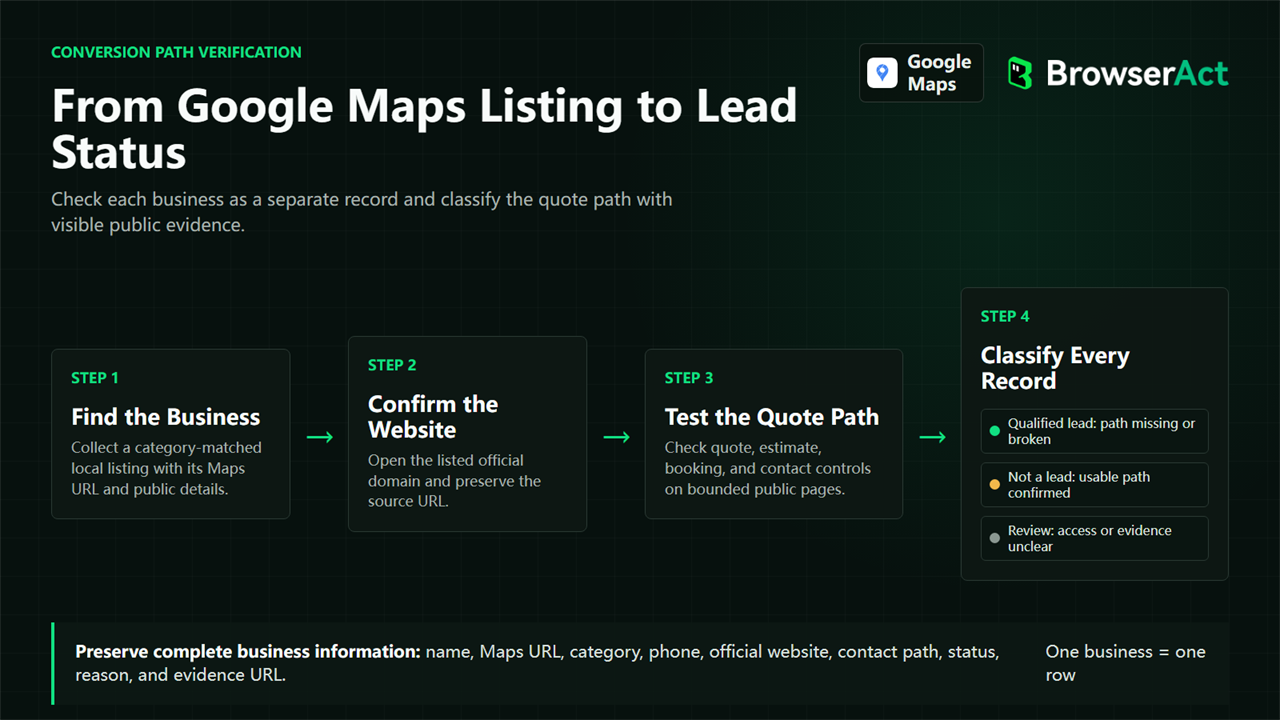
1. Select the industry and location
Use a narrow category such as HVAC contractor instead of a broad query such as home services. Enter a location that matches the market you can serve.
2. Collect visible business records
Preserve the business name, category, address, phone, rating, review count, Google Maps URL, and listed website. These fields provide context and make later checks reproducible.
3. Confirm the official website
Follow the website associated with the public business listing. Avoid treating directory, social, tracking, or unrelated domains as the business-owned site unless ownership can be verified.
4. Check bounded high-value pages
Inspect the homepage and a small set of relevant pages such as contact, services, booking, quote, or estimate. The process should be bounded so one record does not turn into an unrestricted crawl.
5. Evaluate the conversion path
Record the quote status, the URL checked, whether usable form controls were found, and the evidence behind the decision. Also capture legitimate alternatives such as a phone number, public email, contact page, or external booking route.
6. Classify every business
Return each checked business as its own row. Do not return only qualified leads, because that makes it impossible to understand how the rule handled working forms, excluded businesses, and ambiguous cases.
7. Review before outreach
Open the evidence for qualified records and confirm that the condition is still visible. Then decide whether the opportunity matches your service and whether the published contact route is appropriate for the message.
What a Five-Business Sample Showed
A five-record BrowserAct sample checked public home-service businesses. Three were classified as qualified leads, one had a usable quote form and was therefore not a lead for this offer, and one was excluded after an alternative booking route was considered.
The table below keeps the businesses anonymous while preserving the actual decision structure.
Anonymous record | Public category | Quote status | Best public contact | Lead status | Interpretation |
A | Plumber | Broken or incomplete form | Phone | Excluded | A form issue was observed, but an alternative public booking route changed the final decision |
B | HVAC contractor | Missing quote form | Phone | Qualified lead | No usable quote or contact path was found on checked website pages; phone remained available |
C | Plumber | Usable quote form | Contact form | Not a lead | Identity, contact, message, and submit controls were present |
D | Plumber | Missing quote form | Public email | Qualified lead | The visible gap was paired with a business-published contact route |
E | Plumber | Broken or incomplete form | Public email | Qualified lead | An entry point existed, but usable form controls were not found on checked pages |
This sample demonstrates why output should include every checked business. If the table showed only the three qualified leads, a reader could not see that the process rejected a working form or excluded a record with a conflicting alternative path.
It also shows why quote_status and lead_status should remain separate. The page observation describes the website. The lead decision combines that observation with category fit, contactability, alternatives, and review rules.
How BrowserAct Classifies Every Business
The Google Maps Missing Quote Form Lead Finder API starts from a selected industry, country, open-ended location, and result limit. It searches public Google Maps pages, opens each visible business profile, follows the public business website when needed, and checks a bounded set of pages for quote-path evidence.
Each row can contain:
- Public business details and Google Maps URL
- Website, booking, contact-page, and contact-form URLs when available
- Public phone, email, and business-owned social links when visible
- Quote status and concise evidence
- Form-control observations
- Contactability and best public contact channel
- Lead status, priority reason, recommended service, and factual outreach angle
The Bot returns missing values honestly. It does not submit a form, confirm that a CRM received a lead, inspect private systems, or guarantee that every embedded tool is visible in the checked page state.
How to Prioritize Contactable Opportunities
Use a decision order that prevents a visible gap from becoming an automatic lead.
Check | Pass condition | Otherwise |
Industry fit | Business matches the service category | Exclude or review |
Quote-path evidence | Missing or broken path is reproducible | Mark usable path as not a lead |
Alternative path | No clearly sufficient alternative removes the gap | Exclude or narrow the offer |
Contactability | Appropriate public contact route is available | Hold for research, not outreach |
Evidence quality | URLs and concise reason are preserved | Manual review |
Prioritize records where the offered service directly addresses the observed condition. A CRM-connected estimate workflow may fit a missing or incomplete request path. A generic website redesign pitch may be too broad.
Public email discovery should remain evidence-based. The Google Maps Email Scraper explains how to use business-owned pages and why a missing email should not be replaced with a guessed address.
False Positives and Manual Review Cases
Phone-first businesses
A prominent phone number may be the intended conversion path, especially for urgent services. A missing form can still be an improvement opportunity, but it should not be described as an obvious failure.
External booking tools
Google Maps or the website may link to a scheduler hosted on another domain. Check that path before classifying the business.
Embedded forms
Some forms load inside iframes, scripts, or consent-gated components. If the controls cannot be verified, use manual review.
Links that look like forms
A Contact Us page can contain only an address and phone number. Record the page, but do not mark a usable form unless the required controls are visible.
Access failures
A timeout, blocked page, or unsupported state does not prove that the business lacks a quote path. Keep an unavailable or review status.
Different industry expectations
A detailed estimate form may be useful for remodeling and unnecessary for a simple emergency call. Apply a category-specific interpretation.
Turn the Gap Into a Helpful Offer
Outreach should describe the visible path and acknowledge uncertainty.
For example:
I found your service page and public phone number, but I could not complete a general estimate request on the public pages I checked. If phone calls are your preferred intake channel, that may be intentional. If you want to collect project details before a callback, I can share a simple form and routing approach.
Avoid telling a business that its website is losing a specific amount of revenue. The public evidence does not support that conclusion. A useful message offers a relevant next step and gives the recipient an easy way to correct the observation.
Frequently Asked Questions
What counts as a working quote form?
A working quote form has a visible entry path, enough fields to identify and contact the requester, and a visible submission or continuation control. Industry-specific service details may improve the form but are not universal requirements.
Which home service industries are a good fit?
Plumbing, HVAC, roofing, electrical services, landscaping, cleaning, painting, pest control, and contracting can be useful starting categories. Choose an industry where customers commonly request estimates or describe service needs.
Is a phone number enough if there is no quote form?
It may be. Emergency and phone-first businesses can intentionally prioritize calls. Treat the phone as a legitimate alternative path and decide whether an online intake option would add value for that specific service.
How do I handle forms hidden behind booking tools?
Follow the visible booking path when it is public and relevant. If an embedded or third-party tool cannot be verified, assign a manual-review status instead of claiming the form is missing or broken.
Can the results be sent to a CRM or automation workflow?
Yes. Structured BrowserAct rows can be reviewed or connected to supported downstream processes. Keep the quote evidence, contactability, and lead status attached so automation does not discard the reason behind the decision.
Find a Specific Conversion Gap Before You Pitch
The reliable way to find home service businesses missing quote forms is to verify the complete public path: Google Maps listing, business website, quote or contact entry, visible controls, alternatives, and contactability. A missing button alone is not enough.
Start with five businesses in one category and location. Review every status, refine the rule for that industry, and expand only after the results support useful, evidence-based outreach.
Start With a Reusable BrowserAct Template
Choose the template that matches the data, evidence, or browser task you need, then configure its inputs and review the structured result.


