How to Find Businesses Without Websites on Google Maps

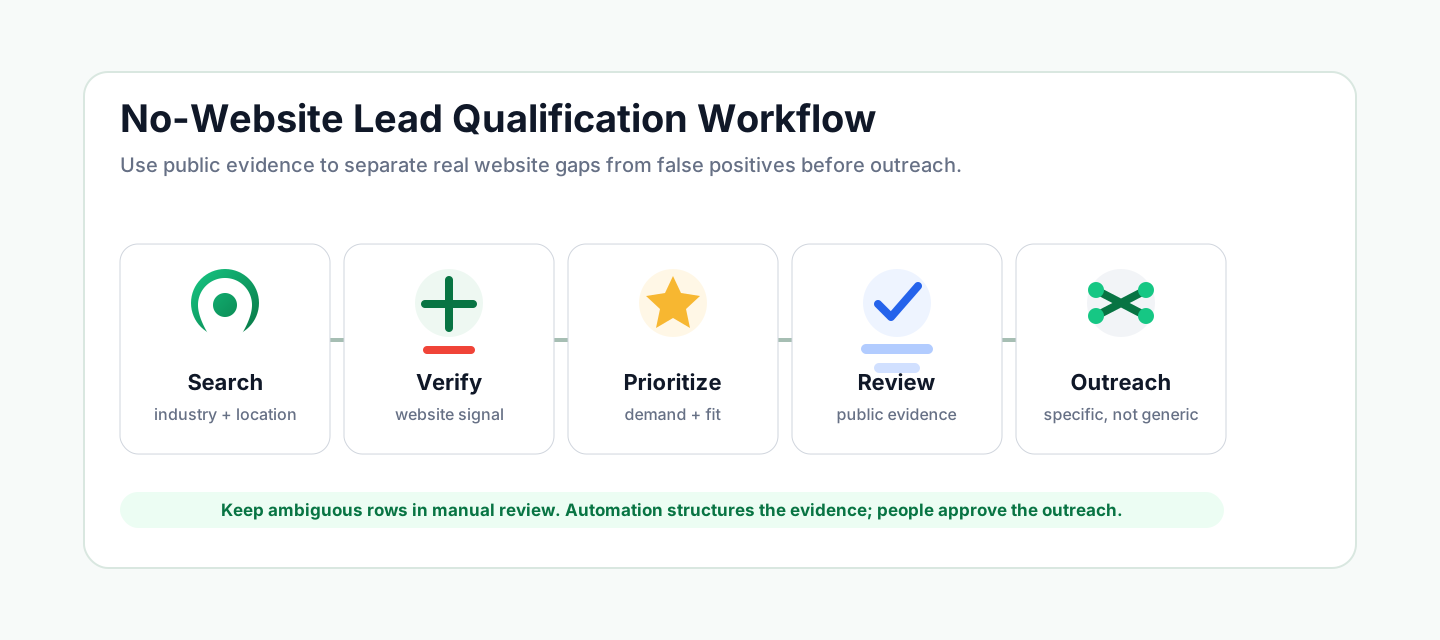
To find businesses without websites on Google Maps, search by industry and location, open each business profile, check whether Google shows an independent website, then verify the result against social pages, directory links, broken URLs, contact paths, reviews, and business activity.
The important word is verify. A missing Website button on Google Maps is a useful lead signal, but it is not absolute proof that the business has no website anywhere. For web designers, WordPress freelancers, Webflow agencies, and local marketing teams, the best prospects are businesses where the website gap is clear, the business looks active, and there is enough public evidence to support a relevant outreach message.
That is the difference between scraping a list and building a qualified prospecting workflow.
- 1Treat "no website" as a qualification signal, not a final sales conclusion.
- 2Prioritize businesses that combine a website gap with customer-demand signals, category fit, and a usable contact path.
- 3Separate social-only, directory-only, broken, ambiguous, and independent-website cases before outreach.
- 4Preserve public evidence for every lead so your pitch can reference a specific observable gap.
- 5Use automation to repeat the research, but keep manual review for ambiguous records and final outreach decisions.
- 6Measure the workflow by qualified opportunities approved for outreach, not by the number of rows collected.
What Counts as a Business Without a Website?
In a Google Maps lead-generation workflow, a "business without a website" should usually mean this:
No listed independent business website was verified from the public Google Maps profile and the public pages checked during review.
That wording matters. Google Maps may not show a website link even when a business has a site elsewhere. A business may also use Facebook, Instagram, Yelp, a booking platform, a franchise page, or a directory profile instead of an independent domain. Some links may be unavailable, redirected, parked, or too ambiguous to classify automatically.
Use these categories before deciding whether a business is a real web design lead:
Website Signal | What It Means | How to Treat It |
No website listed | Google Maps does not show a visible Website link for the business | Potential lead, but still review contact and demand signals |
Social or directory page only | The business points customers to Facebook, Instagram, Yelp, a marketplace, or another third-party page | Possible owned-website opportunity, but confirm the business context |
Website unavailable or ambiguous | A link exists, but the page cannot be opened or confidently identified | Manual review before outreach |
Independent website found | The business has a dedicated website or domain | Not a no-website lead; consider other gaps instead |
Low activity or weak fit | The business lacks reviews, contact paths, or category fit | Low priority even if no site is visible |
This classification prevents the most common mistake in this niche: treating every blank website field as a ready-to-contact lead.
Why These Leads Matter for Web Designers
Businesses without independent websites can be attractive prospects because the need is visible. A local service business with reviews, operating hours, a phone number, and active customer demand may still depend on a Google Business Profile, social page, or directory listing as its main online presence.
For a web designer, that creates a concrete conversation. Instead of opening with a generic "I build websites" pitch, you can reference a specific public gap:
- The business appears active on Google Maps.
- Customers are already finding it through local search.
- The profile does not show a verified independent website.
- The current contact path may depend on phone calls, social pages, or third-party listings.
- A website could support service pages, booking, forms, reviews, local SEO, or paid campaign landing pages.
That does not mean every business wants a new website. Some small businesses intentionally operate from social channels. Some franchises use location pages controlled by a parent brand. Some businesses may be inactive or too small for your offer. The goal is not to contact everyone. The goal is to build a smaller list where the public evidence makes the outreach relevant.
Manual Method: How to Search Google Maps for No-Website Leads
Start with a narrow market. A query like plumber in Austin or pet groomer in Tampa is easier to judge than a broad query like local business.
Use this manual process for a small test:
- Choose one industry and one city or service area.
- Search Google Maps for that phrase.
- Open each visible business profile.
- Check whether a Website button appears.
- Inspect any visible website, booking, social, or directory link.
- Record phone number, rating, review count, category, address, and business status.
- Mark the website signal as
no website listed,social or directory only,independent website found, ormanual review. - Keep a short evidence note for every business you might contact.
A simple spreadsheet is enough for the first pass:
Column | Why It Matters |
Business name | Identifies the record |
Category | Confirms the business fits your offer |
Location | Keeps the prospecting territory clear |
Rating and review count | Shows whether the business has visible customer demand |
Website signal | Separates missing, social-only, ambiguous, and already-covered cases |
Contact path | Shows whether outreach is possible |
Evidence note | Gives your pitch a specific public reason |
Lead status | Keeps lead, not-a-lead, and manual-review rows separate |
This small manual test is useful even if you plan to automate later. It teaches you which industries produce real opportunities and which ones create too many false positives.
Where Manual Research Breaks Down
Manual Google Maps research becomes frustrating once the task moves beyond a small sample.
The repetitive work is obvious: click a profile, check the Website button, copy the phone number, copy the address, note the rating, open a link, return to the list, repeat. The harder problem is consistency. Different profiles expose different fields. Some website links redirect. Some businesses use social profiles. Some listings are branches of a larger company. Some websites are present but unavailable during your check.
When the spreadsheet grows, the judgment behind each row often disappears. You may remember that a business looked promising, but not why. That makes outreach weaker because the final list no longer contains the evidence that made the lead worth contacting.
For web design prospecting, the evidence matters as much as the name. A useful lead list should show:
- What website signal was observed.
- Whether the business appears active.
- Whether a public contact path exists.
- Why the business was marked as a lead or manual review.
- What service angle is supported by the public evidence.
Without that layer, a no-website list becomes another cold spreadsheet.
A Better Qualification Framework for Businesses Without Websites
Use a decision framework before sending any outreach. The strongest prospects usually combine a website gap with customer-demand signals and a reachable contact path.
Signal | What It Means | Outreach Priority |
No independent website verified, strong reviews, active profile | The business may have demand but lacks an owned website presence | High |
Social or directory page only | The business has an online presence, but may not control an owned website | Medium |
Website unavailable or ambiguous | The website signal needs a human check before pitching | Medium to low |
Independent website found | The business is not a no-website lead | Not for this offer |
Low reviews, weak category fit, or inactive status | The website gap may not justify immediate outreach | Low |
This framework also helps you avoid the wrong pitch. A business with no website may need a starter site. A business with a broken site may need maintenance or redesign. A business with a website but no booking path may need conversion work. A business with inconsistent local information may need local SEO support.
Those are different offers. A better list helps you keep them separate.
How BrowserAct Finds Google Maps Businesses Without a Listed Independent Website
The Google Maps No Website Lead Finder API is a BrowserAct template built for this specific prospecting job.
Instead of asking you to rebuild a scraper or click through profiles one by one, the Bot searches public Google Maps using the selected industry, country, and location. It opens visible business profiles, checks website presence, and returns one flat structured row per checked business.
The template is designed for web design outreach and local-business research. It captures business details, public contact paths, website evidence, and lead-priority fields so you can review the result before contacting anyone.
The published template does not require login. It reads public Google Maps pages and, when needed, bounded public business website pages.
Useful output groups include:
Output Group | Examples | Why It Matters |
Business profile | Business name, category, address, status, rating, review count, Google Maps URL | Confirms the business fits your target market |
Website evidence | Website URL, website gap status, listed website type, final website domain, website evidence | Reduces false positives |
Contact path | Phone, public email when available, contact page, contact form, social URLs, contact evidence | Shows whether outreach is possible |
Lead judgment | Lead status, contactability, best contact channel, opportunity type, opportunity score, priority reason | Helps prioritize review |
Outreach context | Recommended service, factual pitch angle, source pages checked | Supports a more specific message |
BrowserAct produces structured data first. You can review the rows directly, export them, or connect results through the BrowserAct API and supported automation paths such as n8n, Make, Zapier, or MCP-based agents.
The output still needs judgment. If a row is marked for manual review, treat it as a prompt to inspect the evidence, not as a finished lead.
Example Output: What to Review Before Outreach
Before contacting a business, review the result as a decision record, not just as a row in a list.
Field Group | What to Check | Decision It Supports |
Business profile | Does the business match your target category and location? | Whether the record belongs in your prospect pool |
Rating and reviews | Does the business show enough customer activity to justify attention? | Whether the opportunity is worth prioritizing |
Website evidence | Was an independent website found, missing, social-only, or ambiguous? | Whether this is truly a no-website opportunity |
Contact path | Is there a phone number, contact page, public email, or verified social route? | Whether outreach is possible |
Lead status and priority reason | Why did the row receive its classification? | Whether a human should approve, reject, or review it |
For example, a high-priority no-website lead might be an active local service business with strong reviews, no verified independent website, a visible phone number, and a clear website-gap evidence note. A manual-review row might have a website URL that does not load or a third-party page that is not clearly owned by the business.
Keep those cases separate. The first may support a direct website offer. The second needs review. The third may belong in a different campaign entirely.
How to Use the List Responsibly
A no-website lead list is only useful if it improves the quality of your outreach.
Use the evidence to personalize. A good message might reference the business category, the public profile, and the observed website gap. A weak message simply says every business needs a website.
Review local requirements before contacting businesses. Outreach rules vary by channel, region, and use case. Public business information can help with research, but it does not remove your responsibility to respect applicable privacy, email, phone, and platform requirements.
Use this review checklist before sending anything:
- Remove businesses that already have an independent website.
- Move ambiguous website cases into manual review.
- Prioritize active businesses with clear category fit and customer demand.
- Confirm the contact path is appropriate for your outreach channel.
- Keep the pitch tied to the observed public gap.
- Avoid implying that the business asked for a website audit unless it did.
The goal is not to maximize sends. The goal is to contact fewer businesses with a better reason.
BrowserAct vs Manual Search, Lead Lists, and Generic Scrapers
Different approaches work for different levels of maturity.
Approach | Best For | Limitation |
Manual Google Maps search | Small local checks and final verification | Slow and inconsistent at scale |
Purchased lead lists | Broad contact databases | May not show current website-gap evidence |
Generic scraper | Raw Google Maps fields | Often stops before website-type verification |
BrowserAct No Website Lead Finder | Repeatable website-gap screening with structured evidence | Still requires review before outreach and depends on public visible data |
Manual search is flexible, but it does not scale cleanly. Purchased lists can be fast, but they often separate contact data from the reason a business is worth contacting. Generic scrapers can collect fields, but the output may not tell you whether the business has an independent website, a social-only presence, an ambiguous link, or a real opportunity.
BrowserAct is useful when the research pattern is repeatable and the evidence needs to stay attached to each row.
When to Use Another Google Maps Lead Workflow Instead
Not every local-business opportunity is a no-website opportunity.
If a business already has a website, it may still have a different visible gap. The website might be unavailable, hard to use, missing a booking path, missing a quote form, or weak from a local SEO perspective. Those scenarios need different screening logic and different outreach.
Use the broader Google Maps scraper for lead generation guide when you are still choosing your overall Google Maps research workflow.
Use a no-code Google Maps scraper when you only need a broad business listing dataset. Use a deeper contact or qualification workflow when you need emails, conversion signals, website gaps, or evidence for a specific service offer.
Keeping these workflows separate prevents one common mistake: trying to turn every Google Maps listing into the same sales pitch.
Frequently Asked Questions
How do I find businesses without websites on Google Maps?
Search Google Maps by industry and location, open each business profile, check the Website field and related links, then record website status, contact path, rating, reviews, and evidence.
Does a missing website field mean the business has no website?
No. It means Google Maps did not show a listed website in that profile. You should still check for social pages, directory profiles, ambiguous links, or independent domains before outreach.
What industries are best for finding web design leads?
Start with local service businesses where customers compare providers online, such as dental clinics, plumbers, salons, restaurants, pet services, and home service companies.
Can BrowserAct export Google Maps no-website leads?
BrowserAct returns structured rows that can be reviewed, exported, or connected through the BrowserAct API and supported automation tools.
Does the Google Maps No Website Lead Finder require login?
No. The published template reads public Google Maps pages and bounded public business website pages when needed.
Should I contact every business without a website?
No. Review demand signals, contactability, and evidence first. Some businesses may be inactive, intentionally social-only, already covered by a parent brand, or too ambiguous for immediate outreach.
What should I do if a business already has a website?
Remove it from the no-website campaign. If the site is broken, lacks booking, lacks quote forms, or has local SEO gaps, use a more specific workflow and a different offer.
Build a Better No-Website Lead List
The fastest way to find businesses without websites is not always the best way to win web design clients. A useful prospect list should separate missing websites from social-only pages, directory listings, broken links, and already-covered businesses. It should also show why a business is active enough to deserve your time.
Start with one industry, one location, and one clear offer. Review the website evidence before outreach. Keep ambiguous cases out of your first campaign. Then repeat the process in nearby markets once the signal is strong enough.
Run the BrowserAct template to turn that process into structured rows with website evidence and lead-priority fields.
Start With a Reusable BrowserAct Template
Choose the template that matches the data, evidence, or browser task you need, then configure its inputs and review the structured result.


