How to Find Businesses With Outdated Websites Without Guessing

To find businesses with outdated websites, start with local companies that match your service area, then look for reproducible website problems rather than judging design taste. A page that will not load, an important contact link that consistently fails, or an insecure final URL can justify further review. An old color palette cannot.
That distinction matters because a redesign prospect is not simply a business with a website you dislike. It is a relevant business with a public website, an observable problem, and enough evidence to support a helpful conversation. Some checks can be repeated automatically. Others, including mobile usability, visual hierarchy, accessibility, and conversion clarity, still require human review.
The practical workflow is therefore: discover local businesses, check the listed website, classify the evidence, remove false positives, and contact only the businesses for which your service addresses a defensible problem.
What Counts as an Outdated or Broken Business Website?
“Outdated” is an imprecise label. It can refer to a technical failure, a user-experience problem, an old visual style, or simply a personal preference. These conditions should not be treated as equivalent.
Signal type | Example | Can it support prospecting? | Required next step |
Reproducible technical issue | The public homepage repeatedly fails to load | Yes, when the failure is confirmed and not just an access challenge | Save the URL, observed state, and check time |
Broken business path | A visible Contact, Booking, Quote, Schedule, or Services link repeatedly returns an error | Yes, because it interrupts a customer action | Reopen the exact URL and verify the failure manually |
HTTPS issue | The final public page remains HTTP-only or shows a reproducible security problem | Potentially, depending on the site and redirect behavior | Confirm the final URL and browser state |
Mobile or layout concern | Navigation is difficult to use on a narrow screen | It may support a redesign discussion, but requires human judgment | Review on real viewport sizes and document the specific task affected |
Visual age | Fonts, colors, or layout feel old | Not by itself | Connect the observation to a usability or business consequence before using it |
Automation block | A challenge page or browser error appears during an automated check | No | Mark it for manual review rather than calling the website broken |
A strong prospecting standard focuses on what can be shown again. If another reviewer cannot reproduce the issue, it should not become the premise of an outreach message.
This is also different from finding businesses without a listed website. A missing website link, an inaccessible website, and a website with a specific conversion problem are three separate sales scenarios.
Signals You Can Verify and Signals That Need Human Review
Website research becomes more reliable when each signal has an explicit evidence standard.
Checks that can be repeated consistently
- Whether the listed homepage reaches a public final URL.
- Whether the final page uses HTTPS.
- Whether a bounded set of visible business links opens successfully.
- Whether the site exposes a public contact page, form, booking route, or business email.
- Which exact URL failed and what was visible at the time of the check.
These checks answer narrow questions. They do not determine whether the brand needs a new identity, whether the information architecture is effective, or whether a redesign would produce revenue.
Checks that need human judgment
- Whether mobile navigation is understandable and usable.
- Whether important information is easy to find.
- Whether calls to action match the visitor's likely task.
- Whether accessibility problems affect real interaction.
- Whether the visual design is inconsistent with the business and audience.
- Whether performance requires deeper measurement with an appropriate tool.
For performance work, use a dedicated method such as Google PageSpeed Insights. A bounded website-availability check should not be described as a Core Web Vitals or complete performance audit.
A Google Maps-to-Website Audit Workflow
Google Maps can provide the discovery layer for local website prospecting. The website linked from the listing then becomes the subject of a separate audit.
1. Define a market you can actually serve
Choose a business category, country, and location that match your offer. “Small businesses” is too broad. “Independent dental clinics in Austin” or “roofing contractors in Bristol” produces a list that can be reviewed against one service proposition.
2. Preserve the source business record
Keep the business name, category, address, Maps URL, and listed website together. This makes it easier to resolve duplicate branches, confirm that the website belongs to the right business, and return to the public source.
3. Open the listed website and record the final state
A website link may redirect to another domain, location page, franchise site, social profile, directory, or error state. Record the final URL instead of assuming the first link is the correct destination.
4. Check a bounded set of customer paths
Focus on visible links that matter to the business, such as Contact, Booking, Quote, Schedule, or Services. The objective is not to crawl the entire website. It is to determine whether a small set of important paths produces repeatable evidence.
5. Classify the result before enrichment
Use a conservative status such as:
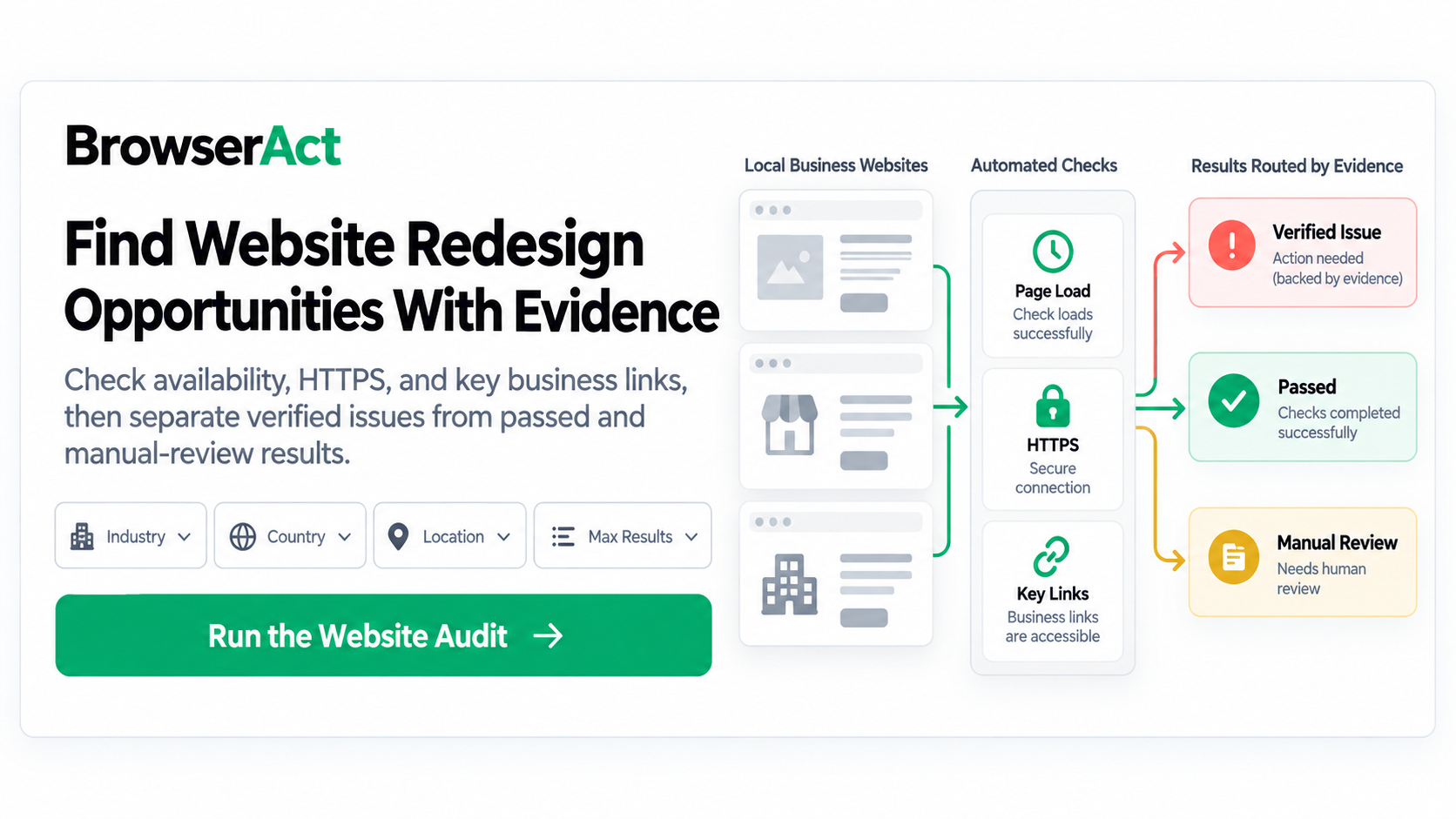
verified_issue: a specific problem can be reproduced and tied to an exact URL;passed: the bounded checks did not reveal a qualifying issue;manual_review: the observation is incomplete, blocked, ambiguous, or subjective;unavailable: the required public evidence was not available.
6. Review the evidence before contacting anyone
Reopen the source, confirm that the issue is still present, and decide whether your service directly addresses it. Only then should contact enrichment or outreach begin.
This workflow fits into a broader Google Maps lead generation process, but website evidence remains distinct from business discovery and contact collection.
How to Classify Results Without False Positives
False positives are especially damaging in website-service outreach. A message that tells a business its website is broken when the site works normally makes the sender look careless.
Use this decision table before assigning a prospect status:
Observation | Classification | Why |
Homepage and checked key links load over HTTPS | Passed | No qualifying issue was reproduced in the bounded check |
Exact key URL repeatedly returns a site-side error | Verified issue | The problem is specific, repeatable, and relevant to a customer path |
Homepage shows an access challenge or browser-specific error | Manual review | The observation may reflect access conditions rather than a site defect |
Mobile layout looks difficult but no task has been tested | Manual review | The conclusion still depends on human usability judgment |
Website link leads to a social profile or directory | Separate scenario | It may indicate a weak owned-web presence, but it is not a broken website |
One request times out and later succeeds | Manual review or passed | A transient event is not enough to claim a persistent problem |
The absence of a defect is a useful result. It prevents unnecessary enrichment and keeps a normal website out of a redesign campaign. A responsible audit process should be able to return “not a lead” without trying to convert every checked row into an opportunity.
How BrowserAct Records Website Evidence
The Google Maps Business Website Audit combines local-business discovery with a bounded public website check. Its inputs define the industry, country, location, and result range. It returns one flat record per checked business rather than grouping all businesses inside one result cell.
Useful output fields include:
- the Maps source and listed website;
- the final website URL and observed load status;
- HTTPS status;
- checked key-link status and exact failed URLs when present;
- audit classification and primary issue;
- concise issue evidence;
- public contact paths when visible; and
- a recommended next step grounded in the observed result.
The important product behavior is conservative classification. A completed run does not need to discover a defect. Clean sites can remain passed, while blocked or ambiguous observations remain manual_review instead of being presented as redesign opportunities.
This makes the output useful as an audit queue, not a guaranteed lead list. The reviewer still decides whether an issue is current, relevant, and appropriate for outreach.
Turning an Audit Finding Into a Helpful Outreach Message
An effective redesign message should describe one observable problem, explain its likely customer impact, and offer a low-friction next step. It should not insult the existing website or pretend to know the business's internal priorities.
A useful structure is:
- Context: Identify the public page or customer path you reviewed.
- Observation: State the exact behavior you could reproduce.
- Impact: Explain which customer action may be affected without exaggerating the consequence.
- Evidence: Include the relevant public URL or a concise screenshot when appropriate.
- Offer: Suggest a small verification, fix, or review rather than pushing a full redesign immediately.
For example:
I was checking the booking path linked from your public website and found that the appointment page returned an error during two reviews today. I saved the public URL and can send the short reproduction notes if useful. I help local service businesses repair customer-facing website paths, so I would be happy to confirm whether this is still affecting visitors.
That message is stronger than “your website looks outdated” because the recipient can evaluate the same evidence. If email is the appropriate contact route, use a public business-owned source. The guide to Google Maps email discovery explains why an empty email result should not be replaced with a guessed address.
What This Workflow Does Not Audit
A focused website-checking workflow has useful limits. It is not a substitute for:
- a complete UX research program;
- Core Web Vitals or laboratory performance testing;
- a full technical SEO crawl;
- accessibility conformance testing;
- security penetration testing;
- conversion-rate analysis based on private analytics;
- legal or regulatory compliance review; or
- proof that a company has budget, authority, or purchase intent.
These tasks require different tools, permissions, evidence, and expertise. Keeping the scope narrow makes the prospecting result easier to defend.
Find Defensible Website Opportunities
The best way to find businesses with outdated websites is not to search for ugly pages. It is to define a relevant local market, check a bounded set of public website paths, and keep only the issues that another reviewer can reproduce.
Start with a small sample. Confirm the business identity, final website URL, and customer path. Let clean results remain clean, route ambiguous observations to manual review, and deepen the audit only when the evidence justifies it.
Frequently Asked Questions
How can I tell whether a business website is outdated?
Separate technical evidence from design opinion. Reproducible load failures, broken customer links, and final HTTPS problems can support further review. Visual age, mobile usability, navigation quality, and conversion clarity require human judgment and a specific explanation of the affected task.
Is a slow or inaccessible website always a redesign lead?
No. A slow response may be temporary, and an inaccessible result may come from a challenge page, regional condition, or automation block. Recheck the exact URL, use an appropriate performance tool when speed is the concern, and classify ambiguous evidence as manual review.
What website problems can be checked automatically?
Automation can consistently record whether a public URL loads, where it redirects, whether the final page uses HTTPS, and whether a bounded set of visible business links opens. It cannot independently complete a full UX, accessibility, SEO, performance, or conversion audit.
How do I avoid false positives when a site blocks automated access?
Do not label the site broken. Save the observed block, mark the record for manual review, and check the page in an appropriate authorized browser context. Only use a verified issue in outreach when the problem can be reproduced as a site-side failure.
What evidence should I include before contacting a business?
Keep the business source, final website URL, exact failed path, observed behavior, and check time. Reopen the page before outreach, explain the likely customer impact conservatively, and offer a small verification or repair step rather than assuming the business needs a complete redesign.


