How to Find an Address by Name and Verify the Right Person

To find an address by name, start with the most complete name you have and add a city, state, or ZIP code whenever possible. The location clue helps separate people who share the same name. Then review each candidate as a separate record, compare the current and past addresses shown, and keep the source URL so the information can be checked again.
That final step matters. A people-search result is a lead for review, not proof that someone currently lives at an address or uses a phone number. Public records can be incomplete, old, duplicated, or attached to another person with the same name.
BrowserAct's Fast People Search Phone & Address Finder turns this lookup into a reusable Bot. It searches FastPeopleSearch by person name and optional location, keeps candidates separate, and returns visible address and phone fields with their source URLs.
- 1Start with a complete name and add a location clue when possible; the first same-name result is not automatically the right person.
- 2Keep each candidate separate and compare multiple fields together before choosing a likely match.
- 3Treat address and phone values as source claims that may be incomplete or outdated, then recheck the saved source before use.
- 4Use a reusable Bot when consistent collection and source retention matter, but keep human verification in the decision loop.
- 5Use public people-search data only for a lawful, authorized purpose appropriate to the source.
What You Can Find From a Name and Location
A name-based people search can surface several kinds of publicly displayed information. What appears depends on the source record and the candidate. No individual field should be treated as an identity guarantee.
Starting information | Possible public result | What it does not prove |
Full name | One or more candidate profiles | That every candidate is the person you intended |
Name plus city or state | A narrower candidate list | That the person still lives there |
Candidate profile | Current and past address labels | That every address is accurate or current |
Candidate profile | Publicly displayed phone numbers | That a number is still active or owned by that person |
Source page | Profile and source URLs | That the source is authoritative for regulated decisions |
The search direction is also important. This workflow starts with a person's name and optionally a location. It can return public phone numbers found on matching profiles. It is not a reverse phone lookup, which starts with a phone number and attempts to identify the associated person.
How to Find an Address by Name Without Mixing Up People
The practical challenge is not entering a name into a form. It is keeping identity boundaries intact while you review the results.
1. Use the most complete name available
A first and last name is the minimum useful starting point. A middle initial or full middle name can reduce ambiguity when the source supports it. Avoid treating a nickname as equivalent to a legal name unless another public signal supports the connection.
2. Add a location clue
If you know a city, state, or ZIP code, include it. Location is especially useful for common names because it narrows the candidate set before you inspect addresses or phone numbers.
The BrowserAct template makes location optional, but omitting it can produce more candidates. That is useful for broad research, not for assuming the first result is correct.
3. Keep every candidate separate
Two profiles with the same name may represent different people. Do not merge their ages, phone numbers, addresses, or relatives into one record.
BrowserAct returns one structured record per selected FastPeopleSearch candidate. This preserves the relationship between each profile and the fields displayed on that profile.
4. Compare current and past address labels
People-search pages may distinguish between a current address and past addresses. Preserve those labels rather than flattening every location into one list.
Even a field labeled "current" should be treated as the source's current designation, not independently verified residence. For important use, check the source page again and look for another lawful public signal.
5. Preserve the source URL
A copied phone number without its source quickly becomes hard to review. Keep the candidate profile URL and any source URLs returned with the record. They show where the information came from and make later rechecking possible.
A Real FastPeopleSearch Example
A real BrowserAct dashboard run completed successfully and returned three separate candidate records. Actual run time and credit use vary with the requested result count, page behavior, and available records.
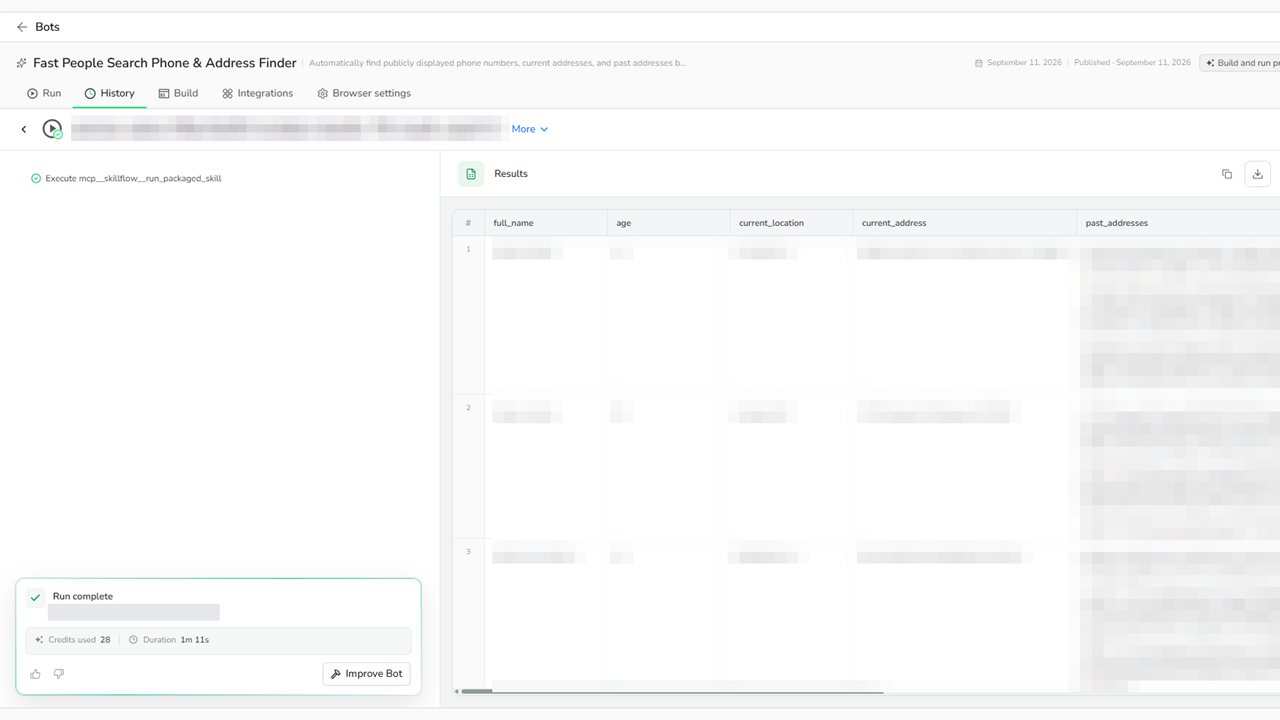
A completed BrowserAct dashboard run with personal values masked. The field headers and three separate candidate rows remain visible.
The returned schema kept each candidate separate and used eight fields:
Field | Purpose |
| Name displayed on the selected profile |
| Displayed age when available |
| City and state shown for the candidate |
| Address labeled as current by the source |
| List of previously associated addresses shown |
| List of publicly displayed phone numbers |
| Direct FastPeopleSearch candidate profile |
| Public pages used for the returned record |
The masked rows demonstrate candidate separation without republishing personal records. The visible field headers show how identity, location, address history, phone, profile, and source data stay attached to the corresponding candidate.
Treat every output row as a candidate record. A returned address or phone number is not proof that the value is current, accurate, or associated with the person you intended to find.
How BrowserAct Makes the Lookup Reusable
A manual search works for a single lookup. The process becomes harder to manage when a team needs to repeat it, preserve evidence, or deliver results in a consistent structure.
The BrowserAct Bot defines three inputs:
person_name: required full person name.location: optional city, state, ZIP, or another public location clue.result_count: return up to 1, 3, 5, or 10 separate candidates.
During a run, the Bot searches FastPeopleSearch, applies the location clue when supplied, opens the selected public candidate pages, and reads the visible identity, location, phone, and address fields. It removes interface labels from extracted values, deduplicates list items, and preserves source URLs.
The result is structured data that can be reviewed in BrowserAct, exported for an authorized internal process, or retrieved through the template's supported API flow. The same defined inputs and outputs can be reused without copying the lookup steps by hand each time.
Manual Lookup vs. a Reusable BrowserAct Bot
Step | Manual lookup | BrowserAct Bot |
Enter search criteria | Re-enter the query for every lookup | Reuse defined name, location, and result-count inputs |
Handle common names | Easy to combine details accidentally | Keep each selected candidate in a separate record |
Capture phone and address fields | Copy individual values manually | Return consistent scalars and lists |
Remove interface text | Clean copied values by hand | Filter labels and deduplicate returned values |
Preserve evidence | Source links are easily lost | Retain candidate profile and source URLs |
Repeat the process | Repeat every browser step | Run the published Bot or its supported API flow |
Automation does not remove the need for judgment. It makes the collection process repeatable so reviewers can spend more time evaluating candidates and less time copying fields.
Verify Before You Contact or Rely on a Record
Publicly visible does not mean current, complete, or appropriate for every purpose. Use a simple review checklist before acting on a result:
- Compare the full name, location, age, and address history together.
- Keep conflicting candidates separate instead of choosing the first result.
- Open the saved source URL and confirm the record is still visible.
- Treat phone numbers and "current address" labels as source claims that may be stale.
- Use another lawful public source when the consequence of a wrong match is meaningful.
- Record when the information was checked.
Use people-search data only for a lawful and authorized purpose. Do not use it for harassment, stalking, intimidation, prohibited screening, or decisions that require regulated consumer-reporting data. BrowserAct automates interaction with public pages; it does not grant permission to misuse the information they display. For a broader review of permissions and collection boundaries, read Is Web Scraping Legal? Rules and Best Practices.
Create a Custom Bot for Your Review Rules
The published template provides a working starting point. If your authorized process needs a different field or a stricter review rule, open the template and choose Create Editable Duplicate. If this is your first BrowserAct Bot, start with Build and Run Your First Bot.
In the duplicate, you can use Improve to adjust the requested inputs, output fields, or matching behavior. Keep two safeguards in place:
- Preserve one record per candidate so same-name people are never silently merged.
- Preserve source URLs so every returned value remains reviewable.
After changing the Bot, validate it with positive, multiple-candidate, and no-result examples before connecting it to an application. Once the revised output is stable, use the supported API integration to submit runs and retrieve structured results.
If your authorized research starts with a person's name but the goal is to locate public social profiles rather than address records, read How to Find Social Media Accounts. That workflow has a different source boundary and result schema.
Frequently Asked Questions
How can I find someone's address by name?
Search the person's complete name and add a city, state, or ZIP code when possible. Review every candidate separately, compare current and past address labels, and preserve the source URL. Do not assume the first same-name result is correct.
Can I find a phone number using only a name?
Some public people-search profiles display phone numbers for name-based candidates. A complete name plus a location clue improves the candidate search, but any returned number may be old or associated with another same-name person. Verify it before use.
Why should I add a city, state, or ZIP code?
A location clue narrows common-name results and reduces the chance of mixing details from different people. It is a discriminator, not proof of identity.
Is this a reverse phone lookup?
No. This BrowserAct Bot starts with a person's name and optional location, then returns publicly displayed candidate records. A reverse phone lookup starts with a phone number.
Are public people-search records always current?
No. Public records and aggregator pages can be incomplete, delayed, duplicated, or outdated. Treat every result as a candidate record and recheck the source before relying on it.
Can I automate repeated FastPeopleSearch lookups?
Yes. The BrowserAct template provides defined inputs and structured outputs for repeated authorized lookups. You can run the template directly, create an editable duplicate, or use its supported API flow after validating your use case.
Find the Record, Then Verify the Person
The safest way to find an address by name is to narrow the search with a location clue, keep every same-name candidate separate, and retain the public source behind each phone or address field. A reusable Bot can standardize those steps, but it should never replace verification.
Use BrowserAct's published template to run the lookup with defined inputs, review separate candidate records, and preserve source URLs for follow-up checks.
Turn a Name-and-Location Lookup Into a Reusable Bot
Run a defined lookup, keep same-name candidates in separate records, and retain visible source URLs for review before relying on an address or phone field.


