Facebook Scraper: Tools, Data Types, and Access Limits

You need a spreadsheet of Facebook data. The first decision is not which scraper to buy. It is whether each row should describe a Page, a post, or a comment—and whether your collection session can actually access it. A Facebook scraper collects accessible Facebook information into structured records. This guide explains the different tasks hidden behind that term, compares practical approaches, and shows a small BrowserAct acceptance test. Our actual test reached a login prompt and collected zer
- 1Page information, posts, comments, and group content need different collection rules. A tool supporting one does not automatically support the others.
- 2Meta's Sharing Debugger is for inspecting shared-link information, not exporting Facebook posts into a research dataset.
- 3BrowserAct is an option for a custom no-code collection task. Validate the target, fields, and failure behavior before treating a Bot as production-ready.
- 4Missing data is not zero. Preserve source URLs, observation times, and access status alongside the collected records.
- 5A small, authorized acceptance test is more useful than an unverified promise of unlimited extraction.
Which kind of Facebook scraper do you mean?
There are two different searches hiding behind this phrase. One concerns collecting data from Facebook. The other concerns how Facebook reads a link from your website when someone shares it.
For a wrong link-preview title or image, start with Meta's Sharing Debugger. Its purpose is to inspect information used when a URL is shared on Facebook or Messenger. That is a publishing and preview-debugging task. It will not give you a CSV of a competitor's posts.
For research, monitoring, or a content inventory, define the Facebook objects you want to collect. “Scrape this Page” is ambiguous: it could mean the business description, its recent posts, or all visible comments under selected posts. Write the intended row type before comparing tools.
Data object | A useful row represents | Typical fields to verify | Important boundary |
Page information | One organization Page | Page URL, displayed name, category, website, visible follower count | Page details do not establish post-history coverage |
Page post | One observed post | Post URL, text, displayed date, visible interaction counts | A recent sample is not an all-time archive |
Comment | One visible comment or reply | Parent post URL, comment ID or URL if visible, text, parent relationship | Sorting and collapsed replies affect the sample |
Group content | One accessible group post | Group URL, post URL, text, visible date | Membership and access conditions must be respected |
Shared-link preview | One website URL inspected by Meta | Preview title, description, image information | This is not Facebook audience-data extraction |
Match the dataset to the decision
A local-market inventory may need Page names, categories, and official website links. A content review may need post text, format, dates, and source URLs. A customer-question study may need a bounded set of comments under specific posts. Those are different datasets, even when all three begin on the same Page.
For social media competitor analysis, define a comparable time window and competitor set. Public reaction counts cannot tell you a competitor's reach, sales, or ad spend. Keep the interpretation separate from the source records.
For social media monitoring, keep an observation history and a source-health record. A job that returns no records because it was blocked should not tell the team that the competitor stopped posting.
For comment research, decide whether you need top-level comments, replies, or both. Record the visible sorting mode and any collection cap. If the interface exposes only selected comments, describe the output as the observed sample. A displayed total count does not prove you collected the corresponding text.
Pro Tip: Finish this sentence before building anything: “Each row is one ___, collected from ___, to help us decide ___.” It exposes scope problems earlier than a long list of desired columns.
Compare Facebook scraping approaches by fit
The following comparison is about method selection, not a controlled speed or accuracy benchmark. We did not run the same successful extraction across every product. Vendor descriptions establish what a product claims to support; they do not replace your acceptance test.
BrowserAct: custom no-code collection with explicit checks
BrowserAct lets you describe a browser task and build a reusable Bot. It is useful when you need a particular set of visible fields, source links, and stopping rules rather than a predefined analytics report.
The trade-off is that you still need to inspect the generated behavior and output. A Bot build completing does not mean the Facebook extraction succeeded. In our September 7, 2026 pilot, the target required login, the workflow stopped, and no posts were collected. The four-step section below explains the test and its limits.
Use BrowserAct when you can define a bounded, authorized collection task and evaluate the result. Do not choose it on the assumption that natural-language instructions remove Facebook's access controls or guarantee every requested field.
Apify: choose the specific Facebook Actor, not just the brand
Apify's Facebook Pages Scraper describes Page and profile information such as names, categories, website links, and visible audience counts. Its documentation also points to separate tools for posts, comments, groups, and other objects.
That distinction matters: Page metadata support is not evidence that the same Actor exports every post or reply. Check the exact Actor's input, output schema, limits, and recent issue reports. We also observed different price figures in the Page Scraper's header and explanatory text, so this guide does not treat either as a verified quote. Confirm the current charge in the product before running a paid task.
Python: inspectable code with maintenance responsibility
The open-source kevinzg/facebook-scraper repository documents post collection, command-line export, and comment/reply options. It also warns that fields may be missing and that some group results can be limited.
This route suits a team able to inspect dependencies, handle failures, and maintain code as the target changes. The README's examples are documentation, not proof that a particular target works today. We have not executed this library in the current comparison and do not label it a verified working alternative to the blocked pilot.
Authorized exports or integrations: check these first for owned data
If you manage the relevant account or Page, first investigate the export or approved integration available for your exact data need. Confirm which objects, fields, dates, and permissions it covers. A sanctioned data route can be a better starting point than rebuilding a browser workflow, but do not assume ownership exposes every historical field through every integration.
Approach | Best fit | What to validate | Main responsibility |
BrowserAct | Custom no-code browser task | Access, requested fields, stopping rules, real output | Review the generated workflow and acceptance sample |
A specific Apify Actor | A supported, packaged data object | Exact Actor schema, charges, limits, current behavior | Select the right Actor and check its output |
Python library | Developer-owned collection logic | Current target compatibility and dependency behavior | Maintain code, tests, credentials, and exports |
Authorized export or integration | Data you are entitled to obtain through that route | Permissions, fields, history, and export availability | Stay within the approved scope |
Test a Facebook collection task with BrowserAct
This is a small acceptance-test workflow, not a claim of successful post extraction. The target used for our pilot was the Nintendo Facebook Page, with a maximum of three visible posts. Use a target you are authorized to collect from and keep the initial scope similarly bounded.
1. Open the BrowserAct Dashboard
Use the left-side Create control, choose Build with Agent, or enter the requirement in the central input. These are the anchors visible in the English interface we checked. Define the collection requirement before expanding to multiple Pages.
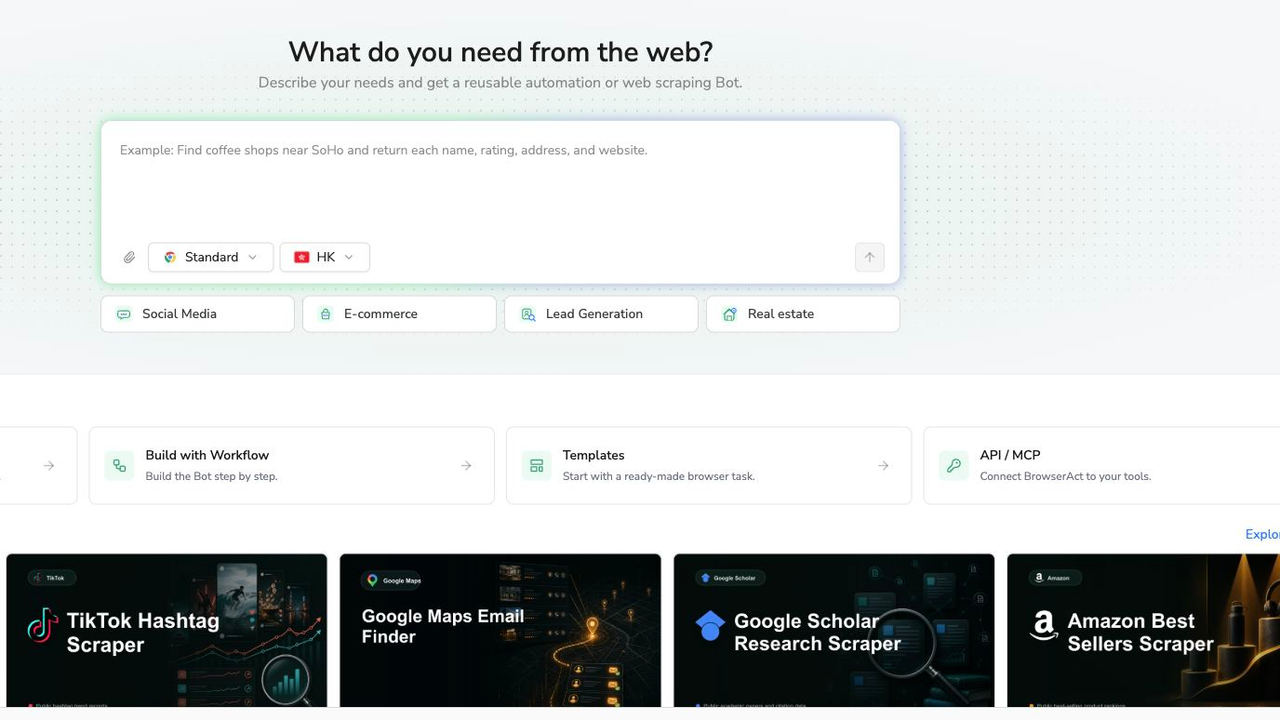
Actual BrowserAct creation interface. Describing a task starts the build process; it does not confirm access to the target or successful extraction.
2. Copy the complete prompt
The prompt below is an acceptance-test specification. It makes the desired output and the stop conditions explicit. It is not a production-certified recipe. Replace the target only when the new target is within your authorized scope.
Scrape data from any website.
Describe the data you need. Get a Bot — a reliable, reusable scraper.
3. Handle access restrictions only through authorized review
Watch for login, CAPTCHA, two-factor authentication, membership approval, or a restricted page. Stop and inspect the condition. If an authorized manual handoff is supported, the authorized person should complete it directly; do not put credentials into the prompt or the exported data.
Our pilot did not continue past the login prompt. We did not test whether a different session would succeed, and we did not attempt to bypass the restriction. Do not turn this observation into a universal statement that Facebook always requires login—or that another tool will necessarily avoid it.
4. Review, deduplicate, and export only verified records
Compare the structured result with the visible source. Check that each post row has a defensible identity, that the text belongs to that post, and that unavailable values remain null. Remove duplicates without erasing a later observation that you intentionally need for monitoring.
Then use the available export for the verified dataset. If the run stopped before collecting posts, save the status report instead of presenting it as a successful post export. Our actual result contained one status-only row and zero collected posts; the post-extraction branch was not exercised.
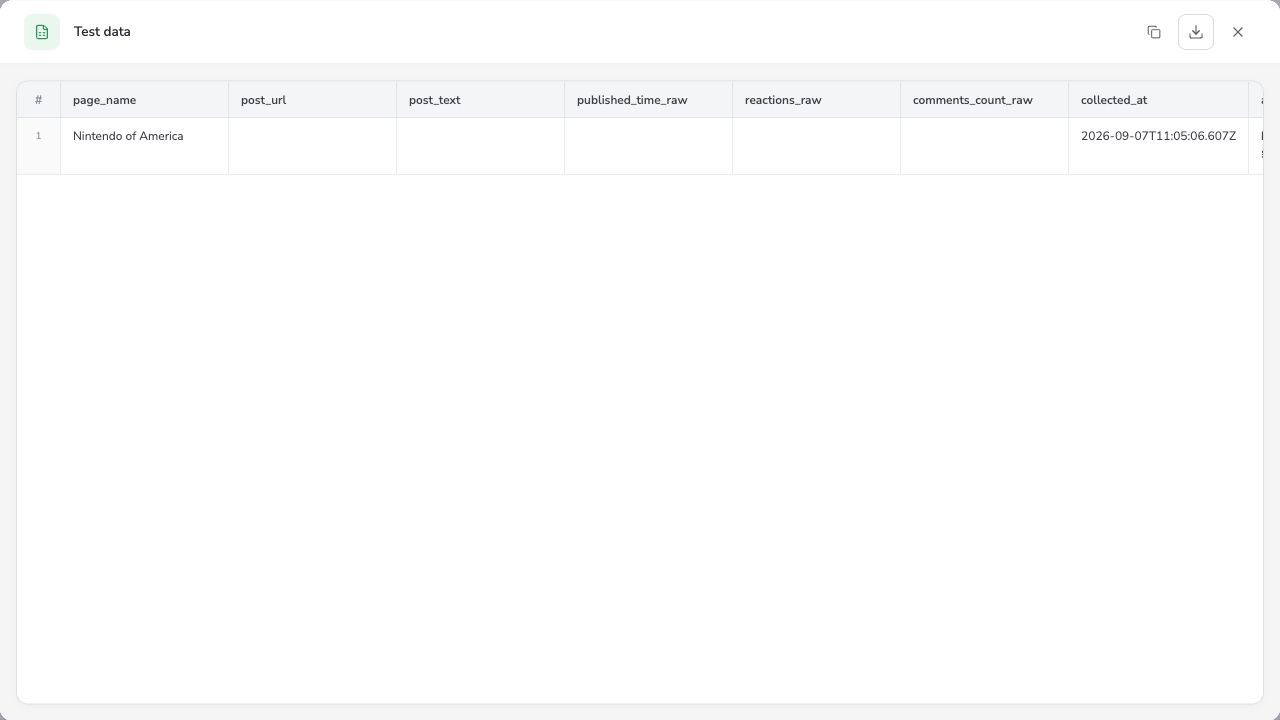
Actual September 7, 2026 pilot result. Post fields are empty because access stopped at login. The access-status field recorded the restriction outside this cropped view; the row is not a Facebook post.
The useful outcome of this pilot was knowing where the task stopped. Before recurring collection, you would still need an authorized, successful sample and field-by-field verification. A reusable BrowserAct Bot should earn that status through observed results, not through the fact that a build completed.
Design an export that remains useful after the first run
Use separate record types for Page metadata, posts, comments, and run status. Mixing them into one undifferentiated table creates counting errors: a Page-summary row or an access-error row can accidentally become an extra post in a dashboard.
For a small project, separate spreadsheet tabs are enough. For a larger workflow, use explicit record-type fields and stable relationships. The important point is that a downstream reader can tell what a row represents without guessing from which cells happen to be filled.
Field group | Suggested fields | Why keep them? |
Identity | record_type, page_url, post_url, comment_id if visible | Connect records to the correct source object |
Content | post_text or comment_text, content_type | Keep observations separate from later classification |
Raw values | published_time_raw, reactions_raw, comments_count_raw | Preserve what the interface actually displayed |
Observation | collected_at, run_id | Distinguish publication time from collection time |
Coverage | requested_limit, collected_count, stop_reason | Explain the boundary of the dataset |
Quality | access_status, missing_fields, review_status | Keep failures and uncertainty visible |
For comments, preserve the parent relationship when available. Otherwise a reply can look like a standalone statement, changing its meaning. If the parent is not available, mark that limitation rather than inventing the relationship from text similarity.
Pro Tip: Test the exported file, not only the result preview. Check multiline text, non-English characters, missing values, and URLs after opening the file in the spreadsheet or downstream system your team actually uses.
Diagnose incomplete results without inventing missing data
An empty or short result can mean several different things. It may indicate an access restriction, a reached cap, a loading problem, a changed layout, or simply no matching visible records. Diagnose the observed state before changing the prompt.
Observed problem | First check | What not to conclude |
Login or restriction shown | Session state and authorized access path | The Page has no posts |
Fewer rows than requested | Visible sample, cap, and stopping reason | All available history was collected |
Empty text with a valid URL | Whether text was visible or expanded | The original post contained no text |
Repeated rows | URL identity and repeated loading | Each row represents a new post |
Comment count exceeds collected comments | Sorting, collapsed replies, and separate limits | The export contains the entire discussion |
Different counts on a later run | Observation time and source changes | One of the runs must be wrong |
For ongoing collection, keep post identity and observation history separate. You may want one content record per post plus multiple timestamped metric observations. Deduplicating everything by post URL would otherwise erase legitimate changes in visible counts.
Define a stop policy for recurring failures. Repeated unsuccessful runs can consume resources without producing useful evidence. Assign a human owner to review a changed access state or schema instead of allowing a blank export to flow silently into a report.
Pro Tip: Put collected-record count and run status next to each other in the report. A zero beside “access blocked” should prompt an operational check, not a marketing conclusion.
Respect access, permissions, and data minimization
Technical accessibility and permission are separate questions. A publicly visible field is not a blanket authorization for every collection purpose or downstream use. Review the applicable platform terms, your permissions, privacy obligations, and retention requirements before collecting data. This guide is not legal advice.
Meta's engineering explanation of anti-scraping protections describes safeguards against unauthorized collection, including limits on returned data. Treat access controls as boundaries, not as obstacles the workflow should circumvent.
Collect the minimum information necessary for the stated decision. For a content-format analysis, you may need post text and source links but not commenters' identities. Restrict access to the resulting dataset, define a retention period, and establish a review process for deletion requests or changes in authorized scope.
Keep API tokens, session cookies, and passwords out of prompts, screenshots, spreadsheets, and published examples. A reproducible research record needs source references and collection conditions, not secrets that grant account access.
Choose the next step by what the pilot proves
If your task is a shared-link preview problem, use Meta's debugging route. If it is Page information, compare a Page-level tool with your exact field requirements. If it is posts or comments, select a method built for that object and validate its sample and limits.
For a custom no-code task, start a bounded BrowserAct test. Keep the first decision simple: can this authorized session produce the specific records you need, with source links and honest failure reporting? Expand only after the answer is supported by inspected output.
Frequently Asked Questions
What is a Facebook scraper?
A: A Facebook scraper collects accessible Facebook information into structured records. Page details, posts, and comments are different data objects and may require different tools or collection rules.
Can I scrape Facebook without an API key?
A: Some browser-based tools and libraries do not require a Facebook API key. That does not guarantee access, remove permission requirements, or make every field available. Test your exact authorized task.
What is the best Facebook scraper?
A: Choose by data type and workflow. BrowserAct fits custom no-code tasks; a specific Apify Actor fits its documented scope; Python offers code-level control. Verify a representative sample before committing.
Can a Facebook Page scraper collect all comments?
A: Do not assume so. Page information, posts, comments, and replies can have separate support and limits. Check the exact tool and record the sorting mode, caps, and missing parts of the discussion.
Why does a Facebook scraper return no data?
A: Check for login requirements, restrictions, loading failures, changed layouts, and collection caps. An empty result is not proof that the source has no content. Preserve the observed stop reason.
Is Facebook's Sharing Debugger a data scraper?
A: It serves a different purpose: inspecting information used for shared-link previews. Use it for preview issues, not for exporting a Facebook Page's posts or comments into a research dataset.


