Codex MCP Web Scraping: Run BrowserAct Bots from Your Agent

You are building a research tool in the Codex desktop client. One task needs a few documentation links; another needs records from the same website every week. Use Codex's built-in search for the first. For the second, consider a Codex MCP connection to BrowserAct when a published Bot or official template matches the collection task.
Codex can already search, work with code, and organize data. BrowserAct adds a callable collection task: Codex supplies the Bot's inputs, starts a run, and retrieves its output. MCP, short for Model Context Protocol, provides the connection between them. The practical choice is whether to organize the collection with Codex's existing tools or reuse a BrowserAct Bot.
- 1Decide whether Codex's existing tools cover the task before adding a BrowserAct collection Bot.
- 2Treat tool discovery, run submission, and result retrieval as three separate checks.
- 3Use a small real input to inspect fields, empty values, and failures before expanding the task.
- 4Keep collected facts separate from Codex's analysis, and find the original task before retrying a timed-out submission.
Start in the Codex Desktop Client
Open your project in the Codex desktop client. This guide uses chat instructions for connection and collection. Codex needs permission to configure the connection; managed settings may require help from your administrator.
BrowserAct runs Bots in its cloud browser, separately from your desktop browser. Prepare required website access in the Bot environment; local sign-in does not carry over.
When to Use Codex Web Search or BrowserAct MCP
Use Codex search for a one-off answer, documentation lookup, or a small set of sources. Consider BrowserAct MCP when you need repeated collection, larger batches, managed browser access, or cloud schedules. The Bot or template must support the task.
What Codex's Existing Tools Already Cover
Built-in search is a useful starting point for finding documentation, researching an unfamiliar library, or locating sources for an answer. Codex's configuration reference distinguishes cached, indexed, and live search modes. Check the mode and access policy in your environment before treating a result as a fresh observation of a page.
Codex can also write code to process data. A table, JSON file, or CSV is therefore not a reason on its own to add MCP. If you already have a working collection script, Codex can help run and adapt that workflow. Whether its available tools can read a particular page and collect all the fields you need is something to check against that page.
What Changes When You Call a BrowserAct Bot
With BrowserAct MCP, the collection step is an existing Bot or official template. Codex reads its input requirements and sends a matching request. BrowserAct runs that task; Codex then retrieves the returned records or available file information and uses them in the project.
BrowserAct provides Bots and infrastructure; MCP connects them to Codex.
Why BrowserAct Fits Repeated and Bulk Extraction
Lower token usage on repeated runs. BrowserAct uses AI to build and validate a Bot, then primarily reuses its tested script during routine execution. This reduces repeated page-by-page reasoning compared with having an agent work out the browsing steps each time. Codex still uses tokens for requests, returned data, and analysis; savings depend on the task and output size.
A browser environment closer to a real device. BrowserAct runs Chromium with stealth fingerprint handling to reduce detectable automation signals. It also provides residential proxies and region selection, so you do not have to assemble that browser infrastructure yourself. These features help with access friction; they do not make a session undetectable.
Built-in CAPTCHA handling. BrowserAct automatically handles supported challenges, including reCAPTCHA, Turnstile, and DataDome. This reduces the verification logic you need to maintain. Some login or verification steps still require user assistance.
Cloud capacity for batches and 24/7 schedules. BrowserAct hosts the browser execution, supports concurrent tasks, and lets you schedule Bots around the clock without keeping your computer on. Scheduling is configured in BrowserAct, separately from MCP calls. This suits recurring data collection and larger batches, within account concurrency, credit, and website limits.
Decision | Use Codex's existing tools | Consider BrowserAct MCP |
What is the immediate task? | Find sources, answer a question, read a page, or use a script you already maintain. | Run an existing Bot or template that supports the collection you need. |
How is collection organized? | Codex chooses tools for the request, or follows your reusable code or instructions. | Codex calls a defined resource with its published input rules. |
What comes back? | Search results, page content, or other tool output, which Codex can organize into records. | A task ID first, followed by the task's actual output and any available files. |
What must you maintain? | Your prompts, scripts, browser steps, and their dependencies as applicable. | The matching Bot, its inputs, website access, and checks on each returned result. |
What does it cost? | Your client, external services, and maintenance effort depend on your setup. | BrowserAct runs consume account credits; plan limits and website access conditions still apply. |
Is repeated AI browsing consuming too much context? | Keep a working script if it already avoids repeated reasoning. | Reuse a tested Bot rather than replan each page interaction. |
Do you need browser infrastructure? | Use the available browser tools and maintain any required access setup. | Use managed Chromium, stealth fingerprints, proxies, and supported CAPTCHA handling. |
Will collection run in batches or overnight? | Maintain your own execution and scheduling environment as needed. | Use cloud concurrency and BrowserAct schedules, within account and website limits. |
Check structured output for empty fields and failed records. Bot reuse can reduce repeated reasoning; it does not establish that every MCP task is faster or cheaper than search or a script.
The Same Reddit Request Through Two Paths
Suppose you have one public Reddit post and want up to five comments, with their text, score, reply depth, and source links, followed by a short summary.
Using existing Codex tools, you can ask it to read that post, collect only the fields it can obtain, and save the records. The result depends on the tools and access available in that session. Search snippets alone are not enough to establish the complete comment records.
For the existing-tools path, use the same input and acceptance criteria:
Using the tools already available in this Codex session, read the public
Reddit post URL I provide and collect up to five comments. Preserve each
comment's text, score, reply depth, and source link when available.
Report any field or page you cannot read. Keep the records separate from
your summary. Do not call BrowserAct for this request.
Using BrowserAct MCP, ask Codex to find a matching comments template, inspect its inputs, run it for the same post and limit, and retrieve the result. Check that the current template supports the fields you need before running it.
Check both paths for the correct post, source links, missing fields, and separation of collected text from commentary. You can combine them: search for a post, collect through a matching Bot, then analyze in Codex.
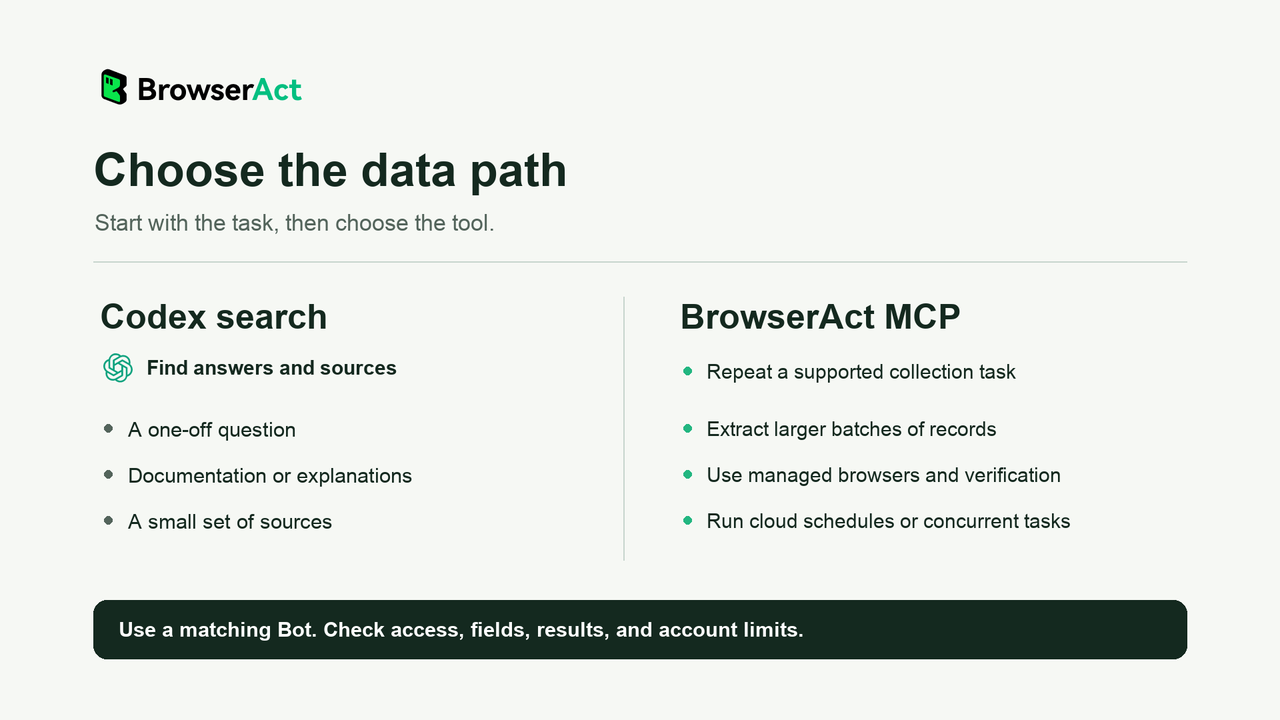
Choose by task; inspect a small result before scaling.
Connect BrowserAct by Pasting This Prompt
Copy the complete prompt below and send it directly in your Codex desktop chat. It comes from the BrowserAct MCP help guide and asks Codex to configure or reuse the connection, then verify tool availability.
Copy and send to Codex:
Identify this MCP client and connect BrowserAct. Configure it if you have access; otherwise give the setup steps.

Name: browseract
URL: https://mcp.browseract.com/mcp/
Transport: Streamable HTTP
Authorization: Bearer <BROWSERACT_API_KEY>

Reuse a valid key, or get one at https://www.browseract.com/reception/integrations?co-from=blog-Codex-MCP-Web-Scraping. Enter it in local configuration or a secure credential field, never in chat.

Reuse or repair an existing browseract connection; preserve other MCP settings. Verify that BrowserAct tools are available, and reload only if needed. Report any setup or verification issue. Do not run tasks.
If a key is needed, follow API Keys & Authentication and enter it in the configuration or secure credential field Codex identifies. Keep the real key out of chat. Follow any required permission or reload step; a prompt alone does not prove the connection works.
Then verify the connection in the same Codex chat:
Confirm that search_bots and search_official_templates are available
from BrowserAct MCP in this chat. Report any connection issue.
Do not start a collection task yet.
Continue when the live tools are available. BrowserAct uses its general API Key for this connection, without an OAuth login. If configuration is restricted or tool verification fails, have Codex report the specific issue before proceeding.
Find a Template and Inspect Its Inputs
Use the Bot Templates overview to understand the ready-made route. You can run an official template directly. A personal Bot must already be published before Codex can run it through MCP.
For the Reddit example, send this request:
Find a BrowserAct official template for extracting comments from one
public Reddit post. Read its current input requirements and tell me
whether it supports comment text, score, reply depth, and source links.
Ask me for the post URL and any missing required inputs. Do not run yet.
The matching resource and its input schema matter more than the name alone. A tool for subreddit search is not necessarily a tool for collecting comments from one post. Check which URL, limits, and other inputs the selected template accepts.
For your own published Bot, ask Codex to read its requirements. If no resource matches, prepare a Bot in BrowserAct first; MCP does not build one.
Run Once and Retrieve the Actual Result
After supplying the required inputs and checking the selected resource, ask:
Run the selected BrowserAct template once for the post URL I provided,
with a maximum of five comments if that limit is supported. Keep the
task ID, check its status, and retrieve the completed output.
Do not replace missing comment text with a guess or a search snippet.
The run tools return a task ID. Keep it and query the same task until its status is clear. Use get_task_status for progress and get_task for the task details and available output. A submission response by itself does not show that collection succeeded.
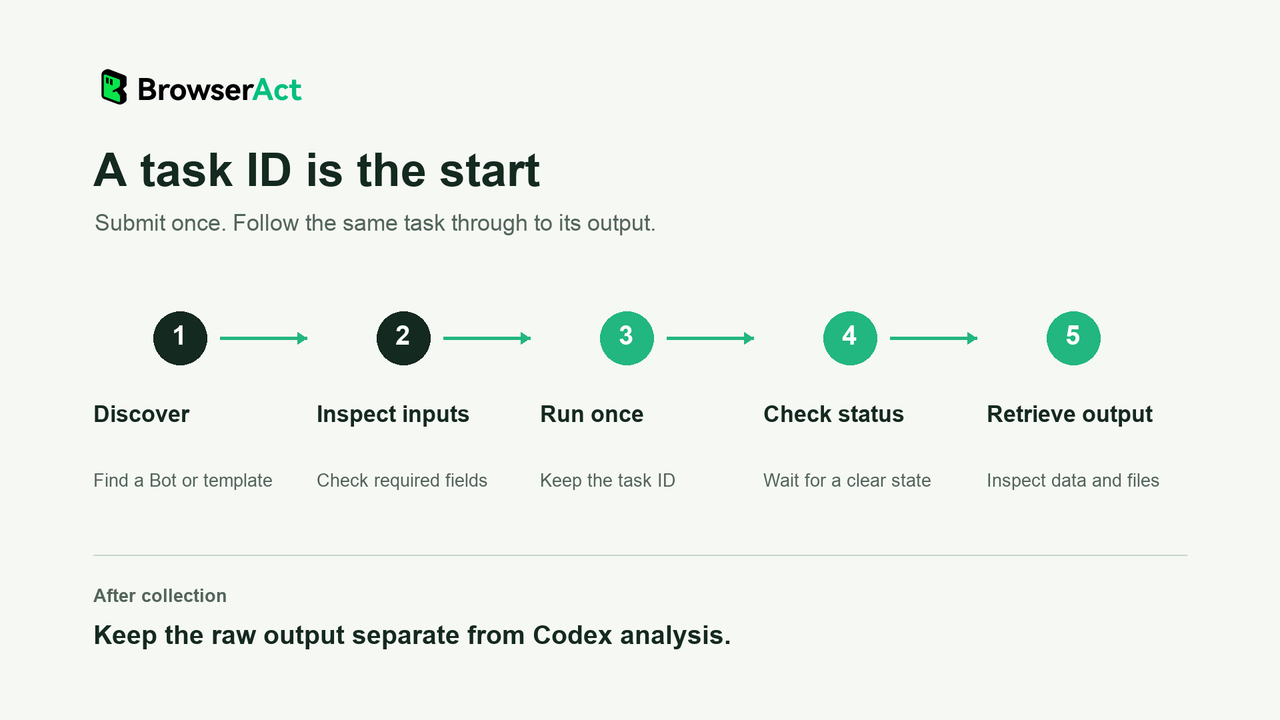
Keep the same task ID through status and result retrieval.
A BrowserAct run on November 4, 2026 used a five-comment limit for this public Reddit post. It returned five records, with nonempty comment text in two of them. The output included score, depth, parent_comment_id, and permalink. Five returned rows therefore did not mean five readable comments.
Check in that sample | Observed result | How to use it |
Returned records | Five | Count rows separately from usable text. |
Records with nonempty comment text | Two | Base the text summary on those records. |
Reply structure | Depth and parent-comment fields were present | Retain the relationship information alongside each record. |
The table describes that historical BrowserAct output. It is not a side-by-side test of Codex's native tools and MCP. Deleted content, access conditions, and the requested limit can affect another run; use only the text actually returned when writing its summary.
Use the Returned Data in Your Project
Keep a copy of the original output before transforming it. Then ask Codex to create a working dataset that your application or analysis script can consume.
Save the returned records as a source JSON file in my project.
Create a separate working file for analysis. Preserve source links,
empty values, and reply relationships. Report how many records have
usable comment text, then summarize only that text. Keep your analysis
separate from the collected fields.
Codex saves local files and generates the summary; BrowserAct supplies the task output. Keep the original data so you can check conclusions or regenerate analysis without collecting again.
Reusing a Bot does not automatically synchronize your app. Check the output whenever you change inputs.
Troubleshoot Authentication, Missing Tools, and Timeouts
If authentication fails, ask Codex to check whether the connection uses a valid general BrowserAct API Key and Bearer authentication. If tools are visible but individual Bots are not, use resource search: Bots and templates are discovered through the MCP tools rather than appearing as a separate permanent tool for each Bot.
For input errors, read the selected resource's current schema. For a failed run, inspect the task details and address the reported access, input, or account problem before choosing to start another run.
A submission timeout can leave the outcome uncertain. If you received a task ID, query it. If you did not, look for the original task using the request details before submitting again. Repeating the submission while the first outcome is unknown can create a duplicate.
Frequently Asked Questions
Can Codex Connect to a Remote MCP Server?
Yes. Codex supports Streamable HTTP MCP servers, including Bearer token authentication. Configure the server for the host running your task and verify that its tools are available in that session.
Can I Set Up BrowserAct by Sending Codex a Prompt?
Yes. Copy the setup prompt included above and send it to your Codex desktop chat. It requests configuration when access permits, otherwise setup guidance. You still need a valid API Key, any required permissions, and a successful tool check before running a Bot.
Do I Need to Build a Bot Before Using an Official Template?
No. BrowserAct official templates can run directly through MCP with their required inputs. To use a personal Bot, prepare and publish it first, then have Codex read its current input requirements.
Why Did a BrowserAct Run Return Only a Task ID?
BrowserAct MCP starts an asynchronous task. Use the returned ID to query its progress and retrieve the completed task's output and any available file information. The ID is not the collection result.
When Should I Use Codex Web Search Instead of BrowserAct MCP?
Use built-in search for answers, documentation, and a few sources. Choose a Codex MCP connection to BrowserAct for a supported collection task that benefits from Bot reuse, lower repeated reasoning, managed browser and CAPTCHA handling, or cloud batch execution. Keep an existing script if it already meets your needs. Check one small result before scaling up.


