How to Download OpenAI Invoice PDFs from the API Platform Automatically (2026)

Month-end closes. Your AP lead asks for last month’s openai invoice PDFs from the API platform. Someone signs into platform.openai.com, opens Billing history, and downloads PDFs one row at a time. Next month, the same hunt starts again—unless the person who had Owner access left, the org switcher was on the wrong workspace, or someone mistakenly scraped ChatGPT Plus receipts from chatgpt.com and filed the wrong product.
That last mix-up is more common than it should be. OpenAI ChatGPT billing and OpenAI API billing are separate systems. This guide is only for API / platform invoices at platform.openai.com. It is not for ChatGPT Plus, Pro, Business, or Enterprise bills on chatgpt.com. OpenAI’s own help center (article 9039756) states that clearly: manage each product’s charges in its own settings.
If you need a repeatable way to pull OpenAI API invoice PDFs into AP without writing a brittle Playwright script, this is the path.
Runs in an isolated BrowserAct browser (cloud Bot), not as a Chrome extension on your daily profile—so you can keep separate logins, proxies, and schedules.
Invoice download is an application-layer job. Tools that speed up agents on an already-logged-in daily browser and tools that give agents isolated, parallel browser infrastructure can both touch it. BrowserAct’s edge for this use case is the second model: cloud-side isolation, multi-identity, and schedulable Bots—not hitchhiking on the Chrome profile you use for email and Slack.
TL;DR / Key Takeaways
- Keep the OpenAI API Owner/Admin login in an isolated BrowserAct browser, not your daily Chrome.
- Point the Bot at Billing history on the API platform, list invoices by date range, and download original PDFs.
- Deliver files to AP (email, Drive, S3, or a shared folder) with stable filenames keyed by invoice number.
- Treat missing invoices as a first-class result: zero-usage months, wrong org, or Reader role often explain the gap.
Before you start
Have these ready before the first dry-run:
- A BrowserAct account (cloud Bot path below)
- Portal URL:
https://platform.openai.com/(API platform—not chatgpt.com) - Billing history URL often used:
https://platform.openai.com/settings/organization/billing/history - An OpenAI API organization login with Owner or Admin billing access (Reader often cannot download)
- Your 2FA method (authenticator app, email, or SMS)
- One already-reconciled month of invoices as a ground-truth check
- Optional: AP notify email, Drive/S3 path, or shared folder for delivery
- Optional: organization name if you manage more than one API org under the same login
Do not use ChatGPT Settings → Billing for this job. That is a different billing system.
Choose your path
Keep these three lanes separate. This article’s main tutorial is Cloud Bot only.
Path | Best for | How you run it | Do not confuse with |
Cloud Bot (main) | AP / ops / month-end schedules | Create or open a portal Bot in BrowserAct, save login in an isolated browser, schedule monthly | Installing a Chrome extension on your daily profile |
MCP (secondary) | Teams already in Claude or Cursor | Connect | Controlling local Chrome; MCP calls the cloud Bot |
CLI + Skills (Advanced) | Multi-org, fixed proxies, developer agents |
| “Just install a plugin and you’re done” |
Main how-to: Cloud Bot
1. Create or open the OpenAI API invoice Bot
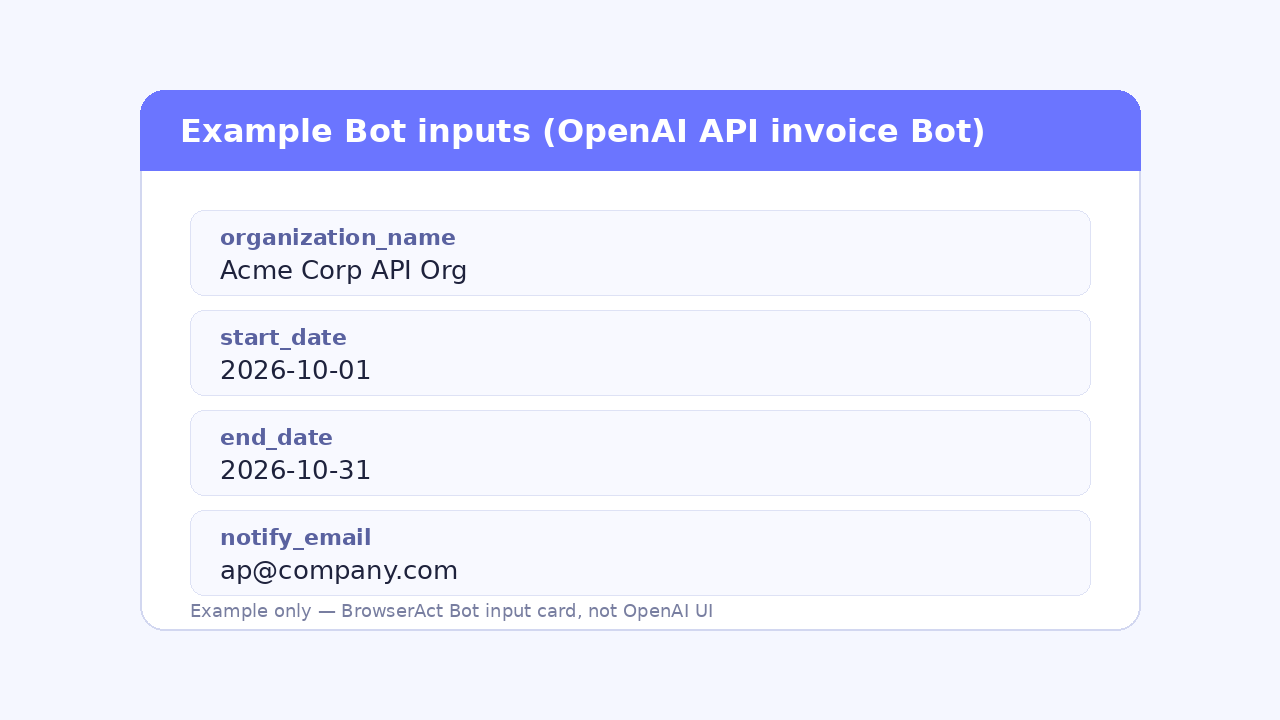
In BrowserAct, create an Agent / Workflow Bot for OpenAI API invoices, or open the official template if your workspace already lists one. Keep inputs explicit so month-end runs stay boring:
start_date/end_date(inclusive)organization_name(when the login can see more than one org)notify_emailor delivery path (optional)
Paste a prompt like this into the Bot (adapt variables; keep the structure):
Open https://platform.openai.com/settings/organization/billing/history.
Sign in with the saved OpenAI API org owner/admin login in the isolated browser.
If multiple orgs, select {{organization_name}}.
List invoices/receipts with issue or billing date between {{start_date}} and {{end_date}} inclusive.
Paginate until done.
Download each original PDF (invoice preferred over bare receipt when both exist).
Name files: openai-api_{{invoice_number}}_{{issue_date}}.pdf.
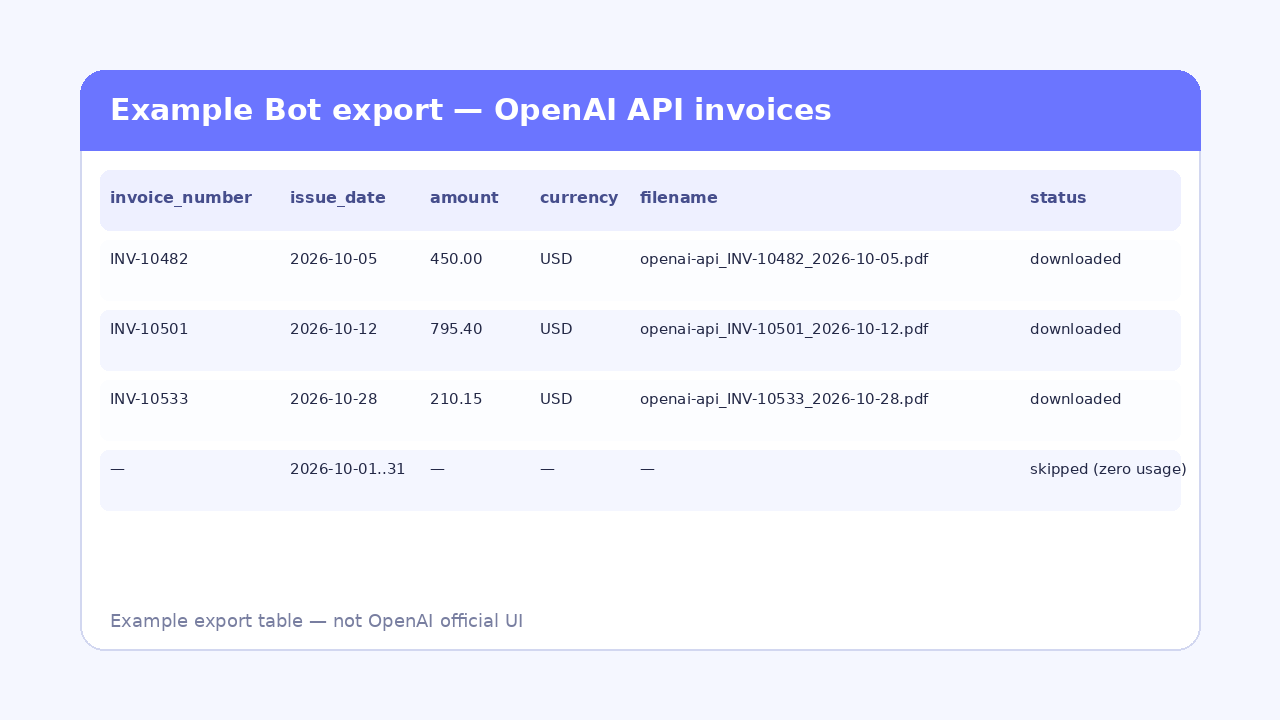
Return table: invoice_number, issue_date, amount, currency, filename, status.
List any you could not download and why.
Never use ChatGPT Settings → Billing for this job.
That prompt is the whole “script.” You are teaching the Bot the portal path, not claiming OpenAI exposes a public invoice-download API for model usage. The Completions / Responses APIs are not invoice download APIs—do not wire those and expect PDFs.
2. Attach login in an isolated browser
Create a dedicated browser identity for this OpenAI API organization (or for this client, if you are an accounting firm). Bind a static proxy when the account expects a stable network.
Complete the first sign-in and 2FA yourself in that isolated browser, then save the session. This is the critical product difference: the login lives in a cloud Bot browser, not as an extension riding your everyday Chrome profile. Separate clients get separate browsers so cookies never cross.
Pro Tip: One OpenAI org (or one client) per isolated browser identity. Never reuse the same Bot browser across unrelated AP clients.
If the Bot hits a credential wall later, pause for human assist, finish MFA once, and resume—the same pattern covered in BrowserAct’s notes on login, Google Auth, 2FA, and manual takeover and workflow policies that decide when to pause.
3. Dry-run one known month
Run the Bot against a month you already closed in the books.
Check:
- Invoice count matches your manual archive
- Invoice numbers, amounts, currency, and legal entity / org name
- Open one or two PDFs and confirm they are API platform documents, not ChatGPT subscription receipts
Common fixes after the first dry-run:
- Pagination stopped early—widen “load more” / next-page waits
- Download click opened a preview tab—wait for the PDF response, then save
- Org switcher still on the wrong organization
- Role is Reader—switch to Owner/Admin or grant billing download permission
- Month had prepaid credits / auto-recharge docs only, or zero usage and no invoice row
Pro Tip: Keep a ground-truth folder for that month. If the Bot returns a different count, fix pagination/org switcher before you schedule anything.
4. Deliver files and schedule monthly
After a clean dry-run, wire delivery:
- Download artifacts from the Bot run
- Email AP, or drop into Drive / S3 / a shared folder
- Keep filenames stable:
openai-api_{invoice_number}_{issue_date}.pdf - Dedupe on invoice number so re-runs do not double-archive
Then schedule. For self-serve API customers, pull after the prior month’s charges settle. For Enterprise API customers, OpenAI notes invoices are typically issued within about two weeks after the billing cycle ends (invoice dates help article)—so schedule with that lag, not on the 1st by default. Alert on failure; keep the “could not download” list for the AP review queue.
Pro Tip: For Enterprise API accounts, build in that ~two-week invoice lag—otherwise month-end runs return empty lists and false “missing invoice” alarms.
Give your agent a real browser, then turn the workflow into a Skill.
- 1. Use browser-act when an agent needs to open, click, scroll, extract, or inspect a live site.
- 2. Use browser-act-skill-forge when the workflow should become reusable across runs and agents.
- 3. Keep the operational boundary simple: automate what the user can already do in the browser.
Optional: Run from Claude or Cursor via MCP
If your team already works in Claude or Cursor, keep the same cloud Bot and call it over MCP. MCP here is not “drive my laptop Chrome.” It is a remote control plane for BrowserAct cloud Bots.
- Connect BrowserAct MCP at
https://mcp.browseract.com/mcp/ - Ask the assistant to find the OpenAI API invoice Bot (search / list bots)
- Supply missing inputs (
start_date,end_date,organization_name) - Run once, then fetch task status and download the PDFs
If token burn becomes an issue while the agent chatters around the browser, keep browser state compact and prefer a packaged Bot over rediscovering the portal every time—see how to reduce MCP token usage in browser automation.
Advanced: CLI + Skills for multi-org and proxies
Use CLI + Skills when one operator manages many client OpenAI orgs, needs fixed proxies, or wants the same Skill inside a local / self-hosted agent loop.
High-level shape (details live in BrowserAct CLI docs; this is not a full install tutorial):
- Install the BrowserAct CLI and entry Skill
- Pull core Skills (for example via
browser-act get-skills core) - Run each org in its own stealth / isolated browser identity with a pinned proxy
- Reuse the same invoice prompt / Skill; swap identity + org name per client
Cloud Bot remains the default for AP month-end. CLI is the advanced lane when isolation and multi-identity are the product requirement—not a second copy of the beginner tutorial.
Why OpenAI API invoices stay manual
A few structural reasons this job still lands on a human calendar:
- PDFs live behind login; there is no public “download all invoices as ZIP” button for typical self-serve orgs
- The menu path is deep: Settings → Organization → Billing → Billing history
- Download permission is role-gated; Owner/Admin usually required
- ChatGPT and API billing look similar enough that teams pull the wrong portal
- Prepaid credits, auto-recharge receipts, and zero-usage months create uneven document sets
- Enterprise timing lags calendar month-end, so “pull on the 2nd” often returns an empty or partial list
None of those problems is solved by calling the model API harder. They are portal problems—exactly where an isolated browser Bot earns its keep.
Ways to collect OpenAI API invoices
Honest comparison. Short cells on purpose.
Approach | Enters platform.openai.com? | Where login lives | Who maintains selectors / flows | Multi-org / multi-client fit |
Email rules | Only if OpenAI emails a PDF or link | Inbox | Fragile subject/body rules | Weak for portal-only docs |
GetMyInvoices-class tools | Often yes for supported vendors | Vendor connector | Vendor catalog coverage | Good when OpenAI is supported; check coverage |
Vendor API | No dedicated public invoice-download API for this use | N/A | N/A if no endpoint | Not a substitute for Billing history PDFs |
DIY Playwright | Yes | Your scripted browser | Your team, every UI change | Possible, high maintenance |
Skyvern-class cloud agents | Yes | Cloud agent browser | Prompt + recovery layer | Strong for one-off portal tasks |
Reduck-style extension + scripts | Yes | Daily / already-logged-in browser | Extension + script library | Fast on one machine; weaker for cloud schedule + many isolated identities |
BrowserAct isolated cloud Bot / MCP / CLI | Yes | Isolated cloud (or CLI) browsers | Bot / Skill; human assist on login walls | Built for separate logins, proxies, schedules |
What this Bot returns
Result fields
Field | Meaning |
| Identifier shown in Billing history |
| Invoice or billing document date |
| Total on the document |
| Currency code |
| Saved PDF name ( |
| downloaded / skipped / failed |
| Optional reason when status is not downloaded |
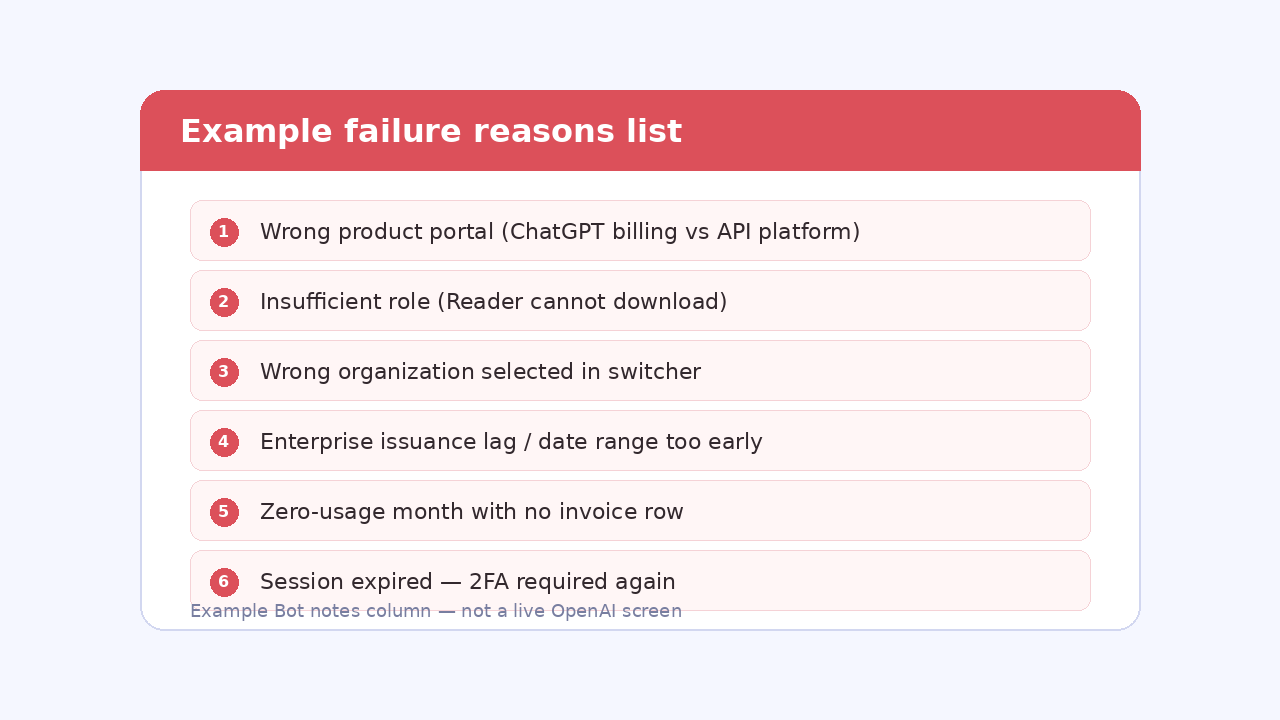
Common failure reasons
- Wrong product portal (ChatGPT billing instead of API platform)
- Insufficient role (Reader / member without billing download)
- Wrong organization selected in the switcher
- Date range before invoices were issued (especially Enterprise lag)
- Zero-usage month with no invoice row
- Session expired; 2FA required again
- PDF open in a new tab / viewer; download wait too short
- Pagination incomplete
Two Skills, One Repeatable Browser Workflow
Start with live browser execution when the agent needs to understand a page. Move to Skill Forge when the same scraper should run again without re-exploring the site.
Run once with browser-act
Give Codex, Claude Code, Cursor, Windsurf, or another agent a real browser for rendered pages, clicks, scrolling, screenshots, DOM extraction, and network inspection.
Open browser-act SkillPackage with Skill Forge
Explore the site once, verify the extraction path, then generate a callable Skill package that other agents can reuse for batch jobs or scheduled workflows.
Open Skill ForgeFrequently Asked Questions
Do I need an OpenAI invoice API?
No. Self-serve and most team workflows download PDFs from platform.openai.com Billing history. Model APIs are not invoice-download APIs; automate the billing portal instead.
Do my OpenAI passwords leave my machine?
First login and 2FA happen in an isolated BrowserAct browser you control for that Bot. Prefer saved sessions over stuffing passwords into prompts or chat logs.
How does 2FA work with the Bot?
Complete 2FA during the initial isolated-browser attach (or on human-assist pause). Reuse the saved session for later scheduled runs until it expires.
Is this for ChatGPT Plus invoices too?
No. ChatGPT and API billing are separate. This Bot targets platform.openai.com API org billing only—not chatgpt.com Settings → Billing.
Can one Bot handle multiple OpenAI API organizations?
Yes, with care: one isolated browser identity per org (or per client), pass organization_name, and never share cookies across clients.
Can I schedule this offline for month-end?
Yes on the Cloud Bot path. Schedule after invoices usually appear; for Enterprise API, allow roughly two weeks after month end unless your contract says otherwise.
Should I use MCP or CLI?
Use Cloud Bot for AP schedules. Use MCP if you already live in Claude/Cursor and want to trigger the same cloud Bot. Use CLI+Skills for multi-identity/proxy engineering workflows.
Why are some months missing an openai invoice?
Zero usage, prepaid-only activity, wrong org, role limits, or Enterprise issuance lag. The Bot should list missing items with reasons instead of failing silently. ## Soft CTA If OpenAI API invoice PDFs are still a month-end scavenger hunt, put the login in an isolated browser and let a cloud Bot do the row-by-row work. Get your Bot — Free Related next: pair with sibling vendor-portal invoice guides, and keep ChatGPT vs API billing called out in the first screen.


