Best Google Maps Scraper Tools in 2026: 7 Options by Use Case

An agency needs 500 dental practices across three cities by Friday. One analyst wants a CSV, the operations team wants the search repeated next month, and the developer wants an API. The best Google Maps scraper for this job is not simply the tool that returns the most rows. It is the one whose collection depth, delivery method, and maintenance model fit what happens after the export.
This guide compares seven Google Maps scraper options by operating model, setup, output, reuse, and maintenance. BrowserAct publishes this article and appears as one of the options. We did not run one shared benchmark across all seven tools, so this is a use-case comparison, not a performance ranking. Product details and pricing units were checked against official pages on September 24, 2026 and can change.
What Is a Google Maps Scraper?
A Google Maps scraper converts information visible in Google Maps search results or place pages into structured records. Depending on the tool and collection depth, a record may include:
- Business name
- Category
- Address
- Phone number
- Website
- Rating and review count
- Opening hours
- Geographic coordinates
- Place ID or Maps URL
- Status, price range, service options, or other visible attributes
The category includes browser extensions, cloud scrapers, APIs, visual tools, reusable Bots, and self-hosted projects. Each shifts setup, infrastructure, delivery, and maintenance to a different owner.
How We Evaluated Google Maps Scraper Tools
We used the same decision dimensions for every option:
Dimension | What to check |
Operating model | Extension, visual no-code tool, cloud scraper, API, reusable Bot, or self-hosted software |
Input scope | Keyword, location, Google Maps URL, place ID, or an existing results page |
Output depth | List-card fields, place details, reviews, coordinates, or website-derived data |
Delivery | CSV, Excel, JSON, API response, webhook, database, or automation integration |
Reuse | One-off export, saved task, scheduled run, reusable Bot, or deployable service |
Infrastructure | Vendor-managed, local browser, or self-hosted |
Reviewability | Source URLs, consistent fields, missing-value handling, and reproducible inputs |
Cost model | Subscription, per result, credits, infrastructure, or engineering time |
We did not assign scores. A fair score would require one shared query, location, requested record count, field contract, time window, and acceptance rule across every product.
Best Google Maps Scraper Tools at a Glance
Tool | Operating model | Best fit | Delivery path | Main trade-off |
BrowserAct | Reusable cloud Bot | Repeatable list-card collection with a consistent schema | Structured results, export, API and automation paths | The referenced Bot does not open individual detail pages |
Apify Compass | Cloud Actor and API | Developer-controlled searches, deeper fields, and add-on enrichment | Dataset, JSON, CSV, Excel, XML, HTML, API, scheduling | Configuration and add-on pricing can become layered |
Outscraper | Cloud service and API | Pay-as-you-go Maps exports | CSV, Excel, Parquet, JSON, API | Contact enrichment is a separate data layer |
Bright Data | Scraper API and data infrastructure | High-volume API delivery with managed unblocking and parsing | JSON, NDJSON, CSV, API, webhook, cloud storage | More infrastructure-oriented than a lightweight one-off tool |
Octoparse | Visual no-code platform and templates | Teams that prefer prebuilt visual workflows | Excel, CSV, JSON, Google Sheets, API and integrations | Template state, plan limits, and premium usage fees require checking |
gosom/google-maps-scraper | Open-source, self-hosted | Teams that want code and infrastructure control | CSV, JSON, PostgreSQL, S3, REST API and plugins | Your team owns deployment, resources, proxies, and maintenance |
LeadGrab | Chrome extension | Small, local, one-off exports from the open Maps page | On-device CSV and lightweight local CRM | Browser-bound workflow and controlled phone batches |
BrowserAct: Reusable Bot for Structured List-Card Research
The BrowserAct Google Maps Business Listings Scraper is a published reusable Bot. It takes a keyword, a country selection, and a maximum business count, then returns a consistent 12-field record for each visible result card.
The documented schema includes name, rating, review count, category, address, description, status, hours, price, accessibility, service options, and a place URL. When Google Maps does not show a value in the list, the Bot keeps the field and returns N/A rather than changing the schema.
It fits teams that want to repeat a standard collection task across keywords or markets without writing selectors or maintaining scraper code. The structured output can be reviewed, exported, or connected to supported API and automation paths.
The boundary is important: this particular Bot reads result cards and does not open each business detail page. Phone numbers, websites, public emails, and qualification signals require deeper or separate workflows. That narrower scope makes it easier to understand exactly what the Bot collected.
Apify Compass: Developer-Controlled Cloud Scraping
The Compass Google Maps Scraper on Apify accepts a Google Maps URL or a search term combined with a location. Its official page documents broad place-detail coverage, reviews, images, contact information, geographic inputs, scheduling, integrations, and API use.
Results can be viewed as tables, JSON, or maps and downloaded in several formats. The official page listed pricing from $1.50 per 1,000 scraped places when checked, while place details and enrichment can use paid add-ons. Apify suits technical teams that want a configurable cloud Actor, API control, scheduling, and broad field options, provided they scope platform usage and add-ons together.
Outscraper: Pay-as-You-Go Maps Exports
Outscraper's Google Maps Scraper is a managed cloud service with a no-code interface and API access. Its official product page lists CSV, Excel, Parquet, and JSON delivery, plus a broad data dictionary for business identity, location, rating, review, website, phone, and geographic fields.
Outscraper separates basic Maps records from contact services. Its pricing page lists the first 500 businesses at no charge, $3 per 1,000 records from 501 through 100,000, and $1 per 1,000 above 100,000. It suits buyers who want pay-as-you-go export or API access without running browser infrastructure. Website-contact enrichment adds another service, billing unit, and validation step.
Bright Data: Managed Scraper API Infrastructure
The Bright Data Google Maps Scraper API is designed around API-driven collection. Its official page lists place IDs, URLs, business names, categories, addresses, phone numbers, websites, coordinates, hours, ratings, review counts, price ranges, descriptions, images, and related fields.
The service delivers JSON, NDJSON, or CSV through an API, webhook, or cloud storage. Bright Data states that proxies, browser execution, retries, unblocking, and parsing are included in its per-record model. At review time, the page offered 5,000 free records per month and listed pay-as-you-go pricing at $1.50 per 1,000 records. It fits API-first data operations, though its infrastructure model may be excessive for an occasional spreadsheet.
Octoparse: Visual No-Code Scraping
Octoparse's Google Maps scraper collection provides prebuilt templates and a visual workflow environment. Official pages describe keyword, URL, location, and language inputs, with outputs that can include identity, location, phone, website, rating, review, hours, image, status, and place fields.
Octoparse exports to Excel, CSV, JSON, and Google Sheets and provides integrations and an OpenAPI. It fits non-developers who prefer visual workflows. The exact template matters: the advanced Google Maps template showed a maintenance notice and per-line usage fee when checked, while other templates had different fields and terms. Verify the template state, plan limits, and premium fees before use.
gosom/google-maps-scraper: Self-Hosted Control
The open-source gosom/google-maps-scraper provides a command-line interface, web UI, and REST API. Its repository documents Docker installation, source builds, CSV and JSON output, proxy support, concurrency settings, website email extraction, database writers, and deployment paths from one machine to Kubernetes.
This route gives engineering teams control over runtime, storage, proxies, output writers, and deployment. It also leaves them responsible for compute, concurrency, failures, monitoring, and updates. Open source removes the core software license fee, not the infrastructure or engineering cost.
LeadGrab: Chrome Extension for Small One-Off Jobs
LeadGrab is a Chrome extension that works from the Google Maps search page already open in the user's browser. Its store listing documents business name, phone, website, rating, review count, category, address, and Maps URL fields, along with CSV export and a lightweight local CRM.
The extension runs on-device without an account to start. Its listing describes auto-scrolling and phone collection in controlled batches of up to 50 listings. It fits occasional exports with a user present in Chrome, not unattended schedules, server-side APIs, or large parallel runs.
How to Choose the Right Google Maps Scraper
Use this decision sequence before comparing logos or headline prices.
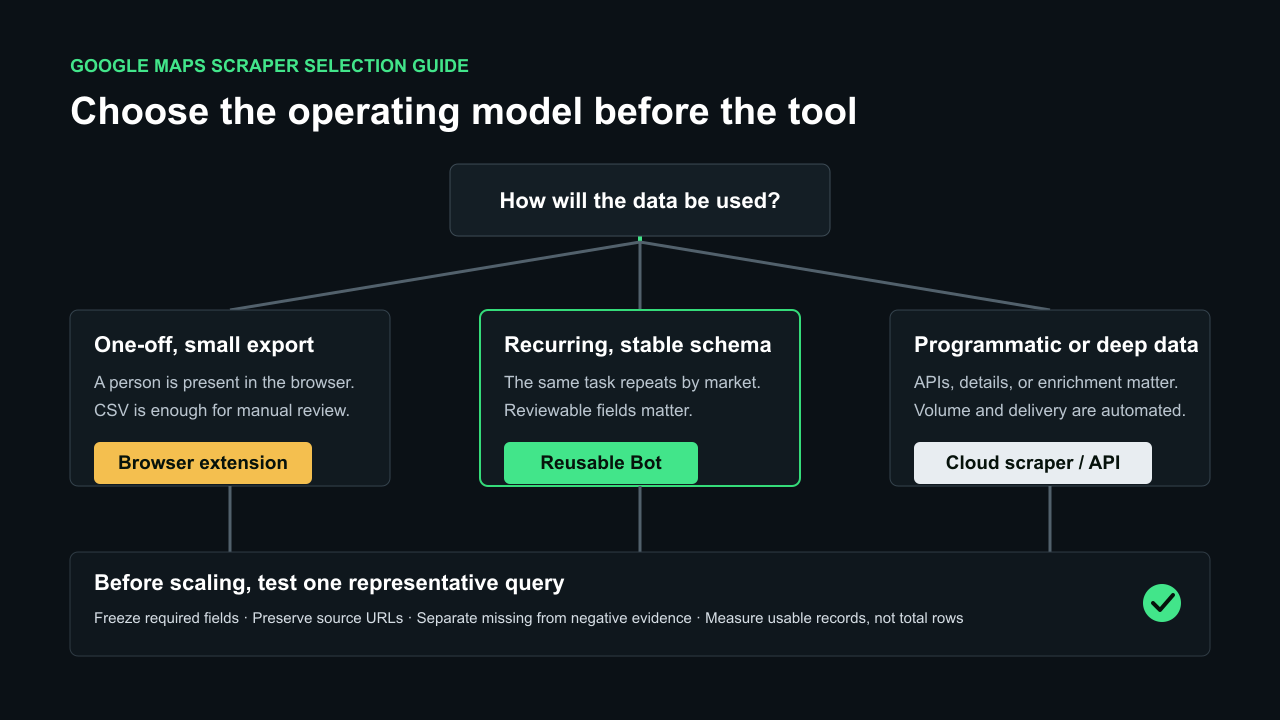
Example decision: suppose the input is dentists in Austin, the target is 50 records, the required fields are name, category, address, rating, review count, and source URL, and the research must run again next month. A reusable Bot is a better fit than a browser extension because repeatability and a stable schema matter. If the same job also requires each practice's website and public contact details, choose a deeper cloud scraper or add a separate enrichment step rather than treating missing list-card fields as a tool failure.
1. Define the downstream decision
Do you need a market count, a call list, a competitor dataset, review monitoring, location intelligence, or evidence for a manual audit? Each outcome needs a different field contract.
2. Separate collection depth
Write down whether the job includes:
- Search-result cards
- Individual business detail pages
- Reviews or images
- The linked official website
- Contact or booking pages
- Human qualification
A tool that collects only list cards should not be compared directly with a pipeline that opens websites and verifies contacts.
3. Decide who owns the infrastructure
Choose vendor-managed infrastructure when you want the provider to handle browsers, retries, and platform maintenance. Choose self-hosting when source control and custom deployment are worth the engineering responsibility. Choose an extension when a person will run a small job interactively.
4. Match the delivery path
A CSV works for manual review. JSON and APIs suit applications. Webhooks, schedules, MCP tools, and automation integrations matter when the job repeats. Do not pay for an integration layer the team will not use.
5. Test the real acceptance rule
Request a small but representative sample. Check:
- Whether the category and location match the brief
- Whether required fields are populated
- Whether duplicates are handled
- Whether source URLs are preserved
- Whether missing data remains distinguishable from negative evidence
- How much cleanup is required before the next system can use the records
The most useful metric is not total rows. It is the number of records that pass the same acceptance rule.
For a deeper cost framework, see Google Maps Scraper Costs: No-Code Bots vs Custom Scrapers and Lead Lists.
What Google Maps Data Does Not Prove
A structured export is useful evidence, but it is not proof of every business conclusion.
- A rating does not prove purchase intent.
- A missing website field does not prove that no website exists.
- A public phone number does not grant permission for every outreach method.
- An inaccessible page does not prove a missing feature.
- A website-derived email is not a native Google Maps field.
- A returned listing may be stale, duplicated, irrelevant, or temporarily unavailable.
Keep collection and interpretation separate. If the goal is outreach, qualify Google Maps leads before outreach and preserve the source evidence behind each decision.
A Five-Step Validation Workflow Before You Scale
- Choose one representative query. Use a real category and market that reflects the production job.
- Freeze the output contract. Define the required fields and whether detail pages, websites, or enrichment are in scope.
- Run a small sample. Ten to fifty records is often enough to expose scope and schema problems.
- Review each failure state. Keep
not found,not checked,blocked, andunavailableseparate. - Scale only after acceptance. Measure usable records, cleanup time, and maintenance ownership before increasing volume.
This process is more reliable than selecting the tool with the longest feature list.
Conclusion
The best Google Maps scraper is the one whose operating model matches the work. Use a Chrome extension for a small interactive export. Choose a visual no-code platform when business users need configurable templates. Use a managed cloud scraper or API when programmatic delivery and vendor-run infrastructure matter. Choose open source when your engineering team wants control and accepts the maintenance burden. Use a reusable Bot when the task repeats and a stable, reviewable schema matters more than building custom scraper code.
For BrowserAct's list-card workflow, start with the published Bot, run a representative query, and inspect the structured records before connecting them to enrichment or qualification.
Enter a keyword, choose a country, and get one structured row per business with a reusable BrowserAct Bot.

Frequently Asked Questions
What is the best Google Maps scraper in 2026?
There is no universal winner. Browser extensions fit small interactive exports; visual no-code tools fit configurable business workflows; managed cloud scrapers and APIs fit programmatic volume; open-source projects fit teams that want infrastructure control; reusable Bots fit recurring tasks that need a consistent output contract. Select the operating model first, then compare products inside that category.
Can I scrape Google Maps without coding?
Yes. BrowserAct, Outscraper, Octoparse, and browser extensions provide no-code or interface-driven paths. The setup, output depth, reuse model, and infrastructure ownership differ, so test the exact fields and delivery format before scaling. For a step-by-step overview, read How to Scrape Google Maps Without Code.
Can a Google Maps scraper extract email addresses?
Google Maps business listings do not normally expose a native email field. Some products visit the linked business website or add a separate contact-enrichment service to look for public email addresses. Check whether website crawling is included, optional, or billed separately, and treat any returned contact as data that still requires validation.
Is a Google Maps scraper better than the Google Places API?
They serve different requirements. Google's Places API provides official search and place-detail endpoints, requires selected response fields, and bills requests according to the applicable SKU. Scrapers may expose different collection workflows, but they also add source-access, maintenance, validation, and terms considerations. Choose according to the application's fields, delivery model, scale, and risk controls.
What should I verify before using Maps data for outreach?
Verify that the business matches the target category and market, that the listing and official website belong to the same organization, that required fields are current enough for the campaign, and that the public contact route is appropriate for the intended use. Preserve source URLs and require human approval before sending outreach.


