Amazon MCP in Codex: Compare Black Friday Offers with BrowserAct

You open Codex on Monday to prepare an Amazon Black Friday report. By Friday, a lower headline price appears—but the seller and delivery terms have changed. An Amazon MCP connection helps collect the offers; a useful report still needs comparable snapshots. Use BrowserAct to retrieve the public offer data, then have Codex preserve the original result and explain what changed.
This guide uses the Codex desktop client and BrowserAct’s Amazon Buy Box Offers Scraper. The goal is a source-backed comparison in your project: original JSON, a working difference table, and a short brief. Start with one ASIN—the Amazon identifier for a product—before expanding the watchlist.
- 1Compare the same offer conditions before calling a change a discount.
- 2Use search for context and a supported Bot for repeatable collection.
- 3Keep raw snapshots, collection time, and missing fields visible.
- 4Review the first small result before expanding the watchlist.
Choose Search, an Existing Script, or a BrowserAct Bot
Use Codex’s built-in search to find documentation, locate a product, or answer a small research question. Check the active search mode when freshness matters: OpenAI’s web-search documentation distinguishes cached results from live retrieval. A search result is a lead to inspect, rather than proof of a complete offer snapshot.
If a collection script already gets the required data reliably, Codex can help run it and compare its output. JSON or CSV alone is not a reason to add another service. BrowserAct becomes useful when a matching, reusable Bot can take over repeated browser collection while Codex handles the project files and analysis.
Your immediate need | A useful starting point |
Find documentation or a few product sources | Codex search, followed by source checks |
Reuse an existing working collector | Keep the script and its checks |
Collect the same supported Amazon offer fields repeatedly | BrowserAct Bot through MCP |
Explain differences between saved records | Codex working with the original outputs |
Bot reuse can reduce tokens spent working out the same browser steps on every run. Codex still uses tokens to request, read, and analyze results, and BrowserAct runs consume account credits. A large response can still use substantial context. Begin with one product and compare only the fields needed for the decision.
BrowserAct also provides a managed browser environment with stealth fingerprint handling, proxies, and supported CAPTCHA handling. These capabilities reduce infrastructure work for repeated collection; they do not guarantee access to every page or remove website and account limits. The Codex MCP guide explains the broader tool choice.
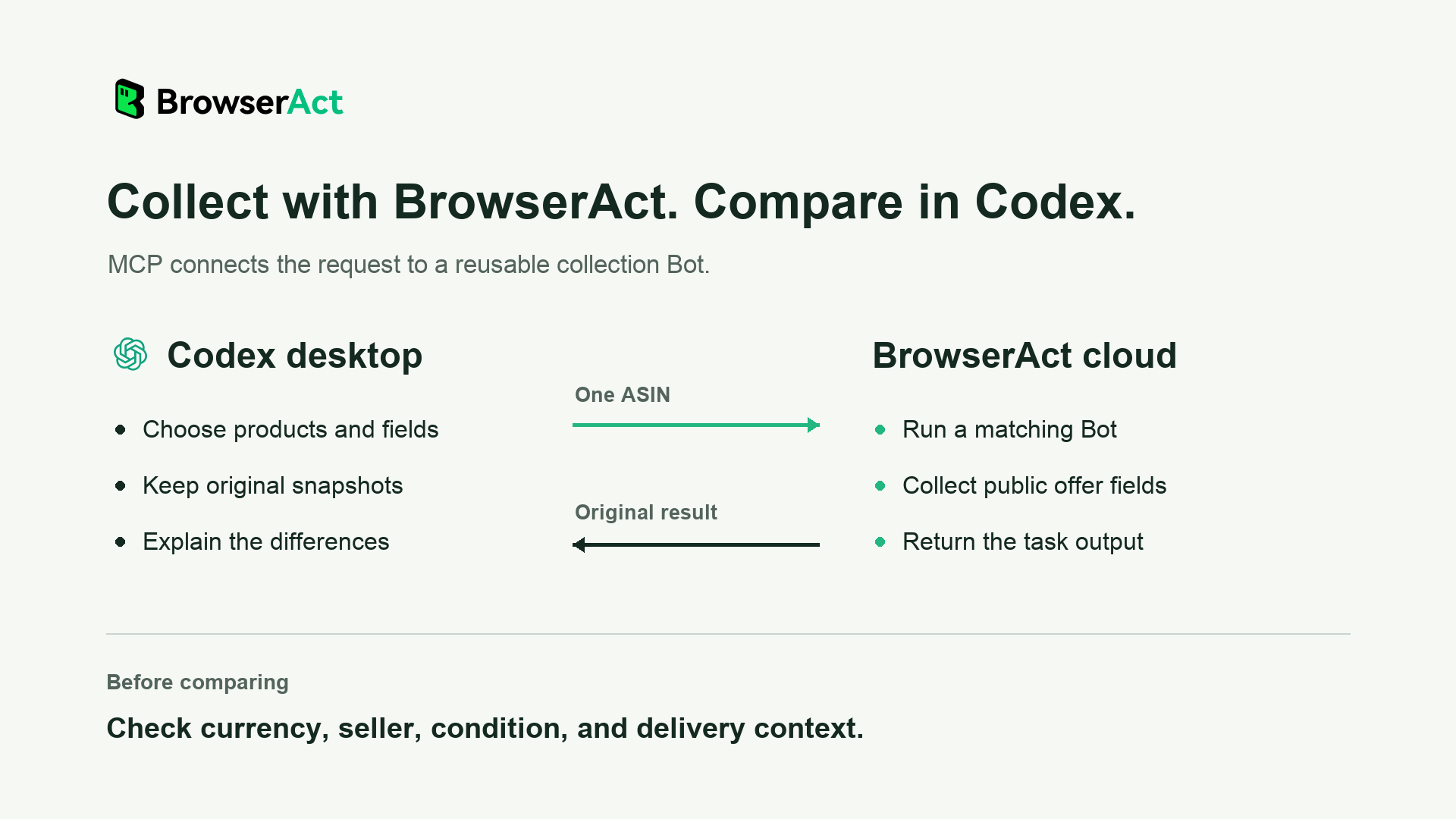
Codex handles product selection, files, and comparison; BrowserAct handles the matching Bot’s collection run.
Connect BrowserAct in Codex with a Setup Prompt
Open the project where you want to keep the comparison. Copy the complete prompt below into your Codex desktop chat. It uses the connection details in the BrowserAct MCP help guide. Codex needs access to configure the connection; managed settings or missing permissions may require administrator help.
Identify this MCP client and connect BrowserAct. Configure it if you have access; otherwise give the setup steps.

Name: browseract
URL: https://mcp.browseract.com/mcp/
Transport: Streamable HTTP
Authorization: Bearer <BROWSERACT_API_KEY>

First reuse a valid BrowserAct API Key already configured in the current client. If none is available, provide the API Key page link below and guide the user to create a key and enter it in local configuration or a secure credential field. Do not ask the user to send the key in chat.
API Key page: https://www.browseract.com/reception/integrations?co-from=blog-Codex-Amazon-Black-Friday-MCP

Reuse or repair an existing browseract connection; preserve other MCP settings. Verify that BrowserAct tools are available, and reload only if needed. Report any setup or verification issue. Do not run tasks.
Then ask Codex to confirm that search_bots and search_official_templates are available in this chat. A configuration entry is not enough: the tools must be available to the current task. Keep the real API Key out of chat and shared project files. BrowserAct uses its general API Key for this connection.
Inspect the Amazon Offers Template and Run One ASIN
Start with discovery and input inspection, before paying for a collection run. Send:
Find the official BrowserAct Amazon Buy Box Offers Scraper. Read its
current input requirements and explain which offer fields it returns.
Ask me for the marketplace URL and one ASIN. Do not run it yet.
The published template takes Marketplace URL and ASIN. Its advertised output includes the featured seller and price, currency, fulfillment, availability, shipping or delivery text, and alternative offers when visible. Those fields describe what the public page exposes; a field can be empty. Read the live input requirements rather than assuming the display labels are the JSON parameter names.
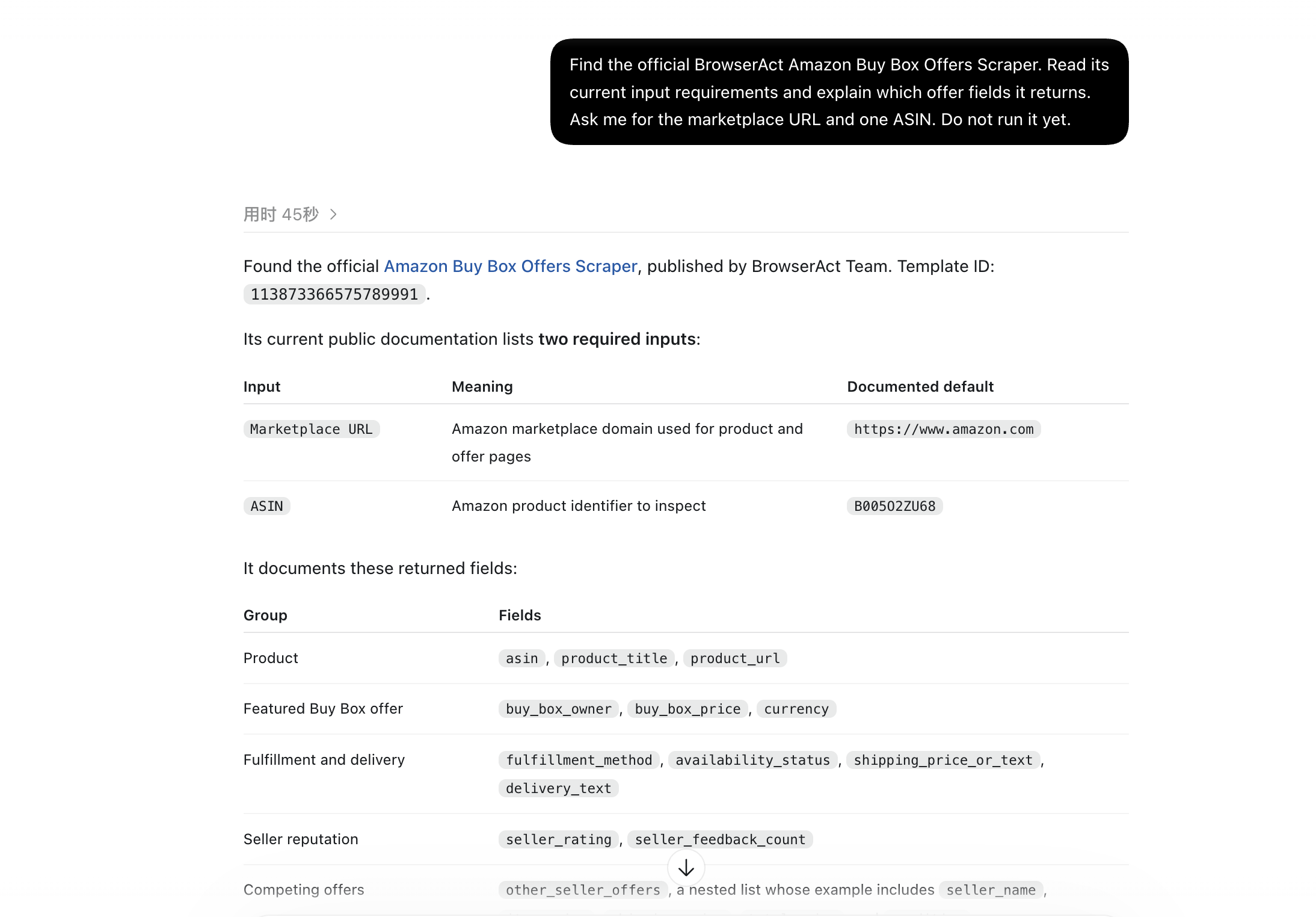
Actual Codex conversation: finding the template and inspecting its inputs before running it. The ASIN in the input table is a documented default, not the product used in the run below.
Keep the ASIN input singular for this resource. To expand to three to five products, have Codex submit separate requests that match the current schema. Run them concurrently only within your account allowance and the source’s access conditions; several products do not automatically become one supported input.
Give Codex one product you already monitor. Keep the marketplace and intended delivery region consistent. A proxy region can help select a browsing region, but it does not by itself establish the delivery ZIP or checkout conditions Amazon displays. Record the conditions you can actually confirm.
Run the selected BrowserAct template once with the marketplace and ASIN
I supplied. Keep the task ID, check the same task, and retrieve its
completed output. Save the original response before transforming it.
Report unavailable fields and any failure; do not infer a missing price.
BrowserAct starts an asynchronous task: the initial response identifies the run, and the completed output comes afterward. Keep that task ID through status checks and result retrieval. If submission times out, check the original task before submitting again. Repeated submissions can create duplicate runs.
A November 6, 2026 run used https://www.amazon.com/ and ASIN B0C3HCD34R for soundcore by Anker Q20i Hybrid Active Noise Cancelling Headphones, Black. The completed output returned a Buy Box price and shipping, along with missing values that still needed review:
Returned field | Value in that run |
Buy Box seller | Amazon.com |
Buy Box price | CAD62.86 |
Currency | CAD |
Fulfillment | Amazon |
Shipping | CAD11.01 |
Availability | null |
Seller rating / feedback count | null / null |
Other seller offers | Empty list |
The marketplace URL did not make this a USD result: the returned currency was CAD. Preserve that currency and confirm the delivery context before comparing it with another collection. A null availability field does not mean out of stock, and an empty alternative-offers list means none were returned—not that no competing sellers exist. This is one observed snapshot, not a Black Friday discount or a lowest-price claim.
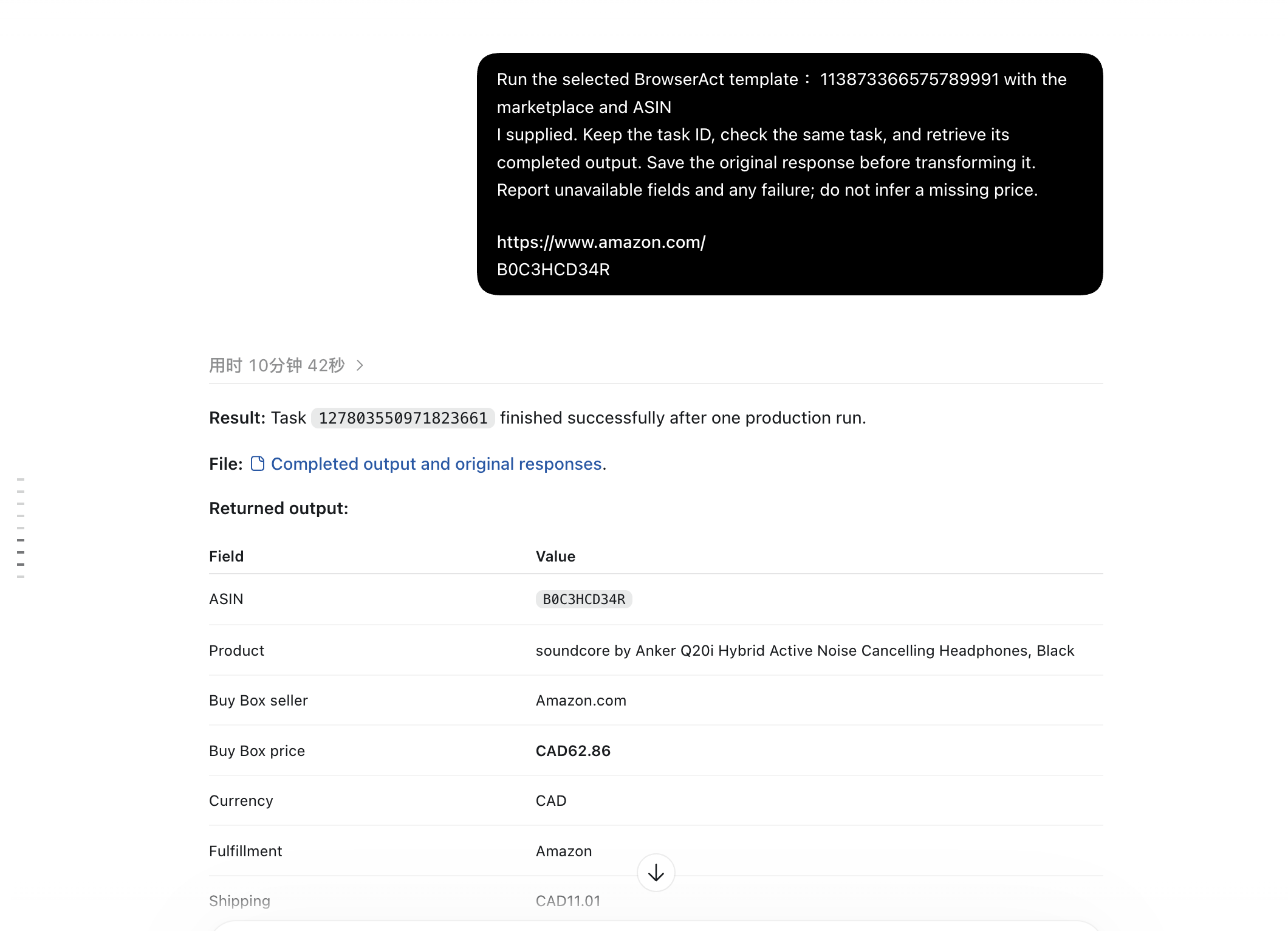
Actual completed result for B0C3HCD34R: CAD62.86, with CAD11.01 shipping in the saved output. This is one snapshot; the chat’s elapsed-time label is not a Bot-speed benchmark.
Once you know which fields your product returns, use the Amazon Buy Box Offers Scraper for the watchlist you want to inspect.
Save a Comparable Pre-Sale Snapshot
A snapshot is the result you saved at a particular collection, together with the conditions needed to interpret it. Keep the untouched response separate from your working table. Record the source task’s available times and the time Codex retrieved the output; do not invent a precise page-observation time when the response does not provide one.
Save the untouched BrowserAct result as a source JSON file. In a separate
working table, record the ASIN, marketplace, source URL, available task
timestamps, output-retrieval time, currency, seller, fulfillment, and
confirmed delivery context. Preserve unknown conditions as unknown.
Use this first collection as the baseline; do not claim earlier history.
Build the baseline before you need to judge a sale. This Bot collects the current public offer state; it does not reconstruct prices from the weeks before you started. For a larger monitoring plan, use the Amazon price-tracking guide alongside the collection instructions here.
Compare Price, Seller, Shipping, and Missing Fields
At the next check, use the same marketplace and ASIN. Ask Codex to compare the two saved outputs before writing a summary. Separate a change in the featured offer from a price change by the same seller under the same conditions.
If product condition or delivery context cannot be confirmed, put that pair in manual review. The same ASIN is not enough to establish equivalent offers. You may report the visible prices, but keep them out of the comparable-change calculation until the conditions are resolved.
What changed or is missing? | What the report can say |
Same seller, product condition, currency, and comparable delivery terms; both prices readable | Report the observed price difference |
Featured seller or fulfillment changed | Report an offer change; qualify any price comparison |
Product condition or delivery context is unconfirmed | Keep the pair in manual review |
Price or numeric shipping is unavailable | Mark the numerical comparison incomplete |
Earlier snapshot is missing | Record a new baseline, without a historical discount claim |
Collection failed | Record a failed check, rather than “no change” |
Only add item price and shipping when both are numeric, in the same currency, and refer to the same offer. Text such as “delivery options available” is not a shipping amount. Taxes, coupons, membership benefits, and final checkout conditions may differ from the public offer. Label the result for what you observed instead of calling it the final checkout price.
For a comparable pair, calculate current price − baseline price. If the baseline is positive, the percentage change is (current price − baseline price) / baseline price × 100. Keep missing data out of the calculation and preserve it in an exception table. A reduction between two snapshots says nothing by itself about the product’s all-time low.
Compare the new output with the saved baseline. Match the ASIN, seller,
currency, product condition, fulfillment, and delivery context when
available. Calculate price changes only for comparable records.
Keep uncertain conditions in manual review. Keep separate lists for
comparable changes, changed offer conditions, missing values, new
baselines, and failed checks. Retain source links.
Turn the Difference Table into a Black Friday Brief
Have Codex write the brief from the checked table. Include the number of requested products, successful collections, comparable pairs, and exceptions. Put source links next to the findings. A report that covers part of the watchlist should say so, even if the collected products did not change.
Write a short Black Friday brief from the checked comparison table.
Separate observed price changes, changed offer conditions, unchanged
comparable records, and items we could not assess. State the baseline
and retrieval times. Link each finding to its original product record.
Do not recommend changing our prices from a single incomplete snapshot.
For repeat collection, decide which system owns the schedule. BrowserAct cloud execution and account-supported concurrent runs can help with batches; MCP itself does not create a recurring schedule. BrowserAct schedules are configured separately. Codex’s later file processing and report generation still need an available execution environment. Closing the desktop app is not a complete unattended reporting setup.
Keep the first watchlist small, review credit use, and increase the batch only after the fields and failures are understood. Use the Amazon MCP connection in Codex to build repeatable collection and a comparison your team can check against the original records.
Frequently Asked Questions
Does Amazon MCP Mean the Amazon Ads or AWS Server?
The phrase can refer to different services. Here it means Codex using BrowserAct MCP to run an Amazon product-data Bot. It is not an Amazon-operated server or an Amazon Ads or AWS integration.
Can Codex Search Already Collect This Information?
Sometimes its available tools or an existing script can obtain what you need. Start there for a small lookup. Consider BrowserAct when a matching Bot makes repeated collection easier to reuse. Both approaches need checks on freshness, access, sources, and missing fields.
Can This Bot Retrieve Prices from Before I Started Tracking?
It collects the current public offer state. Save results over time to build your own baseline history. Do not turn a first collection into a claim about earlier prices or an all-time low.
Should Missing Shipping Be Treated as Free Shipping?
No. An empty shipping field means the result did not provide that amount. Preserve the unknown value and avoid a delivered-cost comparison until the required information is available.
Does BrowserAct Run After I Close the Codex App?
BrowserAct hosts its cloud Bot execution independently of the desktop browser. Recurring collection needs a configured schedule, and later Codex analysis needs its own available runtime. Check each part before relying on a 24/7 report.


