Walmart Price Tracker: Monitor Black Friday Offers by Seller

You open a Walmart product page while planning your Black Friday offer and notice a lower price. Before reacting, check the selected variant, pack size, seller, and delivery conditions. A Walmart price tracker needs that context to help you decide whether the change is relevant to your own offer.
Start with a small set of matched product URLs and save their current information. BrowserAct's Walmart Product Details Scraper can collect public product details, including price, seller, availability, and fulfillment information when shown. Repeat the checks, then review changes under comparable conditions.
- 1Match the variant and pack size before comparing offers.
- 2Keep the seller and fulfillment context beside each price.
- 3Do not treat a displayed original price as a historical price chart.
- 4Review unknown conditions and missing fields before acting.
Match the Product, Variant, and Pack Size
Choose products you can compare meaningfully. Confirm the brand, model, UPC when available, selected variation, and quantity. A similar title or photograph does not establish that the offers contain the same product.
Pay particular attention to multipacks, storage sizes, colors, and included accessories. If a two-pack becomes the selected option on a page, its price should not be compared directly with yesterday's single-unit observation. Keep the variation in your review notes, even when the URL appears unchanged.
Use the Walmart Product Search Bot to discover candidates if you do not yet have a list. Review the matches before monitoring them. Separate confirmed equivalents, different products, and candidates that need a manual check. An unknown UPC is not proof of a mismatch, but it may leave you needing other evidence.
Record the Seller and Fulfillment Context
Keep the displayed seller and fulfillment information beside the price. Fulfillment describes how the product can reach the buyer, such as shipping, delivery, or pickup. When those options change, the observed offer may have changed in ways a price-only table would hide.
Record what the page actually shows. A seller name can help you notice that the offer now belongs to a different merchant. Availability and delivery text can help you determine whether the lower price represents a usable alternative in the context you are comparing.
Keep Known Location and Delivery Conditions with the Record
Retain the location or delivery context you can establish for the observation. If it is unknown, say so. Do not assume a price from one observation applies to every store, delivery destination, or pickup option.
The Product Details template's documented inputs are product URLs and Count. It does not provide a ZIP-code input for selecting arbitrary locations. If your decision depends on a particular local store or destination, confirm that context separately before treating two records as directly comparable.
A field for fulfillment information also does not guarantee that every possible delivery option will be returned. Use the visible result and check the source when a missing condition affects the decision.
Capture a Baseline with the Walmart Product Details Bot
Create the baseline before the campaign requires a rushed decision. It should preserve the product, its current offer, and enough context to recognize a meaningful change later.
Supply Product URLs and Count
Open the Walmart Product Details template, enter the public item links in Product URLs, and set Count to the maximum number of supplied URLs to process. Begin with a small list whose variants and pack sizes you have checked.
After the run, inspect the item ID, title, model, and product URL. Confirm that the result describes the intended product. Save the original output, add the check time and time zone to your review record, and keep any comparison notes separate from the collected fields.
Read Current Price, Original Price, and Missing Fields
The result can include current and original prices, currency, availability, seller information, specifications, variants, and fulfillment details. Optional fields may be empty when the page does not display them.
Information | How to use it in the baseline |
Item ID, URL, model, and UPC | Confirm product identity and return to the source |
Variant and pack-size notes | Keep the comparison tied to the selected product |
Current price and currency | Record the observed amount without mixing currencies |
Original price, when shown | Preserve the page's reference price separately |
Seller and availability | Identify the offer and whether it is available |
Fulfillment and known location context | Check whether delivery conditions remain comparable |
An original or crossed-out price is a reference displayed on the page. It is not a time series showing what the product cost throughout the preceding months. Keep that distinction clear when reviewing a Black Friday discount.
Likewise, a missing original price does not establish that the item has no promotion. A missing seller or fulfillment field leaves the comparison incomplete; it does not justify inventing a default value.
Repeat Checks Under Comparable Conditions
Compare subsequent observations with the baseline using the same product identity and known conditions. Save each valid record rather than overwriting the previous price. That lets you inspect both the change and the evidence behind it.
BrowserAct supports hourly, daily, or weekly schedules for published Bots, with a selected time zone and notification settings. For ongoing checks, configure a published Bot for this task and choose a schedule your team can review. Running a template once does not automatically create a continuing monitor.
Use an interval appropriate to the work. A small list may only need a daily review during preparation; a short campaign may justify more frequent checks when someone can act on the results. Scheduled monitoring can miss changes between runs, and it does not reconstruct prices from before your first observation.
Decide what needs a source check. A price move with the same seller and comparable conditions may be ready for review. A price move accompanied by a different seller, missing fulfillment information, or an unexpected variant should first be investigated.
Separate Price Changes from Seller and Availability Changes
Read the price together with the rest of the offer. A changed seller or delivery method can explain why the number differs, even when the underlying product looks the same.
The following example uses hypothetical records to illustrate a decision. It is not a current Walmart offer or a Bot run.
Illustrative input: one matched model and pack size, observed twice.
Observation | First check | Second check |
Item price | $49 | $45 |
Displayed seller | Seller A | Seller B |
Availability | Available | Available |
Fulfillment context | Delivery conditions recorded | Delivery conditions unknown |
The item price is $4 lower, but the seller changed and the second delivery context is unknown. Mark the record for review. It does not yet establish a comparable $4 reduction that you should match.
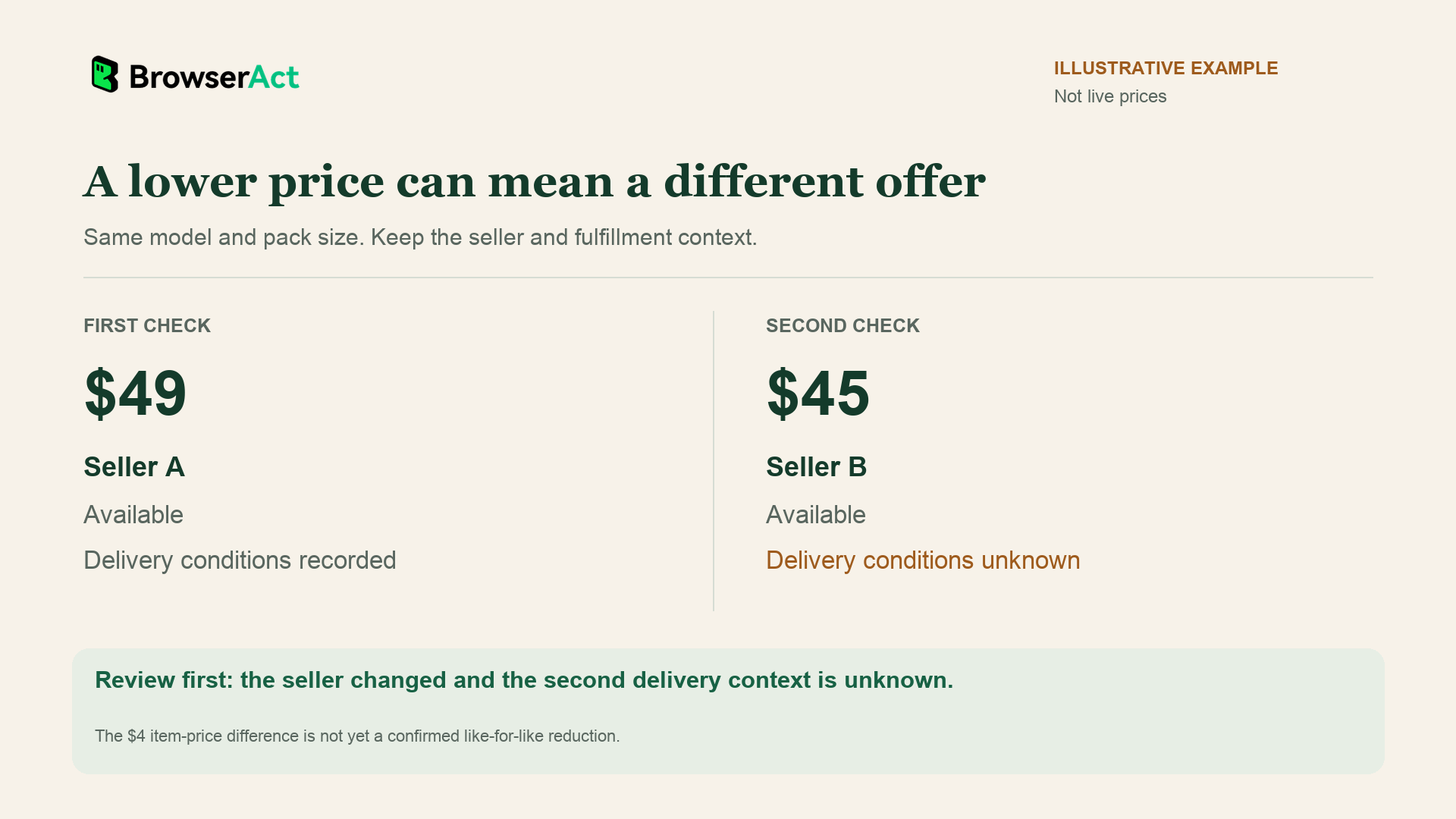
Illustrative comparison, not live prices. A changed seller and unknown delivery context make the second offer a review case.
If the seller, selected product, and relevant conditions stayed the same, you could evaluate the price change more directly. If availability disappeared, check whether the offer is still usable. A blank availability field should remain unknown until you inspect the source.
Keep your review categories simple: comparable change, changed conditions, unavailable offer, or incomplete observation. Those categories make follow-up clearer than a table that turns every missing field into a price alert.
Review Your Black Friday Offer Using Comparable Records
Use the monitoring record to decide what deserves attention, then make the pricing decision with your own numbers. Review product costs, marketplace fees, stock, delivery commitments, and the minimum return you need.
A lower observed competitor price does not show whether that seller is profitable or whether you can offer equivalent terms. Your response might be to maintain the price, change a promotion, adjust the bundle, or improve an availability or delivery message you can support.
Give someone responsibility for reviewing significant changes. Keep a short decision note explaining the comparison and what happened next. A Walmart price tracker can then support an operating decision while data collection and changes to your own listings remain separate actions.
FAQ
Can the record include a third-party Walmart seller?
The template can return the seller information displayed on the public product page. Inspect that field rather than assuming every offer has the same seller. Missing seller information remains unknown and may require a source check.
Is the displayed online price the same as a local store price?
Do not assume they are interchangeable. The observation describes the visible page in its available context. If a decision depends on a particular store, pickup option, or delivery destination, verify those conditions separately.
Can I supply a ZIP code to this Bot?
The documented inputs are Product URLs and Count. There is no documented ZIP-code parameter for this template. Confirm any location-dependent comparison separately rather than assuming the run selects your preferred store or destination.
Can the Bot retrieve prices from before my first check?
This template collects current product information. Repeated checks can build your own record from that point onward. A displayed original price is not a substitute for earlier observations, and the template does not provide a pre-existing historical price database.
Does the recorded price include membership offers and checkout discounts?
Not necessarily. Keep visible conditions with the price and review the source when an offer depends on membership, delivery selection, or checkout steps. The public-page template does not log in or perform cart actions to establish a final payable amount.
Build your Walmart price baseline. Start with matched product URLs, inspect the current price and seller information, and save a record with the conditions you can verify.