n8n Reddit Automation in 9 Steps: Stop Manual Browsing

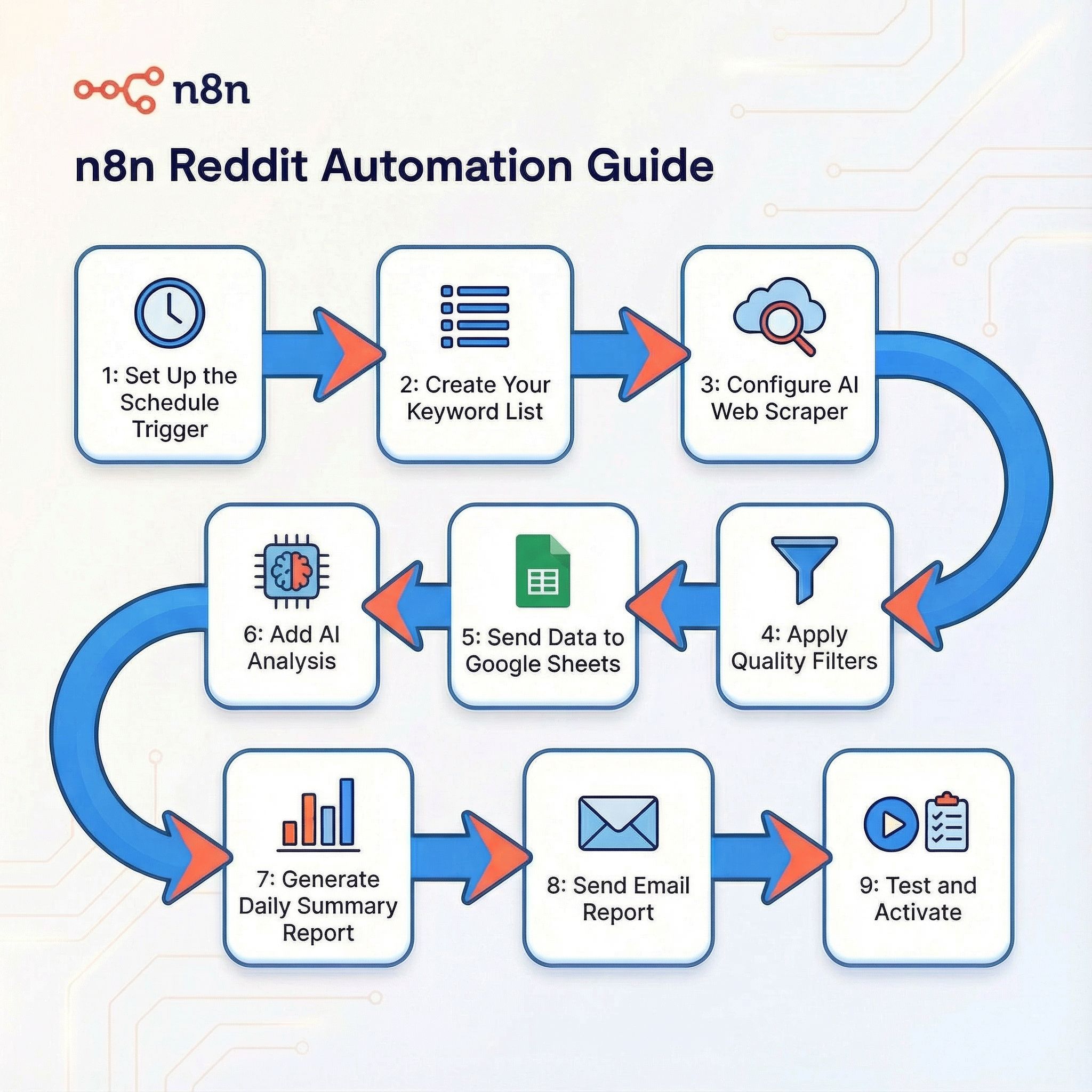
n8n Reddit automation guide: 1: Set Up the Schedule Trigger 2: Create Your Keyword List 3: Configure Web Scraper 4: Apply Quality Filters 5: Send Data to Google Sheets 6: Add AI Analysis 7: Generate Daily Summary Report 8: Send Email Report 9: Test and Activate
For content creators, marketers, and product developers, hunting for customer insights on Reddit is essential work—but it's also incredibly time-consuming. If you're manually searching subreddits every day, you know the drill: open Reddit, search your keywords, scroll through posts, read comments, take notes, repeat. Hours disappear into this process.
What if you could automate the entire workflow? Imagine waking up each morning to find a neatly organized Google Sheet waiting for you—filled with yesterday's most relevant Reddit discussions, automatically filtered by AI, and summarized into actionable insights. No more manual searching. No more missed opportunities.
In this guide, I'll show you exactly how to build this automated Reddit research system using n8n and AI web scraping. By the end, you'll have a workflow that runs on autopilot, capturing Reddit gold while you sleep.
Why Reddit Automation Matters for Marketing & Research
Manual Reddit research is a massive time sink with inconsistent results. Here's why automation is essential:
Time & Efficiency:
- Manual searching takes 2-3 hours daily across multiple keywords and subreddits
- Automation reduces this to 10 minutes of reviewing curated insights
- Never miss trending discussions or late-night posts
Quality & Consistency:
- 24/7 monitoring ensures complete coverage
- AI filtering removes noise and false positives
- Structured data capture enables trend analysis
Competitive Advantage:
- First-mover access to emerging pain points and opportunities
- Continuous competitor monitoring without manual effort
- Scalable across unlimited keywords and communities
Actionable Intelligence:
- Organized data ready for content creation, product decisions, or sales outreach
- Sentiment and urgency scoring helps prioritize responses
- Historical tracking reveals patterns invisible in manual review
The bottom line: while competitors manually scroll, you receive AI-curated market intelligence delivered to your inbox daily.
How the Reddit Automation Workflow Works
Before we dive into the technical setup, let's understand the complete automation pipeline:
The Automation Workflow at a Glance:
Scheduled Trigger (Daily at 10 PM)
    ↓
AI Web Scraper (Extracts Reddit data)
    ↓
Initial Filters (Upvotes, recency, content quality)
    ↓
Google Sheets (Stores all data)
    ↓
AI Analysis (Relevance scoring & categorization)
    ↓
AI Summary Generator (Creates daily report)
    ↓
Gmail (Sends report to your inbox)
This automated system continuously monitors Reddit, processes thousands of data points, and delivers only what matters directly to you.
Tools You'll Need
Here's your complete toolkit for Reddit automation:
1. n8n
Open-source automation platform (the backbone of our workflow)
- Perfect for building complex automation workflows without extensive coding
- Self-hosted (free) or cloud ($20/mo)
- Visual workflow builder with 500+ integrations & 7000+ templates
2. BrowserAct AI Web Scraper
Intelligent web scraping tool
- No-code solution: Configure scraping tasks through simple interface, no programming required
- Cloud-based: Runs on BrowserAct's infrastructure, no server maintenance needed
- Bypasses protections: Handles CAPTCHAs and human verification automatically
- Global IP pool: Rotate through worldwide IP addresses to avoid detection and blocking
- AI-powered extraction: Intelligently understands page structure even when layouts change
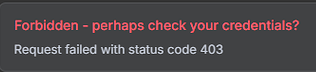
Why BrowserAct matters: If you try using standard HTTP requests to scrape Reddit, you'll quickly encounter 403 Forbidden errors due to Reddit's anti-bot protections. BrowserAct solves this by simulating real browser behavior and handling all the technical challenges automatically.
3. Google Sheets
Data storage and collaboration
- Familiar, shareable interface for your team
- Built-in formulas and Apps Script for additional automation
- Free with unlimited sheets
4. Gmail
Email delivery for daily reports
- Ensures you never miss your daily insights
- Free with Google account
5. OpenAI API or Claude API
AI-powered analysis and filtering
- Transforms raw data into actionable intelligence
- ~$10-30/mo for moderate usage
Building Your n8n Reddit Automation Workflow
Now let's build the actual automation. I'll walk you through the complete workflow setup.
Workflow Architecture Overview
Our n8n workflow consists of several connected nodes:
- Schedule Trigger: Runs the workflow at your specified time (e.g., daily at 10 PM)
- Keyword Loop: Iterates through your list of search terms
- BrowserAct Reddit Scraper: Extracts data from Reddit search results
- Filter Node: Applies quality rules to keep valuable posts
- Google Sheets Node: Stores the filtered data
- AI Analysis Node: Scores relevance and categorizes content
- AI Summary Node: Generates daily insights report
- Gmail Node: Sends the report to your inbox
Step 1: Set Up the Schedule Trigger
Add a Schedule Trigger node to your n8n canvas.
Configuration:
- Trigger Interval: Cron expression
- Cron Expression:
0 22 * * *(runs daily at 10:00 PM)
Alternative schedules: 0 */6 * * * for every 6 hours, or 0 22 * * 1-5 for weekdays only.
Step 2: Create Your Keyword List
Add a Function node to define which keywords to monitor:
return [
  { json: { keyword: "TikTok caption ideas" } },
  { json: { keyword: "how to write viral TikTok caption" } },
  { json: { keyword: "TikTok caption stuck" } },
  { json: { keyword: "TikTok growth hacks" } }
];
Customize this list based on your research goals. You can monitor 5-50+ keywords without impacting performance.
Step 3: Configure BrowserAct AI Web Scraper
This is the critical step where we extract Reddit data using BrowserAct.
1. Set Up BrowserAct
- Visit BrowserAct and create an account
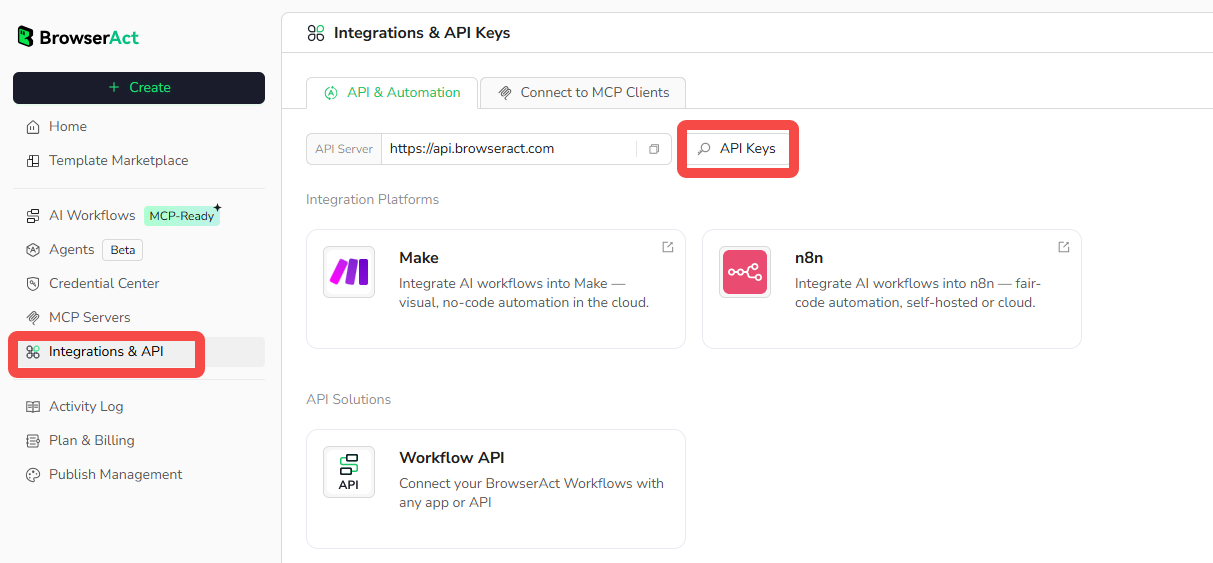
- Navigate to Settings → Integrations & API
- Click "Generate API Key" and copy it
2. Use the Reddit Scraper Template
BrowserAct provides a ready-made template for Reddit scraping, so you don't need to build the scraper from scratch:
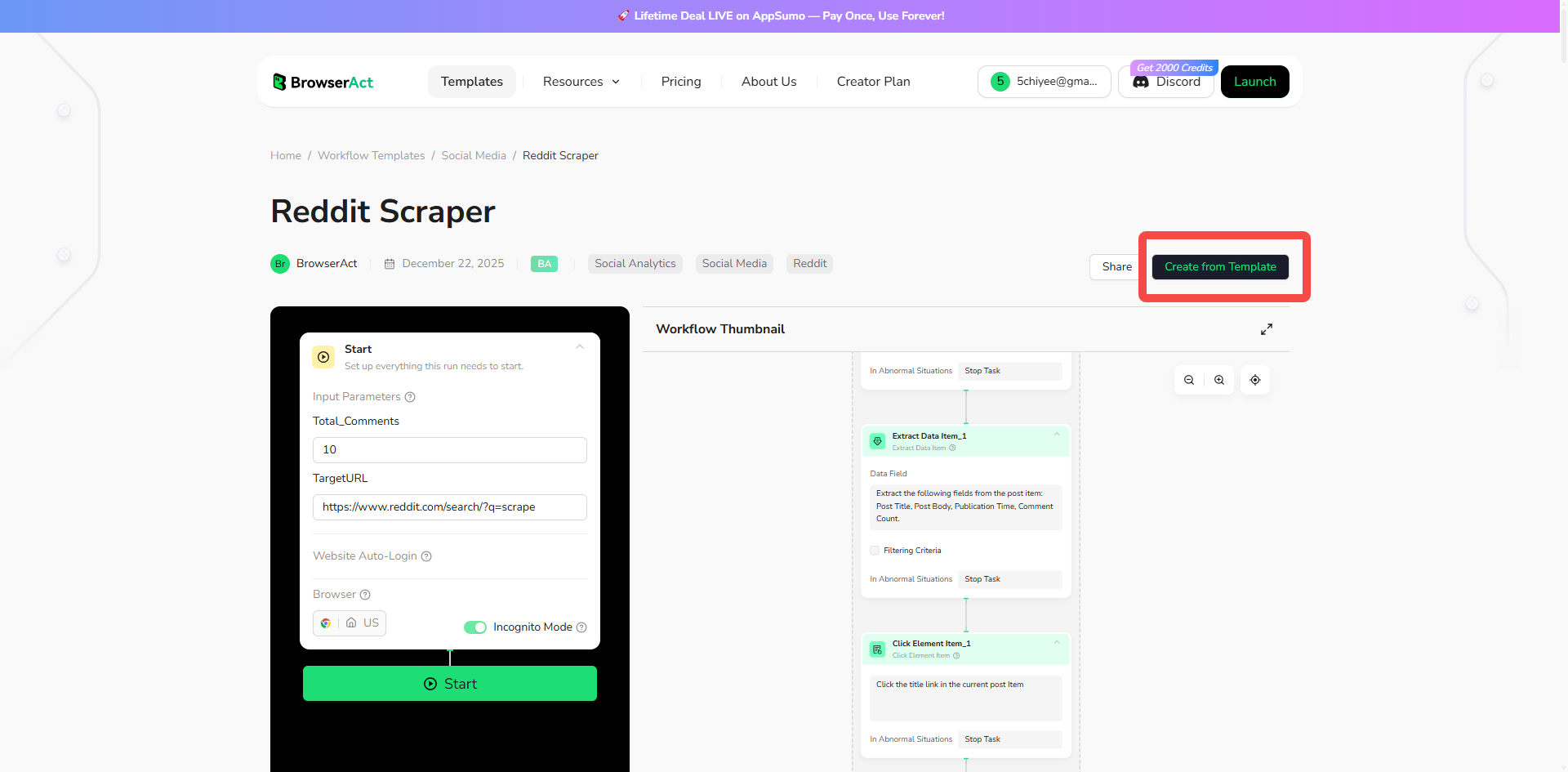
- Access the Reddit Scraper in BrowserAct
- Click "Create from Template" to add it to your workflows
- Customize the default parameters (or adjust the scraper to fit your needs):
- Target URL: The Reddit URL you want to scrape (e.g., search results, subreddit page)
- Total_Comments: Number of comments to extract per post
- You can modify the template to add filters, extract specific data fields, or change the scraping logic
- Publish the workflow to make it available via API
Cost estimate: Reddit scraping typically uses 80-150 credits per run, depending on how many posts you're extracting.
3. Integrate with n8n
Add the BrowserAct Node:
- Open your n8n workflow
- Click "+" to add a new node
- Search for "BrowserAct" and select it
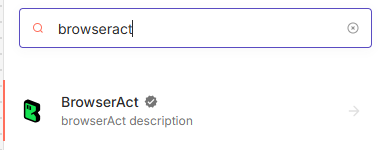
- In Credentials, click "Create New"
- Paste your API key and save
- Test the connection to verify it works
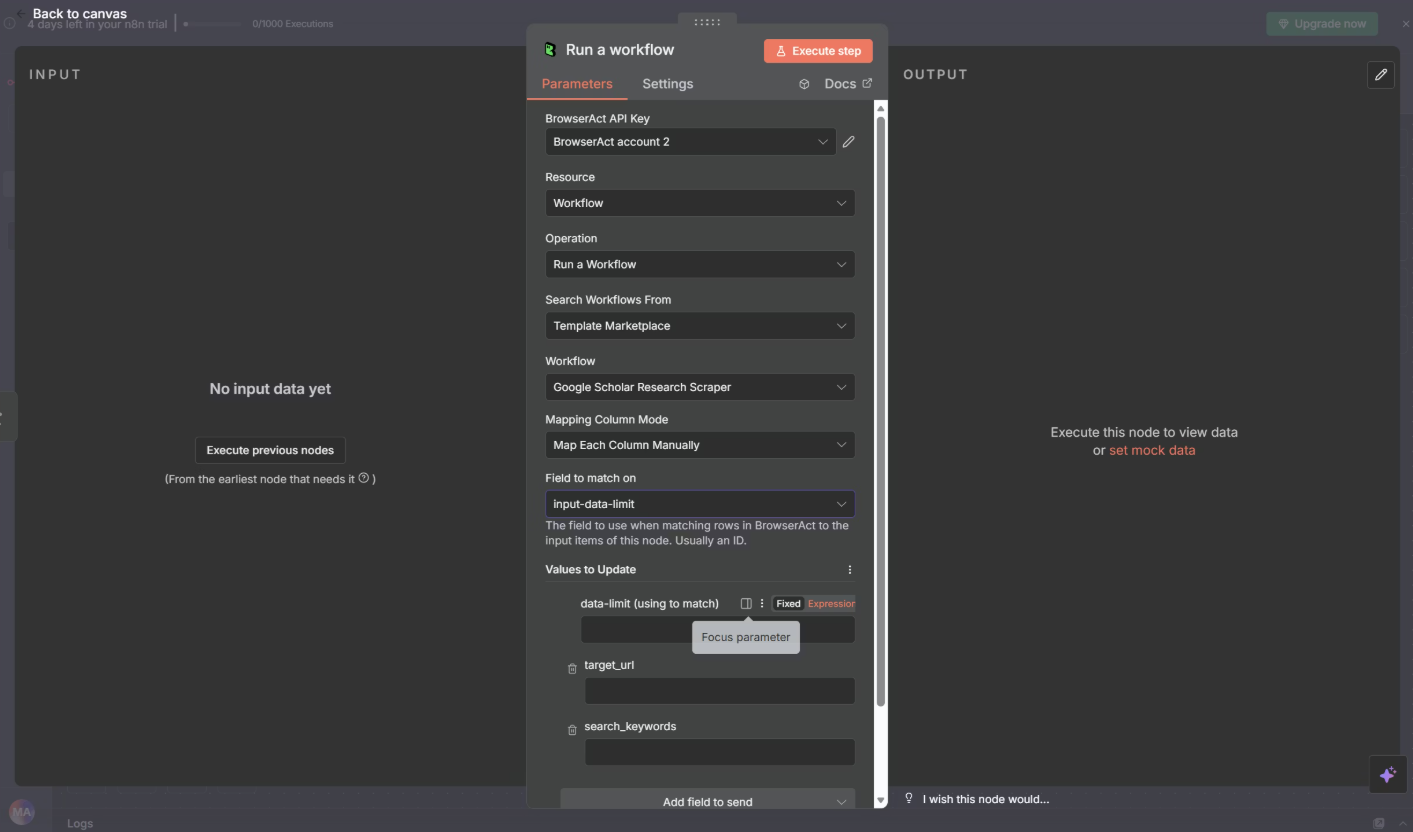
- Configure the Workflow:
- Set Resource: "Workflow"
- Set Operation: "Run a workflow"
- Select your published Reddit workflow from the dropdown
- Map input parameters from previous nodes (e.g., keyword from your loop)
- Click "Test execution" to run a trial
BrowserAct handles the complexity: You don't need to write CSS selectors or worry about Reddit's page structure. The template already knows how to extract post titles, content, comments, upvotes, and more. BrowserAct's AI understands the page and adapts automatically, even when Reddit changes its layout.
Ready to build your automation? Start with BrowserAct and connect it to n8n in minutes. The Reddit scraper template integrates seamlessly with your workflow.
Step 4: Apply Quality Filters
Add an IF node to filter out low-quality posts before they reach your database.
Filter Criteria:
- Content length > 100 characters (excludes title-only posts)
- Posted within last 24 hours
- Upvotes ≥ 10 (community validation)
- Comment count ≥ 5 (active discussion)
- Exclude deleted/removed posts
- Exclude obvious promotional content
This typically reduces your dataset by 60-80%, leaving only high-quality discussions.
Step 5: Send Data to Google Sheets
Add a Google Sheets node to store your filtered data.
Setup:
- Authenticate with your Google account
- Select "Append" operation
- Choose your spreadsheet and worksheet
- Map the extracted fields to columns
Step 6: Add AI Analysis
Add an HTTP Request node to call your AI API (Claude or GPT).
Simple Relevance Check:
Configure the AI to analyze each post and determine if it's relevant to your business goals. The AI reads the post title, content, and comments, then returns:
- Relevant: Yes/No
- Category: Pain point, feature request, competitor mention, etc.
- Confidence: High/Medium/Low
This AI filtering step removes false positives that passed your keyword search but aren't actually relevant to your needs.
Update your Google Sheet with the AI's analysis results.
Step 7: Generate Daily Summary Report
Add another HTTP Request node to create an AI-generated summary.
Summary Configuration:
Have the AI analyze all relevant posts from the day and generate a report including:
- Executive summary of key themes
- Top 3-5 pain points with examples
- Emerging trends or patterns
- Competitor mentions and sentiment
- High-priority posts worth reviewing
The AI condenses hours of reading into a 2-3 minute scannable report.
Step 8: Send Email Report
Add a Gmail node to deliver your daily report.
Configuration:
- To: your-email@gmail.com
- Subject:
Reddit Insights - {{$now.format('MMMM DD, YYYY')}} - {{$json.relevantCount}} Relevant Posts - Message: The AI-generated summary report
- Format: HTML for better formatting
Schedule: Set this to run each morning (e.g., 7 AM) so the report is waiting in your inbox when you start your day.
Step 9: Test and Activate
- Click "Execute Workflow" to test the entire flow
- Verify data appears correctly in Google Sheets
- Check that the email arrives with proper formatting
- Activate the workflow to run automatically
Conclusion: From Manual Reddit Browsing to Automated Intelligence
You've just learned how to build a complete Reddit automation system that:
⏰ Saves 15-20 hours per week of manual Reddit browsing
🤖 Monitors Reddit communities 24/7 without your involvement
📊 Delivers structured, AI-filtered Reddit insights daily
🎯 Spots Reddit trends and opportunities before competitors
📧 Requires only 10 minutes of daily review
Your competitors are still manually browsing Reddit threads. You're receiving automated Reddit intelligence while you sleep.
Start building your Reddit automation today. Set up your first n8n workflow this week, and by next month, you'll wonder how you ever managed manual Reddit research without it
Ready to automate your Reddit research? Visit BrowserAct to access Reddit Scraper, then build your first Reddit automation workflow in n8n today.


