How to Fix "429 Too Many Requests" Error in n8n Workflows

Struggling with 429 Too Many Requests errors in n8n? Learn why IP blocking happens in cloud workflows and how automatic IP rotation solves it permanently.
If you're running n8n workflows and suddenly hit a wall with "Error 429: Too Many Requests," you're not alone. This frustrating error can stop your automation dead in its tracks, even when you're well within your API usage limits. Your workflows were running smoothly, and then—boom—everything grinds to a halt.
The worst part? You check your API dashboard and see you're using less than 10% of your allowed requests. So why are you getting blocked?
In this comprehensive guide, we'll explain exactly what causes the 429 error in n8n cloud environments, why traditional solutions don't work well, and how to permanently solve this problem with automatic IP rotation.
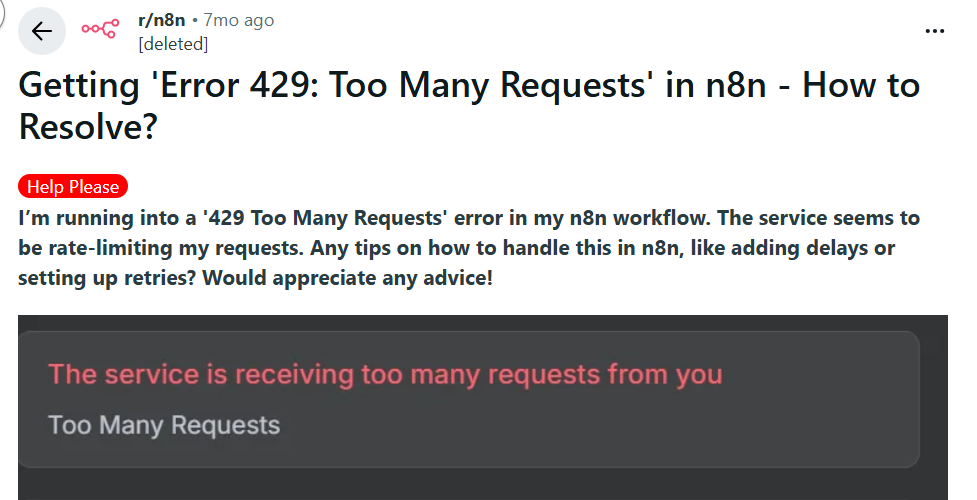
What Does "429 Too Many Requests" Mean?
The HTTP 429 status code is an API's way of saying "slow down." When you see "Error 429: Too Many Requests," the server has determined that too many requests are coming from your source in a given time period and is temporarily blocking you.
API providers implement rate limiting for several critical reasons:
- Server protection: Prevents infrastructure overload
- Fair usage: Ensures equitable access for all users
- Cost management: Controls computational and bandwidth expenses
- Security: Detects and prevents potential abuse or attacks
The Two Types of Rate Limits
Here's the crucial distinction that most developers miss:
Account-Level Limits:
Based on your API key or subscription tier
- Example: "5,000 requests per day on your plan"
- You can track this in your API dashboard
- Usually clearly documented
IP-Level Limits:
Based on the IP address making requests
- Example: "100 requests per minute from any single IP"
- Often undocumented or hidden in fine print
- Affects you even if you're under account limits
- This is the real culprit in n8n cloud environments
You can be well under your account-level limits but still get blocked due to IP-level restrictions.
Why This Happens in n8n Cloud
Here's the root cause of the problem: When you use n8n's cloud service, your workflows share IP addresses with other n8n cloud users.
Think of it like living in an apartment building where everyone shares the same street address for deliveries. If your neighbor orders 50 packages in one day, the delivery service might temporarily flag that address as suspicious—even though you personally only ordered one item.
How Shared IPs Cause 429 Errors
In the n8n cloud environment:
- User A is running intensive data scraping workflows
- User B is testing automation with rapid API calls
- User C (that's you) is making completely reasonable requests
- But you're all using the same IP address
When an API server receives hundreds of requests from the same IP address in minutes, it doesn't distinguish between different n8n users. It only sees one IP exceeding rate limits and returns a 429 error to everyone using that IP.
Common Scenarios That Trigger IP Blocking
Understanding when IP blocking happens helps you recognize the pattern:
- Peak usage times: More n8n cloud users active simultaneously
- Concurrent workflows: Multiple workflow instances running at once
- Loop operations: Nodes executing repeated API calls
- Other users' activity: Someone else's heavy usage on your shared IP
- API provider changes: Services tightening their IP-based limits
- Geographic clustering: Many users in the same region using the same IP pool
The frustrating reality: Even with perfect workflow design, you cannot control what other users on your shared IP are doing.
Why Traditional Solutions Fall Short
Let's examine why the common fixes don't effectively solve the problem.
Solution 1: Wait and Retry
The Approach: Add delays between requests, implement retry logic, or use n8n's error handling to wait and try again.
Pros:
- Simple to implement
- No additional cost
- Works for occasional, temporary spikes
Cons:
- Doesn't solve the root cause (shared IP)
- Unpredictable delays break time-sensitive workflows
- Can create cascading failures in complex automation
- Makes workflows slow and unreliable
- You're still vulnerable to other users' activity
- Wastes execution time waiting
Reality Check: This is like treating a broken leg with painkillers. It masks the symptom but doesn't fix the underlying problem.
Solution 2: Setting Up Proxy Tunnels
The Approach: Route requests through proxy servers or VPNs to use different IP addresses.
Pros:
- Can bypass IP-based rate limits
- Gives you networking control
- Works with most APIs
Cons:
- Complex technical setup required
- Ongoing maintenance burden
- Additional monthly costs ($20-100+)
- Potential security risks
- May violate some APIs' terms of service
- Proxy IPs can also get blocked
- Adds request latency
- Requires expertise to manage
Reality Check: This is like building your own road to avoid traffic. It works, but requires significant ongoing effort and technical knowledge.
Solution 3: Dedicated IP from n8n
The Approach: Purchase a dedicated IP address for your n8n cloud instance.
Pros:
- Isolates you from other users
- Professional solution
- No workflow changes needed
Cons:
- Very expensive (enterprise-tier pricing, $200-500+/month)
- Limited availability
- Not offered to all users
- Your dedicated IP can still get blocked with heavy usage
- Doesn't scale if you need multiple IPs
- Long procurement and setup process
Reality Check: This is like buying a private highway. Effective but prohibitively expensive for most users.
The Smart Solution: Automatic IP Rotation with BrowserAct
After examining traditional approaches, the ideal solution becomes clear: A fresh IP address for every request, automatically managed, without complexity or enterprise costs. This is exactly what BrowserAct delivers.
What is BrowserAct?
BrowserAct is a cloud-based browser automation platform designed for seamless integration with workflow tools like n8n. Unlike simple HTTP request tools, BrowserAct combines real browser behavior with enterprise-grade features like automatic IP rotation.
Think of it as having thousands of browsers around the world at your command, each with its own unique IP address, ready to make your API calls without ever triggering rate limits.
How BrowserAct Solves the 429 Problem
Automatic IP Rotation: The Core Solution
The game-changer: Every single request through BrowserAct uses a fresh IP address from a rotating pool of thousands.
Standard n8n HTTP Node (Shared IP):
Request 1 → Shared IP: 192.0.2.1
Request 2 → Shared IP: 192.0.2.1
Request 3 → Shared IP: 192.0.2.1
Request 10 → Shared IP: 192.0.2.1
Request 50 → Shared IP: 192.0.2.1 ❌ 429 ERROR!
BrowserAct Node (IP Rotation):
Request 1 → IP: 198.51.100.5   ✅
Request 2 → IP: 203.0.113.42   ✅
Request 3 → IP: 192.0.2.88     ✅
Request 10 → IP: 198.18.0.201  ✅
Request 50 → IP: 203.0.113.156 ✅
Request 100 → IP: 192.0.2.99   ✅
Each request appears to the API as coming from a completely different user, eliminating IP-based rate limiting entirely.
Seamless n8n Integration
BrowserAct is built specifically for automation platforms:
- Drop-in replacement: Replace problematic HTTP nodes with BrowserAct nodes
- Familiar interface: Works like standard HTTP requests
- Minimal configuration: Set up in minutes, not hours
- Universal compatibility: Works with any API (AI services, social media, e-commerce, CRM systems, etc.)
- No workflow rebuilding: Keep your existing logic and structure
Benefits Beyond IP Rotation
- Natural Request Patterns Browser-based requests include realistic headers, cookies, and JavaScript execution. Your requests are indistinguishable from human browsing, making APIs more lenient.
- Built-in Anti-Detection Many services are stricter with raw HTTP requests than browser traffic. BrowserAct's browser simulation helps avoid detection as automated traffic.
- JavaScript Rendering Need to interact with dynamic content? BrowserAct executes JavaScript, unlike simple HTTP nodes.
- Visual Debugging Take screenshots of requests to see exactly what the browser sees, making debugging infinitely easier.
- Infinite Scalability As your automation grows, BrowserAct's infrastructure scales with you—no proxy servers or IP pools to manage.
How Fix 429 Errors in n8n with BrowserAct
Ready to eliminate 429 errors forever? Follow this comprehensive setup guide to integrate BrowserAct with your n8n workflows.
Step 1: Set Up Your BrowserAct Account
First, create your BrowserAct account and generate API credentials:
- Visit BrowserAct and create a free account
- Navigate to Settings → Integrations & API
- Click "Generate API Key" and copy it to your clipboard
- Save this key securely—you'll need it for the n8n integration
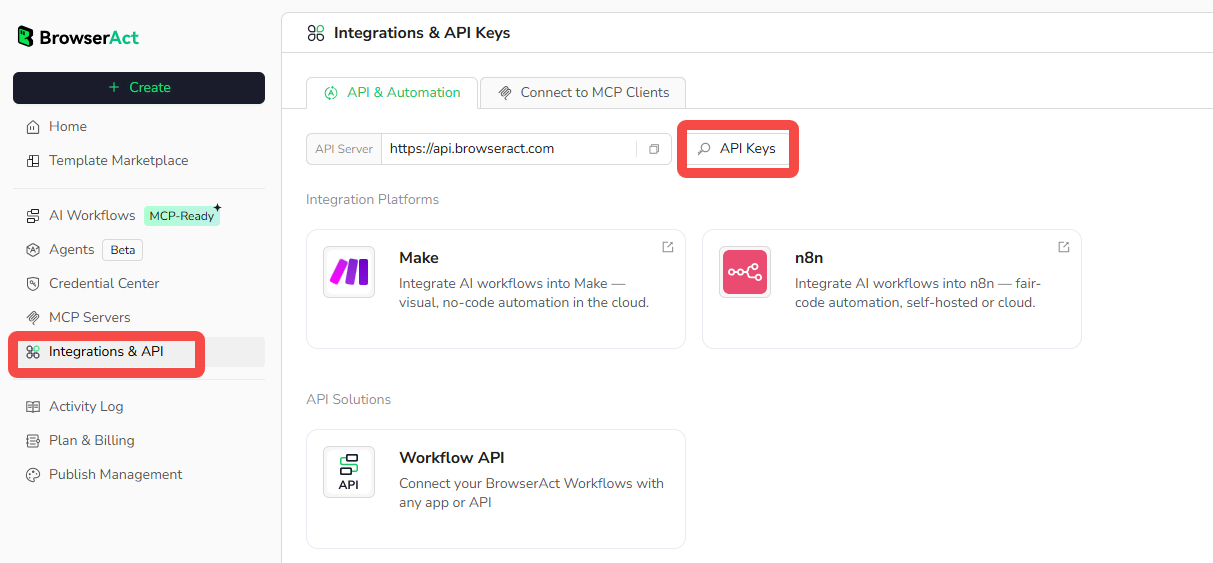
Step 2: Set Up Your Workflow in BrowserAct
BrowserAct offers flexible options to create your automation workflow:
- Browse Ready-Made Templates: Explore the workflow template library in your dashboard and select a pre-built template that fits your use case (web scraping, data extraction, etc.)
- Create Custom Workflows: Use BrowserAct's visual, drag-and-drop workflow builder to design your automation with natural language commands—no coding required
- Configure Your Workflow: Set your target URLs, select geographic regions for automatic IP rotation, and configure actions like clicking elements, looping through lists, data extraction, and more
- Test and Publish: Run a test to verify everything works, then click "Publish" to make your workflow accessible via API for n8n integration
BrowserAct's no-code platform makes it simple to build powerful workflows in minutes, with IP rotation automatically handling rate limit issues.
Step 3: Integrate BrowserAct with n8n
Now connect BrowserAct to your n8n workflow to eliminate 429 errors.
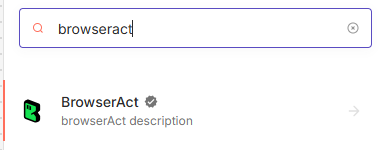
Add the BrowserAct Node
- Open your n8n editor (cloud or self-hosted)
- Click the "+" button to add a new node
- Search for "BrowserAct" and select the BrowserAct node
- Click "Create New Credentials"
- Paste your BrowserAct API key from Step 1
- Click "Save" and then "Test Connection" to verify it works
Configure the BrowserAct Node
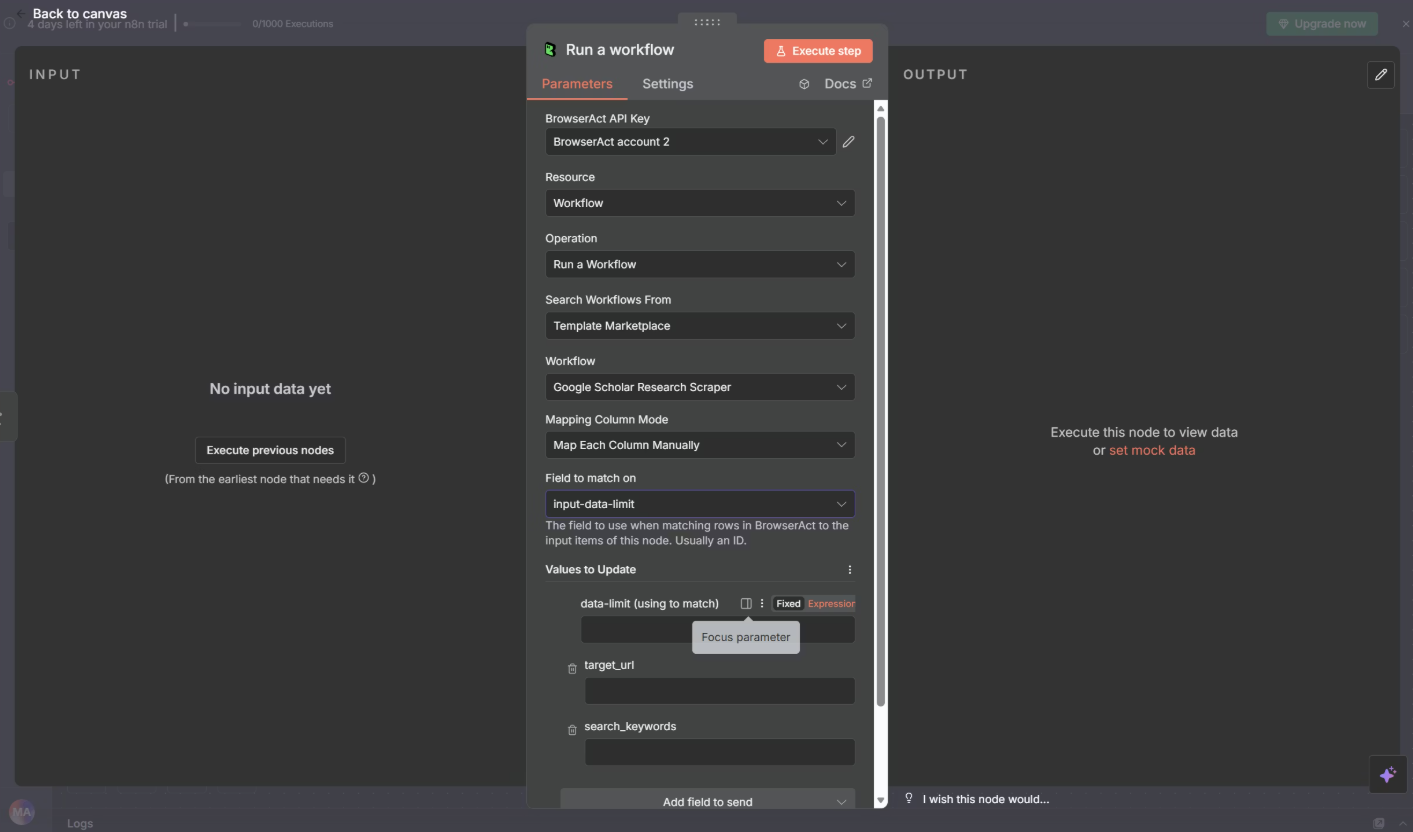
Set up the node to call your published workflow:
- In the BrowserAct node, configure:
- Resource: Select "Workflow"
- Operation: Choose "Run a workflow"
- Workflow: Select your published workflow from the dropdown
- Map input parameters:
- If you have dynamic data from previous nodes, map variables here
- Set any fixed parameters directly in the node
- Click "Test Execution" to run a trial request
Step 4: Build Your Complete n8n Workflow
Now connect BrowserAct to your existing workflow logic to create a complete automation that avoids 429 errors. The key is to strategically place BrowserAct nodes where you've been experiencing rate limiting issues.
Cost-Benefit Analysis: Comparing Solutions
Let's examine the true cost of each solution for a typical n8n user making 10,000 API requests per month.
Comprehensive Comparison Table
Solution | Setup Time | Monthly Cost | Reliability | Maintenance Time | Scalability | Technical Skill Required |
Wait & Retry | 30 minutes | $0 | 60-70% | 1 hour/month | Poor | Low |
Proxy Setup | 4-8 hours | $30-80 | 75-85% | 3-5 hours/month | Medium | High |
Dedicated IP | 1-2 weeks | $200-500 | 85-90% | Minimal | Limited | Medium |
BrowserAct | 15-30 minutes | $29-99 | 99%+ | None | Excellent | Low |
Conclusion
The "429 Too Many Requests" error in n8n cloud workflows is one of the most frustrating obstacles in automation, but it's completely solvable. The root cause is simple: shared IP addresses trigger rate limits, regardless of your individual API usage.
Traditional solutions like adding delays, setting up proxies, or purchasing dedicated IPs all have serious drawbacks:
- Wait-and-retry doesn't solve the root problem
- Proxy tunnels require ongoing technical maintenance
- Dedicated IPs cost hundreds of dollars per month
BrowserAct provides the modern solution:
✅ Eliminates IP-based rate limiting through automatic rotation
✅ Integrates seamlessly with existing n8n workflows
✅ Scales effortlessly as your needs grow
✅ Costs 85% less than traditional solutions
✅ Requires zero maintenance once configured
✅ Works in minutes, not weeks
If 429 errors are disrupting your automation, the problem isn't your workflow design or API tier—it's the shared infrastructure. BrowserAct gives every request a fresh IP address, completely bypassing the issue.
Stop fighting rate limits. Start building reliable automation.
Ready to fix your 429 errors? Sign up for BrowserAct and get started with 100 free credits to test the solution with your n8n workflows.


