4 AI Agent Skills That Actually Make Your AI Smarter in 2026

Discover 4 must-have AI agent skills in 2026 — from Vercel's skills manager to Anthropic's build guide, brainstorming enforcement, and systematic debugging.
AI agent skills are transforming how developers and automation enthusiasts extend the capabilities of large language models. Whether the goal is to find pre-built agent skills for Claude or to create custom AI skills packages from scratch, understanding the ecosystem is now essential for anyone working with AI automation workflows in 2026.
This guide breaks down the top tools and methodologies for managing AI agent skills — from official package managers to battle-tested debugging frameworks.
What Are AI Agent Skills?
AI agent skills are modular instruction sets — typically structured as SKILL.md files — that extend what an AI agent can do within a given session or project. Think of them as plugins or capability packs: each skill tells the agent how to behave in a specific domain, whether that's debugging code, scraping data, brainstorming product designs, or managing project workflows.
The core file structure of a well-built AI skill typically includes:
SKILL.md— The main instruction file with YAML metadata and Markdown directivesscripts/— Executable automation scriptsreferences/— Supporting documentationassets/— Templates, images, and reusable resources
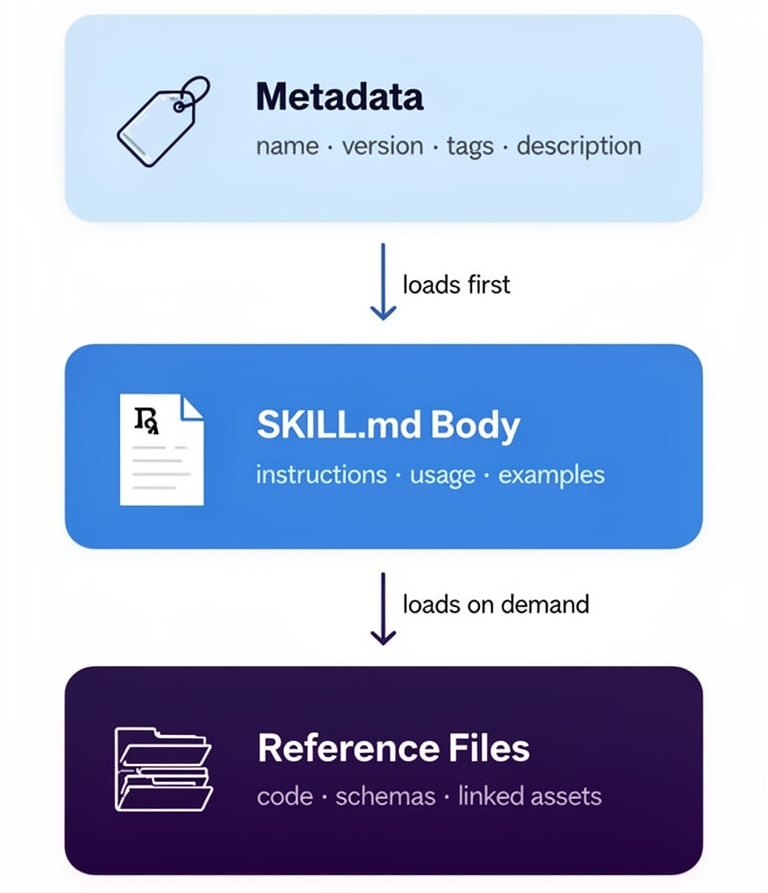
The design philosophy behind good AI agent skills is progressive loading: metadata loads first (~100 words), then the full SKILL.md body (<5,000 words), then reference files on demand. This keeps context window usage efficient without sacrificing capability depth.
Top Tools for Finding and Managing AI Agent Skills
Vercel's
find-skills— The Skills Package Manager
For developers who use AI agents regularly, Vercel's official find-skills tool solves one of the most common problems: discovering the right skill quickly.
Accessible via a single npx skills command, it functions as a skills package manager with four core commands:
npx skills find [keyword]— Interactive keyword search across all published skillsnpx skills add <package-name>— Install a skill directly to the projectnpx skills check— Check for available updatesnpx skills update— Batch update all installed skills
For example, searching npx skills find react performance returns all relevant React optimization skills with install commands and documentation links included. Vercel also maintains a dedicated browsing site at skills.sh for teams who prefer a visual interface.
Best for: Teams that need rapid skill discovery and a standardized installation workflow.
Open source: github.com/vercel-labs/skills
Anthropic's
skill-creator— The Official Blueprint for Building AI Skills
For developers who want to create rather than just consume AI agent skills, Anthropic's official skill-creator guide is the authoritative reference. As the organization behind Claude, their approach reflects real-world constraints around context windows, agent behavior, and instruction clarity.
Key design principles from the guide:
Progressive Loading Architecture Skills load in three layers to conserve context tokens:
- YAML metadata header (~100 words)
- Main SKILL.md body (<5,000 words)
- Reference files loaded on demand
Instruction Specificity Matching The rule of thumb is: the more fragile the task, the more specific the instructions. Tight guardrails belong on precision tasks; open-ended creative tasks benefit from looser directives. This mirrors how human teams operate — a surgeon follows checklists; an architect gets principles.
Minimal File Footprint A common mistake when building AI skills is adding unnecessary files. READMEs, changelogs, and installation guides are for human developers — not for the AI agent. The skill file should contain only what the agent needs to perform the task.
Platforms like ClaWHub's Amazon Scraper skill and the community repository at github.com/browser-act/skills both follow this architecture, making them excellent real-world references for skill structure in data collection and automation contexts.
Open source: github.com/anthropics/skills
Instruction Specificity Matching The rule of thumb is: the more fragile the task, the more specific the instructions. Tight guardrails belong on precision tasks; open-ended creative tasks benefit from looser directives. This mirrors how human teams operate — a surgeon follows checklists; an architect gets principles.
Minimal File Footprint A common mistake when building AI skills is adding unnecessary files. READMEs, changelogs, and installation guides are for human developers — not for the AI agent. The skill file should contain only what the agent needs to perform the task.
Platforms like ClaWHub's Amazon Scraper skill and the community repository at github.com/browser-act/skills both follow this architecture, making them excellent real-world references for skill structure in data collection and automation contexts.
Open source: github.com/anthropics/skills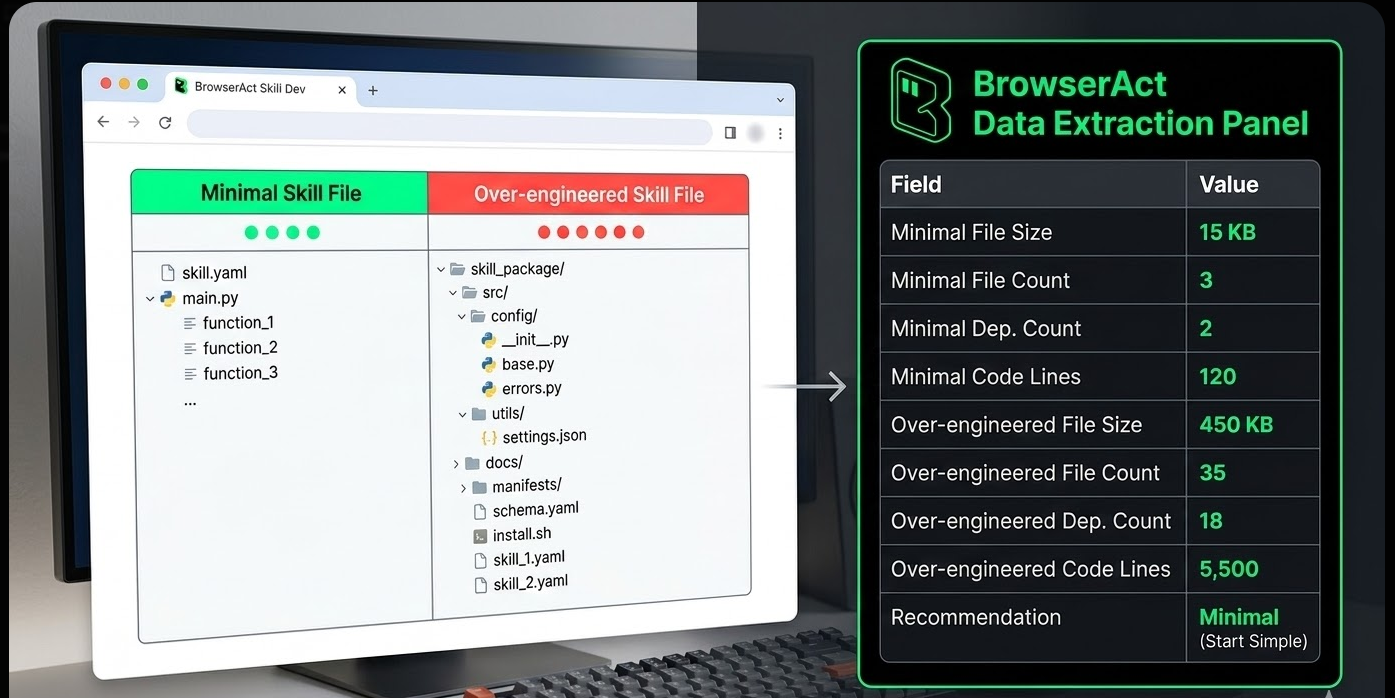
Specialized AI Skills Worth Knowing
The Brainstorming Skill — Mandatory Design Before Execution
One underrated category of AI agent skills is process enforcement skills — those that change how an agent approaches work, not just what it can do.
The Brainstorming Skill from the superpowers repository enforces a structured design review before any code is written. The workflow:
- Context discovery — The agent reviews existing files, documentation, and recent commits
- Clarification loop — Questions are asked sequentially (not all at once) to surface goals, constraints, and success criteria
- Proposal phase — 2–3 alternative approaches are presented with trade-off analysis
- Design approval — The user approves a final design, which is saved to
docs/plans/ - Implementation unlock — Only after written approval can implementation-class skills be invoked
The hard constraint: no code is written, no files are created, and no implementation skills are called until the user explicitly approves the design.
This workflow reduces rework significantly. Projects that seem simple at the outset frequently reveal hidden complexity during design review — catching these issues before implementation saves hours of debugging.
Open source: github.com/obra/superpowers — brainstorming
The Systematic Debugging Skill — No Guessing Allowed
Perhaps the most practically valuable AI skill in a developer's toolkit, the Systematic Debugging Skill enforces one iron rule: no fix is attempted before the root cause is identified.
The methodology runs in four structured phases:
Phase 1: Root Cause Investigation
- Read the full error message carefully
- Reproduce the issue reliably
- Review recent code changes
- Add diagnostic logging at component boundaries to trace where data breaks
Phase 2: Pattern Analysis
- Compare working code with broken code
- Map dependency relationships
- Resist the assumption that "minor" differences are irrelevant
Phase 3: Hypothesis Testing
- Form a single hypothesis
- Test it with the smallest possible change
- Change only one variable at a time
- If the hypothesis fails, return to Phase 1 — do not pile on additional changes
Phase 4: Implementation
- Write a failing test case first
- Apply the targeted fix
- Verify the fix resolves the issue without introducing regressions
- If three consecutive fix attempts fail, pause and question the architectural assumptions
Industry benchmarks support this approach: systematic debugging resolves issues in 15–30 minutes on average, compared to 2–3 hours of trial-and-error patching that often introduces new bugs in the process.
For teams building data pipelines or scraping workflows with tools like BrowserAct's Google Maps Scraper template or the Amazon Bestsellers Scraper, this debugging skill is especially valuable — complex multi-step automation chains have many failure points, and disciplined root-cause analysis prevents cascading failures.
Open source: github.com/obra/superpowers — debugging
How to Choose the Right AI Agent Skill
Not every project needs a custom-built skill. Here's a practical framework for deciding:
Scenario | Recommended Approach |
Need a common capability (React, Python, testing) | Search via npx skills find or skills.sh |
Building domain-specific automation | Create a custom skill using Anthropic's skill-creator guide |
Team needs consistent process enforcement | Deploy a brainstorming or planning skill |
Working on complex multi-component systems | Deploy the systematic debugging skill |
Scraping or data extraction workflows | Reference community skills at github.com/browser-act/skills |
Common Mistakes to Avoid
- Over-loading skill files — Adding README files, changelogs, and install guides inflates context window usage without benefiting the agent
- Under-specifying fragile tasks — Precision tasks with strict output requirements need explicit, detailed instructions
- Skipping design review — Jumping straight to implementation without a design phase leads to costly rework
- Trying to fix bugs without root cause analysis — Symptom-patching creates new bugs and technical debt
Key Takeaways
- AI agent skills are modular
SKILL.mdinstruction files that extend what an AI agent can do — think of them as capability plugins for LLMs - Vercel's
find-skillsprovides a package-manager-style CLI (npx skills find,add,update) for discovering and installing pre-built skills efficiently - Anthropic's
skill-creatorguide defines the authoritative architecture for building custom skills: progressive loading, specificity matching, and minimal file footprint - Process enforcement skills like the Brainstorming Skill prevent costly rework by requiring design approval before any implementation begins
- The Systematic Debugging Skill eliminates guesswork by mandating root-cause identification before any fix is attempted — reducing resolution time from hours to minutes
Conclusion
The AI agent skills ecosystem is maturing rapidly, with official tooling from Vercel and Anthropic making it easier than ever to discover, install, and build capability extensions for LLM-based workflows. Whether the task involves enforcing better development processes, accelerating debugging, or automating complex data workflows, there is likely a skill — or a framework for building one — that fits the need.
For teams running data extraction or browser automation pipelines, platforms like BrowserAct complement agent skills architecture well: BrowserAct's no-code automation workflows and anti-detection scraping capabilities handle the execution layer, while structured AI skills manage the orchestration and decision-making layer above it.


