How to Manage 20+ AI Agents from a Single Multi-Agent Management Dashboard

Managing multiple AI agents at scale has become one of the most pressing operational challenges in 2026. As organizations deploy dozens of specialized agents for research, content creation, SEO, development, and data analysis, the complexity of coordinating them spirals out of control. Terminal tabs multiply, messages scatter across Discord channels, and token costs burn silently in the background.
A multi-agent management dashboard solves this by consolidating every agent, task, log, and cost metric into one unified interface. This article explores the real-world pain points of running 20+ AI agents simultaneously, examines how open-source tools like ClawPort address these challenges, and breaks down practical strategies for keeping an AI agent fleet organized, monitored, and cost-efficient.
Why Managing Multiple AI Agents Is So Difficult
The global AI agent market reached $7.6 billion in 2025 and continues to grow rapidly. Gartner predicts that over 40% of enterprise applications will embed role-specific AI agents by 2026. But as the number of agents increases, so does the operational overhead.
Here are the five biggest pain points teams face when running multiple agents without a centralized system.
Context Loss Across Agents
When five or more agents operate simultaneously, context fragmentation becomes the primary bottleneck. Agent A researches market trends, Agent B writes content, and Agent C optimizes for SEO — but none of them know what the others have produced. Information gets siloed, and the only workaround is manually copying outputs from one agent to another. This introduces errors and wastes significant time.
Tool-Switching Overload: Terminal, Discord, and Browser
Managing a fleet of agents typically requires constant switching between the terminal (to check agent status), Discord (to receive notifications), a browser (to review generated outputs), and a text editor (to modify configurations). Each switch carries a cognitive cost. Operators lose track of which agent runs in which window, which log lives in which tab, and which output needs review.
For teams already struggling with browser-based data tasks — scraping competitor pages, pulling product listings, or monitoring web content — tools like BrowserAct can offload repetitive browser automation entirely. Instead of manually opening tabs to verify agent-generated web content, the BrowserAct web scraping platform handles data extraction automatically, freeing operators to focus on higher-level agent coordination.
Task Tracking Blind Spots
With 20 agents running simultaneously, it becomes nearly impossible to answer basic questions: Which tasks are completed? Which agents are still running? Which ones are stuck and need human intervention? Without a unified task view, operators check agents one by one — a process that wastes time and risks missing critical failures.
Opaque Cost Structures
AI agent costs are notoriously difficult to track. Token usage accumulates across multiple agents and models, but without centralized monitoring, teams operate blind. The bill arrives at the end of the month with no breakdown of which agent consumed the most resources, which model was most expensive, or whether caching saved any meaningful amount.
Cron Job Chaos
Many agents run on scheduled tasks — hourly data scrapes, daily report generation, weekly summaries. When 20 agents each have three to five scheduled jobs, the total quickly reaches 60 to 100 cron jobs. Tracking which ones succeeded, which failed, and which need a restart becomes unmanageable without a dedicated monitoring layer.
ClawPort: An Open-Source Multi-Agent Management Dashboard
ClawPort is an open-source command center purpose-built for managing OpenClaw agents. Created by developer John Rice after experiencing the chaos of coordinating 20 agents across terminals and messaging platforms, ClawPort consolidates all agent management into a single web-based dashboard.
The core design philosophy is straightforward: every agent, every log, every cost metric, and every scheduled task should be visible and manageable from one interface.
How ClawPort Works Under the Hood
ClawPort requires zero manual configuration. It automatically scans the OpenClaw workspace directory structure, discovers all agents (including sub-agents and team members), and maps their hierarchical relationships. All AI API calls route through the OpenClaw Gateway, eliminating the need for individual API keys.
The technical architecture follows a clean flow: the browser connects to ClawPort (built on Next.js 16), which communicates with the OpenClaw Gateway, which routes requests to the underlying language model. Text chat uses server-sent events for streaming, vision analysis runs through the gateway CLI, and voice transcription leverages the Whisper API.
The installation process takes roughly three minutes:
npm install -g clawport-ui
clawport setup
clawport dev
After launching at localhost:3000, a setup wizard handles portal naming, theme selection (Dark, Glass, Color, Light, or System), and operator identity configuration.
Eight Core Features for AI Agent Monitoring and Orchestration
ClawPort ships with eight modules that collectively cover the full spectrum of multi-agent management needs.
Interactive Organization Map
The Org Map feature generates a visual hierarchy of the entire agent fleet. Built on React Flow, it displays top-level orchestrators, sub-agents (researchers, writers, SEO specialists), their relationships, and real-time status indicators. Operators can see at a glance which agents are running, idle, or in an error state — all from a single, zoomable, draggable canvas.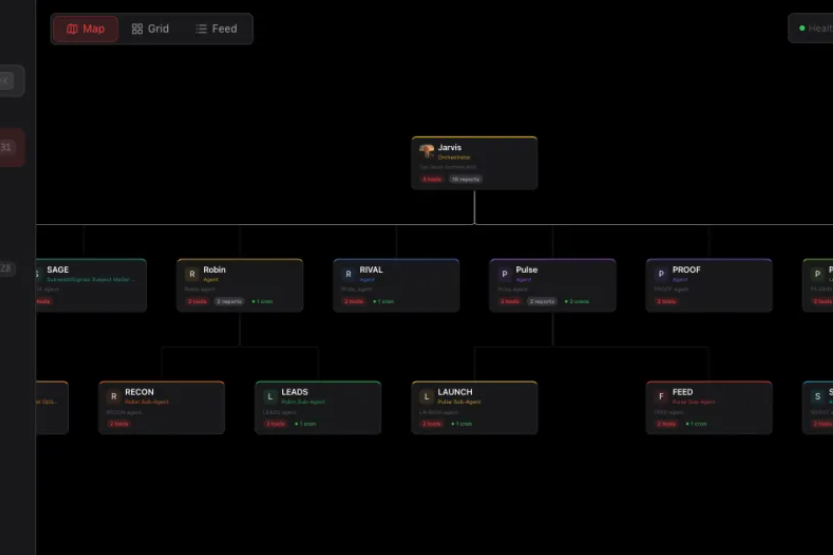
Unified Chat Interface
Rather than bouncing between terminal commands and Discord messages, ClawPort provides a single chat interface for communicating with any agent. Features include streaming text responses, image uploads with vision analysis, voice messages with waveform playback, file attachments via drag-and-drop, and persistent conversation history stored locally.
Kanban Task Board
The built-in Kanban board allows operators to manage agent workflows like a project management tool. Task cards can be created, assigned to specific agents, and dragged between status columns (To Do, In Progress, Done, Review). This is especially useful for content teams where research agents hand off to writing agents, which then pass to SEO agents.
Cron Job Monitor
ClawPort reads all OpenClaw scheduled tasks and provides real-time status monitoring. Operators see a full list of cron jobs with run status (success, failure, running), last and next execution times, and error logs for failed jobs. The monitor auto-refreshes every 60 seconds and supports filtering by status with error-priority sorting.
Cost Analytics Dashboard
The cost dashboard tracks token consumption across all agents and visualizes spending patterns. It includes daily cost charts, per-agent cost breakdowns, model distribution analysis, anomaly detection for sudden cost spikes, week-over-week trend comparisons, and cache savings reports. This transforms AI spending from a black box into a transparent, optimizable metric.
[Image suggestion: A cost analytics dashboard mockup showing daily spend trends, per-agent breakdowns, and model distribution pie charts]
Real-Time Activity Console
The activity console aggregates historical logs from all agents into a single stream. A floating log widget displays the latest activity regardless of which page the operator is viewing. Clicking any log entry expands the raw JSON payload, making debugging and monitoring significantly faster.
Memory Browser
ClawPort can read and display OpenClaw memory files, including team memory, long-term memory, and daily logs. Content renders with Markdown formatting and JSON syntax highlighting, and operators can search, browse, and download memory files directly.
Agent Detail Profiles
Each agent has a comprehensive profile page showing its SOUL.md configuration, available tools, hierarchical position (parent and child agents), cron jobs, voice settings, and a direct link to the chat interface.
Practical Use Cases for Multi-Agent Dashboards
Content Production Teams
A typical content operation might include an orchestrator agent, three research agents, two writers, and two SEO specialists. Without a dashboard, coordination requires manual copy-pasting between agents, constant terminal and Discord switching, and end-of-month cost surprises. With ClawPort, the orchestrator distributes tasks automatically, the Kanban board tracks progress visually, the Org Map shows real-time status, and the cost dashboard reveals exactly which agent or model is consuming the most tokens.
Software Development Teams
Development teams running code review agents, testing agents, and documentation agents benefit from the Activity Console (real-time test logs and failure tracking), the Cron Monitor (ensuring CI/CD scheduled tasks run reliably), and the Chat interface (discussing pull request details directly with the code review agent).
Data Collection and Analysis Teams
Teams operating five scraping agents, three analysis agents, and two report generators use ClawPort to monitor scraping schedules, track per-task costs, and review historical data through the Memory Browser. For the data scraping layer itself, teams often pair agent orchestration with dedicated BrowserAct data extraction tools that handle the actual web interaction — including anti-detection, proxy rotation, and CAPTCHA bypass — while the agents focus on analysis and reporting.
For example, teams researching competitor pricing on Amazon can leverage Amazon product search API skills or Amazon reviews API skills to automate data collection. Similarly, teams monitoring local business data can use Google Maps search API skills or Google Maps reviews API skills to gather structured location and review data at scale.
How ClawPort Compares to Alternative Approaches
ClawPort vs. Terminal-Only Management
Terminal-based management offers no visualization, requires manual log refreshing, forces operators to switch between windows for different agents, and provides no cost tracking. ClawPort adds interactive org charts, auto-refreshing monitors, unified chat, and detailed spending analytics.
ClawPort vs. Enterprise Agent Platforms
Enterprise platforms like CrewAI AMP, Salesforce Agentforce, and Kore.ai provide powerful orchestration but come with significant setup requirements, YAML configuration files, and subscription costs. ClawPort targets a different niche: developers and small teams using OpenClaw who need a lightweight, open-source, zero-configuration dashboard. It installs via npm, auto-discovers agents, and runs locally — no cloud infrastructure required.
ClawPort vs. Other Open-Source Dashboards
Projects like Agent of Empires (aoe) focus on terminal-based session management for coding agents, while AgentRails provides n8n integration for workflow agents. ClawPort differentiates with its comprehensive feature set (eight modules), zero-configuration auto-discovery, built-in cost analytics, and full web-based UI with five theme options.
[Image suggestion: A feature comparison table rendered as an infographic — ClawPort vs. Terminal vs. Enterprise platforms across key dimensions like setup time, cost tracking, visualization, and real-time monitoring]
Best Practices for Running a Multi-Agent Fleet
Set cost budgets per agent. Use the Cost Dashboard to establish spending thresholds for each agent. Review weekly trends and investigate any anomalies immediately rather than waiting for the monthly bill.
Use the Kanban board for handoffs. When agents work in sequence (research → writing → SEO), model the workflow as task cards moving through status columns. This creates accountability and visibility at every stage.
Monitor cron jobs daily. Scheduled task failures often go unnoticed for days. Use the Cron Monitor's error-priority sorting to surface problems immediately.
Keep agent hierarchies shallow. Deep nesting of sub-agents makes the Org Map harder to read and increases coordination overhead. Aim for two to three levels maximum.
Pair agents with dedicated automation tools. For any task involving web browsers — data scraping, form filling, content verification — use dedicated browser automation rather than forcing general-purpose agents to handle raw web interaction. This separation of concerns keeps agents focused on reasoning and analysis.
Common Mistakes When Scaling AI Agents
Ignoring cost until the bill arrives. Without real-time cost monitoring, token spend can spiral quickly, especially when agents use expensive models for low-value tasks.
Running all agents on the same model. Different tasks have different complexity levels. Routing simple classification tasks to a smaller, cheaper model while reserving larger models for complex reasoning can cut costs significantly.
No centralized logging. When agents fail silently, debugging becomes a forensic exercise. Centralized logging through a dashboard like ClawPort makes root cause analysis dramatically faster.
Overcomplicating agent hierarchies. More layers of orchestration do not always mean better results. Start simple, measure performance, and add complexity only when data shows it is needed.
Key Takeaways
- Multi-agent management dashboards eliminate the chaos of switching between terminals, messaging platforms, and browsers when coordinating 20+ AI agents.
- Real-time cost analytics transform AI spending from a monthly surprise into an optimizable, transparent metric — making it possible to track per-agent and per-model token consumption daily.
- Zero-configuration auto-discovery (as implemented by ClawPort) removes the setup friction that typically blocks dashboard adoption, scanning workspace directories and mapping agent hierarchies automatically.
- Kanban-style task boards and cron job monitors bring project management discipline to agent workflows, ensuring no task gets stuck and no scheduled job fails unnoticed.
- Separating agent orchestration from browser automation — using dedicated tools like BrowserAct for web scraping and data extraction — keeps agents focused on reasoning while specialized platforms handle anti-detection, proxy rotation, and CAPTCHA bypass.
Conclusion
The multi-agent era demands new management infrastructure. Running 20 or more AI agents without centralized visibility leads to context fragmentation, untracked costs, missed failures, and constant tool-switching that erodes the productivity gains agents are supposed to deliver.
Open-source dashboards like ClawPort represent a practical, zero-configuration solution for teams already working with OpenClaw. For teams that also need reliable browser-based data extraction alongside their agent workflows, platforms like BrowserAct provide the automation layer — handling everything from Amazon product data collection to social media discovery and Reddit community monitoring — so agents can focus on analysis and decision-making rather than raw web interaction.
The shift from manual coordination to dashboard-driven orchestration is not optional for teams operating at scale. It is the operational foundation that makes multi-agent workflows sustainable.
Ready to streamline browser automation alongside agent management? Try BrowserAct for no-code web scraping, or explore ClawHub skills to power data pipelines for AI agent fleets.
SEO Metadata
SEO Title: How to Manage 20+ AI Agents with a Multi-Agent Dashboard (≤60 chars: "Manage 20+ AI Agents with a Multi-Agent Dashboard")
Meta Description: Learn how to manage 20+ AI agents from one dashboard. Explore ClawPort's cost tracking, task boards, cron monitoring, and real-time agent orchestration features. (155 chars)
URL Slug: multi-agent-management-dashboard-guide
Primary Keyword: multi-agent management dashboard
Secondary Keywords:
- AI agent monitoring
- manage multiple AI agents
- agent orchestration tool
- AI agent cost tracking
- open-source agent dashboard
Image Suggestions
Image 1
- Title: Chaotic vs. Organized Agent Management
- Alt text: Split-screen comparison showing disorganized terminal tabs and Discord messages on left versus a clean unified multi-agent management dashboard on right
- Placement: After the "Why Managing Multiple AI Agents Is So Difficult" section
Image 2
- Title: AI Agent Cost Analytics Dashboard
- Alt text: Cost analytics dashboard showing daily token spend trends, per-agent cost breakdowns, and model distribution pie charts for multi-agent monitoring
- Placement: After the "Cost Analytics Dashboard" subsection
Image 3
- Title: Multi-Agent Dashboard Feature Comparison
- Alt text: Feature comparison infographic showing ClawPort versus terminal management versus enterprise agent platforms across setup time, cost tracking, and visualization capabilities
- Placement: After the "How ClawPort Compares to Alternative Approaches" section
Social Posts
LinkedIn Post
Managing 20+ AI agents without a centralized dashboard leads to context fragmentation, untracked costs, and constant tool-switching. The multi-agent management problem is real — and growing fast.
ClawPort is an open-source dashboard that auto-discovers agents, tracks token costs in real time, and provides Kanban-style task boards for agent workflows. Zero configuration. MIT licensed.
With the AI agent market projected to grow at nearly 50% annually through 2033, centralized agent monitoring is no longer optional — it is operational infrastructure.
Full breakdown of the five biggest multi-agent pain points and how dashboards solve them:
[Blog Link]
What tools are you using to manage your AI agent fleet?
#AIAgents #Automation #MultiAgent #OpenSource #DevTools #AgentOrchestration #NoCode
X Post
Managing 20+ AI agents from terminals + Discord = chaos.
Open-source dashboards now auto-discover agents, track costs in real time, and provide Kanban task boards for agent workflows.
Full guide to multi-agent management dashboards 👇
[Blog Link]
#AIAgents #Automation #OpenSource
Indie Hackers Post
A developer running 20 OpenClaw agents got fed up with terminal tab chaos and built ClawPort — an open-source dashboard with cost tracking, cron monitoring, and auto-discovery.
The multi-agent management space is heating up fast. Enterprise platforms charge $300+/month. ClawPort is free, MIT-licensed, and installs with one npm command.
If you are building tools in the AI agent orchestration space, this market is wide open.
[Blog Link]
#IndieHackers #OpenSource #SaaS #AIAgents #Bootstrapped


