CSV vs JSON for Web Scraping: Rows, Arrays, and Exports

A scraping run can return ten reviews while its CSV contains one data row. Both counts can describe the same response: the exporter saved the entire run as a record and put the reviews inside one cell. The practical question in CSV vs JSON is whether the output preserves the data in a form your next task can use.
- 1CSV fits a table with a defined row type. JSON preserves objects, arrays, nested relationships, and explicit value types.
- 2For a spreadsheet of reviews, one row should represent one review. Run metadata belongs outside that review table or in clearly repeated context columns.
- 3A valid file is not proof of a usable dataset. Check record counts, identifiers, missing values, and a few source records before relying on it.
What is the difference between CSV and JSON?
CSV represents records as rows of delimited fields. JSON represents values through objects, arrays, and scalar values. A flat product list can be delivered in either format; a product with several variants and reviews needs an explicit plan before it becomes a table.
Question | CSV | JSON |
What is the basic shape? | Rows with a consistent set of columns | Objects and arrays, including nested values |
Where is it convenient? | Spreadsheet filtering, flat imports, tabular handoffs | APIs, applications, and records with nested relationships |
How are types communicated? | Text fields need an agreed interpretation | Numbers, strings, booleans, and null have distinct representations |
What happens to child records? | They need separate rows, tables, or a documented summary | They can remain arrays inside their parent record |
That decision comes before choosing a download button. A spreadsheet reader and an application developer may need different views of the same collected data.
Decide what one record represents
Suppose a run reads one hotel and returns several guest reviews. The hotel is one entity, the run is one event, and each review is another entity. Treating those as interchangeable creates confusing exports.
For review analysis, use the review as the row type. Keep its identifier, score, date, text, and hotel reference together. For a hotel comparison, a row might instead represent one hotel, with aggregate measures that are clearly labelled. A row containing one hotel's review array is a different dataset from a row containing one review.
Here is a deliberately small, fictional example. It illustrates a data structure, not a BrowserAct test result:
{
  "request_metadata": {"requested_count": 2},
  "data": [
    {"review_id": "r-101", "score": 8, "comment": "Quiet room"},
    {"review_id": "r-102", "score": 6, "comment": "Small room"}
  ]
}
This response contains one outer object and two review objects. A review-level table would be:
review_id,score,comment
r-101,8,Quiet room
r-102,6,Small room
The number two in the metadata is useful for checking the request. It is not itself a review. If the output needs the hotel URL or collection time, those can be repeated as context columns or stored in a separate run record. Make that choice explicit so another person can interpret the file without opening the original workflow.
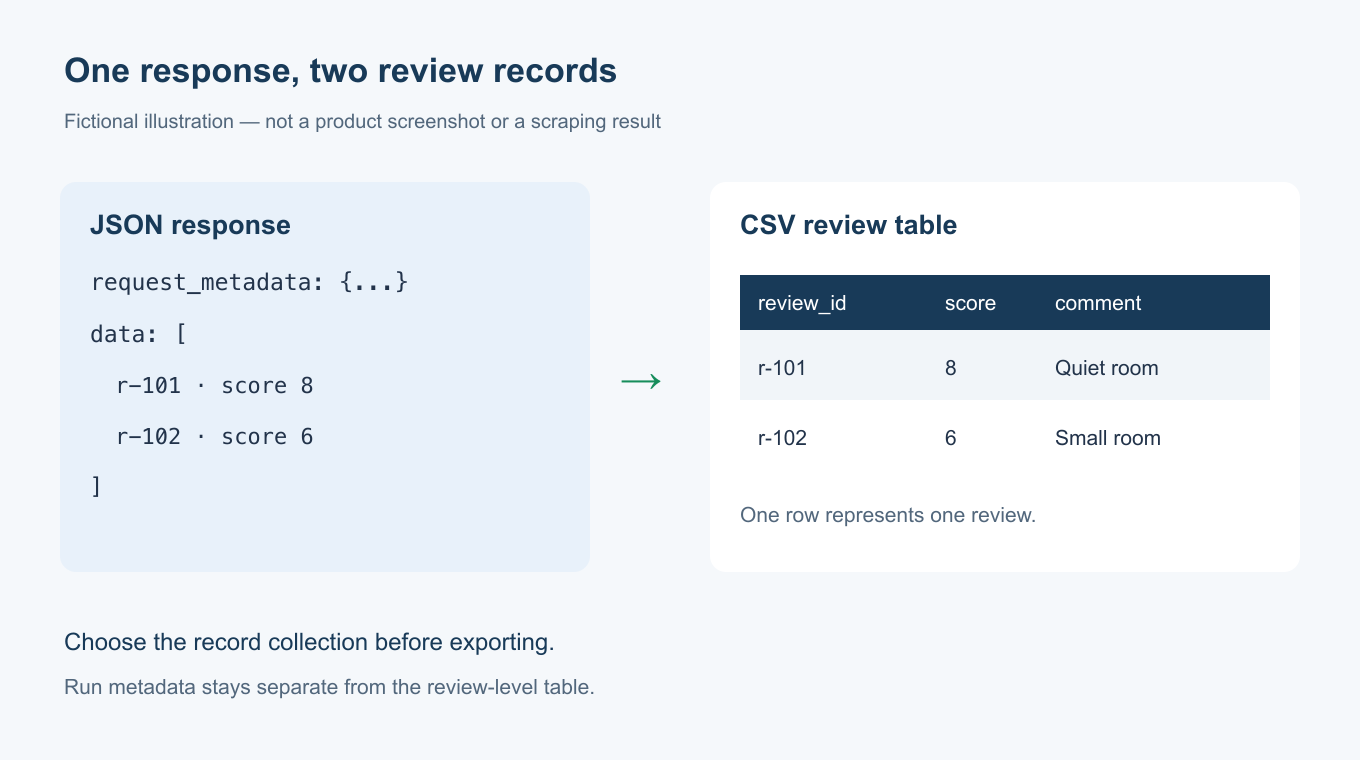
Concept illustration using fictional records. It does not show a product interface or an actual scraping run.
Why can a CSV contain JSON in one cell?
A CSV writer can place a JSON array inside a quoted field. The resulting file may be syntactically valid. That does not make it a useful review table.
An exporter that starts at the outer object may create columns such as request_metadata and data. If it serializes data as text, all child reviews stay inside that single field. A spreadsheet then shows one run-level row, even though the array contains several review records.
The correct transformation depends on the intended output. For the example above, the records to export are the objects in data. Metadata can be handled separately. Renaming the file, widening the column, or inserting line breaks will not change the record structure.
Do not split that cell on commas. Commas can also occur inside quoted comments, objects, and nested arrays. A proper conversion first parses the JSON, identifies the record collection, and writes the chosen fields with a CSV-aware writer.
This is also why “download succeeded” is a weak acceptance check. The file can open successfully while still requiring a second data-processing job before it answers the user's question.
Preserve relationships when flattening data
Not every nested array should become extra columns. A product may have three variants and four reviews. Joining every variant to every review can create twelve rows from one product without adding twelve independent products. Summing those rows would count the parent repeatedly.
Separate tables are often clearer: products, variants, and reviews, each with stable identifiers linking them. If a single table is required, choose its row type first and include only the relationships that fit that purpose.
A short list of tags may reasonably stay in one documented text column. A list of independent reviews usually deserves its own records. The difference is what the consumer needs to filter, count, join, or update.
Keep the original JSON when it carries relationships the table omits. That preserves a source for later checks. It does not excuse a misleading CSV: the spreadsheet view should still be usable for the task it promises to support.
Check values as well as file structure
Missing is different from zero
JSON can represent a missing value with null, although an application may also omit a field. CSV needs an agreed convention, such as an empty field. Document that convention. Filling a missing price with zero changes an unknown value into a numerical claim.
Also distinguish an empty comment from an unavailable comment. Both may look blank in a spreadsheet, but they can have different implications when you assess extraction coverage.
Identifiers should survive the import
A number-looking identifier is not necessarily a measurement. Leading zeros and long digit strings may be meaningful. Set identifier columns to text when importing into a spreadsheet, and confirm that the values match the source file afterward.
Keep dates and prices understandable too. A price needs its currency and unit; a date such as 04/05/2026 needs an unambiguous interpretation. Choosing JSON does not fix a badly defined field, and choosing CSV does not prevent you from documenting it correctly.
Quotes and line breaks need proper handling
Comments can contain commas, quotation marks, and newlines. Use a CSV parser when counting records; counting physical lines in a text editor can overstate the number of records. Open the file using the expected encoding and check accented or non-Latin text if your source contains it.
These checks concern the handoff, not just the scraper. A correct extraction can become unusable during serialization or spreadsheet import.
Choose the output for the next task
Choose CSV when a person needs to sort, filter, or import a well-defined table. Choose JSON when an application needs nested records, typed values, or the complete response. Keep both when they serve different consumers, with a clear relationship between the original response and the tabular view.
Before accepting either output, compare the returned item count with the records you can actually read, check identifiers for duplicates, inspect representative source records, and confirm the agreed missing-value conventions. A successful run, a valid file, and a useful dataset are three separate checks.
BrowserAct's Output Data node guide explains the product's documented output options. The Google Maps CSV guide covers a specific collection task. Those pages do not establish that every template produces the same record structure; inspect the actual file for the Bot you use.
For CSV vs JSON, start with the consumer and the row type. If you want to build a reusable BrowserAct Bot, include the fields, record definition, and required output in the request, then verify the delivered file before reusing it.
Related reading: Use the tested website-to-Excel workflow to see a native CSV checked against its requested records.
Related reading: Our explanation of structured and unstructured data separates file representation from the meaning of its fields.
Frequently Asked Questions
Is CSV or JSON better for web scraping?
CSV suits flat spreadsheet tables. JSON suits nested records and application handoffs. Choose according to the consumer and define what one record represents.
Why does my CSV show only one row for several results?
It may contain one run-level object with a results array serialized in one cell. Check the array before concluding that only one item was collected.
Can CSV store nested JSON?
A cell can contain JSON text, but a spreadsheet cannot automatically treat the child objects as separate rows. The intended record collection needs explicit expansion.
Does CSV preserve numbers and dates automatically?
CSV stores fields as text. The importing application interprets them. Specify identifier, date, currency, and missing-value conventions, then check the import.
Is JSON output proof that the data is correct?
No. Valid JSON can contain missing, duplicated, or incorrectly mapped fields. Check record structure and sample values against their sources.


